Unauthenticated GraphQL Introspection and API calls
A GraphQL endpoint on a subdomain allowed unauthenticated introspection and unauthenticated execution of queries and mutations. An attacker could enumerate the schema, check whether an email had an account, and create a customer account, whose token then worked on a separate company service portal.
 Published on medium.com
Assalam u Alikum Everyone, it’s been a while since my last writeup. So here I am with another interesting finding.
The full write-up lives on its author's site
It belongs to its author, so we link to it rather than copy it. The other two tabs are our own rewrites, checked against it.
Context
GraphQL introspection is a feature of the GraphQL specification that lets clients query information about an API's schema. It is useful for generating documentation, building GraphQL clients and performing validations. When introspection is reachable without authentication, anyone can query the API's schema and retrieve all its types, fields and relationships.
This write-up describes a hunt on a Bugcrowd public program. The researcher found a subdomain with no login or signup page and nothing obviously interesting, then fuzzed it and came across a GraphQL endpoint that allowed unauthenticated introspection. The researcher was also able to make API calls to all the GraphQL queries without authentication.
Setup
The work was done against a subdomain of a Bugcrowd public program. The researcher used Burp Suite with the InQL Scanner extension to load the introspected schema and browse the resulting queries and mutations. The researcher had already created an account with their own email, which was used later to check the isEmailAvailable query.
Finding it
After fuzzing the subdomain, the researcher came across a GraphQL endpoint. Two things stood out: it answered an introspection query without any authentication, and it accepted calls to the GraphQL queries without authentication as well. The isEmailAvailable request was sent to the /graphql endpoint.
Exploitation
Step 1: Run the introspection query
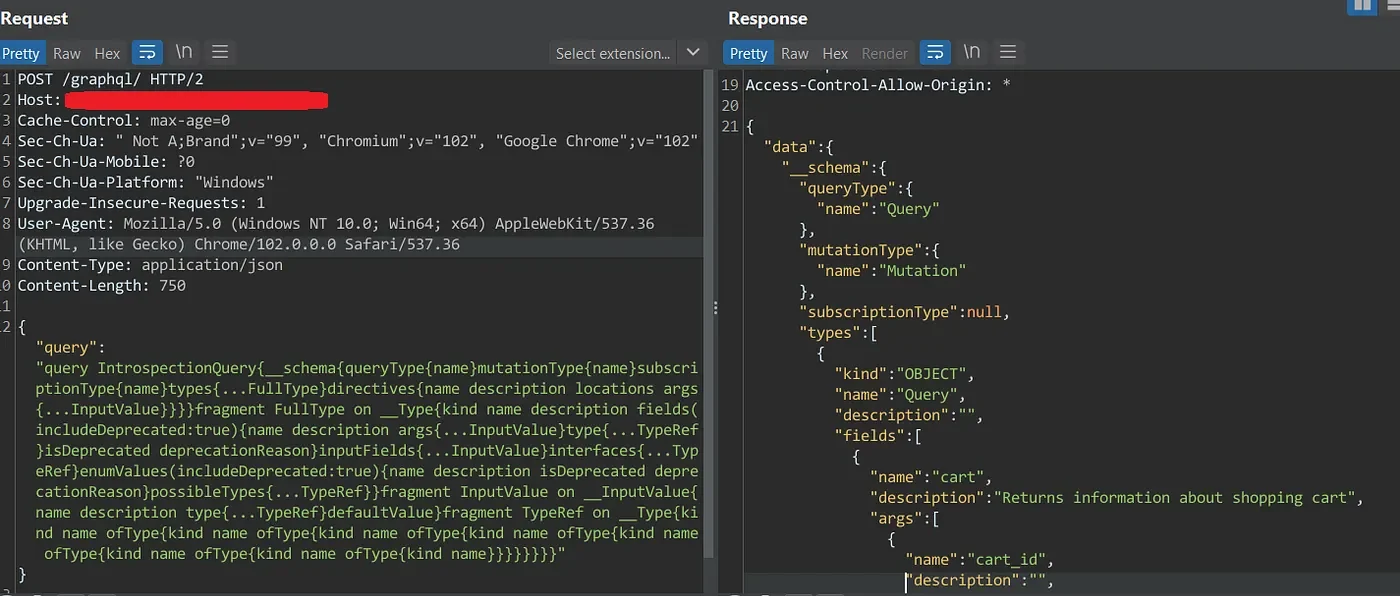
To test for introspection, send a POST request with a query. The payload used is the standard introspection query:
{"query": "query IntrospectionQuery{__schema{queryType{name}mutationType{name}subscriptionType{name}types{...FullType}directives{name description locations args{...InputValue}}}}fragment FullType on __Type{kind name description fields(includeDeprecated:true){name description args{...InputValue}type{...TypeRef}isDeprecated deprecationReason}inputFields{...InputValue}interfaces{...TypeRef}enumValues(includeDeprecated:true){name description isDeprecated deprecationReason}possibleTypes{...TypeRef}}fragment InputValue on __InputValue{name description type{...TypeRef}defaultValue}fragment TypeRef on __Type{kind name ofType{kind name ofType{kind name ofType{kind name ofType{kind name ofType{kind name ofType{kind name ofType{kind name}}}}}}}}"}
The response contained the GraphQL schema.
Step 2: Save the schema and load it into InQL
Copy the whole JSON from the response, which is the schema, and save it in a file with the .json extension. In Burp Suite, open the InQL scanner tab, click Load and load the .json file.
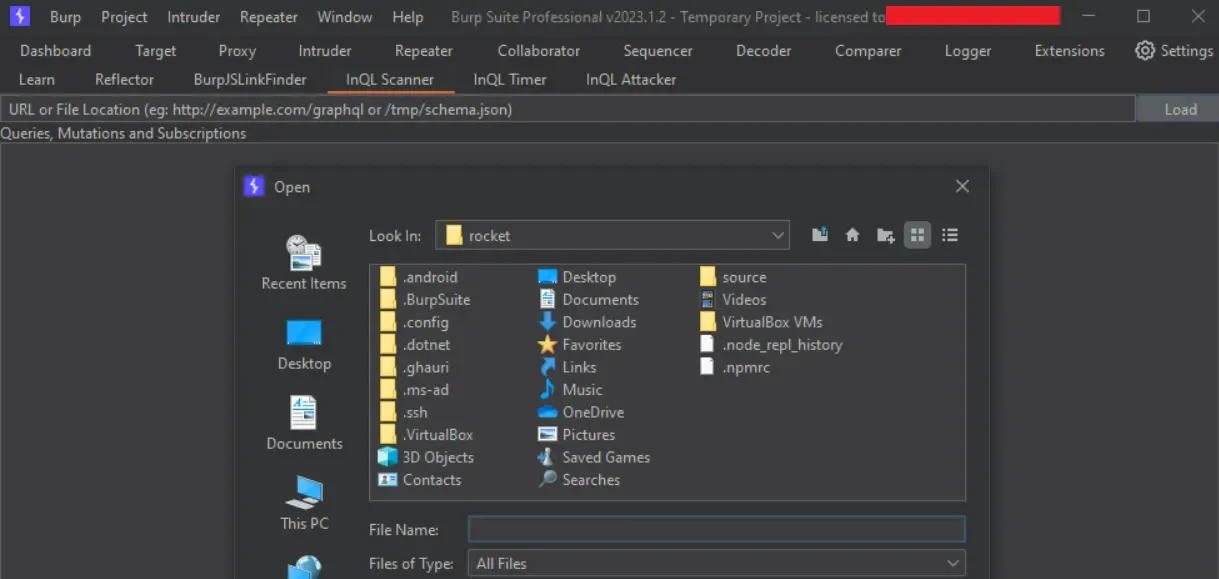
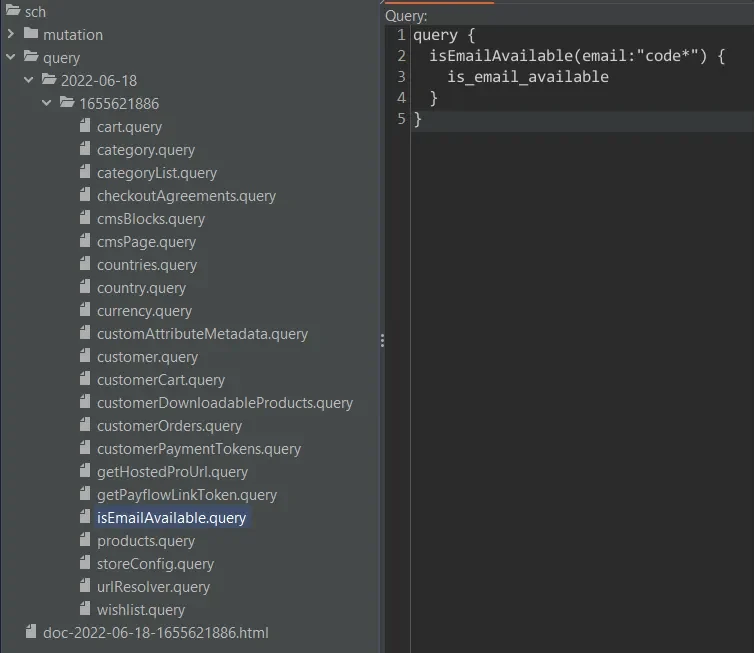
After the schema is loaded, InQL creates a directory structure that separates queries and mutations. Queries fetch data and typically take the form of a JSON-like object with a set of fields defining the data to be returned, for example a user's name, email address and profile picture. Mutations modify data on the server: clients specify the exact changes they want, and mutations can create, update or delete data. Mutations are similar to queries in structure but are typically used to change data rather than retrieve it.
Step 3: Check whether an email is registered
The isEmailAvailable query was used to see which email is taken, meaning whether the user has an account or not. Select isEmailAvailable.query and click the Raw tab at the top.
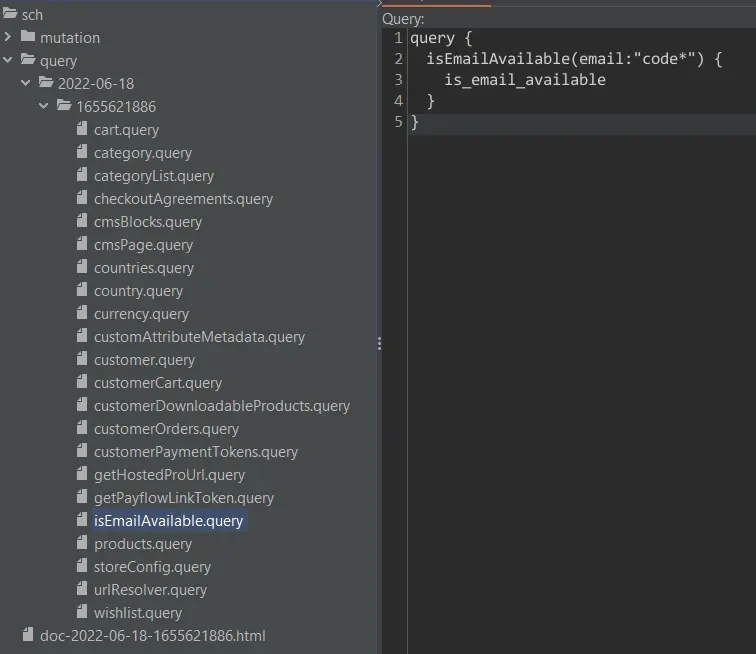
In the query, "code*" indicates that a string datatype is expected. Copy the raw query and send a POST request to the /graphql endpoint with the JSON query.
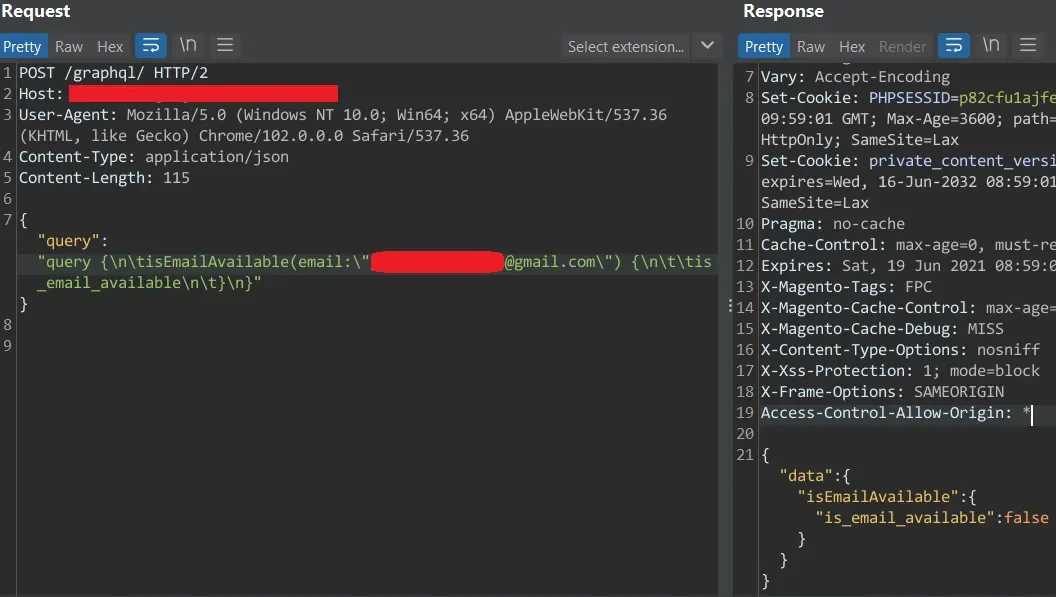
Because the researcher had already created an account with their own email, the response said "is_email_available: false", meaning the email was already taken.
Step 4: Create an account with the createCustomer mutation
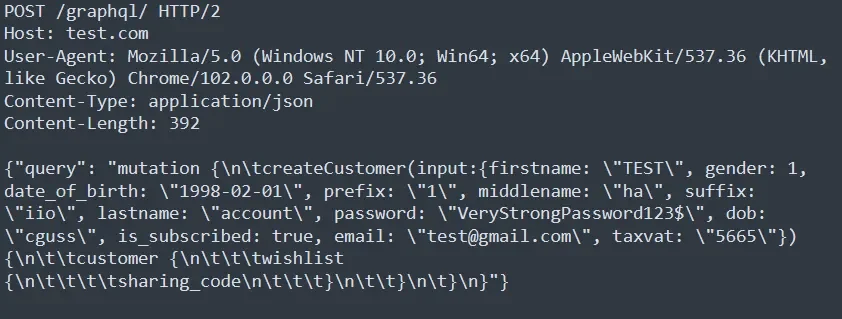
Since mutations can create or modify data on the server, the researcher used createCustomer.query to create an account. Copy the raw query and fill the values according to their fields. "code*" is replaced with string values, while the gender: field is without quotes, so it is an integer value.
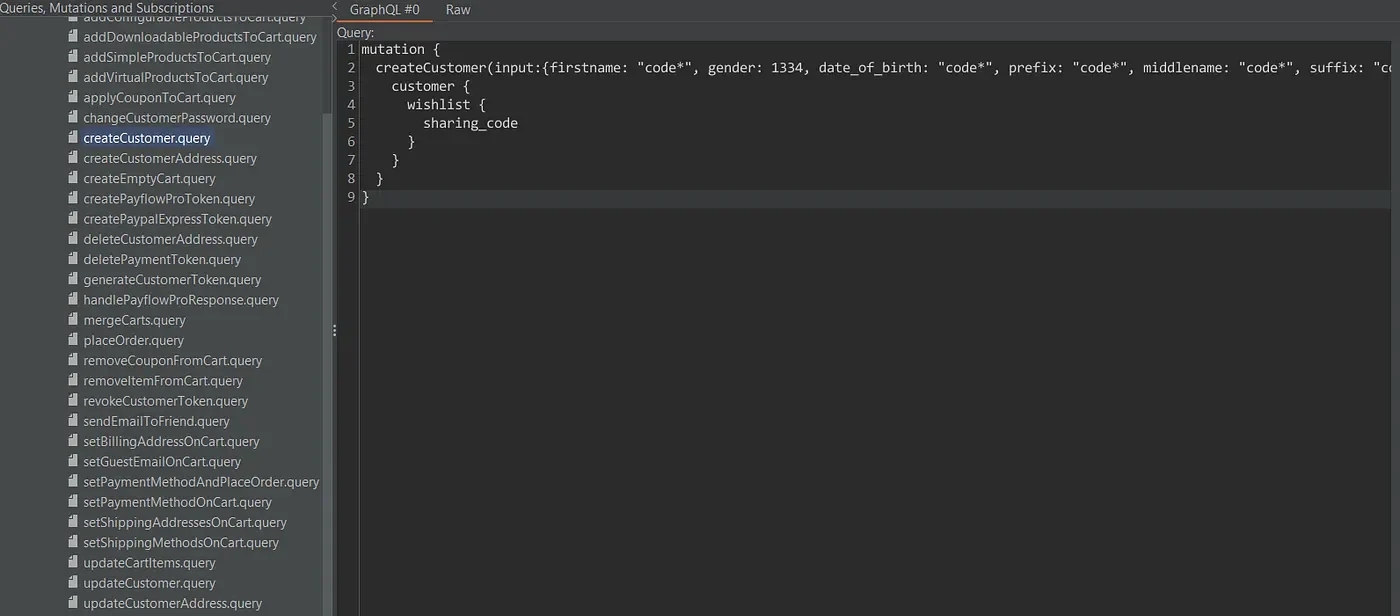
The POST request was sent with the fields filled with their respective data.
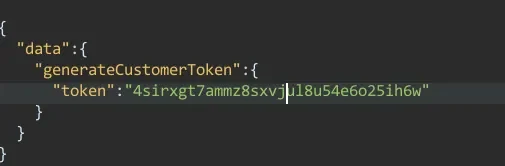
The account was created and an access token was returned in the HTTP response.
Step 5: Use the created credentials elsewhere
There was no login page on the subdomain where the account was created. After some analysis, the researcher found another subdomain, a service portal of the company, where the created credentials worked, and gained access to that portal. That portal exposed the same GraphQL queries the researcher already had access to, again without any authentication.
Root cause
The GraphQL endpoint did not require authentication for introspection or for the queries and mutations it exposed. Because the schema was readable, the full set of operations, including isEmailAvailable and createCustomer, could be enumerated and called directly.
Impact
Without authentication, the schema could be read, the queries and mutations enumerated, an email checked for an account, and a customer account created with an access token returned. In this case the created credentials also worked on a separate service portal subdomain, giving access to that portal. The report does not state what data or actions that portal exposed beyond the same GraphQL queries being available unauthenticated.
Fix
The report does not describe a fix. The measures it implies are to require authentication on the GraphQL endpoint, including for introspection, and to restrict which operations unauthenticated clients can reach.
Variants to test
- Send the introspection query above to any
/graphqlendpoint you find. A positive result is a JSON response containing__schemawith types and fields. - Load the returned schema into InQL and inspect the query and mutation folders. A positive result is a populated directory of operations to test.
- Call a query that reveals account existence, such as
isEmailAvailable, with a known and an unknown email. A positive result is a different answer for each, for exampleis_email_available: falsefor a registered address. - Call a mutation that creates an account, such as
createCustomer, with the fields filled in. A positive result is a created account and an access token in the response. - Try the credentials created this way on other subdomains of the same organisation. A positive result is a successful login on another portal with the created credentials.
What happened, in plain words
A security researcher was looking for bugs on a public bug bounty program (a scheme where companies invite people to test their systems and report problems). While exploring a subdomain (a smaller site under the company's main domain, like shop.example.com under example.com), they found something that should have been locked but was not: a GraphQL API that answered questions from anyone, without asking for a username or password.
GraphQL is a way for programs to talk to a server. Instead of many separate addresses for different pieces of data, there is usually one address where you send a structured request describing exactly what you want. The server replies with JSON, a text format for data that both people and machines can read.
Two problems combined here. First, the API let anyone ask it to describe itself, a feature called introspection. Second, it let anyone actually run its queries and mutations (the operations that read and change data) without logging in. The researcher used the self-description to learn the operations the API offered, then called some directly: checking whether an email address already had an account, and creating a new account. The new account came back with an access token, a short piece of text that proves you are logged in, a bit like a wristband at an event. The created credentials then worked on a separate company portal, which the researcher could log into.
The ideas you need first
Before walking through the steps, here are the concepts in plain terms.
- API: the part of a website that programs talk to, rather than people. When a page loads your profile, it is usually asking an API behind the scenes. Think of a restaurant: the menu and the waiter are the API, the kitchen is the server.
- GraphQL: a style of API where you send one request describing the exact fields you want, and you get back only those fields. It has two main kinds of operation. A query reads data (for example a user's name and email). A mutation changes data (create, update or delete something).
- Schema: the API's own description of itself: what types of data exist, what fields they have, and what operations you can call. It is like the restaurant's menu, listing every dish and its ingredients.
- Introspection: a built-in GraphQL feature that lets a client ask the API to hand over its schema. It exists so tools can generate documentation or build clients automatically. It is useful, but it should not be open to strangers.
- Unauthenticated: without proving who you are. No login, no password, no token. If a feature is reachable unauthenticated, anyone on the internet can use it.
- Endpoint: a specific address on a server that accepts requests, here
/graphql. - POST request: one of the ways a browser or tool sends data to a server. The data travels in the request body, not in the address.
- JSON: a text format for structured data, using curly braces, quotes and colons. Requests and responses in this story are JSON.
- Fuzzing: trying many possible names or paths quickly to see which ones exist. Like knocking on every door in a corridor to find the one that opens.
- Burp Suite: a tool used by security testers to watch and modify the traffic between a browser and a website. It acts as a middleman you can inspect.
- InQL Scanner: an extension for Burp Suite that reads a GraphQL schema and turns it into a tidy folder of ready-to-use queries and mutations.
- Access token: a string the server gives you after you log in or register, which you send with later requests to prove who you are. Like a cloakroom ticket: whoever holds it gets the coat.
Finding the endpoint
The researcher was hunting on a Bugcrowd public program. Bugcrowd is a platform where companies publish programs and researchers report bugs; a public program is open to anyone registered on the platform.
They picked a subdomain that had no login page, no signup page and nothing obviously interesting. That is a common starting point: a quiet site can still have hidden machinery behind it. They fuzzed it, trying many paths, and came across a GraphQL endpoint. Two things stood out:
- It answered an introspection request without any authentication.
- It accepted calls to its GraphQL queries without authentication too.
The path used in the later requests is /graphql.
Step 1: Ask the API to describe itself
To test for introspection, you send a POST request containing a query. The payload used is the standard introspection query:
{"query": "query IntrospectionQuery{__schema{queryType{name}mutationType{name}subscriptionType{name}types{...FullType}directives{name description locations args{...InputValue}}}}fragment FullType on __Type{kind name description fields(includeDeprecated:true){name description args{...InputValue}type{...TypeRef}isDeprecated deprecationReason}inputFields{...InputValue}interfaces{...TypeRef}enumValues(includeDeprecated:true){name description isDeprecated deprecationReason}possibleTypes{...TypeRef}}fragment InputValue on __InputValue{name description type{...TypeRef}defaultValue}fragment TypeRef on __Type{kind name ofType{kind name ofType{kind name ofType{kind name ofType{kind name ofType{kind name ofType{kind name ofType{kind name}}}}}}}}"}
What this does, piece by piece:
- The outer
{"query": "..."}is the JSON envelope. The keyquerytells the server that the value is a GraphQL query. query IntrospectionQuerynames the operation. The name is just a label.__schemais the special entry point for introspection. Fields starting with two underscores are reserved by GraphQL for this kind of built-in information.queryType{name},mutationType{name}andsubscriptionType{name}ask for the names of the operations that read, change and stream data.types{...FullType}asks for every data type, and...FullTypemeans "fill in the details described in the fragment called FullType".directives{...}asks for any directives, which are extra instructions the schema supports.- The three
fragmentblocks (FullType,InputValue,TypeRef) are reusable descriptions.FullTypelists each type's fields, arguments and possible values.InputValuedescribes an argument.TypeReffollows the chain of types, including nested ones, which is whyofTyperepeats several times.
The server answered with the full schema in the response body.
Step 2: Save the schema and load it into InQL
Copy the whole JSON from the response, which is the schema, and save it in a file with the .json extension. Then, in Burp Suite, open the InQL scanner tab, click Load and load that .json file.
Why bother? Reading a raw schema by hand is slow and error-prone. InQL turns it into a directory structure that separates queries from mutations, so you can see every operation the API offers and pick the ones worth testing.
After loading, the tool shows folders. Queries fetch data and typically look like a JSON-style object listing the fields you want back, for example a user's name, email address and profile picture. Mutations change data on the server: you state the exact change you want, and they can create, update or delete records. Mutations look similar to queries but are used to change data rather than retrieve it.
Step 3: Check whether an email is registered
The researcher picked the isEmailAvailable query, which answers whether an email address is already taken, in other words whether a user has an account. Select isEmailAvailable.query and click the Raw tab at the top.
In the query, "code*" marks a value that expects a string (text). Copy the raw query and send a POST request to the /graphql endpoint with the JSON query.
The researcher had already created an account with their own email, so the response said "is_email_available: false", meaning the address was already taken. The response said the address was already taken, so the query reveals whether an email has an account.
Step 4: Create an account with the createCustomer mutation
Since mutations can create or change data on the server, the researcher used createCustomer.query to create an account. Copy the raw query and fill in the values for each field. "code*" is replaced with string values, while the gender: field has no quotes, so it takes an integer (a whole number).
The POST request was sent with the fields filled in with their respective data.
The account was created, and an access token came back in the HTTP response.
An access token came back in the HTTP response.
Step 5: Use the new credentials elsewhere
There was no login page on the subdomain where the account was created. After some analysis, the researcher found another subdomain, a service portal belonging to the company, where the same credentials worked. They logged in and gained access to that portal. That portal exposed the same GraphQL queries the researcher already had access to, again without any authentication.
The account created through the mutation also worked on a second system.
Why it worked
The GraphQL endpoint did not require authentication, either for introspection or for the queries and mutations it exposed. Because the schema was readable, the full set of operations, including isEmailAvailable and createCustomer, could be listed and called directly.
What an attacker could do
Without authentication, the schema could be read, the queries and mutations listed, an email checked for an account, and a customer account created with an access token returned. In this case the created credentials also worked on a separate service portal subdomain, giving access to that portal. The report does not say what data or actions that portal exposed beyond the same GraphQL queries being available unauthenticated.
How to fix it
The report does not describe a fix. The measures it implies are to require authentication on the GraphQL endpoint, including for introspection, and to limit which operations unauthenticated clients can reach.
Things to try yourself
- Send the introspection query above to any
/graphqlendpoint you find. A positive result is a JSON response containing__schemawith types and fields. - Load the returned schema into InQL and look through the query and mutation folders. A positive result is a populated directory of operations to test.
- Call a query that reveals whether an account exists, such as
isEmailAvailable, with a known and an unknown email. A positive result is a different answer for each, for exampleis_email_available: falsefor a registered address. - Call a mutation that creates an account, such as
createCustomer, with the fields filled in. A positive result is a created account and an access token in the response. - Try the credentials created this way on other subdomains of the same organisation. A positive result is a successful login on another portal with the created credentials.
Glossary
- API: the part of a service that programs talk to, rather than people.
- Access token: a string returned after logging in or registering, sent with later requests to prove who you are.
- Bug bounty program: a scheme where a company invites researchers to test its systems and report problems.
- Bugcrowd: a platform that hosts bug bounty programs.
- Burp Suite: a tool that sits between your browser and a website so you can inspect and change the traffic.
- Directive: an extra instruction a GraphQL schema can support.
- Fragment: a reusable block in a GraphQL query that describes a set of fields.
- Fuzzing: trying many possible names or paths quickly to find the ones that exist.
- GraphQL: a style of API where one request describes exactly which fields you want back.
- HTTP response: what a server sends back after a request, including a status and a body.
- InQL Scanner: a Burp Suite extension that turns a GraphQL schema into a folder of ready-to-use queries and mutations.
- Integer: a whole number, written without quotes in JSON.
- Introspection: a built-in GraphQL feature that lets a client ask the API to describe its own schema.
- JSON: a text format for structured data using braces, quotes and colons.
- Mutation: a GraphQL operation that creates, updates or deletes data.
- POST request: a request that sends data to the server in its body.
- Query: a GraphQL operation that reads data.
- Schema: the API's description of its types, fields and operations.
- String: text data, written inside quotes in JSON.
- Subdomain: a smaller site under a main domain, such as
shop.example.comunderexample.com. - Unauthenticated: reachable without proving who you are.

