Story of my first cash bounty on hackerone
An image-fetching parameter accepted a URL and returned the fetched content, allowing an attacker to supply a URL that returned an SVG with an XSS payload. This let the attacker execute script in the victim's browser and steal session cookies.
 Published on vedanttekale20.medium.com
Hello again bugbounty community! My name is Vedant(Also known as Vegeta on Twitter😁) and I’m a cybersecurity enthusiast and an aspiring Bug hunter :) Today I’ll share with you a story about an interesting bug that I found recently which helped me get my first bounty on hackerone platform.
The full write-up lives on its author's site
It belongs to its author, so we link to it rather than copy it. The other two tabs are our own rewrites, checked against it.
Context
This is the story of the researcher's first cash bounty on HackerOne, found on a bug bounty program whose scope contained only the main web application. The feature involved is an image-fetching endpoint that takes a URL as an argument. The URL the researcher found looked like this:
htttps://www.example.com/image?Id=somelinkwithouthttp.com
The Id parameter takes a link, and the researcher's testing suggested the application fetched the image behind it. That is the whole of the feature as described: a parameter that takes a URL and retrieves an image from it.
Setup
- Target: a program with only the main web application in scope.
- Recon tool: Linkfinder, used for the first time by the researcher, instead of the usual waybackurls collection.
- Interception and out-of-band testing: Burp Collaborator.
- Hosting for the exploit page: ngrok, serving a file from the researcher's local host.
- Two accounts created on the site to test the cookie-stealing exploit.
The command used for recon was:
python linkfinder.py -i https://example.com -d
Finding it
After the Linkfinder run completed, the researcher went through the results one by one. Among the many URLs, one stood out because the value of the Id parameter had no http:// or https:// in front of it. A parameter that accepts URLs as an argument is a natural candidate for SSRF, so that is where the testing went.
Exploitation
Step 1: A Collaborator payload without a scheme
The researcher copied a Burp Collaborator payload and pasted it into the Id parameter without prepending http or https, then submitted the request, expecting SSRF. The Collaborator received only a DNS request, no HTTP interaction.

The Collaborator recorded only a DNS request, with no HTTP interaction.
Step 2: Prepending @
The researcher then prepended an @ symbol to the Collaborator payload and submitted again. This time the Collaborator received more than a DNS lookup.

The IP that came back belonged to AWS. The researcher prepended @ spontaneously and the fetch then went through; the report does not explain why.
Step 3: Trying to reach AWS metadata
Because the resolved IP was on AWS, the researcher attempted to fetch the AWS metadata service, and tried many different techniques over roughly three to four days, including redirects and DNS rebinding. None of them worked. The report was submitted anyway, and two days later the triager responded that the impact had to be demonstrated.
Step 4: Chaining with XSS
The next day the researcher approached it from a different angle: chaining the SSRF with another bug. Since the parameter fetches an image, the Brutelogic XSS proof-of-concept link was used as the value. The XSS executed.
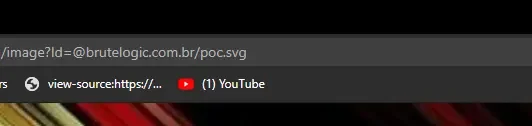
Step 5: Stealing session cookies
Because the poc.svg was fetched successfully, the researcher created an HTML file containing an XSS payload to steal the victim's session cookies, and hosted it on the local machine with ngrok. Two accounts were created on the site, and the payload was used against the second account. The victim's cookies were received.
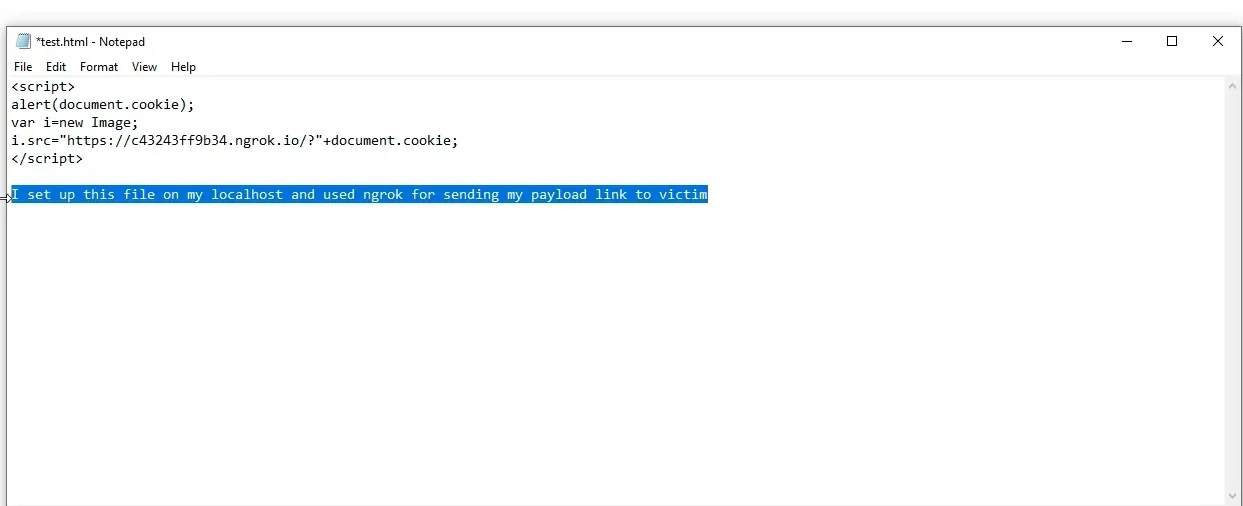
The report was submitted, triaged within one day, and after almost 20 days the researcher received their first bounty on HackerOne.
Root cause
The Id parameter accepts a URL and the server fetched the researcher's chosen resources, as shown by the Collaborator interaction and the loaded XSS proof-of-concept. The @ behaviour suggests the value is parsed as a URL and the host portion after @ is what gets fetched, so a naive check on the beginning of the string would not constrain the real destination. The XSS chain worked: the Brutelogic proof-of-concept link was fetched and the XSS executed. The report does not describe the server-side code, so the exact parsing and validation logic is not stated.
Impact
The Collaborator interaction showed the server made a request to the researcher's Collaborator host. The researcher could not turn this into access to the AWS metadata service despite several days of attempts, so that escalation is not demonstrated. The researcher created two accounts on the site, used the payload, and received the victim's cookies.
Fix
Based on the behaviour shown, the endpoint should restrict the destinations it will fetch to an allowlist, resolve and validate the host after URL parsing rather than checking the raw string, and serve fetched content with a type and disposition that prevents it from executing as HTML in the application's origin.
Variants to test
- Run Linkfinder against other targets and look for parameters whose sample values are URLs without a scheme. A positive result is a parameter that causes an out-of-band DNS or HTTP interaction when you supply a Collaborator payload.
- When a bare Collaborator payload yields only DNS, try prepending
@before the host. A positive result is an HTTP interaction in Collaborator, showing the server completed the fetch. - If the parameter fetches images, try pointing it at a known XSS proof-of-concept resource. A positive result is script execution in the application's context.
- If script execution works, host a cookie-stealing page and test it between two accounts you control. A positive result is the victim account's cookies arriving at your listener.
- Where the resolved address is a cloud provider, attempt metadata retrieval, including via redirects and DNS rebinding. A positive result is metadata content returned through the vulnerable parameter.
What happened, in plain words
A security researcher found a feature on a website that let the site fetch an image from any web address you gave it. The researcher could make the site's own server fetch addresses they supplied, as shown by the Collaborator and the XSS proof-of-concept. At first the Collaborator recorded only a DNS request, but after prepending @ it recorded more than a DNS lookup. The researcher then pointed the same parameter at a Brutelogic XSS proof-of-concept link, and the XSS executed. Finally, the script was used to send the victim account's cookies to a server the researcher controlled. The report was triaged and paid.
This article walks through the same story for someone who has never done security testing. Every tool and term is explained the first time it appears.
Background: what a bug bounty is
A bug bounty program is an arrangement where a company says: if you find a security problem in our systems and tell us privately, we will pay you. The company publishes a page describing what is in scope (which websites or apps you are allowed to test) and the rules. HackerOne is one of the platforms that hosts these programs.
The researcher had spent about three months working on HackerOne before this, and reached 53rd place on a country-based leaderboard. That gave them confidence to aim for a first paid bounty. They picked a program whose scope contained only the main web application.
The feature that was found
Websites often have a feature that takes an address and fetches something from it. For example, a page might show a preview of an image hosted elsewhere. The address is passed in the URL as a parameter, which is the part after the ? sign. In this case the parameter was called Id, and the URL looked like this:
htttps://www.example.com/image?Id=somelinkwithouthttp.com
Line by line:
htttps://www.example.com/imageis the page on the site. (The extratis how it appeared in the report.)?starts the list of parameters.Id=is the name of the parameter and the start of its value.somelinkwithouthttp.comis the value: a web address, but written withouthttp://orhttps://in front.
Normally a web address starts with http:// or https://, which tells the browser which protocol to use (the language used to talk to web servers). Seeing a value that looks like a domain but has no protocol in front is interesting, because it suggests the server may be fetching that address itself. If the server will fetch any address it is given, that is the setup for a class of bug called SSRF, explained below.

What SSRF means
SSRF stands for Server-Side Request Forgery. A request is what your browser sends to a web server when you visit a page. In SSRF, the attacker does not send the request from their own computer; they trick the victim's server into sending it. The everyday comparison: imagine a building where visitors are not allowed into the back rooms, but the receptionist will happily walk back and fetch anything you ask for. If you can convince the receptionist to fetch something from a locked room, you have effectively reached the locked room yourself.
SSRF matters because servers often sit inside a private network with access to internal services that outsiders cannot reach. If you can make the server send requests, you may be able to reach those internal services.
How the researcher found the URL
Recon (short for reconnaissance) is the phase where you gather information about a target: pages, endpoints, parameters. The researcher usually used a tool called waybackurls, which pulls old URLs from internet archives. This time they tried a different tool, Linkfinder, for the first time. Linkfinder scans a web page or a JavaScript file and extracts URLs and paths from it.
The command was:
python linkfinder.py -i https://example.com -d
Line by line:
pythonruns the Python programming language interpreter.linkfinder.pyis the Linkfinder script.-i https://example.comtells it the input: the site to scan.-dis an option that tells Linkfinder to search inside JavaScript files as well, not just the HTML of the page.
After the run, the researcher went through the results one by one. Among many URLs, one stood out because the Id value had no http:// or https:// in front. That is the URL shown above. A parameter that accepts a URL is a natural place to test for SSRF, so that is where testing went next.
Testing for SSRF with Burp Collaborator
Burp Collaborator is a service that gives you a unique address you can put into a target. If the target's server ever tries to contact that address, the Collaborator records it. This is called out-of-band testing: you are not watching the response in your browser, you are watching a separate channel to see whether the server made a request at all.
Step 1: A payload without a protocol
The researcher copied a Collaborator address and pasted it into the Id parameter without adding http or https in front, then submitted the request, expecting SSRF. The Collaborator only recorded a DNS request, not an HTTP request.
DNS is the system that turns a domain name like example.com into an IP address, which is the numeric address of a computer on the internet. An HTTP request is the actual page fetch. A DNS-only hit means the server looked up the name but did not go on to fetch the page. So the server was resolving the address but not completing the fetch.
Step 2: Adding an @ symbol
The researcher then put an @ symbol in front of the Collaborator address and submitted again. This time the Collaborator recorded more than a DNS lookup.
Why does @ matter? In a URL, the @ separates the user information part from the host. For example, in https://[redacted], the host is example.com and user is the user information. So a value like something@host is read by the URL parser with host as the real destination. That is the likely reason the fetch went through when the bare address did not: the server's parsing treated the part after @ as the host to fetch.
The IP address that came back belonged to AWS, Amazon's cloud platform. The IP address that came back belonged to AWS.
Step 3: Trying to reach the AWS metadata service
Cloud providers like AWS run a special internal address that a server can query to learn about itself: its instance identity, configuration, and sometimes credentials. This is called the metadata service. If SSRF can reach it, the impact can be serious.
Because the IP was on AWS, the researcher tried to fetch the metadata service, and tried many techniques over roughly three to four days, including redirects (where one address sends the server on to another) and DNS rebinding (where a domain name changes what IP it points to between lookups). None of them worked. The researcher submitted the report anyway. Two days later the triager (the person at the program who reviews reports) replied that the impact had to be demonstrated.
Chaining SSRF with XSS
The next day the researcher tried a different angle: chaining the SSRF with another bug. Chaining means combining two weaknesses so that one makes the other possible or more serious.
The other bug was XSS, which stands for Cross-Site Scripting. XSS happens when a website displays content supplied by an attacker in a way that lets the attacker's script run in the victim's browser, as if it were part of the site. A script is a small program that runs in the browser. If an attacker's script runs on a site, it can read things the site has stored in the browser, including cookies.
A cookie is a small piece of data a website asks the browser to store and send back on every request. One common use is a session cookie: after you log in, the site gives your browser a cookie that identifies your logged-in session. If someone else gets that cookie, they can often act as you without knowing your password.
Because the Id parameter was fetching an image, the researcher tried pointing it at a known XSS proof-of-concept link from Brutelogic. The XSS executed.
A proof-of-concept (PoC) is a small demonstration that a bug is real, without causing harm. Here the PoC was a resource that, when loaded, runs a script.
Step 4: Stealing session cookies
Because the poc.svg was fetched successfully, the researcher created an HTML file containing an XSS payload to steal the victim's session cookies. HTML is the language web pages are written in. The file was hosted on the researcher's own machine using ngrok, a tool that gives a public address to a service running on your local computer. Two accounts were created on the site, and the payload was used against the second account. The victim's cookies were received.
The report was submitted, triaged within one day, and after almost 20 days the researcher received their first bounty on HackerOne.
Why it worked
The Id parameter accepts a URL and the server fetched the researcher's chosen resources. That is what allowed the out-of-band interaction and then the loading of an attacker-chosen resource. The @ behaviour suggests the value is parsed as a URL and the host portion after @ is what gets fetched, so a naive check on the beginning of the string would not constrain the real destination. The XSS chain worked: the Brutelogic proof-of-concept link was fetched and the XSS executed. The report does not describe the server-side code, so the exact parsing and validation logic is not stated.
What the impact was
The Collaborator interaction showed the server made a request to the researcher's Collaborator host. The researcher could not turn this into access to the AWS metadata service despite several days of attempts, so that escalation is not demonstrated. The researcher created two accounts on the site, used the payload, and received the victim's cookies. The report does not state which users or roles were affected beyond that test.
How it could be fixed
Based on the behaviour shown, the endpoint should restrict the destinations it will fetch to an allowlist (a list of permitted addresses), resolve and validate the host after URL parsing rather than checking the raw string, and serve fetched content with a type and disposition that prevents it from executing as HTML in the application's origin. Origin here means the combination of protocol, domain and port that the browser treats as one site.
Variants to test
- Run Linkfinder against other targets and look for parameters whose sample values are URLs without a protocol. A positive result is a parameter that causes an out-of-band DNS or HTTP interaction when you supply a Collaborator payload.
- When a bare Collaborator payload yields only DNS, try prepending
@before the host. A positive result is an HTTP interaction in Collaborator, showing the server completed the fetch. - If the parameter fetches images, try pointing it at a known XSS proof-of-concept resource. A positive result is script execution in the application's context.
- If script execution works, host a cookie-stealing page and test it between two accounts you control. A positive result is the victim account's cookies arriving at your listener.
- Where the resolved address is a cloud provider, attempt metadata retrieval, including via redirects and DNS rebinding. A positive result is metadata content returned through the vulnerable parameter.
Glossary
- Bug bounty program: A scheme where a company pays researchers who privately report security problems in its systems.
- Scope: The list of systems a program allows you to test.
- HackerOne: A platform that hosts bug bounty programs.
- Parameter: The part of a URL after
?that passes a value to the page, such asId=.... - Protocol: The language used to talk to a server, such as
httporhttps. - SSRF (Server-Side Request Forgery): A bug where an attacker makes the victim's server send a request to an address of the attacker's choosing.
- Recon: The information-gathering phase of testing a target.
- waybackurls: A tool that collects old URLs from internet archives.
- Linkfinder: A tool that extracts URLs and paths from web pages and JavaScript files.
- JavaScript: The programming language that runs in web browsers.
- Burp Collaborator: A service that gives you a unique address and records any request made to it, used for out-of-band testing.
- Out-of-band testing: Checking for a bug through a separate channel rather than the normal response.
- Payload: The value you supply to a target to test or exploit a bug.
- DNS: The system that turns domain names into IP addresses.
- IP address: The numeric address of a computer on a network.
- HTTP request: A request from a client to a web server to fetch or send something.
- URL parser: The part of software that reads a URL and works out its parts, such as host and path.
- Host: The domain name or IP address of the server a URL points to.
- AWS: Amazon Web Services, a cloud platform.
- Metadata service: An internal address on a cloud server that returns information about that server.
- Redirect: A response that tells the client to go to a different address.
- DNS rebinding: A technique where a domain name changes the IP it points to between lookups.
- Triager: The person at a program who reviews and classifies reports.
- XSS (Cross-Site Scripting): A bug where an attacker's script runs in a victim's browser as part of a website.
- Script: A small program that runs in the browser.
- Cookie: A small piece of data a site asks the browser to store and send back on each request.
- Session cookie: A cookie that identifies a logged-in session.
- Proof-of-concept (PoC): A small demonstration that a bug is real.
- HTML: The language web pages are written in.
- ngrok: A tool that gives a public address to a service running on your local computer.
- Allowlist: A list of things that are explicitly permitted.
- Origin: The combination of protocol, domain and port that a browser treats as one site.





