Local Administrator Account VS NT AUTHORITY\SYSTEM
The author describes how a local administrator account lacks the privileges of NT AUTHORITY\SYSTEM, and explains how to use Windows API calls to duplicate a SYSTEM process token and spawn a new process with SYSTEM privileges. The text is a learning write-up rather than a vulnerability disclosure.

medium.com
Published on medium.com
Gather around, neighbors! It is time for a short pentest adventure story.
The full write-up lives on its author's site
It belongs to its author, so we link to it rather than copy it. The other two tabs are our own rewrites, checked against it.
Context
This is not a bug bounty report about a web target. It is a write-up of a Windows privilege escalation exercise carried out during a penetration test engagement. The author and their team had administrator access to a Windows host but could not obtain a command prompt running as nt authority\system, and the article explains how they built their own implementation of token impersonation in C# to get one.
The problem, as the author frames it, was not a missing capability but a missing understanding. The team had been running PSExec and WMIExec without knowing how they work, and the author describes that as using a Swiss Army knife as a screwdriver. The write-up is therefore a walk through the Windows access token model and the API calls needed to duplicate a SYSTEM process token and launch cmd.exe with it.
Setup
The starting position is a Local Administrator account on a Windows host, with UAC consent given. The author notes that at this privilege level, operations such as Mimikatz's lsadump::sam or a call to LsaRegisterLogonProcess() were not possible until a nt authority\system context was obtained. They also note that running token::elevate before lsadump::sam would have achieved the same result, but the point of the exercise was to understand the mechanism rather than rely on a tool.
The implementation is written in C#, chosen because the author had never written anything in that language before. P/Invoke signatures are taken from the Windows documentation and from pinvoke.net. The author keeps all the PInvoke signatures and definitions in a class called myAPI.
Finding it
The author starts from the Windows definition of an access token: an object describing the security context of a process or thread, containing the identity and privileges of the user account associated with it. When a user logs on and the password is authenticated, the system produces an access token, and every process executed on behalf of that user has a copy of it.
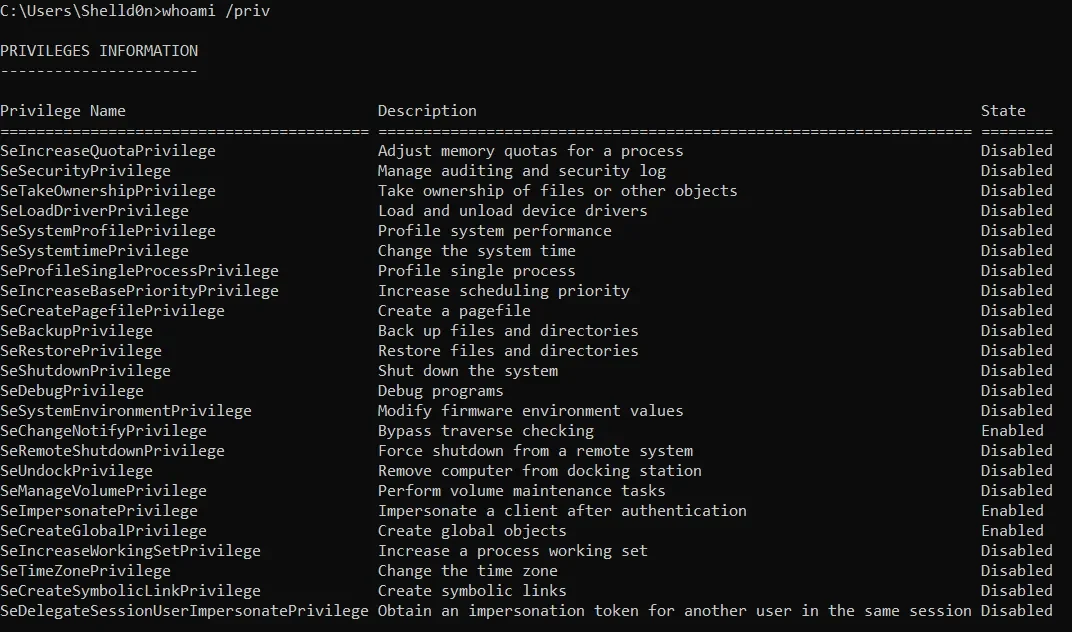
The security context of the Local Administrator account with UAC consent looks like this:
The access token under nt authority\system looks like this:
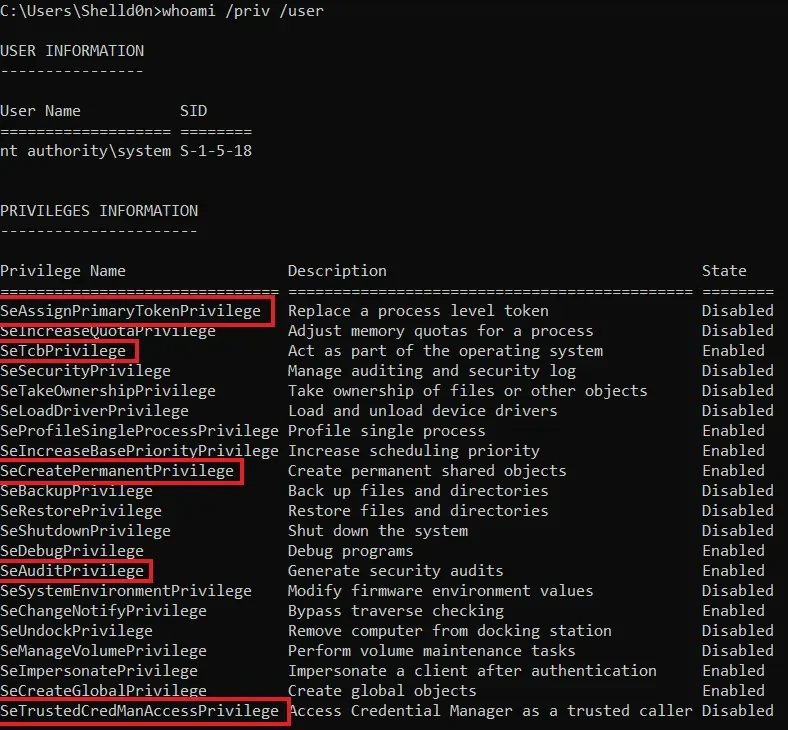
The comparison shows privileges that are specific to the nt authority\system account. The author's conclusion is that a SYSTEM context is needed to get access similar to root on Linux, and that this is what token::elevate does behind the scenes.
Every process has a primary token describing the security context of the user account associated with it. The Windows API exposes functions to enable or disable privileges in an access token, to create a new primary token that duplicates an existing one, and more. With these, a thread can impersonate a client account and obtain a copy of its primary token. Impersonation is the ability of a thread to execute using different security information than the process that owns the thread. The plan follows directly: copy the primary token of a process running as SYSTEM and use it to start a new program with the same context, in this case a shell.
Exploitation
Step 1: identify a SYSTEM process
The first step is to find the PID of a process running as nt authority\system. The author says this can be done with a PowerShell command but the command itself is not reproduced in the text.
Step 2: enable SeDebugPrivilege
Obtaining a handle to the primary token of the target SYSTEM process requires SeDebugPrivilege, the privilege that allows debugging of programs. In the Local Administrator access token shown earlier, SeDebugPrivilege is present but marked as Disabled, so it must be enabled before proceeding.
The function for this is AdjustTokenPrivileges. Because it is unmanaged code, all the signatures and structures needed to call it must be declared and imported. The C++ signature given in the Windows documentation is:
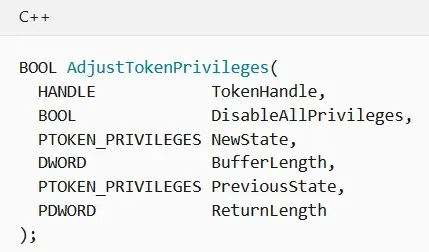
This is declared in C# using signatures from pinvoke.net. With that function available, enabling SeDebugPrivilege for the current process needs a few further API calls:
GetCurrentProcessto get a handle for the current process.OpenProcessTokento get a handle for the access token of the current process.LookupPrivilegeValueto retrieve the unique identifier of the privilege being looked for.AdjustTokenPrivilegesto change the state of that privilege.
After a few more definitions, the code enables SeDebugPrivilege.
Step 3: get a handle to the primary token
With SeDebugPrivilege enabled, the primary token of a SYSTEM process can be accessed. OpenProcess gets a handle to the targeted process, using the PID obtained in step 1. OpenProcessToken is then called again, this time to get a handle to that process's token. The OpenProcess C++ signature from the Windows documentation is:
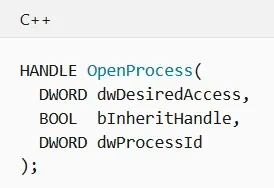
This translates into C#, and the resulting code stores a handle to the primary token in a variable called tokenHandle.
Step 4: duplicate the token and spawn a process
With a handle to the token, the final stage duplicates it and uses the duplicate to create a new process that uses it as its primary token. The new process is cmd.exe. Two more API calls are involved, DuplicateTokenEx and CreateProcessWithTokenW, so more definitions and structures are declared. The author describes the resulting C# as ugly but functional.
Step 5: run it
The project is built and run with the PID of a non-protected SYSTEM process such as Winlogon:
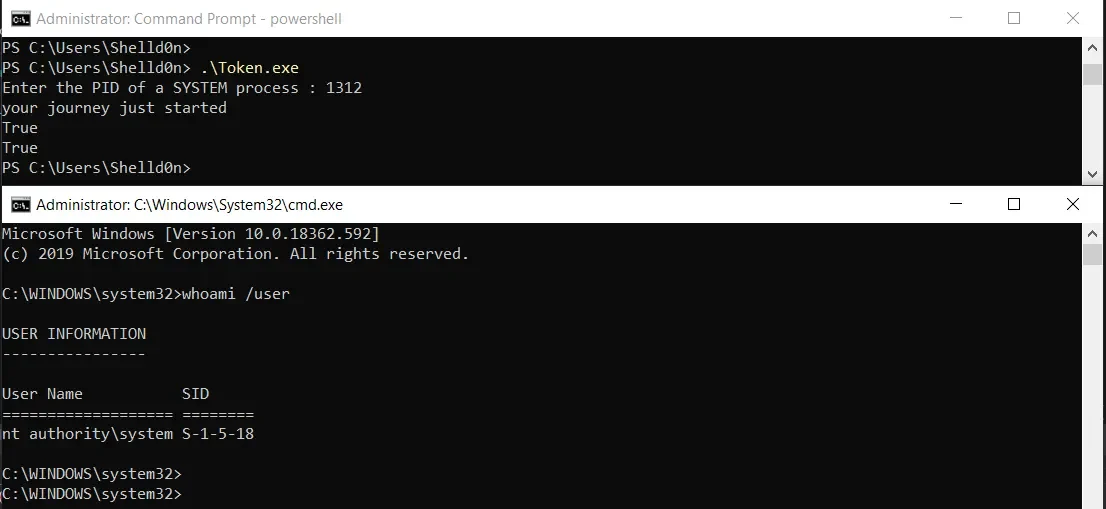
The result is a shell running as nt authority\system, which the author describes as a meterpreter getsystem alternative.
Root cause
This is not a vulnerability in a product. The behaviour being demonstrated is by design: a process holding SeDebugPrivilege can open another process and duplicate its token, and a duplicated primary token can be used to start a new process with the same security context. The precondition is that the caller holds SeDebugPrivilege and can enable it; in the Local Administrator token shown, the privilege was present but disabled. The author's point is that the privilege boundary between Local Administrator and SYSTEM is crossed through documented API calls, not through a flaw.
Impact
An attacker who already has Local Administrator rights on a Windows host can obtain a nt authority\system shell by duplicating the token of a SYSTEM process, provided such a process is running and not protected against the access. The author hedges the PSExec comparison, noting that PSExec will give a system shell in most cases, and the technique here is presented as an alternative that does not depend on an external tool. The write-up does not describe any target, program or bounty.
Fix
No fix is proposed, because there is no vulnerable product in scope.
Variants to test
- On a host where you hold Local Administrator with UAC consent, check whether
SeDebugPrivilegeis present but disabled in your token. A positive result is the privilege appearing in the token and being enableable throughAdjustTokenPrivileges. - Enumerate processes running as
nt authority\systemand try to open one withOpenProcessafter enabling the privilege. A positive result is a valid process handle and then a valid token handle fromOpenProcessToken. - Duplicate the token with
DuplicateTokenExand launchcmd.exewithCreateProcessWithTokenW. A positive result is a new process whose token showsnt authority\system.
What happened, in plain words
This is not a story about a website with a bug. It is a story about a Windows computer and about a person who already had a lot of power on that computer but still could not do one specific thing.
During a security test (a "pentest", short for penetration test, where someone is paid to try to break into a company's systems with permission), the author and their team had administrator access to a Windows machine. Administrator is the most powerful normal user account on a Windows computer. But they wanted a command prompt running as nt authority\system, which is an even more powerful account that Windows itself uses for its own internal services. They could not get it.
The author's honest explanation is that they did not understand what they were doing. They had been running tools called PSExec and WMIExec over and over without knowing how those tools work inside. The author compares this to using a Swiss Army knife as a screwdriver: the tool might work, but you have no idea why. The author does add that PSExec will give you a system shell in most cases.
So the author decided to stop being a "script kiddie" (someone who runs other people's tools without understanding them) and spend a few hours learning the actual mechanism. The result is a walk through how Windows handles permissions, and how you can write your own small program in C# to get the same result without any external tool.
The two accounts: Local Administrator versus NT AUTHORITY\SYSTEM
On Windows, not all powerful accounts are equal. A Local Administrator is a human user who has been given the top level of control on one machine. nt authority\system (often just called SYSTEM) is the account that Windows itself uses to run its own core services. SYSTEM is more powerful than Local Administrator.
The author gives a concrete example of why this matters. Two things they wanted to do were not possible with only Local Administrator rights:
- Running Mimikatz's
lsadump::samcommand. Mimikatz is a well-known tool for extracting passwords and password hashes from Windows memory and databases. Thelsadump::samcommand specifically reads the local account database. - Calling a Windows function called
LsaRegisterLogonProcess().
Neither worked until they had a SYSTEM context. The author also notes that running token::elevate (a Mimikatz command that raises your privileges) before lsadump::sam would have solved it, but that was not the point. The point was to understand the mechanism.
To understand why SYSTEM is more powerful, you need to understand what an access token is.
According to the Windows documentation, An access token is an object that describes the security context of a process or thread. The information in a token includes the identity and privileges of the user account associated with the process or thread. When a user logs on, the system verifies the user's password by comparing it with information stored in a security database. If the password is authenticated, the system produces an access token. Every process executed on behalf of this user has a copy of this access token.
In everyday terms: when you log in to Windows, Windows checks your password, and if it is correct it hands you a kind of digital ID badge. Every program you start carries a copy of that badge. The badge says who you are and what you are allowed to do. That badge is the access token.
The security context of the Local Administrator account, with UAC consent given, looks like this:
UAC stands for User Account Control. It is the pop-up Windows shows when a program wants administrator rights ("Do you want to allow this app to make changes to your device?"). Giving consent means clicking Yes on that pop-up.
The access token under nt authority\system looks like this:
Comparing the two, you can see that the SYSTEM token has some privileges that the Local Administrator token does not. A privilege here is a specific permission, like "may debug other programs" or "may shut down the computer". The author's conclusion is that a SYSTEM context is needed to get something similar to root on Linux (root being the all-powerful account on Linux systems), and that this is exactly what token::elevate does behind the scenes.
Why can't we just do it ourselves?
At this point the author was curious. They did not want to rely on another tool. So they read the Windows documentation more carefully.
Two things they learned:
- Every process has a primary token. This is the token that describes the security context of the user account the process belongs to. When you open Notepad, Notepad's primary token is your user's token.
- The Windows API offers a whole set of functions for working with access tokens: enabling or disabling privileges inside a token, creating a new primary token that duplicates an existing one, and more.
The Windows API (Application Programming Interface) is the set of functions that Windows offers to programs so they can ask the operating system to do things. Think of it as a service counter: you walk up, hand over a request in a specific format, and Windows does the work and hands back a result. You cannot just do things yourself; you have to go through the counter.
With these functions, a thread can impersonate a client account and get a copy of its primary token. A thread is the smallest unit of work inside a program; a program can have one or many threads. Impersonation is the ability of a thread to execute using different security information than the process that owns the thread. In everyday terms: it is like a member of staff temporarily wearing a visitor's badge to see what the visitor can see, then taking it off again.
So the plan becomes clear: copy the primary token of a process that is already running as SYSTEM, and use that copy to start a new program with the same context. The end goal is a shell (a command prompt where you type commands) running as nt authority\system.
The author is upfront that none of this is new to the offensive security community. Many "OSTs" (offensive security tools) abuse impersonation. But now that the author had a clear idea of what to do, they felt confident enough to write their own implementation. They chose C# because they had never written anything in that language before, and thought it would be a good introduction.
Step 1: find a process running as SYSTEM
The first step is to identify the PID of a process running as nt authority\system. A PID (Process ID) is a number Windows assigns to every running program so it can be referred to unambiguously. The author says this can be done with a PowerShell command, but the command itself is not reproduced in the text.
Step 2: enable SeDebugPrivilege
To get a handle to the primary token of the SYSTEM process you are targeting, you need a specific privilege called SeDebugPrivilege. This is the privilege that allows a program to debug other programs. A handle is a kind of reference or ticket that Windows gives you when you open something (a process, a file, a token). You do not get direct access to the object; you get a handle that you can use in later calls.
If you look back at the Local Administrator access token shown earlier, SeDebugPrivilege is present but marked as Disabled. A privilege can be present in your token but switched off, like a key on your keyring that you have to actively turn to use. Since the plan depends on this privilege, it must be enabled first.
The function for this is AdjustTokenPrivileges. Because it is part of the unmanaged code of the Windows API, all the signatures and structures needed to call it must be declared and imported. Unmanaged code here means code that is not part of the .NET runtime that C# normally runs on; it is the raw Windows API, written in C and C++. To call it from C#, you have to describe its shape to the C# compiler. This is called P/Invoke (Platform Invoke).
The C++ signature given in the Windows documentation is:
This is declared in C# using signatures from pinvoke.net, a community wiki that collects these declarations. The author gives full credit to pinvoke.net.
With that function available, enabling SeDebugPrivilege for the current process needs a few further API calls, in this order:
GetCurrentProcessto get a handle for the current process (the program you are running).OpenProcessTokento get a handle for the access token of the current process.LookupPrivilegeValueto retrieve the unique identifier of the privilege you are looking for. Windows identifies each privilege by a long numeric value, not by its name, so you have to look it up.AdjustTokenPrivilegesto change the state of that privilege, in this case from Disabled to Enabled.
After a few more definitions, the code enables SeDebugPrivilege. The author notes that myAPI is just a class where all the PInvoke signatures and definitions are kept, to keep things tidy.
Step 3: get a handle to the primary token
With SeDebugPrivilege enabled, you can now access the primary token of a SYSTEM process. OpenProcess gets a handle to the targeted process, using the PID obtained in step 1. Then OpenProcessToken is called again, this time to get a handle to that process's token.
The OpenProcess C++ signature from the Windows documentation is:
This translates into C#, and the resulting code stores a handle to the primary token in a variable called tokenHandle. The author notes that the PID used here is the one obtained with the command earlier.
Step 4: duplicate the token and spawn a process
This is the part where the magic finally happens. With a handle to the token, you can duplicate it and use the duplicate to create a new process that uses it as its primary token. The new process is cmd.exe, the Windows command prompt.
Two more API calls are involved: DuplicateTokenEx and CreateProcessWithTokenW. Because of that, more definitions and structures have to be declared. The author describes the resulting C# code as ugly but functional.
Step 5: run it
The project is built and run, feeding it the PID of a non-protected SYSTEM process such as Winlogon. Winlogon is the Windows component that handles logon and logoff; it runs as SYSTEM.
The result is a shell running as nt authority\system. The author describes it as a meterpreter getsystem alternative. Meterpreter is the interactive shell that comes with the Metasploit framework, and getsystem is a Meterpreter command that tries to raise your privileges to SYSTEM. The author has now built their own version of that command.
Root cause
This is not a vulnerability in a product. Nothing is broken. The behaviour being demonstrated is by design: a process holding SeDebugPrivilege can open another process and duplicate its token, and a duplicated primary token can be used to start a new process with the same security context. The precondition is that the caller holds SeDebugPrivilege and can enable it; in the Local Administrator token shown, the privilege was present but disabled. The author's point is that the privilege boundary between Local Administrator and SYSTEM is crossed through documented API calls, not through a flaw.
Impact
An attacker who already has Local Administrator rights on a Windows host can obtain a nt authority\system shell by duplicating the token of a SYSTEM process, provided such a process is running and is not protected against the access. The author hedges the PSExec comparison, noting that PSExec will give a system shell in most cases, and the technique here is presented as an alternative that does not depend on an external tool. The write-up does not describe any target, program or bounty.
Fix
No fix is proposed, because there is no vulnerable product in scope.
Variants to test
- On a host where you hold Local Administrator with UAC consent, check whether
SeDebugPrivilegeis present but disabled in your token. A positive result is the privilege appearing in the token and being enableable throughAdjustTokenPrivileges. - Enumerate processes running as
nt authority\systemand try to open one withOpenProcessafter enabling the privilege. A positive result is a valid process handle and then a valid token handle fromOpenProcessToken. - Duplicate the token with
DuplicateTokenExand launchcmd.exewithCreateProcessWithTokenW. A positive result is a new process whose token showsnt authority\system.
Glossary
- Access token: a Windows object that describes the security context of a process or thread, including the identity and privileges of the user account associated with it. Every process started by a user carries a copy.
- Administrator (Local Administrator): the most powerful normal user account on a single Windows machine.
- API (Application Programming Interface): a set of functions that a program can call to ask the operating system or another program to do something.
- cmd.exe: the Windows command prompt program.
- C#: a programming language developed by Microsoft, commonly used on Windows and part of the .NET family.
- C++: a programming language widely used for system-level software; the Windows API is written in it.
- Disabled privilege: a privilege that is present in an access token but switched off, and must be explicitly enabled before use.
- DuplicateTokenEx: a Windows API function that creates a new token by copying an existing one.
- CreateProcessWithTokenW: a Windows API function that starts a new process using a specified token as its primary token.
- GetCurrentProcess: a Windows API function that returns a handle to the calling process.
- getsystem: a Meterpreter command that attempts to raise the current session to SYSTEM.
- Handle: a reference or ticket that Windows gives you when you open an object such as a process, file or token; you use it in later calls instead of touching the object directly.
- Impersonation: the ability of a thread to execute using different security information than the process that owns the thread.
- Local Administrator: see Administrator.
- LookupPrivilegeValue: a Windows API function that returns the unique identifier of a named privilege.
- lsadump::sam: a Mimikatz command that reads the local Windows account database.
- LsaRegisterLogonProcess(): a Windows function related to the Local Security Authority; the author notes it was not callable without SYSTEM context.
- Meterpreter: the interactive shell provided by the Metasploit framework.
- Mimikatz: a well-known tool for extracting credentials from Windows systems.
- myAPI: the class the author uses to hold all PInvoke signatures and definitions.
- nt authority\system (SYSTEM): the Windows account used to run core operating system services; more powerful than Local Administrator.
- OpenProcess: a Windows API function that opens an existing process and returns a handle to it.
- OpenProcessToken: a Windows API function that opens the access token of a process and returns a handle to it.
- OST (offensive security tool): a tool used by security professionals and attackers to perform offensive actions such as credential theft or privilege escalation.
- P/Invoke (Platform Invoke): the mechanism C# uses to call functions from unmanaged code such as the Windows API.
- Pentest (penetration test): an authorised security assessment in which someone tries to break into systems to find weaknesses.
- PID (Process ID): a number Windows assigns to each running process so it can be referred to.
- pinvoke.net: a community wiki that collects P/Invoke signatures for Windows API functions.
- PowerShell: Microsoft's command-line shell and scripting language for Windows.
- Primary token: the token that describes the security context of the user account associated with a process.
- Privilege: a specific permission held in an access token, such as the right to debug programs or shut down the machine.
- Process: a running program.
- PSExec: a Sysinternals tool for running commands on remote (or local) Windows systems; the author notes it usually gives a system shell.
- Root: the all-powerful account on Linux and other Unix-like systems.
- Script kiddie: someone who runs other people's tools without understanding how they work.
- SeDebugPrivilege: the Windows privilege that allows a process to debug other processes; required to open a SYSTEM process and read its token.
- Security context: the identity and privileges under which a process or thread runs.
- Shell: a command prompt where you type commands.
- SYSTEM: see nt authority\system.
- Thread: the smallest unit of execution inside a process; a process can contain one or more threads.
- token::elevate: a Mimikatz command that raises the privileges of the current session.
- UAC (User Account Control): the Windows feature that asks for confirmation when a program wants administrator rights.
- Unmanaged code: code that does not run inside the .NET runtime, such as the raw Windows API written in C and C++.
- WMIExec: a tool for running commands on remote Windows systems via WMI; the author notes it was used without understanding how it works.
- Winlogon: the Windows component that handles logon and logoff; it runs as SYSTEM and is a common target for token duplication.



