SuiteCRM SQL Injection: Breaking an XSS-Oriented Input Sanitization Layer
SuiteCRM passed user input through an XSS-oriented sanitiser (the antiXSS library) before building SQL queries, and the author found that a SQL injection payload containing a less-than character survived the transformation while only that character was encoded. This let an authenticated user inject SQL into several query-building functions, and the author reports more than nine SQL injection issues with advisories assigned.
 Published on sadc0d3r.medium.com
Code Review
The full write-up lives on its author's site
It belongs to its author, so we link to it rather than copy it. The other two tabs are our own rewrites, checked against it.
Context
SuiteCRM is a mature, open-source CRM platform written in PHP, with a large codebase, multiple modules, controllers and user roles, and a history of publicly disclosed vulnerabilities. That combination made it a good subject for security code-review practice: a large attack surface and many user-controlled input paths.
The review started on SQL injection, specifically on how SuiteCRM sanitises user-controlled input before it reaches database queries. SuiteCRM follows an MVC-oriented architecture, so the initial focus was on controllers and model/database interactions, since those components are useful entry points for tracing user-controlled input into SQL queries.
What began as a review of SQL query construction turned into an input-validation issue involving an XSS-oriented sanitisation layer.
Setup
The work was a source code review of SuiteCRM, not a black-box engagement. The researcher extracted the validation code into a separate file to test it in isolation, loading the application's own bootstrap files and the Composer autoloader:
<?phpdefine('sugarEntry', true);if (!defined('sugarEntry') || !sugarEntry) { die('Not A Valid Entry Point');}require_once __DIR__ . '/../php_version.php';require_once __DIR__ . '/../include/SugarObjects/SugarConfig.php';require_once __DIR__ . '/../include/utils/security_utils.php';require_once __DIR__ . '/../vendor/autoload.php';use voku\helper\AntiXSS;function securexss($uncleanString){ if (is_array($uncleanString)) { $new = []; foreach ($uncleanString as $key => $val) { $new[$key] = securexss($val); } return $new; } static $xss_cleanup = [ '"' => '&', '"' => '"', "'" => ''', '<' => '<', '>' => '>', '`' => '`' ]; $uncleanString = preg_replace(array('/javascript:/i', '/\0/', '/javascript:/i'), array('java script:', '', 'java script:'), (string) $uncleanString); $partialString = str_replace(array_keys($xss_cleanup), $xss_cleanup, $uncleanString); $antiXss = new AntiXSS(); $antiXss->removeEvilAttributes(['style', 'onerror']); return $antiXss->xss_clean($partialString);}echo securexss("sad") . '';
The report does not list specific SuiteCRM versions, accounts or roles used for the review.
Finding it
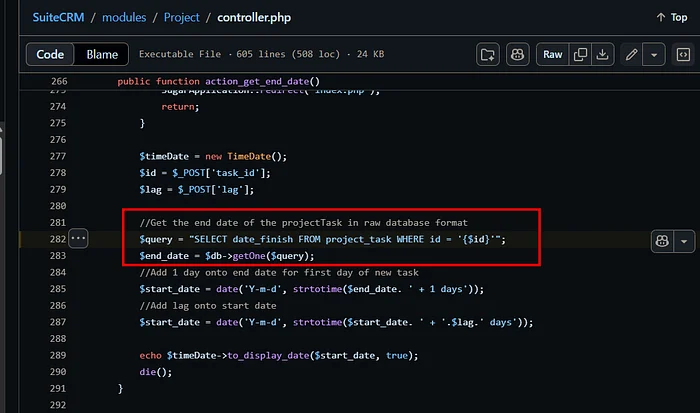
At first glance, several SQL query construction points looked potentially interesting because user-controlled parameters seemed to reach query-building code.
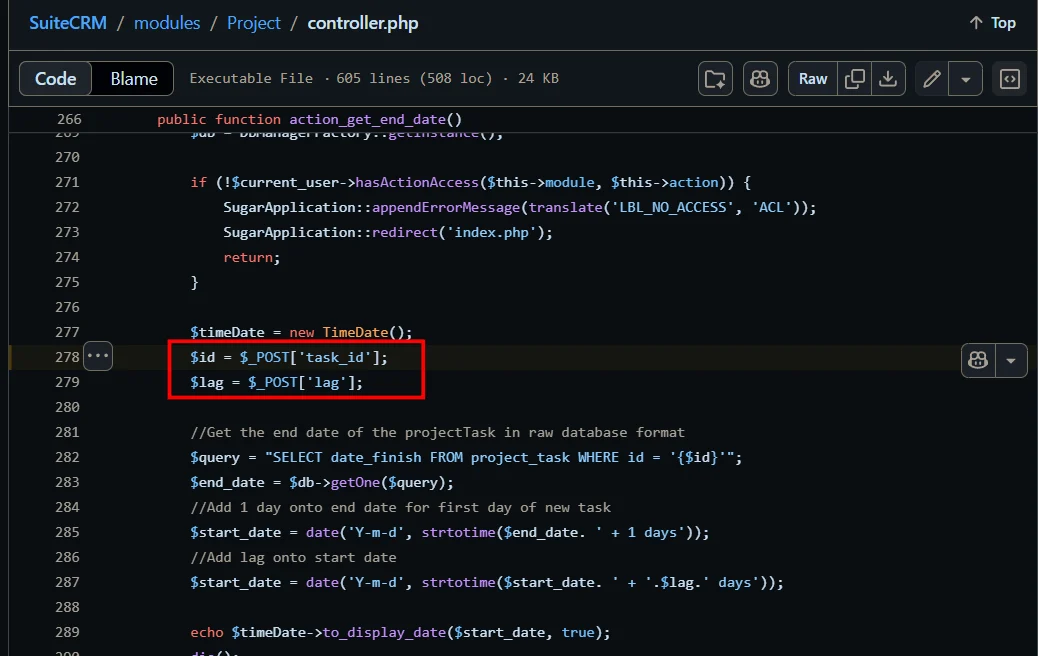
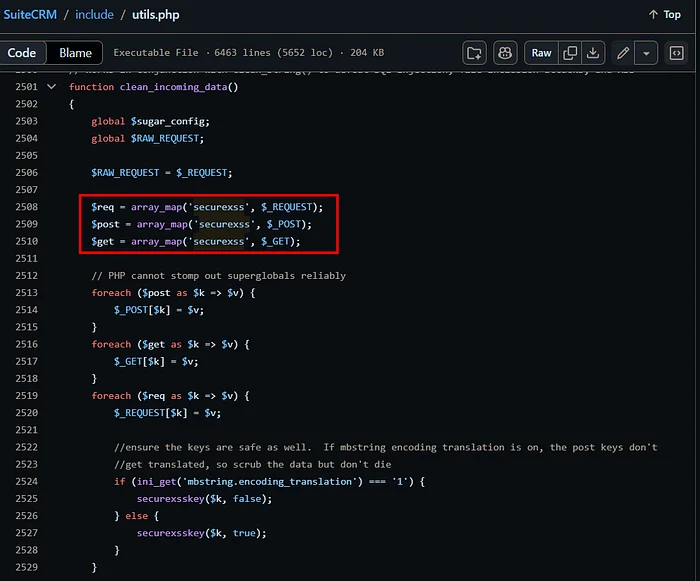
They were not directly reachable, however. The application passes any user input first into a utils file:
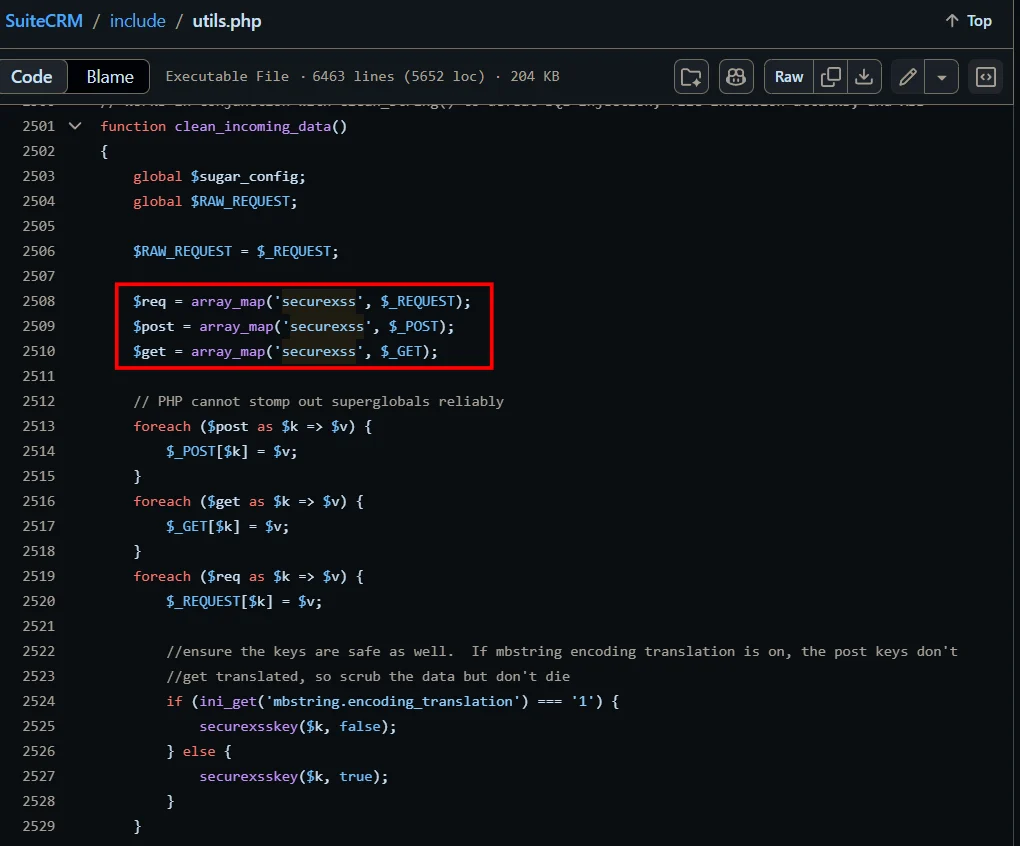
The flow is:
user input → utils → antiXSS → SQL
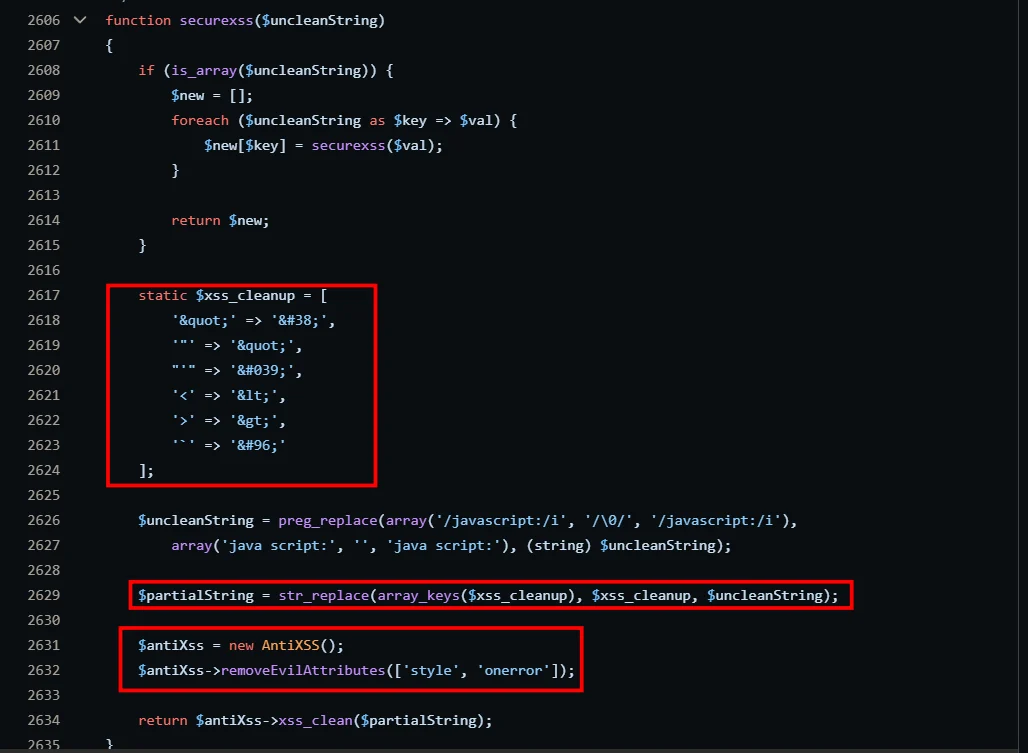
That file contains multiple layers of filtration and sanitisation, and SQL injection appeared to be prevented by two main functions. No obvious bypass through the first validation layer was found. The second function was the interesting one, because it uses an XSS prevention library called antiXSS (https://github.com/voku/anti-xss).
That raised the obvious question: how does an XSS prevention library prevent SQL injection? Digging into the function, it seemed to be secure.
Exploitation
Step 1: baseline
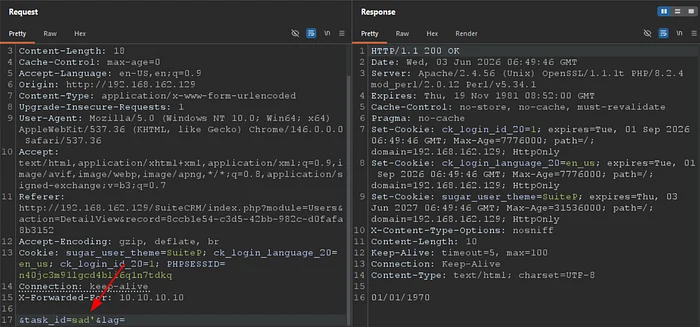
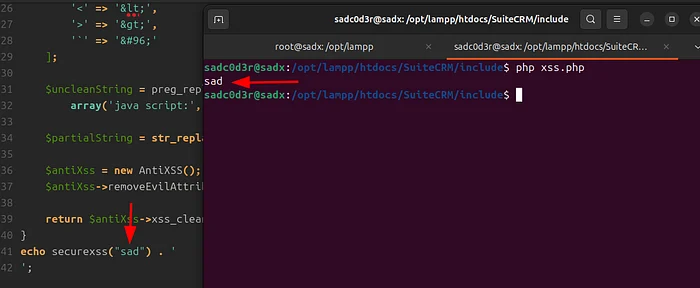
A benign value (sad) was submitted first to establish a baseline and observe how it propagated through the application and into the generated query.
Step 2: single quote
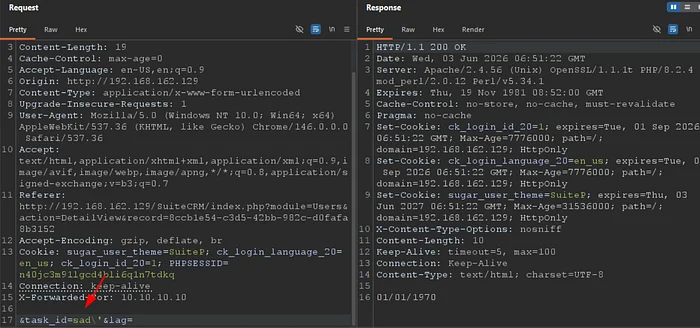
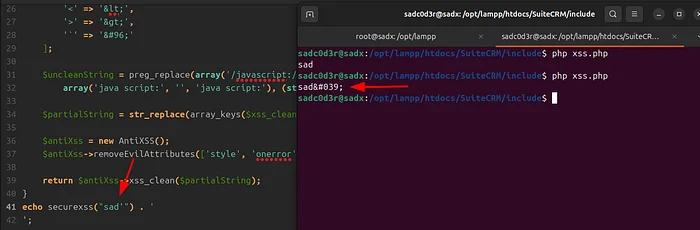
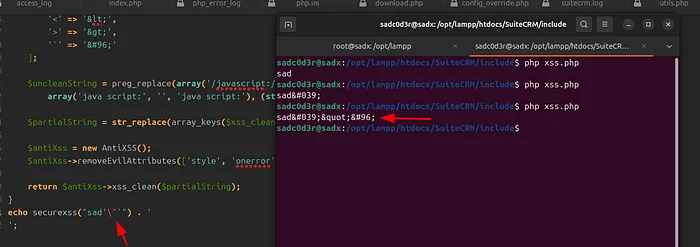
A single quote (') was then introduced as a minimal SQL metacharacter test. The application transformed or rejected the character, which indicated that the input was being processed by the sanitisation layer before reaching the query construction logic.
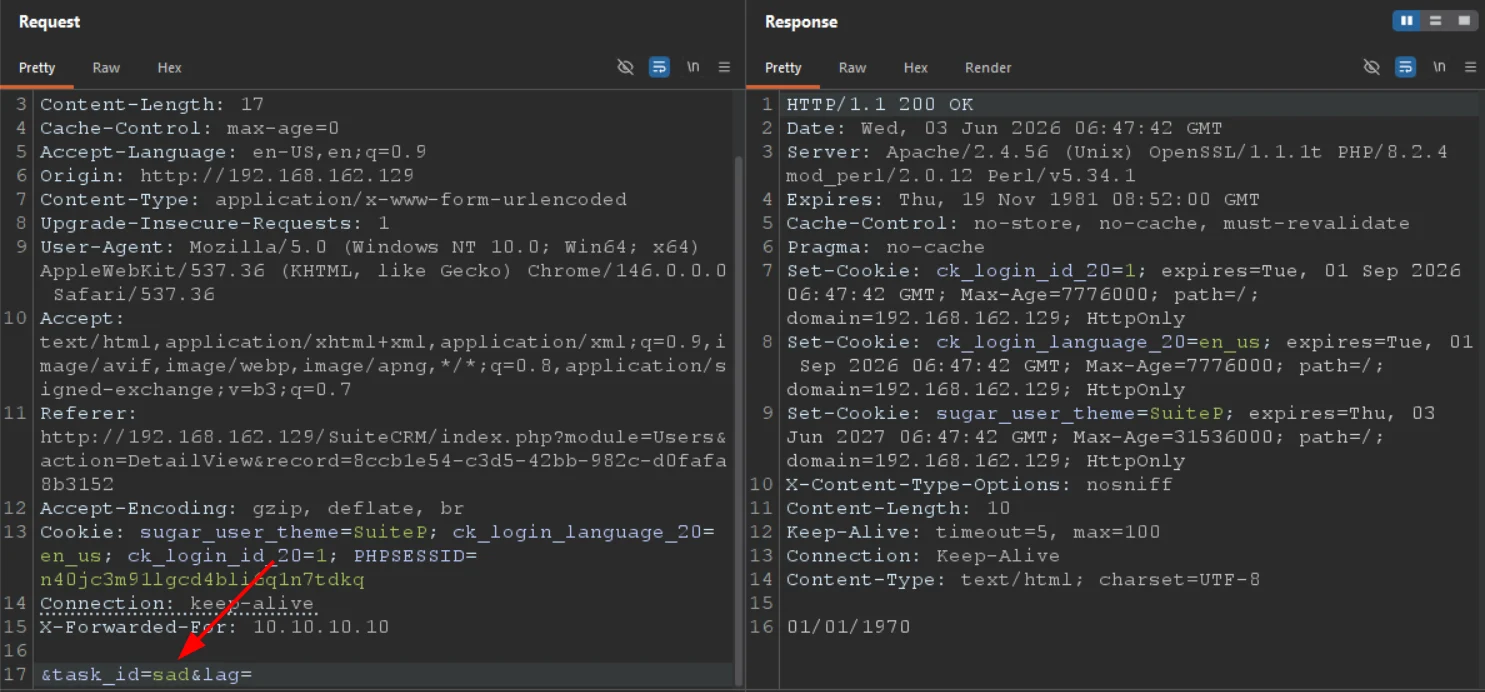

The single quote test was repeated:

The same behaviour was observed with other quote characters. At this point the initial filtering mechanism appeared to be working as expected, but that did not prove the complete input-handling mechanism was safe.

Step 3: reading the sanitisation code
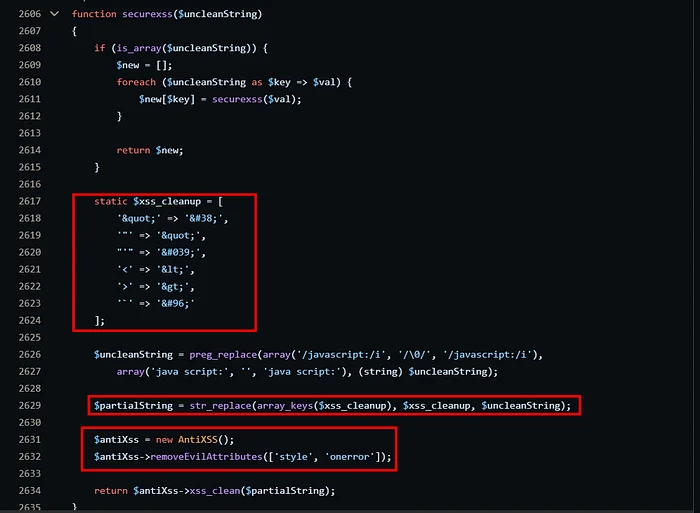
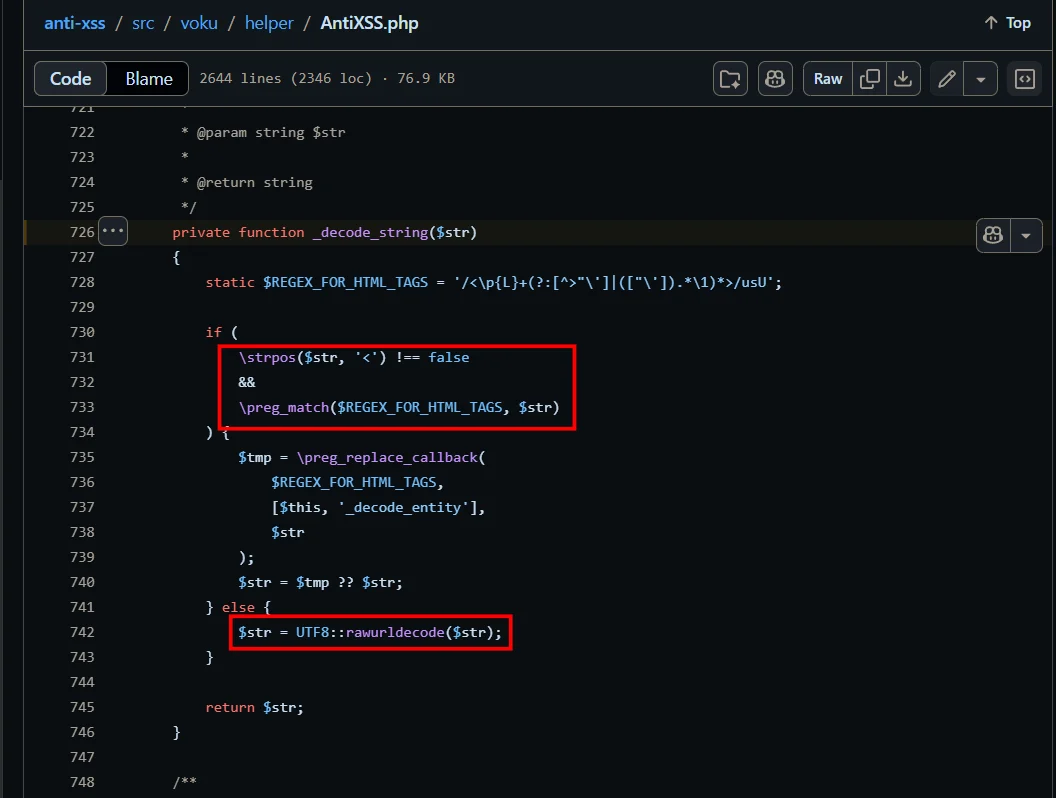
With the validation code extracted into its own file (shown above) and the library source read on GitHub, one behaviour stood out: when the input contained the < character, the input was processed according to HTML/XSS-oriented sanitisation rules. As a result, the < character could be transformed while other parts of the input remained unchanged.
Step 4: making an SQL expression survive the transformation
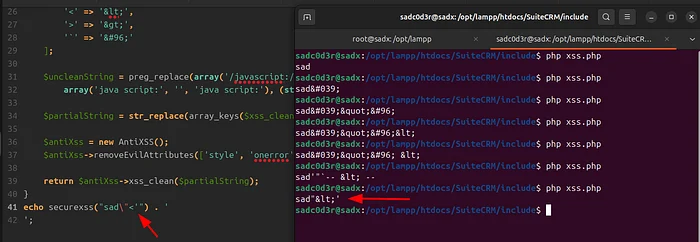
The next test was whether an SQL expression could survive this transformation while incorporating a character sequence that triggered the HTML-oriented processing. The reasoning was that a regular SQLi payload combined with — < — would bypass normally, and only the < would be encoded.
When the SQLi payload contains — < —, the antiXSS library decodes all HTML-encoded characters and then encodes only <.
Step 5: finding the affected functions
Using this bypass, the researcher grepped for all functions that use this prevention technique and found more than 9 SQL injections. The published advisories are:
- Authenticated SQL Injection in the
action_get_end_datefunction, in the Project Template module. - Authenticated SQL Injection in the Project module
Save.php, via theduplicateIdPOST parameter. - Authenticated SQL Injection in the
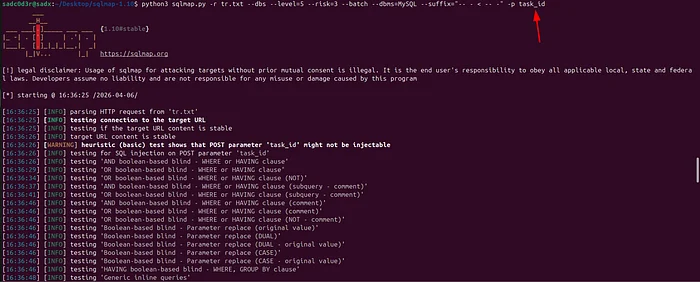
get_end_datefunction in the Project Controller, via thetask_idparameter of theget_end_dateaction. - Authenticated SQL Injection in the
handleAttachmentsfunction, in email template attachment handling. - Authenticated SQL Injection in the Project Controller, a time-based blind injection in the
searchparameter of theget_kb_articlesaction.
Five CVE numbers were still waiting to be assigned at the time of writing.
One of these functions, the report notes, is secure without using the antiXSS library at all.
Root cause
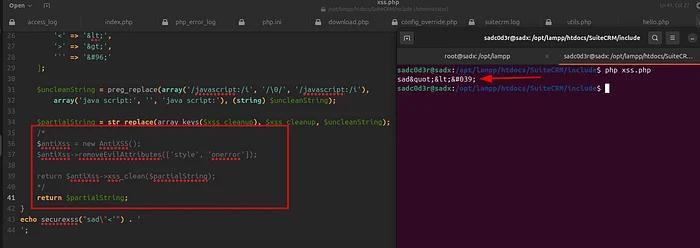
The root cause was not simply insufficient character filtering. The deeper issue was the use of an XSS-oriented sanitisation routine as part of an SQL input protection mechanism.
XSS and SQL injection are different classes of vulnerabilities and require context-specific defences. Transformations that are useful for HTML output cannot be treated as a substitute for parameterised SQL queries or context-aware database escaping.
In the securexss function, the static replacement table maps ", ", ', <, > and ` to HTML entities, and the input is then passed through the antiXSS library. Because the library decodes HTML entities and re-encodes only the characters it considers dangerous for HTML, an SQL payload that includes a < can pass through with its SQL metacharacters intact.
Impact
The advisories describe the issues as authenticated SQL injection, so an attacker needs an authenticated session in SuiteCRM. Under that condition, the affected parameters and functions listed above allow SQL injection, including time-based blind injection in at least one case. The report does not describe the data or privileges reachable through the injections.
Fix
The report does not describe a patch or code change. The lesson it draws is that SQL input must be handled with parameterised queries or context-aware database escaping, not with an HTML/XSS sanitiser. Adding more security layers does not make an application more secure when those layers are used outside their intended context; they can create new attack paths instead.
Variants to test
- Grep the codebase for calls to the same sanitiser (
securexssor equivalent) and trace each call into query construction. A positive result is a parameter that reaches a query after passing through the sanitiser. - Send a benign baseline value, then a single quote, and compare the responses. A positive result is a difference in the response or query behaviour that the sanitiser does not neutralise.
- Combine an SQL payload with a character that triggers HTML-oriented processing, such as
<, and observe whether the SQL metacharacters survive while only the HTML character is encoded. A positive result is a payload that reaches the query with its SQL syntax intact. - Test other characters in the sanitiser's replacement table (
>,`,") in the same way. A positive result is any character that is transformed in a way that leaves the surrounding SQL expression usable. - Test parameters in modules with attachment handling, project templates and project controllers, since those are where the reported advisories sit. A positive result is an injection confirmed by time-based or error-based behaviour.
What happened, in plain words
A security researcher spent some time reading the source code of SuiteCRM, a free and open-source customer relationship management (CRM) program. A CRM is the software a company uses to keep track of its customers, sales leads, support tickets and projects. SuiteCRM is written in PHP, a programming language commonly used to build websites, and it is large: it has many separate sections (called modules), many screens, and several kinds of user accounts with different permissions.
The researcher was practising a skill called code review, which means reading the program's source code the way you might read the recipe of a dish to see whether the kitchen is clean, rather than tasting the dish and guessing. He picked SuiteCRM because it is big, because it has many places where a user can type something in, and because other people have found bugs in it before, so there is plenty to learn from.
He was looking for one specific kind of bug: SQL injection. To understand that, you need to know two things. First, most websites store their data in a database, which is a program that holds information in tables, a bit like a very large and very strict spreadsheet. Second, the website talks to that database using a language called SQL, which is a set of instructions like "give me every customer whose name starts with A" or "save this new support ticket". When you type something into a website, the website usually builds one of these SQL instructions by gluing your text into a template. SQL injection happens when your text is not treated as plain text but as part of the instruction itself, so you can change what the instruction does. It is like filling in a form that says "I would like to order ___ sandwiches" and writing "five sandwiches and also please open the cash register".
What the researcher found is subtle and interesting. SuiteCRM does try to clean up what you type before it reaches the database. But the cleaning tool it uses was designed for a completely different problem: cross-site scripting, usually shortened to XSS. XSS is a bug where a website shows your text back to other people without cleaning it, so you can sneak in a small piece of code that runs in their browser. The tool that fights XSS is called antiXSS. Using an anti-XSS tool to stop SQL injection is like using a spell-checker to stop someone from writing a forged cheque: it might catch some obvious mistakes, but it is not the right tool for the job, and a determined person can get around it.
The researcher worked out exactly how to get around it. He found that if he put a less-than sign (<) somewhere in his malicious text, the anti-XSS tool would focus on that character, decode and re-encode things around it, and let the rest of his SQL instruction through untouched. With that trick he found more than nine SQL injection bugs in SuiteCRM, and five advisories were published, with CVE numbers still waiting to be assigned. A CVE number is a unique identifier given to a publicly known security flaw, so people can talk about it unambiguously.
This article walks through the whole journey in the same order the researcher took it: how he set up, how he tested, what he saw, what he read in the code, how he found the bypass, and what it all means. Every technical term is explained the first time it appears, and every piece of code is explained line by line.
The product and why it was chosen
SuiteCRM is a mature, open-source CRM platform written in PHP. "Open source" means the source code is publicly available, so anyone can download it, read it and even change it. "Mature" means it has been around for years and has grown large. It has a big codebase (the whole collection of source files), many modules (self-contained sections such as Projects, Emails, Contacts), controllers (the parts of the code that decide what happens when you click something or submit a form), and several user roles (for example an administrator versus a regular salesperson).
It also has a history of publicly disclosed vulnerabilities, meaning bugs that were found before and written up in public. All of that made it a good subject for security code-review practice: a large attack surface (the total number of places where an outsider could try to send something in) and many user-controlled input paths (places where whatever you type ends up being used by the program).
The review started on SQL injection, and specifically on how SuiteCRM sanitises user-controlled input before it reaches database queries. "Sanitise" means to clean or filter text before using it. SuiteCRM follows an MVC-oriented architecture. MVC stands for Model, View, Controller, and it is a common way of organising a web application: the Model handles data and the database, the View is what you see on screen, and the Controller is the middleman that receives your request and decides what to do. The initial focus was on controllers and model/database interactions, because those are the places where text you type travels towards the database, so they are the best places to watch the traffic.
What began as a review of how SQL queries are built turned into an input-validation issue involving an XSS-oriented sanitisation layer. In other words, the bug was not in the database code itself but in the cleaning step that sits in front of it.
Setting up the test
This was a source code review of SuiteCRM, not a black-box engagement. "Black-box" means testing a running website from the outside without seeing its code, like a burglar trying doors. "Source code review" means reading the code itself, like an architect studying the blueprints. The researcher extracted the validation code into a separate file so he could test it in isolation, without having to run the whole CRM. To make that isolated file work, he loaded the application's own bootstrap files (the files that set up the environment) and the Composer autoloader. Composer is the standard tool for managing libraries in PHP, and the autoloader is the part that automatically finds and loads the right library file when the code asks for it.
Here is the extracted code:
<?phpdefine('sugarEntry', true);if (!defined('sugarEntry') || !sugarEntry) { die('Not A Valid Entry Point');}require_once __DIR__ . '/../php_version.php';require_once __DIR__ . '/../include/SugarObjects/SugarConfig.php';require_once __DIR__ . '/../include/utils/security_utils.php';require_once __DIR__ . '/../vendor/autoload.php';use voku\helper\AntiXSS;function securexss($uncleanString){ if (is_array($uncleanString)) { $new = []; foreach ($uncleanString as $key => $val) { $new[$key] = securexss($val); } return $new; } static $xss_cleanup = [ '"' => '&', '"' => '"', "'" => ''', '<' => '<', '>' => '>', '`' => '`' ]; $uncleanString = preg_replace(array('/javascript:/i', '/\0/', '/javascript:/i'), array('java script:', '', 'java script:'), (string) $uncleanString); $partialString = str_replace(array_keys($xss_cleanup), $xss_cleanup, $uncleanString); $antiXss = new AntiXSS(); $antiXss->removeEvilAttributes(['style', 'onerror']); return $antiXss->xss_clean($partialString);}echo securexss("sad") . '';
Line by line, in plain words:
<?phptells the server that everything after it is PHP code, not plain text to display.define('sugarEntry', true);creates a constant calledsugarEntryand sets it to true. A constant is a named value that cannot be changed later. SuiteCRM uses this as a simple guard: files are only allowed to run if this constant exists.if (!defined('sugarEntry') || !sugarEntry) { die('Not A Valid Entry Point'); }checks whether the constant exists and is true. If not, the script stops immediately with the message "Not A Valid Entry Point". This is a common PHP pattern to stop someone from loading a file directly in their browser when it was only meant to be included by other files.require_once __DIR__ . '/../php_version.php';loads a file calledphp_version.phpfrom the parent folder.__DIR__is a PHP magic constant that means "the folder this file is in".require_oncemeans "load this file, but only once even if asked twice".require_once __DIR__ . '/../include/SugarObjects/SugarConfig.php';loads SuiteCRM's configuration file, which sets up things like database settings.require_once __DIR__ . '/../include/utils/security_utils.php';loads the file that contains the security helper functions, including the one being tested.require_once __DIR__ . '/../vendor/autoload.php';loads Composer's autoloader, which knows where all the third-party libraries live.use voku\helper\AntiXSS;is a shortcut so the code can writeAntiXSSinstead of the full namevoku\helper\AntiXSS. The backslashes are PHP's way of separating namespaces, which are like folders for class names.function securexss($uncleanString){starts the definition of a function calledsecurexssthat takes one argument, the text to clean.if (is_array($uncleanString)) {checks whether the input is an array, which in PHP is an ordered list or a set of key-value pairs. Forms often send several values at once, so the function has to handle that.$new = [];creates an empty array to hold the cleaned results.foreach ($uncleanString as $key => $val) {loops over each item in the array.$new[$key] = securexss($val);cleans each item by calling the same function on it, and stores the result under the same key. This is recursion: a function calling itself.}closes the loop.return $new;returns the cleaned array.}closes the array-handling branch.static $xss_cleanup = [starts a lookup table.staticmeans the table is created once and reused on every call, which is a small performance trick.'"' => '&',maps the HTML entity"(which browsers display as a double quote) to&(which browsers display as an ampersand).'"' => '"',maps a literal double quote to the HTML entity"."'" => ''',maps a literal single quote to the HTML entity'.'<' => '<',maps a less-than sign to<.'>' => '>',maps a greater-than sign to>.'`' => '`',maps a backtick to`.];closes the table.$uncleanString = preg_replace(array('/javascript:/i', '/\0/', '/javascript:/i'),starts a search-and-replace using regular expressions. A regular expression is a pattern for matching text./javascript:/imatches the literal textjavascript:with theiflag meaning case-insensitive./\0/matches a null byte, a character with value zero that is sometimes used to confuse parsers.array('java script:', '', 'java script:'), (string) $uncleanString);gives the replacements:javascript:becomesjava script:(with a space), null bytes are removed, andjavascript:is replaced again. The(string)part forces the input to be treated as text.$partialString = str_replace(array_keys($xss_cleanup), $xss_cleanup, $uncleanString);applies the lookup table from step 17 to the input, replacing each key with its value.array_keysgets the list of things to search for, and$xss_cleanupis the list of replacements.$antiXss = new AntiXSS();creates an object from the antiXSS library. An object is a bundle of code and data you can call methods on.$antiXss->removeEvilAttributes(['style', 'onerror']);tells the library to strip two HTML attributes,styleandonerror, which are often used in XSS attacks.return $antiXss->xss_clean($partialString);passes the partially cleaned text through the library's main cleaning method and returns the result.}closes the function.echo securexss("sad") . '';calls the function with the harmless wordsadand prints the result, followed by an empty string. This is a quick smoke test to make sure the extracted file runs.
The report does not list specific SuiteCRM versions, accounts or roles used for the review.
Finding it
At first glance, several SQL query construction points looked potentially interesting because user-controlled parameters seemed to reach query-building code.
They were not directly reachable, however. The application passes any user input first into a utils file:
"Utils" is short for utilities: a file full of small helper functions used all over the application. The flow is:
user input → utils → antiXSS → SQL
This diagram says: whatever you type goes first into the utilities file, then into the antiXSS library, and only then into the SQL query. That file contains multiple layers of filtration and sanitisation, and SQL injection appeared to be prevented by two main functions. No obvious bypass through the first validation layer was found. The second function was the interesting one, because it uses an XSS prevention library called antiXSS (https://github.com/voku/anti-xss).
That raised the obvious question: how does an XSS prevention library prevent SQL injection? Digging into the function, it seemed to be secure.
Exploitation
Step 1: baseline
A benign value (sad) was submitted first to establish a baseline and observe how it propagated through the application and into the generated query. A baseline is a known-good starting point. If you change one thing at a time and compare against the baseline, you can tell what caused any difference. It is like taking a photo of an empty room before moving furniture in.
Step 2: single quote
A single quote (') was then introduced as a minimal SQL metacharacter test. A metacharacter is a character that has special meaning to a language rather than being plain text. In SQL, the single quote marks the beginning and end of a text value, so if you can sneak an extra one in, you can often break out of the text and start writing SQL instructions. It is the smallest possible test: one character.
The application transformed or rejected the character, which indicated that the input was being processed by the sanitisation layer before reaching the query construction logic.
The single quote test was repeated:
The same behaviour was observed with other quote characters. At this point the initial filtering mechanism appeared to be working as expected, but that did not prove the complete input-handling mechanism was safe.
Step 3: reading the sanitisation code
With the validation code extracted into its own file (shown above) and the library source read on GitHub, one behaviour stood out: when the input contained the < character, the input was processed according to HTML/XSS-oriented sanitisation rules. As a result, the < character could be transformed while other parts of the input remained unchanged.
To unpack that: HTML is the language web pages are written in, and it uses angle brackets to mark up structure, for example <b> for bold. XSS attacks rely on getting HTML or JavaScript into a page, so anti-XSS tools focus on angle brackets and similar characters. When the anti-XSS library sees a <, it switches into HTML-cleaning mode. The researcher noticed that this mode only touched the < and left the rest of the text alone, which is exactly the kind of gap an attacker can exploit.
Step 4: making an SQL expression survive the transformation
The next test was whether an SQL expression could survive this transformation while incorporating a character sequence that triggered the HTML-oriented processing. The reasoning was that a regular SQLi payload combined with — < — would bypass normally, and only the < would be encoded. A payload is the actual text an attacker sends. "Encoded" means converted into a safe representation, such as turning < into <.
When the SQLi payload contains — < —, the antiXSS library decodes all HTML-encoded characters and then encodes only <.
"Decodes" means turning an entity like < back into the character it represents, <. So the library first undoes any encoding, then re-encodes only the <. Everything else, including the SQL metacharacters, comes out the other side unchanged. That is the bypass.
Step 5: finding the affected functions
Using this bypass, the researcher grepped for all functions that use this prevention technique and found more than 9 SQL injections. "Grep" is a command-line tool for searching text, and here it means searching the whole codebase for every place that calls the same cleaning function. The published advisories are:
- Authenticated SQL Injection in the
action_get_end_datefunction, in the Project Template module. - Authenticated SQL Injection in the Project module
Save.php, via theduplicateIdPOST parameter. - Authenticated SQL Injection in the
get_end_datefunction in the Project Controller, via thetask_idparameter of theget_end_dateaction. - Authenticated SQL Injection in the
handleAttachmentsfunction, in email template attachment handling. - Authenticated SQL Injection in the Project Controller, a time-based blind injection in the
searchparameter of theget_kb_articlesaction.
"Authenticated" means the attacker needs to be logged in first. A POST parameter is a value sent in the body of a form submission rather than in the URL. "Time-based blind" is a technique where the attacker cannot see the database output, so instead they make the database pause for a few seconds if a condition is true, and measure the delay to learn the answer one bit at a time. It is like asking yes-or-no questions through a closed door and timing how long the answer takes.
Five CVE numbers were still waiting to be assigned at the time of writing.
One of these functions, the report notes, is secure without using the antiXSS library at all.
Root cause
The root cause was not simply insufficient character filtering. The deeper issue was the use of an XSS-oriented sanitisation routine as part of an SQL input protection mechanism.
XSS and SQL injection are different classes of vulnerabilities and require context-specific defences. "Context-specific" means the defence has to match where the data is going. Cleaning text for a web page is not the same as cleaning text for a database, just as a spell-checker is not a substitute for a bank teller checking signatures. Transformations that are useful for HTML output cannot be treated as a substitute for parameterised SQL queries or context-aware database escaping.
A parameterised query is the proper fix for SQL injection: instead of gluing your text into the SQL instruction, you send the instruction and the text separately, and the database treats the text purely as data, never as code. It is like handing a form to a clerk who reads it as a form, rather than letting you write on the form's own instructions.
In the securexss function, the static replacement table maps ", ", ', <, > and ` to HTML entities, and the input is then passed through the antiXSS library. Because the library decodes HTML entities and re-encodes only the characters it considers dangerous for HTML, an SQL payload that includes a < can pass through with its SQL metacharacters intact.
Impact
The advisories describe the issues as authenticated SQL injection, so an attacker needs an authenticated session in SuiteCRM. A session is the state of being logged in: after you log in, the server gives your browser a cookie (a small piece of data stored by the browser) that identifies you on each subsequent request. Under that condition, the affected parameters and functions listed above allow SQL injection, including time-based blind injection in at least one case. The report does not describe the data or privileges reachable through the injections.
Fix
The report does not describe a patch or code change. The lesson it draws is that SQL input must be handled with parameterised queries or context-aware database escaping, not with an HTML/XSS sanitiser. Adding more security layers does not make an application more secure when those layers are used outside their intended context; they can create new attack paths instead. Think of a house with three locks on the front door and an open window at the back: more locks are not more security if they are in the wrong place.
Variants to test
- Grep the codebase for calls to the same sanitiser (
securexssor equivalent) and trace each call into query construction. A positive result is a parameter that reaches a query after passing through the sanitiser. - Send a benign baseline value, then a single quote, and compare the responses. A positive result is a difference in the response or query behaviour that the sanitiser does not neutralise.
- Combine an SQL payload with a character that triggers HTML-oriented processing, such as
<, and observe whether the SQL metacharacters survive while only the HTML character is encoded. A positive result is a payload that reaches the query with its SQL syntax intact. - Test other characters in the sanitiser's replacement table (
>,`,") in the same way. A positive result is any character that is transformed in a way that leaves the surrounding SQL expression usable. - Test parameters in modules with attachment handling, project templates and project controllers, since those are where the reported advisories sit. A positive result is an injection confirmed by time-based or error-based behaviour.
Glossary
- Advisory: a public notice describing a security flaw, usually with an identifier and a description.
- antiXSS: a library designed to clean text so it cannot be used in cross-site scripting attacks.
- Array: in PHP, an ordered list or a set of key-value pairs.
- Attack surface: the total number of places where an outsider could try to send something into an application.
- Authenticated: requiring the attacker to be logged in first.
- Autoloader: the part of a PHP application that automatically finds and loads library files when they are needed.
- Baseline: a known-good starting point used for comparison.
- Black-box testing: testing a running application from the outside without seeing its source code.
- Blind injection: an injection where the attacker cannot see the database output and must infer results indirectly.
- Bootstrap files: the files that set up an application's environment before the main code runs.
- Code review: reading source code to find bugs or security problems.
- Codebase: the whole collection of source files that make up a program.
- Composer: the standard dependency manager for PHP.
- Constant: a named value in a program that cannot be changed after it is set.
- Context-specific defence: a security measure designed for the exact place the data is going, such as a web page versus a database.
- Controller: the part of an MVC application that receives a request and decides what to do.
- Cookie: a small piece of data a website stores in your browser, often used to remember that you are logged in.
- CRM: customer relationship management software, used to track customers, leads and support.
- CVE: a unique public identifier for a known security vulnerability.
- Decode: to turn an encoded representation back into the original character.
- Encode: to convert a character into a safe representation, such as
<into<. - Entity (HTML entity): a code like
<that represents a character in HTML. - Function: a named block of code that performs a task and can be called by name.
- Grep: a command-line tool for searching text, used here to mean searching a codebase.
- HTML: the language web pages are written in, using angle brackets for structure.
- Input validation: checking and cleaning what a user types before using it.
- Library: a collection of reusable code written by someone else.
- Metacharacter: a character with special meaning to a language, such as a single quote in SQL.
- Model: the part of an MVC application that handles data and the database.
- Module: a self-contained section of a large application, such as Projects or Emails.
- MVC: Model-View-Controller, a common way of organising a web application.
- Namespace: a way of grouping names in PHP so they do not clash, written with backslashes.
- Null byte: a character with value zero, sometimes used to confuse parsers.
- Object: a bundle of code and data in PHP that you can call methods on.
- Open source: software whose source code is publicly available.
- Parameterised query: a way of sending SQL where the instruction and the data are sent separately, so the data is never treated as code.
- Payload: the actual text an attacker sends to exploit a vulnerability.
- PHP: a programming language commonly used to build websites.
- POST parameter: a value sent in the body of a form submission rather than in the URL.
- Recursion: a function calling itself.
- Regular expression: a pattern for matching text.
- Sanitise: to clean or filter text before using it.
- Session: the state of being logged in, usually tracked by a cookie.
- Source code review: reading an application's source code to find bugs.
- SQL: the language used to talk to a database.
- SQL injection: a bug where user text is treated as part of an SQL instruction, letting an attacker change what the instruction does.
- Static (in PHP): a variable that is created once and reused on every call.
- Time-based blind injection: a blind injection where the attacker measures delays to infer answers.
- User role: a category of account with a defined set of permissions.
- Utils: short for utilities, a file of small helper functions.
- View: the part of an MVC application that is shown on screen.
- XSS (cross-site scripting): a bug where a website shows user text back to others without cleaning it, letting an attacker run code in their browsers.



