Tale of Account Takeovers (Part-2)
The article describes three account takeover scenarios: one where signup allowed duplicate emails and overwrote existing accounts, one where credentials were stored in cookies and could be stolen via XSS, and one where OTP brute force was made feasible by lack of rate limiting and non-expiring codes. An attacker could take over accounts by exploiting these flaws.
Vijaysimha Reddy Bathini Follow
 Published on medium.com
Hello guys, It’s my birthday today and on the occasion of my birthday, I’m here with the next part of Tale of Account Takeovers. It’s been a long time since I have released my part 1 of Tale of Account Takeovers so I thought of giving some time from my busy schedule and start working on this part.
The full write-up lives on its author's site
It belongs to its author, so we link to it rather than copy it. The other two tabs are our own rewrites, checked against it.
Context
This is the second part of a series on account takeover scenarios. The first part covered two scenarios; this part describes three more, numbered 3, 4 and 5. The targets are not named in the report, and the report gives no versions, endpoints or parameter names beyond what appears in the requests shown. The three scenarios share a theme: each one is a small, ordinary feature (signup, a cookie, a password reset flow) that behaves in a way that lets an attacker end up inside someone else's account.
Scenario 3 is about a signup feature. Scenario 4 is about a value stored in a cookie after login. Scenario 5 is about a forgotten password feature that sends a 5 digit code to the user's email.
Setup
The researcher used a browser and Burp Suite (the report refers to the Burp decoder and to capturing requests). For scenario 3, two browsers were used so that two sessions could be held at the same time. For scenario 4, an account was created and the requests were inspected after login. For scenario 5, the program was an external program, not on Bugcrowd, HackerOne or any other platform.
No versions, hostnames or account roles are given in the report.
Finding it
Scenario 3: signup accepts an existing email
There was a signup feature on the target. The researcher created an account with [redacted] and logged in. There was no verification email functionality, which was noted down. Then, in another browser, an account was created with the same email address. The server created the account without any error.
To confirm the effect, the researcher created an account with [redacted], added information such as credit card details and a shipping address, then went to another browser and created an account with [redacted] again. The details kept on the first account were reflected in the new account. That is the account takeover.
Scenario 4: credentials in a cookie
A new account was created and the requests were inspected. After login, a parameter was found in the cookies with this value:
[redacted]
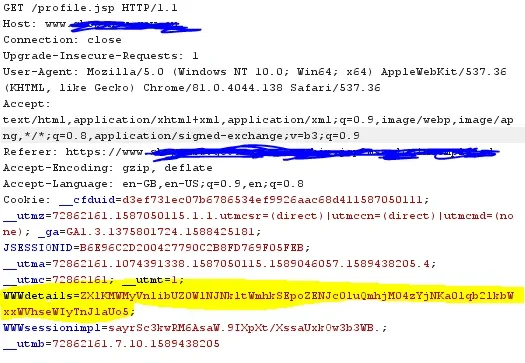
The value was sent to the Burp decoder to check for encryption. Base64 decoding produced output starting with ey, and the researcher treats a value starting with ey as base64 encoded, so it was decoded again.
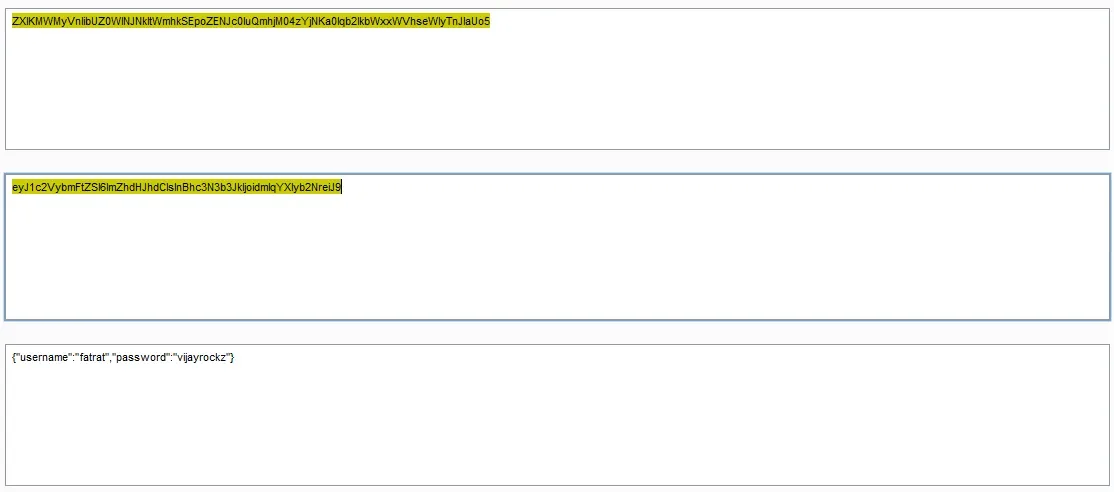
The double decoded value showed that usernames and passwords were being stored in the cookie. To read the cookie from a victim, an XSS vulnerability is needed. The researcher had reported an XSS vulnerability on the same domain two days earlier and chained it with this cookie issue.
Scenario 5: OTP reset with no rate limit and no expiry
The forgotten password functionality sends a 5 digit code to the user's email. Entering the OTP showed no rate limit protection on that endpoint, which was reported to the company. The company replied that they knew about it and that an attacker would need to fire 100,000 requests to brute force the OTP from 00000 to 99999.
While hunting for other bugs, the researcher found that when 10 forgot password requests are issued, only the last OTP code should be valid, but the previous codes were not expiring even after a new OTP was issued. Combining the two rate limit issues gave a chain with no user interaction.
Exploitation
Scenario 3, step by step
- The attacker obtains the victim's email address.
- The attacker creates an account with the victim's email. The server accepts an account with an already existing email without any error.
- The victim's password is overridden.
- This leads to account takeover.

The screenshot shows the result of the signup with the victim's email: because the server accepts creating an account with an already existing email without any error, the victim's password is overridden and the account is taken over.
Scenario 4, step by step
- The attacker sends the XSS payload link to the victim and grabs the victim's cookies.
- The attacker double decodes the cookie parameter value and gets the username and password.
The report does not include the XSS payload or the request that exfiltrates the cookie; it only says the XSS was reported two days earlier on the same domain and was chained here.
Scenario 5, step by step
- The attacker sends 1000 password reset codes to the victim's email.
- The attacker brute forces from 50000 to 50999 and gets logged in.
The reasoning behind the range: the researcher assumed the probability of an OTP starting with 50XXX is higher than for other prefixes. With the no rate limit bug on the forgot password endpoint, 1000 password reset emails were issued. The 1000 OTP codes were not checked; the assumption was that among them there might be a code starting with 50XXX. The OTP entry request was captured and the brute force ran from 50000 to 50999. After the attack completed, the correct code was found and the account was logged into.
The arithmetic in the report: previously 100,000 attempts were needed to crack the code; now 1000 password reset codes plus 1000 payloads are enough, reducing the attack from 100000 to 2000. The company triaged it and called it a clever finding.
Root cause
Scenario 3: the signup handler does not check whether the email already belongs to an account, and it does not require email verification before the account becomes usable. Creating an account with an existing email therefore overwrites the existing account's password and keeps its stored data. The report notes there was no verification email functionality, but does not explain why the overwrite happens.
Scenario 4: the application stores the username and password in a cookie, encoded only with base64 applied twice. Base64 is an encoding, not encryption, so anyone who can read the cookie can recover the credentials. To read the cookie from a victim, an XSS vulnerability is needed, and the researcher chained one reported earlier on the same domain.
Scenario 5: two separate weaknesses combine. The OTP verification endpoint has no rate limit, and old OTP codes are not invalidated when a new one is issued. The company's defence assumed 100,000 attempts were needed; the researcher found previous OTP codes were not expiring after a new one was issued. The report does not describe the server side implementation, so the exact reason old codes remain valid is not stated.
Impact
Scenario 3: an attacker who knows a victim's email can take over the account and read the data stored on it, including credit card details and shipping address in the researcher's test. No user interaction is described.
Scenario 4: an attacker who can run XSS on the domain can read the cookie and recover the victim's username and password, leading to account takeover. This depends on the XSS being present.
Scenario 5: an attacker can take over an account through the password reset flow without user interaction, using 1000 reset emails and 1000 brute force attempts instead of 100,000.
Fix
The report does not say what fixes were applied. Based on the described behaviour, the changes that would address each scenario are:
- Scenario 3: reject signup when the email already exists, and require email verification before an account can be used or before a password can be set.
- Scenario 4: do not store credentials in cookies; keep session state server side and use an opaque session identifier.
- Scenario 5: rate limit the OTP verification endpoint, invalidate all previous OTP codes when a new one is issued, and expire codes after a short time.
Variants to test
- Signup with an email that already has an account, in a second browser. A positive result is a new session logged into the existing account, with the old password replaced and the old data still present.
- Signup without any verification email, then check whether the account is usable immediately. A positive result is an active account before any email confirmation.
- Inspect cookies after login for values that look like base64 (starting with
ey). Decode once and again; a positive result is readable JSON containing a username or password. - Chain a known XSS on the same domain with cookie exfiltration. A positive result is a cookie value that decodes to credentials.
- Request several password resets in a row and test whether older OTP codes still work after a new one is issued. A positive result is any earlier code being accepted.
- Send OTP guesses to the verification endpoint without throttling. A positive result is many attempts accepted in a short time.
- Combine 5 and 6: issue many reset codes, then brute force a narrow range based on a guessed prefix. A positive result is a valid code found within the reduced search space.
What happened, in plain words
This is the second part of a series about account takeover. Account takeover means someone else gets into your account, as if they had your username and password, and can then read or change everything you keep there. The first part described two ways this happened; this part describes three more, numbered 3, 4 and 5.
The three stories have something in common. None of them needs a clever, complicated attack. Each one starts with a completely ordinary feature that every website has: a signup form, a small piece of data the site stores in your browser after you log in, and a "forgot my password" flow. In each case the feature behaves in a way that lets an attacker end up inside someone else's account.
Before the details, a few words that come up constantly.
- A server is the computer that runs the website. Your browser asks it for pages and sends it data, and it decides what to do with that data.
- A request is one message your browser sends to the server, for example "please create an account with this email and password". A response is the server's reply.
- An endpoint is a specific address on the server that accepts a particular kind of request, like a specific counter in a large office. The signup form talks to one endpoint, the login form to another, the password reset to a third.
- A cookie is a small piece of text that a website asks your browser to store and to send back with every later request to that site. It works like a cloakroom ticket: the site gives you a ticket, you show it again on your next visit, and the site knows who you are without asking for your password every time.
- Burp Suite is a tool that sits between your browser and the website and lets you look at, and change, every request and response. The report uses two parts of it: capturing requests, and the decoder, a small built-in utility that converts text between formats such as base64.
- Base64 is a way of writing data using only letters, digits and a couple of symbols, so it can travel safely through systems that only expect text. It is not a secret code. Think of it as a different alphabet, not a locked box.
- XSS (cross-site scripting) is a bug where an attacker can make a website run JavaScript code that the attacker wrote. JavaScript is the programming language that runs inside your browser, and it can read the cookies of the page it runs on. So an XSS bug on a site can be used to steal that site's cookies.
- An OTP (one-time password) is a short code, here 5 digits, that a site emails you and asks you to type in to prove it is really you. It is meant to be used once and then be useless.
- Brute force means guessing systematically: trying every possibility, one after another, until the right one is found. It only works if the site lets you try many times.
- A rate limit is a cap on how many times you may do something in a period, for example "only 5 login attempts per minute". Without one, an attacker can try thousands of guesses.
With those in hand, here are the three scenarios.
Scenario 3: signing up with an email that already has an account
The researcher found a signup feature on the target. The target is not named in the report. The first thing done was to create an account with the email [redacted] and log in. A detail was noted straight away: there was no verification email. Normally, after you sign up, a site sends you an email with a link or a code, and your account only becomes active once you click or type it. That step proves the email address really belongs to you. Here it did not exist.
Then a second browser was opened and an account was created with the same email address. The server accepted it without any error. That is already strange: a well-built signup form should say "this email is already registered" and stop.
To see what that actually meant, the researcher created an account with [redacted], added information to it such as credit card details and a shipping address, then went to another browser and created an account with [redacted] again. The details from the first account appeared in the new one. The second signup had not created a separate account; it had taken over the existing one and replaced its password. That is the account takeover.
Why does this happen? The signup handler never checks whether the email already belongs to an account, and it does not require email verification before the account can be used. So when someone signs up with an email that is already registered, the server simply overwrites the existing account's password and keeps all its stored data. The report notes there was no verification email functionality, but does not explain why the overwrite happens.
The exploit, step by step
- An attacker gets the victim's email. Email addresses are not secret; they are shared, published and guessed.
- He creates an account with the victim's email. The server accepts an account with an already existing email without any error.
- The victim's password is overridden, meaning replaced by the one the attacker chose at signup.
- This leads to account takeover.
The screenshot shows the result of the signup with the victim's email: because the server accepts creating an account with an already existing email without any error, the victim's password is overridden and the account is taken over.
What this means for a real person: if you have an account on such a site and someone knows your email address, they can sign up with it, set their own password, and from then on log in as you. Your old password no longer works, and everything stored on the account, including card details and addresses, is readable by them. The report describes no step where the victim has to click anything or approve anything.
Scenario 4: a username and password stored in a cookie
A new account was created and the requests were inspected. After logging in, a parameter was found in the cookies with this value:
[redacted]
A cookie value like this is just text. It looks random, but that does not mean it is protected. The researcher sent it to the Burp decoder to check whether any encryption had been used. Base64 decoding produced output starting with ey. The researcher treats a value starting with ey as base64 encoded, because that is what base64-encoded text beginning with a { looks like: the opening brace of a JSON object becomes ey in base64. JSON is a common text format for structured data, with names and values in curly braces. So the value was decoded a second time.
The double decoded value showed that usernames and passwords were being stored in the cookie. In other words, the site was putting the user's credentials into the cloakroom ticket itself, hidden only by two rounds of base64. Since base64 is an encoding and not encryption, anyone who can read the cookie can recover the credentials. There is no key to guess and no lock to pick.
But reading someone else's cookie is not something a random website can do. Browsers keep cookies tied to the site that set them, so another site cannot simply ask for them. To read the cookie from a victim, an attacker needs code running on the same site, and that is exactly what an XSS vulnerability gives. The researcher had reported an XSS vulnerability on the same domain two days earlier and chained it with this cookie issue. Chaining means using one bug to make another bug possible: the XSS runs the attacker's JavaScript on the site, and that JavaScript reads the cookie and sends it to the attacker.
The exploit, step by step
- The attacker sends the XSS payload link to the victim and grabs the cookies of the victim.
- The attacker double decodes the cookie parameter value and gets the username and password.
The report does not include the XSS payload or the request that sends the cookie away; it only says the XSS was reported two days earlier on the same domain and was chained here.
So the victim clicks a link, the page runs the attacker's code, the code reads the cookie, and the attacker is left holding a string of text. Two rounds of base64 decoding later, that text is a username and a password. With those, the attacker can log in as the victim from anywhere, without needing the victim's browser at all.
Scenario 5: a password reset code that never expires and can be guessed
This scenario chains two low-hanging bugs, meaning two bugs that are each fairly easy to find, into an account takeover. The program was an external program, not on Bugcrowd, HackerOne or any other platform, so the report went directly to the company.
The forgotten password functionality sends a 5 digit code to your email. You type the code in, and if it matches, you get to set a new password. A 5 digit code has 100,000 possible values, from 00000 to 99999. That is a lot for a human, but nothing for a computer, so the whole security of the flow depends on the site refusing to accept many guesses.
When the OTP was entered, the researcher found that there was no rate limit protection on that endpoint, and reported it to the company. The company replied that they knew about it and that an attacker would need to fire 100,000 requests to brute force the OTP from 00000 to 99999. In other words, they treated the size of the code space as the defence.
While hunting for other bugs, the researcher found something else. When 10 forgot password requests are issued, only the last OTP code should be valid, but the previous codes were not expiring even after a new OTP was issued. That is the second bug: old codes stay alive. The report does not describe the server side implementation, so the exact reason old codes remain valid is not stated.
Combining the two gives a chain with no user interaction. The reasoning behind the range used: the researcher assumed the probability of an OTP starting with 50XXX is higher than for other prefixes. With the no rate limit bug on the forgot password endpoint, 1000 password reset emails were issued. The 1000 OTP codes were not checked; the assumption was that among them there might be a code starting with 50XXX. The OTP entry request was captured and the brute force ran from 50000 to 50999. After the attack completed, the correct code was found and the account was logged into.
The arithmetic in the report: previously 100,000 attempts were needed to crack the code; now 1000 password reset codes plus 1000 payloads are enough, reducing the attack from 100000 to 2000. The company triaged it and called it a clever finding.
The exploit, step by step
- An attacker sends 1000 password reset codes to the victim's email.
- After that, the attacker starts to brute force from 50000 to 50999 and gets logged in.
Why does this work? The company's defence, that 100,000 attempts are needed, assumes a single valid code. Because previous codes were not expiring after a new one was issued, the attacker could issue many codes at once and then search a much smaller space. If any one of the 1000 codes starts with 50, the attacker only has to try the 1000 numbers from 50000 to 50999 to find it. The victim does nothing at all; they may not even notice the flood of reset emails.
Why these bugs exist
Scenario 3: the signup handler does not check whether the email already belongs to an account, and it does not require email verification before the account becomes usable. Creating an account with an existing email therefore overwrites the existing account's password and keeps its stored data. The absence of a verification email is what makes the overwrite silent and immediate.
Scenario 4: the application stores the username and password in a cookie, encoded only with base64 applied twice. Base64 is an encoding, not encryption, so anyone who can read the cookie can recover the credentials. To read the cookie from a victim, an XSS vulnerability is needed, and the researcher chained one reported earlier on the same domain.
Scenario 5: two separate weaknesses combine. The OTP verification endpoint has no rate limit, and old OTP codes are not invalidated when a new one is issued. The company's defence, that 100,000 attempts are needed, assumes a single valid code; because every issued code stays valid, the attacker can issue many codes and search a much smaller space.
What an attacker gets
Scenario 3: an attacker who knows a victim's email can take over the account and read the data stored on it, including credit card details and shipping address in the researcher's test. No user interaction is described.
Scenario 4: an attacker who can run XSS on the domain can read the cookie and recover the victim's username and password, leading to account takeover. This depends on the XSS being present.
Scenario 5: an attacker can take over an account through the password reset flow without user interaction, using 1000 reset emails and 1000 brute force attempts instead of 100,000.
How to fix it
The report does not say what fixes were applied. Based on the described behaviour, the changes that would address each scenario are:
- Scenario 3: reject signup when the email already exists, and require email verification before an account can be used or before a password can be set.
- Scenario 4: do not store credentials in cookies; keep session state server side and use an opaque session identifier, meaning a random value that means nothing on its own and is looked up on the server.
- Scenario 5: rate limit the OTP verification endpoint, invalidate all previous OTP codes when a new one is issued, and expire codes after a short time.
Things to try yourself
These are the same checks, written so you can follow them with a browser and a tool that shows requests.
- Sign up with an email that already has an account, in a second browser. A positive result is a new session logged into the existing account, with the old password replaced and the old data still present.
- Sign up without any verification email, then check whether the account is usable immediately. A positive result is an active account before any email confirmation.
- Inspect cookies after login for values that look like base64 (starting with
ey). Decode once and again; a positive result is readable JSON containing a username or password. - Chain a known XSS on the same domain with cookie exfiltration. A positive result is a cookie value that decodes to credentials.
- Request several password resets in a row and test whether older OTP codes still work after a new one is issued. A positive result is any earlier code being accepted.
- Send OTP guesses to the verification endpoint without throttling. A positive result is many attempts accepted in a short time.
- Combine 5 and 6: issue many reset codes, then brute force a narrow range based on a guessed prefix. A positive result is a valid code found within the reduced search space.
Glossary
- Account takeover: getting into someone else's account and acting as them, usually by obtaining or replacing their credentials.
- API: a set of addresses on a server that accept specific requests and return data, like a set of service counters rather than a single front desk.
- Base64: an encoding that rewrites data using letters, digits and a few symbols so it can travel as text; it is reversible by anyone and is not encryption.
- Brute force: trying every possible value in turn until the right one is found.
- Burp Suite: a tool that sits between your browser and a website so you can view and modify requests and responses; it includes a decoder for formats such as base64.
- Chaining: using one bug to enable another, so the combined effect is worse than either alone.
- Cookie: a small piece of text a site asks your browser to store and send back on later requests, used to recognise you.
- Endpoint: a specific address on a server that handles a particular kind of request.
- Exfiltration: sending stolen data out to a place the attacker controls.
- JSON: a text format for structured data, with names and values inside curly braces.
- OTP (one-time password): a short code sent to you, meant to be used once, to prove you control an email address or phone.
- Rate limit: a cap on how many requests or attempts are allowed in a period.
- Request: one message from your browser to a server asking it to do something.
- Response: the server's reply to a request.
- Server: the computer that runs a website and decides what to do with the requests it receives.
- Session: the state of you being logged in, which the site tracks across requests, usually with a cookie.
- Signup: the feature where you create an account with an email and password.
- Triage: the stage where a company reviews a reported bug and decides whether it is valid.
- Verification email: an email sent after signup with a link or code that proves the email address belongs to you.
- XSS (cross-site scripting): a bug that lets an attacker run their own JavaScript inside a page on the victim site, which can then read that site's cookies.


