Tools used
AWS access and secret keys were exposed in a publicly accessible JavaScript configuration file on a development subdomain. An attacker could use these keys to gain full administrative access to the company's AWS account, allowing them to create, read, update, and delete any resource.
 Published on medium.com
Its been a while since my last write up. As a-lot of you know, last year I joined the Bugcrowd team as an Application Security Engineer.
The full write-up lives on its author's site
It belongs to its author, so we link to it rather than copy it. The other two tabs are our own rewrites, checked against it.
Context
This is a write-up of a bug bounty finding on a single program where, in the researcher's words, every asset the company owned was in scope. The researcher, Daniel Marte (@Masonhck3571), had recently joined Bugcrowd as an Application Security Engineer and had decided to focus on one program only. The finding is an information disclosure: AWS access and secret keys left in a JavaScript configuration file on a development subdomain, which turned out to belong to an IAM user with the AWS-managed AdministratorAccess policy attached. The report does not name the company or the program.
The asset recorded for the write-up is medium.com, which is where the article was published, not the target itself. The target host appears in the report only in redacted form.
Setup
The researcher lists the following tools:
- Burp Suite Pro
- JSminer Extension
- DataExtractor Extension
- FFUF
- KiteRunner
- Assetnote Wordlists
- AWS cli
- Shodan
Two Burp extensions do the heavy lifting during passive scanning. JSminer runs a list of regexes and patterns over traffic and reports matches as a severity. DataExtractor, written by Gwendolyn, pulls data based on a user-supplied list of regexes; the report links to its GitHub repository. Both work through passive scanning, although JSminer also has an active scan module that looks for .map files.
On the AWS side the only precondition is the AWS CLI itself, which the researcher describes as a tool that pulls all the AWS services together in one central console, giving control of multiple AWS services from the command line. The keys found in JavaScript are loaded into a named profile so that every subsequent CLI call uses them.
Finding it
The work starts with Shodan rather than with the target directly. The query
ssl:"{{Org name}}"
returns all scanned assets whose certificate mentions the organisation. That produced many assets, so the researcher filtered results out by prepending a minus sign to additional terms. To remove everything belonging to one particular host, example1.com, the query becomes:
ssl:"{{Org name}} -Ssl.cert.subject.CN:"example1.com"
Assets served by AkamaiGhost were removed the same way, by adding -AkamaiGhost. What remains is a set of assets and IP addresses the researcher had not seen before, which are then opened in Burp and Firefox.

For JavaScript collection, the researcher pulled JS files from GAU and Wayback and saved them into a file called JSurls.txt. Using TomNomNom's Unfurl, the host list was extracted into Domains.txt and the path list into Jspaths.txt. Before brute-forcing, the URL list was expanded: the researcher took each URL up to its first subdirectory (without the JS files) and added those to Domains.txt, then did the same for URLs with second-level subdirectories and again for third-level subdirectories.
FFUF was then run as a one-liner to request all the JavaScript paths scraped from GAU and Wayback against all subdomains and subdirectories, with FFUF proxying responses that returned 200 to Burp. Burp's live passive scan then applied JSminer and DataExtractor to everything that came back.
Within a couple of minutes there were several hits for an AWS key on a dev subdomain. The researcher notes that adding the second-level subdirectories was the key step. The JavaScript file that produced the hit was:
https://tre-uat-euw1.redacted.com/assets/Javascript/config/config.js
The path /Javascript/config/config.js was the important part. The file contained an AWS Access Key and an AWS Secret Key, and the researcher moved straight to the AWS CLI to establish the maximum impact.
Exploitation
Step 1: create a profile with the recovered keys
aws configure — profile {whatevername}
Creating the profile stores the credentials found in the JavaScript file so that later CLI calls use them. The researcher notes that the profile name is arbitrary.
Step 2: identify the principal behind the keys
aws — profile {whatevername} sts get-caller-identity
This call returns the User ID, the Account ID and the ARN, and the ARN includes the username. That username is what allows further enumeration. The researcher is explicit that this alone is sensitive but not maximum impact, and that demonstrating deeper impact is what separates a report from a higher severity and payout.
Step 3: list the policies attached to the user
aws iam list-attached-user-policies — profile {whatevername} — user-name {username}
This returns the policy information for the username found in the previous step. The policy name associated with the user is AdministratorAccess.

In AWS terms a policy is a permission set, comparable to a role or group, that grants a user access to services with create, read, update and delete permissions. On this evidence the keys carry admin privileges, but the researcher still wants to confirm which services are covered and whether the access is genuinely full.
Step 4: read the policy document
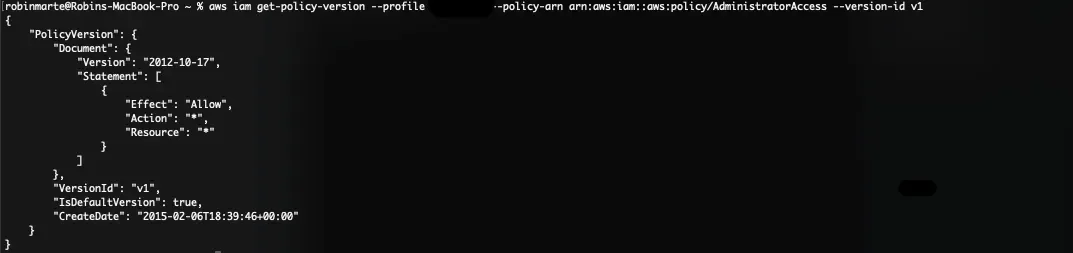
aws iam get-policy-version — profile redacted — policy-arn arn:aws:iam::aws:policy/AdministratorAccess — version-id v1
This returns the policy document itself. The Action and Resource keys both carry a wildcard asterisk, which means any action can be performed with these keys and every resource is in reach.
Impact
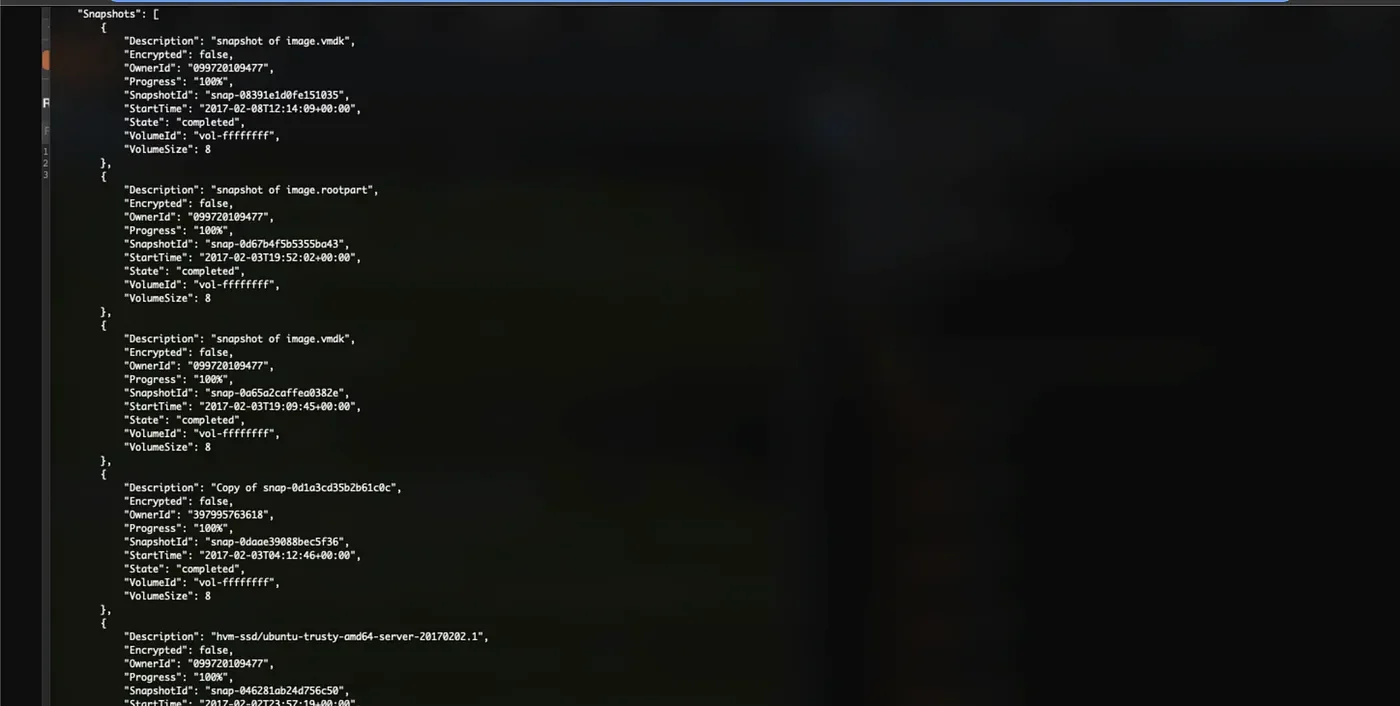
The keys belong to an identity with full access to all AWS services as an administrator, able to perform all actions: create, read, update and delete anything belonging to the company. Concretely, the researcher reports:
- full access to all their EC2 snapshots;
- full access to their Lambda functions;
- full access to all S3 buckets.
The finding was taken down within 30 minutes and triaged by the program manager on a Saturday. Within a week the researcher received a first five-figure payout of $16,000.
Root cause
An AWS access key and secret key were committed into a client-side JavaScript configuration file, config.js, served from a development subdomain. Anything a browser can fetch, anyone can fetch, so the credentials were effectively public to anyone who found the file. The credentials belonged to an IAM user with the AWS-managed AdministratorAccess policy attached, so the disclosure was not a limited read-only key but full administrative control of the account. The report does not describe any server-side control that should have caught this.
Fix
The measures that follow from the finding are: remove the credentials from the JavaScript file and from any other client-side asset, rotate the exposed access and secret keys, and replace long-lived administrator keys with narrowly scoped credentials issued through a mechanism that does not place secrets in the browser.
Variants to test
- Shodan certificate pivoting. Run
ssl:"{{Org name}}"and then subtract known hosts and CDN fingerprints with-Ssl.cert.subject.CN:"..."and-AkamaiGhost. A positive result is a set of hosts and IPs that are not in the organisation's published inventory. - Directory-depth expansion before brute-forcing. Take every JS URL from GAU and Wayback, strip the file name, and add the first, second and third level subdirectories to the host list. A positive result is a path such as
/assets/Javascript/config/config.jsthat only appears once deeper directories are included. - Proxying FFUF 200s into Burp with JSminer and DataExtractor loaded. A positive result is a passive-scan hit for an AWS key, secret or other credential pattern in a response body.
- Credential triage with the AWS CLI. For any key pair found, run
aws sts get-caller-identity, thenaws iam list-attached-user-policiesandaws iam get-policy-versionon the attached policy. A positive result is an ARN that resolves, an attached policy such asAdministratorAccess, and a policy document with wildcards inActionandResource. - Service enumeration after confirmation. Once admin scope is confirmed, list the services the report names, such as EC2 snapshots, Lambda functions and S3 buckets, to document concrete data at risk. A positive result is a listing that returns the organisation's resources.
What happened, in plain words
A security researcher found a file on a company's website that contained the digital equivalent of a master key to the company's cloud account. That key was sitting in a JavaScript file, which is a file your browser downloads and runs every time you visit a web page. The file was publicly reachable, so anyone who found it could read the key. The key turned out to belong to an administrator account with full control over everything the company ran in Amazon Web Services (AWS), the cloud platform where many companies host their servers, storage and databases. The researcher reported it, the company removed the exposure within 30 minutes, and the researcher was paid $16,000.
This article walks through exactly how that happened, step by step, assuming you have never done security work before. Every tool and term is explained where it first appears.
The background
The researcher, Daniel Marte (@Masonhck3571), had recently joined Bugcrowd as an Application Security Engineer. Bugcrowd is a company that runs bug bounty programmes: a company publishes a list of its systems and offers money to anyone who finds a security flaw in them. The researcher decided to focus on one programme only, because in his words every asset the company owned was in scope, meaning he was allowed to test all of it.
The finding is classed as information disclosure. That simply means some private information was left somewhere the public could reach it. Think of it like a house key taped under the doormat: the lock is fine, but the key is in plain sight.
The report does not name the company or the programme. The asset recorded for the write-up is medium.com, which is where the article was published, not the target itself. The target host appears only in redacted form.
The tools, and what each one is for
The researcher lists eight tools:
- Burp Suite Pro: a program that sits between your browser and a website and lets you see and change every request and response. Think of it as a transparent proxy that records the conversation.
- JSminer Extension: an add-on for Burp that scans the traffic passing through and looks for patterns (called regular expressions, or regexes) that look like secrets, such as keys or tokens. It flags matches as findings.
- DataExtractor Extension: another Burp add-on, written by Gwendolyn, that pulls data out of responses based on a list of patterns you supply. The report links to its GitHub repository.
- FFUF: a tool that sends many requests very quickly, usually to guess file and folder names on a website. This is called brute-forcing.
- KiteRunner: listed among the tools; the report does not describe what it does.
- Assetnote Wordlists: ready-made lists of common file and folder names used when brute-forcing.
- AWS cli: the command-line interface for AWS. The researcher describes it as a tool that pulls all the AWS services together in one central console, giving control of multiple AWS services from the command line. In plain terms, it is a text window where you type commands to talk to Amazon's cloud instead of clicking around a website.
- Shodan: a search engine for internet-connected devices and servers. Instead of searching web pages, it searches information that servers expose about themselves, such as the security certificates they present.
Two of these do most of the work during scanning. JSminer and DataExtractor both work through passive scanning, which means they only look at traffic that is already flowing through Burp; they do not send extra requests of their own. JSminer also has an active scan module that looks for .map files. A .map file is a helper file that developers sometimes publish alongside compressed JavaScript so that the original, readable source code can be reconstructed. If it is left public, it can reveal code the developer did not intend to share.
On the AWS side, the only thing needed is the AWS CLI. The keys found in the JavaScript file are loaded into a named profile, which is just a saved set of credentials with a label, so that every later command uses them automatically.
Finding it
The work starts with Shodan rather than with the target directly. The idea is to find servers belonging to the company that the researcher did not already know about. Every secure website (one whose address starts with https) presents a TLS certificate, a digital document that proves the server's identity. Those certificates often contain the organisation's name. Shodan has already scanned huge numbers of servers and recorded their certificates, so you can search that record.
The query
ssl:"{{Org name}}"
returns all scanned assets whose certificate mentions the organisation. The ssl: part tells Shodan to look at certificate information, and the text in quotes is what to look for.
That produced many assets, so the researcher filtered results out by prepending a minus sign to additional terms. In Shodan, a minus sign means "exclude anything matching this". To remove everything belonging to one particular host, example1.com, the query becomes:
ssl:"{{Org name}} -Ssl.cert.subject.CN:"example1.com"
Here Ssl.cert.subject.CN means the common name field of the certificate, which is normally the hostname the certificate was issued for. So this query says: find certificates mentioning the organisation, but drop any whose certificate names example1.com.
Assets served by AkamaiGhost were removed the same way, by adding -AkamaiGhost. Akamai is a content delivery network, a service that sits in front of websites and serves their content from many locations; AkamaiGhost is a marker that appears in its responses. Excluding it removes hosts that belong to the CDN rather than to the company itself.
What remains is a set of assets and IP addresses the researcher had not seen before. An IP address is the numeric address of a machine on the internet, like a street address for a computer. These new assets are then opened in Burp and Firefox so the researcher can browse them while Burp records everything.
Next comes collecting JavaScript files. Two sources are used: GAU (GetAllUrls), a tool that gathers known URLs for a domain from public sources, and Wayback, the Internet Archive, which keeps old copies of web pages. The JavaScript files found this way are saved into a file called JSurls.txt.
Using TomNomNom's Unfurl, a small tool that splits URLs into their parts, the host list is extracted into Domains.txt and the path list into Jspaths.txt. A URL is made of a host (the site name) and a path (the location on that site), so Unfurl separates the two.
Before brute-forcing, the URL list is expanded. The researcher took each URL up to its first subdirectory (without the JS files) and added those to Domains.txt, then did the same for URLs with second-level subdirectories and again for third-level subdirectories. A subdirectory is a folder in a web address: in example.com/a/b/c.js, the subdirectories are a and b. The reason for this step is that brute-forcing only works if you give the tool the right starting points. If a folder is never in your list, the tool will never look inside it.
FFUF is then run as a one-liner to request all the JavaScript paths scraped from GAU and Wayback against all subdomains and subdirectories, with FFUF proxying responses that returned 200 to Burp. A 200 is the HTTP status code for "OK, here is the page". By sending those successful responses through Burp, the passive scanners get to see them. Burp's live passive scan then applies JSminer and DataExtractor to everything that comes back.
Within a couple of minutes there were several hits for an AWS key on a dev subdomain. A dev subdomain is a development version of a site, used while features are being built. The researcher notes that adding the second-level subdirectories was the key step. The JavaScript file that produced the hit was:
https://tre-uat-euw1.redacted.com/assets/Javascript/config/config.js
The path /Javascript/config/config.js was the important part. The file contained an AWS Access Key and an AWS Secret Key. Together these are like a username and password for a program: the access key identifies who is calling, and the secret key proves it. Anyone holding both can act as that identity. The researcher moved straight to the AWS CLI to establish the maximum impact.
Exploitation
Exploitation here means using the keys to find out what they can actually do. The goal is not just to show that a secret leaked, but to show how much damage someone could cause with it.
Step 1: create a profile with the recovered keys
aws configure — profile {whatevername}
This command sets up a saved profile. aws is the CLI program, configure is the command that stores credentials, and -- profile names the profile. The {whatevername} placeholder means the name is arbitrary; you pick anything. Creating the profile stores the credentials found in the JavaScript file so that later CLI calls use them. Without this step you would have to paste the keys into every command.
Step 2: identify the principal behind the keys
aws — profile {whatevername} sts get-caller-identity
This call returns the User ID, the Account ID and the ARN, and the ARN includes the username. An ARN (Amazon Resource Name) is AWS's unique identifier for a resource or an identity, a bit like a full postal address. sts is the AWS service that answers the question "who am I?", and get-caller-identity is the specific request. That username is what allows further enumeration, meaning looking up more details about that identity. The researcher is explicit that this alone is sensitive but not maximum impact, and that demonstrating deeper impact is what separates a report from a higher severity and payout. In other words, knowing a name is bad; proving you can delete the company's data is worse.
Step 3: list the policies attached to the user
aws iam list-attached-user-policies — profile {whatevername} — user-name {username}
This returns the policy information for the username found in the previous step. iam is AWS's Identity and Access Management service, the part of AWS that decides who is allowed to do what. list-attached-user-policies asks which permission sets are attached to a given user, and -- user-name supplies the name. The policy name associated with the user is AdministratorAccess.
In AWS terms a policy is a permission set, comparable to a role or group, that grants a user access to services with create, read, update and delete permissions. Those four actions are often shortened to CRUD. On this evidence the keys carry admin privileges, but the researcher still wants to confirm which services are covered and whether the access is genuinely full. The next step reads the actual rules.
Step 4: read the policy document
aws iam get-policy-version — profile redacted — policy-arn arn:aws:iam::aws:policy/AdministratorAccess — version-id v1
This returns the policy document itself. get-policy-version asks for one specific version of a policy, -- policy-arn identifies which policy, and -- version-id v1 picks the first version. The Action and Resource keys both carry a wildcard asterisk, which means any action can be performed with these keys and every resource is in reach. A wildcard is a symbol that stands for "everything"; in a permission rule, * in Action means every operation, and * in Resource means every object.
Impact
The keys belong to an identity with full access to all AWS services as an administrator, able to perform all actions: create, read, update and delete anything belonging to the company. Concretely, the researcher reports:
- full access to all their EC2 snapshots;
- full access to their Lambda functions;
- full access to all S3 buckets.
An EC2 snapshot is a saved copy of a virtual server's disk, used for backups or for creating new servers. A Lambda function is a piece of code AWS runs on demand without you managing a server. An S3 bucket is a storage container for files. Having full access to all three means the researcher could read, copy, change or delete the company's backups, its running code and its stored files.
The finding was taken down within 30 minutes and triaged by the program manager on a Saturday. Triaged means the programme reviewed the report and confirmed it was valid. Within a week the researcher received a first five-figure payout of $16,000.
Root cause
An AWS access key and secret key were committed into a client-side JavaScript configuration file, config.js, served from a development subdomain. Client-side means the file is sent to the visitor's browser and run there, so anything in it can be read by anyone. Anything a browser can fetch, anyone can fetch, so the credentials were effectively public to anyone who found the file. The credentials belonged to an IAM user with the AWS-managed AdministratorAccess policy attached, so the disclosure was not a limited read-only key but full administrative control of the account.
Fix
The measures that follow from the finding are: remove the credentials from the JavaScript file and from any other client-side asset, rotate the exposed access and secret keys, and replace long-lived administrator keys with narrowly scoped credentials issued through a mechanism that does not place secrets in the browser. Rotating a key means cancelling it and issuing a new one, so the old one stops working.
Variants to test
These are the same techniques, written so you can try them on a programme that authorises you to test it.
- Shodan certificate pivoting. Run
ssl:"{{Org name}}"and then subtract known hosts and CDN fingerprints with-Ssl.cert.subject.CN:"..."and-AkamaiGhost. A positive result is a set of hosts and IPs that are not in the organisation's published inventory. - Directory-depth expansion before brute-forcing. Take every JS URL from GAU and Wayback, strip the file name, and add the first, second and third level subdirectories to the host list. A positive result is a path such as
/assets/Javascript/config/config.jsthat only appears once deeper directories are included. - Proxying FFUF 200s into Burp with JSminer and DataExtractor loaded. A positive result is a passive-scan hit for an AWS key, secret or other credential pattern in a response body.
- Credential triage with the AWS CLI. For any key pair found, run
aws sts get-caller-identity, thenaws iam list-attached-user-policiesandaws iam get-policy-versionon the attached policy. A positive result is an ARN that resolves, an attached policy such asAdministratorAccess, and a policy document with wildcards inActionandResource. - Service enumeration after confirmation. Once admin scope is confirmed, list the services the report names, such as EC2 snapshots, Lambda functions and S3 buckets, to document concrete data at risk. A positive result is a listing that returns the organisation's resources.
Glossary
- AWS (Amazon Web Services): Amazon's cloud platform, where companies rent servers, storage and other computing services.
- AWS CLI: the command-line tool for controlling AWS by typing commands.
- Access key / Secret key: a pair of strings that identify and authenticate a program to AWS, like a username and password for software.
- AdministratorAccess: an AWS-managed policy that grants every action on every resource.
- AkamaiGhost: a marker that appears in responses from Akamai's content delivery network, used here to exclude CDN hosts from Shodan results.
- ARN (Amazon Resource Name): AWS's unique identifier for a resource or identity.
- Asset: any system, host or address that belongs to a target and may be tested.
- Brute-forcing: sending many requests with guessed names to discover files, folders or accounts.
- Bug bounty programme: a scheme where a company pays researchers for reporting security flaws in its systems.
- Burp Suite Pro: a tool that intercepts and records traffic between a browser and a website.
- Client-side: code or data sent to and run in the visitor's browser, therefore readable by anyone.
- Content delivery network (CDN): a service that serves website content from many locations to speed it up.
- CRUD: create, read, update, delete, the four basic operations on data.
- DataExtractor: a Burp extension that pulls data from responses using patterns you supply.
- Dev subdomain: a development version of a site, often less protected than the live one.
- EC2 snapshot: a saved copy of a virtual server's disk.
- FFUF: a fast tool for sending many requests to guess file and folder names.
- GAU (GetAllUrls): a tool that collects known URLs for a domain from public sources.
- IAM (Identity and Access Management): the AWS service that decides who may do what.
- Information disclosure: a flaw where private information is exposed to people who should not see it.
- IP address: the numeric address of a machine on the internet.
- JSminer: a Burp extension that flags secrets and other patterns in traffic using regexes.
- Lambda function: code AWS runs on demand without you managing a server.
- .map file: a helper file that can reconstruct original source code from compressed JavaScript.
- Passive scanning: inspecting traffic that is already flowing, without sending extra requests.
- Policy: an AWS permission set that says which actions are allowed on which resources.
- Profile (AWS CLI): a saved set of credentials with a label, used automatically by later commands.
- Regex (regular expression): a pattern used to match text, such as something that looks like a key.
- Rotate (a key): cancel a key and issue a new one so the old one stops working.
- S3 bucket: a storage container for files in AWS.
- Shodan: a search engine for internet-connected servers and devices.
- Subdirectory: a folder within a web address.
- TLS certificate: a digital document a secure website presents to prove its identity; it often contains the organisation's name.
- Triaged: reviewed and confirmed as valid by the programme.
- Unfurl: a tool that splits URLs into their parts, such as host and path.
- Wayback (Internet Archive): an archive of old copies of web pages.
- Wildcard: a symbol such as
*that stands for everything.




