The Database Handover | A Dumb Mistake | Critical BUG
A publicly accessible WordPress debug log revealed the name of a database backup file created by the Duplicator plugin, which was left on the server. An attacker could download the backup and extract the full database, including user credentials and password hashes.
 Published on mr23r0.medium.com
Hi hackers & Security Enthusiasts, I’m Saransh Saraf and this a simple bug with a critical Impact. I hope you’ll enjoy it and learn something from it.
The full write-up lives on its author's site
It belongs to its author, so we link to it rather than copy it. The other two tabs are our own rewrites, checked against it.
Context
This is a story about a second round of testing on a target the author had already worked on: a large German company, tested under a pentesting contract. In the first round he found an email verification bypass (two methods), stored cross site scripting, an IDOR leaking employee data, and broken link hijacking, and earned 1000 Euros for it.

After the broken link hijacking was reported, the company fixed it by changing the whole child company name and the domain. The author calls the new domain "IAMNEW.COM" in the write-up. When he revisited it, every subdomain looked identical, which is the kind of surface that makes you think there is nothing left to find.
The bug that follows is a leftover backup archive. The report explains that the WordPress plugin Duplicator lets an administrator package a whole WordPress installation (files plus database) into a backup archive and move it to another server. When that archive is left behind on the new server, everything inside it is downloadable by anyone.
Setup
The write-up does not describe accounts, roles or a test environment. What it does give is the tooling and the precondition:
- The scope was small and already mapped from round one, so the author was revisiting old issues to try to bypass the fixes.
- The only version mentioned is WordPress 4.8, spotted through the Wappalyzer browser extension.
- WPScan was run against the target.
- A WordPress API token was created and a scan was run with it in the background while manual testing continued.
- The precondition for the bug is simply that a backup archive was left on the server.
Finding it
The new domain looked uniform across all subdomains, and the author was close to giving up. The turn came by accident: he looked at his Wappalyzer banner and saw WordPress 4.8.

He started WPScan straight away but says the results were not amazing. He gave himself 30 minutes to think about what to do next, then created a WordPress API token and ran a scan with it in the background while he did manual recon. The manual testing produced nothing. When he went back to the WPScan output, it reported that debug.log was publicly accessible.
Exploitation
Step 1: read the exposed debug log
The log was reachable without authentication. Reading it gave a list of users and some authentication keys. He reported that as an information disclosure.
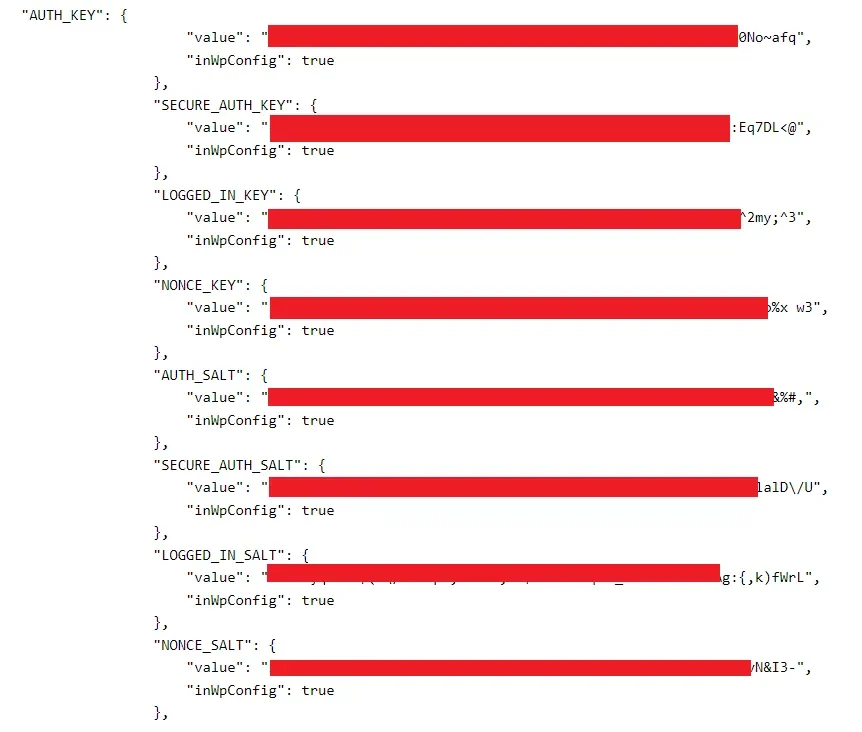
Step 2: go back and read it properly
His gut told him he was missing something, so he read the log again and found the database name, which he added to the same information disclosure report. Still not satisfied, he read the log again, this time on a TV for a better view, and after 580 lines he found a reference to a backup file.
Step 3: the backup file and the wrong report
The backup was larger than 500MB. He could not extract it, had never seen a file like it before, and reported it as a possible denial of service. That was the second mistake: the interesting property of the file was its contents, not its size.
Step 4: extract the archive
The next day he searched Stack Overflow, then YouTube, and found a tutorial plus a Windows extraction tool for the format:
https://snapcreek.com/misc/tools/DupArchiveExtractor/Windows/DupArchiveExtract.exe
After extracting and navigating the nested folders, the database backup was at:
dup-installer/database.sql
That file contained all users, password hashes and, in his words, much more juicy stuff.
Root cause
Duplicator builds an archive of the whole WordPress installation so an administrator can move it to another server. The report lists files you may find in the backup: wp-config.bak, all user information, a full database backup with users, password hashes and articles, all articles including unlisted and drafts, and all WordPress files for static analysis. When the migration is finished, the developer is supposed to remove the backup files from the new server. Here they were left in place.
The exposed debug.log made it worse: it disclosed user names, authentication keys and the database name, and it pointed at the backup. The write-up does not say how the log came to be publicly readable, only that WPScan found it.
Impact
The database backup file contained all users, password hashes and, in the author's words, much more juicy stuff. Password hashes are offline-crackable. The author's own framing is that this is a simple bug with critical impact.
Fix
The fix implied by the finding is to delete the Duplicator installer and archive files from the server once a migration is complete, and to make sure debug.log is not publicly reachable.
Variants to test
- Check for leftover Duplicator artefacts on any WordPress site that has been migrated: request the installer directory and look for
dup-installer/database.sqlinside the extracted archive. A positive result is a readable SQL dump containing user rows and password hashes. - Run WPScan with an API token and read the full output rather than skimming it. A positive result is a finding such as a publicly accessible
debug.log. - Fetch
debug.logdirectly and read it line by line, not just the first screen. A positive result is user names, authentication keys, database names or paths to backup files. - When you find a large archive you cannot open, identify the format before reporting it. A positive result is an extractor that opens it and reveals configuration or database contents.
- After a vendor fixes one issue by renaming a domain or product, re-enumerate the new host. A positive result is a fresh fingerprint, such as an outdated WordPress version, that the old scope did not show.
What happened, in plain words
A security researcher was hired to test the website of a large German company. He found several problems in the first round of testing and was paid 1000 Euros for them. Then he came back for a second round, and this time he found something much worse: a backup file left on the company's web server. Inside that backup was a database dump containing all users and password hashes.
The interesting part is how he found it. He did not break any login, guess any password or exploit any clever flaw in the website's code. He simply noticed that a log file was readable by anyone, read it carefully, and followed a clue inside it to the backup. The whole story is a lesson in patience and in reading things properly instead of skimming them.
The starting point: a second round on a known target
A "pentesting contract" means a company pays a security professional to attack its own systems on purpose, with permission, so that real attackers cannot do it first. The researcher had already done one round of this on the German company. In that first round he found:
- an email verification bypass (two different methods), meaning a way to get past the step where a website checks that an email address really belongs to you;
- stored cross site scripting, a flaw where malicious code typed into a website is saved and later runs in other visitors' browsers;
- an IDOR (Insecure Direct Object Reference) that leaked employee data, which is when a website lets you change an identifier in a request and see someone else's records;
- broken link hijacking, which is when a website links to an external address that no longer belongs to the intended owner, so someone else can take it over.
For all of that he earned 1000 Euros.

After the broken link hijacking was reported, the company fixed it in a drastic way: it changed the name of the whole child company and its domain. A domain is the part of a web address you type, like example.com. The researcher calls the new one "IAMNEW.COM" in his write-up, which is clearly a stand-in name rather than the real one.
When he came back for round two, the scope was small and already mapped from round one. "Scope" means the list of systems he is allowed to test. He started by revisiting the old issues to see whether the fixes could be bypassed. That is normal practice: a fix that only hides a problem often leaves the problem in place.
Comparing the new domain
On the new domain, every subdomain looked identical. A subdomain is a prefix on a domain, like shop.example.com or mail.example.com; companies often run many of them for different services. Seeing the same page everywhere made him think there was nothing new to find, and he started to lose motivation.
Then, by accident, he looked at his Wappalyzer banner. Wappalyzer is a browser extension that inspects the pages you visit and tells you which software and which versions the site is built with, a bit like a label on the back of a device telling you what is inside. The banner said the site was running WordPress 4.8. WordPress is a very popular system for building websites and blogs; a version number matters because old versions have known weaknesses.
Background enumeration
"Enumeration" means systematically listing what exists on a target: which pages, which files, which software versions. He started WPScan, a tool made specifically for scanning WordPress sites, but says the results were not amazing. He was frustrated, so he gave himself 30 minutes to think about what to do next.
He then created a WordPress API token and ran a scan with it in the background while he did manual testing. An API is a way for one program to talk to another over the web, and a token is a short secret string that proves to the program who it is, much like a wristband at an event proves you paid to get in. Some scanning services need such a token so they can do more work for you. The manual testing produced nothing.
When he went back to look at the WPScan output, it reported that debug.log was publicly accessible. A log is a file where software writes a running diary of what it did: who logged in, what errors happened, which files were touched. A debug log is a more detailed diary used while building or fixing a site. It is meant for the site's own administrators, not for visitors, so leaving it readable on the public web is a mistake in itself.
Reading the log, step by step
Step 1: the first look
The log could be opened without logging in to anything. Reading it gave him a list of users and some authentication keys. Authentication keys are secret strings a WordPress site uses internally to prove that a logged-in session is genuine; if an outsider learns them, they may be able to forge sessions. He reported this as an "information disclosure", which is the general name for any bug where data that should be private can be read by someone who should not see it.
Step 2: going back and reading it properly
His gut told him he was missing something, so he read the log again and found the database name, and added that to the same information disclosure report. A database is the organised store where a website keeps its content and user accounts; its name is a small clue, but a useful one when you are trying to find where its contents might be copied.
Still not satisfied, he read the log a third time, this time on a TV so the text was bigger and easier to scan, and after 580 lines he found a reference to a backup file. A backup is a copy of data kept so it can be restored if something goes wrong. A backup of a website is extremely sensitive, because it contains everything the live site contains.
Step 3: the backup and the wrong report
The backup was larger than 500MB. He could not open it, had never seen a file like it before, and reported it as a possible denial of service. A denial of service (DoS) is an attack that makes a service unavailable, for example by making it handle far too much data. That was his second mistake: the interesting thing about this file was what was inside it, not how big it was. Reporting the size missed the point entirely.
Step 4: opening the archive
The next day he searched Stack Overflow (a question and answer site for programmers), then YouTube, and found a tutorial plus a Windows tool for extracting this particular archive format:
https://snapcreek.com/misc/tools/DupArchiveExtractor/Windows/DupArchiveExtract.exe
This is a download link for a small program that runs on Windows. An archive is a single file that packs many files and folders together, like a box taped shut; an extractor is the tool that opens the box and puts the contents back on your disk. He needed it because the backup was not a plain zip file that any computer can open by double-clicking.
After extracting and navigating the nested folders, the database backup was at:
dup-installer/database.sql
This line is a path: the location of a file inside the extracted folders. dup-installer is a folder name, and database.sql is the file inside it. The .sql ending means it is a database dump, a text file full of the commands needed to rebuild the database. That file contained all users, password hashes and, in his words, much more juicy stuff. A password hash is the result of scrambling a password with a one-way function: the site stores the scrambled value, not the password itself, but an attacker who obtains hashes can try to guess passwords offline until a guess produces the same hash.
Why it happened
The report explains a WordPress plugin called Duplicator, which packages a whole installation into one archive. A plugin is an add-on that gives a website extra features, like an app on a phone. Duplicator lets an administrator package a whole WordPress installation, both the files and the database, into one archive so it can be moved to another server. That is genuinely useful when a site changes hosting.
The report lists files you may find in the backup:
wp-config.bak, a backup copy of the WordPress configuration file, which holds settings such as the database login details;- all user information;
- a full database backup containing users, password hashes and articles;
- all articles, including unlisted and draft ones that were never published;
- all WordPress files, which allow static analysis, meaning studying the code without running it.
When the migration is finished, the developer is supposed to delete the backup files from the new server. Here they were left in place. The exposed debug.log made it worse: it revealed user names, authentication keys and the database name, and it pointed at the backup. The write-up does not say how the log became publicly readable, only that WPScan found it.
What an attacker could do with it
The database backup file contained all users, password hashes and, in the author's words, much more juicy stuff. Password hashes can be cracked offline, meaning an attacker can take them away and test guesses on their own computer without the website noticing. The author's own framing is that this is a simple bug with critical impact.
The fix
The write-up does not describe the fix the company applied. The fix implied by the finding is to delete the Duplicator installer and archive files from the server once a migration is complete, and to make sure debug.log is not publicly reachable.
Things worth trying yourself
- Check for leftover Duplicator artefacts on any WordPress site that has been migrated: request the installer directory and look for
dup-installer/database.sqlinside the extracted archive. A positive result is a readable SQL dump containing user rows and password hashes. - Run WPScan with an API token and read the full output rather than skimming it. A positive result is a finding such as a publicly accessible
debug.log. - Fetch
debug.logdirectly and read it line by line, not just the first screen. A positive result is user names, authentication keys, database names or paths to backup files. - When you find a large archive you cannot open, identify the format before reporting it. A positive result is an extractor that opens it and reveals configuration or database contents.
- After a vendor fixes one issue by renaming a domain or product, re-enumerate the new host. A positive result is a fresh fingerprint, such as an outdated WordPress version, that the old scope did not show.
Glossary
- API: a way for one program to talk to another over the web, like a service counter where you ask for something and get a structured answer.
- API token: a secret string that proves to a service which program or account is making a request, like a wristband at an event.
- Archive: a single file that packs many files and folders together, like a box taped shut.
- Authentication key: a secret string a website uses internally to prove a logged-in session is genuine.
- Backup: a copy of data kept so it can be restored if something goes wrong.
- Broken link hijacking: a flaw where a site links to an external address that no longer belongs to the intended owner, so someone else can take it over.
- Cross site scripting (stored): a flaw where malicious code entered into a site is saved and later runs in other visitors' browsers.
- Database: the organised store where a website keeps its content and user accounts.
- Database dump: a text file containing the commands needed to rebuild a database, usually ending in
.sql. - Debug log: a detailed diary file a site writes while being built or fixed, meant for administrators only.
- Denial of service (DoS): an attack that makes a service unavailable, for example by making it handle far too much data.
- Domain: the main part of a web address, like example.com.
- Duplicator: a WordPress plugin that packages a whole WordPress installation into one archive so it can be moved to another server.
- Email verification bypass: a way to get past the step where a site checks that an email address really belongs to you.
- Enumeration: systematically listing what exists on a target, such as pages, files and software versions.
- Extractor: a tool that opens an archive and puts its contents back on your disk.
- Hash (password hash): the scrambled result of running a password through a one-way function; the site stores this instead of the password.
- IDOR (Insecure Direct Object Reference): a flaw where changing an identifier in a request lets you see someone else's records.
- Information disclosure: any bug where data that should be private can be read by someone who should not see it.
- Log: a file where software writes a running diary of what it did.
- Offline cracking: testing password guesses against stolen hashes on your own computer, without the website noticing.
- Pentesting contract: an agreement in which a company pays a security professional to attack its own systems on purpose, with permission.
- Plugin: an add-on that gives a website extra features, like an app on a phone.
- Scope: the list of systems a tester is allowed to test.
- Static analysis: studying code without running it.
- Subdomain: a prefix on a domain, like shop.example.com, often used for a separate service.
- Token: see API token.
- Wappalyzer: a browser extension that reports which software and versions a site is built with.
- WordPress: a very popular system for building websites and blogs.
- WPScan: a tool made specifically for scanning WordPress sites for known weaknesses and exposed files.




