The PDF Trojan Horse: Leveraging HTML Injection for SSRF and Internal Resource Access
The application allowed HTML injection in profile fields, and when generating a PDF, the injected HTML was rendered, enabling server-side request forgery. An attacker could use iframes to access internal resources and AWS metadata, including credentials.
 Published on uchihamrx.medium.com
.بِسْ� اللَّه الرَّحْ� ن الرَّحِي� . . اللَّه� َّ صَلِّ وَسلَّ� وبارك على نَبِينَا � ُح� َّد
The full write-up lives on its author's site
It belongs to its author, so we link to it rather than copy it. The other two tabs are our own rewrites, checked against it.
Context
The target was a web application built for company management, serving both users and clients. Each user receives a unique subdomain to manage their company, for example hacker.target.com. The application was part of a private bug bounty programme, so the programme name and the real hostnames are not part of this write-up.
Two features matter here. The profile section lets a user set a username and a company name. A separate feature generates monthly PDFs containing statistical data. The PDF feature is the interesting one: the researcher found that markup injected into the profile persisted into the generated PDF, which suggested the document was built server-side.
Setup
- Create an account on the application and use it as a normal user to map out its features.
- Identify the profile section, where the username and company name fields are editable.
- Identify the monthly PDF generation feature.
- Have an out-of-band listener ready. The researcher used a Burp Collaborator payload to catch callbacks.
No specific versions, roles beyond the ordinary user account, or special preconditions are described.
Finding it
The researcher started with the profile section and tested the username and company name fields with a basic HTML payload to see whether it would be rendered as markup:
'"><h1>Mrx</h1>
It worked: the HTML injection executed successfully. On its own this looks like a low-severity finding, so the next question was how to make it more impactful.

The screenshot shows the profile fields with the injected markup taking effect.
While exploring the application, the researcher found the feature that generates monthly PDFs containing statistical data. The idea was to reach server-side request forgery through that PDF generation. The researcher generated a PDF with the HTML injection payload in place and found that the injection persisted into the rendered PDF. That persistence is what makes the PDF generator a candidate for SSRF: if the injected markup can reference a URL, the PDF renderer will request it from the server side.
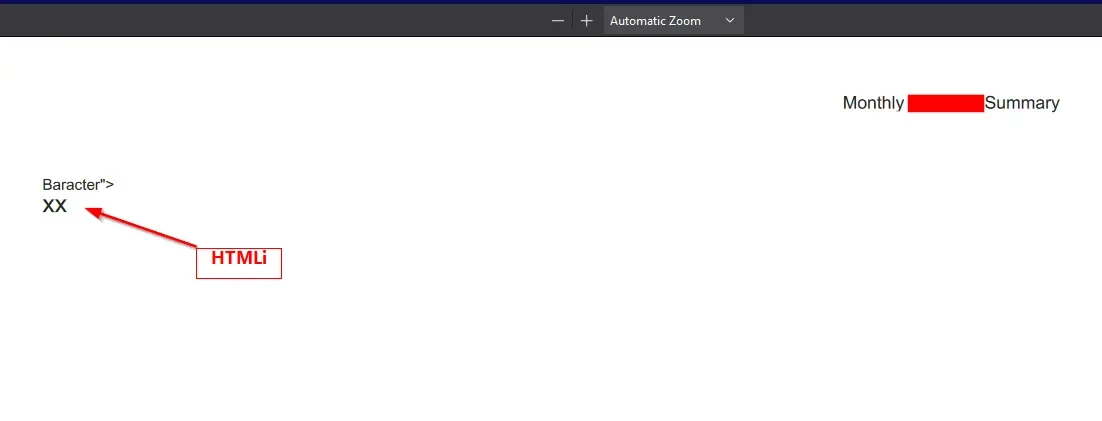
The image shows the generated PDF still carrying the injected HTML.
Exploitation
Step 1: confirm server-side fetching with an out-of-band callback
To validate the idea, the HTML injection payload was replaced with an iframe pointing at a Burp Collaborator:
<iframe src="http://Burp-Collaborator"></iframe>
After generating the PDF, callbacks were received. After generating the PDF, callbacks were received, confirming SSRF feasibility.
Step 2: reach local services
With server-side fetching confirmed, the next step was to target the loopback interface:
<iframe src="http://[redacted]"></iframe>
Regenerating the PDF granted access to internal portals, which demonstrates that the renderer can reach services bound to localhost on the application server.
Step 3: query the AWS metadata service
Knowing the target used AWS services, the researcher moved to the instance metadata endpoint:
<iframe src="http://[redacted]/latest/meta-data"></iframe>
Regenerating the PDF with the modified payload succeeded.
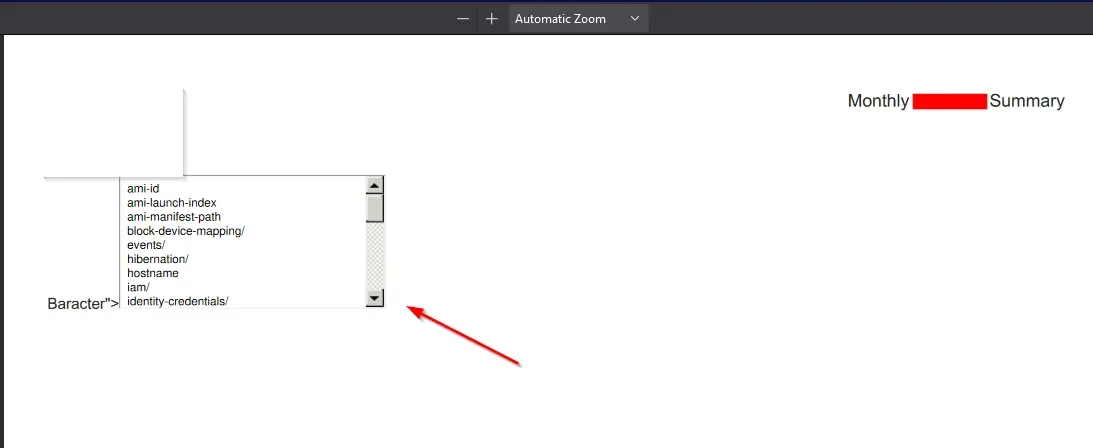
The image shows the metadata response rendered into the PDF.
Step 4: read the instance credentials
The final payload pointed at the credentials path for the instance identity role:
<iframe src="http://[redacted]/2021-07-15/meta-data/identity-credentials/ec2/security-credentials/ec2-instance"></iframe>
Regenerating the PDF with the modified payload gave access to AWS credentials.
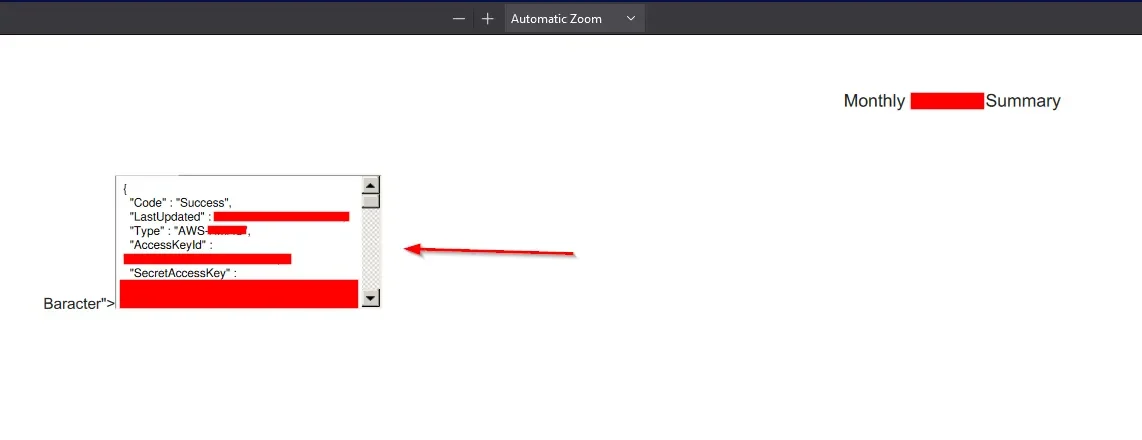
The image relates to accessing the AWS credentials.
The report was submitted to the programme, which acknowledged the severity as critical and rewarded the researcher. The amount is not stated.
Root cause
The profile fields accept HTML, and the PDF generation feature rendered that injected markup into the document. Because the renderer processes the injected markup, any URL in an iframe is fetched by the server itself, which turns a stored HTML injection into SSRF. The report does not describe the rendering library or its configuration, so the exact reason the renderer follows iframe sources is not stated; likely the renderer resolves external resources by default and no allow-list or network restriction was applied to it.
Impact
An ordinary user with an account could inject markup that the PDF generator renders, and use it to make the server issue requests to arbitrary destinations. In this case that gave access to internal portals on the loopback interface and to the AWS instance metadata service, including the instance identity credentials. The credentials were accessed; the report does not describe what they permit. The report does not enumerate the permissions attached to the role or the internal portals reached, so the full blast radius beyond credential disclosure is not described. The programme rated the issue critical.
Fix
The measures that would address the issue are: escape or sanitise user-controlled fields before they are rendered into the PDF, and restrict what the renderer may fetch, for example by disabling external resource loading or applying an allow-list of destinations. On the infrastructure side, enforcing IMDSv2 on the instance metadata service limits the value of a plain GET to the metadata endpoint.
Variants to test
- Stored fields rendered into documents. Put an HTML payload in profile fields, then trigger any export, invoice, report or PDF feature. A positive result is the markup appearing in the generated document.
- Out-of-band confirmation. Replace the payload with an iframe pointing at a Collaborator or similar listener. A callback from the server's address confirms server-side fetching.
- Loopback and internal ranges. Point the iframe at
http://[redacted]and at internal hostnames or RFC 1918 addresses. A positive result is internal content appearing in the document. - Cloud metadata. Point the iframe at the metadata endpoint for the cloud provider in use. A positive result is a metadata listing, and then credentials, rendered back.
- Other renderer primitives. Try image tags, link tags and CSS imports in the same fields, since renderers may fetch some of these even when iframes are blocked. A positive result is a callback or fetched content from any of them.
What happened, in plain words
A security researcher found a way to make a company management website do something it was never meant to do: fetch web pages and files on the researcher's behalf, from the inside of the company's own network. The trick started with a text field on a profile page that accepted a bit of HTML (the language web pages are written in), and the payload executed. That kind of bug is called HTML injection, and on its own it is usually rated low severity, because it only affects the person looking at the page.
The researcher then found a second feature: the site could generate a monthly PDF report full of statistics. The important detail is that this PDF is built by the server, not by the visitor's browser. When the researcher put the injected HTML into the profile and then generated the PDF, the injected markup showed up inside the PDF. That meant the injected markup was still present, and still rendered, in the generated PDF. If those instructions could include a link to another address, the server itself would go and fetch that address. Making a server fetch an address of your choosing is called SSRF, short for Server-Side Request Forgery.
From there the researcher walked the server through a series of addresses: first a listener the researcher controlled, to prove the server really was making the request; then the server's own loopback address, which is how a machine talks to itself; then a special address that cloud providers use to hand out information about the machine; and finally a path on that address that returns the machine's cloud credentials. The programme rated the finding critical and rewarded the researcher.

The image above is the title card of the write-up, introducing the idea that a low-severity HTML injection can be turned into SSRF through PDF generation, reaching AWS metadata and internal resources.
A quick word on the setting: this was a private bug bounty programme. A bug bounty programme is an arrangement where a company invites outside researchers to look for security problems and pays them for reporting the ones they find. "Private" means only invited researchers can take part. The programme's name and the real hostnames are not part of the write-up, so the examples use placeholder names like hacker.target.com.
The application and its two interesting features
The target was a web application built for company management, used by both users and clients. Each user gets a unique subdomain to manage their company, for example hacker.target.com. A subdomain is the part of a web address before the main domain: in hacker.target.com, hacker is the subdomain and target.com is the domain. Giving each customer their own subdomain is a common way for a service to keep customers' spaces separate while running them all on the same platform.
Two features matter for this story.
- The profile section. This is where a user sets a username and a company name. These are ordinary text fields, the kind you fill in on any sign-up page.
- The monthly PDF generator. This feature produces a PDF document containing statistical data for the month. A PDF is a file format for documents that look the same wherever you open them. The key point is that this PDF is produced on the server, the machine that runs the website, and not in the visitor's browser. So anything the document needs to load, such as an image or an embedded page, is fetched by the server.
That second point is the whole story. A browser on your laptop fetches things from the internet using your network. A server fetches things using the company's network, which often sits inside a private infrastructure with access to internal systems that outsiders cannot reach. If you can make the server fetch an address you choose, you are borrowing the server's position inside that network.
Setting up
Before any testing, the researcher needed a normal account and a way to observe requests coming from the server. The steps were:
- Create an account on the application and use it as a normal user to map out its features. This is reconnaissance: clicking through the product the way a real customer would, to learn what it does and where it accepts input.
- Identify the profile section, where the username and company name fields are editable.
- Identify the monthly PDF generation feature.
- Have an out-of-band listener ready. "Out-of-band" means the signal comes back through a different channel than the one you sent the request on. The researcher used a Burp Collaborator payload to catch callbacks. Burp Collaborator is a service that gives you a unique address and records any request that arrives at it, so you can tell whether some other machine, somewhere, tried to contact you.
An everyday comparison: imagine posting a letter to a friend and asking them to ring a phone number you control. You are not watching the letter; you are waiting for the phone to ring. If it rings, you know the letter arrived and your friend did what you asked. An out-of-band listener is that phone.
No specific software versions, special roles beyond the ordinary user account, or unusual preconditions are described in the report.
Finding the HTML injection
The researcher started with the profile section and tested the username and company name fields with a basic HTML payload to see whether it would be rendered as markup:
'"><h1>Mrx</h1>
Line by line, in plain words:
'"is a single quote followed by a double quote. These are characters that often close a string or an attribute in the code that builds a web page. Attackers put them at the start of a payload to try to break out of whatever context their text is being placed into, so that what follows is treated as new page instructions rather than as plain text.<h1>is an HTML tag that starts a top-level heading. A tag is an instruction to the browser about how to display something.Mrxis just the text that will appear in the heading. It is a marker: if you see it displayed as a big bold heading, you know your tag was treated as real markup.</h1>closes the heading tag.
So the payload is a small experiment: "if I put a heading tag in this field, will the site show a heading, or will it show the literal characters?"
It worked: the HTML injection executed successfully. On its own this looks like a low-severity finding, because it only changes what the page looks like for whoever views the profile. The next question was how to make it more impactful.
The screenshot shows the profile fields with the injected markup taking effect, which is how the researcher confirmed the injection.
From HTML injection to SSRF through the PDF generator
While exploring the application, the researcher found the feature that generates monthly PDFs containing statistical data. The idea was to reach server-side request forgery through that PDF generation. The researcher generated a PDF with the HTML injection payload in place and found that the injection persisted into the rendered PDF. "Persisted" means the injected markup was still there, and still being treated as markup, when the document was produced.
That persistence is what makes the PDF generator a candidate for SSRF. If the injected markup can reference a URL, the PDF renderer will request it from the server side. A URL is a web address, like http://example.com/page. A renderer is the piece of software that turns markup into a finished document, in this case a PDF.
The image shows the generated PDF still carrying the injected HTML, which is the moment the researcher realised the renderer could be used to make the server fetch things.
Step 1: confirm server-side fetching with an out-of-band callback
To validate the idea, the HTML injection payload was replaced with an iframe pointing at a Burp Collaborator:
<iframe src="http://Burp-Collaborator"></iframe>
Line by line, in plain words:
<iframe>is an HTML tag that embeds another web page inside the current one, like a small window cut into a wall.src=is the attribute that says where the embedded page lives. "Attribute" just means a setting on a tag."http://Burp-Collaborator"is the address to load. In the real test this was the researcher's unique Collaborator address; here it is written as a placeholder.</iframe>closes the tag.
The reasoning: if the PDF renderer treats this as a real iframe, it will try to load the address inside it. If that address belongs to the researcher's listener, the listener will record a request. And because the PDF is built on the server, the request will come from the server, not from the researcher's browser.
After generating the PDF, callbacks were received, confirming SSRF feasibility. In other words, the researcher now had a remote control for the server's network access, limited to whatever a URL can express.
Step 2: reach local services
With server-side fetching confirmed, the next step was to target the loopback interface:
<iframe src="http://[redacted]"></iframe>
Line by line, in plain words:
<iframe>and</iframe>do the same job as before: embed a page.src="http://[redacted]"points at[redacted]. This is a special address, called the loopback address, that always means "this same machine". When a server requests[redacted], it is talking to itself, not going out to the internet.
Why this matters: many internal services on a server are deliberately not exposed to the internet. They listen only on the loopback address, on the assumption that only software on the same machine can reach them. An SSRF bug breaks that assumption, because the request now comes from the machine itself.
Regenerating the PDF granted access to internal portals, which demonstrates that the renderer can reach services bound to localhost on the application server. "Bound to localhost" means the service only accepts connections from the same machine.
Step 3: query the AWS metadata service
Knowing the target used AWS services, the researcher moved to the instance metadata endpoint:
<iframe src="http://[redacted]/latest/meta-data"></iframe>
Line by line, in plain words:
<iframe>and</iframe>again embed a page.src="http://[redacted]/latest/meta-data"points at[redacted]. This is a special address used by cloud platforms such as AWS. It is not a normal website; it is a service running on the cloud platform's side that answers questions about the machine you are on. AWS calls it the instance metadata service./latest/meta-datais the path that lists what information is available. A path is the part of a URL after the address, like a folder name.
Why this matters: cloud machines are often given permissions through a role, and the metadata service is how the machine learns which role it has and obtains temporary credentials for it. If an outsider can reach the metadata service from the machine, they can ask the same questions the machine asks itself.
Regenerating the PDF with the modified payload succeeded.
The image shows the metadata response rendered into the PDF, which is the confirmation that the server could reach the cloud metadata service.
Step 4: read the instance credentials
The final payload pointed at the credentials path for the instance identity role:
<iframe src="http://[redacted]/2021-07-15/meta-data/identity-credentials/ec2/security-credentials/ec2-instance"></iframe>
Line by line, in plain words:
<iframe>and</iframe>embed a page, as before.src="http://[redacted]/..."again targets the cloud metadata service./2021-07-15/is a version marker in the path. Metadata services keep several versions of their answers so that older software keeps working, and this segment selects one of them./meta-data/identity-credentials/ec2/security-credentials/ec2-instanceis the path that returns the credentials tied to the machine's identity. Credentials here means the secret material a program uses to prove who it is when talking to other cloud services, roughly like a password that a program carries instead of a person.
Regenerating the PDF with the modified payload gave access to AWS credentials.
The image relates to accessing the AWS credentials, the end of the chain from a profile text field.
The report was submitted to the programme, which acknowledged the severity as critical and rewarded the researcher. The amount is not stated.
Why it worked
The profile fields accept HTML, and the PDF generation feature rendered that injected markup into the document. "Neutralising" means making user text safe to display, usually by turning characters like < into a form that is shown as text rather than treated as a tag.
Because the renderer processes the injected markup, any URL in an iframe is fetched by the server itself, which turns a stored HTML injection into SSRF. "Stored" means the malicious text is saved on the server and reused later, rather than only affecting the page where it was typed.
The report does not describe the rendering library or its configuration, so the exact reason the renderer follows iframe sources is not stated. A likely explanation is that the renderer resolves external resources by default and no allow-list or network restriction was applied to it. An allow-list is a list of addresses that are permitted, with everything else refused.
What the impact was
An ordinary user with an account could inject markup that the PDF generator renders, and use it to make the server issue requests to arbitrary destinations. In this case that gave access to internal portals on the loopback interface and to the AWS instance metadata service, including the instance identity credentials.
The credentials were accessed; the report does not describe what they permit. Think of it as finding a keycard in a hotel corridor: the card only opens the doors it was programmed for, but those doors are inside the building, where guests are not supposed to wander. The report does not enumerate the permissions attached to the role or the internal portals reached, so the full blast radius beyond credential disclosure is not described. The programme rated the issue critical.
How it should be fixed
The measures that would address the issue are:
- Escape or sanitise user-controlled fields before they are rendered into the PDF. Escaping means converting characters that have special meaning in HTML into harmless equivalents, so they display as text.
- Restrict what the renderer may fetch, for example by disabling external resource loading or applying an allow-list of destinations.
- On the infrastructure side, enforce IMDSv2 on the instance metadata service. IMDSv2 is a newer version of the metadata service that requires a special session-based request, which a simple iframe fetch cannot produce, so it limits the value of a plain GET to the metadata endpoint.
Similar things to test elsewhere
If you are learning to test applications, the same pattern can be tried in other places. These are starting points, not a checklist of guaranteed results.
- Stored fields rendered into documents. Put an HTML payload in profile fields, then trigger any export, invoice, report or PDF feature. A positive result is the markup appearing in the generated document.
- Out-of-band confirmation. Replace the payload with an iframe pointing at a Collaborator or similar listener. A callback from the server's address confirms server-side fetching.
- Loopback and internal ranges. Point the iframe at
http://[redacted]and at internal hostnames or RFC 1918 addresses. RFC 1918 addresses are the private address ranges reserved for internal networks, such as those starting with10.or192.168.. A positive result is internal content appearing in the document. - Cloud metadata. Point the iframe at the metadata endpoint for the cloud provider in use. A positive result is a metadata listing, and then credentials, rendered back.
- Other renderer primitives. Try image tags, link tags and CSS imports in the same fields, since renderers may fetch some of these even when iframes are blocked. A positive result is a callback or fetched content from any of them.
Glossary
- API: a defined way for one piece of software to ask another for data or actions, like a service counter with a fixed menu of requests.
- Attribute: a setting written inside an HTML tag, such as
srcon an iframe, that tells the tag what to do. - AWS: Amazon Web Services, a cloud platform where companies rent servers and services instead of running their own machines.
- Blast radius: how much damage an attacker could do from a given starting point.
- Bound to localhost: a service configured to accept connections only from the same machine, not from the network.
- Bug bounty programme: an arrangement where a company pays outside researchers for reporting security problems.
- Burp Collaborator: a service that gives you a unique address and records any request that reaches it, used to detect out-of-band callbacks.
- Callback: a request that arrives at a listener you control, proving that some other machine made it.
- Credentials: secret material a program or person uses to prove identity, similar to a password or key.
- Critical: the highest severity rating a programme typically uses, meaning the issue could cause serious harm and should be fixed urgently.
- CSS import: a way for a stylesheet to pull in another stylesheet from a URL, which can cause a fetch.
- Escape: convert characters with special meaning into harmless equivalents so they display as text.
- GET: the basic kind of web request used to retrieve a page or resource.
- HTML: the language web pages are written in, made of tags that describe structure and content.
- HTTP: the protocol browsers and servers use to exchange requests and responses.
- Iframe: an HTML tag that embeds one web page inside another.
- IMDSv2: a newer version of the AWS instance metadata service that requires a session-based request, making simple fetches insufficient.
- Instance: a single virtual machine rented from a cloud provider.
- Instance metadata service: a service reachable from inside a cloud machine that answers questions about that machine, including its role and credentials.
- Internal portal: a web application meant only for people or systems inside an organisation's network.
- Listener: a service that waits for incoming requests and records them.
- Loopback address: the special address
[redacted], which always means the same machine the request originates from. - Low severity: a rating for issues with limited impact, often affecting only the person viewing a page.
- Markup: text written with tags that describe structure, as in HTML.
- Metadata: data about data; here, information about a cloud machine rather than its contents.
- Out-of-band: a signal that comes back through a different channel than the one used to send the request.
- Path: the part of a URL after the address, like a folder name, that selects a resource.
- Payload: the specific text or code an attacker sends to try to trigger a bug.
- PDF: a document file format that looks the same wherever it is opened.
- PDF renderer: software that turns markup or data into a finished PDF document.
- Persist: remain stored and still effective later, rather than only affecting the moment of input.
- Private bug bounty programme: a bounty programme open only to invited researchers.
- Reconnaissance: exploring a target to learn how it works before testing it.
- Renderer: software that converts markup or data into a finished document or display.
- RFC 1918: the standard that defines private IP address ranges reserved for internal networks.
- Role: a set of permissions in a cloud platform that a machine or user can assume.
- Sanitise: clean user input so that dangerous parts cannot take effect.
- Severity: a rating of how serious a security issue is.
- SSRF (Server-Side Request Forgery): a bug where an attacker can make a server send requests to addresses the attacker chooses.
- Stored: saved on the server and reused later, rather than only affecting the current page.
- Subdomain: the part of a web address before the main domain, as in
hacker.target.com. - Tag: an instruction in HTML, written between angle brackets, that describes part of a page.
- URL: a web address identifying where a resource lives.
- Username: the name a user chooses to identify themselves on a service.
- XSS: cross-site scripting, a bug where attacker-supplied script runs in another user's browser; HTML injection is a related but distinct issue.



