What is HTTP Request Smuggling? 📖
HTTP request smuggling vulnerabilities were found in multiple subdomains of a private bug bounty program, allowing an attacker to redirect users to arbitrary domains and, in an MDM server, to send commands to enrolled devices. The attacker demonstrated sending a ProfileList command to devices and the company confirmed a device wipe was possible.
Ricardo Iramar dos Santos Follow
 Published on medium.com
TL;DR: This is how I was able to exploit a HTTP Request Smuggling in some Mobile Device Management (MDM) servers and send any MDM command to any device enrolled on them for a private bug bounty program.
The full write-up lives on its author's site
It belongs to its author, so we link to it rather than copy it. The other two tabs are our own rewrites, checked against it.
Context
This is a private bug bounty program on HackerOne. The target was a set of subdomains belonging to a company whose name is not disclosed; the researcher substitutes the placeholder host vulnerable.requestsmuggling.com for the real one. Among the affected hosts was mdm.qa-vulnerable.requestsmuggling.com, a Mobile Device Management (MDM) server, and later mdm.prod-vulnerable.requestsmuggling.com, its production counterpart.
MDM is the Apple protocol used to manage enrolled devices. After enrolment, a device listens for a push notification from the server; the server sends a notification through the APNS gateway, and the message is JSON-formatted and must contain the PushMagic string as the value of the mdm key. The device then contacts the MDM server with HTTP PUT over TLS, and that message may contain an Idle status or the result of a previous operation. The server can send commands back to the device, and the device waits for the server to finish the process or to send more commands. The protocol reference the researcher used is Apple's Mobile Device Management Protocol Reference.
The vulnerability class is HTTP request smuggling: a front-end reverse proxy and a back-end application disagree about where one request ends and the next begins, because they interpret the Content-Length and Transfer-Encoding headers differently.
Setup
The researcher scanned subdomains with Smuggler. Smuggler flagged 13 subdomains as potentially vulnerable. He reported all of them in a single report as critical, without a real PoC, because he was afraid of a duplicate and planned to work on impact later. He later added 4 more subdomains, for 17 in total.
Other tools used: Burp Collaborator to catch requests from redirected clients, and a Python BaseHTTP server hosted at https://myattackerdomain.com to act as a fake MDM server.
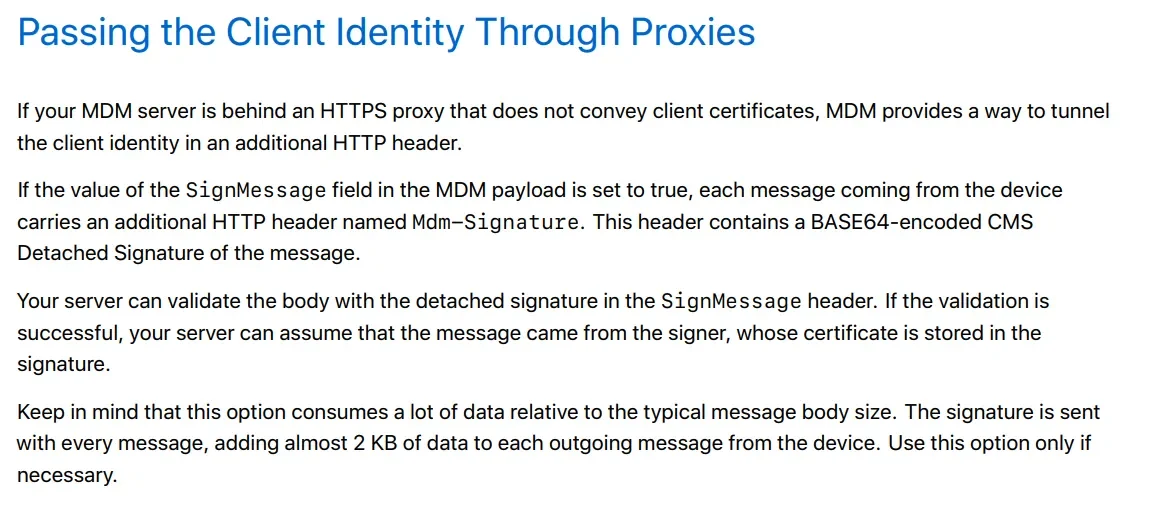
A precondition worth noting: the MDM host did not use client certificate authentication. The presence of the Mdm-Signature header on device requests is the signal. Per the documentation, if an MDM server sits behind an HTTPS proxy that does not convey client certificates, MDM tunnels the client identity in an additional HTTP header: when the SignMessage field in the MDM payload is true, each message from the device carries a header named Mdm-Signature.
Finding it
Smuggler reports potential vulnerabilities that usually need manual work to turn into real impact. The researcher's common outcome is what he calls Universal Redirect: forcing any user to receive a response that redirects them to another domain.
The HackerOne triager asked for a PoC with valid impact. From the 13 flagged subdomains, one was quickly confirmed vulnerable to Universal Redirect. The request was sent to one of the subdomains; in the write-up the host is replaced with https://vulnerable.requestsmuggling.com. Instead of the real host in the Host header, the researcher used www.example.com so the response would redirect there.
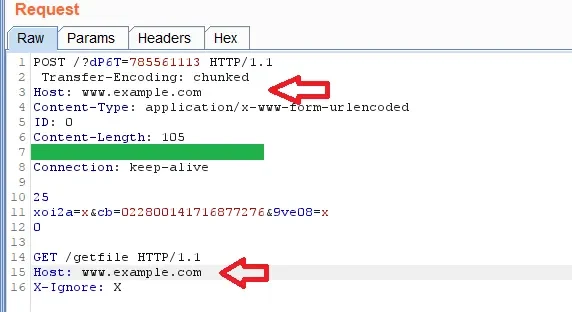
The luckiest next user making any request to https://vulnerable.requestsmuggling.com would receive the response generated by the malicious request.
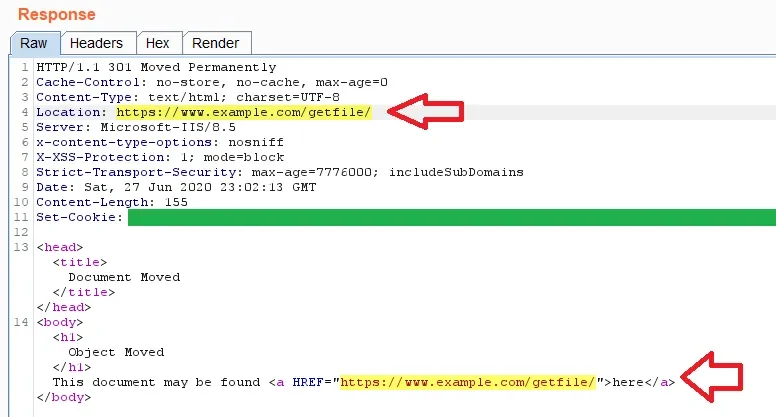
That user, with no knowledge of what happened, would be redirected to https://www.example.com/getfile/. Repeating the request would redirect almost all users to a domain the attacker controls.
After demonstrating this, the researcher found 4 more subdomains flagged by Smuggler and added them to the same report, without looking closely at them at that point. The triager accepted the report and downgraded severity from critical (9.1) to high (7.5); the company later changed it back from high (7.5) to critical.
Once the report was validated, the researcher asked permission to try other scenarios affecting real users and received this answer from the triager:
I passed your report to the company team, please don't perform any activity that might affect live users before hearing back from the team.
Exploitation
Step 1: first bounty and scope of the redirect
Four days after opening the report, someone from the company asked for reproduction details for a specific subdomain and asked to avoid testing production subdomains as much as possible. The subdomain names made it easy to tell production from non-production. After the reproduction details for one subdomain were provided, the researcher received a US$2,000 bounty.
He checked all subdomains and could demonstrate Universal Redirect on 7 of the 17. He disagreed with the bounty, arguing that redirecting all users of 7 vulnerable subdomains to a malicious domain was a large business impact. The company replied:
The bounty payment was based on the number of unique systems affected and the maximum perceived impact of the vulnerability (redirection).
He then focused on the remaining 10 subdomains. Several had api in the name, so redirecting their traffic to a domain under his control might expose sensitive information. After a few days he got nothing from them and went back to the 7 confirmed hosts.
Step 2: spotting the MDM host
The subdomain mdm.qa-vulnerable.requestsmuggling.com stood out. The researcher had prior experience with an MDM solution and knew a little about the protocol, and the name made clear it was a QA environment, which made him comfortable working there.
Step 3: redirect a random request to Burp Collaborator
The first step was to redirect a random request to Burp Collaborator to see whether a real user's request could be captured and analysed. He built a payload, sent the request and waited.
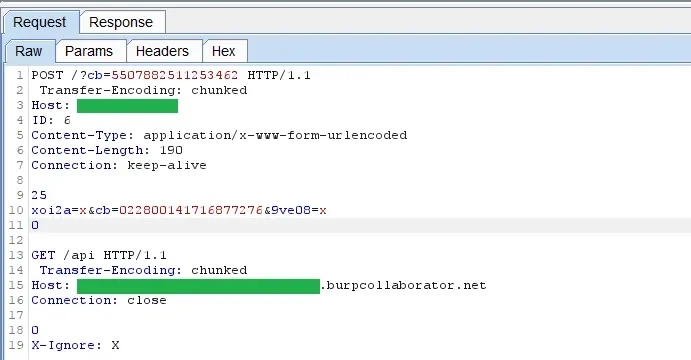
After a few seconds the request appeared in Burp Collaborator.
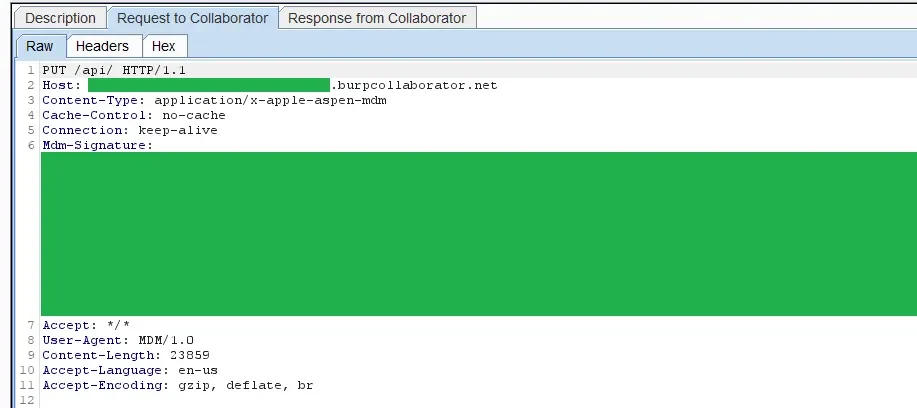
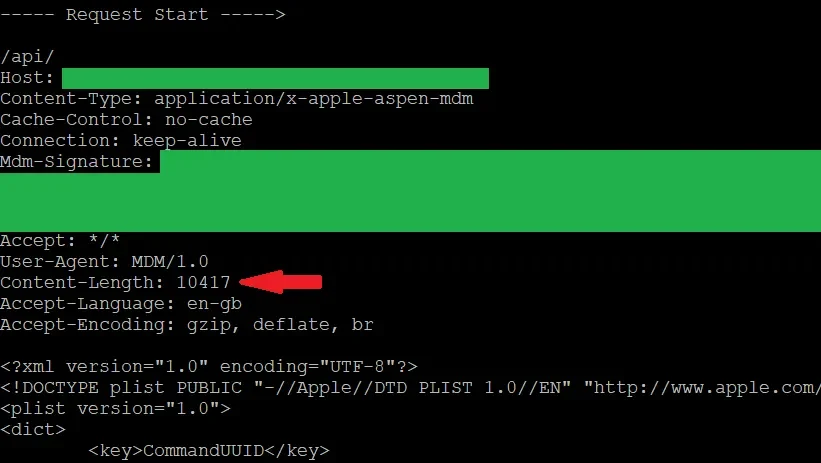
The headers Content-Type: application/x-apple-aspen-mdm, Mdm-Signature: … and User-Agent: MDM/1.0 indicate the request came from an MDM client. A quick search led to Apple's Mobile Device Management Protocol Reference.
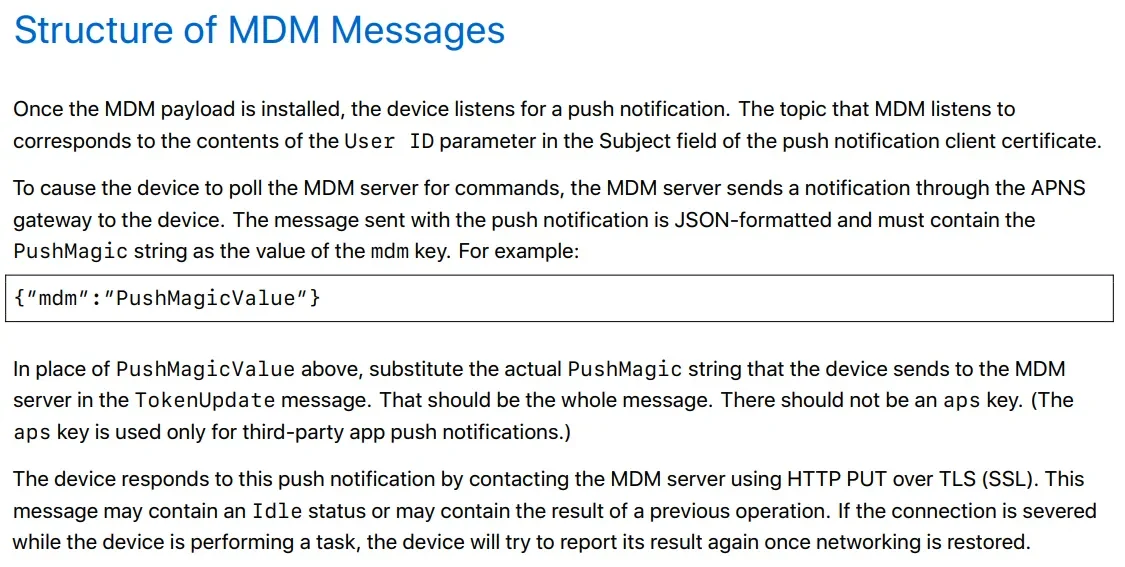
He did not have the mdm key and was not sure a notification could be sent through the APNS gateway, so he checked what happens next. The device responds to the push notification by contacting the MDM server with HTTP PUT over TLS, which matches the Collaborator request. The message may carry an Idle status or the result of a previous operation. He assumed the requests he saw were Idle status, since it was Sunday and nobody was likely sending commands to devices in a QA environment.
From the documentation, MDM clients follow HTTP 3xx redirections without user interaction, and this host had no client certificate authentication, as shown by the Mdm-Signature header.
Step 4: the attack idea
The scenario follows from how the protocol works: after executing one command, a device waits for the server to finish the process or to send more commands.
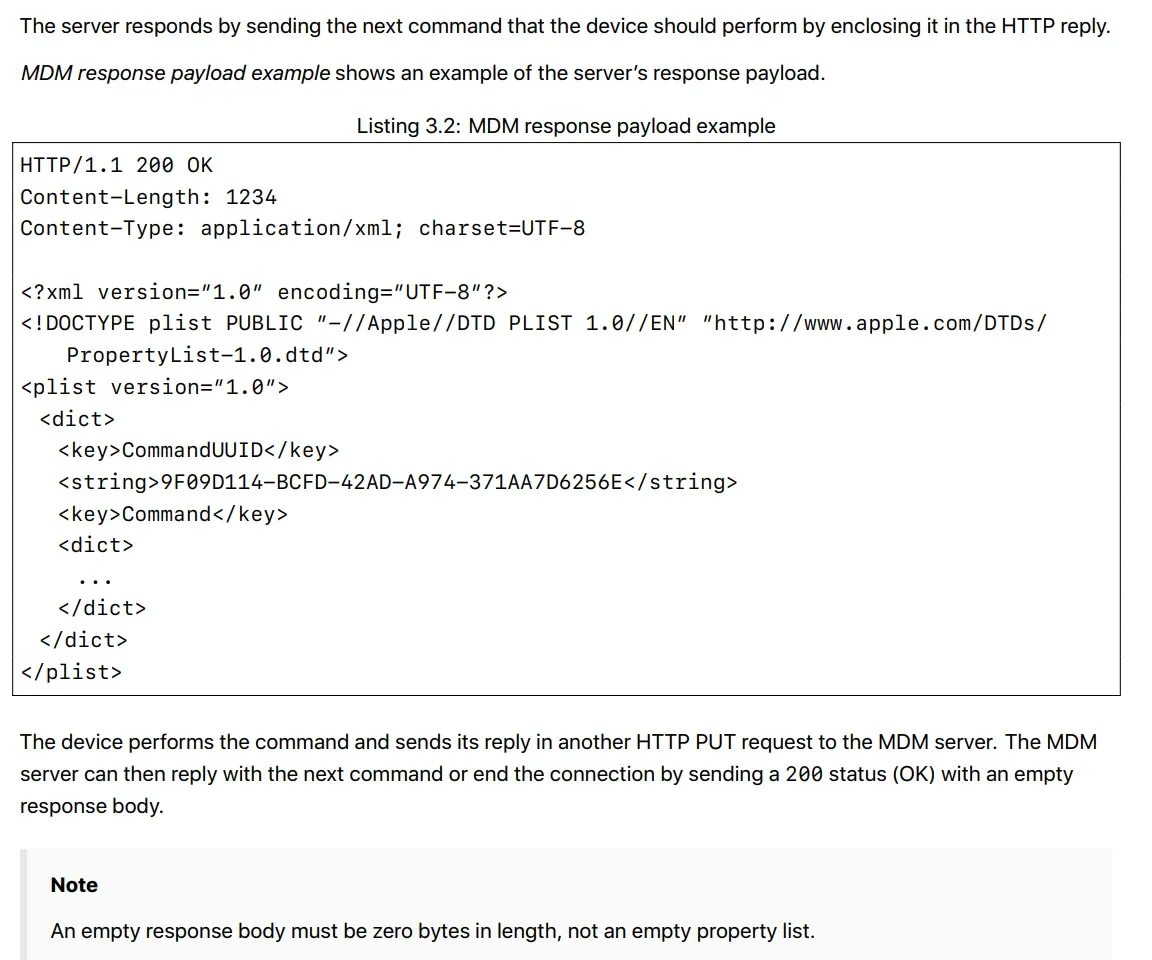
In theory, the attacker could inject a redirection, replacing the server response that would finish the process, and send the device to a fake MDM server that issues another command instead. For this he took the example from the document that sends a command to install an application on the device.
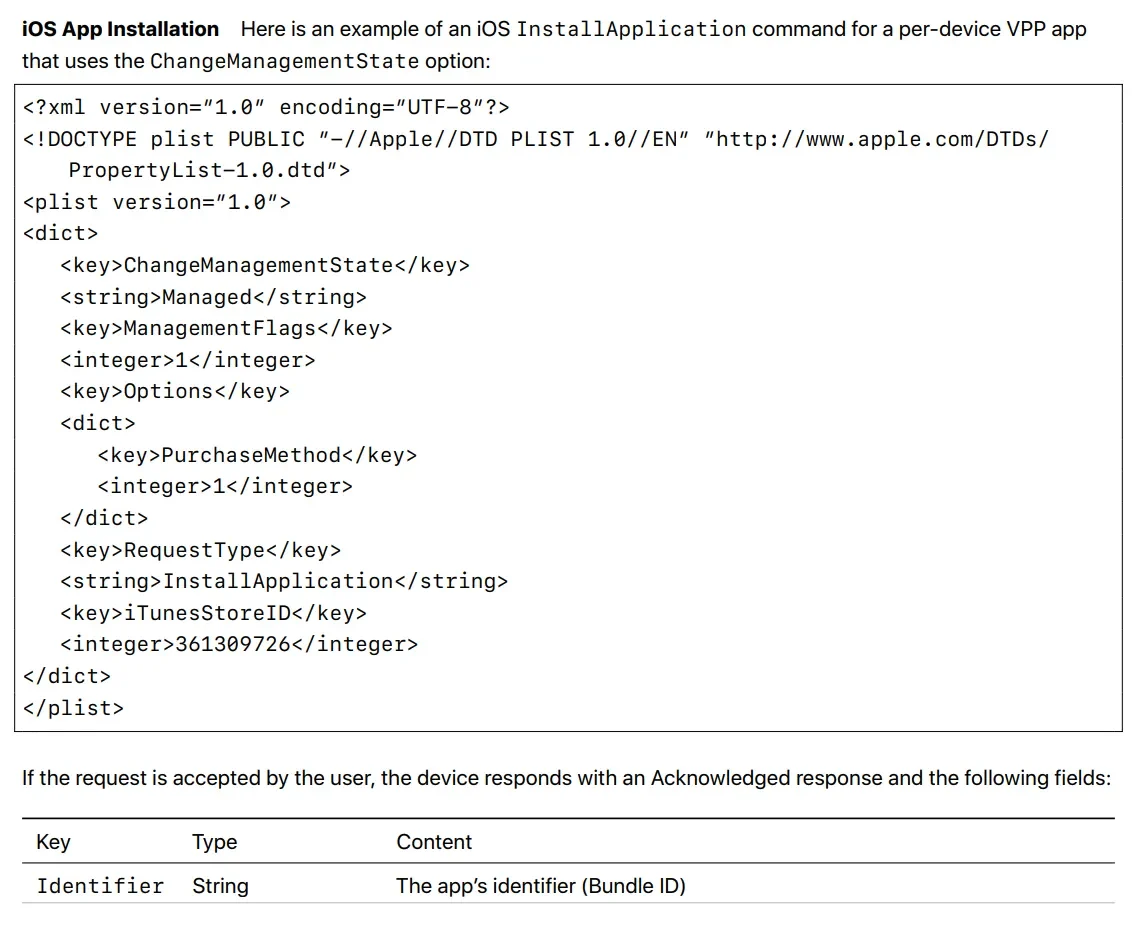
In that example the user must accept the request to install the application. Because the attack is blind, he created a test Python server at https://myattackerdomain.com with that example and added a ManifestURL parameter pointing to Burp Collaborator to get feedback. No feedback arrived.
Step 5: first fake server run
He ran the fake server for a few minutes and performed the attack with the redirection pointing to https://myattackerdomain.com/api. Only a few requests reached the server. He was not sure they came from real MDM devices, and since it was a QA environment he did not expect much device traffic.

Afraid of violating policy, he stopped and sent everything to the company. The answer was:
If you are able to prove that the vulnerability can be used for more than redirection, like gaining access to sensitive information, we can re-evaluate the reward.
Step 6: production, and a server that answers commands
Since there was little traffic elsewhere, he tried production: the same attack against mdm.prod-vulnerable.requestsmuggling.com. This time he got responses from devices for valid server commands.
He improved the server to print requests and reply to the ProfileList command, using Apple's documentation on listing installed profiles as an example. The screenshot is from the Python BaseHTTP server.
To prove command execution, he took a valid CommandUUID from one of the outputs, changed one letter so it would be unique, and repeated the attack. The next request, the command response to the server, carried exactly the same CommandUUID from his payload, proving he could execute the ProfileList MDM command on any client.
He added everything to the report. The company replied:
Alright! I think this proves your point much better. Based on the impact even just testing can have on active devices, please stop testing this while we investigate further.
Step 7: the redirect behaviour argument
When the company asked follow-up questions, he highlighted that clients follow redirects. RFC 2616 states the data should be sent through the redirect URL, but the user agent MUST NOT automatically redirect the request unless the user confirms it. In the MDM context it would be impractical for a user to accept every possible redirect, which is why the MDM documentation describes the 301 redirect as automatically followed but not remembered. He notes he has no idea why clients need to blindly follow redirects.
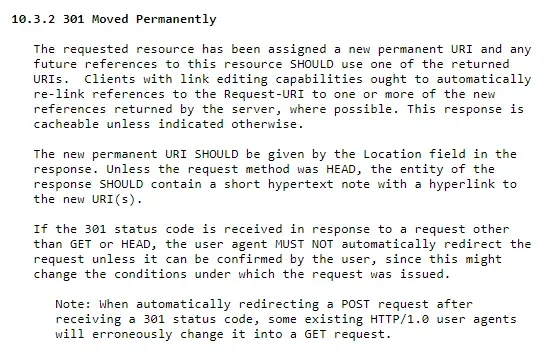
RFC 2616

MDM documentation
Step 8: reward and vendor disclosure
After the fix was confirmed, he received the maximum payout of US$15,000 plus a US$50 bonus, US$17,050 in total for the report. The company also said they built a lab to test the same attack with the EraseDevice command:
A few seconds later, we hear on the call the iPad had rebooted and was showing a progress bar. About a minute later, the iPad rebooted again and showed the default iOS setup screen. A complete device wipe!
He asked to publish the post without naming the company. The reply asked him to wait a few days because vendors were involved and the company wanted to check whether other customers had the same problem. The final answer:
Good news! Citrix has released their security bulletin and have credited you in it, as well as in their hall of fame!Bulletin - https://support.citrix.com/article/CTX281474Hall of Fame - https://www.citrix.com/about/trust-center/vulnerability-process.htmlYou should be all set to go ahead and publish your report.


Citrix has no bug bounty program, but the researcher was recognised in their portal.
Root cause
The front-end and back-end disagreed on message framing. RFC 2616 section 4.4 is explicit:
If a message is received with both a Transfer-Encoding header field and a Content-Length header field, the latter MUST be ignored.
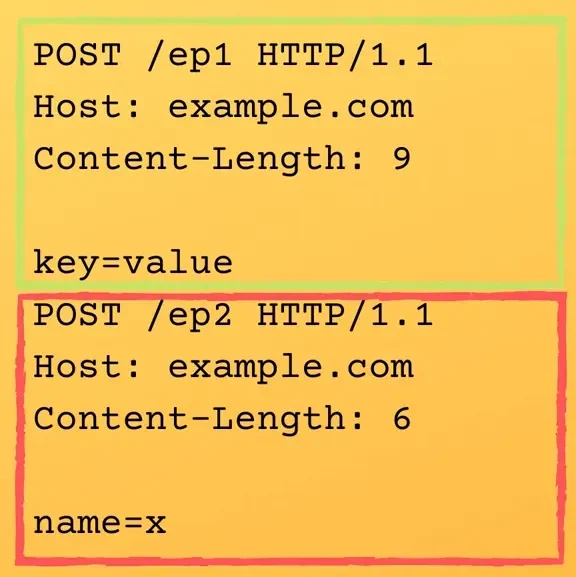
When an environment does not respect that rule, request smuggling is possible. In the classic picture, Bob sends a request with both Content-Length and Transfer-Encoding, and Alice sends a request right after Bob with only Content-Length. If the front-end uses Content-Length (ignoring Transfer-Encoding), Bob's request ends right after the body text key=value and Alice's request starts at POST / HTTP/1.1. If the back-end uses Transfer-Encoding (ignoring Content-Length), Bob's request ends at the terminating chunk 0 and the back-end treats the text key=value as the start of Alice's request, which is invalid. A skilled attacker crafts the request so Alice receives a different response from the one her request should have produced.
On the MDM host, the smuggled request made the next client receive an attacker-chosen response, in this case a redirect. The MDM clients then followed that redirect without user interaction, which turned a response-queue poisoning into command injection against enrolled devices. The host had no client certificate authentication, with identity carried in Mdm-Signature instead.
Impact
With Universal Redirect alone, any user of an affected host could be transparently redirected to an attacker-controlled domain; repeating the request redirects almost all users. On the MDM hosts, the attacker could send any MDM command to any device enrolled on the server. The researcher proved this with ProfileList by matching a CommandUUID he chose, and the company reproduced a full device wipe with EraseDevice in their lab. The attack is blind: the attacker sees device requests and command responses on his own server, not the device screen. The QA host saw only a few requests of uncertain origin; the production host returned responses for valid server commands. The researcher stopped testing when asked, and the issue was confirmed as fixed and rewarded.
Fix
The report does not describe the fix that was applied. The underlying requirement is that front-end and back-end agree on message framing and that the Transfer-Encoding/Content-Length conflict is resolved as RFC 2616 requires, rejecting or normalising ambiguous requests at the edge. On the client side, the blind following of 3xx redirects by MDM clients is the behaviour that turns a poisoned response into command execution.
Variants to test
- Run Smuggler against a scope and treat every hit as a lead, not a finding. A positive result is a request that makes the next user's response differ from the expected one, for example a redirect to a host you control.
- Test hosts whose names suggest API or device-management roles (
api,mdm,device,enroll). A positive result is a captured request in Burp Collaborator carrying protocol-specific headers such asUser-Agent: MDM/1.0orContent-Type: application/x-apple-aspen-mdm. - On any client that follows redirects automatically, point the smuggled redirect at a server you control and log what arrives. A positive result is the client re-issuing its protocol request, including any signature header, to your server.
- Reply to the client with a valid command response and a CommandUUID you chose. A positive result is a follow-up request carrying that exact CommandUUID, proving command execution.
- Check whether the target relies on header-based identity (
Mdm-Signature) rather than client certificates. - Test both QA and production hosts separately: QA may show little traffic, while production may return real command responses. A positive result is a device response for a valid server command on the production host.
If you want to discuss HTTP request smuggling techniques, the researcher can be reached at [redacted] or on Twitter @ricardo_iramar.
What happened, in plain words
A security researcher found a way to make a company's web servers hand out fake answers to the people and devices that talked to them. The trick is called HTTP request smuggling. On one of the affected servers, which managed devices for a company (a Mobile Device Management server), the researcher could make the next client receive a redirect to a server he controlled. Because those devices follow redirects without asking anyone, the researcher could then send them commands, as if he were their real management server. He proved it by running a harmless command that lists the profiles installed on a device, and the company later reproduced a full device wipe in their own lab. The work was done through a private bug bounty program on HackerOne, and it paid US$17,050 in total.

The image is a meme captioned "I am inevitable.", used to introduce the finding.
What a bug bounty program is
Many companies invite outside people to look for security problems in their systems and pay for good reports. The rules are written down in advance: which systems you may test, what you must not do, and how much each kind of finding is worth. This is called a bug bounty program. A private program is one you can only join by invitation, and its details are not public.
HackerOne is a website that hosts these programs. Researchers submit reports there, a person called a triager reads them first and checks they make sense, and then the company decides what to do.
What HTTP request smuggling is
This section explains the idea from zero. If you already know it, you can skip ahead.
When you open a website, your browser and the web server talk using a set of rules called HTTP. Version 1.1 of those rules lets a browser send several requests one after another over the same connection, instead of opening a new connection each time. Think of it as a single phone call where you ask several questions in a row rather than hanging up and calling again.
The image shows several HTTP requests travelling over one TCP connection.
Each request has two parts: a set of headers (labels with information, like the address on an envelope) and a body (the actual content, like the letter inside). The server needs to know exactly where the body ends, otherwise it cannot tell where the next request begins.
There are two headers that can say how long the body is. The first is Content-Length, which gives a number: the size of the body in bytes. The second is Transfer-Encoding, which says the body is sent in pieces, called chunks.
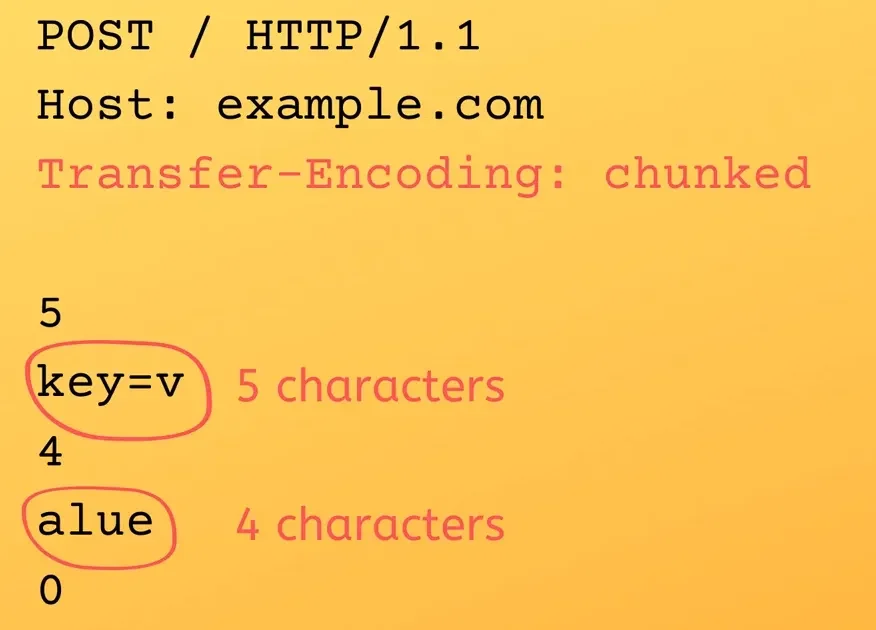
The image shows the Content-Length header and the Transfer-Encoding header side by side.
With Transfer-Encoding, each chunk starts with a number in hexadecimal (base 16) that says how big that chunk is. The last chunk is marked with the number 0, which tells the server the body is finished.
The difference between the two is simple: with Content-Length the whole body arrives at once, and with Transfer-Encoding it arrives piece by piece.
So what happens when a request carries both headers at the same time?
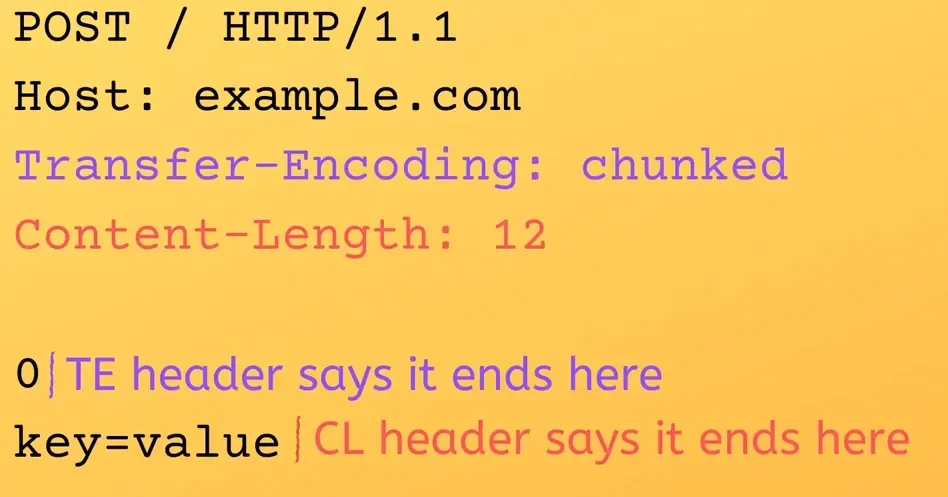
The image shows a request that has both headers present.
The rules for HTTP 1.1 are written in a document called RFC 2616. Section 4.4, on page 34, is clear about this case:
If a message is received with both a Transfer-Encoding header field and a Content-Length header field, the latter MUST be ignored.
In plain words: if both headers are there, the server must ignore Content-Length and use Transfer-Encoding. The word MUST is written in capitals because the rules use it to mean a strict requirement, not a suggestion.
That is the theory. In practice, not every piece of software follows it. When two pieces of software in the same chain disagree about where a request ends, request smuggling becomes possible.
Most modern websites are built in layers. At the front there is a reverse proxy: a server that receives all visitors' requests and passes them on. Behind it there is the actual application, called the back-end. Think of a receptionist who takes your form and walks it to the right office. If the receptionist and the office clerk count the pages of the form differently, pages can end up attached to the wrong form.
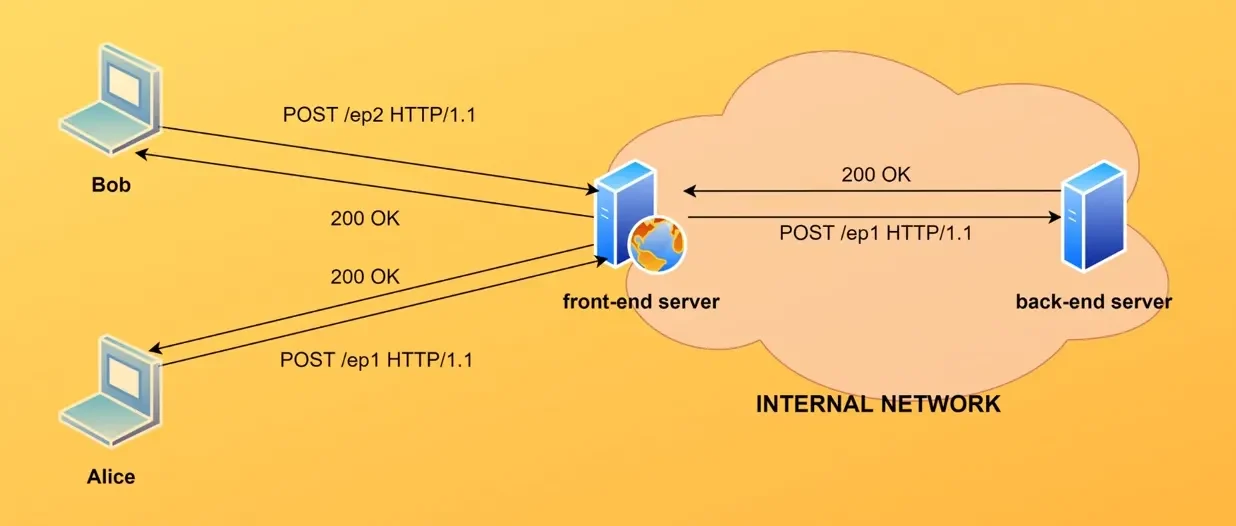
The image is a diagram of a reverse proxy in front of a back-end application.
Now imagine two people, Bob and Alice, sending requests one after the other. Bob sends a request that has both Content-Length and Transfer-Encoding. Alice sends a normal request right after Bob, with only Content-Length. What happens if the front-end and the back-end read the two headers in a different order, ignoring RFC 2616?
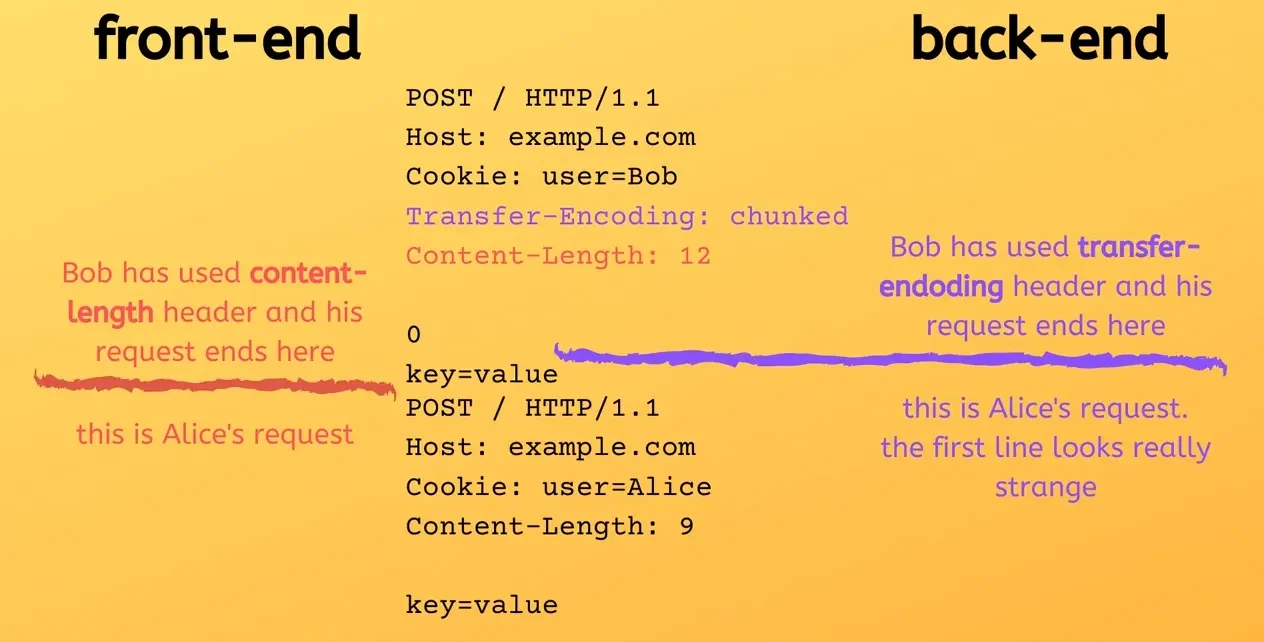
The image shows Bob's request and Alice's request next to each other.
Suppose the front-end uses Content-Length and ignores Transfer-Encoding. For the front-end, Bob's request ends right after the body text key=value, and Alice's request starts at POST / HTTP/1.1.
Suppose the back-end does the opposite: it uses Transfer-Encoding and ignores Content-Length. For the back-end, Bob's request ends at the chunk marked 0, and the text key=value is treated as the beginning of Alice's request, which makes no sense as a request.
The two layers now disagree about where the boundary is. If Bob is an attacker, he can craft his request so that the leftover piece is a request of his own choosing. Alice's request then gets glued onto his, and Alice receives the answer to Bob's request instead of her own. That is the heart of HTTP request smuggling: one person's request influences the answer another person receives.
If that did not click, go back and read this section again before continuing. Everything that follows depends on it.
Reporting the problem
To look for this kind of bug at scale, the researcher used a free tool called Smuggler, which sends many variations of these tricky requests to a list of addresses and reports which ones look suspicious. He ran it against subdomains of a company in a private program on HackerOne. A subdomain is a smaller address under a company's main one, for example shop.example.com next to example.com.
Smuggler flagged 13 subdomains as potentially vulnerable. The researcher reported all 13 in one single report, marked as critical, even though he had no real proof of impact yet. He did this because he was afraid someone else would report the same thing first and his report would be marked a duplicate, which usually means no reward. He planned to work out the real impact afterwards.
If you have used Smuggler, you know that most of its hits are only leads. It says "this looks odd", not "this is exploitable". Each hit needs a person to sit down, understand the setup and build a scenario that proves real damage.
The most common real impact he had seen is what he calls a Universal Redirect. That means forcing any visitor of a site to receive a response that sends their browser to a different domain. Think of a receptionist who, instead of giving you your room key, hands you a note saying "your room is in another building" and you walk there without questioning it.
The triager asked for a proof of concept (a PoC: a concrete demonstration that the bug does something real) with valid impact. That is a fair request. Out of the 13 flagged subdomains, the researcher quickly found one where a Universal Redirect worked, just by sending the request below.
The image shows the request that produced the redirect.
The request was sent to one of the 13 subdomains. The company's real name cannot be revealed, so in the write-up the address is replaced with https://vulnerable.requestsmuggling.com. Instead of putting that real address in the Host header, the researcher put www.example.com. The Host header is the line in a request that tells the server which site the visitor is asking for; a proxy often uses it to decide where to send the request. By changing it, he made the response a redirect pointing at www.example.com.
When he sent that request, the next person to make any request to https://vulnerable.requestsmuggling.com would receive the response generated by his malicious request.
The image shows the redirect response that the next visitor received.
That visitor, with no idea anything had happened, would be sent to https://www.example.com/getfile/. If the researcher kept sending the same request, he could redirect almost all visitors to a domain he controlled.
After proving this, he found 4 more subdomains flagged by Smuggler and added them to the same report, without examining them closely at that point. That made 17 in total. The triager accepted the report and lowered the severity from critical (9.1) to high (7.5). Severity scores are numbers that describe how bad a bug is; 9.1 is in the critical band and 7.5 in the high band. Later the company changed it back from high (7.5) to critical.
Once the report was validated, the researcher asked permission to try other scenarios that could affect real users. The triager answered:
I passed your report to the company team, please don't perform any activity that might affect live users before hearing back from the team.
This is a standard warning. Request smuggling is powerful, and if you are careless you can disturb every visitor of a site at once. The researcher kept investigating, but only to see what other impact he could prove on the instances already found.
The first bounty
Four days after the report was opened, someone from the company asked for reproduction details for one specific subdomain, and asked him to avoid testing production subdomains as much as possible. Production means the systems real customers use; QA means quality assurance, a test environment. The subdomain names made it easy to tell which was which.
After he provided the details for reproducing the Universal Redirect on one subdomain, he was paid US$2,000.
He then checked all the subdomains and could demonstrate the Universal Redirect on 7 of the 17. He did not agree with the size of the bounty, because redirecting all the users of 7 vulnerable subdomains to a malicious domain could hurt the business badly. He complained in the comments and the company replied:
The bounty payment was based on the number of unique systems affected and the maximum perceived impact of the vulnerability (redirection).
In other words: the payment counted how many separate systems were affected and how bad the effect was judged to be, and here the effect was only a redirect. That is fair enough, so he decided to look closely at the other 10 subdomains to see what else he could get from them.
Trying harder
He spent a few days on the remaining 10 subdomains and got nothing. He kept at it because several of their names had api in the middle. An API is a way for one program to talk to another, like a waiter who takes your order to the kitchen; APIs often carry data that is not meant for the public. If he could redirect the traffic of those APIs to a domain he controlled, he might capture sensitive information.
After trying everything, he went back to the 7 confirmed subdomains to check whether he had missed something. One name caught his attention: mdm.qa-vulnerable.requestsmuggling.com.
MDM stands for Mobile Device Management. It is a system companies use to manage phones and tablets that belong to them: installing apps, reading settings, wiping a device that was lost. The researcher had worked with an MDM solution a few months earlier and knew a little about how it works, so he decided to look at this subdomain in detail. The name made clear it was a QA environment, which made him comfortable working there.
Step 1: catch a real request
The first step was to redirect a random request to Burp Collaborator. Burp Collaborator is a service that gives you a unique address and records anything that arrives at it. It is like putting a mailbox with your name on it in a public square and seeing who posts letters. The researcher built a payload (the crafted request that triggers the bug), sent it, and waited.
The image shows the payload sent to trigger the redirect.
After a few seconds, a request appeared in Burp Collaborator.
The image shows the captured request in Burp Collaborator.
Three headers in that request told him where it came from: Content-Type: application/x-apple-aspen-mdm, Mdm-Signature: … and User-Agent: MDM/1.0. The User-Agent header says which program made the request, and here it says MDM version 1.0. The Content-Type says what kind of data the body holds, and this one is Apple's MDM format. The Mdm-Signature is a signature that proves the message came from a managed device. Together they showed the request came from an MDM client, meaning a phone or tablet managed by the server.
A quick web search led him to Apple's Mobile Device Management Protocol Reference, the document that describes how these devices and servers talk.
The image shows the captured request with its MDM headers.
Step 2: understand the MDM conversation
After a device is enrolled (registered with the management server), it does not sit there asking for orders. Instead it waits for a push notification. The server sends that notification through Apple's push service, APNS. The notification is JSON-formatted (a common text format for structured data) and must contain a PushMagic string as the value of the mdm key. Think of it as a doorbell: the server rings, and the device comes to the door.
When the device hears the doorbell, it contacts the MDM server using HTTP PUT over TLS. TLS is the encryption layer behind the padlock in your browser, so the conversation is private. The message the device sends may contain an Idle status (meaning "nothing to report") or the result of a previous operation.
The researcher did not have the mdm key and was not sure a notification could be sent through the APNS gateway, so he checked what happens next. The device's contact with the server matches the request he had captured in Burp Collaborator. He assumed the requests he was seeing were Idle status, because it was Sunday and nobody was likely sending commands to devices in a QA environment.
From the documentation, MDM clients follow HTTP 3xx redirections without asking the user. A 3xx response is the family of answers that mean "the thing you want is somewhere else"; 301 and 302 are the common ones. This host also had no client certificate authentication. A client certificate is a digital ID that a device presents to prove who it is; without that check, the server relies on something else.
That something else is the Mdm-Signature header. The documentation explains: if an MDM server sits behind an HTTPS proxy that does not pass client certificates through, MDM provides a way to carry the device's identity in an extra HTTP header. When the SignMessage field in the MDM payload is set to true, every message from the device carries a header named Mdm-Signature.
The image shows the documentation passage about the Mdm-Signature header.
Step 3: the attack idea
The plan came straight from how the protocol works. After executing one command, a device waits for the server to finish the process or to send more commands.
The image shows the documentation describing how a device waits after a command.
In theory, the attacker could inject a redirection in place of the server's response that would normally finish the process. The device would then be sent to a fake MDM server, which would issue another command instead. To build that fake server, he took the example from the document that sends a command to install an application on the device.
The image shows the documentation example of an install command.
In that example, the user has to accept the request before the application is installed. Because the attack is blind (the attacker cannot see the device screen, only the traffic that reaches his own server), he created a test Python server at https://myattackerdomain.com using that example, and added a ManifestURL parameter pointing to Burp Collaborator to get some feedback. Nothing came back.
Step 4: the first fake server run
He ran the fake server for a few minutes and performed the attack with the redirection pointing to https://myattackerdomain.com/api. Only a few requests reached the server. He was not sure they came from real MDM devices, and since it was a QA environment he did not expect much device traffic.
The image shows the few requests that reached the fake server.
Afraid of breaking the program's rules, he stopped and sent everything he had to the company. The answer was:
If you are able to prove that the vulnerability can be used for more than redirection, like gaining access to sensitive information, we can re-evaluate the reward.
In other words: a redirect alone is not enough to raise the payment; show us something worse, such as access to private data.
Step 5: production, and a server that answers commands
Since there was little traffic anywhere else, he tried production: the same attack, now against mdm.prod-vulnerable.requestsmuggling.com. This time he got responses from devices to valid server commands.
He improved his server so that it printed the requests it received and replied to the ProfileList command, using Apple's documentation on listing the installed profiles as an example. ProfileList is a command that asks a device which configuration profiles it has installed; a profile is a bundle of settings, such as Wi-Fi or email configuration. The screenshot is from the Python BaseHTTP server, a small web server built into Python's standard library.
The image shows the Python server printing requests and replying to ProfileList.
To prove he could really execute commands, he took a valid CommandUUID from one of the outputs, changed one letter so it would be unique, and repeated the attack. A CommandUUID is a unique identifier the server gives to each command so it can match the answer to the order, like a ticket number at a counter. The next request, which was the device's answer to the command, carried exactly the same CommandUUID as his payload. That proved he could execute the ProfileList MDM command on any client.
He added everything to the report and waited. The company replied:
Alright! I think this proves your point much better. Based on the impact even just testing can have on active devices, please stop testing this while we investigate further.
Step 6: why the redirects are the problem
When the company asked follow-up questions, he highlighted that the clients follow redirects. RFC 2616 says the data should be sent through the redirect URL, but the user agent (the program making the request, here the device) MUST NOT automatically redirect the request unless the user confirms it. In the MDM context it would be impractical for a user to accept every possible redirect, which is why the MDM documentation describes the 301 redirect as automatically followed but not remembered. He notes he has no idea why clients need to blindly follow redirects.
RFC 2616
MDM documentation
Step 7: reward and vendor disclosure
After the fix was confirmed, he received the maximum payout of US$15,000 plus a US$50 bonus, US$17,050 in total for the report. The company also said they had built a lab to test the same attack with the EraseDevice command, which wipes a device completely:
A few seconds later, we hear on the call the iPad had rebooted and was showing a progress bar. About a minute later, the iPad rebooted again and showed the default iOS setup screen. A complete device wipe!
He asked to publish this post without naming the company. The reply asked him to wait a few days because vendors were involved and the company wanted to check whether other customers had the same problem. The final answer:
Good news! Citrix has released their security bulletin and have credited you in it, as well as in their hall of fame!Bulletin - https://support.citrix.com/article/CTX281474Hall of Fame - https://www.citrix.com/about/trust-center/vulnerability-process.htmlYou should be all set to go ahead and publish your report.
A security bulletin is a public notice a vendor publishes when it fixes a flaw, and a hall of fame is a page where a vendor thanks the people who reported problems.
Citrix has no bug bounty program, but the researcher was recognised in their portal.
Why it worked
The front-end and the back-end disagreed on where a message ends. RFC 2616 section 4.4 is explicit:
If a message is received with both a Transfer-Encoding header field and a Content-Length header field, the latter MUST be ignored.
When a setup does not respect that rule, request smuggling is possible. In the classic picture, Bob sends a request with both Content-Length and Transfer-Encoding, and Alice sends a request right after Bob with only Content-Length. If the front-end uses Content-Length and ignores Transfer-Encoding, Bob's request ends right after the body text key=value and Alice's request starts at POST / HTTP/1.1. If the back-end uses Transfer-Encoding and ignores Content-Length, Bob's request ends at the terminating chunk 0 and the back-end treats the text key=value as the start of Alice's request, which is invalid. A skilled attacker crafts the request so that Alice receives a different response from the one her request should have produced.
On the MDM host, the smuggled piece let the attacker make the proxy return a response of his choosing to the next request, in this case a redirect. The MDM clients then followed that redirect without asking anyone, which turned a poisoned response into command injection against enrolled devices. The host had no client certificate authentication, with identity carried in Mdm-Signature instead.
What the impact was
With the Universal Redirect alone, any visitor of an affected host could be sent to a domain the attacker controls without noticing; repeating the request redirects almost all visitors. On the MDM hosts, the attacker could send any MDM command to any device enrolled on the server. The researcher proved this with ProfileList by matching a CommandUUID he chose, and the company reproduced a full device wipe with EraseDevice in their lab. The attack is blind: the attacker sees device requests and command responses on his own server, not the device screen. The QA host saw only a few requests of uncertain origin; the production host returned responses for valid server commands. The researcher stopped testing when asked, and the issue was confirmed as fixed and rewarded.
How it was fixed
The report does not describe the fix that was applied. The underlying requirement is that the front-end and the back-end agree on where messages end, and that the conflict between Transfer-Encoding and Content-Length is resolved the way RFC 2616 requires, by rejecting or normalising ambiguous requests at the edge. On the client side, the blind following of 3xx redirects by MDM clients is the behaviour that turns a poisoned response into command execution.
Things to try if you want to look for this yourself
- Run Smuggler against a scope and treat every hit as a lead, not a finding. A positive result is a request that makes the next user's response differ from the expected one, for example a redirect to a host you control.
- Test hosts whose names suggest API or device-management roles (
api,mdm,device,enroll). A positive result is a captured request in Burp Collaborator carrying protocol-specific headers such asUser-Agent: MDM/1.0orContent-Type: application/x-apple-aspen-mdm. - On any client that follows redirects automatically, point the smuggled redirect at a server you control and log what arrives. A positive result is the client re-issuing its protocol request, including any signature header, to your server.
- Reply to the client with a valid command response and a CommandUUID you chose. A positive result is a follow-up request carrying that exact CommandUUID, proving command execution.
- Check whether the target relies on header-based identity (
Mdm-Signature) rather than client certificates. - Test QA and production hosts separately: QA may show little traffic, while production may return real command responses. A positive result is a device response for a valid server command on the production host.
If you want to discuss HTTP request smuggling techniques, the researcher can be reached at [redacted] or on Twitter @ricardo_iramar.
Glossary
- API: a way for one program to talk to another, often carrying data that is not meant for the public.
- APNS: Apple's push notification service, used to wake a device so it contacts its management server.
- Back-end: the application behind a proxy that actually processes requests.
- Bug bounty program: a scheme where a company pays outside researchers for reporting security problems under agreed rules.
- Burp Collaborator: a service that gives you a unique address and records any request that arrives at it.
- Chunk: a piece of a body sent when the Transfer-Encoding header is used, each starting with its size in hexadecimal.
- Client certificate: a digital ID a device presents to prove who it is.
- CommandUUID: a unique identifier the server gives to each command so it can match the answer to the order.
- Content-Length: a header giving the size of the body in bytes.
- Critical / high: bands of a severity score that describe how bad a bug is; 9.1 is critical and 7.5 is high.
- Duplicate: a report for a problem someone else already reported, usually not rewarded.
- Enrolment: the process of registering a device with a management server.
- EraseDevice: an MDM command that wipes a device completely.
- Header: a labelled line in a request or response that carries information about it.
- Host header: the line that tells the server which site the visitor is asking for.
- HTTP: the set of rules browsers and servers use to talk.
- HTTP PUT: a request method used to send data to a server, here used by devices to contact the MDM server.
- HTTP request smuggling: a bug where a front-end proxy and a back-end application disagree about where one request ends and the next begins.
- JSON: a common text format for structured data.
- ManifestURL: a parameter in the install command example that points to where the app description lives.
- MDM: Mobile Device Management, a system companies use to manage phones and tablets.
- Mdm-Signature: a header that carries a device's identity when client certificates are not passed through a proxy.
- Payload: the crafted request that triggers the bug.
- PoC (proof of concept): a concrete demonstration that a bug does something real.
- Production: the systems real customers use.
- ProfileList: an MDM command that asks a device which configuration profiles it has installed.
- PushMagic: a string that must be the value of the mdm key in a push notification.
- QA: quality assurance, a test environment.
- Redirect (3xx): a response that tells the client the thing it wants is somewhere else.
- Reverse proxy: a server at the front that receives requests and passes them to the application behind it.
- RFC 2616: the document that describes HTTP 1.1.
- Severity score: a number that describes how bad a bug is.
- Smuggler: a free tool that sends many variations of tricky requests and reports which look suspicious.
- Subdomain: a smaller address under a company's main one, such as
shop.example.com. - TCP connection: the underlying connection over which HTTP requests travel.
- TLS: the encryption layer behind the padlock in your browser.
- Transfer-Encoding: a header saying the body is sent in chunks.
- Triager: the person at a bug bounty platform who first reads and checks a report.
- Universal Redirect: forcing any visitor of a site to receive a response that sends them to another domain.
- User-Agent: a header that says which program made the request.