The Story of Blind SSRF leads to internal Host discovery.
A parameter in an Excel-parsing endpoint was used as a URL that the server fetched, and a second parameter (an event identifier) had to match a valid value for the fetch to happen. By brute-forcing that identifier alongside a collaborator URL, the author caused the server to make outbound requests and learned internal Amazon IP addresses.
 Published on medium.com
After reading a Lots of tweets on SSRF, I have decided to test for only SSRF for bug bounty. Generally I work on Synack platform due to precise scope and response time.
The full write-up lives on its author's site
It belongs to its author, so we link to it rather than copy it. The other two tabs are our own rewrites, checked against it.
Context
The target was an application on the Synack platform that included an Excel parsing feature. The researcher had decided to test only for SSRF, and after mapping the application, doing content discovery and enumerating the target, he fuzzed every parameter for SSRF. The report does not name the application or the specific endpoint beyond /api/sentry, which the application called when certain values were submitted.
The first idea was the Excel parsing flow: the application accepted an uploaded spreadsheet and processed it server-side. The researcher's first idea was to reach SSRF through XXE inside the uploaded file, and the second was to abuse a parameter that the application used to make an outbound request.
Setup
The work was done on the Synack platform, which the researcher preferred because of its defined scope and response time. He selected a target that was running a Blitz, a tougher engagement, and whose last reported vulnerability was three months old. The tools used were Burp Suite with the Intruder and the Burp Collaborator client, plus a Collaborator client id that he placed into the filename parameter. No versions are given in the report.
The researcher lists the platform's acceptance rules that shaped his approach:
- A proof of concept must be concrete. Wording such as "potential", "which can be used" or "attacker can later" leads to rejection.
- "Out Of Scope" is much wider than the acceptance criteria.
- Low hanging fruits are best described in one picture.

- Bugs that pay well on other platforms can be rejected here.
- The technology stack is often unusual and takes time to understand.
- You have to stay in scope, regardless of where a serious bug such as RCE is found.
Because of these rules he assumed he had to find either something out of the box or something obvious that the Synack Red Team members had missed, and he chose a target running a Blitz.
Finding it
The first attempt was SSRF through XXE in an uploaded spreadsheet. He created an xls file with a basic payload and uploaded it to the application, waited several times, and got nothing. He then uploaded multiple manipulated payloads, still with no result.

He gave up on that option.

He notes that this did not work because all the parameters were properly sanitised.

While fuzzing the application with non-obvious values such as -10, he noticed that the application made a call to /api/sentry. The request carried many parameters, which looked promising. He changed the filename parameter to his Burp Collaborator client id and watched the Collaborator client. A request arrived from an IP address to the Collaborator client.
He took the request to Repeater and replayed it, but got no SSRF. He then took several recent requests to Repeater and replayed them, again with no result. His hypotheses were:
- The sequence of requests might matter, for example an
OPTIONSrequest to/api/sentryfollowed by a POST. He tried that and it did not work. - Only some of the many sentry requests might be able to trigger SSRF. He started from scratch and again saw a single request, but replaying it in Repeater produced no SSRF.
- He compared two or three requests bit by bit and found that all requests were tracked by an
event_id. As soon as he changed a character in it, the Collaborator client was hit again.
Exploitation
Step 1: identify the two parameters that matter
The outbound request was driven by the filename parameter, which held the URL to fetch, and by event_id, which the researcher found had to be changed for the request to fire again. Replaying a request with an already used event_id produced no SSRF, which is why the first Repeater attempts failed.
Step 2: send the request to Intruder
He sent the request to Intruder and marked both positions, filename and event_id:
"filename":"https://§x422hnxyxutjb4dsi0yne38b72dt8hx.burpcollaborator.net§" event_id":"§[redacted]§"
The first position is the Collaborator URL that the server will request. The second is the event identifier that has to be unique for each attempt.
Step 3: generate the payloads
In Burp, he opened the Collaborator client, clicked the number to generate new payloads, changed the count to 50 and copied them to the clipboard. These Collaborator URLs became the payload list for the first position.
Step 4: configure the payloads
In the payload window, payload set 1 was set to a simple list containing the URLs copied from the Collaborator client. Payload set 2 was set to the bruteforcer, with the minimum length changed from 4 to 32 and the maximum length also set to 32, so that each generated event_id was 32 characters long, matching the format of the original value.
Step 5: run the attack
As soon as the attack started, many requests arrived at the Collaborator client.
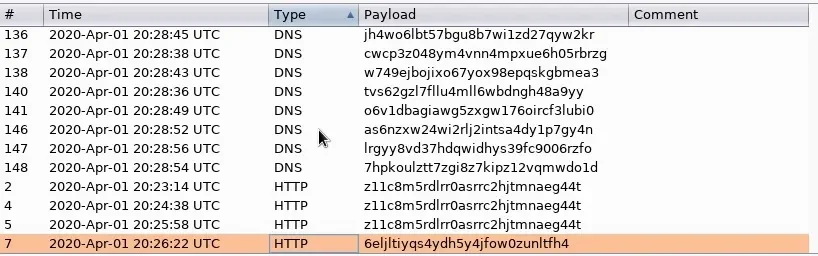
After analysing the results he counted 25 internal Amazon IP addresses from which the requests had been made.
Root cause
The application took the value of the filename parameter and used it to make a server-side request, and the researcher could point it at a host he controlled. The only condition the researcher found was that event_id had to be a fresh value: requests carrying an event_id that had already been used did not produce the outbound request. The report does not describe the code behind this behaviour, so the reason for the event_id check is not stated. The earlier XXE attempt failed, and the direct parameter abuse was the path that worked.
Impact
The researcher could make the server issue requests to a host he controlled and observe them arriving from internal Amazon IP addresses, 25 of them in his analysis. That discloses internal addressing information. He reported the bug, and the platform declared it out of scope. After a discussion in which he argued the bug was valid and provided references, the platform split its position in two:
- The information disclosure, meaning the internal IPs, was low impact.
- Firing millions of requests towards any target is a DDoS, which is out of scope.


Around the same time, three older reports with a CVSS of 9/10 were closed as duplicates, and he decided to stop hunting for a while.
Fix
Variants to test
- Fuzz numeric and otherwise non-obvious parameter values such as
-10and watch for new backend calls in the proxy history. A positive result is a request to an endpoint you had not seen before, such as/api/sentryhere. - Put a Collaborator URL into any parameter that looks like a filename or URL and replay the request. A positive result is a DNS or HTTP interaction from the target's infrastructure.
- When a replay produces nothing, compare several captured requests for a per-request token such as
event_id. A positive result is that changing that token makes the outbound request fire again. - When a token has a fixed format, use the Intruder bruteforcer with the minimum and maximum length set to that format, as was done here with 32 characters, and pair it with a list of Collaborator URLs.
- If the application parses uploaded spreadsheets, try XXE payloads inside the file. A positive result is an outbound interaction from the parser, though in this case the parameters were sanitised and it did not work.
What happened, in plain words
A security researcher hunted for one specific kind of bug on a bug bounty platform called Synack. A bug bounty platform is a website where companies list their own systems and offer rewards to people who find security problems in them, instead of hiring a full-time team. The bug he was hunting is called SSRF, short for Server-Side Request Forgery. To understand it, imagine a hotel concierge who will fetch anything you ask for: you say "please bring me the newspaper from room 12" and the concierge walks into the building and comes back with it. If you can trick the concierge into fetching something from a room you are not allowed to enter, you have abused his trust. In a web application, the "concierge" is the server, and SSRF means you can make the server send a request to an address of your choosing, including addresses inside the company's own private network that you could never reach from your own computer.
The researcher's plan was simple: find a place where the application takes a value from the user and uses it to make a request to somewhere else. He tried one route first (uploading a spreadsheet that might make the server fetch something), it failed, and then he noticed a background call the application made to an endpoint called /api/sentry. An endpoint is simply a specific address on a server that does one job, like a counter in a shop: /api/sentry is the counter that handles "sentry" events. By fiddling with two values in that request, he got the server to call a machine he controlled, and he saw the calls arriving from internal Amazon IP addresses. An IP address is the numeric address of a computer on a network, like a postal address but for machines; "internal" means those addresses belong to the company's private network and are not supposed to be reachable from the internet.
He reported it. The platform said it was out of scope, meaning it fell outside the rules of what they would accept and pay for. After some back and forth, the platform explained its position in two parts: the internal IP addresses were only a small information leak, and sending huge numbers of requests at a target counts as a denial-of-service attack, which is out of scope. So the report ended without a reward.
Background: why he only tested for SSRF
The researcher explains that after reading a lot of posts on Twitter about SSRF, he decided to test for that one bug class only. He normally works on the Synack platform because its scope is precise and its response time is good. Scope means the list of systems and behaviours a platform allows you to test; anything outside that list is off limits, even if it is broken.
He also likes HackerOne, another bug bounty platform, but says that with limited resources and no automation he struggles with the discovery work: finding which parts of a company's systems exist in the first place (asset discovery) and finding pages and files on them (content discovery). He jokes that he hates both. His reason is practical: on his laptop, an Intel Core i5 with 16 GB of memory and a 20 Mbps internet connection, discovery can take a very long time. So he prefers a platform that hands him a defined list of targets, letting him spend his time sharpening his testing skills rather than hunting for targets.
Approach: choosing a target
Even on Synack there are many targets and many skilled researchers, so you have to be very specific when picking one. He points out how fast things move: a bug submitted 20 minutes after a target goes live can already be a duplicate, meaning someone else reported the same thing first. The bug identifier even looks like targetname-13. That is a separate frustration in itself.
When selecting a target on Synack, he says, you have to keep a few things in mind, things that hurt bug bounty hunters later until they get used to them:
- "PoC || GTFO": a proof of concept (PoC) must be concrete. If you use words like "potential", "which can be used" or "attacker can later", your bug is rejected. A proof of concept is the demonstration that the bug really works, not a theory about what might happen.
- "Out Of Scope" is much wider than the acceptance criteria. In other words, the list of things they will not accept is bigger than the list of things they will.
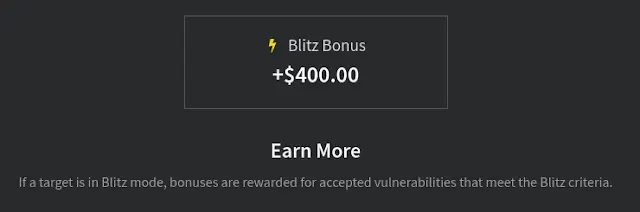
- Low hanging fruits are best described in one picture.
This image accompanies that last point.
- Do not be surprised if bugs that pay well on other platforms get rejected here.
- The technology stack is often unusual, and it can take a long time to understand. The technology stack is the collection of software the application is built from: the web server, the programming language, the database and so on.
- Scope matters. It does not matter whether you find remote code execution (RCE, the ability to run your own commands on the server) on another subdomain or on an out-of-scope endpoint. A subdomain is a subdivision of a domain name, like
shop.example.comnext towww.example.com.
With all of that in mind, he is almost sure every time that he has to find either something out of the box or something obvious that the highly skilled Synack Red Team members have missed. The Synack Red Team is the pool of researchers Synack invites to test on its platform.
Keeping all of this in mind, he always selects a target that is running a Blitz.
A Blitz, on Synack, is a tougher engagement. His comparison is going to war: when you are not sure you will come back, you choose the toughest target to defeat.
Assessment: mapping the target and the first attempt
He selected a target that had a Blitz running, and whose last reported vulnerability was three months old, which he took as a good sign. He then did application mapping (working out what the application is made of and how its parts connect), content discovery (finding pages and files) and complete enumeration of the target (listing everything it exposes). After that he started fuzzing every parameter for SSRF. Fuzzing means sending lots of slightly different inputs and watching how the application reacts, looking for one that behaves differently. He admits it sounds silly to fuzz only for SSRF, but that is what he did.
The target had an Excel parsing feature: it accepted an uploaded spreadsheet and processed it on the server. His first idea was to reach SSRF through XXE inside the uploaded file. XXE stands for XML External Entity: XML is a text format for structured data, and it has a feature where a document can refer to an external resource, such as a file or a URL, which the parser then fetches. If the parser fetches a URL you control, you have made the server talk to you. Spreadsheet files such as .xls can contain XML inside them, which is why an upload feature is a natural place to try XXE.
So he created an xls file with a basic payload and uploaded it to the application, waited several times, and got nothing. He then uploaded multiple manipulated payloads, still with no luck.
Then he gave up on that option.
He gave up on that option. Sanitising means cleaning up user input so that dangerous characters or structures are removed or neutralised before the application uses them.
Wait, something is there
While fuzzing the application with non-obvious values such as -10, he noticed that the application made a call to /api/sentry. A value like -10 is non-obvious because it is not a normal number for a quantity or an identifier, so it is more likely to push the application into an unusual code path. The call to /api/sentry carried lots of parameters, and that smelled promising. A parameter is a named value sent with a request, like filename=report.xls; the name tells the application what the value is for.
He changed the filename parameter to his Burp Collaborator client id and watched the Collaborator client. Burp Suite is a tool for intercepting and modifying web traffic between your browser and a server. Burp Collaborator is a companion service: it gives you unique hostnames that you can put into a request, and it records any request or DNS lookup that reaches them. A DNS lookup is the step where a computer asks the internet's address book, the Domain Name System, "what is the IP address for this name?". If the target server fetches your Collaborator hostname, the Collaborator records the interaction, which proves the server made the request. A client id here is the unique identifier of your Collaborator session.
He was looking at his Collaborator client without much hope, and then saw a request arriving from an IP address to his Collaborator client. That was the moment he saw a request arriving from an IP address to his Collaborator client.
He took the request to Repeater and replayed it, but got no SSRF. Repeater is the Burp tool that lets you send the same request again and again, editing it each time. He then took several recent requests to Repeater and replayed them, again with no result. His hypotheses were:
- The sequence of requests might matter. For example, an
OPTIONSrequest to/api/sentryfollowed by a POST.OPTIONSandPOSTare HTTP methods: the verb at the start of a request that says what kind of action it is.OPTIONSasks the server what it allows;POSTsends data to it. He tried that and it did not work. - Only some of the many sentry requests might be able to trigger SSRF. He started from scratch and again saw a single request, but replaying it in Repeater produced no SSRF.
- He compared two or three requests bit by bit and found that all requests were tracked by an
event_id. As soon as he changed a character in it, the Collaborator client was hit again.
That third point is the key discovery. The application was tracking each request by its event_id, and changing a character in it made the Collaborator client get hit again. A fresh event_id made the application process the event again, and processing it meant fetching the URL in filename.
Setting the attack
Step 1: identify the two parameters that matter
The outbound request was driven by the filename parameter, which held the URL to fetch, and by event_id, which the researcher found had to be changed for the request to fire again. Replaying a request with an already used event_id produced no SSRF, which is why the first Repeater attempts failed.
Step 2: send the request to Intruder
He sent the request to Intruder and marked both positions, filename and event_id:
"filename":"https://§x422hnxyxutjb4dsi0yne38b72dt8hx.burpcollaborator.net§" event_id":"§[redacted]§"
Line by line:
"filename":"https://...burpcollaborator.net"is the parameter that holds the URL the server will fetch. The hostnamex422hnxyxutjb4dsi0yne38b72dt8hx.burpcollaborator.netis a Collaborator hostname, so any request to it will be recorded by the researcher.event_id":"[redacted]"is the identifier the application uses to track the event. It looks like a long hexadecimal string, which is a common format for random identifiers.- The
§symbols are Intruder's markers. Intruder is the Burp tool that takes a request, replaces the marked parts with values from a list, and sends the request once per value. Everything between a pair of§is a position that will be filled in.
So this single line tells Intruder: try many different Collaborator URLs in the first position, and many different event_id values in the second.
Step 3: generate the payloads
In Burp, he opened the Collaborator client, clicked the number to generate new payloads, changed the count to 50 and copied them to the clipboard. These Collaborator URLs became the payload list for the first position. A payload, in this context, is simply one of the values you feed into a marked position.
Step 4: configure the payloads
In the payload window, payload set 1 was set to a simple list containing the URLs copied from the Collaborator client. Payload set 2 was set to the bruteforcer, with the minimum length changed from 4 to 32 and the maximum length also set to 32, so that each generated event_id was 32 characters long, matching the format of the original value. The bruteforcer is the payload type that generates values by trying combinations; setting both the minimum and maximum length to 32 makes it produce 32-character strings, which is the shape the application expects.
Step 5: run the attack
As soon as the attack started, many requests arrived at the Collaborator client.
This image shows the Collaborator client filling up with incoming interactions while the attack runs.
After analysing the results he counted 25 internal Amazon IP addresses from which the requests had been made. In other words, the requests came from 25 internal Amazon IP addresses.
The report and the response
He reported the bug to the platform, and it was declared out of scope.
There was then a small conversation in which he argued the bug was valid and provided references. But the platform's position held, and it split the issue into two parts:
- Information disclosure: the internal IP addresses were low impact. Information disclosure means leaking information the application was not meant to reveal; here, the addresses of internal machines.
- Denial of service: if you fire millions of requests towards any target, that is a DDoS (distributed denial of service, overwhelming a system with traffic), which is out of scope.
Around the same time, three older reports with a CVSS of 9/10 were closed as duplicates, and he decided to stop hunting for a while. CVSS is the Common Vulnerability Scoring System, a standard 0 to 10 scale for how severe a vulnerability is; 9/10 is very severe.
Root cause
The application took the value of the filename parameter and used it to make a server-side request, and the researcher could point it at a host he controlled. The only condition the researcher found was that event_id had to be a fresh value: requests carrying an event_id that had already been used did not produce the outbound request. The report does not describe the code behind this behaviour, so the reason for the event_id check is not stated. The earlier XXE attempt failed, and the direct parameter abuse was the path that worked.
Impact
The researcher could make the server issue requests to a host he controlled and observe them arriving from internal Amazon IP addresses, 25 of them in his analysis. That discloses internal addressing information. The platform judged that disclosure to be low impact, and treated the volume of requests as a denial-of-service concern that is out of scope.
Fix
The report does not say whether anything was changed. An allowlist is a list of things that are explicitly permitted; anything not on the list is refused.
Variants to test
- Fuzz numeric and otherwise non-obvious parameter values such as
-10and watch for new backend calls in the proxy history. A proxy history is the record of every request and response that passed through your intercepting tool. A positive result is a request to an endpoint you had not seen before, such as/api/sentryhere. - Put a Collaborator URL into any parameter that looks like a filename or URL and replay the request. A positive result is a DNS or HTTP interaction from the target's infrastructure.
- When a replay produces nothing, compare several captured requests for a per-request token such as
event_id. A token here is a short value that identifies one particular request or event. A positive result is that changing that token makes the outbound request fire again. - When a token has a fixed format, use the Intruder bruteforcer with the minimum and maximum length set to that format, as was done here with 32 characters, and pair it with a list of Collaborator URLs.
- If the application parses uploaded spreadsheets, try XXE payloads inside the file. A positive result is an outbound interaction from the parser, though in this case the parameters were sanitised and it did not work.
Glossary
- API: a defined set of addresses and rules that one piece of software uses to talk to another; in a web application, usually a set of URLs under
/apithat return data rather than web pages. - Allowlist: a list of things that are explicitly permitted, with everything else refused.
- Asset discovery: finding which systems, domains and subdomains a company owns and exposes.
- Blitz: a tougher, time-limited engagement on the Synack platform.
- Bruteforcer (Burp Intruder payload type): a payload generator that produces values by trying combinations, with configurable length.
- Bug bounty platform: a website where companies list systems they authorise for testing and reward researchers who find security problems in them.
- Burp Collaborator: a service that gives you unique hostnames and records any request or DNS lookup that reaches them, proving a server made an outbound request.
- Burp Suite: a tool for intercepting, inspecting and modifying web traffic between a browser and a server.
- Client id: the unique identifier of your Collaborator session.
- Content discovery: finding pages, files and endpoints on a target that are not linked from the visible site.
- CVSS: the Common Vulnerability Scoring System, a standard 0 to 10 scale for the severity of a vulnerability.
- DDoS: distributed denial of service, overwhelming a system with traffic so that it cannot serve legitimate users.
- DNS lookup: the step where a computer asks the Domain Name System to translate a hostname into an IP address.
- Duplicate: a report for a bug that someone else already reported.
- Endpoint: a specific address on a server that performs one job, such as
/api/sentry. - Enumeration: systematically listing everything a target exposes.
- Event id: in this report, a value the application uses to track each event; it had to be fresh for the outbound request to happen.
- Fuzzing: sending many slightly different inputs and watching for a different behaviour.
- HTTP method: the verb at the start of an HTTP request, such as
GET,POSTorOPTIONS, saying what kind of action is requested. - Information disclosure: leaking information the application was not meant to reveal.
- Internal IP address: an address on a private network that is not reachable from the public internet.
- Intruder: the Burp tool that replaces marked positions in a request with values from a list and sends the request once per value.
- IP address: the numeric address of a computer on a network.
- Out of scope: outside the rules of what a platform authorises and will accept.
- Parameter: a named value sent with a request, such as
filename=report.xls. - Payload: one of the values you feed into a marked position in an attack.
- Proof of concept (PoC): a concrete demonstration that a bug really works.
- Proxy history: the record of every request and response that passed through your intercepting tool.
- RCE: remote code execution, the ability to run your own commands on a server.
- Repeater: the Burp tool that lets you resend and edit a single request repeatedly.
- Sanitising: cleaning user input so dangerous characters or structures are removed or neutralised.
- Scope: the list of systems and behaviours a platform authorises for testing.
- SSRF: server-side request forgery, making a server send a request to an address of your choosing.
- Subdomain: a subdivision of a domain name, such as
shop.example.com. - Synack Red Team: the pool of researchers Synack invites to test on its platform.
- Technology stack: the collection of software an application is built from.
- Token: a short value that identifies one particular request, session or event.
- XXE: XML External Entity, an XML feature where a document refers to an external resource that the parser then fetches.
- XML: a text format for structured data, built from tags and entities.




