Thirteen Years On: Advancing the Understanding of IIS Short File Name (SFN) Disclosure!
The blog post explains that Microsoft IIS discloses short file names (8.3 format) through tilde (~) requests, allowing attackers to enumerate file and directory names. This information can accelerate penetration testing and sometimes reveal sensitive files or admin panels.
 Published on soroush.me
The topic of IIS Short File Name (SFN, also known as 8.3) disclosure has been explored across various platforms in the past. In this blog post, I’ll take a look at the insights I presented at SteelCon 2023, which extended the scope of the original research.
The full write-up lives on its author's site
It belongs to its author, so we link to it rather than copy it. The other two tabs are our own rewrites, checked against it.
Context
This write-up is about Microsoft IIS Short File Name (SFN, also known as 8.3) disclosure, a feature of IIS that leaks the short, legacy-style names that Windows generates for files and directories. The author first identified the issue on 1 August 2010, and the post revisits it thirteen years later, extending the original research with material presented at SteelCon 2023. The presentation and the original 2010 research paper are both linked from the post.
Short names exist because the FAT file systems could only support short names: a maximum of 8 characters, then a dot, then up to 3 characters of extension, for a maximum total of 12 characters including the extension. VFAT brought long file name support with Windows 95. On NTFS short names are not necessary, but Windows still creates them for backwards compatibility, whenever a file name does not conform to the short name rules: it exceeds the character limit, contains unsupported characters, or has more than one dot.
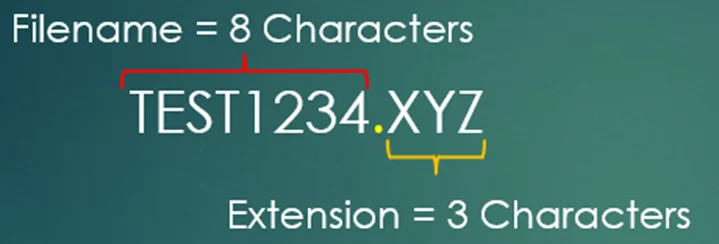
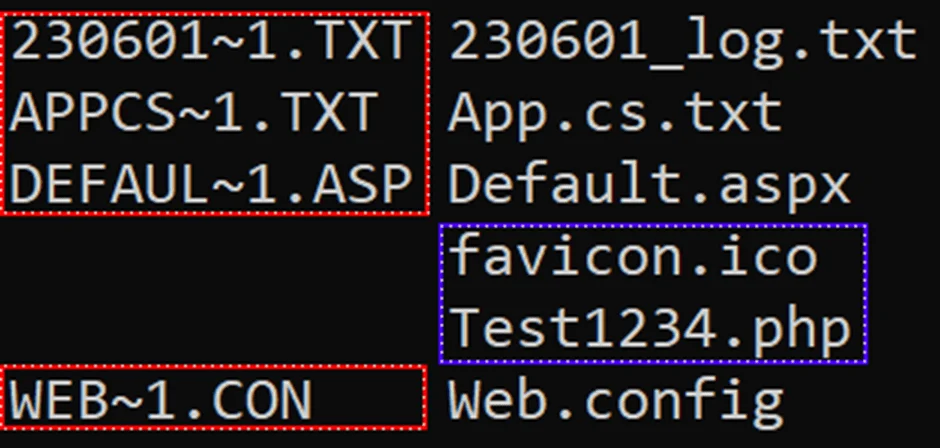
SFNs are case-insensitive and use uppercase characters only. They consist of alphanumerical characters and a select few special characters, with no spaces and only one dot followed by an extension. Windows typically builds the short name from the first six characters of the real name, then a tilde (~) and a number, then the first three characters of the extension after a dot. Disallowed characters, extra dots and spaces are removed, and a plus sign (+) is replaced with an underscore (_). If a short name already exists for a different file, the number after the tilde is incremented. The dir /x or dir /-n commands show the generated short names in Windows.
Before Windows 2000 the number after the tilde could go as high as 9; from Windows 2000 it is capped at 4. When more than four files would produce the same short name, the formula changes: the first two characters of the file name (or fewer, or one if only one exists) are followed by four hexadecimal characters produced by an algorithm. Thomas Galvin has researched that hexadecimal algorithm in depth, and @bitquark has explored the feature further using the leaked Windows 2003 source code, implementing the findings in the Go tool shortscan.
As of the time of writing, all IIS versions are susceptible, unless the SFN feature was disabled on Windows before the web directory was created.
Setup
The technique is performed against a web server over HTTP. The author's manual approach uses a handful of HTTP methods and suffixes, and can be automated with Burp Suite Intruder. The automation tools listed in the post are:
- shortscan (Go, with checks to find the real file name)
- IIS-ShortName-Scanner (the original Java tool)
- sns (another Go implementation)
- Burp-IISTildeEnumerationScanner (a Burp Suite extension)
- IISRecon (a bash script that also finds real file names)
The precondition for the disclosure itself is that short names were generated for the files in the web directory, which depends on the SFN feature not having been disabled before the directory was created.
Finding it
The risk of uncovering short file names on its own is quite low and mostly informational, but the author notes it often accelerates penetration testing or gives quick insights during bug bounty hunts. In his own experience he has found numerous sensitive files this way, downloaded databases, and identified files with inadequate access control, including admin control panels leading to high risk issues.
The manual check works by comparing responses for a short file name that should exist (such as web.config or default.aspx) against one that should not. If the HTTP response differs, the check has hit something.
Exploitation
Step 1: Probe with OPTIONS and a tilde suffix
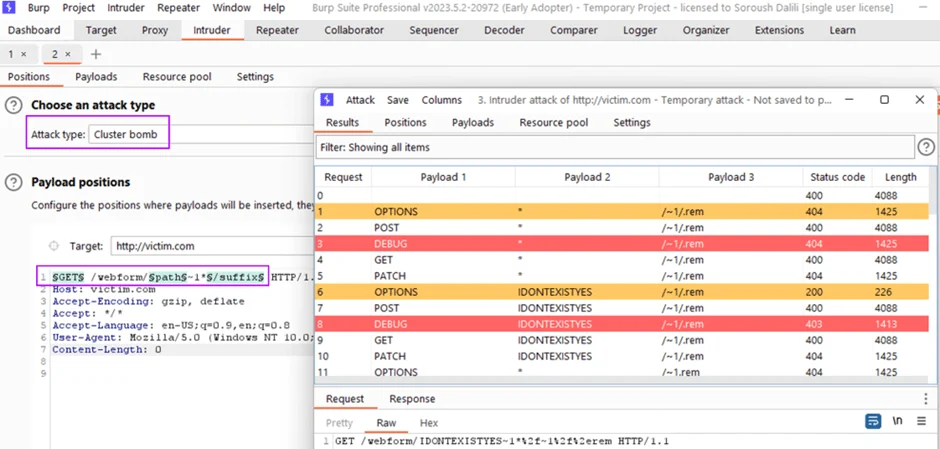
The author starts with the OPTIONS HTTP method paired with the /~1/.rem pattern as the suffix. If that yields nothing, he switches the method to POST, DEBUG, GET or PATCH, and tries suffixes such as /~1.rem, /~1.aspx, /~1.svc, /~1.xamlx or /~1.soap. The differing response between an existing and a non-existing short name is the signal. The process can be automated with Burp Suite Intruder:
Step 2: Distinguish an application from a directory or virtual directory
To tell an IIS "application" from a "directory/virtual directory", append something like /profile_json_appservice.axd/js to the path:
https://victim.com/path1/profile_json_appservice.axd/js
A 200 status code indicates an application; a 500 indicates a directory or virtual directory.
Step 3: Distinguish a directory from a virtual directory
Use the OPTIONS method with a suffix containing an Alternate Data Stream pattern, for example ::$DATA/~1.rem:
OPTIONS /path1::$DATA/~1.rem HTTP/2
Host: victim.com
Accept: */*
Accept-Language: en-US;q=0.9,en;q=0.8
User-Agent: Mozilla/5.0 (Windows NT 10.0; Win64; x64) AppleWebKit/537.36 (KHTML, like Gecko) Chrome/115.0.5790.110 Safari/537.36
A 404 means path1 exists and is a directory. A 200 means path1 either does not physically exist or is a virtual directory.
Step 4: Reveal a long file name containing the ~DIGIT pattern
When a file has a ~ followed by a number anywhere in its name, IIS can reveal the full file name, not just the short name. The enumeration is identical to short name enumeration, except that it continues past the 6th letter of the file name. To test whether such a file exists in a path, use seven question marks either before or after the tilde, followed by a number enumerated from 0 to 9, padded with asterisks:
Normally, if a long file name with the ~DIGIT pattern does not exist, seven question marks produce an error, because the maximum is six. This is especially useful when an application generates files or directories using user-supplied input in the name: the full names can then be revealed, exposing other users' data, particularly where security relies on obscurity.
Tips and tricks for manual checks
- Do not rely solely on the response status code; compare the entire response.
- Do not confuse Kestrel or HTTP.SYS with IIS. Recent .NET versions such as 6, 7 and Core might be running on Kestrel.
- Web Forms using the .NET Framework can be served with or without extensions.
- The process does not work on virtual files or IIS virtual/app paths.
- Wildcards can be replaced:
?with>,*with<, and"with.. - URL encoding may be crucial in certain instances.
- WAFs can cause anomalies.
- Spaces and periods can be used as padding characters.
Root cause
Windows generates 8.3 short names for backwards compatibility on NTFS, and a request for a short name that exists produces a different response from one that does not. , and it is present on all IIS versions unless SFN was disabled on Windows before the web directory was created.
Impact
The direct risk of learning short file names is low and mostly informational. The practical value is in accelerating penetration testing and bug bounty work: the author has used it to find sensitive files, download databases, and identify files with inadequate access control, including admin control panels that led to high risk issues. The long file name technique matters most when applications build file or directory names from user input and rely on obscurity, since it can reveal other users' data.
Fix
The post does not describe a fix or a change made by a vendor. The only mitigation it states is that the issue may not apply if the SFN feature was disabled on Windows prior to the creation of the web directory.
Variants to test
- Method and suffix sweep: send
OPTIONSwith/~1/.rem, thenPOST,DEBUG,GETandPATCHwith/~1.rem,/~1.aspx,/~1.svc,/~1.xamlxand/~1.soap. A positive result is a response that differs between a short name that should exist (such asweb.configordefault.aspx) and one that should not. - Application versus directory: request
/profile_json_appservice.axd/jsunder a path. A 200 indicates an application; a 500 indicates a directory or virtual directory. - Directory versus virtual directory: send
OPTIONS /path::$DATA/~1.rem. A 404 means the path is a directory; a 200 means it does not physically exist or is a virtual directory. - Long file name with ~DIGIT: try
???????~1and~1???????with the number enumerated from 0 to 9 and asterisk padding. A response that does not error where seven question marks would normally fail indicates a matching long file name. - Wildcard substitutions: replace
?with>,*with<, and"with., and try URL encoding, spaces and periods as padding. A positive result is again a response difference between existing and non-existing names.
Before relying on any of these, confirm the target is IIS and not Kestrel or HTTP.SYS, and be aware that WAFs can produce anomalies in the responses.
What happened, in plain words
Imagine a filing cabinet where every folder and document has a proper, descriptive label, but the cabinet maker also stuck a tiny, cryptic sticker on each one for old machines that could not read long labels. Those stickers follow a strict, old-fashioned format: a few characters, a tilde, a number. The stickers were only ever meant to help ancient software, but they are still there, and anyone who knows the format can ask the cabinet, one sticker at a time, whether a particular document exists.
That is the essence of what this post is about. Microsoft's web server, IIS, has a long-standing behaviour: when you ask it for a file using the old-style short name (the "sticker"), it answers differently depending on whether that short name exists. By sending many carefully crafted requests and comparing the answers, an attacker can work out short names of files and folders on the server.
The author first found this behaviour on 1 August 2010, and this post revisits it thirteen years later, adding new material presented at SteelCon 2023. The post links to the SteelCon 2023 presentation and to the original 2010 research paper.
A quick history of short file names
To understand why these short names exist at all, you need a little history. The FAT file systems were limited: they could only support short names. A short file or directory name has a maximum of 8 characters. If there is an extension (the part after the dot, like .txt), it needs a dot followed by up to 3 more characters. So the maximum total length, including the extension, is 12 characters.
Later, with VFAT and Windows 95, long file names became possible. On the newer NTFS file system, short names are not strictly needed, but Windows still creates them anyway, for backwards compatibility, so that old software keeps working. Windows only bothers to create a short name when the real name does not already fit the short-name rules: when it is too long, contains characters the old rules do not allow, or has more than one dot.
The rules Windows follows
Short file names are case-insensitive (upper and lower case are treated the same) and are written in uppercase only. They use letters, digits and a small set of special characters. No spaces. Only one dot, followed by the extension.
When Windows has to invent a short name, it typically takes the first six characters of the real name, adds a tilde (~) and a number, then a dot and the first three characters of the extension. Along the way it removes characters that are not allowed, extra dots and spaces, and it turns a plus sign (+) into an underscore (_). If a short name is already taken by a different file, the number after the tilde goes up. On a Windows machine you can see the generated short names with the dir /x or dir /-n commands.
Because names are so short, many different long names can end up wanting the same short name. Before Windows 2000 the number after the tilde could go as high as 9. From Windows 2000 onwards it is capped at 4. So what happens when more than four files would collide? The formula changes: Windows uses the first two characters of the name (or fewer, or just one if only one exists), followed by four hexadecimal characters produced by an algorithm. Thomas Galvin has researched that hexadecimal algorithm in depth, and @bitquark has explored the feature further using the leaked Windows 2003 source code, implementing the findings in a Go tool called shortscan.
Who is affected
As of the time of writing, every version of IIS is susceptible. This might not be the case if the short-name feature was disabled on Windows before the web directory was created.
Why it matters
On its own, learning short file names is a low-risk, mostly informational problem. But it is a very useful stepping stone. The author says it often speeds up penetration testing (authorised security testing) and gives quick leads during bug bounty hunts (programmes that pay people for reporting security problems). In his own experience he has found numerous sensitive files this way, downloaded databases, and found files with inadequate access control, including admin control panels that led to high-risk issues.
Tools that automate it
The post lists several tools:
- shortscan (written in Go, with checks to find the real file name)
- IIS-ShortName-Scanner (the original tool, written in Java)
- sns (another Go implementation)
- Burp-IISTildeEnumerationScanner (an extension for Burp Suite)
- IISRecon (a bash script that also finds real file names)
Doing it by hand in 2023
The manual approach is simple in principle. You pick a short file name that should exist (for example web.config or default.aspx) and one that should not, send requests for both, and compare the responses. If the responses differ, you have found something. The author starts with the OPTIONS HTTP method and the suffix /~1/.rem. If that gives nothing, he switches the method to POST, DEBUG, GET or PATCH, and tries suffixes such as /~1.rem, /~1.aspx, /~1.svc, /~1.xamlx or /~1.soap. This can be automated with Burp Suite Intruder:
Tips and tricks for manual checks
- Do not rely only on the response status code; compare the whole response.
- Do not confuse Kestrel or HTTP.SYS with IIS. Recent .NET versions such as 6, 7 and Core might be running on Kestrel.
- Web Forms built on the .NET Framework can be served with or without extensions.
- The technique does not work on virtual files or on IIS virtual or application paths.
- Wildcards can be swapped:
?can be replaced with>,*with<, and"with.. - URL encoding can be crucial in some cases.
- Web Application Firewalls (WAFs) can cause anomalies, so be aware.
- Spaces and periods can be used as padding characters.
What is new
The following sections cover topics that were not in the earlier presentations. They can be handy when you are dealing with files or directories on IIS.
Application versus directory versus virtual directory
In an earlier blog post the author explained how to tell an IIS "application" apart from a "directory" or "virtual directory". The short version: append something like /profile_json_appservice.axd/js to the path. If the response status code is 200, it is an application. If it is 500, it is a directory or a virtual directory. An example:
https://victim.com/path1/profile_json_appservice.axd/js
Now, to tell a directory from a virtual directory, use the OPTIONS method with a suffix that contains an Alternate Data Stream pattern, for example ::$DATA/~1.rem:
OPTIONS /path1::$DATA/~1.rem HTTP/2
Host: victim.com
Accept: */*
Accept-Language: en-US;q=0.9,en;q=0.8
User-Agent: Mozilla/5.0 (Windows NT 10.0; Win64; x64) AppleWebKit/537.36 (KHTML, like Gecko) Chrome/115.0.5790.110 Safari/537.36
If the response is 404, path1 exists and is a directory. If it is 200, path1 either does not physically exist or is a virtual directory.
Revealing a long file name that contains the ~DIGIT pattern
When a file has a ~ followed by a number anywhere in its name, IIS can reveal the full file name, not just the short name. The enumeration is the same as for short names, except that you keep going past the sixth letter of the file name. To test whether such a file exists in a path, use seven question marks either before or after the tilde, followed by a number from 0 to 9, padded with asterisks:
Normally, if a long file name with the ~DIGIT pattern does not exist, seven question marks produce an error, because the maximum is six. This is especially useful when an application builds file or directory names from user-supplied input: the full names can then be revealed, exposing other users' data, particularly where security relies on obscurity.
Glossary
- IIS: Microsoft's web server software, the program that serves websites on Windows.
- Short File Name (SFN) / 8.3 name: the old-style, abbreviated name Windows generates for a file or folder, at most 8 characters plus a dot plus up to 3 characters of extension.
- FAT / VFAT / NTFS: families of file systems used by Windows. FAT is the oldest and only supported short names; VFAT added long names with Windows 95; NTFS is the modern one and still creates short names for compatibility.
- Tilde (
~): the~character, used in short names to separate the abbreviated name from a number. - Hexadecimal: a way of writing numbers using sixteen symbols (0 to 9 and A to F).
- HTTP method: the verb at the start of a web request, such as
GET(fetch),POST(submit),OPTIONS(ask what is allowed),PATCH(partially update) orDEBUG. - Status code: the three-digit number a server sends back, such as 200 (OK), 404 (not found) or 500 (server error).
- Suffix: the part of a URL after the path, used here to probe for short names.
- Burp Suite Intruder: a feature of the Burp Suite security testing tool that sends many variations of a request automatically.
- Penetration testing: authorised security testing where a tester tries to break into a system with permission.
- Bug bounty: a programme that pays people for responsibly reporting security problems.
- Kestrel / HTTP.SYS: other web server components used by .NET; they are not IIS, so the technique may not apply.
- Web Forms: an older .NET way of building web pages.
- Virtual directory / application: a folder in IIS that maps to a location elsewhere on disk (virtual directory) or is configured as a separate application.
- Alternate Data Stream (ADS): an extra hidden data channel attached to a file on NTFS, written with
::$DATA. - Wildcard: a character such as
?or*that stands for other characters in a pattern. - URL encoding: writing special characters in a URL as
%followed by two hexadecimal digits. - WAF (Web Application Firewall): a filter in front of a website that inspects requests and can block or alter them.
- Padding: adding extra characters (spaces or periods) to make a value a particular length.
- Obscurity: relying on something being hard to guess (like a file name) as a security measure.






