Cookieless DuoDrop: IIS Auth Bypass & App Pool Privesc in ASP.NET Framework (CVE-2023-36899)
The .NET Framework's cookieless session feature could be abused by repeating the cookieless pattern in a URL to bypass IIS path restrictions, allowing access to protected directories and causing an application to run under its parent application pool. This could lead to authentication bypass and privilege escalation on IIS.
 Published on soroush.me
In modern web development, while cookies are the go-to method for transmitting session IDs, the .NET Framework also provides an alternative: encoding the session ID directly in the URL. This method is useful to clients that do not support cookies.
The full write-up lives on its author's site
It belongs to its author, so we link to it rather than copy it. The other two tabs are our own rewrites, checked against it.
Context
The .NET Framework has a long-standing alternative to cookie-based session tracking: the session ID can be carried in the URL itself, in a construct that looks like this:
https://[targetdomain]/(S(aaaaaaaaaaaaaaaaaaaaaaaa))/default.aspx
This is the "cookieless" feature. It exists for clients that do not support cookies, and it is documented by Microsoft. In practice it is rare, which is exactly why developers and testers tend to overlook it. Historically it has been a source of client-side bugs such as session fixation, session hijacking, HTML injection and cross-site scripting, and it can also be used to slip past path-based firewall rules that were never written with the cookieless syntax in mind.
The feature was deliberately left out of .NET Core and later .NET versions because of its security problems, but a very large number of applications still run on the classic .NET Framework, so the behaviour is still worth understanding.
This write-up covers two issues that arise when the cookieless pattern is repeated twice in a path. They were reported to Microsoft separately because their impact and exploitation differ:
- an IIS restricted path bypass, leading to potential authentication and path-filtration bypass;
- an Application Pool confusion, leading to potential privilege escalation.
Microsoft fixed both with a single patch, under CVE-2023-36899. A later variant was fixed under CVE-2023-36560.
Setup
The examples use a site called victim.com with the following layout:
/webform/protected/target1.aspx, inside a/protected/directory that enforces Basic authentication./webform/bin/target2.aspx, a page that was temporarily moved into the/bin/folder, which makes it inaccessible through IIS.
For the Application Pool work, the site has three applications:
- The root (
/) runs in theDefaultAppPoolApplication Pool. /classic/uses the.NET v4.5 ClassicApplication Pool./classic/nodotnet/uses theNoManagedCodeClassicApplication Pool, which does not support managed code.
A small C# page, AppPoolPrint.aspx, is deployed across all three applications so the current Application Pool can be read back:
<%@ Page Language="C#" %>
<%
string appPoolName = System.Environment.GetEnvironmentVariable("APP_POOL_ID");
Response.Write("App Pool Name: " + appPoolName);
%>
It simply reads the APP_POOL_ID environment variable and writes it into the response.
Finding it
The starting point was unrelated: the researcher was looking for a new way to improve an IIS Short File Name Disclosure technique. While doing that, it became clear that the cookieless part of a path can be used twice, and a short post followed about how WAFs might potentially be bypassed this way:
https://twitter.com/irsdl/status/1640390106312835072
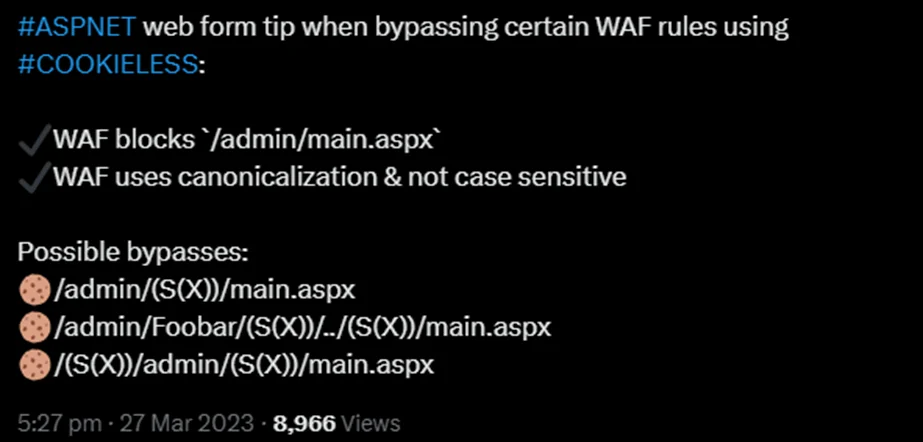
Later, repeating the cookieless pattern twice produced a strange anomaly. That anomaly turned out to be two distinct vulnerabilities, which is why they were reported separately even though one patch ended up fixing both. Microsoft's own comment on the duplicate assessment was:
While it's not technically a dupe from your side, it is from ours because the same patch fixes both thing, although it's by accident rather than deliberation.
Exploitation
Step 1: confirm the normal behaviour
Accessing the two pages through their ordinary URLs is blocked by IIS:
https://victim.com/webform/protected/target1.aspx

https://victim.com/webform/bin/target2.aspx
The first is refused because the /protected/ directory requires Basic authentication; the second because files under /bin/ are not served.
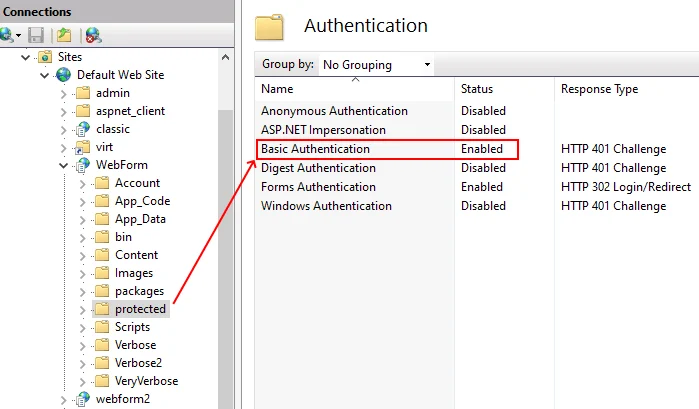
As an example, IIS was configured to require authentication for the /protected/ path:
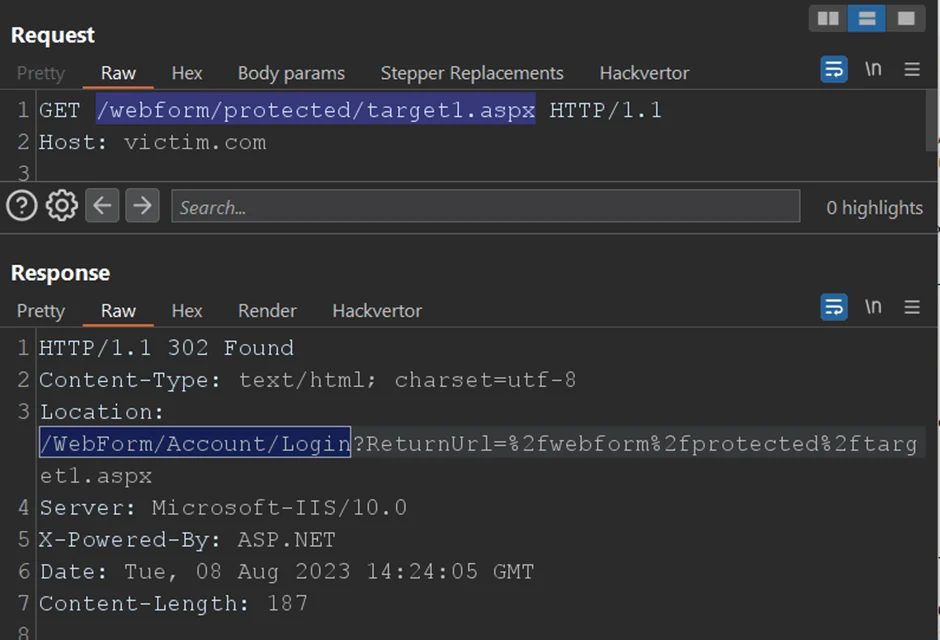
With the standard URL, IIS behaves as expected and redirects unauthenticated users to the login page:
Step 2: split the protected segment with a cookieless pattern
The same pages can be reached by inserting a cookieless pattern into the middle of the restricted directory name:
https://victim.com/webform/(S(X))/prot/(S(X))ected/target1.aspx

https://victim.com/webform/(S(X))/b/(S(X))in/target2.aspx
Each URL contains two (S(X)) segments. By the time the rewrite runs, the initial cookieless value has already been removed, so the second occurrence inside the directory name is the one that gets cut out. After the rewrite, the path becomes /protected/ or /bin/ again and the page is served.
The bypass allows access without authentication, as the Anonymous user. This can sometimes lead to errors if the system expects a specific profile:
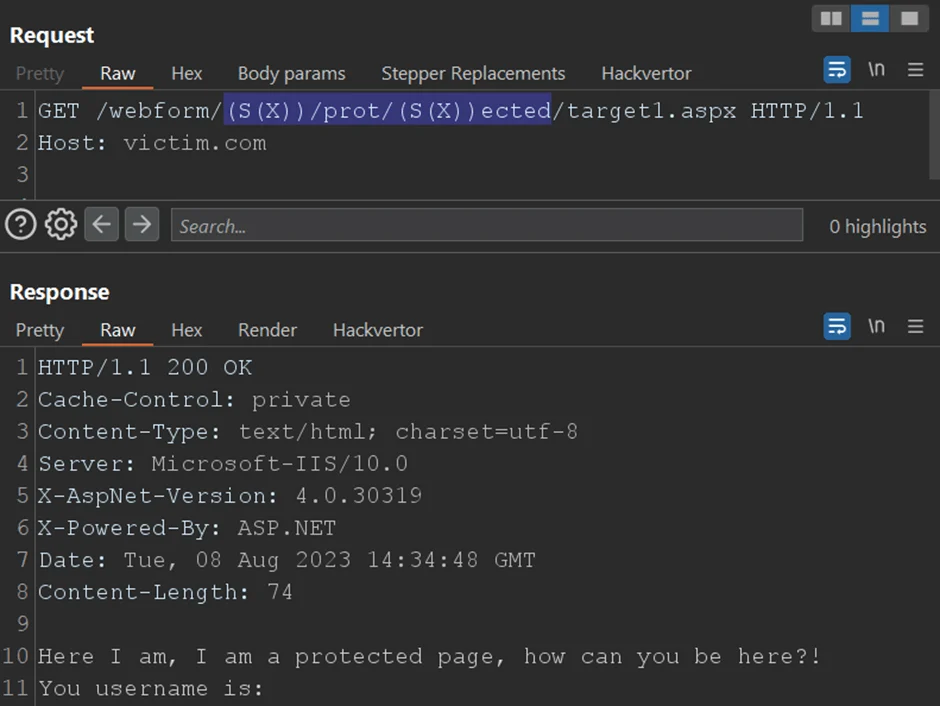
The target1.aspx page used in the test was:
Here I am, I am a protected page, how can you be here?!
You username is: <%=HttpContext.Current.User.Identity.Name%>
Step 3: understand the rewrite
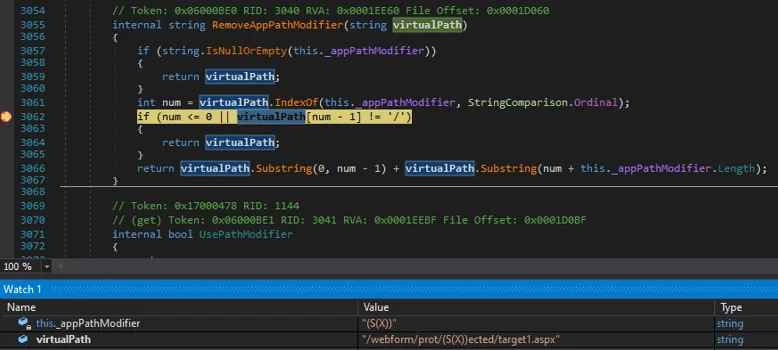
The final rewrite happens in RemoveAppPathModifier in System.Web.HttpResponse:
internal String RemoveAppPathModifier(string virtualPath) {
    if (String.IsNullOrEmpty(_appPathModifier))
        return virtualPath;

    int pos = virtualPath.IndexOf(_appPathModifier, StringComparison.Ordinal);

    if (pos <= 0 || virtualPath[pos-1] != '/')
        return virtualPath;

    return virtualPath.Substring(0, pos-1) + virtualPath.Substring(pos + _appPathModifier.Length);
}
This method is used by RemoveCookielessValuesFromPath in the CookielessHelperClass. By the time it runs, the initial cookieless value has already been removed, so the second occurrence is the one that gets cut out, and the surrounding path is joined back together. The /prot/(S(X))ected/ path therefore becomes /protected/, which is what produces the bypasses above. A screenshot captures the method in action while debugging the .NET Framework:
Step 4: Application Pool confusion
Under normal conditions, AppPoolPrint.aspx reports the Application Pool of the application it lives in:
/AppPoolPrint.aspx -> DefaultAppPool

/classic/AppPoolPrint.aspx -> .NET v4.5 Classic

/classic/nodotnet/AppPoolPrint.aspx -> Error: 404 Not Found (as Managed Code isn't supported)
Repeating the cookieless pattern twice changes which Application Pool executes the page, so it runs in the parent's pool instead of its own:
/(S(X))/(S(X))/classic/AppPoolPrint.aspx -> DefaultAppPool

/(S(X))/(S(X))/classic/nodotnet/AppPoolPrint.aspx -> DefaultAppPool

/classic/(S(X))/(S(X))/nodotnet/AppPoolPrint.aspx -> .NET v4.5 Classic
Pages inside /classic/nodotnet/, which should not be able to run managed code at all, now execute the ASPX page using their parent's Application Pool. On IIS this can lead to privilege escalation.
Step 5: the post-patch variant (CVE-2023-36560)
A new variant was reported to Microsoft after the CVE-2023-36899 patch. It operates only on specific files. The patch only disabled the aggressive path replacement by default, so the problematic behaviour can be reintroduced through web.config:
<appSettings>
  <add key="aspnet:RestoreAggressiveCookielessPathRemoval" value="true" />
</appSettings>
The variant abuses the PathInfo feature of ASP.NET Framework web forms such as .aspx and .ashx pages (and potentially other services that support path parameters), together with the cookieless feature. The same two pages are used:
/WebForm/protected/target1.aspx -> the /protected/ folder requires Basic Authentication

/WebForm/bin/target2.aspx -> an ASPX file has been moved to the /bin/ folder so no one can access it!
Normally these URLs are not accessible in IIS:
/WebForm/protected/target1.aspx

/WebForm/bin/target2.aspx
With the cookieless pattern placed after the .ASPX extension, so that it lands in the path info, they are:
/WebForm/pro/(S(X))tected/target1.aspx/(S(X))/

/WebForm/b/(S(X))in/target2.aspx/(S(X))/
Application Pool confusion works the same way. The baseline results are unchanged:
/AppPoolPrint.aspx -> DefaultAppPool

/classic/AppPoolPrint.aspx -> .NET v4.5 Classic

/classic/nodotnet/AppPoolPrint.aspx -> Error: 404 Not Found (as Managed Code isn't supported)
With the new variant:
/cla/(S(X))ssic/AppPoolPrint.aspx/(S(X))/ -> DefaultAppPool

/cla/(S(X))ssic/nodotnet/AppPoolPrint.aspx/(S(X))/ -> DefaultAppPool

/classic/nodot/(S(X))net/AppPoolPrint.aspx/(S(X))/ -> .NET v4.5 Classic
Again, pages inside /classic/nodotnet/, which should not be able to run managed code, run the ASPX page using their parents' Application Pools, which can lead to escalation of privileges on IIS.
The MSRC experience for this variant is worth recording:
- The issue was submitted on 10 August 2023 and rejected on 21 August 2023 for "unsatisfactory quality".
- It was reported again on 22 August 2023, this time by pasting the original report rather than referencing it.
- A few weeks later the researcher was told the issue was a duplicate, and that someone (Markus Wulftange, according to the released advisory page) had reported it before, on 9 August 2023.
Root cause
The problem is in how cookieless paths are rewritten. RemoveAppPathModifier searches for the app path modifier with IndexOf and removes the first occurrence it finds, provided the character before it is /. Because the initial cookieless value has already been removed by the time this method runs, a second occurrence embedded inside a directory name is the one that gets stripped, and the two halves of the path are concatenated back together. The path that IIS used for its authorisation and filter checks is therefore not the path that is finally resolved, so restrictions on /protected/ and /bin/ no longer apply. The same rewrite is what changes which Application Pool handles the request.
The patch disabled the aggressive path replacement by default, but the behaviour can be turned back on with the aspnet:RestoreAggressiveCookielessPathRemoval setting shown above.
Impact
An attacker can reach directories that IIS protects with authentication, such as a Basic-authenticated folder, and directories that IIS blocks outright, such as /bin/. Requests arrive as the Anonymous user, which can cause errors where the application expects a specific profile. The Application Pool confusion lets pages that should not run managed code execute in a parent Application Pool, which can lead to privilege escalation on IIS. The PathInfo variant can also bypass IIS authentication and run pages in the parent Application Pool.
Fix
Microsoft addressed both original issues in one patch under CVE-2023-36899, and the later variant under CVE-2023-36560, released on 14 November 2023. The CVE-2023-36899 patch only disabled the aggressive path replacement by default; the aspnet:RestoreAggressiveCookielessPathRemoval setting can bring the old behaviour back.
Variants to test
- Repeat the cookieless pattern twice inside a restricted directory name, for example
/webform/(S(X))/prot/(S(X))ected/target1.aspx. A positive result is a page that normally redirects to a login page being served instead, with the Anonymous user. - Repeat the pattern inside a blocked directory name, for example
/webform/(S(X))/b/(S(X))in/target2.aspx. A positive result is a file under/bin/being returned. - Repeat the pattern at the start of the path before an application directory, for example
/(S(X))/(S(X))/classic/AppPoolPrint.aspx. A positive result is the page reporting the parent Application Pool rather than its own. - Place the cookieless pattern after the
.ASPXextension so it lands in the path info, for example/WebForm/pro/(S(X))tected/target1.aspx/(S(X))/. A positive result is the same authentication bypass on a page that supports path parameters. - Combine the path-info placement with Application Pool confusion, for example
/cla/(S(X))ssic/nodotnet/AppPoolPrint.aspx/(S(X))/. A positive result is a page in a no-managed-code application executing and reporting the parent pool. - Check whether
aspnet:RestoreAggressiveCookielessPathRemovalis set totrueinweb.configon a patched system. If it is, the original behaviour is likely still reachable.
What happened, in plain words
Imagine a large office building where some rooms are locked and only staff with a badge can enter. The building has a receptionist (the web server) who reads the room number on each visitor's slip of paper and decides whether to let them in. Now imagine someone discovers that if they write the room number in a slightly odd way, the receptionist reads one number when checking the badge, but a different number when actually walking the visitor to the room. The visitor ends up inside a locked room without a badge.
That is roughly what this report describes, but for websites. A feature of Microsoft's older web technology, the .NET Framework, lets a website keep track of who you are by putting a special marker inside the web address (the URL) instead of in a cookie. This is called the "cookieless" feature. The researcher found that if you put this marker into a web address twice, in a clever position, the path that is finally resolved no longer matches the restriction rules, so you can reach pages that should require a login. The result is that you can reach pages that should require a login, and pages in folders that should be completely blocked.
A second effect of the same trick is that a page can be made to run under a different "Application Pool" than the one it belongs to. An Application Pool is like a separate team of workers with their own set of keys and permissions inside the server. Making a page run under a more powerful team's pool can give it more access than it should have, which is a form of privilege escalation.
Microsoft fixed both problems with one patch, tracked as CVE-2023-36899. Later, a variation of the same trick was found and fixed separately as CVE-2023-36560.
Before going further, a few words on the building blocks, because the rest of this article assumes them.
- A URL (Uniform Resource Locator) is the address you type in a browser, like
https://example.com/folder/page.aspx. The part after the domain,/folder/page.aspx, is called the path. It tells the server which page you want. - A web server is the program that receives your browser's request and sends back a page. IIS (Internet Information Services) is Microsoft's web server, the one that runs on Windows and hosts .NET Framework sites.
- A cookie is a small piece of text a website asks your browser to store and send back with every request. It is how most sites remember that you are logged in. Think of it as a wristband a venue gives you at the door so you do not have to show your ticket again.
- A session ID is the random string inside that cookie (or, in the cookieless case, inside the URL) that identifies your particular visit. It is like a coat-check ticket number: it does not say who you are, it just lets the site look up your session.
- Authentication means proving who you are, usually with a username and password. Authorisation means deciding what you are allowed to do once you are known. A locked folder that asks for a password is enforcing authentication.
- Basic authentication is a very simple login method where the browser sends your username and password with each request. It is old but still used.
- A WAF (Web Application Firewall) is a filter that sits in front of a website and blocks requests that look malicious, often by matching patterns in the URL. If the URL is written in an unexpected way, the filter may not recognise the pattern and let the request through.
- An Application Pool in IIS is a container that runs one or more web applications under a particular Windows account and configuration. Different pools can have different permissions. If a low-privilege application can make its code run in a higher-privilege pool, that is privilege escalation: doing things you were not supposed to be able to do.
- Managed code means code that runs under a runtime that manages memory and security for it, such as the .NET Framework. An Application Pool can be configured to run only managed code, or to run no managed code at all (for static files only).
- A CVE (Common Vulnerabilities and Exposures) is a public identifier for a specific security flaw, so people can refer to it unambiguously. Microsoft publishes patches and advisories under these identifiers.
The cookieless feature
The .NET Framework has an old alternative to cookies: instead of storing the session ID in a cookie, the site can put it directly into the URL. It looks like this:
https://[targetdomain]/(S(aaaaaaaaaaaaaaaaaaaaaaaa))/default.aspx
Line by line:
https://is the usual secure web protocol prefix.[targetdomain]is a placeholder for the site's domain name. The square brackets are not part of a real URL; they just mark where the name would go./(S(aaaaaaaaaaaaaaaaaaaaaaaa))/is the cookieless session marker. TheSstands for session, and the long string ofacharacters is where the session ID would be. The whole thing is wrapped in parentheses and sits as a path segment./default.aspxis the actual page being requested.
This feature exists for clients that cannot or will not store cookies. Microsoft documents it. In real life it is rare, which is exactly why developers and testers tend to forget it exists. Historically it has been a source of client-side bugs such as session fixation (forcing a victim to use a session ID the attacker knows), session hijacking (stealing someone's session), HTML injection and cross-site scripting (getting a site to run attacker-supplied script in a victim's browser). It can also be used to slip past path-based firewall rules that were never written with the cookieless syntax in mind, because the firewall sees a URL that does not match the pattern it was told to block.
The feature was deliberately left out of .NET Core and later .NET versions because of these security problems. But a very large number of applications still run on the classic .NET Framework, so the behaviour is still worth understanding.
This write-up covers two issues that arise when the cookieless pattern is repeated twice in a path. They were reported to Microsoft separately because their impact and how they are exploited differ:
- an IIS restricted path bypass, which can lead to bypassing authentication and path filtering;
- an Application Pool confusion, which can lead to privilege escalation.
Microsoft fixed both with a single patch, under CVE-2023-36899. A later variant was fixed under CVE-2023-36560.
The test setup
The examples use a made-up site called victim.com with the following layout:
/webform/protected/target1.aspx, a page inside a/protected/directory that requires Basic authentication. In other words, you need a username and password to see it./webform/bin/target2.aspx, a page that was temporarily moved into the/bin/folder. IIS refuses to serve files from a/bin/folder by design, because that folder is meant for compiled code, not for web pages. So this page should be unreachable.
For the Application Pool part, the site has three applications:
- The root (
/) runs in theDefaultAppPoolApplication Pool. /classic/uses the.NET v4.5 ClassicApplication Pool./classic/nodotnet/uses theNoManagedCodeClassicApplication Pool, which does not support managed code at all. Pages there should not be able to run as ASP.NET pages.
A small C# page, AppPoolPrint.aspx, is deployed across all three applications so the current Application Pool can be read back:
<%@ Page Language="C#" %>
<%
string appPoolName = System.Environment.GetEnvironmentVariable("APP_POOL_ID");
Response.Write("App Pool Name: " + appPoolName);
%>
Line by line:
<%@ Page Language="C#" %>is a directive telling IIS that this is an ASP.NET page written in C#. It is not HTML; it is a page that will be processed on the server before being sent to the browser.<%and%>mark a block of server-side code. Everything between them runs on the server, not in the browser.string appPoolName = System.Environment.GetEnvironmentVariable("APP_POOL_ID");asks the operating system for the value of an environment variable calledAPP_POOL_ID. IIS sets this variable for each application pool, so its value is the name of the pool currently running the code. The result is stored in a variable calledappPoolName.Response.Write("App Pool Name: " + appPoolName);writes the textApp Pool Name:followed by the pool name into the response that goes back to the browser.
So the page is a simple diagnostic: it tells you which Application Pool is executing it. If a page that lives in /classic/nodotnet/ reports DefaultAppPool, something is wrong, because it should not be running managed code at all.
Finding it
The starting point was unrelated: the researcher was looking for a new way to improve an IIS Short File Name Disclosure technique. That is a technique for guessing file and folder names on an IIS server by observing how it responds to certain requests. While doing that, it became clear that the cookieless part of a path can be used twice, and a short post followed about how WAFs might potentially be bypassed this way:
https://twitter.com/irsdl/status/1640390106312835072
The image shows the social media post about using the cookieless pattern twice to potentially bypass WAFs.
Later, repeating the cookieless pattern twice produced a strange anomaly. That anomaly turned out to be two distinct vulnerabilities, which is why they were reported separately even though one patch ended up fixing both. Microsoft's own comment on the duplicate assessment was:
While it's not technically a dupe from your side, it is from ours because the same patch fixes both thing, although it's by accident rather than deliberation.
In plain words: Microsoft agreed the researcher had found something new, but from Microsoft's point of view it counted as a duplicate of another report because the same fix happened to cover both. The overlap was accidental, not deliberate.
Exploitation
Step 1: confirm the normal behaviour
Before trying anything clever, it helps to confirm what happens normally. Accessing the two pages through their ordinary URLs is blocked by IIS:
https://victim.com/webform/protected/target1.aspx

https://victim.com/webform/bin/target2.aspx
Line by line:
- The first URL asks for
target1.aspxinside/protected/. IIS refuses because that directory requires Basic authentication and the request has no credentials. - The second URL asks for
target2.aspxinside/bin/. IIS refuses because files under/bin/are not served to browsers at all.
These two refusals are the baseline. Any bypass has to turn one of these refusals into a successful page load.
As an example, IIS was configured to require authentication for the /protected/ path:
The image shows the IIS configuration that sets authentication for the /protected/ path.
With the standard URL, IIS behaves as expected and redirects unauthenticated users to the login page:
The image shows the normal behaviour: a request to the protected page is redirected to the login page.
Step 2: split the protected segment with a cookieless pattern
The same pages can be reached by inserting a cookieless pattern into the middle of the restricted directory name:
https://victim.com/webform/(S(X))/prot/(S(X))ected/target1.aspx

https://victim.com/webform/(S(X))/b/(S(X))in/target2.aspx
Line by line:
- Each URL contains two
(S(X))segments.Xis a placeholder for whatever session ID would be there; the exact value does not matter for the trick. - By the time the rewrite runs, the initial cookieless value has already been removed, so the second marker inside the directory name is the one that gets cut out.
- The second
(S(X))sits inside the directory name:prot/(S(X))ectedandb/(S(X))in. After the framework rewrites the path, the second marker is removed and the two halves are joined back together, giving/protected/or/bin/again, and the path no longer adheres to the restriction rules. - After the framework rewrites the path, the second marker is removed and the two halves are joined back together, giving
/protected/or/bin/again. The page is then served.
In everyday terms: the receptionist reads the slip and sees a room number that is not on the locked list, so waves you through. But the actual walking route, once the odd notation is cleaned up, leads to the locked room.
The bypass allows access without authentication, as the Anonymous user. That is the built-in Windows account IIS uses when nobody is logged in. This can sometimes lead to errors if the system expects a specific profile, because the page may try to look up details about the logged-in user and find none.
The image shows the bypass in action: the protected page is served to the Anonymous user instead of being redirected to the login page.
The target1.aspx page used in the test was:
Here I am, I am a protected page, how can you be here?!
You username is: <%=HttpContext.Current.User.Identity.Name%>
Line by line:
Here I am, I am a protected page, how can you be here?!is plain text that the page prints. It is a joke: the page itself is surprised to be reachable.You username is:is more plain text.<%=HttpContext.Current.User.Identity.Name%>is a server-side expression.HttpContext.Current.Useris the user the server thinks is making the request..Identity.Nameis that user's name. The<%= ... %>syntax means "evaluate this and print the result here". If the request is anonymous, the name will be empty or the anonymous account name, which is exactly the error condition mentioned above.
Step 3: understand the rewrite
The final rewrite happens in RemoveAppPathModifier in System.Web.HttpResponse:
internal String RemoveAppPathModifier(string virtualPath) {
    if (String.IsNullOrEmpty(_appPathModifier))
        return virtualPath;

    int pos = virtualPath.IndexOf(_appPathModifier, StringComparison.Ordinal);

    if (pos <= 0 || virtualPath[pos-1] != '/')
        return virtualPath;

    return virtualPath.Substring(0, pos-1) + virtualPath.Substring(pos + _appPathModifier.Length);
}
Line by line:
internal String RemoveAppPathModifier(string virtualPath) {declares a method that takes a path (thevirtualPath) and returns a string.internalmeans it is only visible inside the same assembly, not to outside code.if (String.IsNullOrEmpty(_appPathModifier)) return virtualPath;is a safety check. If there is no cookieless marker to remove, just return the path unchanged.int pos = virtualPath.IndexOf(_appPathModifier, StringComparison.Ordinal);finds the position of the first occurrence of the marker in the path.StringComparison.Ordinalmeans a plain character-by-character comparison, with no culture-specific rules.if (pos <= 0 || virtualPath[pos-1] != '/') return virtualPath;checks two things: the marker must not be at the very start (position 0), and the character just before it must be a slash. If either check fails, the path is returned unchanged. This is meant to make sure the marker is a proper path segment.return virtualPath.Substring(0, pos-1) + virtualPath.Substring(pos + _appPathModifier.Length);builds the new path by taking everything before the slash that precedes the marker, and everything after the marker, and gluing them together. In effect, it cuts out the marker and the slash before it.
This method is used by RemoveCookielessValuesFromPath in the CookielessHelperClass. By the time it runs, the initial cookieless value has already been removed, so the second occurrence is the one that gets cut out, and the surrounding path is joined back together. The /prot/(S(X))ected/ path therefore becomes /protected/, which is what produces the bypasses above. A screenshot captures the method in action while debugging the .NET Framework:
The image shows the RemoveAppPathModifier method running in a debugger, with the path being rewritten.
Step 4: Application Pool confusion
Under normal conditions, AppPoolPrint.aspx reports the Application Pool of the application it lives in:
/AppPoolPrint.aspx -> DefaultAppPool

/classic/AppPoolPrint.aspx -> .NET v4.5 Classic

/classic/nodotnet/AppPoolPrint.aspx -> Error: 404 Not Found (as Managed Code isn't supported)
Line by line:
/AppPoolPrint.aspxis at the root, so it runs inDefaultAppPooland reports that name./classic/AppPoolPrint.aspxis inside the/classic/application, so it runs in.NET v4.5 Classicand reports that name./classic/nodotnet/AppPoolPrint.aspxis inside an application whose pool does not support managed code, so the page cannot run at all. IIS returns a 404 Not Found, as if the page did not exist.
Repeating the cookieless pattern twice changes which Application Pool executes the page, so it runs in the parent's pool instead of its own:
/(S(X))/(S(X))/classic/AppPoolPrint.aspx -> DefaultAppPool

/(S(X))/(S(X))/classic/nodotnet/AppPoolPrint.aspx -> DefaultAppPool

/classic/(S(X))/(S(X))/nodotnet/AppPoolPrint.aspx -> .NET v4.5 Classic
Line by line:
/(S(X))/(S(X))/classic/AppPoolPrint.aspxhas two markers at the very start of the path. The rewrite removes one of them, and the resulting path is interpreted as belonging to the root application, so the page runs inDefaultAppPooleven though it lives under/classic/./(S(X))/(S(X))/classic/nodotnet/AppPoolPrint.aspxdoes the same, but for a page two levels down. It now runs inDefaultAppPoolinstead of failing with a 404./classic/(S(X))/(S(X))/nodotnet/AppPoolPrint.aspxplaces the two markers between/classic/and/nodotnet/. The page now runs in.NET v4.5 Classic, the parent of/classic/nodotnet/.
Pages inside /classic/nodotnet/, which should not be able to run managed code at all, now execute the ASPX page using their parent's Application Pool. On IIS this can lead to privilege escalation, because the parent pool may have more permissions than the child application was meant to have.
Step 5: the post-patch variant (CVE-2023-36560)
A new variant was reported to Microsoft after the CVE-2023-36899 patch. It operates only on specific files. The patch only disabled the aggressive path replacement by default, and the problematic behaviour can be reintroduced through web.config:
<appSettings>
  <add key="aspnet:RestoreAggressiveCookielessPathRemoval" value="true" />
</appSettings>
Line by line:
<appSettings>is a section inweb.config, the configuration file for an ASP.NET application, where application-level settings are stored.<add key="aspnet:RestoreAggressiveCookielessPathRemoval" value="true" />adds a setting namedaspnet:RestoreAggressiveCookielessPathRemovalwith the valuetrue. The name says it plainly: it restores the old, aggressive removal of cookieless path segments. In other words, it turns the vulnerable behaviour back on.
The variant abuses the PathInfo feature of ASP.NET Framework web forms such as .aspx and .ashx pages (and potentially other services that support path parameters), together with the cookieless feature. PathInfo is the part of a URL that comes after the actual page file name. For example, in /page.aspx/extra/stuff, the /extra/stuff part is path info. Some pages use it to pass parameters. The same two pages are used:
/WebForm/protected/target1.aspx -> the /protected/ folder requires Basic Authentication

/WebForm/bin/target2.aspx -> an ASPX file has been moved to the /bin/ folder so no one can access it!
Line by line:
- The first line restates the protected page and its rule: the folder requires Basic authentication.
- The second line restates the blocked page and why it is blocked: it sits in
/bin/, which IIS does not serve.
Normally these URLs are not accessible in IIS:
/WebForm/protected/target1.aspx

/WebForm/bin/target2.aspx
Line by line:
- The first URL is the ordinary path to the protected page. IIS will redirect to the login page.
- The second URL is the ordinary path to the blocked page. IIS will refuse to serve it.
With the cookieless pattern placed after the .ASPX extension, so that it lands in the path info, they are:
/WebForm/pro/(S(X))tected/target1.aspx/(S(X))/

/WebForm/b/(S(X))in/target2.aspx/(S(X))/
Line by line:
- In the first URL, one
(S(X))sits insideprotected(aspro/(S(X))tected), and a second(S(X))sits after the.aspxextension, in the path info. The rewrite removes the path-info marker, and the directory name is reassembled to/protected/, so the page is served. - In the second URL, one
(S(X))sits insidebin(asb/(S(X))in), and a second(S(X))sits after the.aspxextension. The same rewrite applies, and the page under/bin/is served.
Application Pool confusion works the same way. The baseline results are unchanged:
/AppPoolPrint.aspx -> DefaultAppPool

/classic/AppPoolPrint.aspx -> .NET v4.5 Classic

/classic/nodotnet/AppPoolPrint.aspx -> Error: 404 Not Found (as Managed Code isn't supported)
Line by line:
- These are the same three baseline results as before: root reports
DefaultAppPool,/classic/reports.NET v4.5 Classic, and/classic/nodotnet/returns 404 because managed code is not supported there.
With the new variant:
/cla/(S(X))ssic/AppPoolPrint.aspx/(S(X))/ -> DefaultAppPool

/cla/(S(X))ssic/nodotnet/AppPoolPrint.aspx/(S(X))/ -> DefaultAppPool

/classic/nodot/(S(X))net/AppPoolPrint.aspx/(S(X))/ -> .NET v4.5 Classic
Line by line:
/cla/(S(X))ssic/AppPoolPrint.aspx/(S(X))/splitsclassicintoclaandssicwith a marker in between, and adds a second marker after the.aspxextension. The page now runs inDefaultAppPool, the root pool, instead of.NET v4.5 Classic./cla/(S(X))ssic/nodotnet/AppPoolPrint.aspx/(S(X))/does the same for a page inside/classic/nodotnet/, which should not run managed code at all. It now runs inDefaultAppPool./classic/nodot/(S(X))net/AppPoolPrint.aspx/(S(X))/splitsnodotnetinstead, so the page runs in.NET v4.5 Classic, the parent of/classic/nodotnet/.
Again, pages inside /classic/nodotnet/, which should not be able to run managed code, run the ASPX page using their parents' Application Pools, which can lead to escalation of privileges on IIS.
The MSRC experience for this variant is worth recording. MSRC is the Microsoft Security Response Center, the team that receives vulnerability reports and decides what to do with them.
- The issue was submitted on 10 August 2023 and rejected on 21 August 2023 for "unsatisfactory quality".
- It was reported again on 22 August 2023, this time by pasting the original report rather than referencing it.
- A few weeks later the researcher was told the issue was a duplicate, and that someone (Markus Wulftange, according to the released advisory page) had reported it before, on 9 August 2023.
Root cause
The problem is in how cookieless paths are rewritten. RemoveAppPathModifier searches for the app path modifier with IndexOf and removes the first occurrence it finds, provided the character before it is /. Because the initial cookieless value has already been removed by the time this method runs, a second occurrence embedded inside a directory name is the one that gets stripped, and the two halves of the path are concatenated back together. The path that IIS used for its authorisation and filter checks is therefore not the path that is finally resolved, so restrictions on /protected/ and /bin/ no longer apply. The same rewrite is what changes which Application Pool handles the request.
The patch disabled the aggressive path replacement by default, but the behaviour can be turned back on with the aspnet:RestoreAggressiveCookielessPathRemoval setting shown above.
Impact
An attacker can reach directories that IIS protects with authentication, such as a Basic-authenticated folder, and directories that IIS blocks outright, such as /bin/. Requests arrive as the Anonymous user, which can cause errors where the application expects a specific profile. The Application Pool confusion lets pages that should not run managed code execute in a parent Application Pool, which can lead to privilege escalation on IIS. The PathInfo variant can also bypass IIS authentication and run pages in the parent Application Pool.
Fix
Microsoft addressed both original issues in one patch under CVE-2023-36899, and the later variant under CVE-2023-36560, released on 14 November 2023. The CVE-2023-36899 patch only disabled the aggressive path replacement by default; the aspnet:RestoreAggressiveCookielessPathRemoval setting can bring the old behaviour back.
Variants to test
If you are testing a site that might be affected, these are the patterns to try. Each one is a variation on the same idea: put the cookieless marker in a place where the rewrite will change the path after the security checks have already happened.
- Repeat the cookieless pattern twice inside a restricted directory name, for example
/webform/(S(X))/prot/(S(X))ected/target1.aspx. A positive result is a page that normally redirects to a login page being served instead, with the Anonymous user. - Repeat the pattern inside a blocked directory name, for example
/webform/(S(X))/b/(S(X))in/target2.aspx. A positive result is a file under/bin/being returned. - Repeat the pattern at the start of the path before an application directory, for example
/(S(X))/(S(X))/classic/AppPoolPrint.aspx. A positive result is the page reporting the parent Application Pool rather than its own. - Place the cookieless pattern after the
.ASPXextension so it lands in the path info, for example/WebForm/pro/(S(X))tected/target1.aspx/(S(X))/. A positive result is the same authentication bypass on a page that supports path parameters. - Combine the path-info placement with Application Pool confusion, for example
/cla/(S(X))ssic/nodotnet/AppPoolPrint.aspx/(S(X))/. A positive result is a page in a no-managed-code application executing and reporting the parent pool. - Check whether
aspnet:RestoreAggressiveCookielessPathRemovalis set totrueinweb.configon a patched system. If it is, the original behaviour is likely still reachable.
Glossary
- Anonymous user: the built-in Windows account IIS uses when a request arrives without any login credentials.
- Application Pool: an IIS container that runs one or more web applications under a particular Windows account and configuration, with its own permissions.
- ASP.NET: Microsoft's framework for building dynamic web pages and services on the .NET Framework.
- Authentication: the process of proving who you are, usually with a username and password.
- Authorisation: the process of deciding what an authenticated (or anonymous) user is allowed to do.
- Basic authentication: a simple login method where the browser sends the username and password with each request.
- Cookie: a small piece of text a website asks the browser to store and send back with each request, commonly used to remember a login.
- Cookieless feature: a .NET Framework option that puts the session ID in the URL instead of in a cookie.
- CVE: a public identifier for a specific security vulnerability, so people can refer to it unambiguously.
- Environment variable: a named value set by the operating system or a parent process, which programs can read. IIS sets
APP_POOL_IDfor each application pool. - IIS: Internet Information Services, Microsoft's web server for Windows.
- Managed code: code that runs under a runtime that manages memory and security for it, such as the .NET Framework.
- MSRC: Microsoft Security Response Center, the team that receives and handles vulnerability reports.
- Path: the part of a URL after the domain, such as
/folder/page.aspx, which tells the server which page is wanted. - PathInfo: the part of a URL that comes after the actual page file name, such as
/extra/stuffin/page.aspx/extra/stuff. - Privilege escalation: gaining access or permissions you were not supposed to have.
- Session fixation: a bug where an attacker can force a victim to use a session ID the attacker already knows.
- Session hijacking: stealing someone else's session so you can act as them.
- Session ID: a random string that identifies a particular visit to a website.
- URL: Uniform Resource Locator, the address of a page or resource on the web.
- WAF: Web Application Firewall, a filter in front of a website that blocks requests matching malicious patterns.
- web.config: the configuration file for an ASP.NET application, where settings such as authentication and app settings are stored.
- Cross-site scripting (XSS): a bug where a site runs attacker-supplied script in a victim's browser.
- HTML injection: a bug where an attacker can insert their own HTML into a page.
- IIS Short File Name Disclosure: a technique for guessing file and folder names on an IIS server by observing how it responds to certain requests.



