This domain is my domain — G Suite A record vulnerability
A G Suite feature allowed adding a domain and setting a redirect without verifying ownership, because the required A record matched Google's own record. An attacker could redirect a domain like ubereats.com to an attacker-chosen subdomain, causing customer confusion and potential revenue loss.
 Published on medium.com
In part two of G Suite vulnerability discussion, I am writing about a simple but quite serious vulnerability in yet another part of G Suite Application. In general, G Suite is a major application of Google with multiple features.
The full write-up lives on its author's site
It belongs to its author, so we link to it rather than copy it. The other two tabs are our own rewrites, checked against it.
Context
G Suite is a large Google application with many features, and its primary security model rests on domain ownership verification. Before you can attach a domain to a G Suite tenant, Google asks you to publish specific DNS records that prove you control it.
This write-up looks at a different part of the product: the facility that lets you set a redirect for a domain you "own", specifically the "Redirect your naked domain" function. Normally that function should only be usable for a domain whose ownership has already been verified. The target of the research was ubereats.com, an actively used Uber site.
Setup
The report does not describe any special tooling, accounts or versions. The precondition that matters is the state of the target's DNS: ubereats.com had its A record set to Google's A record. That is the same record G Suite uses, and it is what made the rest of the research possible.
Finding it
While testing DNS details around ubereats.com, the researcher noticed that its A record pointed at Google's A record. The record was familiar: it had been seen before somewhere in G Suite, though not pinned to a specific application at the time.

The first idea was to try G Suite itself. When signing up, it was notable that despite having Google's A record, ubereats.com was not yet claimed. As covered in an earlier post on a G Suite email vulnerability, G Suite requires specific records to be set for ownership verification, so the domain could not simply be taken over through that path. The researcher's hands were tied on the domain itself.
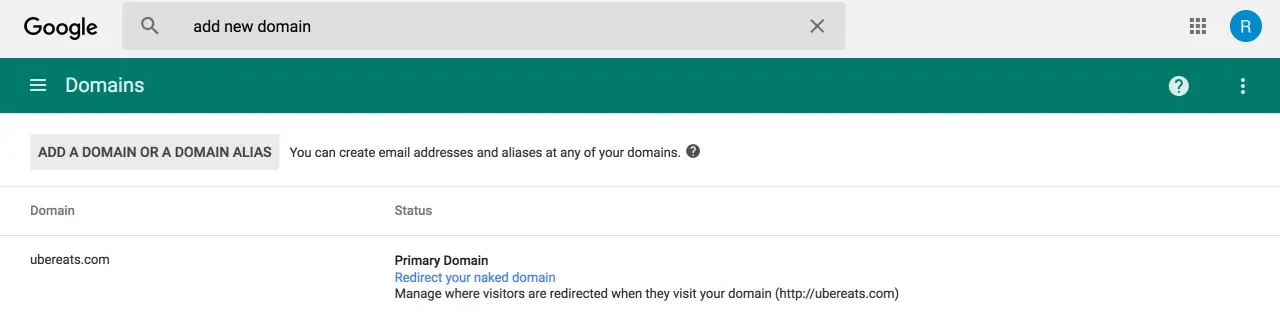
Snooping around the application, however, revealed an option called Add New Domain.
Exploitation
Step 1: Open the naked domain redirect function
That part of the application allows a redirect to be set for a domain the user "owns". To see whether it actually worked, the researcher clicked the "Redirect your naked domain" function and was greeted by a configuration page.
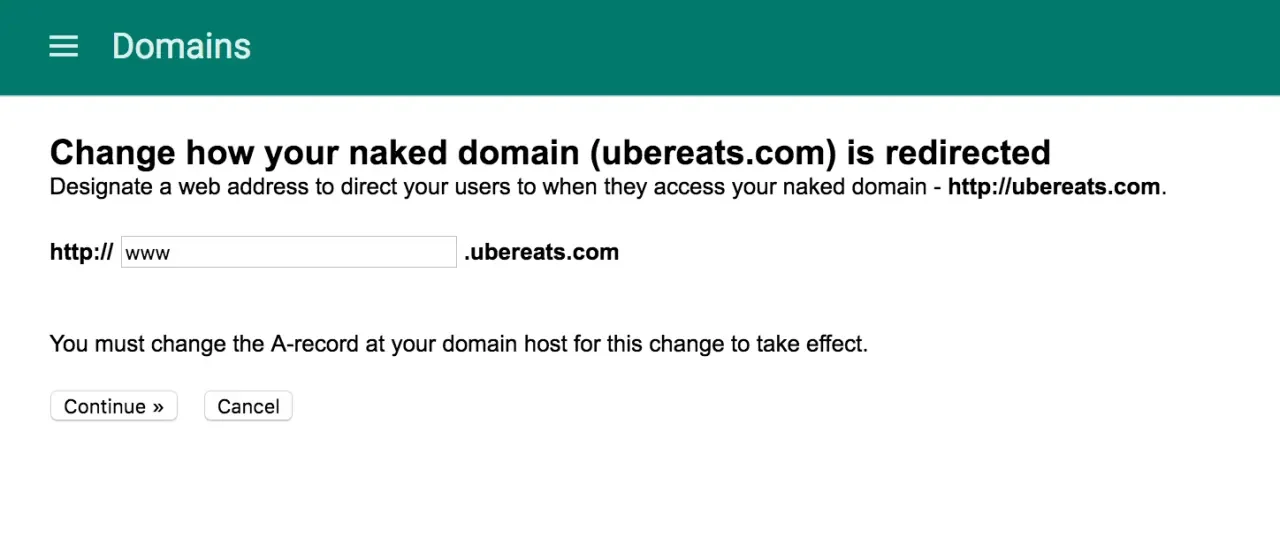
The expectation was still that Google would force domain ownership verification before anything could be set up. The researcher decided to give it a chance anyway.
Step 2: Enter a subdomain label
The field was filled by replacing www with hacked. The report includes an explicit warning: never put hacked when you are testing a domain takeover. The choice was made because experience said it should not work, but instinct said it would.
Step 3: Continue and compare the required A records
Right after pressing continue, the application showed the page listing the A records that had to be set up for the redirect to work.
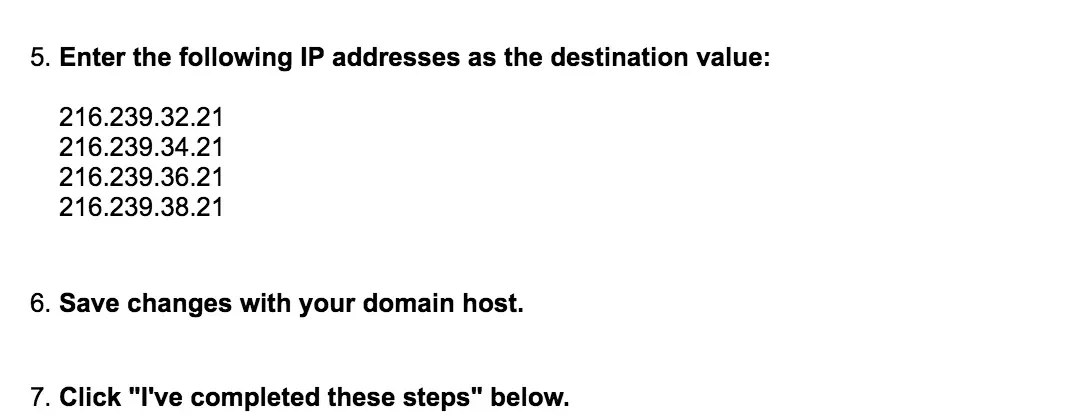
One of those A records matched exactly the one Uber had on the ubereats.com domain. That is the crux: the record the redirect feature demanded was already published by the target.

Step 4: Confirm completion
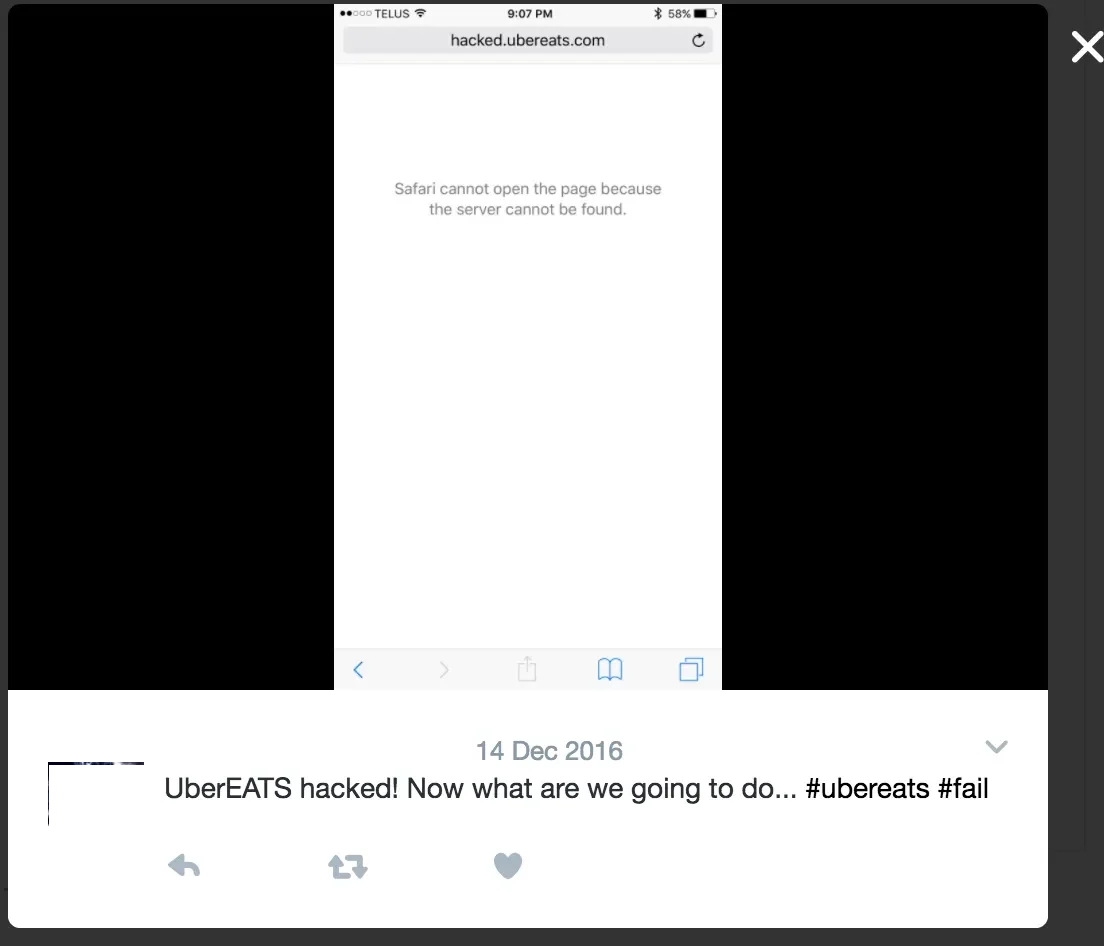
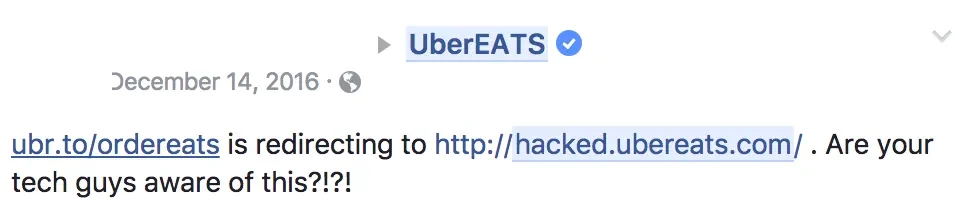
With fingers crossed, the researcher pressed "I've completed these steps", hoping Google would not stop the action. It did not. The domain redirect went through: visiting ubereats.com took the visitor to hacked.ubereats.com.
Root cause
The redirect feature accepted a domain for which ownership had not been verified, and the A record it demanded was already present in DNS. Because ubereats.com already pointed at Google's A record, that condition was satisfied without any proof of control.
Impact
The limit matters: the domain could not be pointed at other personal sites owned by the researcher. The realistic risk was scaring the company's customers and costing it revenue. For Uber this was significant, since ubereats.com is an actively used site. Once the redirect started, customers complained to Uber, freaked out by what they saw.
Fix
About five minutes after exploitation, the researcher reached out to a personal connection at Uber so the issue could be resolved quickly with minimal customer impact. The timing mattered: the takeover happened after 5 PM, which probably meant the report would not be looked at until the next business day, . Uber's security team released a quick fix around 15 minutes after exploitation.
Uber then ran an investigation to make sure other domains did not carry the same risk, and encouraged the researcher to contact Google. Google validated that the vulnerability was on its side and fixed it rather quickly.
Variants to test
- Domains with a Google A record but no G Suite claim. Look for hosts whose A record matches Google's and that are not yet claimed in G Suite, then try the naked domain redirect flow. A positive result is the redirect configuration accepting the domain and the redirect going live without ownership verification.
- Other G Suite features that accept a domain. The same pattern, a feature that trusts a DNS record instead of a verified ownership state, may exist elsewhere in the product. A positive result is any feature that lets you act on a domain you have not verified.
- Subdomain labels in the redirect field. Try arbitrary labels in place of
wwwand confirm whether the application validates them. A positive result is an arbitrary label being accepted and the resulting redirect resolving. - Record matching as the only gate. For any takeover candidate, compare the records the feature demands with what the target actually publishes. A positive result is an exact match that lets you complete the flow without further proof of control.
What happened, in plain words
Google runs a large product called G Suite, a bundle of tools that companies use for email, calendars, document sharing and similar work. To stop one company from grabbing another company's name, G Suite asks every customer to prove they really control the domain they want to use. A domain is the name people type in a browser, like example.com. The proof works through DNS records, which are small entries in a public directory that tells the internet where a domain's traffic should go. Think of DNS as the phone book of the internet: it maps a name to an address. Only the real owner of a domain can change its entries, so a correct entry is decent evidence of ownership.
This story is about a different part of G Suite: a feature that lets you set up a redirect for a domain you "own". A redirect is an automatic forwarding: a visitor asks for one address and is sent to another. The feature in question is called "Redirect your naked domain". A naked domain is the bare name without www in front, so example.com rather than www.example.com. Normally that feature should only work for a domain whose ownership has already been proven. The researcher looked at ubereats.com, an actively used Uber site, and found that the feature would accept it without that proof.
The starting point
The report does not describe any special tools, accounts or software versions. What matters is one detail about the target's DNS: ubereats.com had its A record set to Google's A record. An A record is the DNS entry that maps a domain name to a numeric address, the address of the server that should answer when someone visits. So the A record is the line in the phone book that says "calls for this name go to this number". Here, the number belonged to Google, and it was the same record G Suite uses. That single fact is what made the rest of the research possible.
Finding it
While looking at DNS details around ubereats.com, the researcher noticed that its A record pointed at Google's A record. The record looked familiar: it had been seen before somewhere in G Suite, but at that moment it was not clear which part of the product used it.
The first idea was to try G Suite itself. When signing up, it was notable that despite having Google's A record, ubereats.com was not yet claimed by anyone in G Suite. As covered in an earlier post about a G Suite email vulnerability, G Suite requires specific records to be set for ownership verification, so the domain could not simply be taken over through that path. The researcher's hands were tied on the domain itself.
Snooping around the application, however, revealed an option called Add New Domain.
Exploitation
Step 1: Open the naked domain redirect function
That part of the application allows a redirect to be set for a domain the user "owns". To see whether it actually worked, the researcher clicked the "Redirect your naked domain" function and was greeted by a configuration page.
The expectation was still that Google would force domain ownership verification before anything could be set up. The researcher decided to give it a chance anyway. The reasoning is simple: the page was offering a setting, and the question was whether the server behind it would check ownership before saving anything, or only later, or not at all.
Step 2: Enter a subdomain label
The field was filled by replacing www with hacked. A subdomain is a name placed in front of the main domain, so www.example.com is the www subdomain of example.com. The report includes an explicit warning: never put hacked when you are testing a domain takeover. The choice was made because experience said it should not work, but instinct said it would. In other words, the researcher expected the application to reject the input, and picked an obviously fake label so that any success would be unmistakable.
Step 3: Continue and compare the required A records
Right after pressing continue, the application showed the page listing the A records that had to be set up for the redirect to work.
One of those A records matched exactly the one Uber had on the ubereats.com domain. That is the crux of the bug. The redirect feature was asking for a DNS entry as proof, and that entry was already published by the target. The researcher did not have to change anything in Uber's DNS; the required condition was already true.
Step 4: Confirm completion
With fingers crossed, the researcher pressed "I've completed these steps", hoping Google would not stop the action. It did not. The domain redirect went through: visiting ubereats.com took the visitor to hacked.ubereats.com. Visiting the food delivery site's address forwarded the visitor to a name the researcher had chosen.
Root cause
The redirect feature accepted a domain for which ownership had not been verified, and the A record it demanded was already present in DNS. Because ubereats.com already pointed at Google's A record, that condition was satisfied without any proof of control. The everyday comparison: a building whose only security check is that your name is on a list by the door, where the list is public and anyone can copy a name from it.
Impact
The limit matters: the domain could not be pointed at other personal sites owned by the researcher. The realistic risk was scaring the company's customers and costing it revenue. For Uber this was significant, since ubereats.com is an actively used site. Once the redirect started, customers complained to Uber, freaked out by what they saw.
Fix
About five minutes after exploitation, the researcher reached out to a personal connection at Uber so the issue could be resolved quickly with minimal customer impact. The timing mattered: the takeover happened after 5 PM, which probably meant the report would not be looked at until the next business day, . Uber's security team released a quick fix around 15 minutes after exploitation.
Uber then ran an investigation to make sure other domains did not carry the same risk, and encouraged the researcher to contact Google. Google validated that the vulnerability was on its side and fixed it rather quickly.
Variants to test
These are the same follow-up ideas the technical write-up lists, explained for someone new to security. Each one describes what to look for and what a positive result would look like.
- Domains with a Google A record but no G Suite claim. Look for hosts whose A record matches Google's and that are not yet claimed in G Suite, then try the naked domain redirect flow. A positive result is the redirect configuration accepting the domain and the redirect going live without ownership verification. In plain terms: find another name in the phone book that points at Google's number and has not been registered by its owner, then see whether the redirect feature will act on it.
- Other G Suite features that accept a domain. The same pattern, a feature that trusts a DNS record instead of a verified ownership state, may exist elsewhere in the product. A positive result is any feature that lets you act on a domain you have not verified. The lesson is that a product can check ownership in one place and forget to check it in another.
- Subdomain labels in the redirect field. Try arbitrary labels in place of
wwwand confirm whether the application validates them. A positive result is an arbitrary label being accepted and the resulting redirect resolving. Here the question is whether the field accepts any text at all, or only sensible names. - Record matching as the only gate. For any takeover candidate, compare the records the feature demands with what the target actually publishes. A positive result is an exact match that lets you complete the flow without further proof of control. If the only lock on the door is a public list, and the target's name is already on that list, the door opens.
Glossary
- A record: a DNS entry that maps a domain name to the numeric address of the server that should answer for it.
- DNS: the public directory that translates domain names into addresses and other routing information; the internet's phone book.
- Domain: the name people type to reach a site, such as
example.com. - Domain takeover: a situation where someone who does not own a domain is able to control how it behaves, for example by making it redirect elsewhere.
- G Suite: Google's bundle of workplace tools, including email and document sharing, used by companies under their own domain.
- Naked domain: the bare domain name without a subdomain in front, such as
example.comrather thanwww.example.com. - Ownership verification: the process of proving you control a domain, usually by publishing a specific DNS record that only the real owner could add.
- Redirect: an automatic forwarding that sends a visitor from one address to another.
- Subdomain: a name placed in front of a domain, such as
wwwinwww.example.com. - Tenant: one customer's separate space inside a shared online product, here a company's own G Suite account.






