CVE-2018-3167
An endpoint that parsed XML resolved external DTD URLs, letting an attacker make the server fetch arbitrary hosts and ports. By watching the response type, the attacker could enumerate internal and external hosts and ports, and check whether files exist.

medium.com
Published on medium.com
When testing third party off the shelf applications, it typically just to give the client some assurance that the third party has conducted testing robustly and there’s no absolute clangers in either the way it’s been deployed.
The full write-up lives on its author's site
It belongs to its author, so we link to it rather than copy it. The other two tabs are our own rewrites, checked against it.
Context
This write-up covers CVE-2018-3167, an unauthenticated blind server-side request forgery (SSRF) found in Oracle E-Business Suite (EBS). The work came out of a test of third-party off-the-shelf software, the kind of engagement that is usually meant to give the client some assurance that the vendor has tested its product robustly and that nothing is badly wrong in the way it has been deployed. The researcher notes that the issue is fairly low risk: it only allows enumeration of ports on internal and external hosts. It may still be of interest.
The vulnerable endpoint is part of the EBS application, reached through the OA_HTML path, and the request shown below targets lcmServiceController.jsp. The report does not describe what that endpoint normally does beyond the fact that it was involved in a previous XXE exploit.
Setup
The testing was against a third-party off-the-shelf product. The tools involved were Burp Suite, including the Collaborator feature (the report links to the Burp Collaborator plugin in the BApp Store), and a colleague's listener on an external IP covering a large range of ports. No accounts, roles or credentials are mentioned, and the exploit as shown is unauthenticated. The report does not give the product version or any other deployment detail.
Finding it
The starting point was the endpoint from a previous XXE exploit. The researcher often fuzzes such endpoints, on the reasoning that developers frequently make mistakes when rushing to patch a vulnerability. During this fuzzing, a basic DOCTYPE declaration was submitted, and through Burp Collaborator it became clear that something on the server was trying to resolve the DNS name of the supplied URL.
The request that produced this behaviour looked like the one below, after redundant headers and parameters were removed and target details redacted:
POST /OA_HTML/lcmServiceController.jsp HTTP/1.1Host: victim.comContent-Length: 56<!DOCTYPE root PUBLIC "-//B/A/EN" "http://burpcollaboratorpayload:80">
The DOCTYPE declares an external public identifier whose system literal is a URL pointing at the Collaborator payload on port 80. Something on the server tried to resolve that URL, which produced the DNS hit.
The request itself timed out, but a DNS hit appeared in the Burp issue log. That indicated something was happening, and that a firewall was likely interfering with the request. Trying TCP/443 (HTTPS) gave the same result.
Exploitation
Step 1: Move the listener to a controlled host and sweep ports
Because the direct request timed out, a colleague was enlisted to listen for requests across a large range of ports on an external IP. The port number in the DOCTYPE URL ("80" in the request above) was then changed to enumerate ports.
Step 2: Classify the responses
This produced three types of response:
- A timeout, indicating that a firewall dropped the request.
- An HTTP 200 response containing
A remote host refused an attempted connect operation., indicating that the host and port were hit but the port was not open. - An HTTP 200 response containing
Unexpected text in DTD., indicating that the host and port were hit and the port was open.
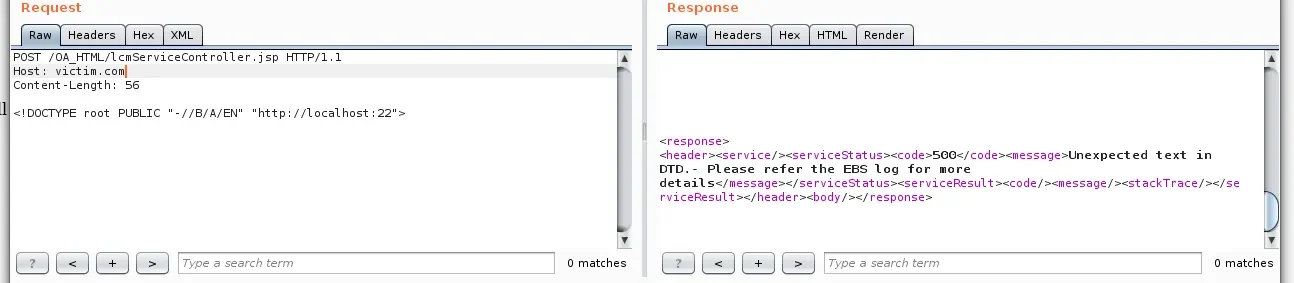
The screenshot shows an example response, in this case indicating that SSH is open on localhost.
Step 3: Enumerate hosts and ports
Using that difference in response type, it was possible to enumerate hosts and ports both internally and externally by monitoring which of the three responses came back.
Step 4: Enumerate files
By using the file:// scheme it was also possible to enumerate the existence of files. Other protocols and methods were tried in the hope of catching a hash, but this proved not to be possible in this specific instance.
Root cause
The endpoint appears to process the DOCTYPE and attempt to fetch the system literal over HTTP or file://. Three distinguishable outcomes were observed: a refused connection message, a DTD parsing error, or a timeout. That difference is what turns a blind SSRF into a port and file enumerator.
Impact
The issue is fairly low risk. It allows enumeration of ports on internal and external hosts, and enumeration of the existence of files via file://. In this instance it was not possible to catch a hash.
Fix
Oracle confirmed the issue and fixed it in the main code line in August 2018. The fix shipped to customers in the October 2018 Oracle Critical Patch Update.
Variants to test
- Submit a DOCTYPE with an external system literal pointing at a Collaborator or other controlled listener on an XML-accepting endpoint, and watch for DNS or HTTP callbacks. A positive result is a hit from the server rather than from your own browser.
- Sweep the port in the system literal across a range on a controlled external host. A positive result is a consistent difference between a timeout, a refused-connection message and a DTD parsing error, which lets you tell closed ports from open ones.
- Point the system literal at internal addresses and compare response types to map reachable hosts and ports. A positive result is the same three-way distinction for internal targets.
- Use
file://in the system literal to test for file existence. A positive result is a response that differs depending on whether the file exists. - Try other schemes and methods in the hope of reading content or capturing a hash. A positive result would be file contents or a hash in the response, which did not happen in this instance.
Disclosure timeline
- April 2018: issue discovered and reported to Oracle.
- August 2018: Oracle confirmed the issue and fixed it in the main code line.
- October 2018: Oracle Critical Patch Update released, including the fix for this vulnerability.
- February 2018: the blog post detailing the vulnerability was published. The report gives this date as written.
What happened, in plain words
A security tester was checking a piece of software that a company had bought from a third party, in this case Oracle. The point of this kind of check is usually to give the client some assurance that the vendor has tested its product properly and that nothing is badly wrong in the way it has been set up. The tester found a bug that lets an outsider make the server fetch a web address of the outsider's choosing, and then tell from the server's reply whether a particular port on a particular machine is open. This kind of bug is called server-side request forgery, or SSRF: the attacker cannot reach the internal network directly, but the server can, so the attacker borrows the server's access.
The bug is fairly low risk. It only allows the enumeration of ports on internal and external hosts, meaning the attacker can learn which doors on which machines are open, but not walk through them. It may still be of interest to some.
The bug was given the identifier CVE-2018-3167. A CVE is a public catalogue number for a known vulnerability, so that everyone talking about the same flaw uses the same name.
Background: what the software is
The target is Oracle E-Business Suite, often shortened to EBS. It is a large package of business applications: finance, purchasing, human resources and so on. It runs on a web server, and people use it through a browser. The vulnerable endpoint is part of the EBS application, reached through the OA_HTML path, and the request shown below targets lcmServiceController.jsp. An endpoint is simply a specific address on a web server that does a specific job, the way a particular counter in a large office handles one kind of form. A .jsp file is a page written in Java Server Pages, a way of building web pages on the server side.
The report does not describe what that endpoint normally does, beyond the fact that it was involved in a previous XXE exploit. XXE stands for XML External Entity, a related class of bug where a server is tricked into fetching something because of a declaration inside an XML document. XML is a text format for structured data, a bit like a very strict form with labelled boxes; a DOCTYPE is the line at the top of an XML document that declares what kind of document it is and can point at other resources.
How the test was set up
The testing was against a third-party off-the-shelf product. Black-box means the tester had no access to the source code and no inside knowledge; they could only send requests and watch what came back, like someone testing a locked building only by knocking on doors.
The tools involved were Burp Suite, a program that sits between your browser and a website so you can look at and change every request, and its Collaborator feature. Burp Collaborator is a service that gives you a unique address and tells you when anything on the internet contacts it. It is a tripwire: you put the address in a request, and if the server later tries to reach it, you get a notification. The report links to the Burp Collaborator plugin in the BApp Store, the plugin shop for Burp.
The tester also used a colleague's listener on an external IP covering a large range of ports. A listener is a program waiting for connections on a machine you control. A port is a numbered channel on a computer, like an extension number on a phone line: one machine can run many services, each on its own port. No accounts, roles or credentials are mentioned, and the exploit as shown is unauthenticated, meaning it works without logging in at all. The report does not give the product version or any other deployment detail.
Finding it
The starting point was the endpoint from a previous XXE exploit. The tester often fuzzes such endpoints, on the reasoning that developers frequently make mistakes when rushing to patch a vulnerability. Fuzzing means sending slightly odd or unexpected input on purpose and watching how the system reacts, the way you might jiggle a stuck handle to see which way it gives.
During this fuzzing, a basic DOCTYPE declaration was submitted, and through Burp Collaborator it became clear that something on the server was trying to resolve the DNS name of the supplied URL. DNS is the internet's phone book: it turns a name like example.com into the numeric address of a machine. Resolving a name means looking it up. If the server looks up a name that only the tester knows about, the tester learns that the server followed their instruction.
The request that produced this behaviour looked like the one below, after redundant headers and parameters were removed and target details redacted:
POST /OA_HTML/lcmServiceController.jsp HTTP/1.1Host: victim.comContent-Length: 56<!DOCTYPE root PUBLIC "-//B/A/EN" "http://burpcollaboratorpayload:80">
Line by line, in plain words:
POST /OA_HTML/lcmServiceController.jsp HTTP/1.1is the first line of an HTTP request. HTTP is the language browsers and servers speak.POSTis the method, meaning "here is some data for you to process". The path after it is the endpoint being called.HTTP/1.1is the version of the protocol.Host: victim.comtells the server which site name the request is for, because one web server can host many sites.Content-Length: 56says how many bytes of data follow, so the server knows where the body ends.<!DOCTYPE root PUBLIC "-//B/A/EN" "http://burpcollaboratorpayload:80">is the body. It is an XML DOCTYPE declaration.rootis the name of the document element.PUBLICintroduces a public identifier,-//B/A/EN, and then a system literal, which here is a URL pointing at the Collaborator payload on port 80. Port 80 is the default port for ordinary web traffic.
The DOCTYPE declares an external public identifier whose system literal is a URL pointing at the Collaborator payload on port 80. Something on the server tried to resolve that URL, which produced the DNS hit. In other words, the server read the declaration, decided it needed to fetch that address, and in doing so looked up the name, which the Collaborator noticed.
The request itself timed out, but a DNS hit appeared in the Burp issue log. That indicated something was happening, and that a firewall was likely interfering with the request. A firewall is a filter between networks that decides which traffic is allowed through; here it was probably dropping the actual connection while the name lookup still went out. Trying TCP/443 (HTTPS) gave the same result. TCP is the underlying protocol that carries web traffic, and 443 is the port normally used for HTTPS, the encrypted version of the web.
Exploitation
Step 1: Move the listener to a controlled host and sweep ports
Because the direct request timed out, a colleague was enlisted to listen for requests across a large range of ports on an external IP. The port number in the DOCTYPE URL ("80" in the request above) was then changed to enumerate ports. Enumerating means going through a list one by one and noting the result for each, like trying every key on a keyring to see which ones turn.
Step 2: Classify the responses
This produced three types of response:
- A timeout, indicating that a firewall dropped the request.
- An HTTP 200 response containing
A remote host refused an attempted connect operation., indicating that the host and port were hit but the port was not open. - An HTTP 200 response containing
Unexpected text in DTD., indicating that the host and port were hit and the port was open.
An HTTP 200 response is the standard "OK" status code, meaning the request itself was handled. The interesting part is the message inside the page. A DTD is a Document Type Definition, the part of XML that describes the document's structure; the parser complained about unexpected text in it when the connection succeeded and returned something it did not expect.
The screenshot shows an example response, in this case indicating that SSH is open on localhost. SSH is a protocol for logging into another machine remotely, and localhost means the same machine the server is running on.
Step 3: Enumerate hosts and ports
Using that difference in response type, it was possible to enumerate hosts and ports both internally and externally by monitoring which of the three responses came back. Internally means machines on the organisation's own network that an outsider cannot reach directly; externally means machines reachable from the internet. The server sits between the two, so it can be used as a middleman.
Step 4: Enumerate files
By using the file:// scheme it was also possible to enumerate the existence of files. A scheme is the first part of a web address that says how to fetch it: http:// means over the web, file:// means from the local disk. Other protocols and methods were tried in the hope of catching a hash, but this proved not to be possible in this specific instance. A hash is a short fingerprint computed from data; if the server could be made to send one back, it might reveal something about a file's contents without sending the file itself.
Why it works
The endpoint appears to process the DOCTYPE and attempt to fetch the system literal over HTTP or file://. Three distinguishable outcomes were observed: a refused connection message, a DTD parsing error, or a timeout. That difference is what turns a blind SSRF into a port and file enumerator. Blind here means the attacker never sees the fetched content itself, only side effects such as a success or failure message.
Impact
The issue is fairly low risk. It allows enumeration of ports on internal and external hosts, and enumeration of the existence of files via file://. In this instance it was not possible to catch a hash.
Fix
Oracle confirmed the issue and fixed it in the main code line in August 2018. The fix shipped to customers in the October 2018 Oracle Critical Patch Update. A Critical Patch Update is Oracle's regular scheduled bundle of security fixes.
Variants to test
- Submit a DOCTYPE with an external system literal pointing at a Collaborator or other controlled listener on an XML-accepting endpoint, and watch for DNS or HTTP callbacks. A positive result is a hit from the server rather than from your own browser.
- Sweep the port in the system literal across a range on a controlled external host. A positive result is a consistent difference between a timeout, a refused-connection message and a DTD parsing error, which lets you tell closed ports from open ones.
- Point the system literal at internal addresses and compare response types to map reachable hosts and ports. A positive result is the same three-way distinction for internal targets.
- Use
file://in the system literal to test for file existence. A positive result is a response that differs depending on whether the file exists. - Try other schemes and methods in the hope of reading content or capturing a hash. A positive result would be file contents or a hash in the response, which did not happen in this instance.
Disclosure timeline
- April 2018: issue discovered and reported to Oracle.
- August 2018: Oracle confirmed the issue and fixed it in the main code line.
- October 2018: Oracle Critical Patch Update released, including the fix for this vulnerability.
- February 2018: the blog post detailing the vulnerability was published. The report gives this date as written.
Glossary
- API: a defined way for one program to ask another to do something, like a service counter with set forms.
- Authentication: proving who you are, usually with a username and password.
- Black-box testing: testing without access to source code or inside knowledge, judging only by what comes back.
- Blind SSRF: server-side request forgery where the attacker cannot see the fetched content, only indirect signs such as errors or timing.
- Burp Collaborator: a service that gives you a unique address and reports when anything contacts it, used to detect server-side requests.
- Burp Suite: a tool that sits between browser and website so requests can be inspected and modified.
- CVE: a public catalogue number for a known vulnerability.
- DNS: the internet's name-to-address lookup system.
- DOCTYPE: the declaration at the top of an XML document that states its type and can reference external resources.
- DTD: Document Type Definition, the part of XML describing the document's structure.
- Endpoint: a specific address on a server that performs a specific job.
- Enumeration: going through a list item by item and recording the result for each.
- EBS: Oracle E-Business Suite, a large package of business applications.
- Firewall: a filter that decides which network traffic is allowed through.
- Fuzzing: sending odd or unexpected input on purpose to see how a system reacts.
- Hash: a short fingerprint computed from data.
- HTTP: the language browsers and servers use to exchange requests and responses.
- HTTP 200: the standard "OK" status code meaning the request was handled.
- HTTPS: the encrypted version of HTTP.
- JSP: Java Server Pages, a way of building web pages on the server side.
- Listener: a program waiting for incoming connections on a machine you control.
- Localhost: the machine the program itself is running on.
- Port: a numbered channel on a computer, like an extension number on a phone line.
- Scheme: the first part of a web address that says how to fetch it, such as
http://orfile://. - SSH: a protocol for logging into another machine remotely.
- SSRF: server-side request forgery, where an attacker makes a server fetch an address of the attacker's choosing.
- System literal: the part of an XML declaration that gives the actual address of an external resource.
- TCP: the underlying protocol that carries web traffic.
- Timeout: a request that gets no answer within the allowed time.
- XXE: XML External Entity, a bug where a server is tricked into fetching something because of a declaration inside an XML document.
- XML: a text format for structured data, like a very strict form with labelled boxes.




