Unauthenticated Email Injection: Turning a Transactional Email Endpoint into a Phishing Delivery…
An unauthenticated trade-in confirmation endpoint accepted a client-supplied recipient address and reflected client-controlled fields into an email sent from the organisation's legitimate, DKIM/SPF-authenticated sender. By encoding URL characters as JSON Unicode escapes, the attacker bypassed the WAF's URL filter and delivered a phishing link to an arbitrary mailbox.
 Published on medium.com
Cybersecurity
The full write-up lives on its author's site
It belongs to its author, so we link to it rather than copy it. The other two tabs are our own rewrites, checked against it.
Context
The target was REI's trade-in confirmation email functionality, exposed through an API endpoint that sends a transactional message associated with a trade-in. The endpoint is:
POST /used/emails/v1/confirmation
Normally this feature sends a confirmation email tied to a trade-in transaction. Transactional email endpoints sit at the intersection of authentication, authorisation, user-controlled data and trusted infrastructure, which is why they are worth attention during a bug bounty assessment. An endpoint that appears to simply send a confirmation email becomes more dangerous when it is reachable without authentication, when the recipient address is controlled by the request, when the email content is populated from client-controlled parameters, when the message is sent from the organisation's legitimate domain, and when security controls such as WAF URL filtering can be bypassed through parser inconsistencies.
The research started from a simple question: what happens if a supposedly transactional email endpoint is called directly, without going through the normal application workflow? That question led to a chain of weaknesses allowing an unauthenticated request to trigger a legitimate, sender-authenticated email containing attacker-controlled content and a deceptive external URL.
Setup
The report does not describe any accounts, roles, tooling versions or special preconditions. The testing was done against the application's API surface. and the only infrastructure mentioned for validation is a mailbox controlled by the tester, used to receive the generated messages.
Finding it
While testing the application's API surface, the researcher identified the trade-in confirmation endpoint. At first glance it looked like a normal transactional API. Transactional endpoints deserve special attention because they frequently contain parameters such as:
{ "memberEmail": "...", "memberName": "...", "orderId": "...", "items": [...]}
Whenever an endpoint accepts a recipient address directly from the client, the first question to ask is what prevents an unauthenticated user from turning it into an email-sending primitive.
Exploitation
Step 1: Test authentication before testing payloads
Rather than immediately attempting injection, the researcher first removed all authentication material from the request. The request contained:
POST /used/emails/v1/confirmation HTTP/2Host: www.rei.comContent-Type: application/json
The server responded with a successful queue response:
202 Accepted
with a response indicating that the email had been queued. There were no cookies, no Authorization header, no authenticated session and no CSRF token. This established the first important property: the email-generation functionality was reachable without authentication.
The general habit worth taking from this: when discovering an API endpoint, do not assume the authentication requirements enforced by the normal frontend workflow are also enforced by the backend API. Always test the endpoint directly.
Step 2: Determine which parameters are trusted
The next step was identifying which fields actually influenced the resulting email. The request contained fields representing things such as:
{ "orderId": "...", "memberEmail": "...", "memberName": "...", "memberId": "...", "store": "...", "items": [ { "itemId": "...", "description": "...", "tradeInPrice": 99999.00, "quantity": 1, "conditionGrade": "EXCELLENT" } ]}
The values were changed individually and the resulting email observed. The methodology matters: do not modify everything simultaneously. Instead:
- Change recipient.
- Change order identifier.
- Change display name.
- Change item description.
- Change price.
- Observe which values reach the email.
This creates a simple input to processing to output map. In this case, several client-controlled values were reflected into the resulting transactional email.
Step 3: Confirm the recipient is client controlled
The most important discovery was that the recipient was supplied directly through:
"memberEmail": "[redacted]"
No authenticated account was required to specify the recipient. The server accepted the request and queued the email, and the message subsequently arrived in a mailbox controlled by the tester. This transformed the endpoint from merely an unauthenticated email endpoint into an unauthenticated arbitrary-recipient transactional email sender.
That distinction matters when assessing impact. The server is not merely returning attacker-controlled text; it is causing the organisation's infrastructure to perform an external action:
Attacker | | unauthenticated HTTP request vREI API | | queues email vREI mail infrastructure | | legitimate sender identity vAttacker-selected recipient
Step 4: Check how the receiving mail server authenticates the message
The next thing checked was not just whether the email arrived, but how the receiving mail server authenticated it. The message came from the legitimate REI transactional sender:
[redacted]
The received message also passed the relevant sender-authentication checks, including:
DKIM: PASSSPF: PASS
This significantly changes the security implications. An attacker is not simply sending from [redacted]; the attacker is causing the organisation's own infrastructure to generate the message:
Attacker ↓Unauthenticated API ↓REI email infrastructure ↓DKIM/SPF authenticated message ↓Victim mailbox
This creates a trusted-channel abuse primitive. The attacker does not need to spoof REI's domain, because REI's infrastructure sends the message legitimately.
Step 5: Establish attacker-controlled content
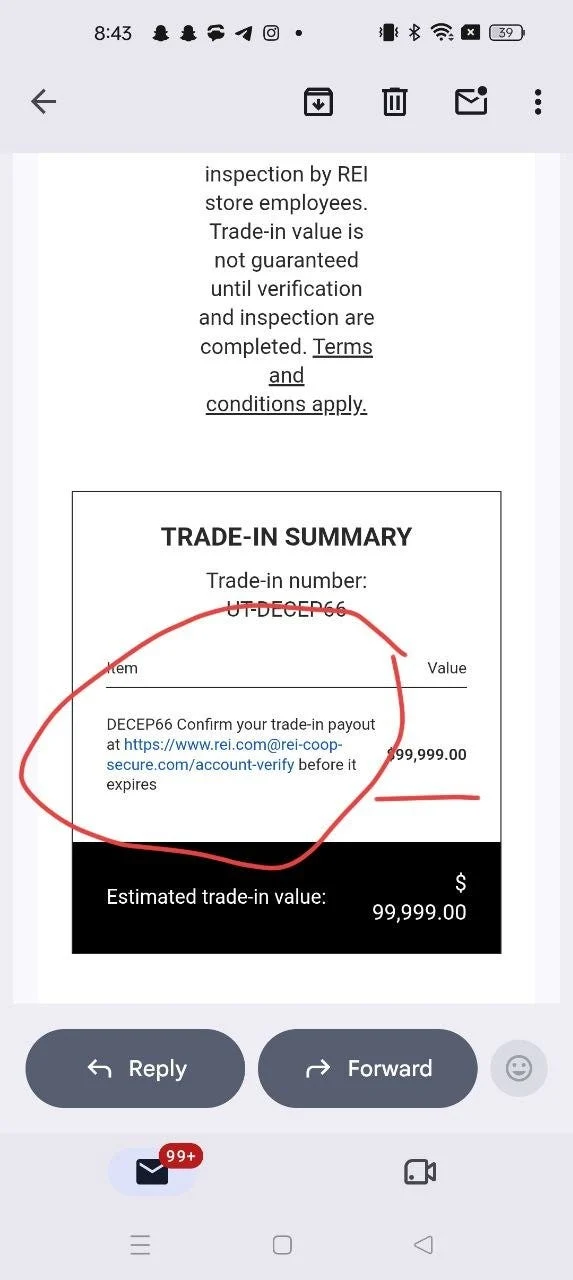
The next question was how much control the attacker has over the email. The item description was reflected into the email body. For example, a controlled value such as:
TEST-CONTROLLED-DESCRIPTION
appeared in the resulting message. The trade-in amount was also influenced by the request:
"tradeInPrice": 99999.00
which resulted in a corresponding amount being rendered in the email. This provides a social-engineering primitive: an attacker can construct a message that looks like a legitimate transactional notification while controlling elements such as the recipient, item description, order number, payout amount and other transaction-related values. At this stage the finding was already more interesting than a generic spam issue because the message had the organisation's legitimate sender identity.
Step 6: Investigate the existing WAF control
During testing, direct URL payloads were being filtered. Attempting to place a normal external URL inside the controlled description triggered the application's edge security controls. This suggested that REI had an existing defence intended to prevent malicious URLs from reaching the email template.
Rather than stopping there, the researcher asked where the URL filtering was happening and whether it parses the request the same way the application does. This is where understanding parser differentials becomes useful.
Step 7: Exploit the parser differential between WAF and application
The HTTP request passes through multiple processing layers. A simplified model looks like:
Raw HTTP body | v WAF | vJSON parser | vApplication | vEmail template | vMail client
The critical question is whether every layer interprets the JSON identically. A JSON string can represent characters using Unicode escapes. For example:
can be represented as:
\u002e
Similarly, other URL characters can be represented using their Unicode escape sequences. If the WAF examines the raw request body, it may see:
\u002e
while the JSON parser later transforms it into:
So the WAF view is \u002e and the application view is .. The two components are effectively processing different representations of the same logical input. This is a classic parser differential.
The same conceptual problem can appear anywhere there is a processing chain:
Proxy → WAF → API Gateway → JSON Parser → Application
or:
WAF → XML Parser → Backend
or:
Firewall → URL Parser → Redirect Handler
Whenever security validation happens before normalisation, the question to ask is whether the security layer validates the same representation that the application eventually consumes. If the answer is no, an attacker may be able to construct two representations:
Representation A ↓Security control ↓Allowed
Representation B ↓Application parser ↓Dangerous value
That is the fundamental idea behind many parser-differential vulnerabilities.
Step 8: Validate the URL filtering bypass
Using JSON Unicode escaping, the URL characters could be represented in encoded form. The edge security layer therefore did not recognise the same URL representation that the application ultimately reconstructed. After JSON parsing, the backend received the normal URL characters, and the resulting email contained the reconstructed URL. The important observation was:
Raw request ↓Encoded characters ↓WAF does not identify URL ↓JSON parser decodes value ↓Application receives URL ↓Email template renders URL
This demonstrated that the URL filtering control was occurring at the wrong normalisation stage.
Step 9: Use the user@host URL trick for a deceptive link
The next part was understanding how a deceptive URL could be presented. A URL such as:
https://[redacted]/account
does not mean that the request is going to www.rei.com. The actual hostname is attacker-domain.example, while www.rei.com is the URL's user-information component:
https://USERINFO@HOST/PATH | | | + | +
Therefore the URL visually contains www.rei.com but resolves to attacker-domain.example. This is a useful phishing-awareness concept for security researchers to understand.
Step 10: End-to-end validation
At this point each component had been independently validated:
- Component 1, authentication: no authentication required.
- Component 2, recipient control:
memberEmailleads to an attacker-selected recipient. - Component 3, content control:
descriptionleads to attacker-controlled email content,tradeInPriceto an attacker-controlled displayed amount, andorderIdto an attacker-controlled transaction identifier. - Component 4, trusted sender:
[redacted]withDKIM: PASSandSPF: PASS. - Component 5, WAF bypass: Unicode-escaped URL passes WAF inspection, is allowed, is decoded by the JSON parser, the URL is reconstructed and the email is delivered.
- Component 6, phishing primitive: an authenticated REI email plus attacker-controlled content plus an attacker-controlled external URL.
The complete attack chain therefore became:
Unauthenticated attacker | vPOST /used/emails/v1/confirmation | +---- arbitrary recipient | +---- arbitrary transaction data | +---- encoded malicious URL | vAkamai WAF | | URL not recognized vJSON parser | | Unicode escapes decoded vEmail service | | legitimate REI sender vVictim mailbox | vTrusted-looking phishing message
Root cause
The individual weaknesses are relatively straightforward: missing authentication, a client-controlled recipient, client-controlled transactional data, insufficient output validation and a parser differential. The security impact comes from combining them. A weakness that only allowed attacker-controlled text would have limited impact, and a weakness that only allowed unauthenticated email triggering would also need careful contextual assessment. Together, unauthenticated access, an arbitrary recipient, a trusted organisational sender, attacker-controlled content and a clickable external URL create a substantially different capability.
The boundary crossed here is the organisation's trusted email infrastructure, reached from an internet attacker and delivering to an arbitrary external mailbox. The WAF did not stop it because the filtering happened at the wrong normalisation stage: the edge inspected the raw request body while the JSON parser later decoded Unicode escapes into the characters the application consumed. The report does not describe the application code itself, so the precise implementation mistake is not stated.
Impact
An unauthenticated attacker could cause REI's own mail infrastructure to send a message to an arbitrary recipient, from the legitimate transactional sender [redacted], passing DKIM and SPF. The attacker controls the recipient, the item description, the order number, the payout amount and other transaction-related values, and can include a clickable external URL that survives the WAF through Unicode escaping. The result is a trusted-looking phishing message delivered through a trusted channel. The report does not quantify how many messages could be sent or describe any rate limiting.
Fix
The strongest fix is not simply adding another WAF rule; the application should enforce authorisation at the endpoint itself. The report recommends:
- Authenticate the endpoint: require an authenticated user or session before allowing a trade-in confirmation to be generated.
- Authorise the transaction: do not trust
"memberEmail": "..."from the client; derive the recipient from the authenticated account and the server-side transaction record. - Validate transaction ownership: the supplied order or trade-in identifier should correspond to a transaction owned by the authenticated user.
- Normalise before security inspection: if WAF filtering is retained, the security layer should inspect a canonical representation, and the application and security layer must agree about the meaning of the request.
- Encode email output: every user-controlled value rendered into an email should be safely encoded according to the output context.
- Avoid trusting WAF filtering for application security: a WAF rule should be defence in depth and should not replace authentication, authorisation, input validation and output encoding.
- Add abuse monitoring: watch for many recipients, many different email addresses, unusual transaction values, repeated requests without authenticated sessions and large volumes from a single source.
Variants to test
The report closes with a reusable workflow for testing transactional email functionality on other targets:
- Find email-related endpoints. Search API traffic for keywords such as
email,mail,notification,confirmation,verify,invite,receipt,reset,trade,order,shipment, and inspect paths such asPOST /.../confirmation,POST /.../notificationandPOST /.../send. - Remove authentication. Replay the request with
Cookie: removed,Authorization: removedandCSRF token: removed, then determine whether the server still performs the action. - Identify the recipient parameter. Look for
email,recipient,to,memberEmail,customerEmailandaddress, and determine whether the backend takes the recipient from the authenticated session or from a client-supplied parameter. - Map reflected fields. Change one parameter at a time among
orderId,memberName,description,price,storeanditemId, then inspect the delivered email and build an input/output map. - Inspect email authentication. Do not stop after confirming delivery; inspect
From,Return-Path,DKIM,SPF,DMARCandMessage-ID. - Test content controls. If URLs or HTML are blocked, determine where the filtering is performed, what representation it inspects and what representation the application consumes.
- Test normalisation boundaries. For structured formats, investigate whether security controls normalise before inspection, including JSON Unicode escapes, URL encoding, double URL encoding, HTML entities, case normalisation, path normalisation and Unicode normalisation.
- Validate safely. Use infrastructure you control: a test mailbox, a controlled email, then inspect headers, inspect the body and verify rendering. Avoid sending test messages to unrelated users.
The broader lesson is to follow the data all the way from attacker input to the final security boundary, and to model the complete pipeline: client, CDN, WAF, load balancer, API gateway, parser, application, template engine, email provider and mail client. Every transition is a potential interpretation boundary.
What happened, in plain words
A security researcher found a way to make REI, a large outdoor-gear retailer, send real emails to any address a stranger chose, with text and links that stranger also chose. The emails came from REI's own mail system, so they passed the checks that mail providers use to decide whether a message is genuine. That means a criminal could use REI's good name to deliver a convincing phishing email: a message that looks like a real REI notification but carries an attacker-chosen link.
The researcher did not break into anything. They found an API endpoint used to send trade-in confirmation emails, and discovered that it would do its job for anyone who asked, with no login required. They then found that the text of the email could be shaped by the person making the request, and that a security filter meant to block links could be slipped past by writing the link in a slightly different way.
This article walks through the whole investigation from the beginning, explaining each idea as it appears. It is written for someone who uses a browser and a computer but has never studied security.
Some background before we start
A few everyday ideas come up constantly below, so here they are first.
A website is really two things. There is the part you see in the browser, with buttons and pages, and there is a part behind the scenes that stores data and does work. The behind-the-scenes part is often called the backend or the server. When you click a button, your browser sends a short message to the server and the server replies.
An API is a doorway for those messages. Think of a restaurant. The dining room is the website you see; the kitchen is the server. The API is the serving hatch where waiters pass orders to the kitchen. The kitchen does not care whether the person at the hatch is a customer, a waiter or someone who wandered in through the back door. It just cooks whatever order is handed through. That is exactly the weakness in this story: the hatch was open to the street.
A request is one of those messages. It has a method (a verb such as POST, meaning "please create or send something"), a path (which part of the system you are talking to), headers (small labels with extra details) and often a body (the actual data).
JSON is a common way of writing data in a request body. It looks like a shopping list with labels:
Curly braces hold a group, each entry has a label in quotes, a colon, then a value. Square brackets hold a list.
A cookie is a small note your browser keeps and shows to a website on every visit, so the site remembers who you are. A login session usually depends on a cookie. An Authorization header is a different way of proving who you are, a line in the request carrying a pass. A CSRF token is a secret value a website puts in a form to prove the request really came from its own pages and not from a malicious site. All three are forms of proof of identity. Removing all three is like walking into the kitchen with no uniform and no badge.
A transactional email is an automatic message triggered by an action, such as "your order shipped" or "your password was reset". It is not a newsletter; it is a receipt-style note tied to one event.
A trade-in is when a customer sends old gear back to the shop in exchange for credit or money. REI has a trade-in programme, and this feature sends the confirmation email for it.
A WAF (web application firewall) is a security guard standing at the door of a website. It reads incoming requests and blocks ones that look dangerous, for example requests containing suspicious web links. It is a filter, not a lock.
Phishing is a con where an attacker sends a message that looks like it comes from a trusted company, hoping the reader clicks a link and types a password into a fake page.
DKIM and SPF are two checks that receiving mail servers run to decide whether an email genuinely came from the domain it claims. DKIM is a cryptographic signature attached to the message; SPF checks that the sending mail server is allowed to send for that domain. When both say PASS, the message is treated as genuine.
A parser is a program that reads a piece of text and works out what it means. Different parsers can read the same text differently, and that gap is the heart of the second half of this story.
1. Starting with the email feature
While exploring the application's API, the researcher found an endpoint for trade-in confirmations:
POST /used/emails/v1/confirmation
Line by line:
POSTis the verb. It means "create or send something"./used/emails/v1/confirmationis the path, like a street address inside the site.usedsuggests the used-gear side of the business,emailssays this is about email,v1is a version number, andconfirmationsays it sends a confirmation.
At first glance this looked like an ordinary transactional API. But transactional endpoints deserve extra attention, because they often carry parameters like these:
{ "memberEmail": "...", "memberName": "...", "orderId": "...", "items": [...]}
Line by line:
- The outer curly braces group the whole order.
"memberEmail"is the address the email should go to."memberName"is the name to show in the message."orderId"is the identifier of the trade-in."items"is a list (the square brackets) of the things being traded in. The...means "some content goes here".
Why this matters: whenever a web endpoint lets the person making the request type in the recipient's email address, the natural question is what stops a stranger from using it as a free email-sending machine. That question is the seed of the whole investigation.
2. Testing login before testing tricks
A tempting first move would be to start injecting strange values. The researcher did the opposite: first, remove every piece of proof of identity and see whether the endpoint still works.
The request was:
POST /used/emails/v1/confirmation HTTP/2Host: www.rei.comContent-Type: application/json
Line by line:
POST /used/emails/v1/confirmationis the same verb and path as before.HTTP/2is the version of the web protocol being spoken. It is just the language version, like saying "English" rather than "French".Host: www.rei.comtells the server which website name the request is for. One server can host many sites, so it needs to know which one you mean.Content-Type: application/jsontells the server that the body is written in JSON, so it knows how to read it.
The body sent was:
That is an empty JSON object: a pair of curly braces with nothing inside. It is the smallest possible request body, sent deliberately to see what the server does with almost no information.
The server replied:
202 Accepted
Line by line:
202is a status code, a number the server sends back to say how things went.200means "here is your page",404means "not found", and202means "I have accepted your request and will deal with it later".Acceptedis just the human-readable name for that number.
The response also said the email had been queued, meaning placed in a line waiting to be sent.
Crucially, the request contained no cookie, no Authorization header, no logged-in session and no CSRF token. In everyday terms: no badge, no password, no proof of identity at all, and the kitchen still cooked the order.
That established the first property of the finding: the email-sending feature could be reached without logging in.
The wider habit here is worth remembering. A website's visible pages might force you to log in before you can click a button, but the API behind that button may not check anything at all. The front door has a lock; the serving hatch does not. So always test the endpoint directly.
3. Working out which fields the email actually uses
The next question was which of the fields in the request actually end up in the email. The request carried fields like these:
{ "orderId": "...", "memberEmail": "...", "memberName": "...", "memberId": "...", "store": "...", "items": [ { "itemId": "...", "description": "...", "tradeInPrice": 99999.00, "quantity": 1, "conditionGrade": "EXCELLENT" } ]}
Line by line:
"orderId"identifies the trade-in order."memberEmail"is the recipient address."memberName"is the customer's display name."memberId"is the customer's account number."store"is the shop involved."items"is a list of the traded-in products. Each product is its own group of curly braces inside the square brackets."itemId"identifies the product."description"is the product's text description."tradeInPrice"is the amount offered, here99999.00."quantity"is how many, here1."conditionGrade"is the condition, here"EXCELLENT".
The researcher changed these values one at a time and looked at the email that arrived. The method matters: change one thing, look, change the next. If you change everything at once and the email looks different, you have no idea which change caused it. It is like seasoning a soup: add one ingredient, taste, then add the next.
The steps were:
- Change the recipient.
- Change the order identifier.
- Change the display name.
- Change the item description.
- Change the price.
- Observe which values reach the email.
The result is a simple map from input to processing to output: which field you type in, and where it shows up in the finished message. In this case, several values that the requester controls were reflected into the email.
4. The recipient was chosen by the requester
The most important discovery was that the recipient came straight from this field:
"memberEmail": "[redacted]"
Line by line:
"memberEmail"is the label for the recipient address."[redacted]"is a placeholder address standing for any mailbox the requester wants.example.comis a reserved domain used in documentation precisely so nobody's real inbox is involved.
No logged-in account was needed to say where the email should go. The server accepted the request, queued the email, and the message arrived in a mailbox the tester controlled.
That changed the endpoint from "an email endpoint that does not require login" into "an email sender that does not require login and will send to any address". The difference matters when judging harm. The server is not merely echoing text back to the person who sent it. It is making the company's own machinery perform an action in the outside world:
Attacker | | unauthenticated HTTP request vREI API | | queues email vREI mail infrastructure | | legitimate sender identity vAttacker-selected recipient
Reading the diagram from top to bottom:
Attackeris the person sending the request.- The arrow labelled
unauthenticated HTTP requestmeans the request carries no proof of identity. REI APIis the endpoint receiving it.queues emailmeans the API places a message in the sending line.REI mail infrastructureis the company's own mail system.legitimate sender identitymeans the message goes out as REI, not as the attacker.Attacker-selected recipientis the inbox the attacker chose.
5. Why it matters that the sender is genuine
The researcher then checked not only whether the email arrived, but how the receiving mail server judged its authenticity. The message came from REI's real transactional sender:
[redacted]
Line by line:
reiis the local part, the name before the @.alerts.rei.comis the domain, a subdomain ofrei.comused for notifications.
The message also passed the sender-authentication checks:
Line by line:
DKIM: PASSmeans the cryptographic signature on the message checked out, so the message was not altered in transit and really was signed by the domain.SPF: PASSmeans the server that sent it is on the list of servers allowed to send mail for that domain.
This changes the picture a lot. An attacker is not sending from [redacted] and hoping nobody looks. The attacker is making the company's own systems produce the message:
Attacker ↓Unauthenticated API ↓REI email infrastructure ↓DKIM/SPF authenticated message ↓Victim mailbox
Reading it as a chain:
Attackerstarts the process.Unauthenticated APIis the endpoint that asks for no login.REI email infrastructureis the company's mail system doing the sending.DKIM/SPF authenticated messagemeans the result passes the genuineness checks.Victim mailboxis where it lands.
The report calls this a trusted-channel abuse primitive. In plain words: the attacker borrows a channel that people already trust, instead of faking it. No spoofing of REI's domain is needed, because REI's own infrastructure sends the message legitimately.
6. Proving the attacker controls the content
The next question was how much of the email's text the attacker can shape. The item description was reflected into the email body. A test value such as:
TEST-CONTROLLED-DESCRIPTION
appeared in the message that arrived. Line by line, that is simply a made-up label the researcher typed into the description field to see whether it would show up. It did.
The trade-in amount was also taken from the request:
"tradeInPrice": 99999.00
Line by line:
"tradeInPrice"is the label for the payout amount.99999.00is the value.
That amount was rendered in the message. This gives an attacker a social-engineering toolkit: they can build a message that looks exactly like a real transactional notification while choosing the recipient, the item description, the order number, the payout amount and other transaction details. Even at this stage the finding was more serious than ordinary spam, because the message carried the company's genuine sender identity.
7. Finding the existing link filter
During testing, the researcher noticed that plain web links were being blocked. Putting an ordinary external URL into the description field triggered the site's edge security controls. In plain terms, the guard at the door recognised a link and refused it. This suggested REI already had a defence meant to stop malicious links reaching the email template.
Rather than stopping there, the researcher asked two sharper questions: where exactly is the link filtering happening, and does that filter read the request the same way the application does? That second question is where the idea of a parser differential comes in.
8. Two readers, one piece of text
A request passes through several layers before it becomes an email. A simplified picture:
Raw HTTP body | v WAF | vJSON parser | vApplication | vEmail template | vMail client
Reading from top to bottom:
Raw HTTP bodyis the request exactly as it arrives, character for character.WAFis the security guard that inspects it.JSON parseris the component that turns the JSON text into usable data.Applicationis the site's own code.Email templateis the mould that shapes the final message.Mail clientis the program the recipient uses to read it.
The critical question is whether every layer reads the JSON the same way. JSON has a feature called a Unicode escape: a character can be written as a code rather than as itself. A full stop, for example:
can be written as:
\u002e
Line by line:
.is an ordinary full stop.\u002eis the same full stop written as a four-digit code. The\usays "a Unicode character follows" and002eis the number for a full stop.
Other characters in a web address can be written the same way. So if the WAF looks at the raw request body, it may see:
\u002e
while the JSON parser later turns that into:
In other words, the WAF's view is \u002e and the application's view is .. The two components are processing different spellings of the same logical input. That is a classic parser differential: two readers disagreeing about what a piece of text means.
9. Why this gap matters beyond email
The same problem can appear anywhere a request passes through a chain of components:
Proxy → WAF → API Gateway → JSON Parser → Application
or:
WAF → XML Parser → Backend
or:
Firewall → URL Parser → Redirect Handler
Line by line for the first chain:
Proxyis an intermediary that forwards traffic.WAFis the security guard.API Gatewayis a front desk that routes requests to the right service.JSON Parserturns the text into data.Applicationis the code that acts on it.
The other two chains follow the same shape with different components: an XML parser reads a different data format, a backend is the server-side code, a firewall filters traffic, a URL parser reads web addresses, and a redirect handler sends the browser elsewhere.
Whenever security checking happens before the text is normalised, meaning before it is converted into its standard form, the question to ask is whether the guard checks the same spelling that the application eventually uses. If not, an attacker may be able to build two spellings of one input:
Representation A ↓Security control ↓Allowed
Representation B ↓Application parser ↓Dangerous value
Line by line:
Representation Ais the harmless-looking spelling shown to the guard, which lets it through.Representation Bis the spelling the application actually ends up with, which is the dangerous one.
That is the basic idea behind many parser-differential vulnerabilities.
10. Confirming the link filter can be bypassed
Using JSON Unicode escaping, the characters of a web address could be written in encoded form. The edge security layer therefore did not recognise the same address that the application later rebuilt. After JSON parsing, the backend received the ordinary characters, and the resulting email contained the rebuilt link. The key observation:
Raw request ↓Encoded characters ↓WAF does not identify URL ↓JSON parser decodes value ↓Application receives URL ↓Email template renders URL
Reading the chain:
Raw requestis what arrives at the door.Encoded charactersmeans the link is written in code form.WAF does not identify URLmeans the guard does not see a link at all.JSON parser decodes valuemeans the parser turns the code back into ordinary characters.Application receives URLmeans the site's code now holds a real link.Email template renders URLmeans the link is placed into the email.
This showed that the link filtering was happening at the wrong stage: it inspected the text before it was converted into its final form, while the application used the text after conversion.
11. The user@host trick for a misleading link
The next piece was how to present a link that looks trustworthy but goes elsewhere. A web address such as:
https://[redacted]/account
does not send the visitor to www.rei.com. The real destination is attacker-domain.example, while www.rei.com is the address's user-information part. The structure is:
https://USERINFO@HOST/PATH | | | + | +
Line by line:
https://is the protocol, the language browsers use for secure web pages.USERINFOis an optional username section, placed before an @ sign.@separates the user information from the real host.HOSTis the actual machine being visited./PATHis the page on that machine.
So the address visually contains www.rei.com but actually resolves to attacker-domain.example. This is a useful phishing-awareness point: the part before the @ is not the destination. It is like writing "Bank of Trust" on an envelope that is actually addressed to a stranger's house.
12. Checking every piece end to end
By this point each component had been confirmed separately.
Component 1, authentication:
No authentication required
Meaning: the endpoint works without any login.
Component 2, recipient control:
memberEmail → attacker-selected recipient
Meaning: the memberEmail field decides where the email goes, and the requester fills it in.
Component 3, content control:
description → attacker-controlled email contenttradeInPrice → attacker-controlled displayed amountorderId → attacker-controlled transaction identifier
Meaning: the description becomes the email text, the price becomes the amount shown, and the order number becomes the reference shown. All three come from the requester.
Component 4, trusted sender:
Meaning: the message is sent by REI's real mail system and passes both genuineness checks.
Component 5, WAF bypass:
Unicode-escaped URL ↓WAF inspection ↓Allowed ↓JSON decoding ↓URL reconstructed ↓Email delivered
Meaning: the link is written in code form, the guard lets it through, the parser turns it back into a link, and the email goes out with it.
Component 6, phishing primitive:
Authenticated REI email +Attacker-controlled content +Attacker-controlled external URL
Meaning: a genuine REI email, with text and a link chosen by the attacker. A primitive here just means a basic building block that can be used to do something bigger.
The complete chain:
Unauthenticated attacker | vPOST /used/emails/v1/confirmation | +---- arbitrary recipient | +---- arbitrary transaction data | +---- encoded malicious URL | vAkamai WAF | | URL not recognized vJSON parser | | Unicode escapes decoded vEmail service | | legitimate REI sender vVictim mailbox | vTrusted-looking phishing message
Reading it from top to bottom:
Unauthenticated attackeris someone with no account.- They send
POST /used/emails/v1/confirmation, the endpoint from step 1. arbitrary recipientmeans any inbox they like.arbitrary transaction datameans any order details they like.encoded malicious URLmeans a harmful link written in code form.Akamai WAFis the security guard, named in the diagram as Akamai.URL not recognizedmeans the guard does not spot the link.JSON parserturns the code back into a link.Unicode escapes decodedis that conversion happening.Email servicesends the message.legitimate REI sendermeans it comes from REI's real address.Victim mailboxis where it lands.Trusted-looking phishing messageis the final result.
13. Why the combination is the real finding
The individual weaknesses are simple on their own: no login check, a recipient chosen by the requester, transaction details chosen by the requester, weak checking of what goes into the email, and a parser differential. The harm comes from putting them together.
A weakness that only let someone put their own text into an email would be limited. A weakness that only let someone trigger an email without logging in would need careful thought about how bad it really is. But together:
Unauthenticated +Arbitrary recipient +Trusted organizational sender +Attacker-controlled content +Clickable external URL
Line by line:
Unauthenticatedmeans no login needed.Arbitrary recipientmeans any inbox.Trusted organizational sendermeans the company's own genuine address.Attacker-controlled contentmeans the attacker writes the message.Clickable external URLmeans a link the reader can click, going where the attacker wants.
That is a very different capability from any one of those alone. This is why a bug hunter should not judge a weakness only by what one endpoint does in isolation. The better question is: what security boundary does this endpoint cross? Here the boundary was:
Internet attacker ↓REI's trusted email infrastructure ↓arbitrary external mailbox
Meaning: someone on the internet reaches into the company's trusted mail system and uses it to deliver to any outside inbox.
14. A repeatable way to test email features
This finding suggests a workflow anyone can follow when testing transactional email features.
Step 1: Find email-related endpoints
Search the traffic for words such as:
emailmailnotificationconfirmationverifyinvitereceiptresettradeordershipment
These are search keywords: email, mail, notification, confirmation, verify, invite, receipt, reset, trade, order, shipment. Also look at paths such as:
POST /.../confirmationPOST /.../notificationPOST /.../send
Line by line:
POST /.../confirmationis a path ending inconfirmation, with...standing for whatever comes before.POST /.../notificationis one ending innotification.POST /.../sendis one ending insend.
Step 2: Remove authentication
Replay the request with:
Cookie: removedAuthorization: removedCSRF token: removed
Line by line:
Cookie: removedmeans the cookie line is taken out.Authorization: removedmeans the identity header is taken out.CSRF token: removedmeans the anti-forgery token is taken out.
Then see whether the server still does the action. If it does, the endpoint does not check who is asking.
Step 3: Find the recipient parameter
Look for fields named:
emailrecipienttomemberEmailcustomerEmailaddress
That is: email, recipient, to, memberEmail, customerEmail, address. Then work out whether the server takes the recipient from the logged-in session or from a value the requester supplies. The second case deserves close attention.
Step 4: Map which fields show up in the email
Change one field at a time:
orderIdmemberNamedescriptionpricestoreitemId
That is: orderId, memberName, description, price, store, itemId. Then read the delivered email and build a table:
| Request field | Email output |
|---|---|
| memberEmail | Recipient |
| orderId | Order identifier |
| description | Item description |
| tradeInPrice | Displayed amount |
This makes the impact easy to show to the people who have to fix it.
Step 5: Check how the email is authenticated
Do not stop once the email arrives. Look at:
FromReturn-PathDKIMSPFDMARCMessage-ID
Line by line:
Fromis the address shown to the reader.Return-Pathis where bounces go.DKIMis the signature check.SPFis the allowed-sender check.DMARCis a policy that ties SPF and DKIM together and tells receivers what to do when they fail.Message-IDis a unique identifier for the message.
A message produced by the company's real mail system is a very different matter from an ordinary faked email.
Step 6: Test what content is allowed
If links or HTML are blocked, work out:
Where is the filtering performed?What representation does it inspect?What representation does the application consume?
Line by line:
Where is the filtering performed?asks which component does the blocking.What representation does it inspect?asks which spelling of the text it reads.What representation does the application consume?asks which spelling the application ends up using.
This is where parser-differential testing pays off.
Step 7: Test the boundaries where text is converted
For structured formats, check whether the security controls convert text to its standard form before inspecting it. Things worth understanding:
JSON Unicode escapesURL encodingdouble URL encodingHTML entitiescase normalizationpath normalizationUnicode normalization
Line by line:
JSON Unicode escapesare characters written as codes, like\u002e.URL encodingwrites characters as percent codes, like%2e.double URL encodingencodes an already encoded value, so it is decoded twice.HTML entitieswrite characters as names or numbers, like&.case normalizationmakes upper and lower case consistent.path normalizationtidies up a web path, resolving..and similar.Unicode normalizationmakes different ways of writing the same character consistent.
The goal is not simply to slip past the WAF. The deeper question is whether the guard and the backend can disagree about what the input means.
Step 8: Test safely
For email issues, use infrastructure you control. A safe workflow:
Test mailbox ↓Controlled email ↓Inspect headers ↓Inspect body ↓Verify rendering
Line by line:
Test mailboxis an inbox you own.Controlled emailis a message you generated yourself.Inspect headersmeans reading the hidden delivery details.Inspect bodymeans reading the visible content.Verify renderingmeans checking how it actually displays.
Never send test messages to people who did not agree to receive them.
15. Lessons worth keeping
Lesson 1: Do not trust the front-end workflow
The visible website may demand a login even when the API behind it does not. Test the API directly.
Lesson 2: Email endpoints deserve special attention
An endpoint that can send email crosses a boundary. Ask:
Who can call it?Who chooses the recipient?Who chooses the content?Which domain sends the message?
Line by line:
Who can call it?asks whether a login is needed.Who chooses the recipient?asks who picks the inbox.Who chooses the content?asks who writes the message.Which domain sends the message?asks whose name appears as the sender.
Lesson 3: A good sender reputation makes the impact worse
The difference between:
[redacted]
and:
[redacted]
is large. [redacted] is an unknown sender; [redacted] is a sender people already trust. A genuine transactional sender inherits that trust.
Lesson 4: A WAF is not application security
A WAF is an extra layer, not the main way to check data. The application itself should still:
- authenticate the caller, meaning check who is asking;
- authorise the action, meaning check whether they are allowed;
- validate inputs, meaning check the data makes sense;
- normalise data, meaning convert it to a standard form;
- safely encode output, meaning make sure text cannot be misread as code when displayed.
Lesson 5: Think in pipelines
Model the whole path a request takes:
Client ↓CDN ↓WAF ↓Load balancer ↓API gateway ↓Parser ↓Application ↓Template engine ↓Email provider ↓Mail client
Line by line:
Clientis the browser or tool making the request.CDNis a content delivery network, a network of servers that serves content close to users.WAFis the security guard.Load balancerspreads traffic across several servers.API gatewayroutes requests to the right service.Parserturns text into data.Applicationis the site's code.Template enginefills in the email template.Email providersends the message.Mail clientis where the recipient reads it.
Every handover is a place where two components might read the same text differently.
Lesson 6: Chain weaknesses carefully
A strong report does not just say "I bypassed the WAF". It explains the chain:
Missing authentication ↓arbitrary email generation ↓attacker-controlled content ↓trusted sender ↓parser differential ↓URL reaches email ↓phishing delivery primitive
Line by line:
Missing authenticationis the starting weakness.arbitrary email generationis what it allows.attacker-controlled contentis what goes into the message.trusted senderis why the message looks genuine.parser differentialis how the link filter is slipped past.URL reaches emailis the link arriving in the inbox.phishing delivery primitiveis the final capability.
The chain shows the security team why the fixes have to be made together.
16. How to fix it
The strongest fix is not another WAF rule. The application should check permissions at the endpoint itself.
- Require a login. The endpoint should demand a logged-in user or session before generating a trade-in confirmation.
- Check the transaction belongs to that user. Do not trust
"memberEmail": "..."from the requester. Take the recipient from the logged-in account and the server-side record of the transaction. - Check ownership of the order. The order or trade-in number supplied should match a transaction owned by the logged-in user.
- Convert to a standard form before checking. If WAF filtering stays, the guard should inspect the standard form, and the guard and the application must agree on what the request means.
- Encode the email output. Every value the user controls that goes into an email should be safely encoded for the place it appears.
- Do not rely on the WAF for application security. A WAF rule is defence in depth, an extra layer behind the main defences. It should not replace:
authenticationauthorizationinput validationoutput encoding
Line by line:
authenticationchecks who is asking.authorizationchecks whether they are allowed.input validationchecks the data is sensible.output encodingmakes sure text cannot be misread as code when displayed.
- Watch for abuse. Monitor for patterns such as:
many recipientsmany different email addressesunusual transaction valuesrepeated requests without authenticated sessionslarge volumes from a single source
Line by line:
many recipientsmeans one request or account reaching lots of inboxes.many different email addressesmeans a wide spread of destinations.unusual transaction valuesmeans odd amounts or order numbers.repeated requests without authenticated sessionsmeans traffic from people who never logged in.large volumes from a single sourcemeans a flood from one place.
The report does not say which of these fixes were actually applied.
Conclusion
The most valuable lesson here is not a particular payload. It is the method. A plain-looking transactional endpoint became far more interesting after a sequence of questions:
Is authentication required? ↓Who controls the recipient? ↓Who controls the email content? ↓Which infrastructure sends the message? ↓Does the message pass sender authentication? ↓Are URLs filtered? ↓Where does filtering occur? ↓Does the WAF parse data the same way as the application? ↓What happens after the parser transforms the input?
Line by line:
Is authentication required?asks whether a login is needed.Who controls the recipient?asks who picks the inbox.Who controls the email content?asks who writes the message.Which infrastructure sends the message?asks whose systems do the sending.Does the message pass sender authentication?asks whether DKIM and SPF pass.Are URLs filtered?asks whether links are blocked.Where does filtering occur?asks which component does the blocking.Does the WAF parse data the same way as the application?asks whether the guard and the app read the text identically.What happens after the parser transforms the input?asks what the text becomes once it is decoded.
That mindset turned a basic API observation into a full analysis of a security chain. For anyone hunting bugs, the pattern to remember is: do not stop when an endpoint behaves unexpectedly. Follow the data all the way from what the attacker types to the final boundary it crosses. Here, that boundary was the company's own trusted email system. The combination of open access, a recipient chosen by the requester, content chosen by the requester, a genuine sender and a parser-differential bypass is what made the story serious.
Glossary
- API: a doorway through which software sends requests to a server, separate from the website you see.
- API gateway: a front desk that routes incoming requests to the right internal service.
- Application: the site's own code that acts on a request.
- Authentication: checking who is asking.
- Authorisation: checking whether the person asking is allowed to do the action.
- Authorization header: a line in a request carrying proof of identity, such as a pass.
- Backend: the server-side part of a system that stores data and does work.
- CDN: a content delivery network, servers placed close to users to serve content quickly.
- Cookie: a small note a browser keeps and shows to a site so the site remembers who you are.
- CSRF token: a secret value in a form proving the request came from the site's own pages.
- DKIM: a cryptographic signature on an email proving it came from the claimed domain and was not altered.
- DMARC: a policy tying SPF and DKIM together and telling receivers what to do when they fail.
- Endpoint: a specific address inside an API that performs one job.
- From: the sender address shown to the reader of an email.
- Header: a small labelled line in a request or email carrying extra details.
- HTML entities: a way of writing characters as names or numbers, such as
&. - HTTP/2: a version of the web protocol, the language browsers and servers speak.
- Input validation: checking that supplied data is sensible and safe.
- JSON: a common text format for data, using curly braces for groups and square brackets for lists.
- JSON parser: the component that turns JSON text into usable data.
- Load balancer: a component that spreads traffic across several servers.
- Message-ID: a unique identifier attached to an email.
- Normalisation: converting text into a standard form so different spellings compare equal.
- Output encoding: making sure text cannot be misread as code when it is displayed.
- Parameter: a named field in a request, such as
memberEmail. - Parser: a program that reads text and works out what it means.
- Parser differential: two components reading the same input differently, so a guard checks one spelling while the application uses another.
- Phishing: a con where a message pretends to come from a trusted company to trick the reader into clicking or typing secrets.
- POST: the request method meaning create or send something.
- Primitive: a basic building block that can be combined into something bigger.
- Proxy: an intermediary that forwards traffic.
- Request: one message from a browser or tool to a server.
- Return-Path: the address where bounced email goes.
- SPF: a check that the sending mail server is allowed to send for the claimed domain.
- Status code: a number a server returns to say how a request went, such as
202for accepted. - Template engine: the component that fills values into an email template.
- Trade-in: sending old gear back to a shop in exchange for credit or money.
- Transactional email: an automatic message triggered by an action, such as a receipt or confirmation.
- Unicode escape: writing a character as a code, such as
\u002efor a full stop. - URL: a web address.
- URL encoding: writing characters as percent codes, such as
%2e. - User-information component: the optional username part of a URL before the @ sign, which is not the destination host.
- WAF: a web application firewall, a security guard that inspects incoming requests and blocks suspicious ones.
- XML parser: a component that reads the XML data format.




