Upload to the future
The upload function allowed an attacker to change the userid parameter to overwrite another user's profile images, but only if the victim's image had not been viewed before. An attacker could replace a victim's profile picture with their own image under specific timing conditions.
 Published on medium.com
A bit of an odd title, eh? Either way, this article will be about a very peculiar bug that I discovered somewhat recently, where it was possible to overwrite user’s/victim’s profile images.
The full write-up lives on its author's site
It belongs to its author, so we link to it rather than copy it. The other two tabs are our own rewrites, checked against it.
Context
The target was an upload feature on a site whose images were served from the same domain rather than a third party host. Every user gets their own folder, and every uploaded image is stored there under a name built from the user id, a number and a size suffix: userid_randomnumber_(small-medium-or-large).png. The same image is saved in three sizes, and the small one is the version displayed on the user's profile page.
The title is a bit odd, but the bug is a straightforward one with an awkward twist: it was possible to overwrite another user's profile images, but only under conditions that are hard to meet.
Setup
The write-up does not describe a particular toolchain beyond a browser and, for the harder variant, Burp Intruder. Two roles are needed: an attacker account and a victim account. The timestamp of the target image could be read from the img src value in the page source. If the target image had been visited before the attack, the overwrite did not work.
Finding it
Recon started with the upload function used as intended. The first check was whether any file could be selected for upload; if so, that was noted while still uploading the expected image type. After uploading, the next questions were where the image is stored and what the naming convention is. Storage on AWS would have meant preparing XXE payloads, storage on the same domain meant trying tricks to get another file type uploaded or to have the uploaded file executed as something other than an image. That part failed.
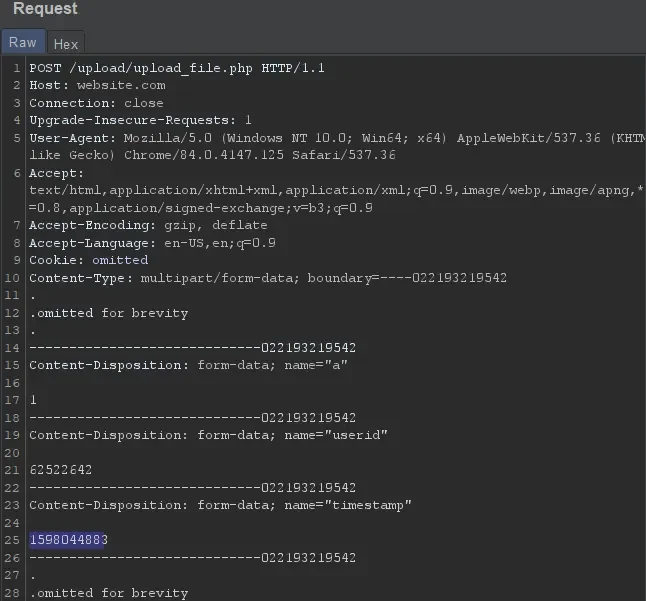
What did stand out was the naming convention together with the parameters and values in the upload request, which suggested IDOR potential.
The caption notes the userid parameter, but also to keep an eye on the timestamp.
Exploitation
Step 1: understand the naming scheme
Each user gets a folder, and uploaded images are renamed to userid_randomnumber_(small-medium-or-large).png. The random number turned out not to be random at all but a Unix epoch timestamp. For example, 1598044883 is Friday, August 21, 2020 9:21:23 PM GMT.
Step 2: change the user id
The obvious approach was to change the victim's userid to the attacker's own and upload an image. It worked: the image was uploaded into the victim's folder. That alone is uninteresting, so the next question was whether existing images could be overwritten.
Step 3: obtain the timestamp
Overwriting an existing image required its timestamp. That was easy to get: view the source of the page and note the img src value. With the timestamp, the user id and the image in hand, the overwrite worked, sort of.
Step 4: observe which size changes
Of the three sizes the image is saved as, the small one was the easy one to spot, because it is displayed on the victim's profile page. Refreshing the victim's page in a different browser after issuing the upload request showed immediately what had happened.
Step 5: the reproduction that failed
A second attempt, this time with a report in mind, was done in story mode: create a profile as a regular user, upload images, look at them, and refresh the page a couple of times to confirm everything looked good. Then, as the attacker, run the same attack. As the victim, refresh the page, ready to take a screenshot, and nothing had changed.
Step 6: isolate the difference
The steps were repeated while omitting the ones that seemed irrelevant, such as clicking around as a regular user after uploading the image, and the attack worked again. The question was what had changed between the working first attempt, the failing second and the working third.
Step 7: the condition
Comparing the failed attempt with the successful one showed, and further testing confirmed, that if the victim's images that the attacker wanted to overwrite had been visited before the attack, the attack would not work at all. Visiting a link to the image in question made it invulnerable to the overwrite. Even a bot crawling the site and reaching the image would make that image invulnerable.
Step 8: working around the condition
It is not impossible, but highly improbable. It requires conditions that are not easy to come by naturally: the victim has to be uploading at the same time as the attack is performed. The timestamp parameter would have to be issued across multiple values, because the epoch timestamp includes minutes and seconds, so the exact time of the victim's upload cannot be known. That means Burp Intruder or similar, setting the timestamp across many values, and the attack hitting exactly the same time as the victim's upload.
Root cause
The upload request carried a userid parameter and a timestamp, and changing them affected where the image landed and which existing image was replaced. The naming scheme makes the target predictable: the user id is visible, and the timestamp is exposed in the img src of the profile page. The image is saved in three sizes, and the small one is displayed on the profile page.
The report does not explain why a previously visited image resists the overwrite.
Impact
An attacker can upload an image into another user's folder and, when the timestamp of an existing image is known and that image has not been visited, overwrite the victim's image, visibly including the small version shown on the victim's profile page. The attack works only while the target image has never been served; once anyone, including a crawler, has visited it, the overwrite fails. The timing workaround requires the victim to upload at the same moment as the attack and is described as highly improbable.
Fix
A sensible fix would be to derive the destination user id from the authenticated session rather than from request parameters.
Variants to test
- Upload endpoints that carry an owner identifier in the request: change it to another account's id and check whether the file lands in that account's storage.
- File names built from a timestamp or other predictable value: read the value from the rendered page, replay it in an upload and see whether the existing file is replaced.
- Multi-size image pipelines: overwrite one size and check whether the small, medium and large variants all change, which shows whether they share a name.
- Immutability checks: request the target image first, then repeat the overwrite, and compare the result with an image that was never requested.
- Timing-based attempts: use an intruder-style sweep over timestamp values around the victim's expected upload time and watch for a successful replacement.
What happened, in plain words
A website let people upload a picture to use as their profile image. Every user got their own little folder on the server, and the file was saved under a name built from the user's id number, a number, and a size label. The upload request contained the user id and the number as values the browser sends, which suggested IDOR potential. By changing the user id to someone else's, an image could be dropped into that person's folder. By also supplying the right number, an existing image of that person could be replaced, as long as it had not been visited. The twist: if the victim's image had already been viewed by anyone, including a search engine bot, the replacement silently failed. The report walks through how the naming worked, how the overwrite was done, why a careful reproduction failed, and what condition makes the attack work again.
The pieces you need to know first
Before the steps make sense, a few everyday ideas.
- Upload feature: the part of a website where you pick a file from your computer and send it to the site. Think of a cloakroom: you hand over your coat, the attendant gives you a ticket, and later the coat comes back.
- Server: the computer that runs the website and stores the files. Your browser asks it for pages and sends it data.
- Request: the message your browser sends to the server, for example "here is my new profile picture". It contains a URL, some headers (extra information), and often a body (the file itself).
- Parameter: a named value inside a request, like
userid=123. It is a label and a value, and the server reads it to decide what to do. - IDOR (Insecure Direct Object Reference): when a request names an object (a user, a file, an order) by an identifier, and the server does not check that you are allowed to touch that object. The everyday comparison: a hotel where room numbers are written on the keys and the reception never checks whether the key is yours. If you change the number on the key, you get into another room.
- Unix epoch timestamp: a way of writing a moment in time as a single number: the count of seconds since 1 January 1970.
1598044883is one such number. It looks random but it is just a clock reading. img src: the attribute in the page's HTML that tells the browser where to fetch an image from. Viewing the page source shows it, and it often contains the file name.- Burp Intruder: a tool that takes one request and resends it many times with one value changed each time (for example, a list of timestamps). The report mentions it for the harder variant only.
Setup
The report does not describe a particular toolchain beyond a browser and, for the harder variant, Burp Intruder. Two roles are needed: an attacker account and a victim account. The timestamp of the target image could be read from the img src value in the page source. If the target image had been visited before the attack, the overwrite did not work.
Finding it
Recon started with the upload function used as intended. The first check was whether any file could be selected for upload; if so, that was noted while still uploading the expected image type. After uploading, the next questions were where the image is stored and what the naming convention is. Storage on AWS would have meant preparing XXE payloads, storage on the same domain meant trying tricks to get another file type uploaded or to have the uploaded file executed as something other than an image. That part failed.
What did stand out was the naming convention together with the parameters and values in the upload request, which suggested IDOR potential.
The caption notes the userid parameter, but also to keep an eye on the timestamp.
Exploitation
Step 1: understand the naming scheme
Each user gets a folder, and uploaded images are renamed to userid_randomnumber_(small-medium-or-large).png. The random number turned out not to be random at all but a Unix epoch timestamp. For example, 1598044883 is Friday, August 21, 2020 9:21:23 PM GMT.
Why this matters: if the file name is predictable, then anyone who can see one file name can guess or reconstruct the name of another. The user id is visible in the request, and the timestamp is visible in the page, so the whole name is knowable from outside.
Step 2: change the user id
The obvious approach was to change the victim's userid to the attacker's own and upload an image. It worked: the image was uploaded into the victim's folder. That alone is uninteresting, so the next question was whether existing images could be overwritten.
In plain terms: the browser sent a request saying "save this picture under user 123", and the server did exactly that without asking whether the person sending the request was user 123. The attacker simply wrote a different number in the request.
Step 3: obtain the timestamp
Overwriting an existing image required its timestamp. That was easy to get: view the source of the page and note the img src value. With the timestamp, the user id and the image in hand, the overwrite worked, sort of.
Why this step: the file name is userid_timestamp_size.png. To replace an existing file, the new upload has to produce exactly the same name. The user id is known, the size is one of three fixed words, and the timestamp is sitting in the page source next to the image. So all three parts of the name can be assembled by anyone who can view the profile.
Step 4: observe which size changes
Of the three sizes the image is saved as, the small one was the easy one to spot, because it is displayed on the victim's profile page. Refreshing the victim's page in a different browser after issuing the upload request showed immediately what had happened.
Refreshing the victim's page in a different browser showed immediately what had happened. A second browser, or a fresh load, shows what the server actually has.
Step 5: the reproduction that failed
A second attempt, this time with a report in mind, was done in story mode: create a profile as a regular user, upload images, look at them, and refresh the page a couple of times to confirm everything looked good. Then, as the attacker, run the same attack. As the victim, refresh the page, ready to take a screenshot, and nothing had changed.
Why story mode: writing a report means the steps must be repeatable by someone else. Acting out both roles, victim first and attacker second, is how you make sure the reproduction is clean. The surprise was that the clean reproduction did not work.
Step 6: isolate the difference
The steps were repeated while omitting the ones that seemed irrelevant, such as clicking around as a regular user after uploading the image, and the attack worked again. The question was what had changed between the working first attempt, the failing second and the working third.
This is ordinary debugging: when something works, then fails, then works, you compare the runs and remove one difference at a time until the cause is isolated.
Step 7: the condition
Comparing the failed attempt with the successful one showed, and further testing confirmed, that if the victim's images that the attacker wanted to overwrite had been visited before the attack, the attack would not work at all. Visiting a link to the image in question made it invulnerable to the overwrite. Even a bot crawling the site and reaching the image would make that image invulnerable.
In plain terms: the first time an image is requested, something on the server side treats it as fixed. After that, the same name can no longer be replaced. The report does not explain the mechanism; it only records the behaviour.
Step 8: working around the condition
It is not impossible, but highly improbable. It requires conditions that are not easy to come by naturally: the victim has to be uploading at the same time as the attack is performed. The timestamp parameter would have to be issued across multiple values, because the epoch timestamp includes minutes and seconds, so the exact time of the victim's upload cannot be known. That means Burp Intruder or similar, setting the timestamp across many values, and the attack hitting exactly the same time as the victim's upload.
Why multiple values: the timestamp is precise to the second. If the attacker guesses one second and the victim uploads a second later, the names do not match and nothing is replaced. Sending many guesses, one per second, is the only way to cover the window, and even then the victim has to be uploading during that window.
Root cause
The upload request carried a userid parameter and a timestamp, and changing them affected where the image landed and which existing image was replaced. The naming scheme makes the target predictable: the user id is visible, and the timestamp is exposed in the img src of the profile page. The image is saved in three sizes, and the small one is displayed on the profile page.
Impact
An attacker can upload an image into another user's folder and, when the timestamp of an existing image is known and that image has not been visited, overwrite the victim's image, visibly including the small version shown on the victim's profile page. The attack works only while the target image has never been served; once anyone, including a crawler, has visited it, the overwrite fails. The timing workaround requires the victim to upload at the same moment as the attack and is described as highly improbable.
Fix
A sensible fix would be to derive the destination user id from the authenticated session rather than from request parameters.
In plain terms: the server should look up who is logged in and use that identity, not a number typed into the request. If the number in the request does not match the logged-in user, the request should be refused.
Variants to test
- Upload endpoints that carry an owner identifier in the request: change it to another account's id and check whether the file lands in that account's storage.
- File names built from a timestamp or other predictable value: read the value from the rendered page, replay it in an upload and see whether the existing file is replaced.
- Multi-size image pipelines: overwrite one size and check whether the small, medium and large variants all change, which shows whether they share a name.
- Immutability checks: request the target image first, then repeat the overwrite, and compare the result with an image that was never requested.
- Timing-based attempts: use an intruder-style sweep over timestamp values around the victim's expected upload time and watch for a successful replacement.
Glossary
- API: the set of requests a website or app accepts, and what each one does. Think of a restaurant menu: you can only order what is listed, in the form the kitchen expects.
- Attacker: the person trying to do something the site did not intend.
- AWS: Amazon Web Services, a cloud provider where many sites store files. The report mentions it only as a possible storage location.
- Bot / crawler: an automated program that visits pages and follows links, for example to index a site for a search engine.
- Browser cache: a copy of a page or image your browser keeps so it does not have to download it again. It can show you an old version after the server has changed.
- Burp Intruder: a tool that resends one request many times, changing a chosen value each time from a list.
- Client: your browser, or more generally the program making the request.
- Epoch timestamp: a moment in time written as the number of seconds since 1 January 1970.
- Header: extra information attached to a request or response, such as the type of content or a cookie.
- HTML source: the text a browser receives and turns into a page. Viewing it shows things like
img srcvalues that are not visible on screen. - IDOR (Insecure Direct Object Reference): a request names an object by an identifier, and the server does not check that you are allowed to access that object.
img src: the part of the HTML that gives the address of an image file.- Parameter: a named value in a request, such as
userid=123. - Payload: the piece of data an attacker puts into a request to achieve an effect.
- Profile image: the picture shown on a user's profile page.
- Request: the message a browser sends to a server asking for a page or sending data.
- Response: the server's reply to a request.
- Server: the computer that runs the website and stores its files.
- Session: the server's memory of who you are across several requests, usually tied to a cookie.
- Third party host: a different domain from the site you are using, often used to store files.
- Upload: sending a file from your computer to a server.
- User id: the number or string that identifies a user account.
- XXE: a class of attack against programs that read XML documents, where the document is made to fetch or reveal other files. The report mentions it only as something the researcher would have prepared if files had been stored on AWS.




