URL Validation Bypass Using Browser URI Normalization
A profile picture URL parameter was validated against a whitelist of allowed domains, but the validation could be bypassed using a URL with multiple @ symbols. An attacker could supply a URL pointing to an arbitrary external domain, potentially causing the server to fetch attacker-controlled content.
 Published on marxchryz.medium.com
Hello everyone, I am Marx Chryz and I do bug bounty hunting for about two years now. It’s also been three and a half years since I started doing web penetration testing.
The full write-up lives on its author's site
It belongs to its author, so we link to it rather than copy it. The other two tabs are our own rewrites, checked against it.
Context
This is a bug found on a website that runs a bug bounty program. It is an external program, so the name of the target cannot be disclosed, and the vulnerability was not yet fixed as of the writing. Throughout this article the target is called redacted.com.
The affected feature is a POST parameter in the API that accepts a profilePicture parameter.
Setup
No special accounts, roles, tools or versions are described. The researcher notes two years of bug bounty hunting and three and a half years of web penetration testing as background.
Finding it
The starting point is URI normalisation. When you type HTTPS://GOOGLE.COM in a browser, it is converted to https://google.com in lowercase. URI normalisation is the process in which browsers modify a URI to make it standardised and consistent.
Lowercasing is only one part of it. Normalisation also converts many other characters, and those conversions can be used to bypass URL validation. The examples below show inputs that the browser treats as google.com:

Figure 1: ⒼⓄⓄⒼⓁⒺ.com is treated as google.com

Figure 2: 𝓰𝓸𝓸𝓰𝓵𝓮.𝓬𝓸𝓶 is treated as google.com

Figure 3: google。com is treated as google.com
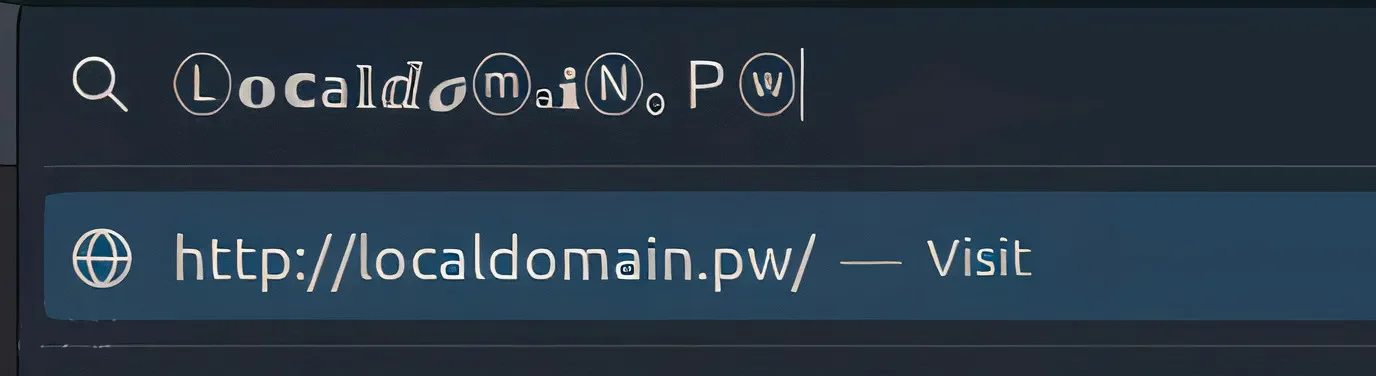
Figure 4: This cursed text lol is still treated as a valid URL, thanks to URI normalization
The normalisation process
The examples above are cases where the browser finds a compatibility equivalent. The report points to the Unicode standard for compatibility equivalence and gives a table of examples:
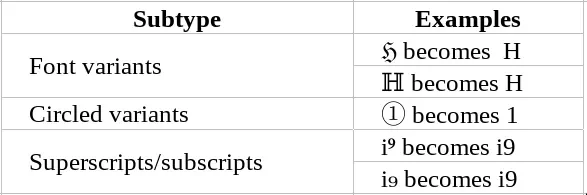
Table 1: Compatibility Equivalence Examples
A quick way to check for compatibility equivalence is shown in the next figure:

Figure 5: This is the code and the output
One caveat from the report: the 。 full stop symbol shown in Figure 3 is not handled by the String.normalize function in JavaScript. The researcher does not know why.
With this insight, a URL validation filter can be bypassed. If a website does not want you to input google.com, you can use ⒼⓄⓄⒼⓁⒺ.com instead.
Exploitation
The bug is described as very similar to a HackerOne report by zurke. The steps below follow the researcher's own sequence.
Step 1: Establish the baseline rejection
A POST parameter in the API accepts a profilePicture parameter. Submitting a URL on an unrelated domain is rejected:
https://mydomain.com/1.jpg
The response is You entered invalid value.
Step 2: Establish the accepted case
Submitting a URL on the target's own image host is accepted:
https://img.redacted.com/random.jpg
The response says that the changes made were successful.
Step 3: Infer the whitelist
From those two observations, the backend likely uses some kind of whitelisting that only allows images from img.redacted.com. The goal is therefore to bypass that whitelist.
Step 4: Try URI normalisation payloads
Several payloads that rely on URI normalisation were tried:
https://img.redacted.com。mydomain.com/1.jpg
https://img.redacted.com.ⓜⓨⓓⓞⓜⓐⓘⓝ.ⓒⓞⓜ/1.jpg
None of them worked.
Step 5: Try the classic userinfo bypass
A common whitelist bypass is to put the allowed host in the userinfo part of the URL:
https://[redacted]
This does not use URI normalisation, but it did not work either.
Step 6: Look further into normalisation
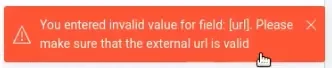
Investigating URI normalisation further, the researcher came across something: the use of multiple @ symbols.

Figure 6: Usage of multiple @ symbols
Step 7: The working payload
The whitelisting filter was bypassed with this payload:
https://img.redacted.com@@mydomain.com/1.jpg

It worked. The researcher states that this payload could not be found anywhere on the internet, and that even swisskyrepo's PayloadAllTheThings does not have it.
Root cause
The report does not describe the backend implementation, so the following is inferred from behaviour. The filter appears to check the URL string for the whitelisted host img.redacted.com, while the browser (or whatever component later resolves the URL) parses the URL differently. With a single @, the part before it is userinfo and the real host is mydomain.com, which is the classic bypass; that one was blocked. With two @ symbols, the payload bypassed the whitelisting filter. The mismatch between the string check and the actual URL parsing is what defeats the whitelist. The report does not state which parser or library was involved.
Impact
The report does not spell out the impact beyond the bypass itself. What is shown is that a profilePicture URL using the double-@ payload was accepted as a successful change. The vulnerability was not fixed as of the writing.
Fix
A robust fix would be to parse the URL with a proper parser and compare the parsed host against the whitelist, rather than searching the raw string for the allowed hostname, and to reject URLs whose userinfo component is present.
Variants to test
- Single
@in the userinfo:https://[redacted]. A positive result is the backend accepting the URL while the resolved host isattacker.example. - Double
@:https://allowed.example@@attacker.example/path. A positive result is acceptance where the single@was rejected. - Unicode compatibility equivalents of the allowed host, such as circled or mathematical letters. A positive result is acceptance of a host that normalises to the allowed name but is not literally it.
- The
。full stop variant, for examplehttps://allowed.example。attacker.example/path. A positive result is acceptance despite the different separator. - Combinations of the above with a path that looks like an image, such as
/1.jpg, since the filter may also check the extension.
For each variant, confirm what the server actually fetches or stores, not just the success message, because the acceptance response alone does not prove where the URL points.
Report timeline
| Date | Event |
|---|---|
| Nov 18, 2022 | Bug submitted |
| Nov 18, 2022 | Triaged |
| Dec 1, 2022 | Bounty received |
What happened, in plain words
A security researcher found a way to trick a website into accepting a profile picture link that pointed to a domain the site was supposed to block. The site had a rule: profile pictures could only come from its own image server. The researcher found a way to write a link that the site's checking code accepted even though it was not on the allowed server. The trick relied on how a URL with two @ symbols is read.
The site runs a bug bounty program, which is a scheme where companies pay people to find and report security problems instead of exploiting them. This particular program is external, meaning the company does not want its name made public, so throughout the article the target is called redacted.com. The problem had not been fixed at the time of writing.
The affected feature is a setting in the site's API that lets a user set a profilePicture. An API (Application Programming Interface) is the set of doors a website offers to other software: instead of a person clicking buttons in a browser, a program sends requests directly to the site and gets answers back. A profilePicture parameter is simply one field in such a request, the place where you supply the address of the image you want to use as your profile picture. The site appears to use some kind of whitelisting that only allows images from its own image host.
Background: what a URL is and how browsers tidy it up
A URL (Uniform Resource Locator) is the address you type in the browser bar, like https://google.com. The https part is the scheme, the protocol used to fetch the page. The google.com part is the host, the name of the server. Anything after a slash is the path, which tells the server which page or file you want.
Have you ever noticed that when you type HTTPS://GOOGLE.COM in the browser, it automatically becomes https://google.com in lowercase? That is URI normalisation at work. A URI (Uniform Resource Identifier) is the general term for an address; a URL is one kind of URI. Normalisation is the process in which browsers modify the URI to make it standardised and consistent, so that two addresses that mean the same thing are treated as the same thing. Think of it like a postal service that rewrites MR. JOHN SMITH, 12 High St. and Mr John Smith, 12 High Street to the same delivery address: different spellings, same house.
Lowercasing is only one part of normalisation. It also converts a great many other characters, and those conversions can be used to slip past URL validation. The examples below show inputs that the browser treats as google.com:
Figure 1: ⒼⓄⓄⒼⓁⒺ.com is treated as google.com
Figure 2: 𝓰𝓸𝓸𝓰𝓵𝓮.𝓬𝓸𝓶 is treated as google.com
Figure 3: google。com is treated as google.com
Figure 4: This cursed text lol is still treated as a valid URL, thanks to URI normalization
In each figure the strange-looking address is treated as the ordinary google.com. The characters are different code points (the numbered symbols that text is made of) that happen to look like, or are defined to be equivalent to, the plain letters and the dot.
The normalisation process
The examples above are cases where the browser finds a compatibility equivalent. Compatibility equivalence is a rule in the Unicode standard (the big catalogue that assigns a number to every character in every writing system) saying that certain characters are meant to stand for the same thing, so software may swap one for the other. The report links to the Unicode standard for the details and gives a table of examples:
Table 1: Compatibility Equivalence Examples
A quick way to check for compatibility equivalence is shown in the next figure:
Figure 5: This is the code and the output
The figure shows a short piece of code and its output. One caveat from the report: the 。 full stop symbol shown in Figure 3 is not handled by the String.normalize function in JavaScript. The researcher does not know why. In plain terms, the JavaScript helper used to test equivalence does not convert that half-width full stop.
With this insight, a URL validation filter can be bypassed. If a website does not want you to input google.com, you can use ⒼⓄⓄⒼⓁⒺ.com instead. It is like a bouncer checking names against a list and turning away John Smith, while Jóhn Smith walks straight past and is understood by everyone inside as the same person.
Exploitation
The bug is described as very similar to a HackerOne report by zurke. HackerOne is a platform where bug bounty programs are listed and reports are handled; the linked report is a public example of the same kind of trick. The steps below follow the researcher's own sequence.
Step 1: Establish the baseline rejection
A POST parameter in the API accepts a profilePicture parameter. A POST request is one of the standard ways a program talks to a web server: it sends data to the server to create or change something, as opposed to a GET request, which just asks for a page. Submitting a URL on an unrelated domain is rejected:
https://mydomain.com/1.jpg
This block is a single URL, the value the researcher put into the profilePicture field. mydomain.com is an unrelated domain and /1.jpg is a path on it. The response is You entered invalid value.
Why this step: before you can show that a filter is broken, you need to show what the filter does when it works. This request proves the site refuses pictures hosted outside its own server.
Step 2: Establish the accepted case
Submitting a URL on the target's own image host is accepted:
https://img.redacted.com/random.jpg
Again a single URL, this time pointing at img.redacted.com, the site's own image server, with a file called random.jpg. The response says that the changes made were successful.
Why this step: this proves the feature itself works and that the site's own image host is on the allowed list. Together with step 1, it gives you the two ends of the filter's behaviour: one address refused, one accepted.
Step 3: Infer the whitelist
From those two observations, the backend likely uses some kind of whitelisting that only allows images from img.redacted.com. Whitelisting (also called allowlisting) is the opposite of blacklisting: instead of naming what is forbidden, you name exactly what is permitted and refuse everything else. A nightclub with a guest list works this way; if your name is not on it, you do not get in, however harmless you look. The goal is therefore to bypass that whitelist: to write an address that the check accepts but that actually leads somewhere else.
Step 4: Try URI normalisation payloads
Several payloads that rely on URI normalisation were tried. A payload is simply the crafted input you send to try to trigger the behaviour you want.
https://img.redacted.com。mydomain.com/1.jpg
This URL uses the 。 half-width full stop from Figure 3 in place of the dot between the allowed host and the attacker's domain. This URL uses the 。 half-width full stop from Figure 3 in place of the dot between the allowed host and the other domain.
https://img.redacted.com.ⓜⓨⓓⓞⓜⓐⓘⓝ.ⓒⓞⓜ/1.jpg
This one keeps the allowed host as a prefix and then appends the attacker's domain written in circled letters, ⓜⓨⓓⓞⓜⓐⓘⓝ.ⓒⓞⓜ, which normalise to mydomain.com. This one keeps the allowed host as a prefix and then appends the other domain written in circled letters, ⓜⓨⓓⓞⓜⓐⓘⓝ.ⓒⓞⓜ.
None of them worked. The filter was not fooled by character equivalence alone.
Step 5: Try the classic userinfo bypass
A common whitelist bypass is to put the allowed host in the userinfo part of the URL:
https://[redacted]
A URL can carry a username (and optionally a password) before the host, separated from it by @. In https://user@host/, everything between // and the @ is userinfo, and the real host is what comes after the @. A URL can carry a username before the host, separated from it by @. This does not use URI normalisation, but it did not work either. It is like addressing an envelope to a stranger but writing a trusted name in the return-address corner.
Step 6: Look further into normalisation
Investigating URI normalisation further, the researcher came across something: the use of multiple @ symbols.
Figure 6: Usage of multiple @ symbols
Why this step: the single @ trick did not work, so the researcher investigated URI normalisation further.
Step 7: The working payload
The whitelisting filter was bypassed with this payload:
https://img.redacted.com@@mydomain.com/1.jpg
This URL has two @ symbols. The single-@ version was blocked; the double-@ version was not.
It worked. The researcher states that this payload could not be found anywhere on the internet, and that even swisskyrepo's PayloadAllTheThings, a well-known public collection of attack payloads, does not have it.
Root cause
The report does not describe the backend implementation, so the following is inferred from behaviour. The filter appears to check the URL string for the whitelisted host img.redacted.com, while the browser (or whatever component later resolves the URL) parses the URL differently. With a single @, the part before it is userinfo and the real host is mydomain.com, which is the classic bypass; that one was blocked. With two @ symbols, the payload bypassed the whitelisting filter. The mismatch between the string check and the actual URL parsing is what defeats the whitelist. The report does not state which parser or library was involved.
In everyday terms: the guard reads the address as text and looks for the trusted name, but the driver reads the address by its grammar and goes where the grammar says. When the two readings disagree, the guard's approval means nothing.
URI normalisation payloads failed here because the filter was not defeated by character equivalence alone; the @ construction was needed.
Impact
The report does not spell out the impact beyond the bypass itself. What is shown is that a profilePicture URL using the double-@ payload was accepted as a successful change. The vulnerability was not fixed as of the writing.
Fix
A robust fix would be to parse the URL with a proper parser and compare the parsed host against the whitelist, rather than searching the raw string for the allowed hostname, and to reject URLs whose userinfo component is present. In plain words: read the address the way the browser will read it, then check the host that comes out, and refuse any address that carries a username part at all.
Variants to test
- Single
@in the userinfo:https://[redacted]. A positive result is the backend accepting the URL while the resolved host isattacker.example. - Double
@:https://allowed.example@@attacker.example/path. A positive result is acceptance where the single@was rejected. - Unicode compatibility equivalents of the allowed host, such as circled or mathematical letters. A positive result is acceptance of a host that normalises to the allowed name but is not literally it.
- The
。full stop variant, for examplehttps://allowed.example。attacker.example/path. A positive result is acceptance despite the different separator. - Combinations of the above with a path that looks like an image, such as
/1.jpg, since the filter may also check the extension.
For each variant, confirm what the server actually fetches or stores, not just the success message, because the acceptance response alone does not prove where the URL points.
Report timeline
| Date | Event |
|---|---|
| Nov 18, 2022 | Bug submitted |
| Nov 18, 2022 | Triaged |
| Dec 1, 2022 | Bounty received |
Triaged means the program's team reviewed the report, confirmed it was a real and in-scope issue, and moved it into their workflow. The bounty is the payment the researcher received for the finding.
Glossary
- API: the set of ways one piece of software talks to another; for a website, the endpoints that accept requests and return data, used by apps and scripts as well as by the site's own pages.
- Backend: the part of a website that runs on the server, out of sight of the visitor, where checks and data storage happen.
- Bounty: a reward, usually money, paid by a company to someone who reports a security problem to it responsibly.
- Bug bounty program: a scheme in which a company invites outsiders to look for security problems in its systems and pays for valid reports.
- Compatibility equivalence: a rule in the Unicode standard saying that certain characters are meant to stand for the same thing, so software may treat one as the other.
- Domain: the name of a server on the internet, such as
google.com; the part of a URL that says which computer to talk to. - Endpoint: a specific address on a server that accepts a particular kind of request, for example the one that handles profile picture changes.
- External program: a bug bounty program run by a company that does not want its identity made public, so reports refer to it under a placeholder name.
- Filter: a check in software that inspects input and decides whether to accept or reject it.
- GET request: a request that asks a server for a page or file without changing anything.
- Host: the server named in a URL, the part that actually receives the connection.
- HackerOne: a platform where bug bounty programs are listed and reports are submitted and handled.
- Impact: what an attacker could actually do with a vulnerability, and how bad the consequences would be.
- JavaScript: the programming language that runs inside web pages in the browser.
- Normalisation (URI normalisation): the process in which browsers rewrite an address into a standard form, for example lowercasing it or swapping fancy characters for plain ones, so that equivalent addresses are treated as the same.
- Parameter: one named field in a request, such as
profilePicture, where you supply a value. - Payload: the crafted input you send to try to make a system behave in a way it should not.
- POST request: a request that sends data to a server to create or change something.
- Protocol: the agreed rules for how two computers communicate, such as
https. - Root cause: the underlying reason a vulnerability exists, as opposed to the symptom you observe.
- Scheme: the first part of a URL, such as
https, naming the protocol to use. - String: a piece of text in programming; a sequence of characters.
- Triaged: reviewed and confirmed as a valid, in-scope issue by the program's team.
- Unicode: the standard catalogue that assigns a number to every character in every writing system, and defines which characters are equivalent.
- URI: Uniform Resource Identifier, the general term for an address on the internet; a URL is one kind.
- URL: Uniform Resource Locator, the address you type in a browser, made of a scheme, a host and a path.
- URL validation: checking that a supplied address is acceptable, for example that it points at an allowed host.
- Userinfo: the optional username (and sometimes password) part of a URL, written before the host and separated from it by
@. - Vulnerability: a weakness in software that lets someone make it behave in a way its owners did not intend.
- Whitelist (allowlist): a list of things that are permitted, with everything else refused.
- Whitelisting bypass: getting past a whitelist check so that something not on the list is accepted anyway.



