Weak Cryptography to Account Takeover’s
The password reset token was a Base64-encoded string containing the user's email and a timestamp, with no signature or randomness. An attacker could decode their own token, swap in a victim's email, re-encode it, and use it to reset the victim's password; the same weak encoding was used in an OAuth Authorization header, allowing login as another user.
 Published on medium.com
In this article, I’ll discuss some of my discoveries that were made possible by weak cryptography, resulting in account takeovers. Before we get started, I’d like to ask that you leave a like and a remark if you learned something.
The full write-up lives on its author's site
It belongs to its author, so we link to it rather than copy it. The other two tabs are our own rewrites, checked against it.
Context
This write-up covers two findings on a web application the author refers to as "cantdisclose.com". The first is in the password reset flow: the reset link carries a token that is nothing more than Base64-encoded text, and the text contains the account email and a sent time. The second is in the OAuth implementation: the authentication request carries an Authorization header that is also Base64 and can be decoded and re-encoded with a different email.
In both cases the encoded value is treated as a credential, but it is only encoded, not signed or encrypted with a secret. Anyone who can read the format can build a value for another account.
Setup
The author used two accounts of their own:
[redacted][redacted]
The first is treated as the attacker's account and the second as the victim's account. Requests were captured and replayed with Burp Suite, and the Intruder was used to send the reset request quickly so that the sent time would be near or the same for both accounts. A Base64 decoder was used to read and rebuild the tokens.
Finding it
The author requested a password reset for their own account and received a link by email. The link looked like this:
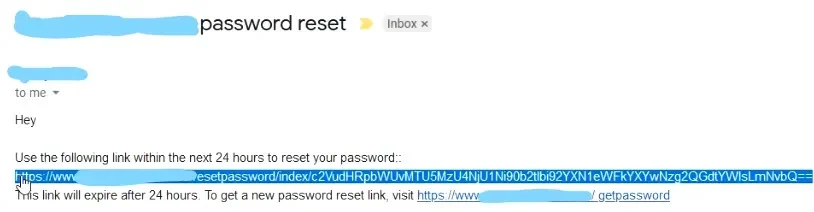
The == padding at the end of the token suggested Base64. The author copied the token, decoded it, and the result was:
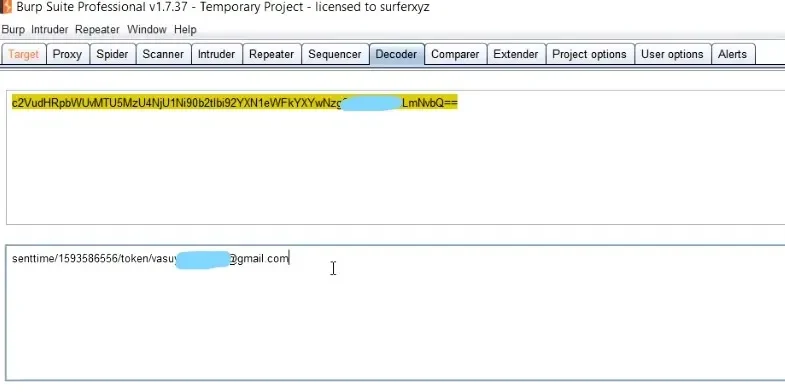
That is the whole of the discovery: the token decodes to readable text containing the email address and a timestamp, with no signature or secret key involved.
Exploitation
Step 1: Prepare the two accounts
The author used two accounts, one as the attacker and one as the victim, as listed in Setup.
Step 2: Request a reset and capture it
A password reset was requested for the first account and the request was captured in Burp Suite.
Step 3: Send the request through Intruder
The captured request was sent to Intruder, the email parameter was selected, and the victim's email was added as the payload. The reason given is speed: Intruder sends requests to the server very fast, so the sent time will be near or the same for both accounts.
Step 4: Take the attacker's link
The attacker's mailbox was checked and the reset link was copied.
Step 5: Decode the token
The string after index/ was decoded as Base64. The decoded form is, for example:
senttime/1593586556/token/[redacted]
Step 6: Swap the email
The email was replaced with the victim's, keeping the same sent time:
senttime/1593586556/token/[redacted]
Step 7: Re-encode
The modified string was encoded to Base64. The author gives the encoded result as:
[redacted]==
Step 8: Build the link
The encoded string is placed in the reset URL to make a valid link:
https://www.cantdisclose.com/resetpassword/index/[redacted]==
Step 9: Adjust the timestamp if needed
If the link does not work, the sent time is changed by 1 or 2 and the same process is repeated. In the author's case it worked when the sent time was changed by 1, and the password of the other account could then be changed without using the link that was sent to that account's mailbox.

Root cause
The reset token is a Base64 encoding of senttime/<timestamp>/token/<email>. Base64 is a transport encoding, not a protection: it is reversible by anyone and involves no key. The server accepted a token whose email field named the author's other account, so the value binding the token to a user could be rewritten. The timestamp is the only variable part, and in the author's case changing it by 1 made the link work. There is no signature or server-side secret in the token, so nothing stops a modified token from being accepted.
Impact
An attacker who can obtain a reset link for any account they control can build a reset link for another account and change its password, leading to account takeover. The author's own case required the sent time to be adjusted by 1 before the link worked, so the attack depends on the timestamp matching what the server expects.
Fix
The report does not describe a fix. The design implies that the token should be signed or generated server-side with a secret, so that the email and timestamp cannot be edited and re-encoded, and that the server should verify the token against the account it was issued for rather than trusting the email inside it.
Variants to test
- Decode any reset, invite or verification token that ends in
=or==. A positive result is readable text containing an email, user id or timestamp. - Re-encode the decoded value with another account's email and submit it. A positive result is a reset form or a successful password change for the other account.
- If the token contains a timestamp, change it by 1 or 2 and retry. A positive result is acceptance of a token that was never issued.
- Apply the same decoding to OAuth
Authorizationheaders. A positive result is a Base64 value containing an email or user identifier that can be swapped and re-encoded to log in as another account.
Second finding: OAuth
The author then looked at the requests sent during OAuth and at how authentication is done. The request looked like this:
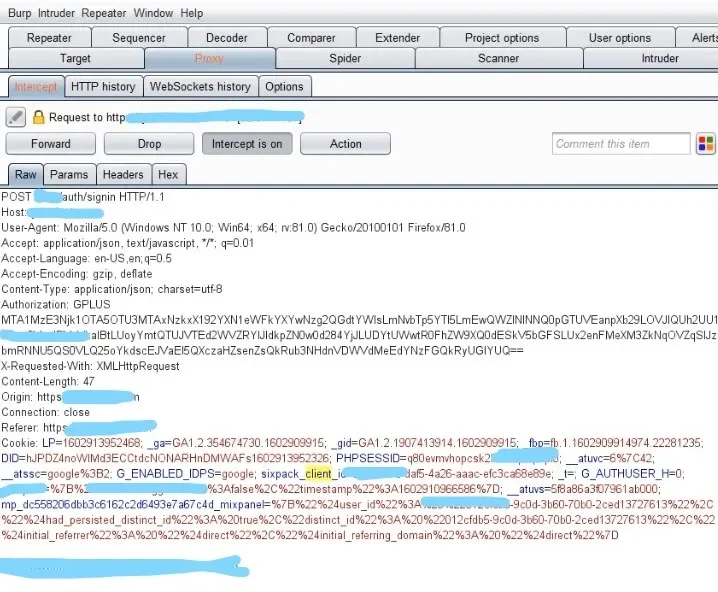
It contains an Authorization header that is also Base64 and can be easily decoded.
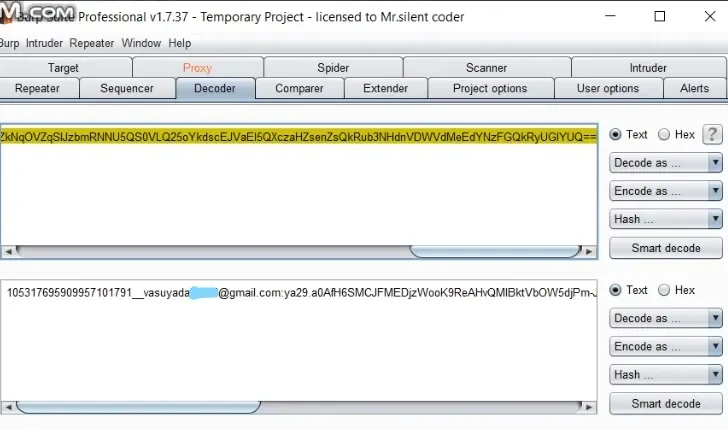
The author did the same thing here: changed the email to the other account's email, encoded it to Base64, and forwarded the request. The result was being logged into the other account.
Closing
The author links a related write-up by Harsh Bothra on weak cryptography in password reset leading to full account takeover:
https://medium.com/bugbountywriteup/weak-cryptography-in-password-reset-to-full-account-takeover-fc61c75b36b9
What happened, in plain words
A security researcher found two ways to take over other people's accounts on a website. He refers to the site as "cantdisclose.com". Both problems come from the same mistake: the website hands out a piece of text that looks scrambled, but it is not really protected. Anyone who knows the trick can unscramble it, change the email address inside it to somebody else's, scramble it again, and the website believes it.
The first problem is in the "forgot my password" feature. When you ask to reset your password, the site emails you a link. That link contains a long string of letters and numbers. The researcher decoded that string and found it was just plain text: a time value and your email address. He changed the email to a second account of his own, re-encoded the string, and used the new link to set a new password on that second account, without ever opening the email sent to it.
The second problem is in the login feature that lets you sign in with another service, called OAuth. The request that carries your identity also contains a scrambled value, and it is scrambled the same weak way. He changed the email inside it to his other account's email, re-encoded it, sent the request, and was logged in as the other account.
Before the details, two ideas need explaining, because the whole article rests on them.
What is cryptography? Cryptography is the craft of turning ordinary readable text into something unreadable, and back again, so that only the intended person can read it. Think of a locked cash box: you put a note in, lock it, and only someone with the key can open it. In computing, the "key" is a long secret string of characters that a program uses to lock and unlock data.
What is weak cryptography? A weak cipher is an encryption or decryption method that uses a key of insufficient length. If the key is too short, there are too few possible keys, and an attacker can simply try them all until the box opens. A weak cipher is defined as one that uses a key of insufficient length, which opens up the possibility, or probability, that the scheme could be broken, that is, cracked.
There is a third idea that matters just as much, and it is not encryption at all: encoding. Encoding is a way of rewriting data in a different alphabet so that it can travel safely through systems that only accept certain characters. It uses no key and no secret. Anyone can reverse it in a second. The most common one is called Base64, and it is the star of both findings. If encryption is a locked cash box, encoding is putting your note in a different envelope. The envelope is not locked. It just looks different.
The setup
The researcher used two accounts that both belonged to him:
[redacted][redacted]
The first one plays the attacker, the person doing the breaking in. The second one plays the victim, the person whose account gets taken over. Using your own two accounts is the normal, safe way to prove an account takeover: you demonstrate the attack without touching anybody else's data.
To do the work he used a few tools. You do not need to install anything to follow the story, but here is what each one is, because the steps refer to them.
- Burp Suite is a program that sits between your browser and a website. Every request your browser sends passes through it, and you can read it, pause it, change it, and send it again. Think of it as a transparent pipe with a tap on it: you can see and alter what flows through. A request is simply the message your browser sends to a website when you click something or load a page.
- Intruder is a part of Burp Suite that sends the same request many times, very fast, with one chosen piece changed each time. The researcher used it for speed, so that the "sent time" recorded by the server would be near or the same for both accounts.
- A Base64 decoder is any free web page or tool where you paste an encoded string and get the readable original back. It is not a hacking tool; it is the same operation your browser does silently all the time.
Finding the first problem
The researcher asked the site to reset the password for his own account. A reset link arrived in his email and looked like this:
The link ends with a long token. A token here is a short-lived password substitute: instead of asking "what is your password?", the site asks "do you hold the token I emailed you?". If you hold it, you are allowed to set a new password. It is like a cloakroom ticket: whoever holds the ticket gets the coat, and the attendant does not check your face.
What caught his eye was the == at the very end. In Base64, the equals signs are padding: they are added so the output length comes out in neat blocks. Seeing == is a strong hint that the string is Base64 and nothing more. He copied the token, pasted it into a decoder, and got this:
That is the entire discovery. The token unscrambles into readable text containing an email address and a time value. There is no signature, no secret key, nothing that would stop a person from writing their own. A signature in this context is a short value computed with a server-side secret over the contents of the token. If even one character of the contents changes, the signature no longer matches, and the server rejects the token. Here there was no signature at all, so the server had no way to tell an original token from a forged one.
Exploiting it, step by step
These are the steps the researcher put in his report. Each one is followed by why it was done.
Step 1: Prepare the two accounts
He used the two accounts listed above, one as attacker and one as victim. You need both because the attack is about making a token for account B while only ever receiving email at account A.
Step 2: Request a reset and capture it
He requested a password reset for the first account and captured the request in Burp Suite. Capturing means pausing the outgoing message so you can look at it and copy it. You need the exact request because you are going to resend it with a small change.
Step 3: Send the request through Intruder
He sent the captured request to Intruder, selected the email parameter, and put the victim's email in as the payload. A parameter is one named piece of data inside a request, for example email=.... The reason given is speed: Intruder sends requests to the server very fast, so the sent time will be near or the same for both accounts. This matters because, as you will see, the token contains a timestamp, and the server appears to expect the timestamp to be close to the moment the token was issued. By firing both requests almost together, the attacker's token and the victim's token end up carrying nearly the same time.
Step 4: Take the attacker's link
He checked the attacker's mailbox and copied the reset link. This is the only email he can read, and it is the raw material for the forgery.
Step 5: Decode the token
The string after index/ was decoded as Base64. The decoded form is, for example:
senttime/1593586556/token/[redacted]
Line by line, in plain words: the word senttime is a label, then a slash, then 1593586556, which is a timestamp, a number representing a moment in time, then another slash, the word token, another slash, and finally the email address the reset was issued for. The whole thing is one flat line of text with fields separated by slashes. Nothing is hidden and nothing is locked.
Step 6: Swap the email
He replaced the email with the victim's, keeping the same sent time:
senttime/1593586556/token/[redacted]
This is the heart of the attack. The only thing that ties the token to a person is the email written inside it, and that email is just text that anyone can edit. It is like a form where the name is filled in pencil rather than printed and stamped.
Step 7: Re-encode
The modified string was encoded back to Base64. The researcher gives the encoded result as:
[redacted]==
This is the forged token. It is the same kind of string the site itself produces, because the site's own tokens are made the same way: take the text, encode it, done. There is no step where a secret is mixed in, so the attacker can perform exactly the same step.
Step 8: Build the link
The encoded string is placed in the reset URL to make a valid link:
https://www.cantdisclose.com/resetpassword/index/[redacted]==
A URL is the address of a page. Here the token sits at the end of the address, after index/. When the victim clicks a reset link, their browser simply opens this address, and the site reads the token from the address to decide whose password may be changed. Because the attacker can write any address he likes into his own browser, he can open this one himself.
Step 9: Adjust the timestamp if needed
If the link does not work, the sent time is changed by 1 or 2 and the same process is repeated. In the researcher's case it worked when the sent time was changed by 1, and he could then change the password of the other account without using the link that was sent to that account's mailbox.
Why would changing a number by one help? Because the server evidently checks the timestamp in some way, perhaps against the time it recorded when it issued the token, and the two values can differ by a second or two. Since the timestamp is just a number in editable text, the attacker can try the neighbouring values until one is accepted. This is a tiny, manual version of what is called brute force: trying a small set of guesses until one works. The search space here is tiny, which is exactly the weakness.
Why it worked
The reset token is a Base64 encoding of senttime/<timestamp>/token/<email>. Base64 is a transport encoding, not a protection: it is reversible by anyone and involves no key. The server accepted a token whose email field named the author's other account, so the value binding the token to a user could be rewritten. The timestamp is the only variable part, and in the author's case changing it by 1 made the link work. There is no signature or server-side secret in the token, so nothing stops a modified token from being accepted.
Put in everyday terms: the site wrote the account name on a cloakroom ticket in ordinary pencil, then put the ticket in a slightly different envelope and hoped nobody would look inside. The envelope is not a lock. The pencil is not a seal.
What an attacker could do with it
An attacker who can obtain a reset link for any account they control can build a reset link for another account and change its password, leading to account takeover. Account takeover means logging in as somebody else and doing everything they could do: read their data, change their settings, and lock them out by changing the password. The researcher's own case required the sent time to be adjusted by 1 before the link worked, so the attack depends on the timestamp matching what the server expects.
How it should be fixed
The report does not describe a fix. The design implies that the token should be signed or generated server-side with a secret, so that the email and timestamp cannot be edited and re-encoded, and that the server should verify the token against the account it was issued for rather than trusting the email inside it.
In plain words: the ticket should be printed and stamped by the cloakroom, not written in pencil by whoever holds it. The stamp is made with a secret the server keeps, so nobody else can produce a valid one.
The same trick elsewhere
Once you know the pattern, you can look for it in other places. These are the checks the researcher lists.
- Decode any reset, invite or verification token that ends in
=or==. A positive result is readable text containing an email, user id or timestamp. - Re-encode the decoded value with another account's email and submit it. A positive result is a reset form or a successful password change for the other account.
- If the token contains a timestamp, change it by 1 or 2 and retry. A positive result is acceptance of a token that was never issued.
- Apply the same decoding to OAuth
Authorizationheaders. A positive result is a Base64 value containing an email or user identifier that can be swapped and re-encoded to log in as another account.
The second problem: OAuth
OAuth is the feature that lets you click "sign in with" another service instead of typing a password on the site itself. The site sends you to the other service, you approve, and the other service sends you back with proof of who you are. That proof travels in a request, and the researcher looked at those requests to see how authentication is done. The request looked like this:
It contains an Authorization header that is also Base64 and can be easily decoded. A header is a labelled line at the top of a request, carrying information about the request rather than the page content. Authorization is the standard header for carrying proof of identity. Here the proof is again just encoded text, not signed or encrypted.
The researcher did the same thing here: changed the email to the other account's email, encoded it to Base64, and forwarded the request. The result was being logged into the other account.
Notice how little changes between the two findings. In the first, the forged value was pasted into a URL in the browser. In the second, it was pasted into a header in a captured request and sent on. The underlying mistake is identical: the site treats an encoded value as if it were a protected one.
Closing
The author links a related write-up by Harsh Bothra on weak cryptography in password reset leading to full account takeover:
https://medium.com/bugbountywriteup/weak-cryptography-in-password-reset-to-full-account-takeover-fc61c75b36b9
Glossary
- Account takeover: logging in as another person's account and acting as them, usually after changing their password.
- API: a way for one program to talk to another, sending requests and getting responses, without a human clicking through pages.
- Attacker: the person trying to break in. In this article, the researcher using his own first account.
- Authentication: the process of proving who you are, for example with a password or a token.
- Authorization header: a standard line at the top of a request that carries proof of identity.
- Base64: a way of rewriting data using a fixed alphabet of letters, digits and a few symbols, with
=padding at the end. It uses no key and anyone can reverse it. - Brute force: trying guesses one after another until one works. It is fast when the number of possible guesses is small.
- Burp Suite: a program that sits between your browser and a website so you can read, pause, change and resend requests.
- Cipher: a method for encrypting and decrypting data.
- Cryptography: the craft of turning readable text into unreadable text and back, so only the intended person can read it.
- Decoder: a tool that reverses an encoding, turning Base64 back into readable text.
- Email parameter: the named piece of data in a request that holds an email address, for example
email=.... - Encoding: rewriting data in a different alphabet so it can travel safely. It is reversible by anyone and is not encryption.
- Encryption: turning readable data into unreadable data using a key, so that only someone with the key can read it.
- Header: a labelled line at the top of a request carrying information about the request.
- Intruder: the part of Burp Suite that resends one request many times, very fast, with a chosen piece changed each time.
- Key: a long secret string of characters used by an encryption method to lock and unlock data.
- OAuth: a feature that lets you sign in to a site using another service, instead of typing a password on the site itself.
- Parameter: one named piece of data inside a request.
- Payload: the value you insert into a chosen position when resending a request many times.
- Request: the message your browser sends to a website when you load a page or click something.
- Reset token: a short-lived password substitute emailed to you so you can set a new password. Whoever holds it is allowed to reset the password.
- Signature: a short value computed with a server-side secret over the contents of a token, so that any change to the contents makes the signature fail.
- Timestamp: a number representing a moment in time.
- Token: a piece of text that stands in for a password, proving you are allowed to do something.
- URL: the address of a page on the web.
- Victim: the person whose account is being taken over. In this article, the researcher's own second account.
- Weak cryptography: an encryption or decryption method whose key is too short, so the scheme can be broken by trying keys until one works.



