Weaponizing AutoGPT’s Email Block for Error-Based Internal SSRF and Banner Grabbing
AutoGPT's SendEmailBlock allowed any authenticated user to specify an arbitrary SMTP server, and the underlying smtplib.SMTP() opened a raw TCP connection without applying the HTTP path's IP blocklist. This let an attacker scan internal networks and leak service banners (such as SSH version strings) through structured error messages.
 Published on pavanchow.medium.com
Cybersecurity
The full write-up lives on its author's site
It belongs to its author, so we link to it rather than copy it. The other two tabs are our own rewrites, checked against it.
Context
AutoGPT is a project with over 160,000 GitHub stars that lets users build autonomous workflows which browse the web, write code and send emails. Its block system is a set of composable units, each of which can make an outbound connection, and each user-controlled input that reaches the network is therefore a potential SSRF surface.
The HTTP layer of the platform had real SSRF protection: an IP blocklist covered private networks, loopback and cloud metadata. The SendEmailBlock is the feature that normally sends email on a user's behalf. Its configuration schema exposes an SMTP server field as free-text input, so any authenticated user can set it to any hostname. That field is the subject of CVE-2026-33234.
Setup
The precondition is an authenticated account on the AutoGPT platform: the block can be configured and executed by any authenticated user. The researcher audited the block system by mapping every user-controlled input that could touch the network, and tested the HTTP path with the standard SSRF techniques before moving to other blocks. The exploit is driven through the platform API with a bearer token, using a JSON payload file and curl.
Finding it
The HTTP layer held up against the obvious attacks:
- Direct IPs in URL fields were blocked.
- DNS rebinding attempts were blocked by validation timing.
- Redirect-based SSRF was blocked by the connection handler.
With that surface exhausted, the researcher opened one more schema. The SendEmailBlock configuration schema had an SMTP server field taking free-text input. Tracing the execution path showed that smtplib.SMTP() opens a raw TCP socket, completely outside the HTTP connection layer where the blocklist enforcement lived. SMTP connections did not go through it.
The insight that turned the dead end into a finding is that smtplib is not just an email client: it is a TCP banner grabber with structured error reporting. When smtplib.SMTP() connects to a non-SMTP service, it reads whatever the service sends as its initial greeting. SMTP expects a 220 status line, and anything else triggers an exception. Python captures whatever bytes arrive on the socket and includes them in the exception message, which propagates through AutoGPT and surfaces directly in the block output without sanitisation.
Pointing it at port 22 on localhost returned an SSH banner wrapped in an SMTPConnectError.
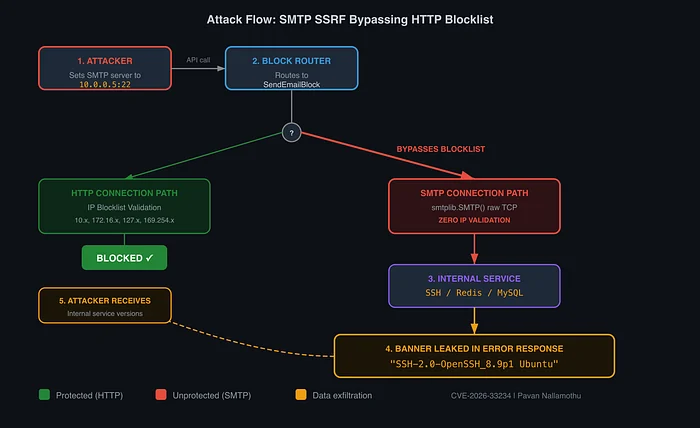
The diagram contrasts the two outbound paths: the HTTP path passes through IP blocklist validation, while the SendEmailBlock path opens a raw TCP socket. The gate the researcher had been hammering did not cover raw sockets.
Exploitation
Step 1: build the block payload
Targeting internal SSH, the payload sets the SMTP server to an internal address and the port to 22:
{ "block_id": "send_email_block", "inputs": { "smtp_server": "[redacted]", "smtp_port": 22, "to": "[redacted]", "subject": "test", "body": "test" }}
The smtp_server and smtp_port inputs are what direct the connection.
Step 2: execute the block via the API
curl -X POST https://autogpt-platform/api/blocks/execute \ -H "Authorization: Bearer <token>" \ -H "Content-Type: application/json" \ -d '@payload.json'
Step 3: read the banner from the error
The response leaks the internal banner:
{ "error": "SMTPConnectError: Connection unexpectedly closed: b'SSH-2.0-OpenSSH_8.9p1 Ubuntu'"}
The exception message carries the bytes the service sent on connect, so the SSH version string comes back in the API response.
SSH is the cleanest case because it sends a newline-terminated greeting immediately on connect. Other targets behave differently. MySQL sends its version string inside the binary Initial Handshake Packet, which smtplib reads but does not parse as SMTP. The version is extractable from the raw bytes in the error, but it requires more work than the clean SSH banner.
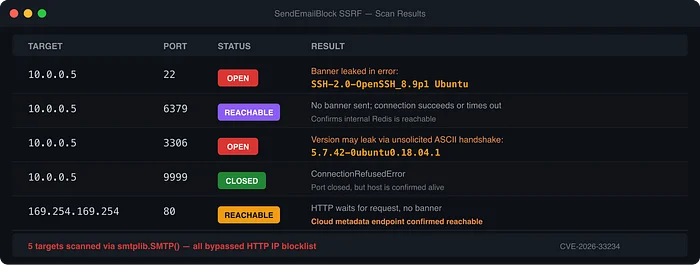
The screenshot shows live scan output via SendEmailBlock, where every connection bypassed the HTTP blocklist.
Root cause
The root cause is an architectural split between two outbound connection paths. AutoGPT's SSRF protection validates IP addresses exclusively on the HTTP connection path. SendEmailBlock uses smtplib.SMTP(), which opens a raw TCP socket through a completely separate code path, and the destination IP is never evaluated against the blocklist:
smtp = smtplib.SMTP(smtp_server, smtp_port)
The flow is:
Attacker sends API request | vAutoGPT Block Router | |-- HTTP Path --> IP Blocklist Validation --> Blocked or Allowed | |-- SendEmailBlock --> smtplib.SMTP() raw TCP socket | v Connects to [redacted]:22 | v Reads SSH banner | v SMTPConnectError includes banner | v Banner leaked in API Response
Impact
An attacker chains the bug in two steps. First, they scan the internal network by iterating through IP ranges and common ports; response time and error type reveal which hosts are alive. Second, they use leaked version strings to identify known vulnerabilities.
The severity ceiling is Moderate because the attack requires authenticated access, and remote code execution depends on a separately vulnerable internal service. The core value is network mapping and version disclosure, not a direct compromise. But that mapping can be exactly what an attacker needs to find the real path in: if an internal SSH server is running an unpatched version, or a reachable Redis instance has no authentication, the attacker now has a path from sending an email to remote code execution on an internal service.
Fix
The fix in autogpt-platform-backend 0.6.52 extends the existing IP blocklist validation to cover the SMTP connection path. Before smtplib.SMTP() is called, the destination address is resolved and checked against the same blocklist that protects HTTP connections. The fix also re-validates the resolved IP immediately before opening the socket to reduce DNS rebinding and TOCTOU risks.
For developers building similar platforms, every outbound connection mechanism needs the same validation layer: HTTP, SMTP, FTP, WebSocket, raw TCP. If a blocklist only covers one protocol, attackers will find the others.
- Other blocks that open sockets. Enumerate every block whose inputs reach the network and check which connection library it uses. A positive result is a block whose destination is not checked against the HTTP blocklist, demonstrated by a connection to an internal address.
- Banner grabbing through protocol mismatches. Point a client that expects one protocol at a service speaking another and inspect the error text. A positive result is a response containing service bytes, such as a version string, in an exception or error field.
- Non-SSH internal services. Try MySQL and similar services whose greeting is binary. A positive result is a version string recoverable from the raw bytes in the error, even if it needs more parsing than an SSH banner.
- DNS rebinding against the new check. Since the fix resolves the address and re-validates immediately before opening the socket, test whether a hostname can resolve to an allowed address at validation time and an internal one at connect time. A positive result is a connection to an internal address despite the blocklist.
- Port and host enumeration. Iterate internal IP ranges and common ports through the SMTP field and compare response times and error types. A positive result is a consistent difference that distinguishes live hosts and open ports from closed ones.
What happened, in plain words
AutoGPT is a free, open-source software project. People use it to build small automated helpers, called workflows, that can do things on a computer without a person clicking every step: look things up on the web, write code, send email. The project is popular, with more than 160,000 stars on GitHub.
A security researcher named Pavan Nallamothu looked at one feature of AutoGPT: the part that sends email. He found that this feature could be tricked into making the AutoGPT server connect to other computers inside the same private network, computers that people on the internet are not supposed to reach. When it connected, the other computer would introduce itself, for example by saying which version of the SSH program it runs, and AutoGPT would pass that introduction back to the person who asked, inside an error message.
SSH is a program that lets you log in to another computer remotely, usually with a text-only session. Its "introduction" is a short line of text it sends the moment someone connects.
So a normal user account on AutoGPT could be used as a kind of periscope into the private network behind the AutoGPT server: find which machines are alive, which ports (numbered doors on a computer) are open, and which software versions they run. That information is valuable because old versions often have known weaknesses.
The problem was given the identifier CVE-2026-33234. A CVE is a public catalogue number for a known security flaw, so that everyone can refer to the same issue. It was rated Moderate, with a score of 5.0, and the fix is in autogpt-platform-backend 0.6.52.
This article walks through the whole story in the same order as the researcher told it: how he looked for the bug, what he found, how he exploited it, why it worked, what damage it could do, and how it was fixed.
Background: what AutoGPT is and what a block is
AutoGPT lets users assemble workflows out of building pieces called blocks. Think of blocks as Lego bricks: each brick does one job, and you snap several together to make a machine that does something useful. One block might fetch a web page, another might run a piece of code, another might send an email.
Each block has settings, called inputs, that the user fills in. For the email block, one of those settings is the address of the mail server to use. A mail server is the computer that actually delivers email; the protocol used to talk to it is called SMTP (Simple Mail Transfer Protocol).
Because every block can reach out to another computer over the network, every user-filled setting that ends up in a network connection is a possible way to make the server connect somewhere it should not. Security people call that class of bug SSRF, short for Server-Side Request Forgery. The name sounds complicated, but the idea is simple: you convince a server to make a request on your behalf, to a destination you are not allowed to reach yourself. A comparison: you are not allowed into a building, but you can ask the receptionist to walk down the corridor and read a door sign for you. The receptionist is the vulnerable server.
AutoGPT did have protection against this. The platform keeps a blocklist, a list of network addresses that must never be contacted: private networks (addresses used only inside an organisation), loopback (the address a computer uses to talk to itself), and cloud metadata (a special internal address that cloud providers use to hand out credentials and configuration). Before making a web request, AutoGPT checked the destination against that list and refused if it was on it.
That protection, however, only covered one kind of network traffic: HTTP, the protocol browsers use to load web pages. The email block used a different protocol, SMTP, and that path did not go through the check. That gap is the subject of the finding.
Setting up
The only precondition is an authenticated account on the AutoGPT platform. Any logged-in user can configure and run the email block.
The researcher started by auditing the block system: he went through every setting a user can fill in that could end up touching the network, and noted which block used it. He first attacked the HTTP path with the usual SSRF tricks, to see whether the existing protection could be defeated. Only after that did he move on to other blocks.
To run the exploit he used the platform's API. An API (Application Programming Interface) is the way one program talks to another over the network, as opposed to the web page a human clicks on. A useful comparison: the website is the restaurant dining room, the API is the serving hatch where orders are passed directly to the kitchen. Requests to the API are authenticated with a bearer token. A token is a long random string that proves who you are, a bit like a wristband at an event: whoever wears it is treated as the person it was issued to. JSON is a plain-text format for structured data, and a payload here simply means the data you send in the request.
Finding it
The HTTP layer held up against the obvious attacks. The researcher tried three standard techniques and all three failed:
- Putting a private IP address directly in a URL field was blocked, because the blocklist recognised it.
- DNS rebinding was blocked by the timing of the validation. DNS is the system that turns a name like example.com into a numeric IP address. DNS rebinding is a trick where a name first resolves to a harmless address (to pass a check) and then to an internal one (to be used afterwards). AutoGPT's check happened at a moment that defeated the trick.
- Redirect-based SSRF was blocked by the connection handler. A redirect is when a web server answers "not here, look over there" and sends the client to a different address; the attacker hopes the check only looks at the first address. AutoGPT's connection handler did not fall for it.
With that surface exhausted, the researcher opened one more block's settings. The email block, SendEmailBlock, had an SMTP server field that accepted free text: any logged-in user could type any hostname or address into it. He traced what happens after that field is filled in, and found that the code calls smtplib.SMTP(). smtplib is a standard Python library for sending email, and SMTP() is the function that opens the connection. It opens a raw TCP socket. A socket is the basic network connection between two programs; "raw" here means it is a plain connection with no web-page machinery around it. Crucially, this connection was completely outside the HTTP layer where the blocklist was enforced. SMTP connections simply did not pass through the check.
The insight that turned a dead end into a finding is this: smtplib is not just an email client. It is also, in effect, a banner grabber with structured error reporting. A banner is the short greeting a network service sends when someone connects, often including its name and version. When smtplib.SMTP() connects to something that is not an SMTP server, it still reads whatever the other side sends as its opening greeting. SMTP expects the greeting to start with the status code 220. Anything else causes an exception, which is programming language for an error being raised. Python captures whatever bytes arrived on the socket and puts them into the error message. That error then travels up through AutoGPT and appears directly in the block's output, with no cleaning or filtering.
He pointed it at port 22 on localhost. Port 22 is the standard door for SSH, and localhost means the same machine. The answer came back with an SSH banner wrapped inside an SMTPConnectError.
The diagram shows the two outbound paths side by side. The HTTP path goes through IP blocklist validation. The SendEmailBlock path opens a raw TCP socket and never touches that validation. The gate the researcher had been hammering did not cover raw sockets.
The exploit
Step 1: build the block payload
To target an internal SSH service, the payload sets the SMTP server to an internal address and the port to 22:
{ "block_id": "send_email_block", "inputs": { "smtp_server": "[redacted]", "smtp_port": 22, "to": "[redacted]", "subject": "test", "body": "test" }}
Line by line:
- The outer braces open one JSON object, a bundle of named values.
"block_id": "send_email_block"says which building block to run. Here it is the email block."inputs"opens the group of settings for that block."smtp_server": "[redacted]"is the address of the mail server.[redacted]is an address in a private range, the kind of machine that is normally unreachable from the internet. This is the setting that decides where the connection goes."smtp_port": 22is the door to knock on. Port 22 is the SSH door, not a mail door, which is exactly the point: we want to talk to SSH, not to a mail server."to","subject"and"body"are the normal email fields. They are filled with placeholder values because the block expects a complete email configuration before it will run.
Step 2: execute the block via the API
curl -X POST https://autogpt-platform/api/blocks/execute \ -H "Authorization: Bearer <token>" \ -H "Content-Type: application/json" \ -d '@payload.json'
Line by line:
curlis the command-line tool that sends the request.-X POSTsays this is a POST request, the kind used to send data to a server rather than just ask for a page.https://autogpt-platform/api/blocks/executeis the API address that runs a block. The<token>placeholder stands for the real bearer token, which is left out here.-H "Authorization: Bearer <token>"adds a header. Headers are extra lines of information attached to a request. This one carries the token, which proves the request comes from a logged-in user.-H "Content-Type: application/json"tells the server that the body of the request is JSON, so it knows how to read it.-d '@payload.json'attaches the filepayload.jsonfrom step 1 as the body of the request. The@means "read this from a file".
Step 3: read the banner from the error
The response leaks the internal banner:
{ "error": "SMTPConnectError: Connection unexpectedly closed: b'SSH-2.0-OpenSSH_8.9p1 Ubuntu'"}
Line by line:
- The response is a JSON object with a single field,
error. SMTPConnectErroris the name of the error Python raised: the SMTP client could not complete a normal SMTP conversation.Connection unexpectedly closedis the library's description of what went wrong.b'SSH-2.0-OpenSSH_8.9p1 Ubuntu'is the interesting part. Thebprefix means these are raw bytes, exactly as received from the other machine. The content is the SSH greeting: protocol version 2.0, the OpenSSH software, version 8.9p1, running on Ubuntu. That is the banner, and it came back in the API response.
SSH is the cleanest case because it sends a newline-terminated greeting immediately on connect: the moment you knock, it introduces itself. Other targets behave differently. MySQL, a database server, sends its version string inside a binary Initial Handshake Packet. smtplib reads those bytes but does not parse them as SMTP. The version can still be extracted from the raw bytes in the error, but it takes more work than the clean SSH banner.
The screenshot shows live scan output produced through SendEmailBlock. Every connection bypassed the HTTP blocklist.
Root cause
The root cause is an architectural split between two outbound connection paths. AutoGPT's SSRF protection validates IP addresses exclusively on the HTTP connection path. SendEmailBlock uses smtplib.SMTP(), which opens a raw TCP socket through a completely separate code path, and the destination IP is never evaluated against the blocklist:
smtp = smtplib.SMTP(smtp_server, smtp_port)
Line by line:
smtp =stores the result in a variable namedsmtp, so the rest of the code can use the connection.smtplib.SMTP(calls the function that opens the connection.smtp_serveris the address the user typed into the field.smtp_portis the port the user chose.- The closing parenthesis ends the call. Nowhere in this line is the destination checked against the blocklist.
The flow is:
Attacker sends API request | vAutoGPT Block Router | |-- HTTP Path --> IP Blocklist Validation --> Blocked or Allowed | |-- SendEmailBlock --> smtplib.SMTP() raw TCP socket | v Connects to [redacted]:22 | v Reads SSH banner | v SMTPConnectError includes banner | v Banner leaked in API Response
Reading the diagram from the top: the attacker sends an API request. The block router, the part of AutoGPT that decides which block to run, has two branches. On the HTTP branch, the destination goes through IP blocklist validation and is either blocked or allowed. On the SendEmailBlock branch, smtplib.SMTP() opens a raw TCP socket, connects to [redacted]:22, reads the SSH banner, wraps it in an SMTPConnectError, and the banner ends up in the API response.
Impact
An attacker chains the bug in two steps. First, they scan the internal network by iterating through IP ranges and common ports. Iterating means trying one address after another, like dialling every number in a range to see who picks up. The response time and the type of error reveal which hosts are alive. Second, they use the leaked version strings to identify known vulnerabilities. A known vulnerability is a publicly documented weakness in a specific software version, and knowing the version tells an attacker which ones to try.
The severity ceiling is Moderate (5.0) because the attack requires authenticated access, meaning the attacker needs a valid account, and remote code execution depends on a separately vulnerable internal service. Remote code execution means running your own commands on someone else's machine. The core value here is network mapping and version disclosure, not a direct compromise. But that mapping can be exactly what an attacker needs to find the real path in: if an internal SSH server is running an unpatched version, or a reachable Redis instance has no authentication, the attacker now has a path from sending an email to remote code execution on an internal service. Redis is an in-memory database often used as a fast cache; if it is reachable and has no password, it can be abused.
The fix
The fix in autogpt-platform-backend 0.6.52 extends the existing IP blocklist validation to cover the SMTP connection path. Before smtplib.SMTP() is called, the destination address is resolved and checked against the same blocklist that protects HTTP connections. The fix also re-validates the resolved IP immediately before opening the socket, to reduce DNS rebinding and TOCTOU risks. TOCTOU stands for time-of-check to time-of-use: the gap between the moment something is checked and the moment it is used, during which an attacker might change it.
For developers building similar platforms, every outbound connection mechanism needs the same validation layer: HTTP, SMTP, FTP, WebSocket, raw TCP. If a blocklist only covers one protocol, attackers will find the others.
- Other blocks that open sockets. Enumerate every block whose inputs reach the network and check which connection library it uses. A positive result is a block whose destination is not checked against the HTTP blocklist, demonstrated by a connection to an internal address.
- Banner grabbing through protocol mismatches. Point a client that expects one protocol at a service speaking another and inspect the error text. A positive result is a response containing service bytes, such as a version string, in an exception or error field.
- Non-SSH internal services. Try MySQL and similar services whose greeting is binary. A positive result is a version string recoverable from the raw bytes in the error, even if it needs more parsing than an SSH banner.
- DNS rebinding against the new check. Since the fix resolves the address and re-validates immediately before opening the socket, test whether a hostname can resolve to an allowed address at validation time and an internal one at connect time. A positive result is a connection to an internal address despite the blocklist.
- Port and host enumeration. Iterate internal IP ranges and common ports through the SMTP field and compare response times and error types. A positive result is a consistent difference that distinguishes live hosts and open ports from closed ones.
Glossary
- API: the way one program talks to another over the network, as opposed to a web page a person clicks on.
- Authentication: proving who you are, usually with a username and password or a token.
- AutoGPT: an open-source project for building automated workflows out of reusable pieces.
- Banner: the short greeting a network service sends when someone connects, often naming the software and its version.
- Banner grabbing: connecting to a service just to read its greeting and learn what software it runs.
- Bearer token: a long random string sent with a request that proves the sender is logged in; whoever holds it is treated as that user.
- Block: a reusable building piece in AutoGPT that performs one job, such as sending email.
- Blocklist: a list of network addresses that must never be contacted.
- Block router: the part of AutoGPT that decides which block to run for a request.
- Bytes: the raw form of data on a network, before it is interpreted as text or anything else.
- CVE: a public catalogue number for a known security flaw.
- curl: a command-line tool for sending web requests.
- DNS: the system that turns a name like example.com into a numeric IP address.
- DNS rebinding: a trick where a name resolves to a harmless address during a check and to an internal one afterwards.
- Exception: the way a program signals that something went wrong; it carries a message describing the error.
- Exploit: the concrete steps that turn a flaw into an actual effect.
- FTP: an older protocol for transferring files between computers.
- Header: an extra line of information attached to a network request, such as the token or the data format.
- Host: a computer on a network.
- HTTP: the protocol browsers use to load web pages.
- IP address: the numeric address of a computer on a network.
- JSON: a plain-text format for structured data, made of named values.
- Localhost: the name a computer uses for itself.
- Loopback: the network address a computer uses to talk to itself.
- Moderate: a severity rating meaning the flaw is real but limited, here because it needs a logged-in account.
- MySQL: a database server.
- Payload: the data sent in a request.
- Port: a numbered door on a computer; different services listen on different ports, such as 22 for SSH.
- Private network: a set of addresses used only inside an organisation and not reachable from the internet.
- Protocol: an agreed set of rules for how two computers talk, such as HTTP or SMTP.
- Python: a popular programming language; AutoGPT is written in it.
- Raw TCP socket: a plain network connection between two programs, with no web-page machinery around it.
- Redirect: a web server answering "not here, look over there" and sending the client to another address.
- Redis: an in-memory database often used as a fast cache.
- Remote code execution: running your own commands on someone else's machine.
- Schema: the definition of which settings a block accepts.
- SMTP: the protocol used to send email.
- smtplib: the standard Python library for sending email over SMTP.
- Socket: the basic network connection between two programs.
- SSH: a program for logging in to another computer remotely, usually in a text-only session.
- SSRF: Server-Side Request Forgery, a flaw where you convince a server to make a network request on your behalf to a destination you cannot reach yourself.
- TCP: the underlying protocol that carries most network connections, including HTTP and SMTP.
- TOCTOU: time-of-check to time-of-use, the gap between checking something and using it, during which an attacker might change it.
- Token: see bearer token.
- WebSocket: a protocol for a two-way connection between a browser and a server.
- Workflow: a chain of automated steps that a user builds in AutoGPT.





