WebCache Poisoning $$$? Worth it?
The website reflected the X-Forwarded-Host header in a link on cached pages, allowing an attacker to poison the cache so that other users were redirected to an attacker-controlled domain. The attacker could not escalate to XSS because the payload was filtered.
 Published on yaseenzubair.medium.com
In this article, I will try to guide the readers about a bug that is easy to miss and doesn’t get a lot of attention, but surely it’s worth it. I was testing a website that has a private bug bounty program, the website was secure and I failed in getting any of the bugs I knew, and suddenly a response header took my…
The full write-up lives on its author's site
It belongs to its author, so we link to it rather than copy it. The other two tabs are our own rewrites, checked against it.
Context
The target was a production website running a private bug bounty program. The site had very limited functionality, sat behind a WAF, and had no interesting subdomains. The feature that mattered here was the CDN cache in front of the site: responses carried CloudFront cache status headers, and some pages were served from cache to other users.
Setup
The only tool described is Burp Suite, used as an intercepting proxy while navigating the site. No accounts, roles or versions are mentioned. The precondition for the whole finding is that the application sits behind CloudFront and that some pages are cacheable, so a response poisoned once is served to later visitors who land on the same cache server.
Finding it
After failing to find any of the bugs I already knew, a response header caught my attention. Browsing with Burp proxying the traffic, I compared headers across several pages that looked almost identical. A request to one page returned:
and the response was:
HTTP/1.1 200 OK
<Snip.......Snip>>
X-Cache: Miss from cloudfront
A similar request to a second page returned almost the same response, except for the cache header:
HTTP/1.1 200 OK
<snip ....... snip>
X-Cache: Hit from cloudfront
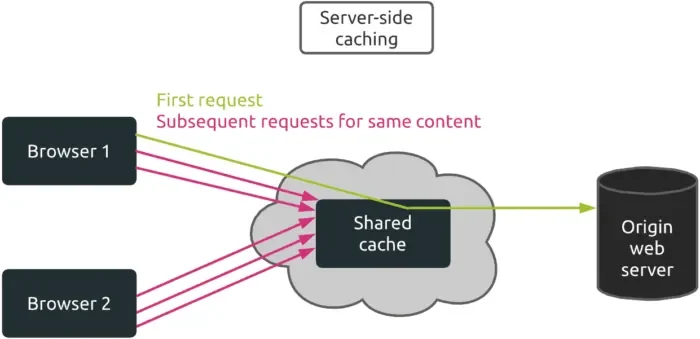
The X-Cache: Hit from cloudfront line means the page was cached at CloudFront. Any other user requesting that page is served from CloudFront's cached copy, provided they hit the same cache server, which is likely if they are in a similar geographical location. That made the page a candidate for cache poisoning: whatever I could get reflected into the cached response would be served to everyone else who hit that cache.
Exploitation
Because this was a production site, I could not risk damaging availability, so I was careful while testing. To avoid poisoning the main cache entry, I cached different parameters by sending requests such as /redacted-page2?dontpoisoneverycache=1.
Step 1: probing the Host header
I started sending different headers, changing the Host header, to see whether I could redirect the mass of users. That returned a server error.
Step 2: injecting a forwarded host header
I then tried adding:
X-Forwarded-Host: evil.com
X-Host: evil.com
To my surprise, the value was appended to the web page as a link:
<a href=”http://evil.com/redacted-page2" >
Clicking it redirected to evil.com. I changed network and opened the URL in a different browser, and the cached page still worked: I was redirected to evil.com. The cached page still worked from a different network and browser: I was redirected to evil.com.
Step 3: attempting XSS
I tried escalating the reflection to XSS by setting the header to:
javascript:alert(1)”>*
and to:
evil.com”onmouseover=alert(1)>
Both were filtered, so the escalation to script execution did not work.
Step 4: reporting
I reported the issue to the appropriate team. It was triaged in two days, classified as medium, and awarded a bounty of 200 USD.
Root cause
The application (or a component in front of it) trusted the X-Forwarded-Host and X-Host request headers and used their value to build a link in the page, without validating that the host belonged to the site. Because the page was cacheable at CloudFront, the response containing the attacker-controlled link was stored and then served to other users. The report does not describe how the WAF or the cache key handled the request. The exact component that consumed the headers is not described in the report.
Impact
The cached page containing the link to evil.com was served from CloudFront, so visitors hitting the same cache server would receive the same page. The redirect happens through a link placed in the page rather than an automatic redirect. Escalation to XSS was attempted but the payloads were filtered, so script execution was not demonstrated. The researcher deliberately avoided harming availability on the production site.
Fix
The report does not describe what was changed. The appropriate fix is to stop trusting client-supplied X-Forwarded-Host and X-Host values when building links, or to validate them against an allowlist of expected hosts, and to ensure the cache key and cacheability rules do not allow attacker-influenced responses to be stored and served to other users.
Variants to test
- Send
X-Forwarded-Host,X-Host,X-Forwarded-Serverand similar headers with a foreign domain on cacheable pages. A positive result is the value appearing in a link, script source or redirect in the response. - Use a cache-busting query parameter such as
?dontpoisoneverycache=1while testing, then request the clean URL from a different network or browser. A positive result is the poisoned content being served from cache to the second client. - Try escalating the reflected value to script execution with payloads that break out of the attribute or URL context. A positive result is JavaScript executing in the victim's browser from the cached response.
- Compare
X-Cachevalues across pages to find which ones are cacheable. A positive result isHit from cloudfronton a page that reflects request headers.
What happened, in plain words
A security researcher was testing a website that pays people for finding bugs in it. The site was well built, and none of the usual tricks worked. Then he noticed one line in the responses the site sent back: a header that said whether the page had been saved in a cache. That small detail led to a bug where he could make the site show a link to a domain he controlled, and the poisoned page was served from the cache. He reported it, the team confirmed it within two days, rated it medium, and paid him 200 USD.
This article walks through the same steps for someone who has never done security testing. Every term is explained the first time it appears.
The target and the setup
The website was a real, live production site (not a test copy) running a private bug bounty program. A bug bounty program is an arrangement where a company invites outside people to look for security problems and pays for valid reports, instead of or in addition to hiring their own testers. "Private" means only invited researchers can take part.
The site had very little functionality, meaning few pages and few features to poke at. It sat behind a WAF, a Web Application Firewall: a filter that inspects incoming requests and blocks ones that look malicious, a bit like a bouncer at a door checking IDs. It also had no interesting subdomains. A subdomain is a name like shop.example.com when the main site is example.com; testers often find weaker, forgotten systems on subdomains.
The feature that mattered here was the CDN cache in front of the site. A CDN, or Content Delivery Network, is a network of servers spread around the world that keep copies of web pages so users get them faster. A cache is a stored copy: instead of asking the original server every time, the CDN hands out the copy it already has. The responses carried CloudFront cache status headers. CloudFront is Amazon's CDN product, and a header is a small line of extra information sent along with a web request or response, separate from the page content itself. Some pages were served from cache to other users, which is the key fact for everything that follows.
The only tool described is Burp Suite, used as an intercepting proxy while browsing the site. A proxy sits between your browser and the website: your browser sends the request to the proxy, the proxy forwards it to the site, and the proxy shows you both the request and the response. Burp Suite is a popular tool for this. It lets you read and edit requests and responses, which is how the researcher inspected headers. No accounts, roles or software versions are mentioned.
The precondition for the whole finding is simple: the application sits behind CloudFront, and some pages are cacheable. Cacheable means the CDN is allowed to store the response and reuse it. So a response that is poisoned once, meaning it has been made to contain something the attacker chose, is served to later visitors who land on the same cache server.
Finding it
After failing to find any of the bugs he already knew, a response header caught his attention. This is a common experience: you try the well-known tricks, they fail, and then something small and unexpected stands out.
Browsing with Burp proxying the traffic, he compared headers across several pages that looked almost identical. Comparing pages side by side is useful because differences reveal how the site is built and which parts behave differently. A request to one page returned:
Line by line:
GET /redacted-page1 HTTP/1.1: this is the request line.GETis the method, meaning "give me this page"./redacted-page1is the path of the page on the site.HTTP/1.1is the version of the protocol, the language browsers and servers use to talk. The page name is redacted, meaning hidden, to protect the real site.Host: www.redacted.com: tells the server which website name the browser is asking for. One server can host many sites, so it needs to know which one you want.Accept-Encoding: gzip, deflate: says the browser can accept the response compressed, to save bandwidth.gzipanddeflateare compression formats.Accept: */*: says the browser accepts any type of content, page, image, and so on. The*/*means "anything".Accept-Language: en: says the browser prefers English content.User-Agent: Mozilla/5.0 (compatible; MSIE 9.0; Windows NT 6.1; Win64; x64; Trident/5.0): identifies the browser and operating system. Here it claims to be an old Internet Explorer on Windows. Testers often change this to see whether the site behaves differently for different browsers.Connection: close: asks the server to close the connection after this response, rather than keeping it open for more requests.Referer: https://www.redacted.com/: tells the server which page the user came from. It is spelledRefererin the protocol, a historical misspelling that stuck.Cookie: _TO_AB_Testing=14: a cookie is a small piece of data the browser stores for a site and sends back with each request. This one,_TO_AB_Testing, looks like it records which version of an A/B test the visitor is in. An A/B test shows different versions of a page to different users to compare results. The value here is14.
And the response was:
HTTP/1.1 200 OK
<Snip.......Snip>>
X-Cache: Miss from cloudfront
Line by line:
HTTP/1.1 200 OK: the status line.200is the code for success, andOKis its short description.<Snip.......Snip>>: the researcher cut out the rest of the response, the page content and other headers, to keep the article short.X-Cache: Miss from cloudfront: this is the header that caught his attention.X-Cacheis a custom header, theX-prefix is a convention for non-standard headers.Missmeans CloudFront did not have this page in its cache, so it fetched it from the original server. AMissis the opposite of aHit.
A similar request to a second page returned almost the same response, except for the cache header:
HTTP/1.1 200 OK
<snip ....... snip>
X-Cache: Hit from cloudfront
Line by line:
HTTP/1.1 200 OK: again, a successful response.<snip ....... snip>: again, the rest of the response is omitted.X-Cache: Hit from cloudfront:Hitmeans CloudFront already had this page stored and served the stored copy. This is the important difference: the second page was served from cache, while the first was fetched from the original server on that request.
The X-Cache: Hit from cloudfront line means the page was cached at CloudFront. Any other user requesting that page is served from CloudFront's cached copy, provided they hit the same cache server. That is likely if they are in a similar geographical location, because CDNs route users to nearby servers. That made the page a candidate for cache poisoning. Cache poisoning means getting harmful content into the stored copy, so that everyone who later receives that copy gets the harmful content too. A simple comparison: if someone swaps the printed menu in a restaurant's display case, every customer who reads the display sees the fake menu, not just the person who swapped it.
Exploitation
Because this was a production site, he could not risk damaging availability, meaning he could not risk taking the site down or breaking pages for real users. So he was careful while testing. To avoid poisoning the main cache entry, he cached different parameters by sending requests such as /redacted-page2?dontpoisoneverycache=1.
A parameter is the part of a URL after the ?, used to pass extra information to the page. Here dontpoisoneverycache=1 is a made-up parameter whose only purpose is to make the URL different from the clean one. Because caches usually store each distinct URL separately, this creates a separate cache entry to experiment on, leaving the real page's cache untouched. The name of the parameter is a reminder to himself: do not poison every cache. It is a safety measure, like testing a new cleaning product on a small corner of the floor before using it on the whole room.
Step 1: probing the Host header
He started sending different headers, changing the Host header, to see whether he could redirect the mass of users. The Host header is the one that tells the server which site name was requested. If the site builds links using whatever Host value it receives, an attacker could make it build links to a foreign domain. That attempt returned a server error, so this path did not work.
Step 2: injecting a forwarded host header
He then tried adding:
X-Forwarded-Host: evil.com
X-Host: evil.com
Line by line:
X-Forwarded-Host: evil.com:X-Forwarded-Hostis a header originally meant for proxies and load balancers. When a request passes through an intermediary, the original host name can be lost, so the intermediary adds this header to tell the next server what the original host was.evil.comis a domain the researcher controls, used here as a stand-in for an attacker's site.X-Host: evil.com: a similar, less standard header with the same idea, carrying a host name.
The point of trying these is that the site might trust them. If the application reads X-Forwarded-Host and uses it to build a link, then whatever value the client sends ends up in the page. The client, meaning the browser or the tester, controls these headers completely, so they should never be trusted for anything security-relevant.
To his surprise, the value was appended to the web page as a link:
<a href=”http://evil.com/redacted-page2" >
Line by line:
<a ...>: an HTML anchor tag, which creates a clickable link.href=”http://evil.com/redacted-page2": thehrefattribute holds the address the link points to. Here it ishttp://evil.com/redacted-page2, meaning the link goes toevil.comand not to the real site. The value came from the header he sent.>: closes the opening tag. The link text would follow, then a closing</a>tag, which is not shown.
Clicking it redirected to evil.com. He changed network and opened the URL in a different browser, and the cached page still worked: he was redirected to evil.com. Changing network and browser matters because it simulates a different visitor: a different internet connection and a fresh browser with no history. If the poisoned content still appears, it is coming from the cache, not from anything stored on his own machine. The cached page still worked from a different network and browser: he was redirected to evil.com.
Step 3: attempting XSS
He tried escalating the reflection to XSS by setting the header to:
javascript:alert(1)”>*
and to:
evil.com”onmouseover=alert(1)>
XSS, or Cross-Site Scripting, is a bug where an attacker gets their own JavaScript code to run in another user's browser as if it came from the trusted site. JavaScript is the programming language browsers run to make pages interactive. alert(1) is the classic test: it makes the browser show a popup with the number 1. If that popup appears, code is running.
Line by line for the first payload:
javascript:: a URL scheme, likehttp:, that tells the browser to run the text after it as JavaScript instead of loading a page. If a link's address starts with this, clicking it runs code.alert(1): the function call that shows the popup.”>*: characters meant to break out of the surrounding HTML, closing a quote, closing a tag, and so on, so the injected text is treated as code rather than as part of a link.
Line by line for the second payload:
evil.com: the domain, placed where the link address would go.”: a double quote, meant to close the attribute value early.onmouseover=alert(1): an event handler attribute.onmouseoverruns its value when the mouse pointer moves over the element, so hovering would trigger the popup.>: closes the tag.
Both were filtered, so the escalation to script execution did not work. Filtering means the site or the WAF recognised the dangerous characters or patterns and removed or blocked them. The link injection still worked, but turning it into running code did not.
Step 4: reporting
He reported the issue to the appropriate team. It was triaged in two days, classified as medium, and awarded a bounty of 200 USD. Triaged means the team reviewed the report, reproduced the bug and confirmed it was valid. Severity ratings like medium describe how serious the issue is judged to be.
Root cause
The application, or a component in front of it, trusted the X-Forwarded-Host and X-Host request headers and used their value to build a link in the page, without validating that the host belonged to the site. Validating here means checking the value against a list of allowed hosts. Because the page was cacheable at CloudFront, the response containing the attacker-controlled link was stored and then served to other users. The report does not describe how the WAF or the cache key handled the request. The exact component that consumed the headers is not described in the report.
Impact
The cached page containing the link to evil.com was served from CloudFront, so visitors hitting the same cache server would receive the same page. The redirect happens through a link placed in the page rather than an automatic redirect, so a visitor has to click the link. Escalation to XSS was attempted but the payloads were filtered, so script execution was not demonstrated. The researcher deliberately avoided harming availability on the production site.
Fix
The report does not describe what was changed. The appropriate fix is to stop trusting client-supplied X-Forwarded-Host and X-Host values when building links, or to validate them against an allowlist of expected hosts, and to ensure the cache key and cacheability rules do not allow attacker-influenced responses to be stored and served to other users. A cache key is the set of things the cache uses to decide whether two requests are "the same page", usually the URL; if attacker-controlled input is not part of the key but does change the response, poisoning becomes possible.
Variants to test
- Send
X-Forwarded-Host,X-Host,X-Forwarded-Serverand similar headers with a foreign domain on cacheable pages. A positive result is the value appearing in a link, script source or redirect in the response. - Use a cache-busting query parameter such as
?dontpoisoneverycache=1while testing, then request the clean URL from a different network or browser. A positive result is the poisoned content being served from cache to the second client. - Try escalating the reflected value to script execution with payloads that break out of the attribute or URL context. A positive result is JavaScript executing in the victim's browser from the cached response.
- Compare
X-Cachevalues across pages to find which ones are cacheable. A positive result isHit from cloudfronton a page that reflects request headers.
Glossary
- Bug bounty program: an arrangement where a company pays outside researchers for valid security bug reports.
- Private bug bounty program: a program open only to invited researchers.
- Production site: the real, live website used by actual users, as opposed to a test copy.
- WAF (Web Application Firewall): a filter that inspects incoming requests and blocks ones that look malicious.
- Subdomain: a name like
shop.example.comunder a main domainexample.com. - CDN (Content Delivery Network): a network of servers around the world that keep copies of pages to serve users faster.
- Cache: a stored copy of a response, reused instead of asking the original server again.
- Cacheable: allowed to be stored in a cache and reused.
- CloudFront: Amazon's CDN product.
- Header: a line of extra information sent with a request or response, separate from the page content.
- Burp Suite: a tool that sits between your browser and a site and lets you read and edit requests and responses.
- Intercepting proxy: a proxy that lets you pause, inspect and change traffic passing through it.
- Proxy: an intermediary that forwards requests between your browser and a website.
- HTTP: the protocol browsers and servers use to exchange requests and responses.
- GET: the HTTP method meaning "give me this page".
- Path: the part of a URL identifying a page, such as
/redacted-page1. - Host header: the header that tells the server which site name was requested.
- Accept-Encoding: the header listing compression formats the browser can accept.
- gzip, deflate: compression formats used to save bandwidth.
- Accept: the header listing content types the browser accepts;
*/*means anything. - Accept-Language: the header stating the browser's preferred language.
- User-Agent: the header identifying the browser and operating system.
- Connection: close: a header asking the server to close the connection after the response.
- Referer: the header telling the server which page the user came from.
- Cookie: a small piece of data the browser stores for a site and sends back with each request.
- A/B test: showing different versions of a page to different users to compare results.
- Status code: a number in the response saying what happened;
200means success. - X-Cache: a custom header showing whether CloudFront served a cached copy.
- Miss: the cache did not have the page and fetched it from the original server.
- Hit: the cache had the page and served the stored copy.
- Cache poisoning: getting harmful content into a cached copy so later visitors receive it.
- Parameter: the part of a URL after
?, used to pass extra information to the page. - Cache entry: the stored copy for one particular URL or cache key.
- Cache-busting: adding something to a URL so it does not match the existing cache entry.
- X-Forwarded-Host: a header used by proxies to pass along the original host name.
- X-Host: a similar, less standard header carrying a host name.
- HTML: the language that describes the structure of a web page.
- Anchor tag (
<a>): an HTML tag that creates a clickable link. - href: the attribute of a link holding its destination address.
- Attribute: a setting on an HTML tag, such as
hreforonmouseover. - XSS (Cross-Site Scripting): a bug where an attacker's JavaScript runs in another user's browser as if from the trusted site.
- JavaScript: the programming language browsers run to make pages interactive.
- alert(1): a JavaScript function that shows a popup with the number 1, used as a test.
- javascript: scheme: a URL scheme that runs the text after it as JavaScript when clicked.
- Event handler: an attribute like
onmouseoverthat runs code when something happens to the element. - onmouseover: an event handler that runs when the mouse pointer moves over the element.
- Filtering: removing or blocking dangerous characters or patterns in input.
- Triaged: reviewed, reproduced and confirmed as valid by the receiving team.
- Severity: a rating of how serious a bug is, such as medium.
- Validating: checking a value against what is expected or allowed.
- Allowlist: a list of values that are explicitly permitted.
- Cache key: the set of things a cache uses to decide whether two requests are for the same stored copy.
- Availability: whether a site keeps working and stays reachable for its users.


