When an Old Password Reset Token Still Worked
A password reset token remained valid after the account password was changed through account settings. An attacker who obtained an old reset token could potentially use it to reset the account password again.

medium.com
Published on medium.com
Hacking
The full write-up lives on its author's site
It belongs to its author, so we link to it rather than copy it. The other two tabs are our own rewrites, checked against it.
Context
This write-up is about an authentication logic issue in a web application's password reset feature. The report does not name the target, the product or the program, and it gives no endpoint, parameter or version details.
The feature under test is the standard "Forgot Password" flow. When a user clicks "Forgot Password", the application generates a temporary token or code and sends it to the user's email. The token acts as a temporary key that allows the user to set a new password. The report describes the expected behaviour of such tokens as having a controlled lifecycle: they should expire, and they should be invalidated when they are no longer supposed to be usable.
The researcher's question was not whether the reset flow works, but what happens to an old reset token after the account password has been changed through the normal account settings.
Setup
The report does not describe the target application, the account type, the environment or any software versions. The only tool named is Burp Suite, and specifically Burp Suite Repeater, which was used to replay the previously generated reset request after the password change. No other accounts, roles or preconditions are mentioned.
Finding it
The researcher deliberately moved away from the usual password-reset checks. Instead of asking "Can I reset the password?", the question was "What happens to an old reset token after the password is changed?"
A password reset token is a sensitive authentication credential. If an old token remains usable when it should have been invalidated, someone who obtains that token may potentially be able to use it to reset the account password again. That is the behaviour the researcher was asking about, and the test below confirmed it.
Exploitation
Step 1: Generate a reset token and leave it unused
The researcher requested a password reset for the account, which produced a reset token, and intentionally did not use it.
Step 2: Log in normally and change the password
The researcher then logged into the account normally and changed the password through the account settings. This is the legitimate action taken between generating the token and replaying it.
Step 3: Replay the old reset request
The researcher went back to the previously generated reset request and replayed it using Burp Suite Repeater. The report does not include the raw request, so the endpoint, parameters and headers are not available here.
Step 4: Observe the result
The application still accepted the previously generated reset token. The flow the researcher describes is:
Reset Token Generated
        ↓
Password Changed Normally
        ↓
Old Token Replayed
        ↓
Token Still Accepted ❗
This was the behaviour that caught the researcher's attention: the old token was still accepted after the password change.
Root cause
The report does not examine the application's code, so the exact mistake is not stated. What the behaviour implies is that changing the password does not invalidate outstanding password reset tokens, or that the reset endpoint does not check whether the token has been superseded by a later password change. In other words, the old token was still accepted after the account's credentials changed.
The finding is a logic issue rather than a bypass of a specific control, and the researcher's point is that it appears when two individually normal features, the reset flow and the change-password flow, interact in an unexpected way.
Impact
If an old token remains usable when it should have been invalidated, someone who obtains that token may potentially use it to reset the account password again.
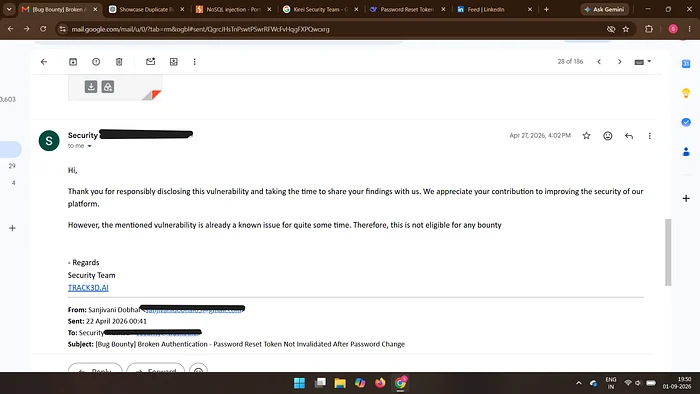
The researcher reported the issue responsibly to the security team with reproduction steps, technical details, screenshots, proof of concept and impact analysis. The security team responded that the issue was already known, so the report was marked as a duplicate and was not eligible for a bounty.
Fix
Variants to test
The researcher's lesson was to test workflows rather than single endpoints, and to ask what happens when one feature is combined with another. Concrete things to try on other targets:
- Password change after token generation. Generate a reset token, change the password through account settings, then replay the token. A positive result is the reset endpoint accepting the old token.
- Token reuse. Use a reset token once, then replay the same request. A positive result is the second use succeeding.
- Multiple outstanding tokens. Request several reset tokens, use one, then try the others. A positive result is any of the older tokens still working after the password has been changed.
- Token lifecycle questions. For each token, ask when it is created, used, expired, invalidated and reused, and test each of those transitions. A positive result is any transition where the token remains usable when it should not be.
- Manual testing over automation. Logic issues like these depend on the sequence of actions and application state, which the researcher notes can be difficult for automated tools to identify, so replay the sequence by hand in a tool such as Burp Suite Repeater.
The researcher's final takeaway is the question that guided the test: "What happens if I do this… after I do that?"
What happened, in plain words
A security researcher was testing a website's password reset feature. You know the one: you click "Forgot Password", the site emails you a link or a code, and you use it to set a new password. The researcher asked a question most people never think to ask: if I ask for a reset link and then change my password the normal way, does the old reset link stop working?
On this site, it did not. The old reset token was still accepted after the password had been changed. That is a logic mistake in how the site handles its reset links, and the researcher wrote it up. The site's security team replied that they already knew about the problem, so the report was marked as a duplicate and no bounty was paid. The researcher still treated it as a useful learning exercise, and this article walks through it from the beginning.
The feature being tested
The feature is the standard "Forgot Password" flow. When you click "Forgot Password", the application generates a temporary token or code and sends it to your email. The token acts as a temporary key that allows you to set a new password.
A few words need unpacking here.
- An application here just means the website or web service you are using through your browser.
- A token is a long, hard-to-guess string of characters that the site creates for one specific purpose. Think of a cloakroom ticket: the attendant gives you a numbered ticket, and whoever holds that ticket can collect the coat. The ticket is not your name or your password; it is a temporary proof that you are allowed to do one thing.
- The password reset flow is the sequence of pages and requests that runs from "I forgot my password" to "I have a new password".
The report describes the expected behaviour of such tokens as having a controlled lifecycle: they should expire, and they should be invalidated when they are no longer supposed to be usable. "Lifecycle" simply means the stages a thing goes through from birth to death. A reset token should be created when you ask for it, used once, and then be dead: expired after a time limit, or cancelled the moment it is no longer needed. A cloakroom ticket that still gets you the coat a week later, after the coat has been collected by someone else, would be a broken lifecycle.
The researcher's question was not whether the reset flow works, but what happens to an old reset token after the account password has been changed through the normal account settings.
That distinction matters. Most people testing a reset feature only check the obvious: does the email arrive, does the link open the reset page, does the new password let me log in. The researcher instead looked at the seam between two features: the reset feature and the change-password feature in account settings. Each one works fine on its own. The interesting question is what happens when they meet.
Setting up
The report does not describe the target application, the account type, the environment or any software versions. The only tool named is Burp Suite, and specifically Burp Suite Repeater, which was used to replay the previously generated reset request after the password change. No other accounts, roles or preconditions are mentioned.
If you have never seen Burp Suite, here is the idea. Your browser and the website have a conversation: the browser sends a request ("please show me this page" or "please change my password") and the server sends back a response. Normally you only see the finished page. Burp Suite is a program that sits between your browser and the website and lets you read that conversation, pause it, and send the same request again. Repeater is the part of Burp Suite built for exactly that: you take one captured request, press send as many times as you like, and watch what comes back each time.
Why does replaying matter? Because a website's behaviour often depends on things you cannot see on the page: hidden form fields, cookies, and tokens travelling in the request. If you can resend an old request exactly as it was, you can test whether the server still treats it as valid. That is the whole technique used here.
Finding it
The researcher deliberately moved away from the usual password-reset checks. Instead of asking "Can I reset the password?", the question was "What happens to an old reset token after the password is changed?"
A password reset token is a sensitive authentication credential. "Authentication" is the process of proving who you are, like showing ID at a door. A "credential" is the thing you use to prove it: a password, a code, a token. A reset token is powerful because whoever holds it can set a new password for the account.
If an old token remains usable when it should have been invalidated, someone who obtains that token may potentially be able to use it to reset the account password again. That is the behaviour the researcher went looking for, and the test below confirmed it.
Notice the careful wording: "someone who obtains that token". The report does not claim the token is easy to steal, and it does not demonstrate a theft. The finding is that the token lives longer than it should. Whether that matters in practice depends on whether anyone else can get hold of it, for example from an old email, a shared computer, a leaked inbox or a log file. The report leaves that part open.
Walking through the test
Step 1: Generate a reset token and leave it unused
The researcher requested a password reset for the account, which produced a reset token, and intentionally did not use it. The report does not show the request or the response for this step.
Why leave it unused? Because the point is to keep a spare key lying around. If you use the token immediately, it is spent, and there is nothing left to test. By requesting the reset and then walking away from it, the researcher created a live token that should later become invalid. That token is the subject of the whole experiment.
Step 2: Log in normally and change the password
The researcher then logged into the account normally and changed the password through the account settings. This is the legitimate action taken between generating the token and replaying it.
Think about why. A reset token exists for one reason: you cannot get into your account, so the site gives you a way back in. The moment you prove you can get in, by logging in with your current password and choosing a new one, that reason disappears. Any reset link still sitting in your inbox is now a loose end. If someone else later finds that email, they should not be able to use it, because you have already dealt with the situation yourself. This step is the action taken between generating the token and replaying it.
Step 3: Replay the old reset request
The researcher went back to the previously generated reset request and replayed it using Burp Suite Repeater. The report does not include the raw request, so the endpoint, parameters and headers are not available here.
"Replay" means sending the exact same request again, unchanged. In Burp Suite Repeater, the captured request sits in a text box, and you press send. The server received the same request again. That is the point: if the server accepts the replay, it means the server still considers the old token valid, no matter what has happened to the account since.
What we know is that it was the reset request generated in step 1, replayed after the password change in step 2.
Step 4: Observe the result
The application still accepted the previously generated reset token. The flow the researcher describes is:
Reset Token Generated
        ↓
Password Changed Normally
        ↓
Old Token Replayed
        ↓
Token Still Accepted ❗
Read the diagram top to bottom as a timeline. First the token is created. Then the password is changed the ordinary way, which should have made the token worthless. Then the old request is sent again. The last line is the result: the server said yes. It accepted the old token.
This was the behaviour that caught the researcher's attention: a credential that should have been dead after the password change was still honoured.
Why it happens
The report does not examine the application's code, so the exact mistake is not stated. In other words, the token lifecycle is incomplete: tokens are created and used, but not invalidated when the account's credentials change.
An endpoint is simply a specific address on a server that does a specific job, like a counter in a building. One counter handles logging in, another handles changing your password, another handles reset requests. When you send a request, you are walking up to one of those counters.
The finding is a logic issue rather than a bypass of a specific control, and the researcher's point is that it appears when two individually normal features, the reset flow and the change-password flow, interact in an unexpected way.
A "logic issue" means the code is doing exactly what it was written to do; the mistake is in the plan, not in a broken line of code. Nobody forgot to check a password. That is why these bugs are easy to miss: every individual piece behaves sensibly, and the flaw only shows up in the sequence.
What it could mean
If an old token remains usable when it should have been invalidated, someone who obtains that token may potentially use it to reset the account password again.
In plain terms: the bug does not hand anyone the account by itself. It removes one safety net. Here, changing the password did not stop the old reset token from being accepted. Whether that turns into a real compromise depends on things outside the report, such as who can read that inbox or that email.
The researcher reported the issue responsibly to the security team with reproduction steps, technical details, screenshots, proof of concept and impact analysis. The security team responded that the issue was already known, so the report was marked as a duplicate and was not eligible for a bounty.
"Responsible disclosure" means telling the organisation privately, with enough detail that they can reproduce and fix the problem, rather than publishing it or using it. The ingredients listed are the standard ones: reproduction steps (the exact sequence anyone can follow), technical details, screenshots, a proof of concept (a demonstration that the issue is real), and impact analysis (what harm it could cause). A "duplicate" means someone else had already reported the same issue, so the team had it on their list. "Not eligible for a bounty" means no reward was paid, because bounty programmes generally pay for the first report of a given issue.
The image sits at the end of the disclosure section, after the note that the report was marked as a duplicate and earned no bounty.
What the researcher took away
The write-up ends with lessons rather than a fix, and those lessons are the most useful part for someone starting out.
1. Test workflows, not just endpoints.
Don't stop at "Does this feature work?" Ask:
"What happens when I combine this feature with another feature?"
A workflow is a sequence of steps a real user takes, not a single page. Testing one page in isolation is like checking that each door in a building locks, without checking whether the corridor between them lets you walk around the lock. The bug here lived in the corridor.
2. Think about token lifecycles.
Ask when a token is:
- Created
- Used
- Expired
- Invalidated
- Reused
For every token you meet, these five moments are five test questions. When is it born? When is it meant to be spent? When does it time out? When is it cancelled early? And what happens if you try to use it a second time? A token that answers any of these wrongly is worth a closer look.
3. Manual testing matters.
Logic-based issues can be difficult for automated tools to identify because they often depend on the sequence of actions and application state. "Application state" means the site's memory of what has happened so far: whether you are logged in, what your password currently is, which tokens are outstanding. An automated scanner tends to fire requests one at a time and check the reply. It does not naturally think "first do this, then do that, then go back and retry the first thing". A person with a browser and a replay tool can.
The final takeaway
This was one of the researcher's early experiences with real-world web application security testing. The report may have been a duplicate, but the process taught them how to analyse authentication workflows, use Burp Suite for manual testing, reproduce an issue, and report it responsibly.
For them, security research is not just about getting a bounty. It is about asking better questions:
"What happens if I do this… after I do that?"
That is the whole method in one sentence. You do not need special access or deep programming knowledge to start. You need a browser, a tool that lets you resend requests, and the habit of wondering what happens at the boundary between two ordinary features. The password reset flow and the change-password page are both boring on their own. Put one after the other and ask what the site remembers, and sometimes you find something worth reporting.
Glossary
- Application: the website or web service you use through your browser.
- Authentication: the process of proving who you are, such as logging in with a password.
- Credential: anything used to prove identity or authorise an action, such as a password, code or token.
- Token: a temporary, hard-to-guess string a site issues for one specific purpose, like a cloakroom ticket.
- Password reset token: a token sent to your email that lets you set a new password.
- Password reset flow: the sequence of pages and requests from "Forgot Password" to setting a new password.
- Lifecycle: the stages something goes through from creation to death, including expiry and cancellation.
- Invalidate: to cancel something so it can no longer be used.
- Expire: to stop being valid after a set time.
- Replay: to send the exact same request again, unchanged.
- Endpoint: a specific address on a server that performs a specific job, such as handling logins or reset requests.
- Request: the message your browser sends to a server asking it to do something.
- Response: the message the server sends back.
- Header: extra information attached to a request or response, separate from the main content.
- Parameter: a named value carried in a request, such as a form field.
- Burp Suite: a tool that sits between your browser and a website so you can inspect, pause and resend requests.
- Burp Suite Repeater: the part of Burp Suite for resending one captured request as many times as you like.
- Logic issue: a flaw in the design or rules of a feature rather than in a single broken line of code; each part works as written, but the combination is wrong.
- Application state: the site's memory of what has happened so far, such as whether you are logged in or which tokens are outstanding.
- Workflow: a sequence of steps a real user takes across several features.
- Proof of concept: a demonstration that an issue is real and reproducible.
- Impact analysis: an assessment of what harm an issue could cause.
- Responsible disclosure: reporting a security issue privately to the organisation with enough detail to reproduce and fix it.
- Duplicate: a report of an issue the organisation already knows about from an earlier report.
- Bounty: a reward, usually money, paid by a programme for a valid security report.



