**When OAuth Works Correctly and Security Doesn’t: A Bug in OAuth Account Linking**
The account-linking callback accepted a state value that was not tied to the session that created it, and attached the external account to whoever was logged in when the callback arrived. An attacker could link their own Microsoft account to a victim's profile and then sign in as the victim.
 Published on medium.com
Cybersecurity
The full write-up lives on its author's site
It belongs to its author, so we link to it rather than copy it. The other two tabs are our own rewrites, checked against it.
Context
This is a write-up about a SaaS product that offered "Sign in with Microsoft" and, alongside it, a feature for linking a Microsoft account to an existing profile. The researcher does not name the platform, and at the request of the company's security team he shares no screenshots or internal URLs. The report was submitted through the official channel and the issue is fixed.
The distinction that matters throughout is between login and account linking. Externally the two flows look the same: the user is sent to the provider, authenticates, and comes back to the site. On the server the jobs differ.
- Login. Work out whose external account has just been authenticated.
- Account Linking. Do the same, and additionally ensure the external account is attached to the profile of the person who actually started the operation.
If the second check is weak, an external account can be attached to the wrong profile. Because a linked provider usually doubles as a sign-in method, that is not a cosmetic misconfiguration but a hole in authentication.
The researcher is explicit that this is not a Microsoft bug. The flaw is in how the application handles the result of external authorisation.
Setup
- Two test accounts on the target: account A as the attacker, account B as the victim.
- Burp Suite as an intercepting proxy.
- No real users' data was touched and there was no mass exploitation; all testing was done between the two accounts.
The researcher first studied the ordinary Microsoft login flow, then the linking flow, looking at five things:
- which parameters are sent when OAuth starts;
- how state is generated and validated;
- where the session context is stored;
- how the callback is handled;
- what data the server uses to choose the account the external identity is added to.
Finding it
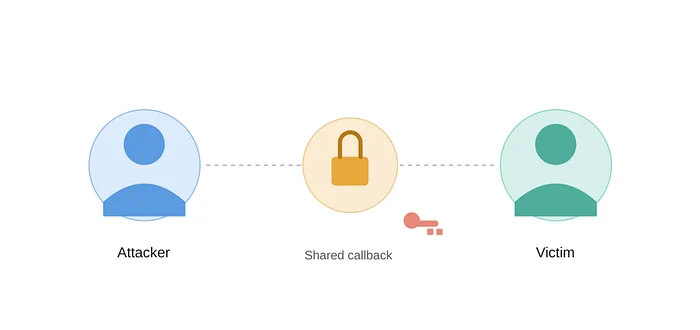
At first glance everything looked correct: a state parameter was present, and the OAuth steps behaved as expected. What drew attention was not the Microsoft login itself but the account-linking feature, and specifically the difference in how login and linking handle the user's context.
The working hypothesis was that it is not enough for state to exist and be unexpired. It has to be tied to the session that started the operation. When the callback arrives, the server should take the target account from the context saved at the start, not from whichever session happens to be active when the user returns. The guess was that the platform checks whether a transaction is valid but not who it belongs to.
Exploitation
The attack has two phases. In the first the attacker works only with their own session; in the second the victim is brought in.
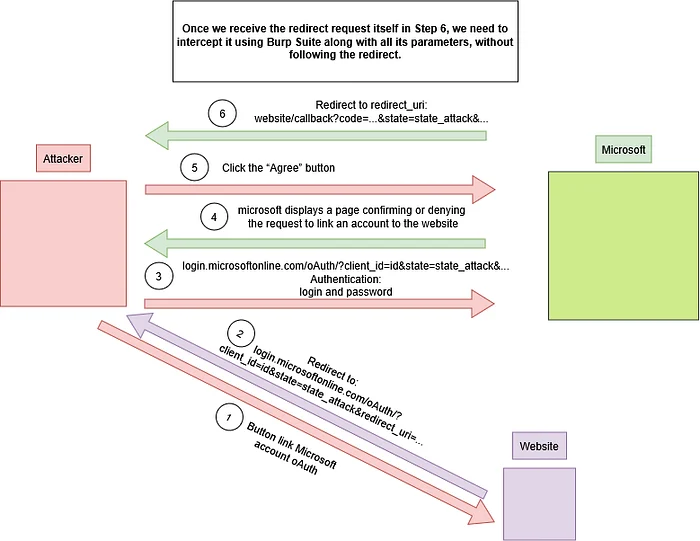
Phase 1, step 1: start the linking flow
The attacker clicks "Link Microsoft account" on the site.
Phase 1, step 2: redirect to Microsoft
The site redirects the attacker to Microsoft carrying its own state value, state_attack in the figure.
Phase 1, step 3: authenticate
The attacker signs in with their own Microsoft credentials.
Phase 1, step 4: consent
Microsoft shows a page asking to confirm or deny linking the account to the website.
Phase 1, step 5: agree
The attacker clicks "Agree".
Phase 1, step 6: intercept the callback
Microsoft redirects the browser to a callback of the following shape:
The attacker catches this request in Burp Suite and does not follow the redirect, keeping the code and state for later. At this point the attacker holds a valid, unused callback URL tied to their own Microsoft account.
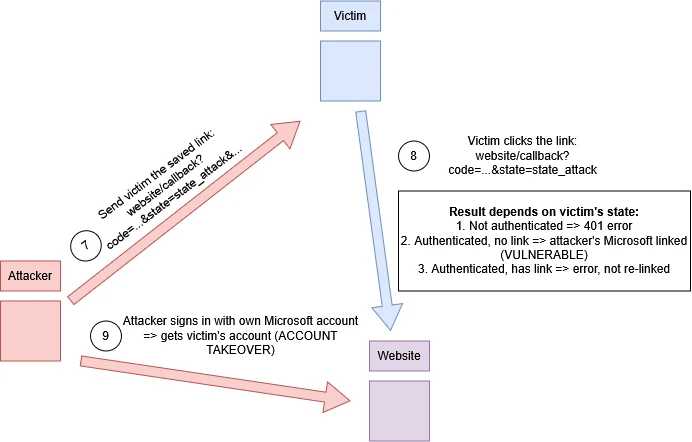
Phase 2, step 7: deliver the link
The attacker sends the victim the saved callback link, for example by email or on a web page.
Phase 2, step 8: the victim opens it
The victim, who is logged in to the platform, opens the link. The server sees a valid code and a state it recognises, but never checks that this state was issued to a different session. It links the attacker's Microsoft account to the victim's profile.
Phase 2, step 9: sign in as the victim
If the platform allows sign-in through a linked provider, the attacker logs in with "Sign in with Microsoft" and lands in the victim's account.
When it works and when it does not
The outcome at step 8 depends on the victim's state:
| Victim state | Result |
|---|---|
| Not logged in | 401 error, nothing is linked |
| Logged in, no Microsoft account linked yet | Attacker's Microsoft account is linked (the vulnerable case) |
| Logged in, Microsoft account already linked | Error, no re-linking |
Two practical notes from the report. The callback is an ordinary top-level GET navigation, so SameSite=Lax session cookies are still sent by the browser and do not block the attack. And the authorisation code is short-lived, so in a realistic scenario the victim has to open the link soon after the attacker obtains it.
Root cause
Two flaws combine:
- state was not strictly bound to the original session;
- when finishing the linking, the application relied on the current session rather than the context saved at the start.
As a result, the outcome of one linking operation is applied to a different account. This is a CSRF in account linking, and the problem lies in the application's handling of the external authorisation result, not in Microsoft OAuth.
The standard defences did not help. A state value can be present, carry an expiration time and pass validation, yet if it is not tied to a specific session it only stops the most primitive forgeries. Checking redirect_uri and making the code single-use do not help either: in this attack the code is valid, unused and goes to the legitimate redirect_uri. PKCE and state would stop it, but only if the verifier and the state are bound to the browser session that started the flow, which here they were not.
Impact
On the researcher's test accounts, signing in with the attacker's Microsoft account opened the victim's account at step 9. In the worst case:
- someone else's external account appears in the victim's profile without their knowledge;
- the victim gains an extra way to sign in that is controlled by another person;
- that access may survive a password change for as long as the link stays active.
If the platform allows sign-in through a linked provider, this amounts to account takeover. If it does not, the impact is smaller, but an unwanted external identity in the profile is still a violation of the account's integrity. The researcher confirmed the sign-in step in testing rather than assuming it.
The attack requires the victim to be logged in and to not already have a Microsoft account linked, and the victim has to open the link soon after the attacker obtains it.
Fix
The report gives recommendations; it does not describe the vendor's patch.
- Bind state to the session and the transaction. Existence and expiration checks are not enough. Store state server-side together with the session and user that started the flow, and compare on callback. Do the same for the PKCE verifier.
- Take the target account from server-side context saved when linking starts, and reject the callback if the current session belongs to someone else.
- Make the transaction single-use and invalidate its data after processing.
- Require re-authentication before adding a new way to sign in.
- Notify the account owner about every new link.
Variants to test
A useful trick from the report: compare login and account linking. Differences between the two implementations often reveal what testing only one flow hides.
- State reuse across sessions. Start a linking flow in one session, capture the callback, and replay it in a second logged-in session. A positive result is the external account being attached to the second profile.
- Logged-out and already-linked callbacks. Send the callback while logged out and while the provider is already linked. A 401 in the first case and a refusal to re-link in the second are the expected safe behaviours; anything else is worth investigating.
- One identity, two profiles. Try linking the same external identity to a second profile. A positive result is the same provider account appearing on two accounts.
- PKCE verifier binding. Where PKCE is used, check whether the verifier is tied to the session that started the flow or accepted from any session.
- Re-authentication before linking. Check whether adding a new sign-in method requires the user to re-authenticate. If it does not, the linking step is a candidate for this class of attack.
- Sign-in through the linked provider. After a successful link, attempt "Sign in with" the linked provider. A positive result is landing in the other account, which turns the linking flaw into account takeover.
The checklist the researcher uses for account linking:
- Is the original user context preserved throughout the entire transaction?
- Can the authorisation result be applied to a different account?
- Is state bound to a specific session? Is the PKCE verifier?
- How does the server determine the target account in the callback?
- How does the callback behave when the user is logged out, or already has this provider linked?
- Can one external identity be linked to two profiles? What happens if it is already linked to someone else?
- Is identity confirmation required before adding a new way to sign in?
- Can you sign in through the linked provider?
What happened, in plain words
A software company runs an online service (a SaaS product, meaning software you use through a browser instead of installing it). That service lets you create an account and, if you want, sign in with your Microsoft account instead of a password made for that site. It also has a separate feature: if you already have an account, you can attach (link) a Microsoft account to it, so that later you can use Microsoft to get in.
The researcher found that this linking feature could be tricked. An attacker could make the site attach the attacker's own Microsoft account to a victim's profile. Once that link exists, the attacker can use "Sign in with Microsoft" and land inside the victim's account. In other words, the attacker gets in as the victim.
The important point is that Microsoft did nothing wrong. Microsoft's sign-in system worked exactly as designed. The mistake was in how the website handled the answer that came back from Microsoft. The researcher says this plainly: it is not a Microsoft bug, it is a flaw in how the application handles the result of external authorisation.
The platform is not named. At the request of the company's security team, the researcher shares no screenshots and no internal URLs. The report went through the official channel, and the issue is fixed.
A few words you will meet constantly below, explained once here:
- OAuth is a standard way for one website to ask another company (here, Microsoft) to confirm who you are, without the first website ever seeing your Microsoft password. Think of a cloakroom: you hand over your coat, you get a ticket, and the ticket proves the coat is yours. The website gets a ticket from Microsoft, not your password.
- A session is the website's memory of "you are logged in right now". When you log in, the site gives your browser a small piece of data (a cookie) that the browser sends back on every request. The site reads that cookie and knows which account is asking. A cookie is like a wristband at an event: show it at the door and you get back in without queuing again.
- A token or code is a short string of characters that stands for something. Here the important one is the authorisation code: a one-time string Microsoft hands back to prove "this person really did sign in".
- CSRF (Cross-Site Request Forgery) means tricking a logged-in user's browser into sending a request the user never intended. The browser dutifully attaches the user's cookie, so the site thinks the user asked for it. It is like someone mailing you a form that is already filled in, and you signing it without reading.
The difference between logging in and linking an account
From the outside, logging in with Microsoft and linking a Microsoft account look identical. You click a button, you are sent to Microsoft, you sign in there, you come back to the site. Same trip, same pages.
On the server, though, the two jobs are different:
- Login. Work out whose external account has just been authenticated. That is all.
- Account Linking. Do the same, and additionally make sure the external account is attached to the profile of the person who actually started the operation.
That second part is the whole story. If the check is weak, an external account can be attached to the wrong profile. And because a linked provider usually doubles as a way to sign in, this is not a cosmetic misconfiguration. It is a hole in authentication: a way in.
Setting up the test
The researcher used two accounts on the target site:
- account A as the attacker;
- account B as the victim.
He also used Burp Suite, a tool that sits between your browser and a website and lets you look at, pause and edit every request and response. Think of a postal worker who can open every envelope, read it, change it, and decide whether to deliver it. No real users' data was touched, and there was no mass exploitation: everything happened between the two test accounts.
He first studied the ordinary Microsoft login flow, then the linking flow, looking at five things:
- which parameters are sent when OAuth starts (a parameter is a named value in a URL or request, like
?colour=blue); - how
stateis generated and validated; - where the session context is stored;
- how the callback is handled;
- what data the server uses to choose the account the external identity is added to.
Two of those need explaining.
state is a random value the website makes up at the start of an OAuth flow and sends along to Microsoft. Microsoft hands it back unchanged when it returns you to the site. The site can then check: is this a value I issued? It is meant to stop someone from slipping in a reply that the site never asked for. Think of a raffle ticket with a number torn in half: the half you keep must match the half that comes back.
The callback is the address on the website that Microsoft sends your browser back to when you are done. It carries the code and the state as parameters. It is the moment the site decides what to do with the answer from Microsoft.
Finding it
At first glance everything looked correct. A state parameter was present, and the OAuth steps behaved as expected. What drew attention was not the Microsoft login itself but the account-linking feature, and specifically the difference in how login and linking handle the user's context.
Context here means "who is doing this and what were they in the middle of". The site should remember, from the moment you click "Link", that this particular operation belongs to this particular logged-in person.
The working hypothesis was that it is not enough for state to exist and be unexpired. It has to be tied to the session that started the operation. When the callback arrives, the server should take the target account from the context saved at the start, not from whichever session happens to be active when the user returns. The guess was that the platform checks whether a transaction is valid but not who it belongs to.
That is like a hotel reception that checks your key card is genuine but never checks it is for this hotel, this room, this guest.
Carrying out the attack
The attack has two phases. In the first the attacker works only with their own session. In the second the victim is brought in.
Phase 1, step 1: start the linking flow
The attacker clicks "Link Microsoft account" on the site. He is doing this with his own account, on his own browser, so nothing unusual yet. The point is to get the site to start a legitimate operation that he can later reuse.
Phase 1, step 2: redirect to Microsoft
The site redirects the attacker to Microsoft carrying its own state value, state_attack in the figure. A redirect is the site telling your browser "go to this other address instead". The site has now issued a state value and remembers it, at least in principle.
Phase 1, step 3: authenticate
The attacker signs in with his own Microsoft credentials. This is a real sign-in to Microsoft, with his real account. Nothing is forged here.
Phase 1, step 4: consent
Microsoft shows a page asking to confirm or deny linking the account to the website. Consent means you agree to share your identity with that website. It is the same kind of screen you see when an app asks to use your Google or Facebook account.
Phase 1, step 5: agree
The attacker clicks "Agree". Microsoft now considers the request approved and prepares to send him back to the site.
Phase 1, step 6: intercept the callback
Microsoft redirects the browser to a callback of the following shape:
Line by line:
GETis the type of request a browser makes when you simply open a page. It asks the server to give something back.website/callbackis the address on the site that Microsoft sends you to. The report shows it in this shortened shape and does not give the real URL.code=…is the authorisation code: the one-time proof from Microsoft that a real sign-in happened. The report writes it as…rather than showing the value.state=state_attackis the value the site itself issued at the start of the flow, coming back unchanged.- The
?starts the list of parameters and&separates them.
The attacker catches this request in Burp Suite and does not follow the redirect, keeping the code and state for later. Normally your browser would follow the redirect automatically and the site would finish the linking. By pausing it, the attacker keeps the callback unused. At this point the attacker holds a valid, unused callback URL tied to his own Microsoft account.
Why this matters: he now has a genuine, unspent ticket that says "this Microsoft account has agreed to be linked". The only thing missing is a profile to attach it to.
Phase 2, step 7: deliver the link
The attacker sends the victim the saved callback link, for example by email or on a web page. The victim does not need to click a suspicious button or type a password. Opening a link is enough.
Phase 2, step 8: the victim opens it
The victim, who is logged in to the platform, opens the link. The server sees a valid code and a state it recognises, but never checks that this state was issued to a different session. It links the attacker's Microsoft account to the victim's profile.
This is the heart of the bug. The site asked "is this code and state valid?" and got yes. It never asked "was this state issued to the person who is asking now?". Because the victim's browser sends the victim's session cookie with the request, the site treats the operation as the victim's, and attaches the attacker's Microsoft account to the victim's profile.
Phase 2, step 9: sign in as the victim
If the platform allows sign-in through a linked provider, the attacker logs in with "Sign in with Microsoft" and lands in the victim's account. The link he planted now works as a door key.
When it works and when it does not
The outcome at step 8 depends on the victim's state:
| Victim state | Result |
|---|---|
| Not logged in | 401 error, nothing is linked |
| Logged in, no Microsoft account linked yet | Attacker's Microsoft account is linked (the vulnerable case) |
| Logged in, Microsoft account already linked | Error, no re-linking |
A 401 is the standard web answer for "you are not authenticated", meaning the site does not know who you are. So a logged-out victim is safe: there is no profile to attach anything to. A victim who already linked a Microsoft account is also safe, because the site returns an error and does not re-link. The dangerous case is the ordinary one: logged in, no Microsoft account linked yet.
Two practical notes from the report. The callback is an ordinary top-level GET navigation, so SameSite=Lax session cookies are still sent by the browser and do not block the attack. SameSite=Lax is a cookie setting that stops your cookie from being sent on some cross-site requests, but it still allows it when you navigate to a page by clicking a link or opening one, which is exactly what happens here. And the authorisation code is short-lived, so in a realistic scenario the victim has to open the link soon after the attacker obtains it.
Why the usual defences did not help
Two flaws combine:
statewas not strictly bound to the original session;- when finishing the linking, the application relied on the current session rather than the context saved at the start.
As a result, the outcome of one linking operation is applied to a different account. This is a CSRF in account linking, and the problem lies in the application's handling of the external authorisation result, not in Microsoft OAuth.
The standard defences did not help. A state value can be present, carry an expiration time and pass validation, yet if it is not tied to a specific session it only stops the most primitive forgeries. Checking redirect_uri and making the code single-use do not help either: in this attack the code is valid, unused and goes to the legitimate redirect_uri. redirect_uri is the address the site tells Microsoft to send the user back to; checking it stops an attacker from redirecting the answer somewhere else, but here the answer goes exactly where it should. PKCE and state would stop it, but only if the verifier and the state are bound to the browser session that started the flow, which here they were not.
PKCE (Proof Key for Code Exchange) is an extra OAuth protection: the site makes a secret, sends a scrambled version of it to Microsoft at the start, and must present the original secret when redeeming the code. It only helps if that secret is tied to the same browser session. Otherwise it is a second raffle ticket that anyone can carry.
What this means for users
On the researcher's test accounts, signing in with the attacker's Microsoft account opened the victim's account at step 9. In the worst case:
- someone else's external account appears in the victim's profile without their knowledge;
- the victim gains an extra way to sign in that is controlled by another person;
- that access may survive a password change for as long as the link stays active.
That last point is worth pausing on. Changing your password normally locks out anyone who knew the old one. But if the attacker's Microsoft account is linked to your profile, he does not need your password: he signs in through Microsoft. The link has to be removed for the access to end.
If the platform allows sign-in through a linked provider, this amounts to account takeover. If it does not, the impact is smaller, but an unwanted external identity in the profile is still a violation of the account's integrity. The researcher confirmed the sign-in step in testing rather than assuming it.
The attack requires the victim to be logged in and to not already have a Microsoft account linked, and the victim has to open the link soon after the attacker obtains it.
Testing ethics
The researcher ran all tests only on his own two accounts. No real users' data was touched, and there was no mass exploitation. In his report he described the issue, the affected scenario, the root cause and recommendations. This is the normal standard for this kind of work: prove the bug on accounts you control, then hand it to the people who can fix it.
How to fix it
The report gives recommendations; it does not describe the vendor's patch.
- Bind
stateto the session and the transaction. Existence and expiration checks are not enough. Storestateserver-side together with the session and user that started the flow, and compare on callback. Do the same for the PKCE verifier. - Take the target account from server-side context saved when linking starts, and reject the callback if the current session belongs to someone else.
- Make the transaction single-use and invalidate its data after processing.
- Require re-authentication before adding a new way to sign in.
- Notify the account owner about every new link.
In plain terms: remember who started the operation, check that the person finishing it is the same person, let each ticket be used once, ask for the password again before adding a new door, and tell the owner when a door is added.
Variants to test
A useful trick from the report: compare login and account linking. Differences between the two implementations often reveal what testing only one flow hides.
- State reuse across sessions. Start a linking flow in one session, capture the callback, and replay it in a second logged-in session. A positive result is the external account being attached to the second profile.
- Logged-out and already-linked callbacks. Send the callback while logged out and while the provider is already linked. A 401 in the first case and a refusal to re-link in the second are the expected safe behaviours; anything else is worth investigating.
- One identity, two profiles. Try linking the same external identity to a second profile. A positive result is the same provider account appearing on two accounts.
- PKCE verifier binding. Where PKCE is used, check whether the verifier is tied to the session that started the flow or accepted from any session.
- Re-authentication before linking. Check whether adding a new sign-in method requires the user to re-authenticate. If it does not, the linking step is a candidate for this class of attack.
- Sign-in through the linked provider. After a successful link, attempt "Sign in with" the linked provider. A positive result is landing in the other account, which turns the linking flaw into account takeover.
The checklist the researcher uses for account linking:
- Is the original user context preserved throughout the entire transaction?
- Can the authorisation result be applied to a different account?
- Is
statebound to a specific session? Is the PKCE verifier? - How does the server determine the target account in the callback?
- How does the callback behave when the user is logged out, or already has this provider linked?
- Can one external identity be linked to two profiles? What happens if it is already linked to someone else?
- Is identity confirmation required before adding a new way to sign in?
- Can you sign in through the linked provider?
Conclusion
Interesting bugs do not always hide in protocols. Sometimes OAuth works perfectly and every parameter is in place, yet a single business-logic mistake opens the way to someone else's account.
Account linking should not be treated as a secondary profile setting. It is a critical security operation that changes how an account can be accessed. Developers should treat it as seriously as primary authentication, and testers should make it a mandatory part of their testing.
Glossary
- Account linking: attaching an external account (here, a Microsoft account) to an existing profile on a website, so it can later be used to sign in.
- Account takeover: an attacker gaining access to someone else's account.
- Authorisation code: a short-lived, one-time string that a provider such as Microsoft hands back to prove a sign-in happened.
- Burp Suite: a tool that sits between a browser and a website so you can inspect, pause and edit requests and responses.
- Callback: the address on the website that the provider sends the browser back to, carrying the code and state.
- Consent: the screen where you agree to share your identity from a provider with a website.
- Cookie: a small piece of data a site stores in your browser and receives back on each request, used to remember that you are logged in.
- CSRF (Cross-Site Request Forgery): tricking a logged-in user's browser into sending a request the user never intended, with the browser attaching the user's cookie automatically.
- GET: the request type a browser uses when you simply open a page.
- OAuth: a standard that lets a website confirm your identity through another company without seeing your password there.
- Parameter: a named value in a URL or request, such as
?state=state_attack. - PKCE (Proof Key for Code Exchange): an extra OAuth protection where the site must present a secret at the end that matches one it committed to at the start.
- Provider: the external company that confirms your identity, here Microsoft.
- Redirect: the site telling your browser to go to a different address instead.
- redirect_uri: the address the site tells the provider to send the user back to; checking it stops the answer being sent elsewhere.
- SaaS: software you use through a browser rather than installing it.
- SameSite=Lax: a cookie setting that limits when your cookie is sent on cross-site requests, but still allows it on ordinary link navigation.
- Session: the website's memory of who is logged in right now, usually carried by a cookie.
- State: a random value the site issues at the start of an OAuth flow and expects back unchanged, meant to prove the reply belongs to a request the site made.
- 401: the standard web answer meaning "you are not authenticated".
- Verifier: in PKCE, the secret the site keeps and must present when redeeming the code.

