Your Security Key Doesn’t Work If Your Microsoft 365 Account Still Accepts a Text
A phishing kit called BigBear 2.0 relays Microsoft 365 logins in real time and injects JavaScript that disables hardware security key support in the victim's browser, forcing the login to fall back to weaker methods like SMS codes or authenticator apps. Attackers could then steal session cookies and bypass MFA, with 258 organisations confirmed compromised.

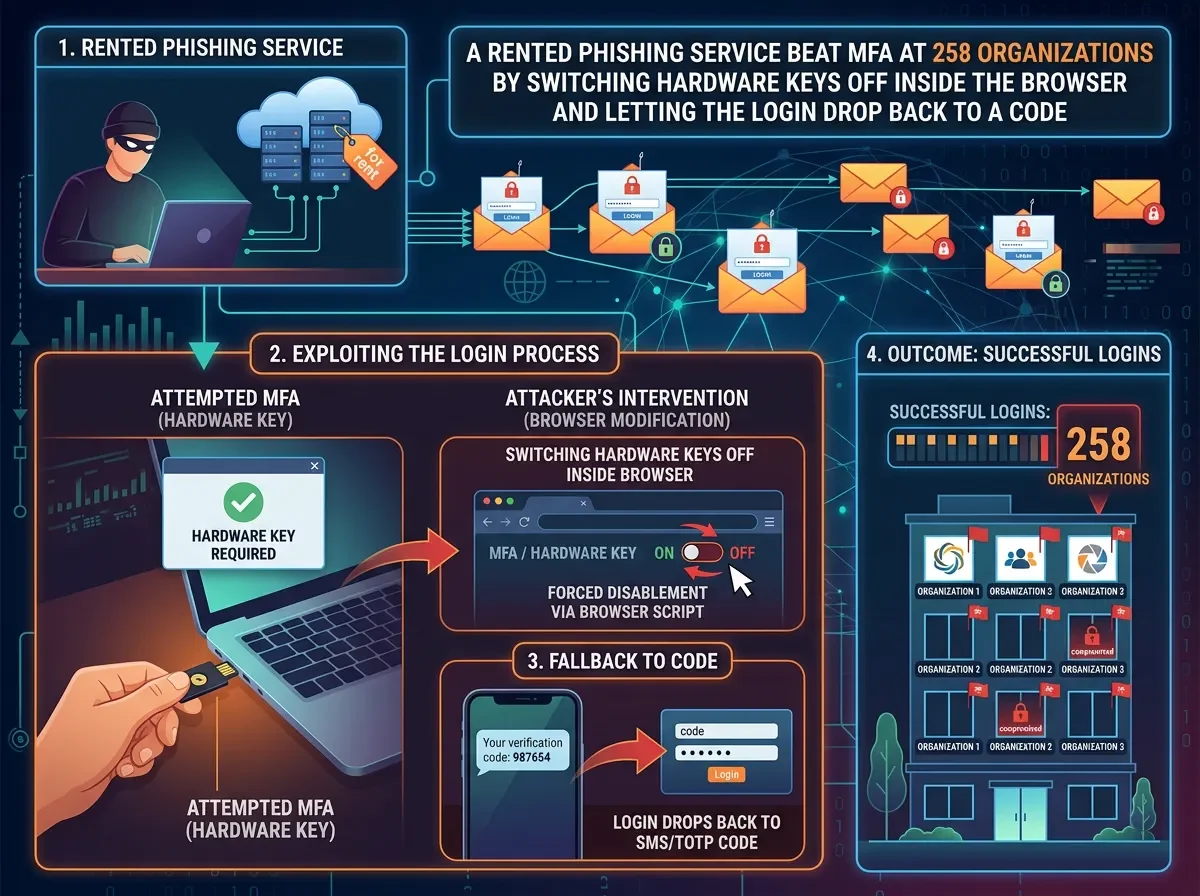
A rented phishing service beat MFA at 258 organizations by switching hardware keys off inside the browser and letting the login drop back to a code. Here is the free 20 minute setting that closes it.
The full write-up lives on its author's site
It belongs to its author, so we link to it rather than copy it. The other two tabs are our own rewrites, checked against it.
The operations manager at a nine person insurance agency bought security keys in March. She had read something about criminals stealing login sessions, liked that the fix was a physical object, and put one on her own account, one on the owner's, and one on the login that runs payroll.
For six months, signing in meant touching the key. Tuesday morning it did not.
She was on a Microsoft page. Right logo, right layout, right field for her email. She typed her password. She reached for the key and nothing happened. She unplugged it, plugged it back in, pressed harder. The page sat there.
Underneath the field was a line she had seen a hundred times and never once used. Having trouble? Sign in another way.
She tapped it. Her authenticator app showed six digits. She typed them in and her inbox loaded.
The key had not failed. It had been switched off by the page she was standing on.
Context
The target here is not a single application but the Microsoft 365 sign-in flow as it is presented through a reverse-proxy phishing platform. The feature under discussion is multi-factor authentication, and specifically the difference between factors that a relay can carry and factors that are bound to the origin domain.
A security key or passkey does not produce a code. It performs a cryptographic handshake bound to a specific web address. Before it releases anything, the browser tells the key which domain is asking. On a fake domain the answer is wrong, the handshake never completes, and the attacker collects nothing. A relay cannot fix that, because the relay's domain is the problem.
The phishing kit described here does not break that binding. It makes sure the handshake never runs, so the account falls back to whatever weaker method is still enrolled.
Setup
On September 7, researchers at CloudSEK published the contents of a phishing panel they had been sitting inside since June. The platform is called BigBear 2.0. It is rented software, leased to at least five affiliate operators who each get stolen logins pushed to their own Telegram feed in real time.
The panel held 5,137 credential records: 1,032 plaintext passwords, 4,148 session cookies, and 474 sign ins where multi-factor authentication had already been completed and beaten anyway. Those records came from 3,331 victim addresses across more than 40 countries and 461 organizations. CloudSEK told reporters 258 of them had at least one confirmed compromise.
Finding it
The machinery is a relay. The fake login page does not collect your password and stop. It passes everything you type to the genuine Microsoft page in real time, and passes Microsoft's response back. You get the real prompts because they are the real prompts. When you finish, Microsoft issues a session cookie, which is the wristband your browser wears so it does not have to prove who you are on every click. The relay keeps a copy of the wristband.
That much has been documented for years. What CloudSEK found bolted on is not in the standard toolkit: three custom pieces of JavaScript patched into every proxied login page.
- One switches off hardware key support in your browser.
- One blocks the telemetry Microsoft uses to spot the phishing page.
- One silently ticks Keep Me Signed In so the stolen session lasts longer.
The first one is the story. It explains why a user holding a working key is never asked to use it.
Exploitation
Step 1: rank the second factors by how much trouble they give a relay
Weakest first:
- A text message code. The relay never needs to know it. You type the code on the page, the page forwards it, Microsoft checks it and issues the wristband. The attacker takes the wristband.
- An authenticator app code. Identical outcome. Six digits typed into a relay are six digits handed to Microsoft on the attacker's behalf.
- A push notification you approve on your phone. Also identical. The request Microsoft sent is legitimate, and approving it is exactly what the attacker is waiting for.
- A security key or passkey. Structurally different. The handshake is bound to the origin domain, so a relayed page cannot complete it.
Step 2: suppress the key in the browser
The injected code sets the browser property that advertises key support to undefined, then rejects the requests that would use it. Your browser now reports, honestly, that this machine has no key support. Microsoft does what it is designed to do and offers something else.
Step 3: fall back to an enrolled method
The something else is whatever your account still has enrolled. In the opening case that was an authenticator app code, reached through Having trouble? Sign in another way. The relay forwards the six digits, Microsoft accepts them, and the session cookie is issued and copied.
Step 4: keep the session alive
The third injected script silently ticks Keep Me Signed In, so the stolen session lasts longer than it otherwise would.
Step 5: hide from detection
The second script blocks the telemetry Microsoft uses to spot the phishing page.
Root cause
The key was never the control. The list of methods your account accepts is the control. A key on an account that also takes a text code is a strong lock hanging next to an open window.
The key was never the control. The injected code sets the browser property that advertises key support to undefined, so the browser reports that this machine has no key support.
Impact
An attacker operating a BigBear 2.0 lease can capture passwords, session cookies and completed MFA sign-ins, provided the account still accepts a relayable method. Across the panel CloudSEK observed 5,137 credential records, including 474 sign-ins where MFA had been completed and beaten, from 3,331 victim addresses across more than 40 countries and 461 organizations, with 258 organizations having at least one confirmed compromise. The stolen session cookie gives access for as long as that session remains valid, and the Keep Me Signed In tick makes it last longer.
Fix
1. Write down every second factor each important account will accept. Free. About 45 minutes.
Not the one you use. Every one it allows. In the Microsoft Entra admin center, go to Protection, then Authentication methods, then User registration details. Do email, banking, payroll and remote access. Most owners find two or three old methods still enrolled on accounts they thought were locked down.
2. Switch off SMS and voice codes in your tenant. Free. About 20 minutes.
Entra admin center, Authentication methods, Policies. Disable SMS and Voice call. Microsoft is retiring both anyway on February 1, 2027, and passkeys became the default sign in experience on September 1 of this year. Doing it now removes the rung BigBear steers people toward. Make sure everyone has a working alternative registered first.
3. Require a phishing resistant method on the accounts that can reset other people's passwords. Free with Microsoft 365 Business Premium. About 30 minutes.
Conditional Access has a built in phishing-resistant MFA authentication strength that accepts only keys, passkeys, Windows Hello and certificates. Nothing relayable satisfies it. Scope it to your admins, run it in report-only for a few days, then enable. This needs Entra ID P1, which ships inside Business Premium. On Business Standard, step 2 is your enforcement, and you strip app codes off the admin accounts by hand.
- Fallback enumeration on any proxied IdP. Register a strong factor and a weak one on a test account, then load the login through a relay you control. A positive result is the page offering the weak method without ever invoking the strong one.
- Client capability spoofing. Set the browser property that advertises key support to
undefinedbefore the sign-in flow starts. A positive result is the IdP switching to an alternative method rather than failing closed. - Telemetry suppression. Block the IdP's phishing-detection beacons from the proxied page. A positive result is the session completing with no warning surfaced to the user or the tenant.
- Session persistence. Check whether the proxied flow pre-ticks Keep Me Signed In. A positive result is a cookie whose lifetime exceeds the default for an interactive sign-in.
- Admin account hardening gap. On tenants where Conditional Access phishing-resistant strength is not enforced, test whether an admin account still accepts an app code. A positive result is a successful relayed sign-in to an account that can reset other users' passwords.
What happened, in plain words
A small insurance agency, nine people, decided to protect its logins properly. The operations manager read about criminals stealing login sessions, liked the idea that the fix was a physical object rather than another password to remember, and bought security keys. She put one on her own account, one on the owner's account, and one on the login that runs payroll.
A security key is a small piece of hardware, often shaped like a USB stick, that you touch or plug in when a website asks you to prove who you are. It is a second factor: something you have, on top of the password, which is something you know. For six months, signing in meant touching the key.
Then one Tuesday morning it did not work.
She was on a page that looked exactly like Microsoft. The right logo, the right layout, the right field for her email address. She typed her password. She reached for the key and nothing happened. She unplugged it, plugged it back in, pressed harder. The page just sat there.
Underneath the field was a line she had seen a hundred times and never once used: Having trouble? Sign in another way.
She tapped it. Her authenticator app, a phone app that shows a fresh six digit number every thirty seconds, displayed six digits. She typed them in and her inbox loaded.
The key had not failed. It had been switched off by the page she was standing on.
The key had not failed. Once the browser said that, Microsoft did the reasonable thing and offered her a different way in. She took it, and the criminals took a copy of the result.
This article walks through how that works, what the researchers found, and what a small business can do about it this week. Every technical idea is explained from scratch, so you can follow it even if you have never configured a login system in your life.
The background you need first
Before the story makes sense, a handful of everyday ideas need names.
Multi-factor authentication (MFA). A password alone is one factor. MFA means the site asks for a second proof as well: a code by text message, a code from an app, a tap on your phone, or a touch on a hardware key. The point is that a stolen password is not enough on its own.
A session cookie. When you sign in successfully, the website hands your browser a small piece of data called a cookie. Think of it as the wristband you get at a festival: you show your ticket once at the gate, and after that the wristband lets you back in without showing the ticket again. Every time you click something, your browser shows the wristband instead of re-entering your password. If someone copies the wristband, they can walk around inside the festival as you, until the wristband expires.
A relay. A relay is a middleman. Imagine a fake ticket desk that looks exactly like the real one. You hand your details to the fake desk, the person behind it immediately passes them to the real desk, takes the real desk's reply and hands it back to you. You see genuine paperwork because it is genuine; it just passed through someone else's hands first. A relay phishing page works the same way with a login form.
A reverse proxy. The technical name for that middleman setup. The fake page sits in front of the real Microsoft login and forwards traffic both ways. To you it looks like one website. To Microsoft it looks like a normal visitor.
JavaScript. The programming language that runs inside your web browser and makes pages interactive. A page can use it to change how the browser behaves, including what the browser tells a website about its own capabilities.
Telemetry. Automatic reports a website or app sends back to its owner: who visited, what happened, whether anything looked odd. Security teams use telemetry to spot attacks. Block the telemetry and the attack becomes quieter.
The origin domain. The web address in your browser bar, the part like example.com. Browsers and security keys both care about it, because a key should only answer to the address it was registered with.
A cryptographic handshake. A short conversation in which two parties prove things to each other using mathematics rather than passwords. A security key does not produce a code you could read out. It performs a handshake with the browser, and the result only makes sense to the real website.
A relying party. The website that trusts your key, in this case Microsoft. It is called the relying party because it relies on the key to vouch for you.
An identity provider (IdP). The service that holds your account and checks your login. Microsoft's sign-in system is one.
The browser property that advertises key support. Browsers have a built-in setting that says, in effect, "this machine can talk to security keys." Websites read that setting to decide whether to offer the key option. It is controlled by the browser, which means a page running JavaScript can change it.
Fallback. What a login system does when the preferred method is unavailable: it offers another method that is still registered on the account. Fallback is convenient. It is also the hole in this story.
Phishing-resistant. A method that cannot be fooled by a fake page, because it is tied to the real web address. Security keys and passkeys are phishing-resistant. Text codes and app codes are not.
With those in hand, the rest is straightforward.
The setup: what the researchers found
On September 7, researchers at CloudSEK published the contents of a phishing panel they had been sitting inside since June. A phishing panel is the criminal equivalent of a management dashboard: the screen where an attacker watches stolen logins arrive.
The platform is called BigBear 2.0. It is rented software, leased to at least five affiliate operators. Think of it as a franchise: the platform owner builds and maintains the kit, and each operator pays to use it. Each operator gets stolen logins pushed to their own Telegram feed in real time. Telegram is a messaging app; the feed is simply where the loot lands.
The panel held 5,137 credential records: 1,032 plaintext passwords, 4,148 session cookies, and 474 sign ins where multi-factor authentication had already been completed and beaten anyway. Those records came from 3,331 victim addresses across more than 40 countries and 461 organizations. CloudSEK told reporters 258 of them had at least one confirmed compromise.
Read those numbers slowly, because they are the whole argument. More than five thousand records. Over four thousand session cookies, meaning wristbands copied from people who had already got through the gate. And 474 cases where the person had done everything right, completed the second step, and still lost the account.
How the fake page works
The machinery is a relay. The fake login page does not collect your password and stop. It passes everything you type to the genuine Microsoft page in real time, and passes Microsoft's response back. You get the real prompts because they are the real prompts. When you finish, Microsoft issues a session cookie, which is the wristband your browser wears so it does not have to prove who you are on every click. The relay keeps a copy of the wristband.
That much has been documented for years. Relay phishing is not new. What CloudSEK found bolted on is not in the standard toolkit: three custom pieces of JavaScript patched into every proxied login page.
- One switches off hardware key support in your browser.
- One blocks the telemetry Microsoft uses to spot the phishing page.
- One silently ticks Keep Me Signed In so the stolen session lasts longer.
The first one is the story. It explains why a user holding a working key is never asked to use it.
Why does the relay need the extra scripts at all? Because a plain relay would fail against a security key. The key checks the web address before it does anything. On a fake address the check fails, the handshake never completes, and the attacker gets nothing. So the kit does not try to beat the key. It removes the key from the conversation entirely.
Step by step: how the attack unfolds
Step 1: rank the second factors by how much trouble they give a relay
Not all second factors are equal. Ranked weakest first, here is how each one behaves when a relay sits in the middle.
- A text message code. The relay never needs to know it. You type the code on the page, the page forwards it, Microsoft checks it and issues the wristband. The attacker takes the wristband. The code itself is useless to the attacker after a minute, but it does not matter, because the wristband is not.
- An authenticator app code. Identical outcome. Six digits typed into a relay are six digits handed to Microsoft on the attacker's behalf. The app is more secure than a text message in general, because text messages can be intercepted, but against a relay it makes no difference at all.
- A push notification you approve on your phone. Also identical. The request Microsoft sent is legitimate, and approving it is exactly what the attacker is waiting for. You are not approving the attacker; you are approving the real Microsoft prompt that the attacker triggered on your behalf.
- A security key or passkey. Structurally different. The handshake is bound to the origin domain, so a relayed page cannot complete it. This is the one method the relay cannot carry, which is why the kit has to switch it off.
A passkey is the software version of the same idea: instead of a physical key, your phone or laptop holds the secret and does the same address-bound handshake.
Step 2: suppress the key in the browser
The injected code sets the browser property that advertises key support to undefined, then rejects the requests that would use it. Your browser now reports, honestly, that this machine has no key support. Microsoft does what it is designed to do and offers something else.
In plain words: the fake page reaches into the browser and flips the switch that says "keys work here" to "no keys here." It then refuses any attempt to use a key, so even a user who tries anyway gets nowhere. The browser is not lying about being attacked. It is reporting, accurately, the state the page has put it in. Microsoft has no way to know the report was manufactured.
This is the clever part. The kit does not break the key's security. It makes sure the key is never asked.
Step 3: fall back to an enrolled method
The something else is whatever your account still has enrolled. In the opening case that was an authenticator app code, reached through Having trouble? Sign in another way. The relay forwards the six digits, Microsoft accepts them, and the session cookie is issued and copied.
This is the moment the operations manager experienced. The page offered her a way in, she took it, and the relay passed her six digits to Microsoft. Microsoft saw a valid code and issued the wristband. The relay kept a copy. She saw her inbox. So, shortly afterwards, did someone else.
Step 4: keep the session alive
The third injected script silently ticks Keep Me Signed In, so the stolen session lasts longer than it otherwise would.
Keep Me Signed In is the checkbox that asks the site to remember you, so you do not have to sign in again for days or weeks. Ticked without your knowledge, it means the copied wristband stays valid for far longer. The attacker is not racing a short timer; they have been handed an extended one.
Step 5: hide from detection
The second script blocks the telemetry Microsoft uses to spot the phishing page.
Microsoft and browser makers collect signals that can reveal a proxy: odd timings, mismatched addresses, reports that do not line up. Those signals are telemetry. Blocking them does not make the attack invisible forever, but it removes the warnings that might have reached the user or the organisation's administrators while the attack was running.
Why this works at all
The key was never the control. The list of methods your account accepts is the control. A key on an account that also takes a text code is a strong lock hanging next to an open window.
That sentence is worth sitting with. People think of security as a series of locks, and assume adding a strong lock makes the door strong. But a login is not a door with several locks. It is a list of acceptable proofs, and the site accepts any one of them. Adding a key to the top of the list does nothing if the bottom of the list still says "or a text code."
The key was never the control. The injected code sets the browser property that advertises key support to undefined, so the browser reports that this machine has no key support.
Unpacking that: the website trusting the key, Microsoft, never removes the old methods when you add a new one. The sign-in flow is allowed to fall back when the strong method is unavailable. And the browser's report about whether a key exists is controlled by the browser, which means a page can change it. Every one of those three facts is reasonable on its own. Together they hand the attacker a path.
What the attackers get
An attacker operating a BigBear 2.0 lease can capture passwords, session cookies and completed MFA sign-ins, provided the account still accepts a relayable method. Across the panel CloudSEK observed 5,137 credential records, including 474 sign-ins where MFA had been completed and beaten, from 3,331 victim addresses across more than 40 countries and 461 organizations, with 258 organizations having at least one confirmed compromise. The stolen session cookie gives access for as long as that session remains valid, and the Keep Me Signed In tick makes it last longer.
In everyday terms: the attacker walks in wearing your wristband, and can keep walking in until the wristband expires. Because the checkbox was ticked for them, that is longer than it should be.
What you can actually do this week
None of the fixes below require buying anything new if you already pay for Microsoft 365 Business Premium. The first two are free and take about an hour between them.
1. Write down every second factor each important account will accept. Free. About 45 minutes.
Not the one you use. Every one it allows. In the Microsoft Entra admin center, go to Protection, then Authentication methods, then User registration details. Do email, banking, payroll and remote access. Most owners find two or three old methods still enrolled on accounts they thought were locked down.
Why this first? Because you cannot remove what you have not listed. The Entra admin center is Microsoft's control panel for accounts and logins. The path above shows, per person, which methods are registered. Expect surprises: an old phone number from a previous job, an app nobody remembers installing.
2. Switch off SMS and voice codes in your tenant. Free. About 20 minutes.
Entra admin center, Authentication methods, Policies. Disable SMS and Voice call. Microsoft is retiring both anyway on February 1, 2027, and passkeys became the default sign in experience on September 1 of this year. Doing it now removes the rung BigBear steers people toward. Make sure everyone has a working alternative registered first.
A tenant is your organisation's slice of Microsoft's cloud: all your accounts, settings and policies in one place. A policy here is a rule the tenant enforces for everyone. Turning off SMS and voice means those options disappear from the sign-in page, so the fallback the kit relies on is no longer there. The warning about alternatives matters: switch off the old method before everyone has a new one and you lock your own staff out.
3. Require a phishing resistant method on the accounts that can reset other people's passwords. Free with Microsoft 365 Business Premium. About 30 minutes.
Conditional Access has a built in phishing-resistant MFA authentication strength that accepts only keys, passkeys, Windows Hello and certificates. Nothing relayable satisfies it. Scope it to your admins, run it in report-only for a few days, then enable. This needs Entra ID P1, which ships inside Business Premium. On Business Standard, step 2 is your enforcement, and you strip app codes off the admin accounts by hand.
Conditional Access is Microsoft's rule engine: it decides who can sign in, from where, and with what. An authentication strength is a named standard for how strong the proof must be. The phishing-resistant one accepts only methods tied to the real web address, so a relay cannot satisfy it no matter what it does to the browser. Windows Hello is the face or fingerprint login built into Windows; certificates are digital credentials issued by your organisation. Report-only mode means the rule records what it would have blocked without blocking anything, which is how you test safely before enforcing. Entra ID P1 is the paid tier of Microsoft's identity service, included in Business Premium. On Business Standard you do not have it, so step 2 is your main defence, and you remove app codes from admin accounts by hand.
How to check your own setup
Each one needs a test account you own and control, never a real one.
- Fallback enumeration on any proxied IdP. Register a strong factor and a weak one on a test account, then load the login through a relay you control. A positive result is the page offering the weak method without ever invoking the strong one.
- Client capability spoofing. Set the browser property that advertises key support to
undefinedbefore the sign-in flow starts. A positive result is the IdP switching to an alternative method rather than failing closed. - Telemetry suppression. Block the IdP's phishing-detection beacons from the proxied page. A positive result is the session completing with no warning surfaced to the user or the tenant.
- Session persistence. Check whether the proxied flow pre-ticks Keep Me Signed In. A positive result is a cookie whose lifetime exceeds the default for an interactive sign-in.
- Admin account hardening gap. On tenants where Conditional Access phishing-resistant strength is not enforced, test whether an admin account still accepts an app code. A positive result is a successful relayed sign-in to an account that can reset other users' passwords.
A beacon, in this context, is a small automatic message a page sends back to its owner. Failing closed means refusing to let anyone in when something is wrong, rather than quietly offering a weaker route.
The takeaway
Nobody is going to break your security key. They are going to make sure your account never asks for it.
The defence is not a better key. It is a shorter list of ways in. Every method you leave switched on is a door, and the attacker will always choose the easiest one.
Glossary
- Affiliate operator: a criminal who rents a ready-made phishing platform from its owner and runs their own campaigns with it.
- Authentication strength: a named standard in Microsoft's system that defines how strong a sign-in proof must be; the phishing-resistant one accepts only keys, passkeys, Windows Hello and certificates.
- Authenticator app: a phone app that generates a fresh six digit code every thirty seconds for signing in.
- Beacon: a small automatic message a web page sends back to its owner, often used for detection and monitoring.
- BigBear 2.0: the rented phishing platform described in the research, leased to at least five affiliate operators.
- Browser property: a setting inside the browser that a website can read, such as whether the machine supports security keys.
- Certificate: a digital credential issued by an organisation that can be used to prove identity at sign-in.
- Conditional Access: Microsoft's rule engine that decides who may sign in, from where, and with which method.
- Cookie: a small piece of data a website stores in your browser after sign-in so it recognises you on later clicks; the wristband analogy.
- Credential record: one stored entry in a phishing panel, such as a password, a cookie or a completed sign-in.
- Cryptographic handshake: a short mathematical conversation in which two parties prove things to each other without exchanging a readable password.
- Entra admin center: Microsoft's control panel for managing accounts, authentication methods and policies.
- Entra ID P1: the paid tier of Microsoft's identity service, included in Microsoft 365 Business Premium.
- Failing closed: refusing access when something is wrong, instead of quietly offering a weaker alternative.
- Fallback: the login system offering another registered method when the preferred one is unavailable.
- Identity provider (IdP): the service that holds your account and checks your login, such as Microsoft's sign-in system.
- JavaScript: the programming language that runs inside web browsers and makes pages interactive.
- Keep Me Signed In: the checkbox that asks a site to remember you so you stay signed in for longer.
- MFA (multi-factor authentication): asking for a second proof, beyond the password, before letting someone in.
- Origin domain: the web address shown in the browser bar, which security keys check before responding.
- Passkey: the software equivalent of a security key, held on a phone or computer, using the same address-bound handshake.
- Phishing: tricking someone into entering their details on a fake page that imitates a real one.
- Phishing-resistant: a sign-in method that cannot be fooled by a fake page because it is tied to the real web address.
- Phishing panel: the dashboard criminals use to watch stolen logins arrive.
- Policy: a rule an organisation sets that applies to all its accounts.
- Relay: a middleman that passes your input to the real site and the real site's replies back to you.
- Report-only mode: running a rule so it records what it would have blocked without actually blocking anything.
- Relying party: the website that trusts your key to vouch for you.
- Reverse proxy: the technical setup behind a relay, where a fake page sits in front of the real login and forwards traffic both ways.
- Security key: a small physical device you touch or plug in to prove who you are at sign-in.
- Session: the period during which a site treats you as signed in, carried by a cookie.
- Session cookie: the cookie that proves you are already signed in, so you do not re-enter your password on every click.
- SMS code: a one-time code sent by text message as a second factor.
- Telemetry: automatic reports a site or app sends back to its owner about what happened.
- Tenant: an organisation's own slice of Microsoft's cloud, holding its accounts, settings and policies.
- Undefined: a programming value meaning "nothing is set here"; setting the key-support property to it tells the site no key exists.
- Voice call code: a one-time code delivered by an automated phone call as a second factor.
- Windows Hello: the face or fingerprint sign-in built into Windows.

