Improper Verification of email address while saving Account Settings
The account settings page allowed an email address to be saved without any verification that the user owned it. An attacker could set a victim's email address and then trigger platform emails to that address, effectively using the service to send unsolicited messages.
 Originally disclosed on HackerOne
- Triaged in 4 days
- Fixed in 7 months
- Paid in 10 days
- Disclosed after 10 months
-
Signup for Ads on twitter and navigate to "Account Settings" on ads.twitter.com/accounts
-
Enter any email address and save Account Settings. Notice that the email address gets updated successfully.
-
There is no verification email that is sent out to confirm that the email account updated actually belongs to the user account.
This can be exploited or misused in a few ways. One such way is:
-
An attacker changes his account settings to update the email address to a victim's email address.
-
The attacker then navigates to Audience Manager and creates a list audience by uploading a CSV data file.
-
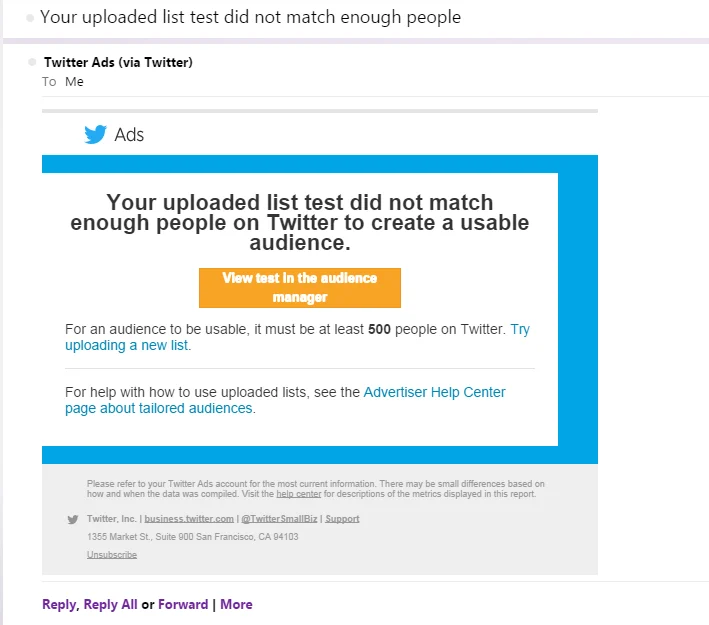
After some time, the victim receives an email from twitter saying that "Your uploaded list test did not match enough people on Twitter to create a usable audience." See attached screenshot.
-
The victim remains clueless as the attacker just leveraged the twitter platform to send this email to the victim.
There might be other possible ways as well that an attacker can leverage the twitter email service to spam innocent victims.
Remediation:
On updating the email address under Account Settings, it should be verified by sending a confirmation link.
PS - I understand that spamming is generally excluded from the scope of this bounty but when I clicked on the link provided under the Program details, it took me to a page which appears to only mention spamming attacks caused directly by attackers targeting victims. In this case, the attacker is completely out of the picture and is leveraging the twitter platform to spam victims. I just wanted to point that out.
Attachments
Context
Twitter Ads is the advertising side of Twitter, reached at ads.twitter.com. Advertisers sign up for it and manage their profile under Account Settings at ads.twitter.com/accounts. That settings page holds the email address associated with the advertising account, and the report is about how that address is changed.
The weakness class recorded for the report is a violation of secure design principles: the settings page accepts a new email address and saves it without any confirmation step. The report was disclosed on 13 August 2015 and a bounty of 560.00 USD was paid.
Setup
No special tooling is needed. The precondition is simply an advertising account on ads.twitter.com that the tester controls, plus access to the Account Settings page. The researcher also uses the Audience Manager feature, where a list audience is created by uploading a CSV data file. A second email address, belonging to a victim, is needed to demonstrate the effect.
Finding it
The researcher went to the Account Settings page, entered an arbitrary email address and saved. The address was updated successfully. What was missing is the confirmation email that should be sent to the new address to prove that the mailbox actually belongs to the account owner. Nothing in the flow checks ownership of the mailbox before the platform starts treating it as the account's address.
That gap matters because the platform itself later sends mail to whatever address is stored. Any feature that emails the account holder becomes a way to make Twitter deliver a message to a third party.
Exploitation
Step 1: change the account email to the victim's address
Sign up for Ads on Twitter, open ads.twitter.com/accounts and save the Account Settings with the victim's email address in the email field. The save succeeds and the address is updated. No verification email is sent to confirm that the mailbox belongs to the account owner.
Step 2: create a list audience
Navigate to Audience Manager and create a list audience by uploading a CSV data file.
Step 3: let the platform send the notification
After some time, the victim receives an email from Twitter stating that the uploaded list did not match enough people to create a usable audience. The report includes an attached screenshot:
The point of this step is that the attacker never contacts the victim. Twitter sends the mail to an address the attacker chose. The victim has no context for why the message arrived and, in the researcher's words, remains clueless.
Other uses
The researcher notes that there may be other ways an attacker could leverage the Twitter email service to spam innocent victims, beyond the audience notification shown here.
Root cause
The design flaw is that the email address in Account Settings is treated as trusted the moment it is saved. A correct flow stores the new address as pending and only makes it active after the owner of that mailbox follows a confirmation link. Here the address becomes active immediately, so every subsequent platform email is delivered to a mailbox the account owner may not control. The report does not describe any server-side or client-side check that would have caught this; the absence of the confirmation step is the whole issue.
Impact
An attacker with an Ads account can direct Twitter's own notification emails to any address they choose, including a victim's. The victim receives unsolicited mail that appears to come from Twitter, with no involvement of the attacker's own mail infrastructure. The report frames this as spam and notes that other platform emails could likely be abused the same way. The researcher explicitly acknowledges that spam is generally excluded from the scope of the bounty, and argues that this case is different: the attacker is out of the picture and the platform is doing the sending.
Fix
On updating the email address under Account Settings, the address should be verified by sending a confirmation link. The report states this as the remediation; it does not say what was actually changed.
Variants to test
- Other notification-producing features. After changing the account email, trigger any feature that emails the account holder (reports, alerts, billing notices) and check whether the message lands at the new, unverified address. A positive result is mail arriving at a mailbox that never confirmed ownership.
- Other settings surfaces. Look for profile, contact or notification settings on sibling products that accept an email or phone number and save it without a confirmation step. A positive result is a saved value that immediately receives platform mail.
- Confirmation bypass. Where a confirmation step does exist, try saving the address and then using features before confirming, or check whether the pending address is already used for delivery. A positive result is delivery to an unconfirmed address.
Hunting notes
This kind of bug hides in account and profile settings pages, especially on secondary products such as advertising or business portals that were built separately from the main signup flow. During recon, look for settings endpoints that accept an email field and watch whether the response indicates an immediate update rather than a pending state. The signal is a successful save with no follow-up verification mail.
Showing impact is the hard part, because spam is often out of scope. The researcher made the case by showing a feature where the platform itself sends the message, so the attacker never touches the victim directly, and by attaching the received email. That framing, a platform-originated message to an address the attacker selected, is how the researcher argued the case.
What happened, in plain words
Twitter has an advertising side called Twitter Ads, at ads.twitter.com. People who want to advertise on Twitter sign up there and keep a profile, including the email address the platform should use to contact them. That profile lives on a page called Account Settings, at ads.twitter.com/accounts.
The researcher found that this page lets you type in any email address and save it, and the platform accepts it straight away. Normally a site should send a message to the new address with a link you have to click, to prove the mailbox really belongs to you. Twitter Ads did not do that here. So an advertiser could put somebody else's email address into their own settings, and Twitter would send that person the account's emails.
To show it was not just a theoretical problem, the researcher used a feature called Audience Manager, where you upload a list of people (a CSV file) and Twitter tries to match them against its users. When the list does not match enough people, Twitter emails the account holder to say so. Because the account holder's address had been swapped for the victim's, that email went to the victim. The victim got a message from Twitter about something they never did, and the attacker never had to contact them at all.
The report was disclosed on 13 August 2015 and a bounty of 560.00 USD was paid. The weakness was recorded as a violation of secure design principles, which is explained in the glossary.
The pieces you need to know
Before walking through the steps, here are the ideas involved, from zero.
- A web application and its pages. When you open a site in a browser, each screen you see (a settings page, a list of campaigns) is generated by a program running on a server somewhere. You type into boxes, press a button, and the browser sends what you typed to that server, which saves it and sends back a new page. Nothing magic happens locally: the server decides what to keep.
- Account Settings. This is the page where your profile details live. On Twitter Ads it holds, among other things, the email address the platform uses to reach you. Changing it is a normal, everyday action.
- Email verification. Many sites, when you change your email address, do not trust the new one immediately. They send a message to it containing a link with a long random code. Only when you open that message and click the link does the site mark the address as confirmed. The point is to prove you can read mail at that mailbox. Without this step, anyone can claim any address.
- Audience Manager and list audiences. Advertising platforms let you target adverts at a specific group of people, called an audience. One way to build an audience is to upload a file, here a CSV file (comma-separated values, a plain text table where each line is a row and commas separate the columns). Twitter processes the uploaded list, and if it does not match enough people, it emails the account holder.
- Platform-originated email. The important detail is who sends the message. In this bug the attacker does not send anything. Twitter's own servers compose the notification and deliver it. From the victim's point of view the mail genuinely comes from Twitter, because it does.
- Spam and scope. A bug bounty programme is a scheme where a company pays researchers for reporting security problems. Each programme publishes a scope: the list of things it will pay for. Spam is usually excluded, because it is seen as a nuisance rather than a security flaw. The researcher addresses this directly, as you will see.
- Violation of secure design principles. This is the weakness category recorded for the report. It means the problem is not a coding slip like a missing check on one line, but a flaw in how the feature was designed: the flow itself lacks the confirmation step that security requires.
Setting up
No special tools are needed. The researcher used an ordinary browser. The requirements were:
- An advertising account on
ads.twitter.comthat the tester controls, so they can open Account Settings and change things. - Access to the Audience Manager feature, to create a list audience by uploading a CSV file.
- A second email address, belonging to a victim, to demonstrate where the mail ends up.
Why these three? The first gives you the ability to change settings. The second gives you a feature that makes Twitter send email to the account address. The third gives you somewhere to observe the result that is not your own mailbox.
Finding it
The researcher opened the Account Settings page, typed an arbitrary email address into the email field and saved. The address was updated successfully. That is the whole discovery: the save worked, and no confirmation email arrived at the new address asking for proof of ownership.
Think of it like a hotel that lets any guest change the contact address on a booking without checking that the guest can read mail sent there. The booking system now believes the new address, and every future letter goes there.
The gap matters because the platform later sends mail to whatever address is stored. Any feature that emails the account holder therefore becomes a way to make Twitter deliver a message to a third party.
Exploitation
Step 1: change the account email to the victim's address
Sign up for Ads on Twitter, open ads.twitter.com/accounts, and save the Account Settings with the victim's email address in the email field. The save succeeds and the address is updated. No verification email is sent to confirm that the mailbox belongs to the account owner.
In plain words: you fill in a form field with someone else's address and press save. The server stores it without asking the mailbox owner anything. This is the step that plants the problem; everything after it is just waiting for Twitter to send something.
Step 2: create a list audience
Navigate to Audience Manager and create a list audience by uploading a CSV data file. The uploaded list is processed against Twitter's audience matching.
In plain words: you use a normal advertising feature. You give Twitter a table of people you would like to target. Twitter compares the rows with its own user base to see how many it can find. You are not doing anything unusual here; you are simply using the product as intended, which is what makes the next step convincing.
Step 3: let the platform send the notification
After some time, the victim receives an email from Twitter saying that the uploaded list did not match enough people to create a usable audience. The screenshot attached to the report shows that message arriving in a mailbox:
The screenshot shows the notification email:
Why does this step matter? Because the attacker never contacts the victim. Twitter sends the mail to an address the attacker chose. The victim has no context for why the message arrived and, in the researcher's words, remains clueless. If the attacker had sent the email themselves, it would be ordinary spam from a stranger. Here the sender is a company the victim may trust.
Other uses
The researcher notes that there may be other ways an attacker could leverage the Twitter email service to spam innocent victims, beyond the audience notification shown here. In other words, the audience email is one example, not the only possible one.
Why it works
The design flaw is that the email address in Account Settings is treated as trusted the moment it is saved. A correct flow stores the new address as pending and only makes it active after the owner of that mailbox follows a confirmation link. Here the address becomes active immediately, so every subsequent platform email is delivered to a mailbox the account owner may not control.
A useful comparison is changing the address on a bank account. A bank does not simply accept a new postal address and start sending statements there; it confirms the change through a channel the real customer controls. Twitter Ads skipped that confirmation.
The report does not describe any server-side or client-side check that would have caught this. The absence of the confirmation step is the whole issue.
Impact
An attacker with an Ads account can direct Twitter's own notification emails to any address they choose, including a victim's. The victim receives unsolicited mail that appears to come from Twitter, with no involvement of the attacker's own mail infrastructure. The report frames this as spam and notes that other platform emails could likely be abused the same way.
The researcher explicitly acknowledges that spam is generally excluded from the scope of the bounty, and argues that this case is different: the attacker is out of the picture and the platform is doing the sending. That distinction is the researcher's argument for why the case is different.
The fix
On updating the email address under Account Settings, the address should be verified by sending a confirmation link. The report states this as the remediation; it does not say what was actually changed.
Other places to look
These are variations on the same idea, useful if you want to hunt for similar bugs yourself.
- Other notification-producing features. After changing the account email, trigger any feature that emails the account holder (reports, alerts, billing notices) and check whether the message lands at the new, unverified address. A positive result is mail arriving at a mailbox that never confirmed ownership.
- Other settings surfaces. Look for profile, contact or notification settings on sibling products that accept an email or phone number and save it without a confirmation step. A positive result is a saved value that immediately receives platform mail.
- Confirmation bypass. Where a confirmation step does exist, try saving the address and then using features before confirming, or check whether the pending address is already used for delivery. A positive result is delivery to an unconfirmed address.
Notes for hunters
This kind of bug hides in account and profile settings pages, especially on secondary products such as advertising or business portals that were built separately from the main signup flow. During recon, look for settings endpoints that accept an email field and watch whether the response indicates an immediate update rather than a pending state. The signal is a successful save with no follow-up verification mail.
Showing impact is the hard part, because spam is often out of scope. The researcher made the case by showing a feature where the platform itself sends the message, so the attacker never touches the victim directly, and by attaching the received email. That framing, a platform-originated message to an address the attacker selected, is how the researcher argued the case.
Glossary
- Account Settings: the page on a website where your profile details, such as your email address, are stored and can be changed.
- Ads account: an advertising account on Twitter, used to create and manage adverts.
- Audience: a group of people you want to show adverts to.
- Audience Manager: the Twitter Ads feature used to build audiences, including by uploading a list of people.
- Bug bounty programme: a scheme where a company pays researchers for reporting security problems in its products.
- Confirmation link: a link containing a long random code, sent by email, that proves you can read mail at that address when you click it.
- CSV: comma-separated values, a plain text file format for tables, where each line is a row and commas separate the columns.
- Email verification: the process of proving that an email address belongs to you, usually by receiving and acting on a message sent to it.
- Endpoint: a specific address on a server that a browser or program sends requests to, such as the one behind a settings page.
- Pending state: a temporary status for a value that has been submitted but not yet confirmed, during which it is not treated as active.
- Platform-originated email: a message composed and sent by the service itself, rather than by an individual user.
- Recon: short for reconnaissance, the early stage of security testing where you explore a product to find features and inputs worth examining.
- Scope: the list of targets and bug types a bounty programme will pay for.
- Spam: unsolicited bulk or unwanted email.
- Violation of secure design principles: a weakness where the overall design of a feature is unsafe, rather than a single coding mistake.








