Insecure Data Storage in Vine Android App
The Vine Android app stored third-party usernames and passwords in plain text inside a WebView database file. An attacker with access to the device's app data could read those credentials.

- Triaged in 9 hours
- Fixed in 8 days
- Paid in 4 days
- Disclosed after 5 months
Summary by the researcher
Webview Activity is storing third party Username & Password in plain text .
The report
Hi Twitter,
- **Vulnerability Class:**OWASP M2 : Insecure Data Storage
Every application needs to store something secret, like a website username,password, cookies etc. , internal storage is the place to do it, android sandbox prevents other applications from accessing this data but,In vine android app developers have chosen to store secret information without any additional encryption in place.
- Where I found it?
/data/data/co.vine.android/databases/webview.db
-
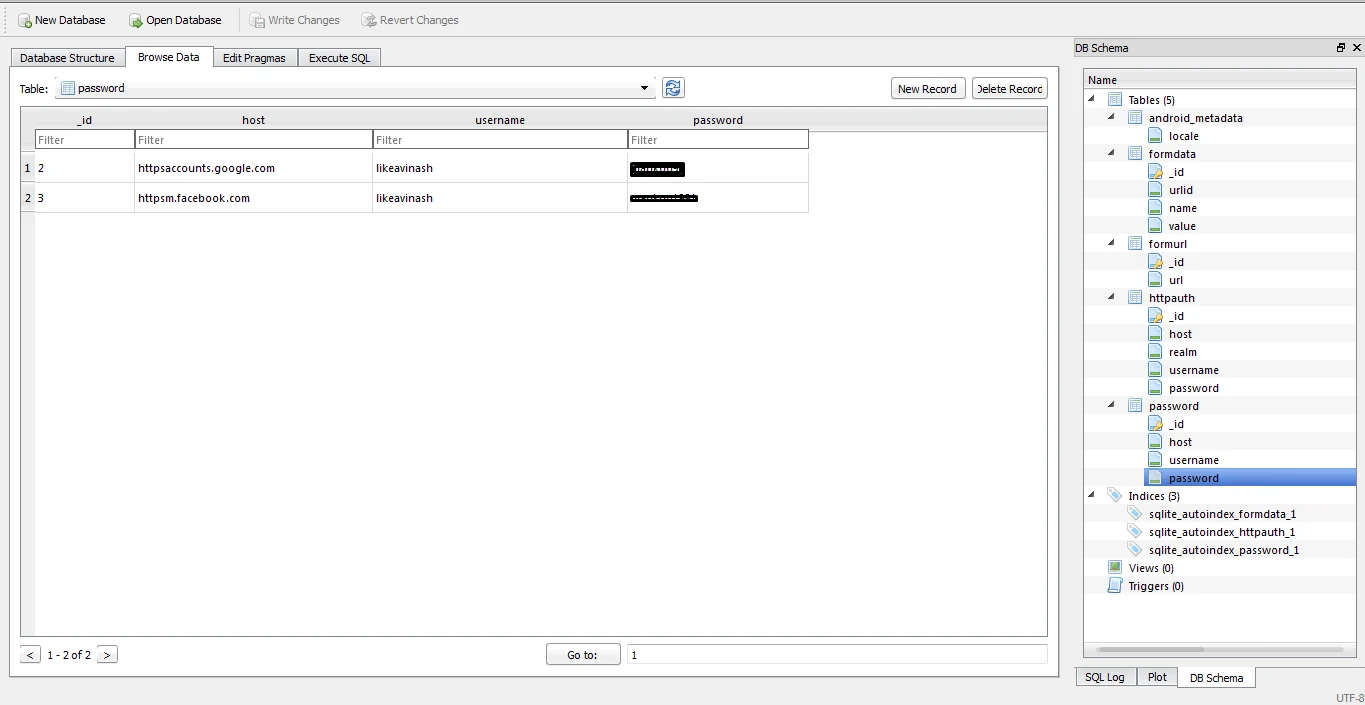
**POC:**Please see the screenshot of SQLite database.
-
SEVERITY:
What is more severe than clear text username password storage and with the JavaScript and file system access enabled , Its not going to be hard for attacker to steal this info from the database or the whole database.
- Reference:
I believe in basics :https://www.owasp.org/index.php/Mobile_Top_10_2014-M2
Please revert if more information needed. It will be fine for me to spare more time in this vulnerability issue.
#:)#
Happy to help.
Regards.
Attachments
Context
The target is the Vine Android application, package co.vine.android, reported through the X / xAI program on HackerOne. The feature at issue is the app's WebView activity, which handles third party logins and therefore receives usernames and passwords entered by the user. Android keeps per-application data in the app's private sandbox under /data/data/<package>/, and WebView persists its own state, including form data, in a SQLite database inside that directory.
The researcher classifies the issue as OWASP M2: Insecure Data Storage. The claim is narrow and specific: the WebView activity stores third party usernames and passwords in plain text.
Setup
The report describes no accounts, roles, tool versions or special preconditions. The only requirement implied by the finding is access to the application's private data directory, which on a normal device means a rooted phone or an emulator, or a device where the sandbox can otherwise be read. The report shows a screenshot of the SQLite database contents.
Finding it
The reasoning starts from what every app stores: secrets such as website usernames, passwords and cookies. Android's internal storage is the intended place for this, and the sandbox normally prevents other applications from reading it. The researcher's point is that the Vine developers stored this secret information without any additional encryption on top of the sandbox.
The database in question is:
/data/data/co.vine.android/databases/webview.db
This is the standard WebView database. Its presence is expected; what matters is its contents. The researcher reports that the third party username and password held by the WebView activity are readable there in plain text.
Exploitation
Step 1: Locate the WebView database
Access the app's private data directory and open the WebView database at the path above. On a rooted device or an emulator with access to the sandbox, the file is readable directly; the report does not describe the exact method used to obtain it.
Step 2: Inspect the database contents
Open the database in a SQLite viewer. The screenshot shows the database contents, with the stored credentials visible in clear text.
Step 3: Read the credentials
The username and password for the third party service are present without encryption, so no cracking or decryption step is needed. The researcher notes that JavaScript and file system access are enabled in the WebView, which in their assessment makes it easier for an attacker to steal this information, or the whole database, from the device.
Root cause
The design mistake is storing secret information without any additional encryption, relying only on the Android sandbox. The sandbox is a real boundary between apps, but it does not protect data against anyone who can read the app's private storage, for example on a rooted device or through a backup or debugging path. Because the WebView database keeps form data as plain text, the credentials are exposed as soon as that boundary is crossed. The report does not describe any application-level encryption that was present and bypassed; the absence of encryption is the finding.
Impact
An attacker who can reach the database can read third party usernames and passwords directly, and potentially take the whole database. The researcher argues that clear text username and password storage is hard to beat in severity, and because JavaScript and file system access being enabled in the WebView makes exfiltration easier. The exposure is limited to users whose devices allow access to the app's private storage, or to whatever other path an attacker has into that storage; the report does not enumerate those paths.
Fix
The measure it points to is not storing secrets in plain text: credentials held by the WebView should be protected with additional encryption rather than relying on the sandbox alone.
Variants to test
- Inspect
webview.dband related WebView files in other Android apps that host third party logins, looking for plain text usernames, passwords or cookies. - Check other databases and shared preferences in the app's data directory for tokens, session identifiers or API keys stored without encryption.
- Look at WebView configuration for JavaScript and file system access enabled alongside stored secrets, which widens what a compromise of the WebView can reach.
- Test on a rooted device or emulator to confirm whether the sandbox is the only protection around the data.
Hunting notes
This class of bug hides in the app's private storage: databases, shared preferences and WebView state files. During recon, an app that embeds a WebView for third party authentication is a strong signal, because the WebView database is a known place where form data lands. The researcher supported the case with a screenshot of the SQLite database, a named OWASP category and a concrete file path. The report was disclosed on 24 June 2015 with a bounty of 140.00 USD.
What happened, in plain words
Vine was a short-video social app for Android. Like many apps, it let you log in to other services from inside it, using a built-in browser component called a WebView. When you type a username and password into a login form shown in a WebView, the app can keep a copy of what you typed so it can fill the form in for you next time. That copy has to live somewhere on the phone.
On Android, every app gets its own private folder for files, and the operating system is supposed to stop other apps from reading that folder. This is called the sandbox. The researcher found that Vine's WebView was saving third party usernames and passwords in a database file inside that private folder, and saving them as ordinary readable text, with no scrambling (encryption) on top. Anyone who could get at that file could simply read the credentials.
The report was filed through the X / xAI program on HackerOne, was disclosed on 24 June 2015, and paid a bounty of 140.00 USD. The researcher is credited as avicoder_.
A few ideas you need before the details make sense:
- App package name: Android apps have a unique identifier, like a surname, so the system can tell them apart. Vine's is
co.vine.android. - Sandbox: a private area on the phone that only one app is meant to be able to read. Think of it as each app having its own locked drawer in a shared filing cabinet.
- WebView: a mini browser built into an app, so the app can show web pages without opening a separate browser app.
- SQLite: a very common way to store data in a single file, used by many apps and by browsers. You can open the file with a viewer and browse it like a small spreadsheet.
- Plain text: stored exactly as typed, with nothing done to hide it. If the password is
hunter2, the file containshunter2. - Encryption: scrambling data with a key so that it looks like nonsense to anyone without the key.
- OWASP M2: Insecure Data Storage: OWASP is a well-known non-profit that publishes lists of common security mistakes. Their Mobile Top 10 list has a category for apps that store sensitive data insecurely, and that category is called M2.
Context
The target is the Vine Android application, package co.vine.android, reported through the X / xAI program on HackerOne. The feature at issue is the app's WebView activity, which handles third party logins and therefore receives usernames and passwords entered by the user. Android keeps per-application data in the app's private sandbox under /data/data/<package>/, and WebView persists its own state, including form data, in a SQLite database inside that directory.
The researcher classifies the issue as OWASP M2: Insecure Data Storage. The claim is narrow and specific: the WebView activity stores third party usernames and passwords in plain text.
In everyday terms: the app has a login screen for another service, you type your details into it, and the app quietly writes those details into a file on the phone in a form anyone with access to the file can read.
Setup
The report describes no accounts, roles, tool versions or special preconditions. The only requirement implied by the finding is access to the application's private data directory, which on a normal device means a rooted phone or an emulator, or a device where the sandbox can otherwise be read. The report shows a screenshot of the SQLite database contents.
Two terms there:
- Rooted phone: a phone where the owner has removed the manufacturer's restrictions and gained full administrator rights over the whole system, including other apps' private folders. It is like being given a master key to the filing cabinet.
- Emulator: a program on a computer that pretends to be a phone, so you can run and inspect Android apps without a physical device.
Why this matters: on an ordinary, unmodified phone the sandbox does its job and other apps cannot open Vine's private files. The finding is about what happens once that barrier is crossed, whether by a rooted device, an emulator, or some other route into the storage.
Finding it
The reasoning starts from what every app stores: secrets such as website usernames, passwords and cookies. Android's internal storage is the intended place for this, and the sandbox normally prevents other applications from reading it. The researcher's point is that the Vine developers stored this secret information without any additional encryption on top of the sandbox.
A cookie here means a small piece of data a website gives your browser so it can recognise you on the next request, a bit like a wristband at an event that proves you already checked in. It is sensitive because whoever holds it can often act as you.
The database in question is:
/data/data/co.vine.android/databases/webview.db
Line by line, in plain words:
/data/data/is the top-level folder on Android where each app's private data lives.co.vine.androidis Vine's package name, so this is Vine's own private folder.databases/is the subfolder where the app keeps its database files.webview.dbis the database file that the WebView component uses to remember things, including form data.
This is the standard WebView database. Its presence is expected; what matters is its contents. The researcher reports that the third party username and password held by the WebView activity are readable there in plain text.
Exploitation
Step 1: Locate the WebView database
Access the app's private data directory and open the WebView database at the path above. On a rooted device or an emulator with access to the sandbox, the file is readable directly; the report does not describe the exact method used to obtain it.
Why this step: you cannot inspect what you cannot reach. The whole point of the sandbox is to stop you reaching this folder, so the first job is to get past that barrier, for example with a rooted device or an emulator.
Step 2: Inspect the database contents
Open the database in a SQLite viewer. The screenshot shows the database contents, with the stored credentials visible in clear text.
Why this step: a database file is not meant to be read as raw text; it has structure. A viewer lays it out in rows and columns, like a spreadsheet, so you can see which field holds the username and which holds the password. The screenshot is the evidence: it shows the credentials sitting there readable.
Step 3: Read the credentials
The username and password for the third party service are present without encryption, so no cracking or decryption step is needed. The researcher notes that JavaScript and file system access are enabled in the WebView, which in their assessment makes it easier for an attacker to steal this information, or the whole database, from the device.
Why this matters: JavaScript is the programming language web pages use to run code in the browser. File system access means the WebView is allowed to read and write files. If a WebView can run JavaScript and touch files, then a malicious page loaded inside it has more power to reach data and send it out. The researcher's point is that these settings widen what an attacker could do once they are inside.
Root cause
The design mistake is storing secret information without any additional encryption, relying only on the Android sandbox. The sandbox is a real boundary between apps, but it does not protect data against anyone who can read the app's private storage, for example on a rooted device or through a backup or debugging path. Because the WebView database keeps form data as plain text, the credentials are exposed as soon as that boundary is crossed. The report does not describe any application-level encryption that was present and bypassed; the absence of encryption is the finding.
A simple comparison: putting your passport in a locked drawer protects it from people in the room, but if someone gets the key to the room, the drawer adds nothing. The sandbox is the room; encryption would be a lock on the drawer itself.
Impact
An attacker who can reach the database can read third party usernames and passwords directly, and potentially take the whole database. The researcher argues that clear text username and password storage is hard to beat in severity, and because JavaScript and file system access being enabled in the WebView makes exfiltration easier. The exposure is limited to users whose devices allow access to the app's private storage, or to whatever other path an attacker has into that storage; the report does not enumerate those paths.
In plain terms: the stolen credentials are for other services, not just Vine, so the damage can spread beyond this one app. If someone reuses the same password elsewhere, the problem grows.
Fix
The measure it points to is not storing secrets in plain text: credentials held by the WebView should be protected with additional encryption rather than relying on the sandbox alone.
Variants to test
These are other places to look for the same kind of mistake:
- Inspect
webview.dband related WebView files in other Android apps that host third party logins, looking for plain text usernames, passwords or cookies. - Check other databases and shared preferences in the app's data directory for tokens, session identifiers or API keys stored without encryption. Shared preferences are Android's simple key-and-value storage, like a small notebook of settings. A token or API key is a secret string that proves an app or user is allowed to do something, similar to a password but usually used by software rather than a person.
- Look at WebView configuration for JavaScript and file system access enabled alongside stored secrets, which widens what a compromise of the WebView can reach.
- Test on a rooted device or emulator to confirm whether the sandbox is the only protection around the data.
Hunting notes
This class of bug hides in the app's private storage: databases, shared preferences and WebView state files. During recon, an app that embeds a WebView for third party authentication is a strong signal, because the WebView database is a known place where form data lands. The researcher supported the case with a screenshot of the SQLite database, a named OWASP category and a concrete file path. The report was disclosed on 24 June 2015 with a bounty of 140.00 USD.
Glossary
- Android: the operating system that runs on most phones that are not iPhones.
- API key: a secret string that identifies software to a service and proves it is allowed to use it.
- App package name: the unique identifier of an Android app, such as
co.vine.android. - Bounty: a reward paid to a researcher for reporting a valid security problem.
- Cookie: a small piece of data a website stores in your browser so it can recognise you later.
- Credentials: a username and password (or similar) used to prove who you are.
- Emulator: software that imitates a phone on a computer so apps can be run and inspected.
- Encryption: scrambling data with a key so it cannot be read without that key.
- Exfiltration: getting stolen data out of the place where it was found.
- File system access: permission for a component such as a WebView to read and write files.
- HackerOne: a platform where security researchers report bugs to companies and can receive bounties.
- JavaScript: the programming language that web pages use to run code in a browser.
- OWASP: a non-profit organisation that publishes widely used lists of common security mistakes.
- OWASP M2: Insecure Data Storage: the OWASP Mobile Top 10 category for apps that store sensitive data without proper protection.
- Plain text: data stored exactly as written, with nothing hiding it.
- Rooted phone: a phone where the owner has gained full administrator rights over the whole system.
- Sandbox: a private area on a device that only one app is meant to be able to read.
- Shared preferences: Android's simple storage for small settings and values, kept as key-and-value pairs.
- SQLite: a common way to store data in a single file, readable with a database viewer.
- Token: a secret string that proves an app or user is allowed to do something, often used instead of a password by software.
- WebView: a mini browser built into an app so it can display web pages.
- WebView database: the file where the WebView component remembers its state, including form data.




