Twitter Ads Campaign information disclosure through admin without any authentication.
A Twitter Ads admin endpoint returned JSON data about any campaign account when queried by screen name, exposing member information normally visible only to campaign members, to any logged-in user.

- Triaged in 24 hours
- Fixed in 46 hours
- Paid in 7 days
- Disclosed after 54 days
Hi Twitter !!
I just wanted to report a major flaw which I found in https://ads.twitter.com , hoping it make twitter more secure and I am glad for being a part of it.
Vulnerability Name: OWASP:A6 Sensitive data Exposure
Vulnerable URL: https://ads.twitter.com/admin/accounts_typeahead.json?query=*****
Vulnerability Overview: Information Disclosure without any authentication .
Proof of Concept:
- Log into twitter account first.
- Go to this URL https://ads.twitter.com/admin/accounts_typeahead.json?query=avicoder
- Change the query string to any other account or screen_name ex: microsoft
- You can view all the information about the account associated with the campaign.
- Usually this information is only visible to members of campaign.
- Look at user_name_info element in JSON POC which actually exposing the members associated with campaign.
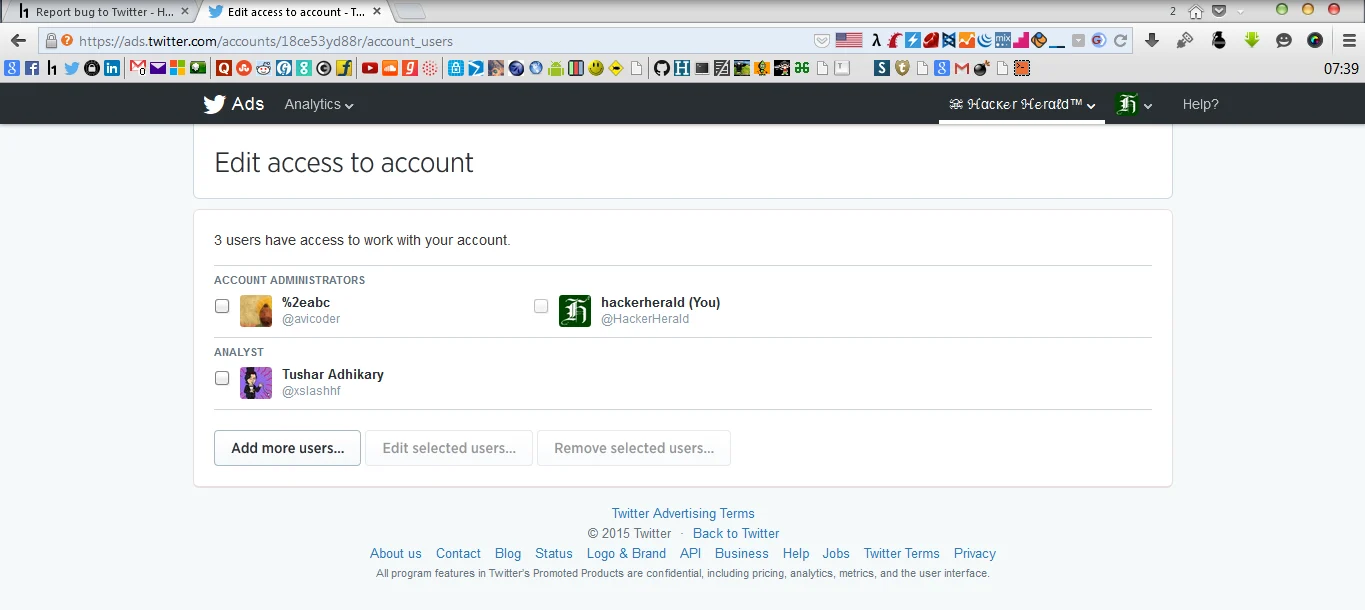
I attached the json file when I query my account in private window.. Its gives me all information about members linked to the campaign without any need of being (admin,manager,analyst)
I made this report short unlike my previous reports but it is to the point. Please revert back if more information is needed.
Happy to help #:)# avicoder
Attachments
Context
Twitter Ads is the advertising platform reachable at https://ads.twitter.com. Ad campaigns on that platform are shared between several people, and the report refers to the roles that can be attached to a campaign: admin, manager and analyst. The endpoint at the centre of this report is an internal typeahead helper that returns JSON describing accounts and the members linked to a campaign.
The researcher classifies the issue as OWASP A6, Sensitive Data Exposure, and describes it as an information disclosure that works without any authentication. The platform recorded the weakness as improper authentication.
Setup
The preconditions are minimal. The researcher states that you first log into a Twitter account, and the proof of concept is written from that starting point. The report does not name a particular account type, a browser, a tool or a version. The only artefact attached is a JSON file captured while querying the researcher's own account in a private window.
Finding it
The report shows that the query parameter accepts any account or screen name, not just one the caller is entitled to see. The response contains a user_name_info element, which the researcher identifies as the part that exposes the members associated with a campaign. Normally, the report says, that information is only visible to members of the campaign, so returning it to an arbitrary logged-in user looked wrong.
Exploitation
Step 1: log in
Log into a Twitter account. The report does not say whether the account needs any advertising relationship at all.
Step 2: request the typeahead endpoint for your own account
https://ads.twitter.com/admin/accounts_typeahead.json?query=avicoder
This is the vulnerable URL with the researcher's own screen name in the query parameter. The path is /admin/accounts_typeahead.json, and the response is JSON.
Step 3: change the query to another account
Replace the value of query with any other account or screen name, for example microsoft:
The report states that you can then view all the information about the account associated with the campaign.
Step 4: read the member data
In the returned JSON, look at the user_name_info element. According to the report, this is what actually exposes the members associated with the campaign. The researcher captured the JSON while querying their own account in a private window, and states that it returns all information about members linked to the campaign without the caller needing to be an admin, a manager or an analyst.
The screenshot is the proof-of-concept capture attached to the report, showing the JSON returned for the query.
Root cause
The endpoint sits under an /admin/ path and returns campaign membership data, yet the report shows it answering for any logged-in user regardless of their role on the campaign being queried. The query parameter is taken as an arbitrary account or screen name, so the caller chooses whose campaign data comes back.
Impact
A logged-in user can supply another account or screen name in the query parameter and read the membership information of the campaign associated with it. The exposed data is the set of members linked to a campaign, together with the account information the endpoint returns. The report frames this as data that should only be visible to campaign members, and notes that no admin, manager or analyst role is required to obtain it.
Fix
Based on the behaviour shown, the endpoint should authenticate the caller and then authorise the request against the specific campaign being queried, returning member information only to users who hold a role on that campaign. The query parameter should not be usable to pull data for campaigns the caller has no relationship with.
Variants to test
- Typeahead and autocomplete endpoints on other advertising or business platforms. Send a query for an organisation you do not belong to and look for member lists, email addresses or role names in the JSON. A positive result is a response containing people or roles tied to an entity you have no access to.
- Internal
/admin/JSON helpers reached with a normal user session. A positive result is any admin-scoped path that returns data instead of a redirect, a 403 or an authorisation error. - Identifier substitution in
query-style parameters: swap your own screen name for a well-known brand or a random one and compare the shape of the response. A positive result is a populateduser_name_info-style object for an entity you do not manage. - Role downgrade checks: repeat the request as a user with no role, then as an analyst, manager and admin on the same campaign, and compare responses. A positive result is identical member data across all four, which shows the role is not being enforced.
Hunting notes
This kind of bug tends to hide in secondary JSON endpoints that back a user interface widget, especially ones under an /admin/ prefix that were written for an internal console and later exposed to the main application. During recon, look for .json endpoints referenced by JavaScript on advertising, business and analytics products, and note any that take a free-text query or screen_name parameter. The signal is a response that varies with an identifier you supply rather than with your own session.
The researcher showed the endpoint with their own screen name, then described changing the query to another account, and attached a capture taken in a private window. That combination, an unauthenticated-in-effect read plus data that is normally restricted to campaign members, is what made the report actionable. The report itself is short and to the point, and the platform paid a bounty of 560.00 USD.
What happened, in plain words
Twitter Ads is the advertising side of Twitter, reachable at https://ads.twitter.com. People use it to create and run ad campaigns. A campaign is not necessarily owned by one person: several people can be attached to it, and the report mentions three roles that can be given to them: admin, manager and analyst. Think of a campaign as a shared folder at work, and the roles as who may open it and what they may do inside.
The report is about a small helper on that site. A helper of this kind is often called an API endpoint: a web address that a program (or a curious person with a browser) can call, and that answers with data instead of a web page. This particular endpoint answers in JSON, a text format that looks like a set of labelled boxes, easy for programs to read. Its name is accounts_typeahead.json, and it sits under an /admin/ path. "Typeahead" means the suggestion list you see while typing in a search box: the site asks the server "which accounts start with these letters?" and the server replies with a list. The word "admin" in the path suggests it was built for an internal administration console.
The problem the researcher found is that this endpoint answers questions about any account, not only about accounts the caller is allowed to see. The caller chooses an account name in a parameter called query, and the server returns information about the campaign linked to that account, including the people attached to it. Normally, the report says, that member information is visible only to members of the campaign. The researcher calls this an information disclosure: data that should stay restricted is handed out to someone who should not have it. They also label it OWASP A6, Sensitive Data Exposure, a well-known category in a list of common web security mistakes. The platform itself recorded the weakness as improper authentication, meaning the server did not properly check who was asking.
One more term is useful before we start. When you log into a website, the site gives your browser a small piece of data, often called a session cookie or a session token, which the browser sends back with every request. It is like a wristband at an event: the door staff see the wristband and let you in without asking for your name again. The report says the endpoint worked "without any authentication", but the proof of concept starts by logging in, so in practice the server was accepting any logged-in visitor, whatever their role on the campaign being queried.
Setup
The requirements are minimal. The researcher says you first log into a Twitter account, and the proof of concept is written from that starting point. The report does not name a particular account type, a browser, a tool or a version. The only artefact attached is a JSON file captured while querying the researcher's own account in a private window. A private window (sometimes called incognito) is a browser mode that starts without your usual cookies, so it is a simple way to show what a fresh session sees.
Finding it
The report shows that the query parameter accepts any account or screen name, not just one the caller is entitled to see. A screen name is the public handle that starts with @, such as @microsoft. The response contains an element called user_name_info, and the researcher identifies that element as the part that exposes the members associated with a campaign. Normally, the report says, that information is only visible to members of the campaign, so returning it to an arbitrary logged-in user looked wrong.
Exploitation
Step 1: log in
Log into a Twitter account. The report does not say whether the account needs any advertising relationship at all. This step matters because it gives your browser the session cookie described above: the server will see a logged-in visitor, and the question is whether it checks anything beyond that.
Step 2: request the typeahead endpoint for your own account
https://ads.twitter.com/admin/accounts_typeahead.json?query=avicoder
Line by line, in plain words:
https://is the secure version of the web protocol; the browser encrypts the conversation with the server.ads.twitter.comis the host, the advertising site./admin/accounts_typeahead.jsonis the path, the address of the helper inside that site. The.jsonending tells you the answer will be in JSON format.?starts the query string, the part of a URL that carries parameters.query=avicoderis one parameter namedquerywith the valueavicoder, the researcher's own screen name.
This first request uses the researcher's own screen name in the query parameter. It shows you the shape of the answer: which labels exist, and where the member information sits. Without this baseline you would not know what a normal response looks like.
Step 3: change the query to another account
Replace the value of query with any other account or screen name, for example microsoft:
Only the value after query= changed. Everything else, the host, the path and the parameter name, is identical. That is the whole test: if the server answers with campaign data for an account you have no relationship with, the check is missing. The report states that you can then view all the information about the account associated with the campaign.
Step 4: read the member data
In the returned JSON, look at the user_name_info element. According to the report, this is what actually exposes the members associated with the campaign. The researcher captured the JSON while querying their own account in a private window, and states that it returns all information about members linked to the campaign without the caller needing to be an admin, a manager or an analyst. In other words, the wristband at the door was enough; nobody checked which rooms you were allowed into.
The screenshot is the proof-of-concept capture attached to the report, showing the JSON returned for the query.
Root cause
The endpoint sits under an /admin/ path and returns campaign membership data, yet the report shows it answering for any logged-in user regardless of their role on the campaign being queried. The query parameter is taken as an arbitrary account or screen name, so the caller chooses whose campaign data comes back.
Impact
A logged-in user can supply another account or screen name in the query parameter and read the membership information of the campaign associated with it. To enumerate means to try one name after another and collect the answers. The exposed data is the set of members linked to a campaign, together with the account information the endpoint returns. The report frames this as data that should only be visible to campaign members, and notes that no admin, manager or analyst role is required to obtain it.
Fix
Based on the behaviour shown, the endpoint should authenticate the caller and then authorise the request against the specific campaign being queried, returning member information only to users who hold a role on that campaign. Authentication answers "who are you?", authorisation answers "are you allowed to do this?". The query parameter should not be usable to pull data for campaigns the caller has no relationship with.
Variants to test
- Typeahead and autocomplete endpoints on other advertising or business platforms. Send a query for an organisation you do not belong to and look for member lists, email addresses or role names in the JSON. A positive result is a response containing people or roles tied to an entity you have no access to.
- Internal
/admin/JSON helpers reached with a normal user session. A positive result is any admin-scoped path that returns data instead of a redirect, a 403 or an authorisation error. A 403 is the standard HTTP status code for "forbidden". - Identifier substitution in
query-style parameters: swap your own screen name for a well-known brand or a random one and compare the shape of the response. A positive result is a populateduser_name_info-style object for an entity you do not manage. - Role downgrade checks: repeat the request as a user with no role, then as an analyst, manager and admin on the same campaign, and compare responses. A positive result is identical member data across all four, which shows the role is not being enforced.
Hunting notes
This kind of bug tends to hide in secondary JSON endpoints that back a user interface widget, especially ones under an /admin/ prefix that were written for an internal console and later exposed to the main application. During recon, look for .json endpoints referenced by JavaScript on advertising, business and analytics products, and note any that take a free-text query or screen_name parameter. Recon means the early exploration phase, reading pages and scripts to map what exists. The signal is a response that varies with an identifier you supply rather than with your own session.
The researcher showed the endpoint with their own screen name, then described changing the query to another account, and attached a capture taken in a private window. That combination, an unauthenticated-in-effect read plus data that is normally restricted to campaign members, is what made the report actionable. The report itself is short and to the point, and the platform paid a bounty of 560.00 USD.
Glossary
- API: a web address that programs call to get or send data, rather than a page meant for a person to read.
- Endpoint: one specific address on a server that accepts requests and returns a response.
- JSON: a text format for data, made of names and values in braces and brackets, easy for programs to read.
- Parameter: a named value in a URL, written after
?asname=value. - Query string: the part of a URL after
?that carries parameters. - Screen name: the public handle of an account, such as
@microsoft. - Typeahead: a suggestion list shown while you type, produced by asking the server for matching names.
- Session cookie / session token: a small piece of data your browser stores after login and sends with each request, so the server recognises you.
- Authentication: checking who the caller is.
- Authorisation: checking whether the caller is allowed to perform the action or see the data.
- Information disclosure: a flaw where data that should be restricted is returned to someone who should not have it.
- Sensitive data exposure: the OWASP category (A6) for flaws that expose private data.
- Improper authentication: a weakness where the server does not properly verify the identity or entitlement of the caller.
- OWASP: a well-known project that publishes lists of common web security risks.
- Private window: a browser mode that starts without your usual cookies, useful for seeing what a fresh session gets.
- Enumeration: trying one identifier after another to collect the answers.
- 403: the HTTP status code meaning the server understood the request but refuses to allow it.
- Recon: the exploration phase of a security test, mapping what exists before trying anything.
- Bounty: a payment made by a company to a researcher who reports a valid security flaw.




