login csrf in analytics.mopub.com
The login endpoint accepted JSON credentials without any CSRF token, so a page on another site could log a victim into an attacker-controlled account. The reporter also suspected a content-sniffing XSS from reflected input in JSON error responses, but did not test it.
 Originally disclosed on HackerOne
- Triaged in 4 days
- Fixed in 4 months
- Paid in 13 days
- Disclosed after 5 months
Description: There is no csrf_token validation while logging in which leads to csrf. base request :
POST /login HTTP/1.1 Host: analytics.mopub.com Connection: close Content-Length: 37 Accept: application/json, text/plain, / Origin: https://analytics.mopub.com User-Agent: Mozilla/5.0 (Windows NT 10.0; Win64; x64) AppleWebKit/537.36 (KHTML, like Gecko) Chrome/74.0.3729.131 Safari/537.36 Content-Type: application/json;charset=UTF-8 Referer: https://analytics.mopub.com/ Accept-Encoding: gzip, deflate Accept-Language: fr-FR,fr;q=0.9,en-US;q=0.8,en;q=0.7 Cookie: _ga=██████; _gid=███████; mp_mixpanel__c=0
{"name":"username","pass":"password"}
** bypass content type & CORS** we cant send it with simple html form , because the Content-Type: application/json;charset=UTF-8 we can send it with ajax request and edit the Content-Type to json and add this link https://cors-anywhere.herokuapp.com/ to bypass CORS ps: more about bypass cors https://medium.com/netscape/hacking-it-out-when-cors-wont-let-you-be-great-35f6206cc646
Steps To Reproduce with :
- download F488813 and edit the username and password.
2.open it with browser .
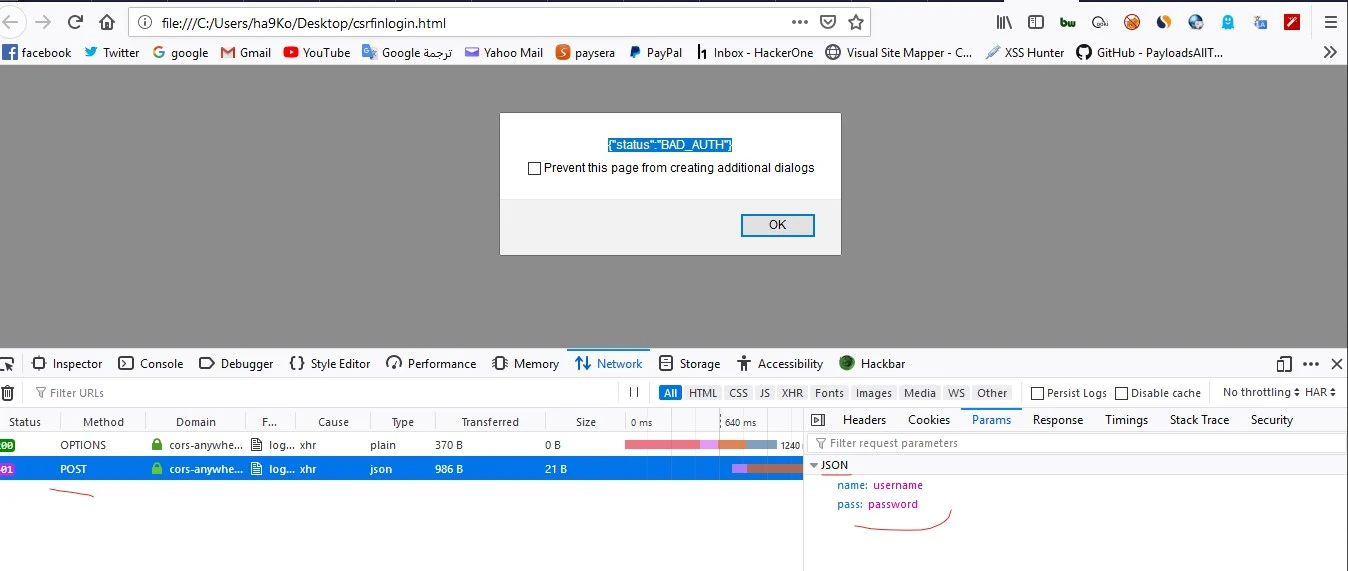
3.with web development tools in browser open Network and look response .
if response status 401 means thats login failed; F488816 ████ else if response status 400 means its bad request with reflected input in json error can get Cross site scripting (content-sniffing): { the response header without X-Content-Type-Options: nosniff } ████ else means login success {i dont have account in analytics.mopub.com}
References & semilar report :
https://medium.com/netscape/hacking-it-out-when-cors-wont-let-you-be-great-35f6206cc646 https://hackerone.com/reports/293016 https://hackerone.com/reports/339352
Impact
1-Log any victim into the attacker account, the attacker can create a similar account profile as the victim 2- with some information missing, and then social-engineering (e.g. email) user to provide personal information or current password and can also monitor the victim activities. 3- Also the victim may add his paymet info in the attackers account unknowingly using your wallet feature. 4-Cross site scripting (content-sniffing) (not tested)
Attachments
Context
The target is analytics.mopub.com, the analytics portal for MoPub. The feature in question is the login endpoint, POST /login, which accepts a JSON body containing a name and a pass field. The researcher found that this endpoint processes a login request without validating a CSRF token, which makes it possible to log a victim into an account chosen by the attacker.
Setup
The report does not describe any special tooling beyond a browser and its web development tools. The researcher did not have an account on analytics.mopub.com, which is stated explicitly and limits what could be confirmed about the success path. The proof of concept is an HTML file (referenced as F488813) that the reader downloads and edits with a chosen username and password, then opens in a browser.
Finding it
The observation is simple: the login request carries no anti-CSRF token. The base request captured from the browser looks like this:
POST /login HTTP/1.1
Host: analytics.mopub.com
Connection: close
Content-Length: 37
Accept: application/json, text/plain, */*
Origin: https://analytics.mopub.com
User-Agent: Mozilla/5.0 (Windows NT 10.0; Win64; x64) AppleWebKit/537.36 (KHTML, like Gecko) Chrome/74.0.3729.131 Safari/537.36
Content-Type: application/json;charset=UTF-8
Referer: https://analytics.mopub.com/
Accept-Encoding: gzip, deflate
Accept-Language: fr-FR,fr;q=0.9,en-US;q=0.8,en;q=0.7
Cookie: _ga=[redacted]; _gid=[redacted]; mp_mixpanel__c=0

{"name":"username","pass":"password"}
The body is JSON, and the only cookies present are analytics cookies (_ga, _gid) plus a Mixpanel cookie, none of which act as a CSRF defence. The researcher argues that because the endpoint accepts a login without a CSRF token, an attacker who can make a victim's browser send this request could control which account the victim ends up in, though the success path was not confirmed with a real account.
Exploitation
Step 1: Understand the content-type obstacle
A plain HTML form cannot produce this request, because the server expects Content-Type: application/json;charset=UTF-8. A form submission would send application/x-www-form-urlencoded (or multipart/form-data), so the request has to be issued with JavaScript via XMLHttpRequest or fetch, with the content type set to JSON.
Step 2: Deal with CORS
Sending a cross-origin AJAX request with a JSON content type triggers a CORS preflight, which the target will not approve for an arbitrary attacker origin. The researcher's workaround is to route the request through the public proxy at https://cors-anywhere.herokuapp.com/, which adds the CORS headers needed for the browser to allow the cross-origin call. The report links to a general article on bypassing CORS for background.
Step 3: Build and run the proof of concept
- Download the attachment (F488813) and edit the username and password to the attacker-controlled credentials.
- Open the file in a browser.
- Open the browser's web development tools, switch to the Network tab, and inspect the response.
The researcher describes how to read the result:
- A response status of
401means the login failed. - A response status of
400means a bad request, with the submitted input reflected in a JSON error. The researcher notes this could be turned into cross-site scripting through content sniffing, because the response header lacksX-Content-Type-Options: nosniff. - Any other response means the login succeeded.
The researcher notes not having an account on analytics.mopub.com, so the success branch was not demonstrated with a real account.
The screenshot is the proof-of-concept attachment referenced in the steps above.
Root cause
The login endpoint accepts a state-changing request (establishing an authenticated session) without requiring a token that the attacker cannot know or forge. The session cookie alone is not sufficient protection here, because the browser attaches cookies automatically to cross-site requests. The JSON content type and CORS are obstacles to a naive form-based attack, but they are client-side constraints that can be worked around with JavaScript and a proxy, as the researcher shows. The absence of a CSRF token is the actual defect; the content type and CORS behaviour only raise the bar.
Impact
The researcher lists these consequences:
- Log the victim into the attacker's account. The attacker can create a profile resembling the victim's, with some information missing, and then use social engineering (for example by email) to get the victim to supply personal information or their current password, and can monitor the victim's activity.
- The victim may add payment information to the attacker's account unknowingly, using the wallet feature.
- Cross-site scripting through content sniffing, which the researcher marks as not tested.
These outcomes depend on the victim being logged into the attacker's account without noticing, and on the victim then entering sensitive data into that account. The report does not demonstrate the success path with a real account.
Fix
The report does not describe a fix or a change made by the vendor. The measure implied by the finding is to require and validate an anti-CSRF token on POST /login, tied to the user's session, so that a cross-site request cannot complete a login. Adding X-Content-Type-Options: nosniff to JSON responses would also close the content-sniffing path the researcher mentions.
Variants to test
- Login and other authentication endpoints that accept JSON: check whether a CSRF token is required and whether the endpoint can be reached cross-origin through a proxy. A positive result is a
200-class response that establishes a session for attacker-supplied credentials. - Endpoints that reflect input in JSON error bodies: check for a missing
X-Content-Type-Options: nosniffheader and whether the reflected content can be interpreted as script. A positive result is script execution in the victim's browser from a cross-origin request. - Any state-changing endpoint protected only by a non-standard content type: test whether JavaScript plus a CORS proxy can still reach it. A positive result is the action completing without a token.
Hunting notes
Login CSRF hides in endpoints that look harmless because they only establish a session rather than modify stored data. During recon, look for authentication requests with JSON bodies, no anti-CSRF token, and permissive CORS or a reachable proxy path. The researcher's approach was to capture the exact request, identify the two obstacles (content type and CORS), and show a concrete workaround for each, then describe how to read the response to confirm success.
What happened, in plain words
A security researcher found that the login page of analytics.mopub.com would accept a login request without checking a special security token. That token, called a CSRF token, is the usual way a website makes sure a login or other action really came from its own pages and not from a page on another site. Because the check was missing, someone could build a small web page that quietly logs a visitor into an account the attacker controls.
This kind of bug is called login CSRF. The attacker does not steal the victim's password. Instead, the attacker makes the victim's browser log in as the attacker. The victim then uses the site believing it is their own account, and anything they type there, such as personal details or payment information, ends up in the attacker's hands.
The feature involved is simply the login endpoint, POST /login, which takes a username and password in a JSON body. The researcher did not have an account on the site, so the successful-login case could not be shown with a real account.
Background you need first
A few everyday ideas make the rest of this easy to follow.
- Endpoint: a specific address on a server that does one job. Think of a large office building: the street address is the website, and each room number is an endpoint.
POST /loginis the room where logins are handled. - HTTP request: the message your browser sends to a server. It has a first line (the method and the path), a set of headers (extra information), and sometimes a body (the data being sent).
- POST: the method used when you are sending data to the server, as opposed to just asking for a page.
- JSON: a simple text format for data, written with curly brackets and quoted names, like
{"name":"username","pass":"password"}. It is the format many modern web apps use to talk to their servers. - API: the set of endpoints a site offers for programs (and browsers running JavaScript) to talk to it, rather than for humans clicking links.
- Cookie: a small piece of text a website asks your browser to store and send back on every later request to that site. It is how a site remembers who you are between page loads. A session cookie is the one that says "this browser is logged in as this user".
- CSRF (Cross-Site Request Forgery): tricking a logged-in user's browser into sending a request to a site the user trusts, without the user meaning to. Your browser automatically attaches the site's cookies to any request going to that site, even one triggered by a different website. CSRF defences exist because of that automatic behaviour.
- CSRF token: a random value the site puts into its own pages and expects back with sensitive requests. Another website cannot know or guess it, so a request without the right token is rejected. It is like a cloakroom ticket: only the person holding the matching ticket gets the coat.
- CORS (Cross-Origin Resource Sharing): a browser rule that stops a page on one site from freely reading responses from another site. It exists to protect users, and it is enforced by the browser, not the server.
- Content type: a header that says what format the body is in, for example JSON or a classic web form.
- Status code: a three-digit number in the response saying how it went.
200-ish means success,400means the request was malformed,401means not authorised (here, wrong credentials).
Finding it
The researcher captured the login request the browser sends and noticed there was no anti-CSRF token anywhere in it. The captured request looks like this:
POST /login HTTP/1.1
Host: analytics.mopub.com
Connection: close
Content-Length: 37
Accept: application/json, text/plain, */*
Origin: https://analytics.mopub.com
User-Agent: Mozilla/5.0 (Windows NT 10.0; Win64; x64) AppleWebKit/537.36 (KHTML, like Gecko) Chrome/74.0.3729.131 Safari/537.36
Content-Type: application/json;charset=UTF-8
Referer: https://analytics.mopub.com/
Accept-Encoding: gzip, deflate
Accept-Language: fr-FR,fr;q=0.9,en-US;q=0.8,en;q=0.7
Cookie: _ga=[redacted]; _gid=[redacted]; mp_mixpanel__c=0

{"name":"username","pass":"password"}
Line by line:
POST /login HTTP/1.1says this is a data-sending request to the/loginendpoint, using version 1.1 of the HTTP protocol.Host: analytics.mopub.comnames the server being talked to.Connection: closeasks the server to close the connection after replying.Content-Length: 37says the body is 37 bytes long, so the server knows where it ends.Accept: application/json, text/plain, */*tells the server which response formats the browser can handle.Origin: https://analytics.mopub.comsays which site the request came from. Browsers add this automatically, and servers can use it for CORS decisions.User-Agent: ...identifies the browser and operating system.Content-Type: application/json;charset=UTF-8says the body is JSON text encoded in UTF-8. This detail matters a lot later.Referer: https://analytics.mopub.com/says which page the request was made from.Accept-EncodingandAccept-Languagedescribe compression and language preferences.Cookie: ...carries the cookies the browser holds for this site. Here they are_gaand_gid(Google Analytics tracking cookies) andmp_mixpanel__c(a Mixpanel analytics cookie). None of these is a CSRF defence; they are just tracking.- The blank line separates headers from body.
{"name":"username","pass":"password"}is the JSON body: the username and password being submitted.
The researcher argues that because the server accepts this login without a CSRF token, anyone who can make a victim's browser send this request could decide which account the victim ends up logged into, though this was not confirmed with a real account. That is the whole bug.
Exploitation
Step 1: Understand the content-type obstacle
A plain HTML form, the kind you build with a <form> tag, cannot produce this request. A form sends its data as application/x-www-form-urlencoded (or multipart/form-data), not as JSON. The server expects Content-Type: application/json;charset=UTF-8, so a form submission would not match.
The way around this is to send the request with JavaScript instead, using XMLHttpRequest or fetch, and set the content type to JSON. JavaScript can set headers that a form cannot.
Step 2: Deal with CORS
Sending a cross-origin AJAX request (a JavaScript request from one site to another) with a JSON content type makes the browser first send a CORS preflight: a small check asking the target server whether the other site is allowed to make this call. The target would not approve an arbitrary attacker's site, so the browser would block the request.
The researcher's workaround is to route the request through the public proxy at https://cors-anywhere.herokuapp.com/. A proxy is a middleman server: the browser talks to the proxy, and the proxy talks to the real target. The proxy adds the CORS headers the browser needs, so the cross-origin call is allowed. The report links to a general article on bypassing CORS for background.
Step 3: Build and run the proof of concept
- Download the attachment (referred to as F488813) and edit the username and password to the attacker-controlled credentials.
- Open the file in a browser.
- Open the browser's web development tools, switch to the Network tab, and look at the response.
The researcher explains how to read the result:
- A response status of
401means the login failed. - A response status of
400means a bad request, with the submitted input reflected back in a JSON error. The researcher notes this could be turned into cross-site scripting through content sniffing, because the response header lacksX-Content-Type-Options: nosniff. - Any other response means the login succeeded.
The researcher states plainly that they did not have an account on analytics.mopub.com, so the success branch was not demonstrated with a real account.
The screenshot is the proof-of-concept attachment referenced in the steps above.
Root cause
The login endpoint accepts a request that changes state (it establishes an authenticated session) without requiring a token the attacker cannot know or forge. The session cookie alone is not enough protection, because the browser attaches cookies automatically to cross-site requests. The JSON content type and CORS are obstacles to a naive form-based attack, but they are browser-side constraints that can be worked around with JavaScript and a proxy, as the researcher shows. The missing CSRF token is the actual defect; the content type and CORS behaviour only raise the bar.
Impact
The researcher lists these consequences:
- Log the victim into the attacker's account. The attacker can create a profile resembling the victim's, with some information missing, and then use social engineering (for example by email) to get the victim to supply personal information or their current password, and can monitor the victim's activity.
- The victim may add payment information to the attacker's account unknowingly, using the wallet feature.
- Cross-site scripting through content sniffing, which the researcher marks as not tested.
These outcomes depend on the victim being logged into the attacker's account without noticing, and on the victim then entering sensitive data into that account. The report does not demonstrate the success path with a real account.
Fix
The report does not describe a fix or a change made by the vendor. The measure implied by the finding is to require and validate an anti-CSRF token on POST /login, tied to the user's session, so that a cross-site request cannot complete a login. Adding X-Content-Type-Options: nosniff to JSON responses would also close the content-sniffing path the researcher mentions.
Variants to test
- Login and other authentication endpoints that accept JSON: check whether a CSRF token is required and whether the endpoint can be reached cross-origin through a proxy. A positive result is a
200-class response that establishes a session for attacker-supplied credentials. - Endpoints that reflect input in JSON error bodies: check for a missing
X-Content-Type-Options: nosniffheader and whether the reflected content can be interpreted as script. A positive result is script execution in the victim's browser from a cross-origin request. - Any state-changing endpoint protected only by a non-standard content type: test whether JavaScript plus a CORS proxy can still reach it. A positive result is the action completing without a token.
Hunting notes
Login CSRF hides in endpoints that look harmless because they only establish a session rather than modify stored data. During recon, look for authentication requests with JSON bodies, no anti-CSRF token, and permissive CORS or a reachable proxy path. The researcher's approach was to capture the exact request, identify the two obstacles (content type and CORS), and show a concrete workaround for each, then describe how to read the response to confirm success.
Glossary
- API: the set of endpoints a site offers for programs and browsers to talk to it, rather than for humans clicking links.
- Cookie: a small piece of text a site asks your browser to store and send back on later requests to that site.
- CORS preflight: a small check the browser sends before a cross-origin request, asking the target server whether the other site is allowed to make the call.
- Cross-origin request: a request made from a page on one site to a different site.
- CSRF token: a random value a site puts into its own pages and expects back with sensitive requests, which another site cannot know or guess.
- Content type: a header saying what format the body is in, such as JSON or a classic web form.
- HTTP request: the message a browser sends to a server, made of a first line, headers and sometimes a body.
- JSON: a simple text format for data, written with curly brackets and quoted names.
- Login CSRF: a CSRF attack that logs the victim into an account chosen by the attacker.
- POST: the HTTP method used when sending data to the server.
- Proxy: a middleman server that passes requests between the browser and the real target.
- Session cookie: the cookie that tells a site which user the browser is logged in as.
- Social engineering: manipulating a person into giving away information or access, for example by email.
- Status code: a three-digit number in a response saying how the request went, such as
200for success,400for a malformed request and401for not authorised. - X-Content-Type-Options: nosniff: a response header that tells the browser to trust the declared content type instead of guessing, which blocks content-sniffing attacks.


