Self-XSS via location cookie city field when getting suggestions for a new location
The site stored a location cookie containing JSON, and the city field from that cookie was echoed back unescaped in the location suggestion JSON response and then rendered on the profile location page. An attacker could only exploit this against themselves, since the victim would have to tamper with their own cookie, so it is a self-XSS with no cross-user impact.

- Triaged in 2 hours
- Paid in 3 months
- Disclosed after 3 months
Hi,
Only self-XSS, but thought I would report it anyway!
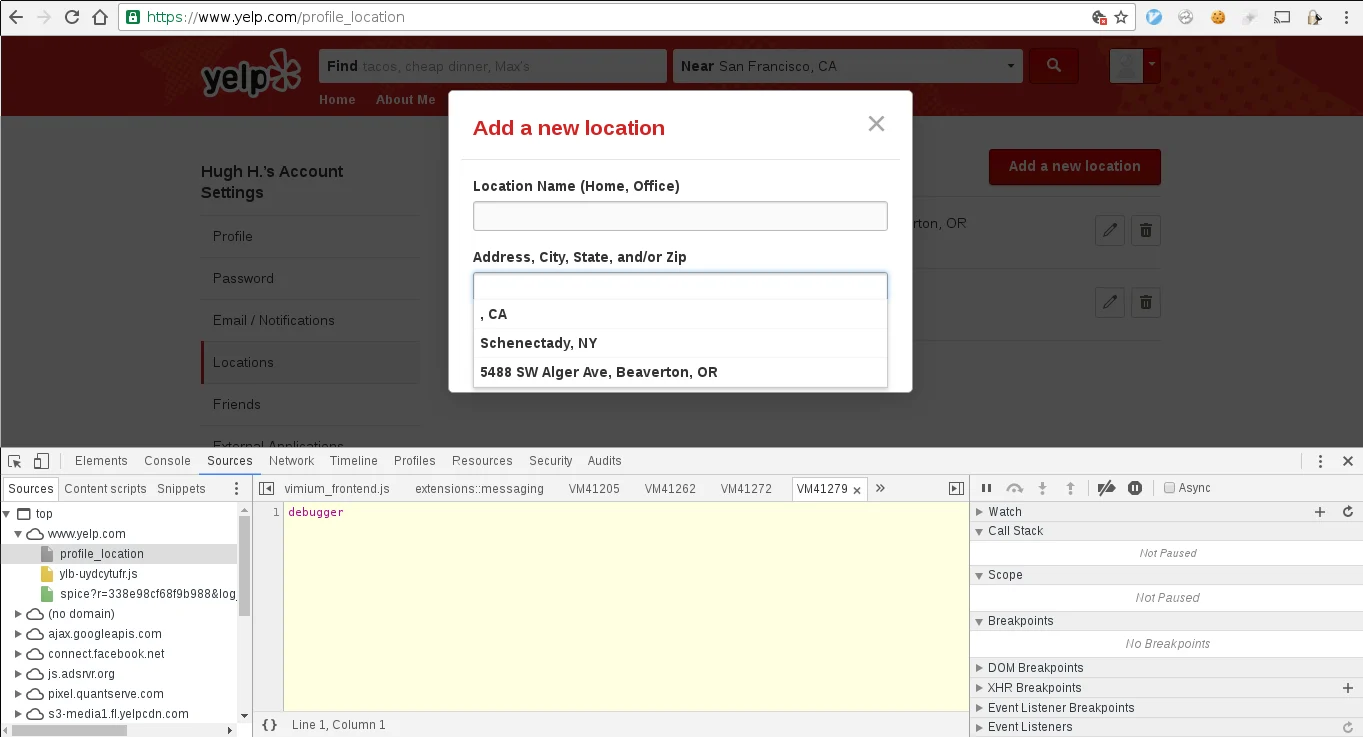
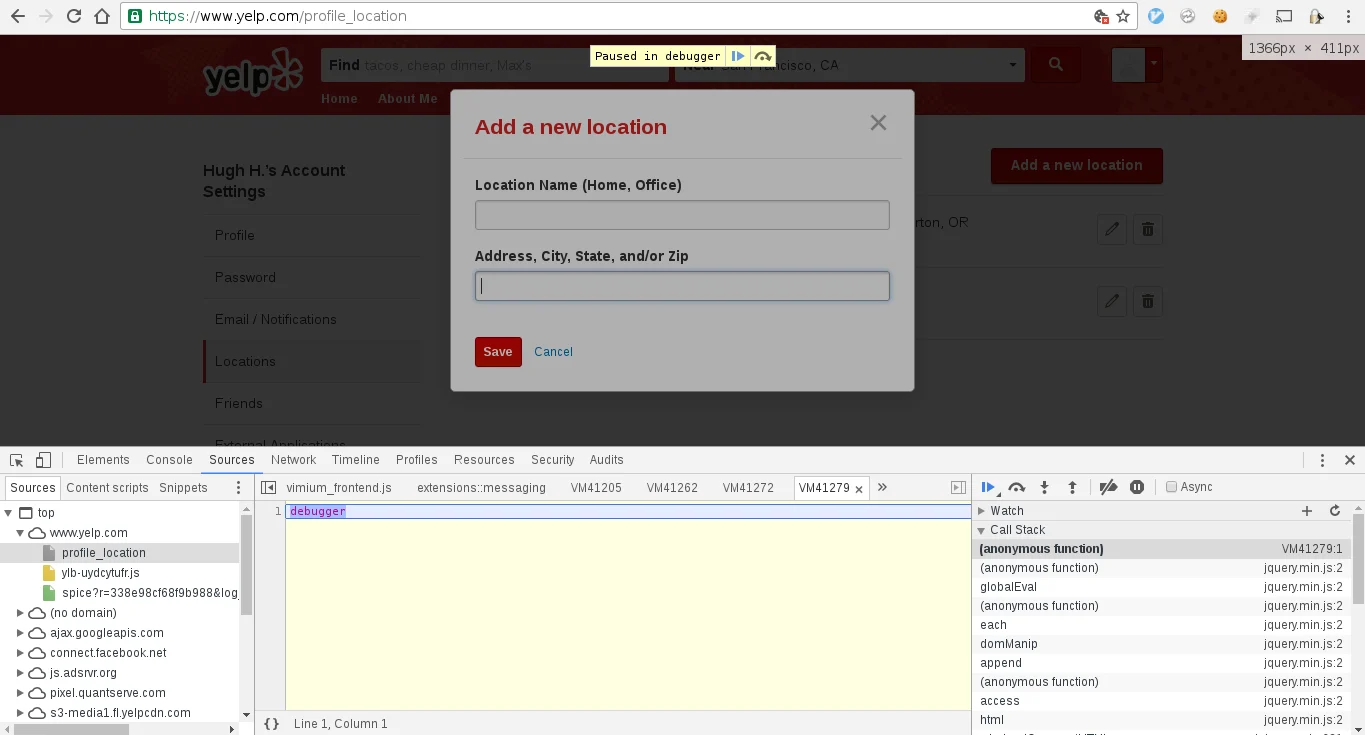
I noticed the cookie "location" had some JSON in it, so I changed the city field to <script>debugger</script>, made sure it was encoded the same, then went to add a new location/change an existing location at https://www.yelp.com/profile_location. Making sure the debugger is open, and then clicking on the Address field on the new location page, the debugger should open up as the XSS fires.
My cookie before tampering was: %7B%22city%22%3A+%22San+Francisco%22%2C+%22zip%22%3A+%22%22%2C+%22country%22%3A+%22US%22%2C+%22address2%22%3A+%22%22%2C+%22address3%22%3A+%22%22%2C+%22state%22%3A+%22CA%22%2C+%22address1%22%3A+%22%22%2C+%22unformatted%22%3A+%22San+Francisco%2C+CA%22%7D
I changed it to be %7B%22city%22%3A%22%3Cscript%3Edebugger%3C/script%3E%22%2C%22zip%22%3A%22%22%2C%22country%22%3A%22US%22%2C%22address2%22%3A%22%22%2C%22address3%22%3A%22%22%2C%22state%22%3A%22CA%22%2C%22address1%22%3A%22%22%2C%22unformatted%22%3A%22SanFrancisco%2CCA%22%7D
What I see on chrome is attached.
The data is getting there from the request to https://www.yelp.com/location_suggest/json?prefix=, with our cookie, and all other auth related cookies. The response is {"suggestions": [{"suggestion_type": "location", "content_id": null, "name": "\u003cscript\u003edebugger\u003c/script\u003e, CA", "alias": null}, {"suggestion_type": "location", "content_id": null, "name": "Schenectady, NY", "alias": null}, {"suggestion_type": "location", "content_id": null, "name": "5488 SW Alger Ave, Beaverton, OR", "alias": null}], "unique_request_id": "8d056ce4b81b2693"} (the other two addresses being random test addresses I guess).
My suggestion would be to validate the city name passed in the cookie as an actual city.
Let me know if you need more info.
Cheers,
Hugh
Attachments
Not written yet. The AI write-up for this report has not been written yet. The Original tab links to the source.
How it worked
Root cause
Likely the city value from the location cookie was passed through the location suggestion endpoint and rendered into the page without output encoding or validation.
Impact
Only the user who modifies their own cookie is affected, so there is no impact on other users.
What the attacker needed
Victim edits their own cookie; attacker is the victim
The fix
The city name taken from the cookie should be validated as a real city.
How it was found
- Edit the location cookie so the city field contains a script tag, keeping the encoding consistent.
- Open the profile location page and go to add or change a location.
- Open the browser debugger and click the Address field.
- The injected script fires and the debugger pauses.
Explained by bugbounty.wiki with AI from the original and checked against quotes from it; it can still be wrong. Read the original before relying on a detail.
Not written yet. The AI write-up for this report has not been written yet. The Original tab links to the source.
A cookie is a small piece of data a website stores in your browser. Here the site trusted a value inside that cookie and put it back into the page without cleaning it, so script-like text in the cookie ran as code. Because only the person who edits their own cookie is affected, this is called self-XSS and is not a real attack against other users.
What is XSS?
Script an attacker supplies runs in another user's browser, on the target's origin, with that user's session.





