Acronis True Image 2020 Build 22510 Nonstop Backup Service Unquoted service path (privilege escalation)
The Acronis True Image Nonstop Backup Service was registered with an executable path containing spaces but without surrounding quotes. A local user could place a crafted executable at an intermediate path such as C:\Program.exe, and it would run with SYSTEM privileges when the service or machine restarted.

- Triaged in 14 hours
- Fixed in 28 days
- Disclosed after 3.6 years
Summary
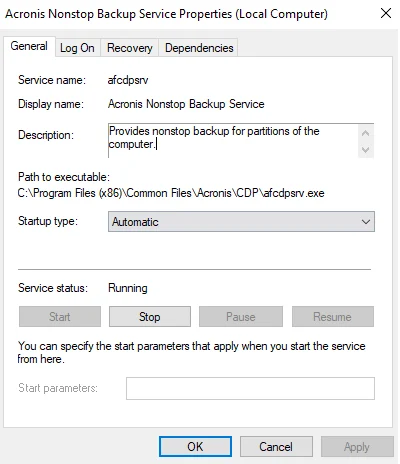
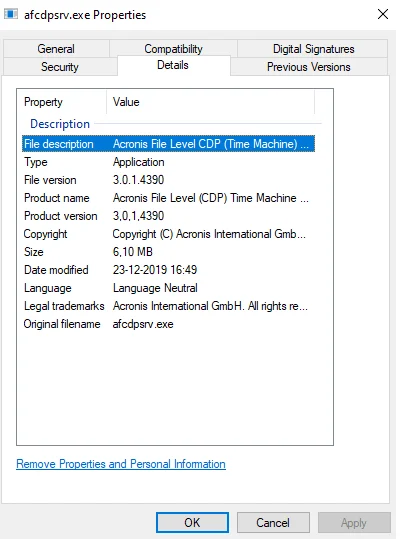
Acronis True Image 2020 Nonstop Backup Service is created with an executable path that contains spaces and isn't enclosed within quotes this leads to a vulnerability known as Unquoted Service Path which allows a user to gain SYSTEM privileges.
See screenshot below.
POC
The vunability can be easily exploited by placing a custom executable C:\Program Files (x86)\Common.exe or C:\Program.exe and restarting the computer/service. The executable will be executed with system privileges.
An example code for such application can be creating a new user with Administrator privilegles.
#include <stdlib.h>
// i686-w64-mingw32-gcc adduser.c -o adduser.exe
int main ()
{
int i;
i = system ("net user username P@ssword! /add");
i = system ("net localgroup administrators username /add");
return 0;
}
Recommendations
Add quotes to the path "C:\Program Files (x86)\Common Files\Acronis\CDP\afcdpsrv.exe" instead of C:\Program Files (x86)\Common Files\Acronis\CDP\afcdpsrv.exe
Impact
privilege escalation on the affected system.
Not written yet. The AI write-up for this report has not been written yet. The Original tab links to the source.
How it worked
Root cause
The service binary path was stored without quotation marks despite containing spaces, so Windows resolves it through intermediate paths a low-privileged user may control.
Impact
A local user could escalate their privileges to SYSTEM on the affected machine.
What the attacker needed
Local access to the machine; ability to write to an intermediate path; service or machine restart
The fix
The service path should be wrapped in quotation marks so Windows only launches the intended binary.
Explained by bugbounty.wiki with AI from the original and checked against quotes from it; it can still be wrong. Read the original before relying on a detail.
Not written yet. The AI write-up for this report has not been written yet. The Original tab links to the source.
Windows services point to a program file on disk. If that file path has spaces and is not wrapped in quote marks, Windows tries several shorter paths first, such as C:\Program.exe. A normal user who can write a file to one of those spots can get their own program started by the service, which runs with the highest system rights.
What is Misconfiguration?
Settings left unsafe: exposed panels, open storage buckets, debug modes, default credentials.



