Stored xss

- Triaged in 4 hours
- Fixed in 5 hours
- Paid in 5 hours
- Disclosed after 30 days
Hi ,i have found an xss issue here : https://www.algolia.com/explorer#?index=test&tab=ranking
Steps to reproduce :
1-Go to : https://www.algolia.com/explorer#?index=test&tab=ranking
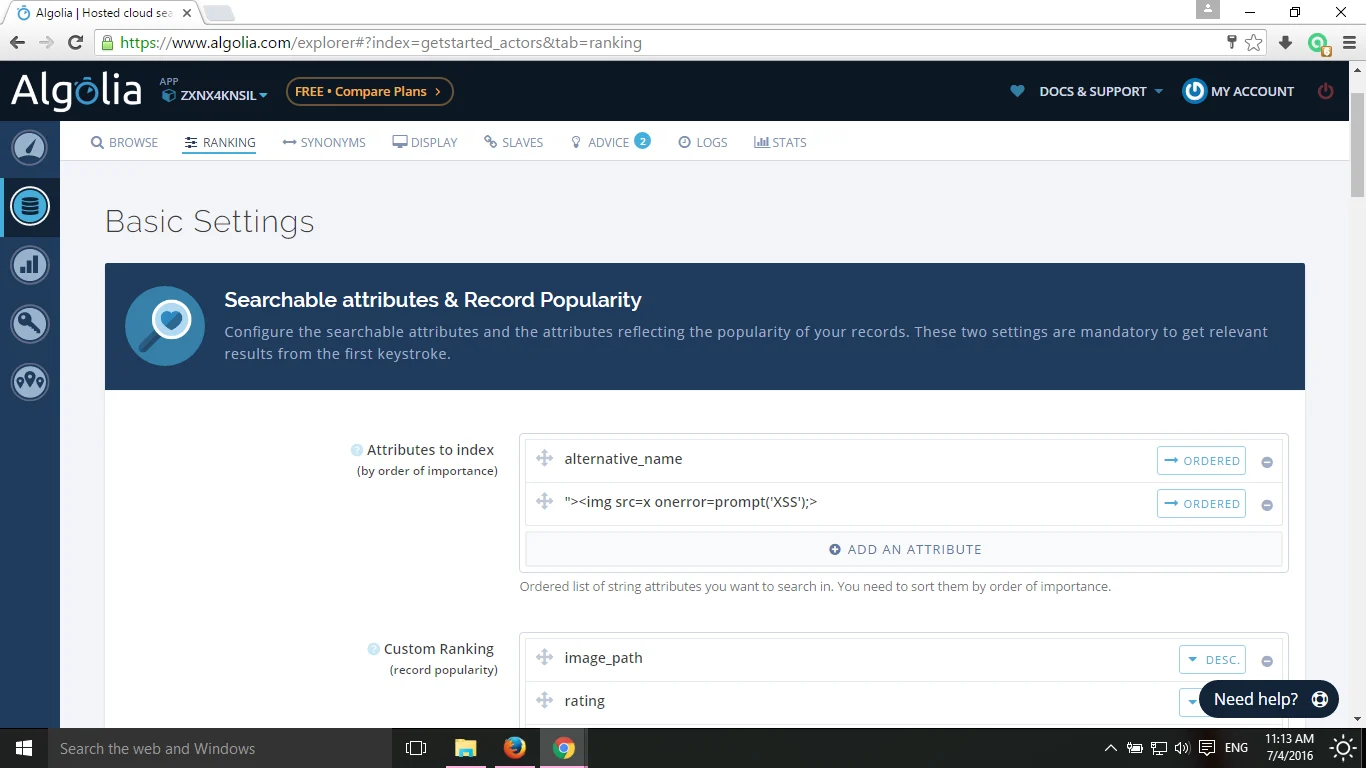
2-At the Attributes to index add this script :"><img src=x onerror=prompt('XSS');> and press enter .
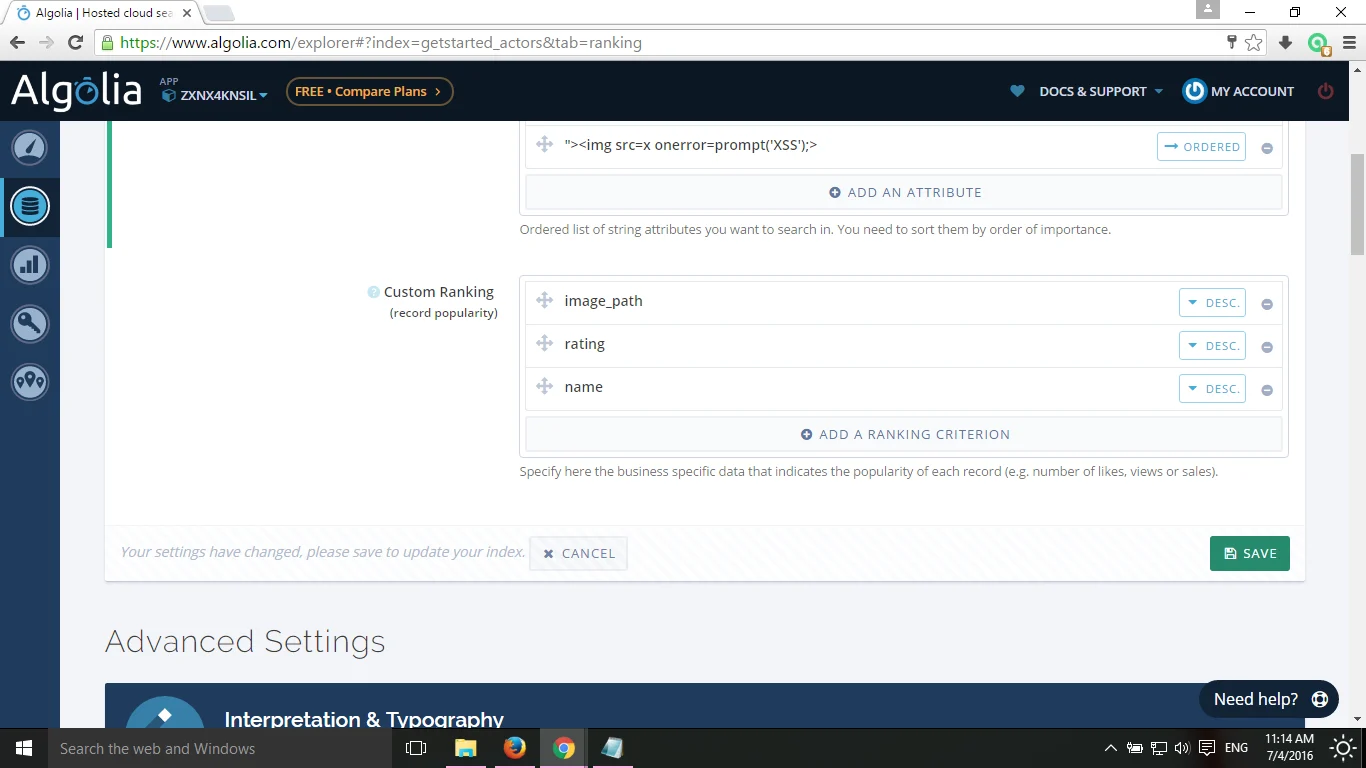
3-Click save
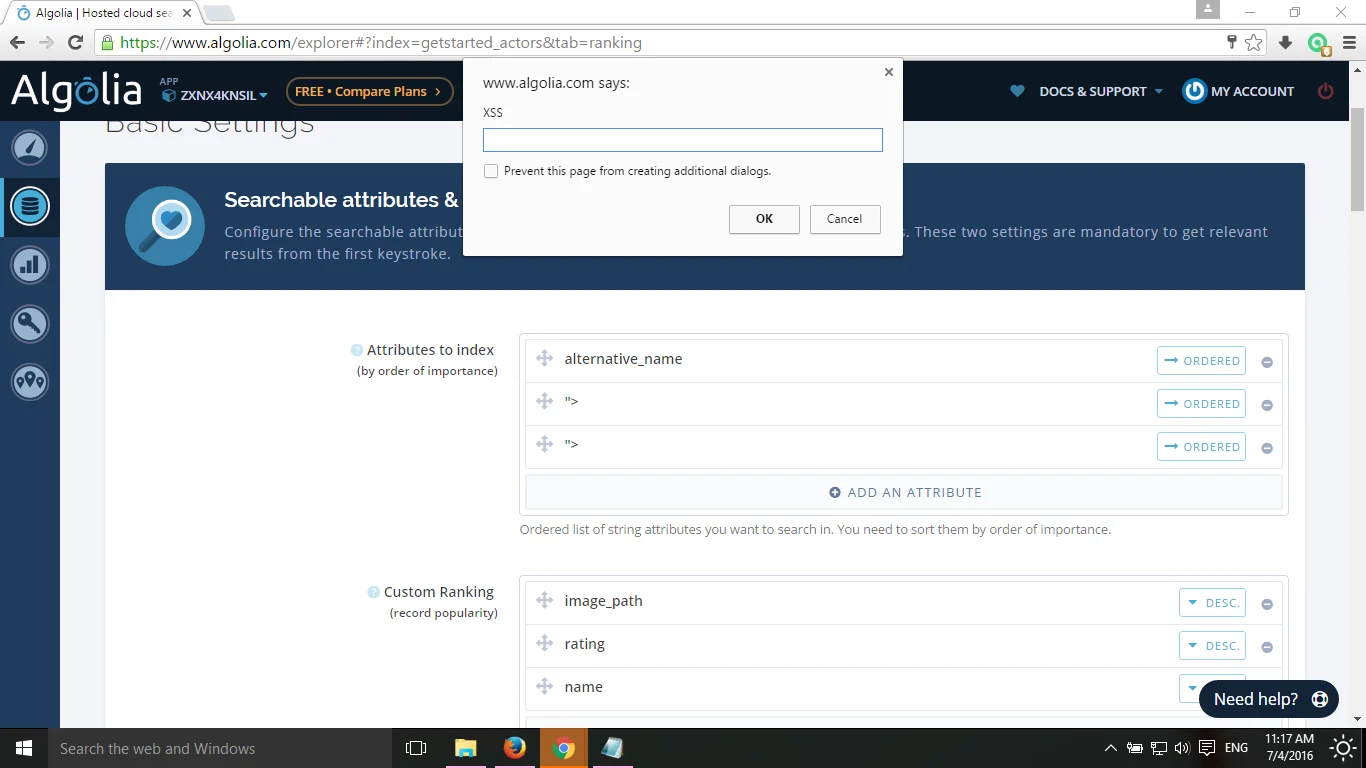
You will see that the xss has been fired .
You can go to https://www.algolia.com/explorer#?index=test&tab=ranking again you will see that xss is fired again .
Thanks , Saleh
Attachments
What the report shows
The target is the Algolia dashboard explorer, specifically the ranking tab of an index. The researcher reported a stored cross-site scripting issue on the page reached at this URL:
https://www.algolia.com/explorer#?index=test&tab=ranking
The reproduction steps are short and direct:
- Open the explorer URL above.
- In the "Attributes to index" field, enter the following payload and press enter:
"><img src=x onerror=prompt('XSS');>
- Click save.
The script fires when the value is saved. The researcher also notes that returning to the same explorer URL afterwards fires the payload again, which is the behaviour that makes this stored rather than reflected: the value persists with the index configuration and is rendered back on the ranking tab.
The report was disclosed on 3 August 2016 and paid a bounty of 100.00 USD. No severity rating or CVSS score is given, and the report does not describe a fix.
The three attachments show the explorer interface around the reproduction. The report includes three attachments.
Root cause
The payload begins with a double quote and a closing angle bracket, then an image tag whose onerror handler calls prompt. That shape only works if the value is written into an HTML attribute or tag context without being encoded, so the leading "> closes the surrounding markup and the injected element is parsed as real HTML. The value appears to be rendered into the page without HTML encoding, so the browser treats the saved string as markup rather than text. Because the value is part of the index configuration, every later load of the ranking tab renders it again.
Impact
The report demonstrates script execution in the context of the Algolia explorer page, triggered by a saved configuration value. The researcher shows only a prompt call, so the report does not establish what an attacker could reach beyond that. In general terms, script running in that origin could act with the privileges of whoever views the affected page, but the report itself makes no claim about other users, accounts or data.
How this kind of bug works
Stored cross-site scripting happens when input is persisted by the application and later included in a page without context-appropriate output encoding. The database or configuration store is not the problem; the rendering step is. When a value is placed inside an HTML attribute, a text node, a URL or a script block, the escaping rules differ, and applying none of them lets an attacker break out of the intended context.
In this case the vulnerable context appears to be an attribute, since the payload starts by closing a quote and a tag. The onerror handler is a common choice because it fires without user interaction once the browser fails to load the image source.
Defences work at several layers: output encoding matched to the context where the value is inserted, a strict Content Security Policy that blocks inline handlers, and, for rich values, server-side sanitisation with an allowlist of tags and attributes. Framework templating that escapes by default removes most of this class, provided developers do not bypass it with raw HTML output.
How to test for it
- Identify every feature where a value is saved and later displayed: profile fields, index or project settings, labels, saved searches, comments, names of objects shown in dashboards.
- Save a benign marker first, such as a unique string, and confirm where and how it is rendered. View the page source and note whether the value lands in a text node, an attribute, a URL or a script block.
- Send a payload shaped for that context. For an attribute context, a value that closes the quote and tag and adds an element with an event handler is the standard probe; for a text node, a plain tag with a handler is enough. Use a harmless action such as a dialog box so the test does not affect other users.
- Reload the page, and also load it in a fresh session, to distinguish stored from reflected behaviour.
- Check whether the value is rendered in other places, such as list views, exports or admin panels, since a single stored value can surface in several contexts with different encoding.
A positive result is your marker executing as script in the page origin, visible in the browser console or as a dialog. Common false positives are values that appear in the response but are HTML-encoded, payloads that only execute because you pasted them into the developer console, and reflected execution that does not persist after a reload. Also rule out cases where the application sanitises on render but your browser extension or a cached page shows the raw value.
How it is fixed
- Encode every stored value for the context in which it is rendered, using the templating engine's escaping rather than string concatenation.
- Where markup must be allowed, sanitise on the server with a well-maintained allowlist library and store the sanitised form.
- Add a Content Security Policy that disallows inline event handlers and inline scripts, as defence in depth.
- Validate input on the server as well as the client, and treat configuration values as untrusted input like any other.
- Add regression tests that save payload-shaped strings and assert they render encoded.
Hunting notes
Stored XSS tends to hide in places where users configure things that are shown back to them or to others: dashboard settings, index or project metadata, display names, saved filters and labels. Features that render values into attributes, such as tooltips, placeholders, titles and data attributes, are frequent offenders because developers encode text nodes but forget attribute contexts.
Recon signals include single-page applications that load configuration through an API and inject it into the DOM, parameters that reappear after a reload, and any field whose value is echoed into a page you did not submit it from. Watching the DOM after saving, rather than only the network response, shows which sink the value reaches.
To make a report accepted, show persistence across a reload and, where possible, across a fresh session, keep the proof to a harmless action, and state clearly which origin and which users are affected. If the impact is limited to your own account, say so rather than implying more.
What happened, in plain words
Algolia is a service that helps websites add search. Its dashboard, called the explorer, lets a customer look at and adjust how search results are ranked for one of their indexes. An index is the stored collection of records that search runs against, a bit like a card catalogue. The ranking tab is the part of the explorer where you tell Algolia which fields matter most when sorting results.
The researcher found that one field on that tab, "Attributes to index", could be made to run code in the browser when the page was opened again. The page in question is:
https://www.algolia.com/explorer#?index=test&tab=ranking
The steps were short:
- Open the explorer URL above.
- In the "Attributes to index" field, enter the following payload and press enter:
"><img src=x onerror=prompt('XSS');>
- Click save.
The script fires when the value is saved. The researcher also notes that coming back to the same explorer URL later fires it again. That repeat behaviour is the important part: the value was kept with the index configuration and shown again on the ranking tab every time the page loaded.
The report was disclosed on 3 August 2016 and paid a bounty of 100.00 USD. No severity rating or CVSS score is given, and the report does not describe a fix.
The three attachments show the explorer around the reproduction. The report includes three attachments.
Why the payload works
A web page is built from HTML, the language of tags such as <img> for an image. When a page shows a value that a user saved, the safe thing to do is treat that value as plain text: display the characters, do not let them become part of the page's structure. If the value is inserted without that treatment, the browser cannot tell the difference between text the site wrote and text a user supplied, and it obeys both.
The payload starts with a double quote and a closing angle bracket:
That shape only works if the value is written into an HTML attribute, for example something like title="...". The " closes the quote the site opened, and the > closes the tag. Everything after that is now outside the attribute, so the browser reads it as new markup.
<img src=x onerror=prompt('XSS');>
This asks the browser to load an image from a source called x, which does not exist. When the load fails, the onerror handler runs, and that handler calls prompt('XSS'), a small dialog box. The dialog is harmless on purpose: it proves code ran without doing damage. The value appears to have been rendered into the page without HTML encoding, so the browser treated the saved string as markup rather than text. Because the value is part of the index configuration, every later load of the ranking tab renders it again.
What it means
The report demonstrates script execution in the context of the Algolia explorer page, triggered by a saved configuration value. The researcher shows only a prompt call, so the report does not establish what an attacker could reach beyond that. In general terms, script running in that origin could act with the privileges of whoever views the affected page, but the report itself makes no claim about other users, accounts or data.
In general, how this kind of bug works
This is called stored cross-site scripting, often shortened to stored XSS. It happens when input is persisted by the application and later included in a page without context-appropriate output encoding. The database or configuration store is not the problem; the rendering step is. When a value is placed inside an HTML attribute, a text node, a URL or a script block, the escaping rules differ, and applying none of them lets an attacker break out of the intended context.
In this case the vulnerable context appears to be an attribute, since the payload starts by closing a quote and a tag. The onerror handler is a common choice because it fires without user interaction once the browser fails to load the image source.
Defences work at several layers: output encoding matched to the context where the value is inserted, a strict Content Security Policy that blocks inline handlers, and, for rich values, server-side sanitisation with an allowlist of tags and attributes. Framework templating that escapes by default removes most of this class, provided developers do not bypass it with raw HTML output.
How to test for it
- Identify every feature where a value is saved and later displayed: profile fields, index or project settings, labels, saved searches, comments, names of objects shown in dashboards.
- Save a benign marker first, such as a unique string, and confirm where and how it is rendered. View the page source and note whether the value lands in a text node, an attribute, a URL or a script block.
- Send a payload shaped for that context. For an attribute context, a value that closes the quote and tag and adds an element with an event handler is the standard probe; for a text node, a plain tag with a handler is enough. Use a harmless action such as a dialog box so the test does not affect other users.
- Reload the page, and also load it in a fresh session, to distinguish stored from reflected behaviour.
- Check whether the value is rendered in other places, such as list views, exports or admin panels, since a single stored value can surface in several contexts with different encoding.
A positive result is your marker executing as script in the page origin, visible in the browser console or as a dialog. Common false positives are values that appear in the response but are HTML-encoded, payloads that only execute because you pasted them into the developer console, and reflected execution that does not persist after a reload. Also rule out cases where the application sanitises on render but your browser extension or a cached page shows the raw value.
How it is fixed
- Encode every stored value for the context in which it is rendered, using the templating engine's escaping rather than string concatenation.
- Where markup must be allowed, sanitise on the server with a well-maintained allowlist library and store the sanitised form.
- Add a Content Security Policy that disallows inline event handlers and inline scripts, as defence in depth.
- Validate input on the server as well as the client, and treat configuration values as untrusted input like any other.
- Add regression tests that save payload-shaped strings and assert they render encoded.
Where to look
Stored XSS tends to hide in places where users configure things that are shown back to them or to others: dashboard settings, index or project metadata, display names, saved filters and labels. Features that render values into attributes, such as tooltips, placeholders, titles and data attributes, are frequent offenders because developers encode text nodes but forget attribute contexts.
Recon signals include single-page applications that load configuration through an API and inject it into the DOM, parameters that reappear after a reload, and any field whose value is echoed into a page you did not submit it from. Watching the DOM after saving, rather than only the network response, shows which sink the value reaches.
To make a report accepted, show persistence across a reload and, where possible, across a fresh session, keep the proof to a harmless action, and state clearly which origin and which users are affected. If the impact is limited to your own account, say so rather than implying more.
Glossary
- Algolia: a hosted search service that websites use to add search to their pages.
- Index: the stored collection of records that search queries run against.
- Explorer: the part of the Algolia dashboard used to inspect and adjust an index.
- Ranking tab: the explorer page where you set which fields matter most when sorting results.
- HTML: the language of tags that describes the structure of a web page.
- Tag: a piece of HTML such as
<img>that tells the browser to create an element. - Attribute: a setting written inside a tag, such as
srcortitle. - HTML encoding: converting characters such as
<,>and"into harmless text so the browser displays them instead of treating them as markup. - Payload: the value an attacker supplies to try to trigger a bug.
- Cross-site scripting (XSS): a bug where attacker-supplied content is treated as code by a victim's browser.
- Stored XSS: XSS where the malicious value is saved by the application and shown again later, to the same or other users.
- Reflected XSS: XSS where the value is echoed back only in the immediate response and does not persist.
onerror: an HTML event handler that runs code when an element, such as an image, fails to load.prompt: a browser function that opens a small dialog box asking for input; here used as a harmless proof that code ran.- Origin: the combination of scheme, host and port that a page belongs to; script running in an origin can act with that origin's privileges.
- Content Security Policy (CSP): a response header that tells the browser which sources of script and other content are allowed.
- Sanitisation: cleaning a value by removing or neutralising anything not on an allowed list.
- Allowlist: a list of things that are permitted, with everything else rejected.
- DOM: the browser's in-memory model of the page, which scripts read and change.
- Sink: the place in the code where a value is inserted into the page.
- False positive: a test result that looks like a bug but is not one.
- CVSS: a scoring system for rating the severity of a vulnerability.