A short story of Content Spoofing to HTML Injection in Apple using Dangling Markup Injection
The errorKey parameter on the Apple iTunes Connect login page reflected user input without encoding, letting an attacker change the page text and inject HTML. The author could not run JavaScript, but used dangling markup with a CSS import to inject HTML and a broken image, and the issue was later patched.
 Published on rishuranjanofficial.medium.com
Rishu Ranjan
The full write-up lives on its author's site
It belongs to its author, so we link to it rather than copy it. The other two tabs are our own rewrites, checked against it.
Context
During a reconnaissance phase, the researcher found itunesconnect.apple.com, a subdomain of Apple. The login page of that host takes an errorKey parameter, whose content is reflected into the page response. The report describes the feature only in those terms: the content of errorKey is reflected into the page response.
Content spoofing, as the report defines it, is an injection in which user input is reflected as it is in the application response, which can be used in phishing attacks. The write-up follows the path from that plain reflection to full HTML injection, using a dangling markup technique because ordinary script payloads did not work.
Setup
No accounts, roles, tools or versions are described. The work was done against the public login endpoint of itunesconnect.apple.com, and the only precondition shown is that the errorKey parameter is reflected into the response. The injected markup references an image at bitenapple.com.
Finding it
After digging into the subdomain, the researcher observed that the content of the errorKey parameter was reflected back to the page. A first payload simply replaced the error message with attacker-chosen text:
https://itunesconnect.apple.com/login?errorKey=This%20message%20can%20be%20changed%20by%20attacker.%20This%20is%20content%20spoofing%20till%20now.%20Let%20try%20to%20exploit%20it%20further.
The URL-encoded value decodes to a sentence stating that the message can be changed by an attacker and that this is content spoofing up to that point. The page rendered that text, which confirmed the reflection.
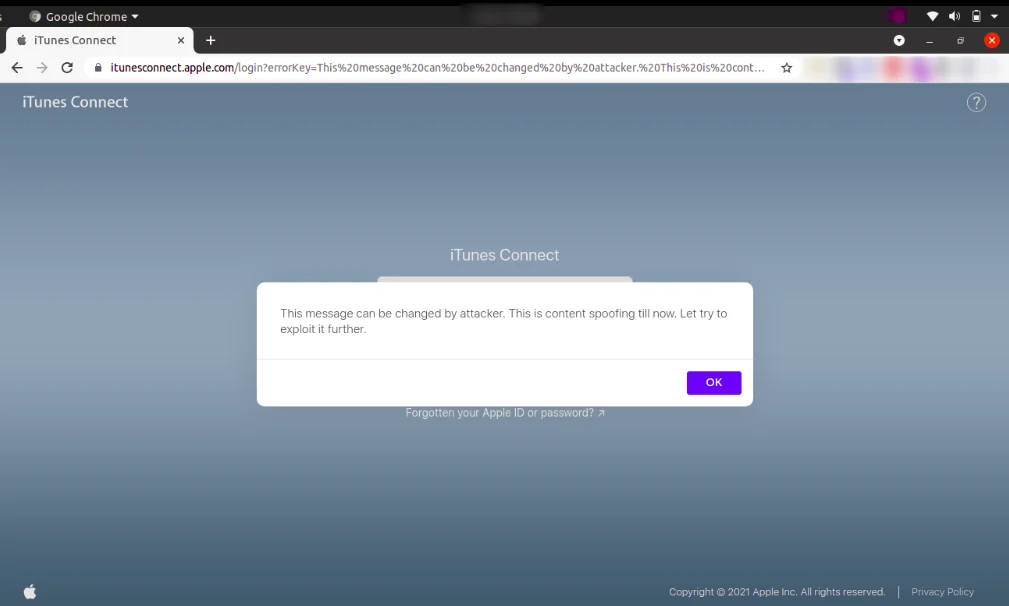
The screenshot shows the login page with the attacker-supplied sentence displayed as the error message, captioned by the author as content spoofing up to that point.
Exploitation
Step 1: Trying inline XSS
With normal inline Cross Site Scripting (XSS) payloads, the application returned a blank pop-up. The report does not give the exact payloads used here. The result was enough to show that script execution was not straightforward, so the researcher moved on to other scenarios.
Step 2: Recognising dangling markup injection
After trying different scenarios, the researcher observed that dangling markup injection was possible on the vulnerable errorKey parameter.
The report explains the concept as follows. Dangling markup injection is useful where there is no way to execute JavaScript because of input filters, content security policy or other obstacles, but where some HTML tags can still be injected. It is used to steal the contents of the page without script, by using resources such as images to send the data to a remote location that an attacker controls.
For the exploitation, the researcher used CSS @import as a payload. The main purpose of the @import method is to use multiple style sheets on a page.

The image accompanies the explanation of the @import-based approach, before the final payload is shown.
Step 3: The final payload
The final payload, described by the author as a broken image linked to itunesconnect.apple.com itself, led to HTML injection:
https://itunesconnect.apple.com/login?errorKey=%3C%3Cstyle%3E@import%2F%2Fcontent-spoofing-to-possible%20xss%3F%3C---%20Injected%20%3Ca%20href%3Dhttps:%2F%2Fitunesconnect.apple.com%2Flogin%3FerrorKey%3DXSS-NOT-confirmed%3E%3Cimg%20src%3D%22https:%2F%2Fbitenapple.com%2Fmytest.jpeg%22%3E%3C%2Fa%3E%3C%2Fbr%3E%3C%2Fbr%3E%3C%2Fbr%3E%3Ch1%3EVulnerable%20to%20HTML%20Injection%3C%2Fh1%3E
The decoded value of errorKey is:
The important parts, as the report presents them:
<<style>@import//...opens a style context and starts an@importwhose URL is left unterminated, so the markup that follows is consumed as part of the import target rather than as ordinary page content.<--- Injectedis the text the author uses to mark where the injected content begins.- The
<a href=...>element points back at the same login endpoint witherrorKey=XSS-NOT-confirmed, and contains an<img>whosesrcishttps://bitenapple.com/mytest.jpeg, a resource on a domain the researcher controls. </br></br></br>and<h1>Vulnerable to HTML Injection</h1>close out the injected block and render a visible heading.
The report states that the broken image linked to itunesconnect.apple.com itself led to HTML injection.

The screenshot shows the resulting page with the injected markup rendered, including the heading stating that the page is vulnerable to HTML injection.
Root cause
The errorKey parameter is reflected into the page response, and injected HTML tags were interpreted as markup rather than shown as text. The report does not describe the server-side code or the exact filter that blocked inline XSS payloads; it only records that inline XSS produced a blank pop-up while HTML tags could still be injected. The report explains dangling markup as using resources such as images to send page data to an attacker-controlled location without script.
Impact
The report frames the issue as content spoofing that escalates to HTML injection. An attacker can change the message shown on the Apple login page, which the report notes can be used in phishing attacks, and can inject HTML elements including links and images. The dangling markup technique is described as a way to steal page contents without script by sending data to an attacker-controlled location. The report does not quantify the data that could be captured in this specific case, nor does it state which users or sessions were affected.
Fix
Timeline
| Date | Event |
|---|---|
| 28 July 2021 | Issue reported to the Apple Product Security Team |
| 29 July 2021 | Apple replied with a follow-up ID |
| 14 September 2021 | Issue patched; researcher asked Apple for an update |
| 20 September 2021 | Apple acknowledged and asked for credit page details, shared the same day |
| 22 September 2021 | Researcher asked for approval to publish a blog post |
| 23 September 2021 | Apple asked to review the blog; draft sent |
| 1 October 2021 | Apple gave the go-ahead to publish |
Variants to test
- Reflected parameters that render inside a style or attribute context: try an unterminated
@importor an unterminated attribute and see whether following page content is swallowed into the URL. A positive result is a request to an external host that carries page content in its path or query. - Error and message parameters on login pages: submit text and check whether it is reflected verbatim. A positive result is attacker text rendered as the page message, as in the first payload here.
- Parameters where inline XSS is blocked but tags are accepted: inject a harmless element such as a heading or an image and check whether it renders. A positive result is visible markup in the response.
- Image sources pointing at an attacker-controlled host: inject an
<img>and watch the host logs. A positive result is a request arriving from the victim's browser. - Anchor elements that point back at the same endpoint: check whether injected links are preserved and rendered. A positive result is a clickable link with attacker-chosen destination.
What happened, in plain words
A security researcher was looking around Apple's websites, the way you might wander through a large building opening doors to see which ones are unlocked. One of the doors he tried was itunesconnect.apple.com, a subdomain of Apple. The login page there takes a parameter called errorKey, and its content is reflected into the page.
The researcher noticed that whatever text you put in errorKey gets printed onto the page. So the page displayed a sentence of his choosing. That alone is called content spoofing: the page looks genuine, but the words on it come from the attacker. It is the kind of trick used in phishing, where someone is fooled into trusting a real-looking page.
He then tried to go further and run his own JavaScript on the page, which would be much more powerful. That did not work: the page just showed a blank pop-up. So he switched to a different technique called dangling markup injection, which does not need JavaScript at all. It uses ordinary HTML tags, and in this case a CSS @import rule, to send data to a remote location the attacker controls without script. With that technique he got HTML injection: his own tags, a link, an image and a heading, appeared on Apple's login page.
He reported it to Apple on 28 July 2021. Apple patched it on 14 September 2021 and later gave permission to publish the story. This article walks through the same steps he did, explaining each idea from scratch.
The pieces you need to know first
Before following the steps, here are the basic building blocks, explained as if you have only ever used a browser.
- A web address (URL) and its parameters. A URL like
https://example.com/login?name=Alexhas two parts: the address of the page (https://example.com/login) and, after the?, a list of extra values called parameters. Herenameis the parameter andAlexis its value. Parameters are how a page receives information from the address bar. A page can have several, joined with&. - URL encoding. Some characters are not allowed raw in a URL, so they are written as a percent sign followed by two characters. A space becomes
%20,<becomes%3C,>becomes%3E,/becomes%2F,"becomes%22. This is just a spelling convention so the address stays valid. When the server reads the parameter, it decodes these back into the real characters. - Reflection. When a page takes a value from the URL and prints it back into the page it sends you, that is called reflection. It is normal and useful: a search page reflects your search words. It becomes a problem when the page prints the value without cleaning it, because then the value can contain instructions the browser will follow.
- HTML. The language web pages are written in. It is made of tags in angle brackets, like
<h1>Hello</h1>for a heading or<img src="picture.jpg">for an image. The browser reads tags as instructions and everything else as text to display. If a page prints your input as text, you see your characters. If it prints your input as HTML, the browser treats your characters as instructions. - Injection. When a program mixes untrusted input into something it is building (a page, a database query, a command) without separating the two, the input can change the structure of the result. That is injection. Content spoofing and HTML injection are two forms of it.
- Content spoofing. The report defines it as an injection in which user input is reflected as it is in the application response, which can be used in phishing attacks. In plain terms: the attacker controls the words shown on a genuine page.
- Cross Site Scripting (XSS). A class of injection where the attacker gets their own JavaScript to run inside someone else's page, in the victim's browser. JavaScript is the programming language browsers run; with it an attacker can read what the page can read, act as the user, and so on. XSS is the big prize, and sites try hard to stop it.
- A pop-up in this context. When a test payload is designed to prove JavaScript runs, a common harmless proof is to make the browser show an alert box. A blank pop-up, as described here, means something happened but the script did not run as intended.
- CSS and
@import. CSS is the language that describes how a page looks: colours, fonts, layout. A CSS file can pull in another CSS file with the rule@import, followed by the address of the stylesheet to load. The report notes that the main purpose of@importis to use multiple style sheets on a page. The important detail for us is that@importis followed by a URL, and the browser will fetch that URL. - Dangling markup injection. The report explains it as a technique that is useful where you cannot execute JavaScript because of input filters, content security policy or other obstacles, but where you can still inject some HTML tags. It is used to steal the contents of the page without script, by using resources such as images to send the data to a remote location that an attacker controls. The word "dangling" refers to leaving something open, like a quote or a URL, so that whatever comes next in the page gets swallowed into it.
- A domain under your control. To receive data, the attacker needs a server they own. The injected markup references an image at
bitenapple.com. When a browser loads an image from that domain, the owner of the domain sees the request in their logs. - Reconnaissance. The exploratory phase of security work: looking at a target's websites, subdomains and features to find something interesting. It is like walking around a building before trying any doors.
Finding the reflection
During the reconnaissance phase, the researcher found itunesconnect.apple.com, a subdomain of Apple. A subdomain is a section of a larger domain: apple.com is the main one, and itunesconnect.apple.com is a part of it. After digging into it, he observed that the content of the errorKey parameter was reflecting back to the page.
To confirm it, he sent a URL whose errorKey value was a plain sentence. Here it is exactly as in the report:
https://itunesconnect.apple.com/login?errorKey=This%20message%20can%20be%20changed%20by%20attacker.%20This%20is%20content%20spoofing%20till%20now.%20Let%20try%20to%20exploit%20it%20further.
Line by line, in plain words:
https://itunesconnect.apple.com/loginis the address of the login page. This is the page the researcher is testing.?errorKey=starts the parameter list and names the parameter the page uses for its message.- Everything after the equals sign is the value. The
%20sequences are encoded spaces, so the value decodes to the sentence: "This message can be changed by attacker. This is content spoofing till now. Let try to exploit it further." - Nothing in the value is a tag or a script. It is just text. The point of the test is to see whether that text appears on the page in place of the normal message.
It did. The page rendered the attacker's sentence, which confirmed the reflection: the page takes the value from the address bar and prints it.
The screenshot shows the login page with the attacker-supplied sentence displayed as the error message, captioned by the author as content spoofing up to that point.
Why this step matters: a reflection is the raw material for every later step. Because the sentence appeared on the page, the researcher knew the value was reaching the page's output.
Trying to run JavaScript
With normal inline Cross Site Scripting (XSS) payloads, the application was giving a blank pop up. The report does not give the exact payloads used here.
Why this step was taken: XSS is the strongest outcome of a reflection. If the page prints your input as HTML, the natural next test is to put a script in it and see whether the browser runs it. A blank pop-up is a partial result: something in the payload was processed, but the script did not execute as the researcher wanted. That told him script execution was not straightforward, so he moved on to other scenarios rather than spending more time on XSS.
Recognising dangling markup injection
After trying different scenarios, the researcher observed that dangling markup injection was possible on the vulnerable errorKey parameter.
The report explains the concept as follows. Dangling markup injection is useful where there is no way to execute JavaScript because of input filters, content security policy or other obstacles, but where some HTML tags can still be injected.
An everyday comparison: imagine a form where you write your name on a line, and the line has a closing bracket at the end. If someone can remove the closing bracket, everything written after your name, including the rest of the form, becomes part of your name. The browser works the same way with tags and URLs. If you can open a quote or a URL and never close it, the browser keeps reading the page as if it were still inside that quote or URL. When it finally reaches something it must fetch, such as an image or an imported stylesheet, it sends everything it swallowed along with the request, to wherever the attacker pointed it.
For the exploitation, the researcher used CSS @import as a payload. The main purpose of the @import method is to use multiple style sheets on a page. The reason @import is useful here is that it is followed by a URL, and the browser will request that URL. If the URL is left unterminated, the content that follows on the page becomes part of the URL, and so travels to the server named in it.
The image accompanies the explanation of the @import-based approach, before the final payload is shown.
The final payload
The final payload was a broken image linked to itunesconnect.apple.com itself, which led to HTML injection. Here is the URL exactly as the report gives it:
https://itunesconnect.apple.com/login?errorKey=%3C%3Cstyle%3E@import%2F%2Fcontent-spoofing-to-possible%20xss%3F%3C---%20Injected%20%3Ca%20href%3Dhttps:%2F%2Fitunesconnect.apple.com%2Flogin%3FerrorKey%3DXSS-NOT-confirmed%3E%3Cimg%20src%3D%22https:%2F%2Fbitenapple.com%2Fmytest.jpeg%22%3E%3C%2Fa%3E%3C%2Fbr%3E%3C%2Fbr%3E%3C%2Fbr%3E%3Ch1%3EVulnerable%20to%20HTML%20Injection%3C%2Fh1%3E
That is hard to read because of the encoding. The decoded value of errorKey is:
Now line by line, in plain words. The report presents the important parts as follows:
<<style>@import//...opens a style context and starts an@importwhose URL is left unterminated, so the markup that follows is consumed as part of the import target rather than as ordinary page content. In everyday terms: the browser is told "load a stylesheet from this address", and the address is never closed, so the browser keeps reading the rest of the page as if it were still part of the address.<--- Injectedis the text the author uses to mark where the injected content begins. It is a label for the reader, not a browser instruction.- The
<a href=...>element points back at the same login endpoint witherrorKey=XSS-NOT-confirmed, and contains an<img>whosesrcishttps://bitenapple.com/mytest.jpeg, a resource on a domain the researcher controls. In plain terms: a link is created, and inside it an image is loaded from the researcher's own server. The image is referenced frombitenapple.com, a domain outside Apple. </br></br></br>and<h1>Vulnerable to HTML Injection</h1>close out the injected block and render a visible heading. In plain terms: a few line breaks, then a large heading with the words "Vulnerable to HTML Injection". That heading is the visible proof that the page treated the input as HTML rather than as text.
The report states that the broken image linked to itunesconnect.apple.com itself led to HTML injection. The heading rendered on the page is the visible proof of that injection.
The screenshot shows the resulting page with the injected markup rendered, including the heading stating that the page is vulnerable to HTML injection.
Why it worked
The errorKey parameter is reflected into the page response, and injected HTML tags were interpreted as markup rather than shown as text. The report does not describe the server-side code or the exact filter that blocked inline XSS payloads; it only records that inline XSS produced a blank pop-up while HTML tags could still be injected. The report explains dangling markup as using resources such as images to send page data to an attacker-controlled location without script.
What an attacker could do with it
The report frames the issue as content spoofing that escalates to HTML injection. An attacker can change the message shown on the Apple login page, which the report notes can be used in phishing attacks, and can inject HTML elements including links and images. The dangling markup technique is described as a way to steal page contents without script by sending data to an attacker-controlled location. The report does not quantify the data that could be captured in this specific case, nor does it state which users or sessions were affected.
That is enough to make a convincing fake message, and the dangling markup part is a way to pull information out of the page without needing JavaScript.
The fix
In everyday terms: the page should treat the value as plain words, so that < and > appear on screen as characters rather than being read as the start of a tag.
Timeline
| Date | Event |
|---|---|
| 28 July 2021 | Issue reported to the Apple Product Security Team |
| 29 July 2021 | Apple replied with a follow-up ID |
| 14 September 2021 | Issue patched; researcher asked Apple for an update |
| 20 September 2021 | Apple acknowledged and asked for credit page details, shared the same day |
| 22 September 2021 | Researcher asked for approval to publish a blog post |
| 23 September 2021 | Apple asked to review the blog; draft sent |
| 1 October 2021 | Apple gave the go-ahead to publish |
Things to try on your own
These are the same variants the technical write-up lists, explained for someone starting out. Each one is a small experiment you can run on a site you are allowed to test.
- Reflected parameters that render inside a style or attribute context: try an unterminated
@importor an unterminated attribute and see whether following page content is swallowed into the URL. A positive result is a request to an external host that carries page content in its path or query. In plain terms: if you can leave a quote or a URL open, watch whether the page's own text ends up in a request to a server you control. - Error and message parameters on login pages: submit text and check whether it is reflected verbatim. A positive result is attacker text rendered as the page message, as in the first payload here. In plain terms: type a distinctive sentence into the parameter and see whether the page shows it back unchanged.
- Parameters where inline XSS is blocked but tags are accepted: inject a harmless element such as a heading or an image and check whether it renders. A positive result is visible markup in the response. In plain terms: if scripts are blocked, try a simple tag and see whether the browser draws it.
- Image sources pointing at an attacker-controlled host: inject an
<img>and watch the host logs. A positive result is a request arriving from the victim's browser. In plain terms: put an image from your own server into the page and see whether your server receives a request when someone loads the page. - Anchor elements that point back at the same endpoint: check whether injected links are preserved and rendered. A positive result is a clickable link with attacker-chosen destination. In plain terms: inject a link and see whether it appears as a real, clickable link on the page.
Glossary
- API: a defined way for one piece of software to ask another for something, like a service counter where you make a request and get a response in a fixed format.
- Attribute: an extra setting inside an HTML tag, such as the
srcin<img src="...">that says where the image comes from. - Content spoofing: an injection in which user input is reflected as it is in the application response, which can be used in phishing attacks.
- Cross Site Scripting (XSS): an injection where an attacker gets their own JavaScript to run inside someone else's page, in the victim's browser.
- CSS: the language that describes how a web page looks, such as colours, fonts and layout.
- Dangling markup injection: a technique that is useful where you cannot execute JavaScript because of input filters, content security policy or other obstacles, but where you can still inject some HTML tags; it is used to steal the contents of the page without script, by using resources such as images to send the data to a remote location that an attacker controls.
- Domain: the name of a website, such as
apple.com; a subdomain is a section of it, such asitunesconnect.apple.com. - HTML: the language web pages are written in, made of tags in angle brackets that the browser reads as instructions.
- HTML injection: getting your own HTML tags into a page so the browser renders them as markup rather than showing them as text.
@import: a CSS rule that loads another stylesheet into a page; it is followed by a URL, and the browser will request that URL.- Injection: mixing untrusted input into something a program is building without separating the two, so the input can change the structure of the result.
- JavaScript: the programming language browsers run; with it a page can react to clicks, change content, and, if an attacker controls it, act as the user.
- Parameter: a named value passed in a URL after the
?, such aserrorKeyin?errorKey=.... - Phishing: tricking someone into trusting a fake page or message so they hand over information or click something harmful.
- Reconnaissance: the exploratory phase of security work, looking at a target's websites and features to find something interesting.
- Reflection: when a page takes a value from the URL and prints it back into the page it sends you.
- Stylesheet: a file of CSS rules that a page loads to control how it looks.
- URL: a web address, made of the page address and, optionally, parameters after a
?. - URL encoding: writing characters that are not allowed raw in a URL as a percent sign plus two characters, such as
%20for a space. - Web server: the computer that answers requests for a website and sends back pages, images and other files.




