Breaking SIP With Apple-signed Packages
Several Apple-signed installer packages ran installation scripts that trusted the USER environment variable, allowing command injection. Because Apple-signed packages are installed by a privileged service that holds an entitlement to write to SIP-protected locations, an attacker who could run the installer with a crafted environment variable could inherit that entitlement and bypass System Integrity Protection.
 Published on l3harris.com
The original topic of my first blog post, posted approximately a year ago, was to discuss how command injection vulnerabilities are present in PackageKit on macOS. While writing the article, I found some Apple-signed packages which had command injection vulnerabilities which could be used to bypass SIP.
The full write-up lives on its author's site
It belongs to its author, so we link to it rather than copy it. The other two tabs are our own rewrites, checked against it.
Context
macOS installs .pkg files through PackageKit. Two daemons are involved: installd, which uses package_script_service to run installation scripts, and system_installd, which is used instead when three conditions hold:
- It is an Apple-signed package.
- The certificate is still valid.
- The installation target is a live volume (otherwise SIP is not applicable).
system_installd carries an extra entitlement, com.apple.rootless.install.heritable, so that OS updates can write to locations that SIP protects. Any process it creates inherits that entitlement. The separation between package_script_service and system_installd is the defence: to cross it you would need a stolen certificate or a validation flaw.
The work described here found Apple-signed packages whose installation scripts contain command injection, letting an attacker inherit the SIP exemption. The issue was tracked as CVE-2023-38609 and fixed in Ventura 13.5.
Setup
The starting point was earlier public work. In March 2020 Patrick Wardle published vulnerabilities in Zoom that, combined with lax application entitlements, gave camera and microphone access through execution inside Zoom. At the time, installation scripts were stored in a world-writable location, so they could be modified to get root when a user installed a package; NCC Group later reported this as CVE-2020-9817.
The author applied the same idea to Microsoft Teams, overwriting ffmpeg with a re-exported dylib to get microphone and camera access inside the Teams process. Microsoft removed the library validation issue around May 2020, and CVE-2020-9817 was fixed in Catalina 10.15.5 at about the same time.
While experimenting with packages, the author found that environment variables were inherited by installation scripts. Experimentation showed that only the PATH variable appeared to be constructed by PackageKit, so any other variable used by a script comes from the caller. A line like this in one of Teams' scripts is therefore problematic:
/usr/bin/sudo -u $USER /usr/bin/open “$TEAMS_APPLICATION”
Most application updaters did not use package files, which limits the opportunity to elevate permissions this way. Zoom was a notable exception: it launched Installer as a regular user, so an unprivileged malicious process could detect an update and launch an Installer instance with a malicious variable. The author chose instead to apply the missing environment variable sanitisation to Apple-signed packages.
Finding it
Because system_installd runs Apple-signed packages with the SIP exemption, a command injection in any Apple-signed installation script is enough to inherit the entitlement. The author quickly identified multiple packages with command injection in their installation scripts.
The first was SafeView up to 9.4.0, which used $USER in a way very similar to Microsoft Teams:
launchctl asuser "$(id -u ${USER})" sudo -u ${USER} launchctl load /Library/LaunchAgents/com.apple.SafeView.app.NexusAgent.plist
This was reported to Apple, which released a patch in SafeView 9.5.0. The patch relied on stat to build $USER and blacklisted the old package in GateKeeper. The author replied that the patch was insufficient, since earlier versions of the package could presumably still be used, and in any case other options had already been found.
The best candidate was Remote Desktop Admin 3.7.2, a relatively small package (about 15MB) that also trusted $USER, in AlertAll.sh:
#!/bin/sh
target=$2
pkg=$0

ALERTALL="./Tools/AlertAll.app/Contents/MacOS/AlertAll"
if [ "$USER" = "" ]; then
USER="root"
fi

if [ -e "/usr/bin/sudo" ]; then
/usr/bin/sudo -u $USER $ALERTALL $target
else
$ALERTALL $target
fi

EXITCODE=$?

exit $EXITCODE
In total, four packages with similar issues were found manually:
| Installed Software | Package Name | Version |
|---|---|---|
| SafeView | SafeView | 9.4.0 |
| Remote Desktop Admin | RemoteDesktopAdmin | 3.5.3 |
| Remote Desktop Admin | RemoteDesktopAdmin | 3.7.2 |
| iPhoto Update | iPhotoUpdate | 9.2.3 |
Many packages would have been better than RemoteDesktopAdmin because of size, but since the system partition became read-only in macOS 11 those packages no longer install. iPhotoUpdate is less serious than the others: its command injection is gated behind a check that COMMAND_LINE_INSTALL is zero, so it cannot be exploited in the background.
Automating the search
After reporting all four, the author tried to automate discovery. A .pkg file is a XAR archive containing files that PackageKit expects. A package with scripts looks like this:
admin@admins-MBP Downloads % xar -t -f iDVD7.1.2Update.pkg
Bom
PackageInfo
Payload
Scripts
XAR stores a compressed table of contents at the start of the file, just after the header.
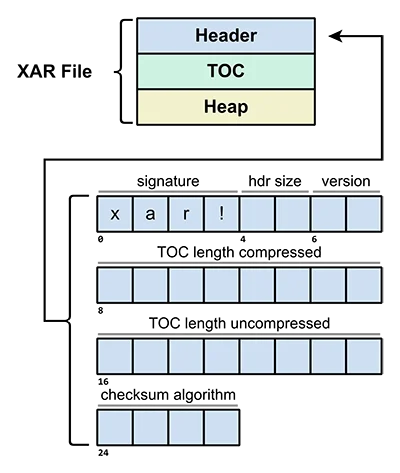
Since many Apple-signed packages are large, such as OS installers, this is useful. By dumping a list of packages from Apple's SUCatalogs, the author could read the header and the number of bytes of compressed TOC to check whether a package contained scripts, then download only packages with a Scripts entry. That reduced the search space considerably.
A partial XAR implementation in Python followed, and the next step was to download only the Scripts file. Apple's servers rejected the Range header, and a partial download was impractical for large files because the Scripts entry is usually at the end of the archive. Filtering out packages without scripts still worked. Package scripts are often reused extensively between software packages, so de-duplicating individual scripts left a minimal set of potentially vulnerable items to investigate.
This did not produce anything smaller, and therefore better, than RemoteDesktopAdmin. Some packages allowed a SIP-exempt change of permissions, but doing anything interesting with that would require a separate TCC bypass. For example, it could be used to own the location clients list, but a separate bypass would still be needed, or something overt such as Finder would have to be used to modify the entries.
Exploitation
Running the installer requires root permissions. The author paired the bug with CVE-2022-46689, known as MacDirtyCow, to escalate from user to a SIP-exempt prompt:
- Use MacDirtyCow to overwrite the
/etc/pam.d/sudofile, padding appropriately to maintain validity. - Call installer with a malicious environment variable.
- Restore the original pam file.
The code to replicate this is published as CVE-2023-38609 and works up to Ventura 13.0.1. Run with root by some other means, it works up to 13.4.1. The partial XAR implementation is also published.
Root cause
Installation scripts inherit environment variables from the caller, and PackageKit only constructs PATH. Scripts that interpolate variables such as $USER into a command line therefore execute attacker-controlled input. For Apple-signed packages, that execution happens under system_installd, which holds com.apple.rootless.install.heritable and passes it to child processes, so the injected command runs with the SIP exemption.
Impact
An attacker who can influence the environment of an installer run can execute commands with the SIP exemption inherited from system_installd, writing to SIP-protected locations. The installer itself requires root, so the author combined the bug with MacDirtyCow to reach that point from an unprivileged user. The author notes that opportunities to elevate permissions through application updaters are likely still limited, since most updaters do not use package files.
Fix
Apple's first fix blacklisted SafeView 9.4.0 from GateKeeper, preventing new installations. When the other packages were raised, Apple added a blacklist in PackageKit matching the specific scripts, landing in 13.5: matching scripts run without the SIP exemption.
In Sonoma 14.1, Apple appears to have gone further with "mutations", matched on script name, position (pre/post install) and package identifier. Mutations allow a find/replace before execution, or running the script as-is without SIP entitlements:
<dict>
<key>ScriptTypes</key>
<array>
<string>preinstall</string>
<string>preflight</string>
<string>postinstall</string>
<string>postflight</string>
</array>
<key>RelativePathTransformation</key>
<true/>
<key>RelativePath</key>
<string>%@_actions/LurkAndLaunch.pl</string>
<key>DropSIP</key>
<true/>
<key>ComponentPackageIdentifiersRegex</key>
<array>
<string>^.*$</string>
</array>
</dict>
The newer approach is easier to maintain and gives finer control over bad scripts. For some scripts the entry is functionally identical to the original blacklist because of widespread usage. The find/replace functionality, defined in InstallScriptMutations.plist, also lets Apple patch scripts that still need the SIP exemption but have other vulnerabilities. The file with this definition, /System/Library/PrivateFrameworks/PackageKit.framework/Versions/A/Resources/InstallScriptActions.plist, is also useful for uncovering live SIP bypass packages from Release Candidates.
The current fix seems fairly good, but all Apple packages still run with the SIP exemption unless explicitly blacklisted, which leaves room for error. The author suggests signing packages that require the SIP exemption with a separate certificate, which would be more robust than relying on engineers not to slip up.
Variants to test
- Dump package lists from Apple's SUCatalogs and read each XAR header and compressed TOC length to find packages with a
Scriptsentry, then download only those. A positive result is a package whose scripts interpolate environment variables into commands. - De-duplicate scripts across packages and inspect the unique set for unquoted variables such as
$USER. A positive result is a script that passes such a variable tosudo,launchctlor a binary path. - Check whether a candidate package is still installable on current macOS, since packages that target the system partition no longer install after macOS 11. A positive result is a package that installs on a live volume and is Apple-signed with a valid certificate.
- Look for scripts whose injection is gated behind a condition such as
COMMAND_LINE_INSTALLbeing zero, which limits exploitation to interactive installs. A positive result is a script with no such gate. - Review
InstallScriptActions.plistandInstallScriptMutations.pliston Release Candidates for entries that drop SIP or transform paths. A positive result is a script that still runs with the SIP exemption without a matching mutation.
What happened, in plain words
Apple computers run a security feature called SIP, short for System Integrity Protection. Think of SIP as a locked glass case around the most important parts of the operating system: even an administrator account cannot reach in and change the files inside. That is deliberate. If malware gets in, it should not be able to rewrite the core of the system.
There is one legitimate exception. When Apple itself ships an update, the update sometimes has to write into those protected places. So macOS has a special installer program, system_installd, that is allowed to reach inside the glass case. It only gets that power when the package it is installing was signed by Apple and the signature is still valid.
The researcher Michael Cowell found that some of these Apple-signed packages contained small scripts (little sequences of commands that run during installation) which trusted input from whoever started the installation. By feeding that input a crafted value, an attacker could make the script run their own commands, and because the script was running under the trusted installer, those commands inherited the power to write into SIP-protected locations. In other words, the attacker got to reach inside the glass case.
The problem was tracked as CVE-2023-38609 and fixed in macOS Ventura 13.5. This article walks through how it was found, how it was exploited, and how Apple fixed it, explaining each idea from scratch.
Background: how this line of thinking started
Before the SIP finding, there was earlier public research to build on. In March 2020 Patrick Wardle published a blog post about vulnerabilities in the Zoom video-calling app. He combined those bugs with something called entitlements.
An entitlement, in Apple's world, is a permission slip baked into a program. Just as a building might give a cleaner a key that opens only the supply closet, macOS gives each program a list of specific extra powers it is allowed to use. If a program has a generous permission slip, and an attacker can run code inside that program, the attacker borrows the permission slip too.
Wardle showed that by running his own code inside Zoom, he could use Zoom's permission slip to reach the camera and microphone.
At that time, there was another weakness. When you installed a package, the installation scripts were stored in a folder that any user on the machine could write to (a "world-writable" location). That meant an attacker could quietly edit a script, and when the user installed the package, the edited script would run with the highest level of permission, root. NCC Group later reported this as CVE-2020-9817.
Root is the all-powerful administrator account on Unix-like systems such as macOS. It can do anything. Getting root is the classic goal of an attacker.
The author applied the same idea to Microsoft Teams. Teams used a library called ffmpeg (software for handling audio and video). The author replaced that library with a modified copy (a "re-exported dylib", where a dylib is a shared library on macOS) so that code would run inside the Teams process, again reaching the microphone and camera. Microsoft fixed the library validation issue around May 2020, and CVE-2020-9817 was fixed in macOS Catalina 10.15.5 at roughly the same time.
While experimenting with packages, the author noticed something else: installation scripts inherit environment variables from whatever started them.
An environment variable is a named value that a program passes to the programs it launches, a bit like a note handed to a colleague. PATH, for example, is a list of folders the system searches when you type a command name. If a script uses a variable that the caller controls, the caller can put anything they like into that note.
Experimentation showed that PackageKit (the part of macOS that handles package installation) only constructed the PATH variable itself. Every other variable a script used came straight from the caller. That makes a line like this in one of Teams' scripts dangerous:
/usr/bin/sudo -u $USER /usr/bin/open “$TEAMS_APPLICATION”
Line by line:
/usr/bin/sudoruns a command as another user.sudois the standard tool for switching to a more powerful account.-u $USERsays which user to run as.$USERis the environment variable holding the current user's name. If the caller controls$USER, they control this value./usr/bin/openis the macOS command that opens a file or application.“$TEAMS_APPLICATION”is the path of the thing to open, again taken from an environment variable the caller may control.
So if an attacker can set $USER or $TEAMS_APPLICATION before the script runs, they can influence what command is executed and as whom.
Most application updaters did not use package files, which limits how often this could be abused. Zoom was a notable exception: it launched the Installer as a regular user, so an unprivileged malicious process could notice an update and start an Installer instance with a malicious variable. The author decided instead to aim the same idea at Apple-signed packages, because those get the SIP exemption.
Targeting SIP
macOS installs .pkg files through a framework called PackageKit. Two background programs (daemons) are involved:
installd, which uses a helper calledpackage_script_serviceto run installation scripts.system_installd, which is used instead when three conditions all hold:
- It is an Apple-signed package.
- The certificate is still valid.
- The installation target is a live volume (otherwise SIP is not applicable).
A daemon is a program that runs in the background without a visible window, doing a job for the system. A certificate here is a cryptographic stamp that proves Apple produced the package; if it is valid, the package has not been tampered with since Apple signed it. A live volume is the disk the running system is actually using; SIP only protects that one.
system_installd carries an extra entitlement, com.apple.rootless.install.heritable, so that OS updates can write to locations that SIP protects. Any process it creates inherits that entitlement. "Heritable" means it is passed down to child processes, like a family name.
The separation between package_script_service and system_installd is the defence. The idea is that ordinary packages run in the less powerful helper, and only Apple-signed packages get the powerful one. To cross that line you would need a stolen certificate or a validation flaw.
The work described here found Apple-signed packages whose installation scripts contain command injection, letting an attacker inherit the SIP exemption. Command injection means a program builds a command out of untrusted input, and the attacker slips extra commands into that input. Imagine a form that asks for a name and then prints "Hello, NAME"; if you type Bob; delete everything, and the program naively glues that into a command, the second part runs too. The issue was tracked as CVE-2023-38609 and fixed in Ventura 13.5.
Finding it
Because system_installd runs Apple-signed packages with the SIP exemption, a command injection in any Apple-signed installation script is enough to inherit the entitlement. The author quickly identified multiple packages with command injection in their installation scripts.
The first was SafeView up to 9.4.0, which used $USER in a way very similar to Microsoft Teams:
launchctl asuser "$(id -u ${USER})" sudo -u ${USER} launchctl load /Library/LaunchAgents/com.apple.SafeView.app.NexusAgent.plist
Line by line:
launchctlis the macOS tool for managing background services (programs that start automatically).asuser "$(id -u ${USER})"tellslaunchctlto act as a particular user.id -u ${USER}looks up the numeric ID of the user named in$USER. The$(...)means "run this command and put its output here".sudo -u ${USER}runs the rest of the line as that user.launchctl load ...loads a service definition file, here a.plistbelonging to SafeView's NexusAgent.
The dangerous part is ${USER}: it comes from the environment, so a caller who controls it controls part of the command.
This was reported to Apple, which released a patch in SafeView 9.5.0. The patch relied on stat to build $USER and blacklisted the old package in GateKeeper.
stat is a command that reports information about a file, including who owns it. Using it to work out the user is a way of getting the value from the system rather than from the environment. GateKeeper is macOS's gatekeeper for downloaded software: it checks whether an app or package is allowed to run or install. Blacklisting means putting it on a deny list so it will not be accepted.
The author replied that the patch was insufficient, since earlier versions of the package could presumably still be used, and in any case other options had already been found.
The best candidate was Remote Desktop Admin 3.7.2, a relatively small package (about 15MB) that also trusted $USER, in AlertAll.sh:
#!/bin/sh
target=$2
pkg=$0

ALERTALL="./Tools/AlertAll.app/Contents/MacOS/AlertAll"
if [ "$USER" = "" ]; then
USER="root"
fi

if [ -e "/usr/bin/sudo" ]; then
/usr/bin/sudo -u $USER $ALERTALL $target
else
$ALERTALL $target
fi

EXITCODE=$?

exit $EXITCODE
Line by line:
#!/bin/shtells the system to run this file with the standard shell, the program that interprets these commands.target=$2stores the second argument passed to the script in a variable calledtarget. Arguments are the extra words given on the command line.pkg=$0stores the name the script was invoked as inpkg.ALERTALL="./Tools/AlertAll.app/Contents/MacOS/AlertAll"sets the path of the program the script will run.if [ "$USER" = "" ]; thenchecks whether$USERis empty.USER="root"if it is empty, sets it toroot.fiends theifblock.if [ -e "/usr/bin/sudo" ]; thenchecks whether thesudoprogram exists./usr/bin/sudo -u $USER $ALERTALL $targetruns the AlertAll program as the user named in$USER, passingtargetalong.elsecovers the case wheresudois missing.$ALERTALL $targetruns AlertAll directly.fiends that block.EXITCODE=$?saves the exit status of the last command. Exit status is a number a program returns to say whether it succeeded.exit $EXITCODEends the script and passes that status back.
The problem is again $USER: it is used unquoted in a command, so a crafted value can inject extra commands.
In total, four packages with similar issues were found manually:
| Installed Software | Package Name | Version |
|---|---|---|
| SafeView | SafeView | 9.4.0 |
| Remote Desktop Admin | RemoteDesktopAdmin | 3.5.3 |
| Remote Desktop Admin | RemoteDesktopAdmin | 3.7.2 |
| iPhoto Update | iPhotoUpdate | 9.2.3 |
Many packages would have been better than RemoteDesktopAdmin because of size, but since the system partition became read-only in macOS 11 those packages no longer install. A partition is a section of a disk; the system partition is the one holding the operating system. Read-only means nothing can be written to it, so packages that expected to write there simply fail.
iPhotoUpdate is less serious than the others: its command injection is gated behind a check that COMMAND_LINE_INSTALL is zero, so it cannot be exploited in the background. In other words, the vulnerable code only runs in an interactive installation, not one started silently by another program.
Automating the search
After reporting all four, the author tried to automate discovery. A .pkg file is a XAR archive containing files that PackageKit expects. An archive is a single file that bundles other files together, like a box with compartments. XAR is Apple's format for such boxes. A package with scripts looks like this:
admin@admins-MBP Downloads % xar -t -f iDVD7.1.2Update.pkg
Bom
PackageInfo
Payload
Scripts
Line by line:
admin@admins-MBP Downloads %is the shell prompt: the useradminon the machineadmins-MBP, in the Downloads folder, waiting for a command.xar -t -f iDVD7.1.2Update.pkgruns thexartool.-tmeans list the contents (table of contents),-fmeans the next word is the file to read.Bom,PackageInfo,Payload,Scriptsare the entries inside the archive.Scriptsis the one that matters here, because it holds the installation scripts.
XAR stores a compressed table of contents at the start of the file, just after the header. A table of contents is like the index at the front of a book: it tells you what is inside and where each part begins, without reading the whole book. Compressed means it has been squeezed to take less space.
The image shows the stored table of contents at the start of the XAR file.
Since many Apple-signed packages are large, such as OS installers, this is useful. By dumping a list of packages from Apple's SUCatalogs, the author could read the header and the number of bytes of compressed TOC to check whether a package contained scripts, then download only packages with a Scripts entry. That reduced the search space considerably.
SUCatalogs are Apple's software update catalogues: lists of packages the system can download. Dumping means extracting the list. The header is the fixed opening section of the file that says what kind of file it is and where things are. The TOC is the table of contents. Reading just those first bytes tells you whether a Scripts entry exists, so you can skip the huge downloads that do not.
A partial XAR implementation in Python followed, and the next step was to download only the Scripts file. Apple's servers rejected the Range header, and a partial download was impractical for large files because the Scripts entry is usually at the end of the archive.
The Range header is part of the HTTP protocol, the language browsers and download tools use to talk to web servers. It asks the server to send only a slice of a file, for example bytes 1000 to 2000, instead of the whole thing. Apple's servers refused, so the tool had to fetch whole files. Since the Scripts entry sits at the end, you would have to download almost everything anyway, which defeats the point for large files.
Filtering out packages without scripts still worked. Package scripts are often reused extensively between software packages, so de-duplicating individual scripts left a minimal set of potentially vulnerable items to investigate. De-duplicating means removing copies so each unique item appears once, like sorting a pile of leaflets and keeping one of each.
This did not produce anything smaller, and therefore better, than RemoteDesktopAdmin. Some packages allowed a SIP-exempt change of permissions, but doing anything interesting with that would require a separate TCC bypass. TCC is macOS's privacy control system, the thing that asks whether an app may use your camera, microphone, location and so on. A bypass is a way around a protection. For example, the permission change could be used to own the location clients list, but a separate bypass would still be needed, or something overt such as Finder would have to be used to modify the entries. Overt means visible and obvious, which an attacker would rather avoid.
Exploitation
Running the installer requires root permissions. The author paired the bug with CVE-2022-46689, known as MacDirtyCow, to escalate from user to a SIP-exempt prompt. To escalate means to go from a low level of permission to a higher one. MacDirtyCow is CVE-2022-46689, which the author used to overwrite the /etc/pam.d/sudo file.
The steps were:
- Use MacDirtyCow to overwrite the
/etc/pam.d/sudofile, padding appropriately to maintain validity. - Call installer with a malicious environment variable.
- Restore the original pam file.
What is /etc/pam.d/sudo? PAM stands for Pluggable Authentication Modules. It is the part of the system that decides how logins are checked, for example whether a password is required. The file /etc/pam.d/sudo holds the rules for the sudo command. Overwriting it lets an attacker change how sudo decides whether to let someone in. Padding means adding filler so the file keeps the right size and format, so the system still accepts it as valid.
Step 2 is the actual bug: the installer is started with an environment variable the attacker controls, which flows into the vulnerable script. Step 3 puts the original file back so the change is not noticed.
The code to replicate this is published as CVE-2023-38609 and works up to Ventura 13.0.1. Run with root by some other means, it works up to 13.4.1. The partial XAR implementation is also published.
Root cause
Installation scripts inherit environment variables from the caller, and PackageKit only constructs PATH. Scripts that interpolate variables such as $USER into a command line therefore execute attacker-controlled input. To interpolate means to substitute a variable's value into a piece of text, the way a mail merge puts a name into a letter.
For Apple-signed packages, that execution happens under system_installd, which holds com.apple.rootless.install.heritable and passes it to child processes, so the injected command runs with the SIP exemption.
Impact
An attacker who can influence the environment of an installer run can execute commands with the SIP exemption inherited from system_installd, writing to SIP-protected locations. The installer itself requires root, so the author combined the bug with MacDirtyCow to reach that point from an unprivileged user. The author notes that opportunities to elevate permissions through application updaters are likely still limited, since most updaters do not use package files.
Fix
Apple's first fix blacklisted SafeView 9.4.0 from GateKeeper, preventing new installations. When the other packages were raised, Apple added a blacklist in PackageKit matching the specific scripts, landing in 13.5: matching scripts run without the SIP exemption.
In Sonoma 14.1, Apple appears to have gone further with "mutations", matched on script name, position (pre/post install) and package identifier. A mutation here is a rule that changes how a particular script is handled. Pre-install and post-install mean before and after the main installation work. A package identifier is the package's unique name. Mutations allow a find/replace before execution, or running the script as-is without SIP entitlements:
<dict>
<key>ScriptTypes</key>
<array>
<string>preinstall</string>
<string>preflight</string>
<string>postinstall</string>
<string>postflight</string>
</array>
<key>RelativePathTransformation</key>
<true/>
<key>RelativePath</key>
<string>%@_actions/LurkAndLaunch.pl</string>
<key>DropSIP</key>
<true/>
<key>ComponentPackageIdentifiersRegex</key>
<array>
<string>^.*$</string>
</array>
</dict>
Line by line:
<dict>opens a dictionary, which is a list of key and value pairs, like a form with labelled fields.<key>ScriptTypes</key>names the field that says which kinds of script this rule applies to.<array>opens a list of values.<string>preinstall</string>,<string>preflight</string>,<string>postinstall</string>,<string>postflight</string>are the four script stages covered: before install, a pre-check, after install, and a post-check.</array>closes the list.<key>RelativePathTransformation</key>with<true/>says the path below should be transformed.<key>RelativePath</key>names the script path this rule targets, here%@_actions/LurkAndLaunch.pl.<key>DropSIP</key>with<true/>says: run this script without the SIP exemption.<key>ComponentPackageIdentifiersRegex</key>names a field holding a pattern for matching package identifiers.<string>^.*$</string>is that pattern. In a regular expression,^means start,.*means any characters, and$means end, so this matches every package identifier.</array>and</dict>close the list and the dictionary.
This is XML, a text format for structured data, the same family of format as the plist shown earlier.
The newer approach is easier to maintain and gives finer control over bad scripts. For some scripts the entry is functionally identical to the original blacklist because of widespread usage. The find/replace functionality, defined in InstallScriptMutations.plist, also lets Apple patch scripts that still need the SIP exemption but have other vulnerabilities. The file with this definition, /System/Library/PrivateFrameworks/PackageKit.framework/Versions/A/Resources/InstallScriptActions.plist, is also useful for uncovering live SIP bypass packages from Release Candidates. A Release Candidate is a near-final build of the operating system handed out for testing before release.
The current fix seems fairly good, but all Apple packages still run with the SIP exemption unless explicitly blacklisted, which leaves room for error. The author suggests signing packages that require the SIP exemption with a separate certificate, which would be more robust than relying on engineers not to slip up.
Variants to test
- Dump package lists from Apple's SUCatalogs and read each XAR header and compressed TOC length to find packages with a
Scriptsentry, then download only those. A positive result is a package whose scripts interpolate environment variables into commands. - De-duplicate scripts across packages and inspect the unique set for unquoted variables such as
$USER. A positive result is a script that passes such a variable tosudo,launchctlor a binary path. - Check whether a candidate package is still installable on current macOS, since packages that target the system partition no longer install after macOS 11. A positive result is a package that installs on a live volume and is Apple-signed with a valid certificate.
- Look for scripts whose injection is gated behind a condition such as
COMMAND_LINE_INSTALLbeing zero, which limits exploitation to interactive installs. A positive result is a script with no such gate. - Review
InstallScriptActions.plistandInstallScriptMutations.pliston Release Candidates for entries that drop SIP or transform paths. A positive result is a script that still runs with the SIP exemption without a matching mutation.
Glossary
- SIP (System Integrity Protection): a macOS feature that stops even administrators from changing protected system files.
- Root: the all-powerful administrator account on Unix-like systems.
- Package (.pkg): a file that installs software on macOS, containing files and optional scripts.
- PackageKit: the macOS framework that handles package installation.
- Daemon: a program that runs in the background doing a system job.
installd/system_installd: the background installers; the second is used for valid Apple-signed packages and has extra powers.package_script_service: the helper that runs installation scripts for ordinary packages.- Entitlement: a permission slip baked into a program that grants specific extra powers.
- Heritable: passed down from a parent process to the processes it creates.
- Certificate: a cryptographic stamp proving who produced a file and that it has not been altered.
- Live volume: the disk the running system is using, the only one SIP protects.
- Environment variable: a named value passed from a program to the programs it launches.
PATH: an environment variable listing folders searched for commands.$USER: an environment variable holding the current user's name.- Command injection: building a command from untrusted input so an attacker can slip in extra commands.
- Interpolate: substitute a variable's value into text.
sudo: the standard tool for running a command as another, usually more powerful, user.launchctl: the macOS tool for managing background services.stat: a command that reports information about a file, including its owner.- GateKeeper: macOS's check on whether downloaded software may run or install.
- Blacklist: a deny list of things that are not allowed.
- XAR: Apple's archive format, a single file bundling other files.
- Archive: a single file that bundles other files together.
- Table of contents (TOC): an index inside a file saying what it contains and where.
- Header: the fixed opening section of a file describing its type and layout.
- SUCatalogs: Apple's software update catalogues listing downloadable packages.
- HTTP: the protocol browsers and download tools use to talk to web servers.
Rangeheader: an HTTP request asking the server to send only part of a file.- De-duplicate: remove copies so each unique item appears once.
- TCC: macOS's privacy control system for camera, microphone, location and similar.
- Bypass: a way around a protection.
- Escalate: move from a lower level of permission to a higher one.
- MacDirtyCow (CVE-2022-46689): the bug the author paired with this issue to overwrite
/etc/pam.d/sudo. - PAM (Pluggable Authentication Modules): the system that decides how logins are checked.
- Padding: adding filler so a file keeps the right size and format.
- Mutation: a rule that changes how a particular installation script is handled.
- Pre-install / post-install: before and after the main installation work.
- Package identifier: a package's unique name.
- XML: a text format for structured data.
- Dictionary: a list of key and value pairs.
- Regular expression: a pattern for matching text.
- Release Candidate: a near-final build of the operating system for testing before release.
- CVE: a public identifier for a specific security vulnerability.


