Zero-Click Calendar invite — Critical zero-click vulnerability chain in macOS
A zero-click vulnerability in macOS Calendar allowed an attacker to write and delete arbitrary files inside the Calendar sandbox via a directory traversal in attachment filenames. This was chained with other flaws to achieve remote code execution and access iCloud Photos without user interaction.
 Published on mikko-kenttala.medium.com
I found a zero-click vulnerability in macOS Calendar, which allows an attacker to add or delete arbitrary files inside the Calendar sandbox environment. This could lead to many bad things including malicious code execution which can be combined with security protection evasion with Photos to compromise users’…
The full write-up lives on its author's site
It belongs to its author, so we link to it rather than copy it. The other two tabs are our own rewrites, checked against it.
Context
macOS Calendar accepts calendar invitations that can carry file attachments. When a user receives an invite, Calendar stores the attachment inside its own sandbox, under ~/Library/Calendar/[CalendarID]/Attachments/[eventid]/, and the attachment filename is used to build that path. The feature is meant to keep attachments confined to the per-event directory inside the Calendar container.
This write-up covers a chain that starts with that attachment handling and ends with access to iCloud Photos data, without any interaction from the victim. Apple fixed the individual issues between October 2022 and September 2023.
Setup
The chain was tested against macOS Monterey. The arbitrary file write and delete issue was present at least in macOS Monterey 12.5, and macOS 13.0 beta4 did not appear to be vulnerable to it. The later phases rely on the macOS version upgrade process, specifically upgrading Monterey to Ventura, and on the Open File functionality in Calendar.
The write-up states that malicious calendar invitations could be sent to any Apple iCloud user.
Finding it
The attachment filename is not properly sanitised. Because the filename is used to construct the destination path, a value containing directory traversal sequences escapes the intended attachment directory. The researcher demonstrated this by setting an arbitrary path in the ATTACH section of the invite with:
FILENAME=../../../PoC.txt
With that value the file is written to ~/Library/Calendar/PoC.txt instead of ~/Library/Calendar/[CalendarID]/Attachments/[eventid]/. That is the arbitrary file write.
The same handling gives a delete primitive. If the attacker-specified file already exists, the new file is saved under the name PoC.txt-2. If the event or attachment sent by the attacker is later deleted, the file with the original name (PoC.txt) is removed. That lets an attacker remove existing files from the filesystem inside the sandbox.
Exploitation
Phase 1: Arbitrary file write and delete (CVE-2022-46723)
The attacker sends a malicious calendar invite with an attachment whose filename contains the traversal sequence.
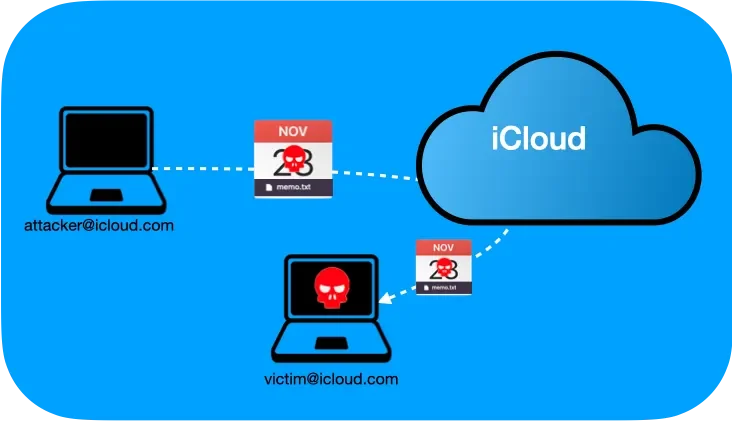
The result is a file placed outside the per-event attachment directory but still inside the Calendar sandbox. The delete behaviour described above is the second half of the primitive: deleting the event removes the file that carried the original name.
Phase 2: From file write to remote code execution
Ventura was about to be released when this was found, and the macOS version upgrade process can be leveraged to gain remote code execution through the Open File functionality in Calendar. The arbitrary file write is used to infect the calendar with several files that, combined, trigger the exploit when Monterey is upgraded to Ventura.
Injected file #1: 000Hacked-$RANDOM.calendar
This file contains calendar data that looks like a "Siri Suggested" calendar: a suggested repeating event with alert functionality. The alerts are what open the other injected files.
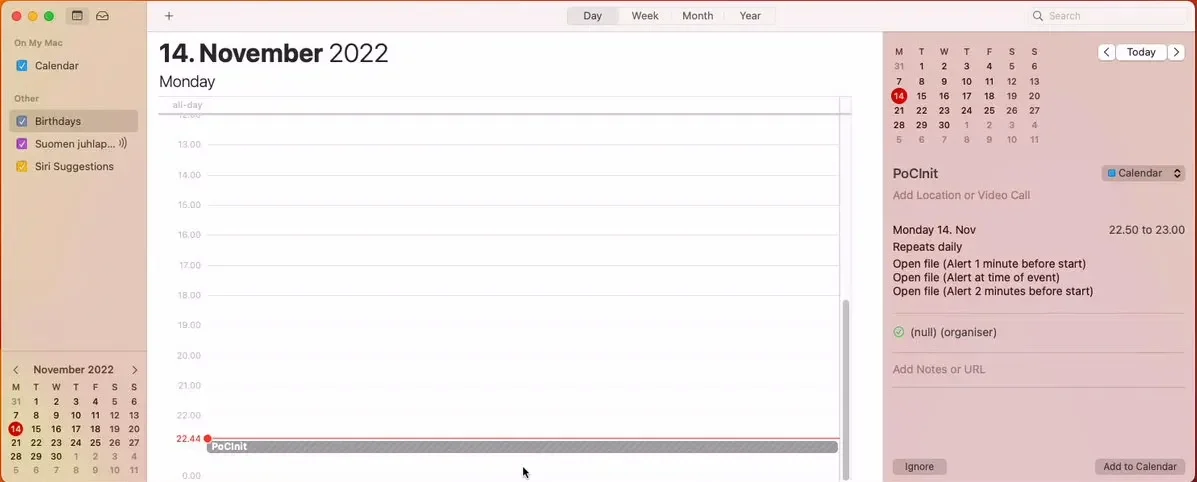
Injected file #2: CalendarTruthFileMigrationInProgress
This file makes sure that existing calendars in the old calendar format are upgraded and merged into the new database.
Injected file #3: CalPoCInit.dmg
An alert embedded in the Calendar event in injected file #1 triggers opening ~/Library/Calendars/CalPoCInit.dmg.
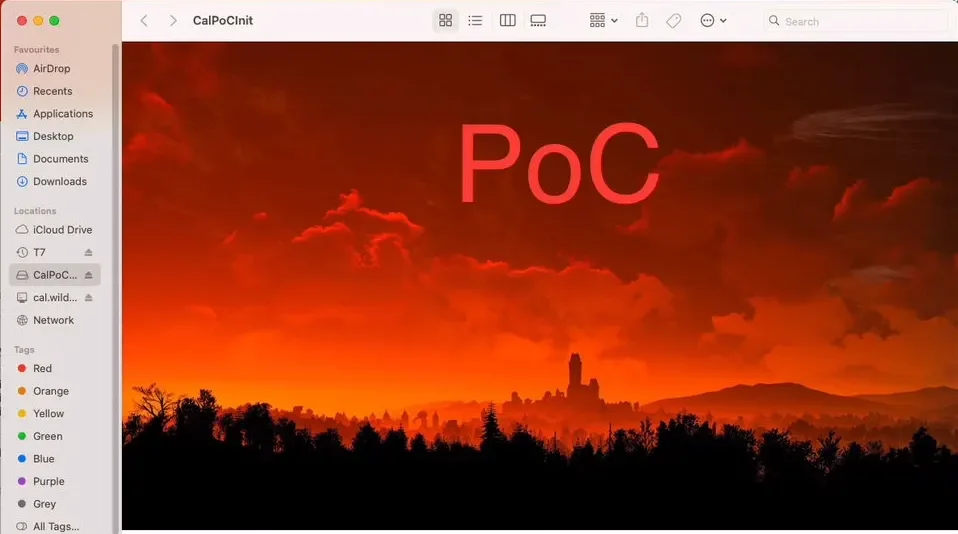
CalPoCInit.dmg contains a reference to a background image that points to an external Samba server. The reference is a Bookmark in the .DS_Store, stored in the root of the image file. The mount happens without a quarantine flag even though the CalPoCInit.dmg mount is in quarantine.
Injected file #4: stage1.url
A second alert from the calendar event in injected file #1 opens ~/Library/Calendars/stage1.url. That file contains a URL to an application inside the Samba mount that injected file #3 triggered:
file:///Volumes/CalPoCPayload/MyMidiTest.app
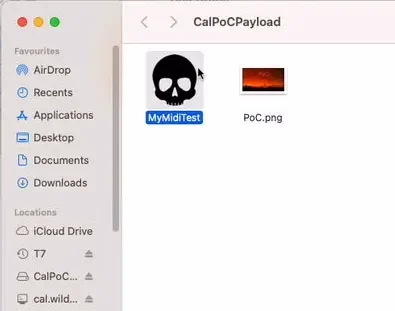
This causes Finder to open /Volumes/CalPoCPayload/, which automatically triggers indexing. Indexing causes MyMidiTest.app to be indexed, which is needed for the unique URL registration to happen.
Inside the application bundle, MyMidiTest.app/Contents/Info.plist registers a handler for a custom URL type:
<key>CFBundleURLTypes</key> <array> <dict> <key>CFBundleURLName</key> <string>MyMidi URL</string> <key>CFBundleURLSchemes</key> <array> <string>mymiditest</string> </array> </dict> </array>
Injected file #5: stage2.url
A third and final alert from the calendar event in injected file #1 opens ~/Library/Calendar/stage2.url, which references the custom URL mymiditest://. That launches the malicious application with no user interaction at all. It works because the application sits inside the Samba mount from the exploit, which has no quarantine flag.
The mymiditest app writes the files needed for Phase 3 to /var/tmp/ and launches a script in Terminal with open /var/tmp/PhotosPoC.sh. The objective is to make a bit more room in the sandbox.
Phase 3: Access to sensitive Photos data
To show what the first two phases make possible, the researcher abused Photos to leak private pictures. Access to sensitive files such as Photos should be restricted and blocked by TCC. By changing the configuration of Photos, however, it is possible to reach pictures stored in iCloud. This is done by changing the System Photo Library to point to a path that TCC does not protect.
The attacker creates a configuration file for Photos that uses a different System Photo Library. The configuration can be imported with defaults import.
Phase 2 has already dropped a configuration that uses /var/tmp/mypictures/Syndication.photoslibrary as the System Photo Library for Photos, cloudphotod and photolibraryd. The malicious configurations created automatically in Phase 2 are in /var/tmp/mypictures/*.plist.
When the chain runs PhotosPoC.sh, all running Photos-related applications are killed and the new configuration is imported with defaults. The original configuration is backed up to /var/tmp/mypictures/*-orig.plist, and the malicious configuration is imported from /var/tmp/mypictures/.
The new photo library is then opened in Photos with open /var/tmp/mypictures/Syndication.photoslibrary. Syndication.photoslibrary is an empty template library.
Photos now runs with the new System Photo Library, iCloud sync is enabled, and the original files are downloaded to an unprotected directory. As they are synchronised to disk they are copied to a new directory in /var/tmp/PoCLoot$RANDOM/. The write-up notes that this private data could also be copied to external resources, or posted to external web servers with the curl command, with trivial modifications to the exploit.
Full chain
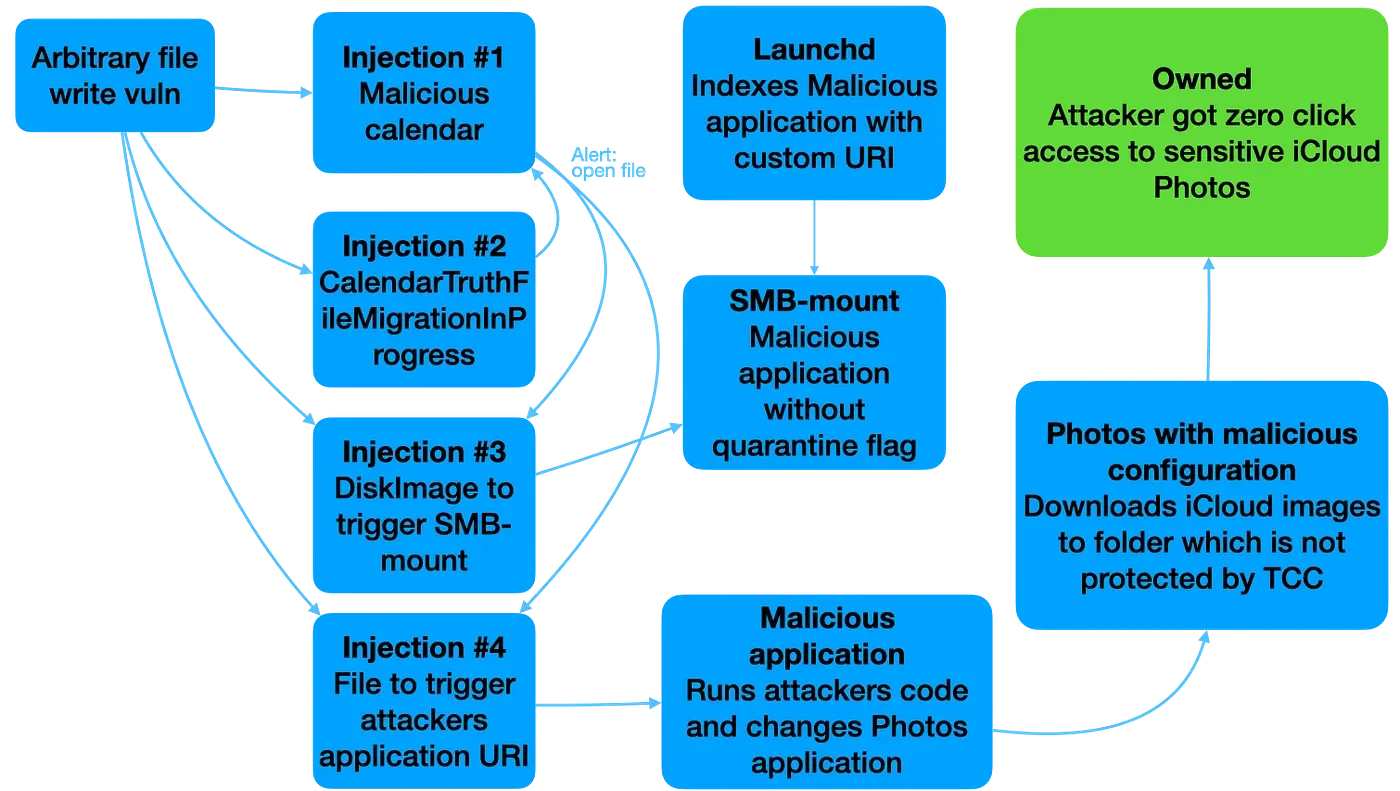
Exploiting the whole chain means getting through many steps to overcome the security obstacles in macOS. Multiple files are injected to evade the sandbox and activate the later phases. Gatekeeper is bypassed with the SMB trick to execute arbitrary code. The last obstacle is TCC, which has to be overcome to reach sensitive data such as iCloud Photos.
Before the fixes, the researcher could send malicious calendar invitations to any Apple iCloud user and steal their iCloud Photos without any user interaction.
Root cause
The Calendar attachment filename is used to build the destination path without proper sanitisation, so a FILENAME value containing ../ sequences escapes the per-event attachment directory. The same path handling means deleting the event removes a file named by the attacker, giving the delete primitive.
The later phases rely on the version upgrade process, the Open File functionality, a Samba mount without a quarantine flag, custom URL registration and Photos configuration import. The version upgrade process and the Open File functionality in Calendar can be driven by files planted through the write primitive. A .DS_Store Bookmark inside a quarantined DMG causes a Samba mount without a quarantine flag, so code from that mount is not treated as quarantined. Registering a custom URL scheme in the application's Info.plist, after Finder indexing makes the app known, lets a .url file launch the app without interaction. Finally, Photos configuration can be imported with defaults import to point the System Photo Library at a path TCC does not protect, so iCloud Photos are downloaded outside the protected location.
Impact
An attacker who can send a calendar invitation to an Apple iCloud user could, before the fixes, add or delete arbitrary files inside the Calendar sandbox, chain that into remote code execution through the upgrade process and Gatekeeper bypass, and then reach iCloud Photos data. The write-up states that this worked against any Apple iCloud user without user interaction. The arbitrary file write and delete issue itself was limited to the Calendar sandbox, and Apple later argued it only affected macOS Monterey, since Ventura was already in beta and did not have the issue, even though Monterey was still the latest production version.
Fix
Apple fixed the issues over time:
| Date | Change |
|---|---|
| 2022-10-24 | Arbitrary file write and delete fixed in macOS Monterey 12.6.1 and Ventura 13 (no CVE at the time; Ventura beta3 was vulnerable) |
| 2023-03-27 | Gatekeeper evasion fixed in macOS Ventura 13.3 (no CVE or credits) |
| 2023-09-26 | Photos vulnerability fixed and credited as CVE-2023-40434 |
| 2023-12-21 | Gatekeeper evasion credited as CVE-2023-40433 |
CVE-2022-46723 credits and the CVE were added on 2023-02-20. A bug bounty related to the Gatekeeper evasion and the Photos vulnerability was announced on 2023-10-09. As of 2024-09-12 there was still no bounty for the original arbitrary file write and delete vulnerability, and on 2024-10-20 Apple decided that CVE-2022-46723 did not deserve a bounty at all because it only affected macOS Monterey.
Variants to test
- Send an invite with an attachment whose
FILENAMEcontains../sequences and check whether the file lands outside~/Library/Calendar/[CalendarID]/Attachments/[eventid]/. - Send an invite whose attachment targets an existing file, then delete the event, and check whether the original file is removed.
- Plant a calendar file that looks like a suggested repeating event with alerts and see whether the alerts open other planted files.
- Plant a DMG whose
.DS_StoreBookmark points to an external SMB server and check whether the mount carries a quarantine flag. - Plant a
.urlfile pointing at an application on that mount and check whether Finder opens the volume and indexes the app. - Plant a
.urlfile referencing the registered custom scheme and check whether the app launches without interaction. - Import a Photos configuration with
defaults importthat points the System Photo Library at an unprotected path and check whether iCloud Photos are downloaded there.
What happened, in plain words
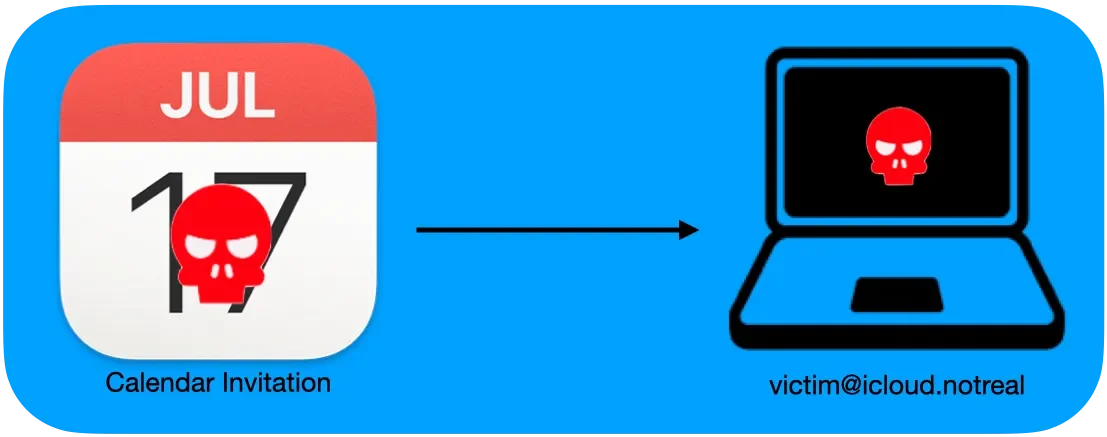
Imagine your computer's calendar app is like a post box. Anyone who knows your address (in this case, your Apple iCloud email) can drop an invitation into it. Normally that is harmless: you get a little notification, you click accept or decline, and life goes on.
A security researcher found that the macOS Calendar app had a flaw in the way it handled the attachments that can come with an invitation. An attachment is a file that travels with the invite, like a document stapled to a letter. Calendar was supposed to keep those attachments in a small, walled-off area of your disk called a sandbox, so that even a bad file could not do much damage. But the name of the attachment was not checked carefully enough, and by putting special characters in that name an attacker could make Calendar write a file outside that walled-off area, or delete a file that was already there.
On its own, that is already bad. But the researcher went further. By planting several carefully crafted files, he could make the Mac run his own code when the user upgraded from one version of macOS (Monterey) to the next (Ventura). That is called remote code execution, or RCE: someone else's program running on your machine. From there he could get around two more of Apple's protections, called Gatekeeper and TCC, and finally reach the user's private iCloud Photos, all without the victim clicking anything. That is what zero-click means: no click, no tap, no confirmation.
Apple fixed the individual problems between October 2022 and September 2023. The researcher also gave a talk about it at Disobey 2024, which you can watch here: https://www.youtube.com/watch?v=9NlQXLLQrvk
The background you need
Before walking through the attack, a few ideas will make everything else easier to follow.
- Sandbox: a restricted area of the disk and a restricted set of permissions that a program is allowed to use. Think of it as a playpen. Calendar is only supposed to touch files inside its own playpen, so even if an attacker slips something nasty in, it cannot wander around the rest of your computer.
- Directory traversal: a trick where a file path contains
../, which in a file path means "go up one folder". If a program builds a path by gluing together a fixed folder and a name supplied by someone else, and that name contains../, the resulting path can point somewhere the program did not intend. It is like being told "put this in room 5" and replying "room 5, then up the stairs, then out the back door". - Attachment: a file that comes with a message or an invitation. In Calendar, attachments are stored on disk so the app can show them later.
- Remote code execution (RCE): when an attacker can make your computer run code they wrote, from a distance, without physical access.
- Gatekeeper: a macOS feature that checks downloaded apps and warns you, or blocks them, if they come from an unknown source. Apps that arrive with a special marker called a quarantine flag are treated with suspicion.
- Quarantine flag: a small piece of metadata macOS attaches to files that came from the internet. It is how Gatekeeper knows to be careful.
- TCC (Transparency, Consent and Control): the part of macOS that asks your permission before an app can use your camera, microphone, photos, contacts and so on. It is the pop-up that says "App X would like to access your Photos".
- DMG: a disk image file on macOS. Double-clicking one mounts it as if it were a disk, and you can browse its contents.
- Samba / SMB: a way for computers to share files over a network. A Samba server is a file server that speaks that protocol.
.DS_Store: a hidden file macOS creates in folders to remember things like icon positions. It can also store bookmarks, which are references to other files or locations.- URL scheme: the part of a link before the
://.https://is one,mailto://is another. Apps can register their own custom schemes so that clicking a link with that scheme opens the app. Info.plist: a settings file inside a macOS application bundle that tells the system things like the app's name and which URL schemes it handles.defaults: a command-line tool on macOS for reading and writing app preferences.defaults importloads a whole set of preferences from a file.- System Photo Library: the main photo library that Photos uses. If you turn on iCloud Photos, this is the library that syncs with Apple's servers.
cloudphotodandphotolibraryd: background services on macOS that handle iCloud photo syncing and the photo library itself.
The setup
The researcher tested the chain on macOS Monterey. The file write and delete problem was present at least in Monterey 12.5, and macOS 13.0 beta4 did not appear to be vulnerable to it. The later stages of the attack rely on the macOS upgrade process, specifically going from Monterey to Ventura, and on a Calendar feature called Open File that opens a file when an event tells it to.
The write-up says malicious invitations could be sent to any Apple iCloud user.
Finding the flaw
The attachment filename was not properly sanitised. Sanitising means cleaning up input so that special characters cannot do anything unexpected. Because the filename was used to build the destination path, a value containing directory traversal sequences could escape the intended attachment folder. The researcher demonstrated this by setting an arbitrary path in the ATTACH section of the invite with:
FILENAME=../../../PoC.txt
Line by line:
FILENAME=is the field in the invitation that names the attachment.../../../is three "go up one folder" steps. Each..climbs one level in the folder tree.PoC.txtis the name of the file the attacker wants to create. "PoC" stands for proof of concept, a small demonstration that the bug is real.
With that value the file is written to ~/Library/Calendar/PoC.txt instead of ~/Library/Calendar/[CalendarID]/Attachments/[eventid]/. The ~ means the user's home folder. So instead of landing deep inside the per-event attachment folder, the file lands one level up, directly in the Calendar folder. That is the arbitrary file write: the attacker chooses where the file goes, within the sandbox.
The same handling gives a delete primitive. A primitive in security means a small, reliable building block that can be combined with others. If the attacker-specified file already exists, the new file is saved under the name PoC.txt-2. If the event or attachment sent by the attacker is later deleted, the file with the original name (PoC.txt) is removed. That lets an attacker remove existing files from the filesystem inside the sandbox.
Exploitation
Phase 1: Arbitrary file write and delete (CVE-2022-46723)
A CVE is a public identifier for a known vulnerability, so people can refer to it unambiguously. The attacker sends a malicious calendar invite with an attachment whose filename contains the traversal sequence.
The result is a file placed outside the per-event attachment directory but still inside the Calendar sandbox. The delete behaviour described above is the second half of the primitive: deleting the event removes the file that carried the original name.
Phase 2: From file write to remote code execution
Ventura was about to be released when this was found, and the macOS version upgrade process can be leveraged to gain remote code execution through the Open File functionality in Calendar. Leveraged just means used as a stepping stone. The arbitrary file write is used to infect the calendar with several files that, combined, trigger the exploit when Monterey is upgraded to Ventura.
Injected file #1: 000Hacked-$RANDOM.calendar
This file contains calendar data that looks like a "Siri Suggested" calendar: a suggested repeating event with alert functionality. The alerts are what open the other injected files. Think of it as a fake calendar entry that, when the system reads it, rings several alarm bells in sequence, and each bell opens the next file.
Injected file #2: CalendarTruthFileMigrationInProgress
This file makes sure that existing calendars in the old calendar format are upgraded and merged into the new database.
Injected file #3: CalPoCInit.dmg
An alert embedded in the Calendar event in injected file #1 triggers opening ~/Library/Calendars/CalPoCInit.dmg.
CalPoCInit.dmg contains a reference to a background image that points to an external Samba server. The reference is a Bookmark in the .DS_Store, stored in the root of the image file. The mount happens without a quarantine flag even though the CalPoCInit.dmg mount is in quarantine. In other words: the disk image itself is treated as suspicious, but the network share it pulls in is not, so files from that share are trusted more than they should be.
Injected file #4: stage1.url
A second alert from the calendar event in injected file #1 opens ~/Library/Calendars/stage1.url. That file contains a URL to an application inside the Samba mount that injected file #3 triggered:
file:///Volumes/CalPoCPayload/MyMidiTest.app
Line by line:
file://means "this is a local file on disk", not a web address./Volumes/CalPoCPayload/is where the Samba share was mounted. On macOS, network shares appear under/Volumes/.MyMidiTest.appis the attacker's application, sitting on that share.
This causes Finder to open /Volumes/CalPoCPayload/, which automatically triggers indexing. Indexing is macOS scanning a folder and recording what is in it, so that Spotlight search and other features know about the files. Indexing causes MyMidiTest.app to be indexed, which is needed for the unique URL registration to happen. The system only registers an app's custom URL scheme once it knows the app exists, and indexing is what makes it known.
Inside the application bundle, MyMidiTest.app/Contents/Info.plist registers a handler for a custom URL type:
<key>CFBundleURLTypes</key> <array> <dict> <key>CFBundleURLName</key> <string>MyMidi URL</string> <key>CFBundleURLSchemes</key> <array> <string>mymiditest</string> </array> </dict> </array>
Line by line:
CFBundleURLTypesis the section of the settings file that lists URL schemes the app wants to handle.arrayanddictare just containers: a list and a key-value table.CFBundleURLNameis a human-readable label, hereMyMidi URL.CFBundleURLSchemeslists the actual scheme names. Here there is one:mymiditest.
So after this, any link starting with mymiditest:// will be handed to this app.
Injected file #5: stage2.url
A third and final alert from the calendar event in injected file #1 opens ~/Library/Calendar/stage2.url, which references the custom URL mymiditest://. That launches the malicious application with no user interaction at all. It works because the application sits inside the Samba mount from the exploit, which has no quarantine flag.
The mymiditest app writes the files needed for Phase 3 to /var/tmp/ and launches a script in Terminal with open /var/tmp/PhotosPoC.sh. /var/tmp/ is a temporary folder that survives reboots, and open is the macOS command that launches a file with its default application. The objective is to make a bit more room in the sandbox: the attacker now has a script running outside Calendar's playpen, so it can do more.
Phase 3: Access to sensitive Photos data
To show what the first two phases make possible, the researcher abused Photos to leak private pictures. Access to sensitive files such as Photos should be restricted and blocked by TCC. By changing the configuration of Photos, however, it is possible to reach pictures stored in iCloud. This is done by changing the System Photo Library to point to a path that TCC does not protect.
The attacker creates a configuration file for Photos that uses a different System Photo Library. The configuration can be imported with defaults import.
Phase 2 has already dropped a configuration that uses /var/tmp/mypictures/Syndication.photoslibrary as the System Photo Library for Photos, cloudphotod and photolibraryd. The malicious configurations created automatically in Phase 2 are in /var/tmp/mypictures/*.plist. The * is a wildcard meaning "any file with this ending".
When the chain runs PhotosPoC.sh, all running Photos-related applications are killed and the new configuration is imported with defaults. The original configuration is backed up to /var/tmp/mypictures/*-orig.plist, and the malicious configuration is imported from /var/tmp/mypictures/. The original configuration is backed up to /var/tmp/mypictures/*-orig.plist.
The new photo library is then opened in Photos with open /var/tmp/mypictures/Syndication.photoslibrary. Syndication.photoslibrary is an empty template library, so Photos starts fresh with it.
Photos now runs with the new System Photo Library, iCloud sync is enabled, and the original files are downloaded to an unprotected directory. As they are synchronised to disk they are copied to a new directory in /var/tmp/PoCLoot$RANDOM/. $RANDOM is a shell variable that produces a random number, so the folder name is unpredictable. The write-up notes that this private data could also be copied to external resources, or posted to external web servers with the curl command, with trivial modifications to the exploit. curl is a command-line tool for sending data over the network.
Full chain
Exploiting the whole chain means getting through many steps to overcome the security obstacles in macOS. Multiple files are injected to evade the sandbox and activate the later phases. Gatekeeper is bypassed with the SMB trick to execute arbitrary code. The last obstacle is TCC, which has to be overcome to reach sensitive data such as iCloud Photos.
Before the fixes, the researcher could send malicious calendar invitations to any Apple iCloud user and steal their iCloud Photos without any user interaction.
Root cause
The Calendar attachment filename is used to build the destination path without proper sanitisation, so a FILENAME value containing ../ sequences escapes the per-event attachment directory. The same path handling means deleting the event removes a file named by the attacker, giving the delete primitive.
The later phases rely on the version upgrade process, the Open File functionality, a Samba mount without a quarantine flag, custom URL registration and Photos configuration import. The version upgrade process and the Open File functionality in Calendar can be driven by files planted through the write primitive. A .DS_Store Bookmark inside a quarantined DMG causes a Samba mount without a quarantine flag, so code from that mount is not treated as quarantined. Registering a custom URL scheme in the application's Info.plist, after Finder indexing makes the app known, lets a .url file launch the app without interaction. Finally, Photos configuration can be imported with defaults import to point the System Photo Library at a path TCC does not protect, so iCloud Photos are downloaded outside the protected location.
Impact
An attacker who can send a calendar invitation to an Apple iCloud user could, before the fixes, add or delete arbitrary files inside the Calendar sandbox, chain that into remote code execution through the upgrade process and Gatekeeper bypass, and then reach iCloud Photos data. The write-up states that this worked against any Apple iCloud user without user interaction. The arbitrary file write and delete issue itself was limited to the Calendar sandbox, and Apple later argued it only affected macOS Monterey, since Ventura was already in beta and did not have the issue, even though Monterey was still the latest production version.
Fix
Apple fixed the issues over time:
| Date | Change |
|---|---|
| 2022-10-24 | Arbitrary file write and delete fixed in macOS Monterey 12.6.1 and Ventura 13 (no CVE at the time; Ventura beta3 was vulnerable) |
| 2023-03-27 | Gatekeeper evasion fixed in macOS Ventura 13.3 (no CVE or credits) |
| 2023-09-26 | Photos vulnerability fixed and credited as CVE-2023-40434 |
| 2023-12-21 | Gatekeeper evasion credited as CVE-2023-40433 |
CVE-2022-46723 credits and the CVE were added on 2023-02-20. A bug bounty related to the Gatekeeper evasion and the Photos vulnerability was announced on 2023-10-09. As of 2024-09-12 there was still no bounty for the original arbitrary file write and delete vulnerability, and on 2024-10-20 Apple decided that CVE-2022-46723 did not deserve a bounty at all because it only affected macOS Monterey.
Variants to test
Each one is a small experiment with a clear pass or fail.
- Send an invite with an attachment whose
FILENAMEcontains../sequences and check whether the file lands outside~/Library/Calendar/[CalendarID]/Attachments/[eventid]/. - Send an invite whose attachment targets an existing file, then delete the event, and check whether the original file is removed.
- Plant a calendar file that looks like a suggested repeating event with alerts and see whether the alerts open other planted files.
- Plant a DMG whose
.DS_StoreBookmark points to an external SMB server and check whether the mount carries a quarantine flag. - Plant a
.urlfile pointing at an application on that mount and check whether Finder opens the volume and indexes the app. - Plant a
.urlfile referencing the registered custom scheme and check whether the app launches without interaction. - Import a Photos configuration with
defaults importthat points the System Photo Library at an unprotected path and check whether iCloud Photos are downloaded there.
Glossary
- Attachment: a file that travels with a message or invitation.
- Bug bounty: a programme where a company pays researchers for reporting security bugs.
- CVE: a public identifier for a known vulnerability.
curl: a command-line tool for sending and receiving data over a network.defaults: a macOS command-line tool for reading and writing app preferences.- Directory traversal: using
../in a file path to climb out of an intended folder. - DMG: a macOS disk image file that mounts like a disk when opened.
.DS_Store: a hidden macOS file that stores folder metadata, including bookmarks.- Gatekeeper: a macOS feature that checks downloaded apps before letting them run.
Info.plist: a settings file inside a macOS app bundle.- iCloud: Apple's cloud service for syncing data between devices.
- Indexing: scanning a folder and recording its contents so the system can search it.
- Open File: a Calendar feature that opens a file when an event asks it to.
- Primitive: a small, reliable building block in an attack.
- Quarantine flag: metadata macOS attaches to files from the internet so Gatekeeper can be careful with them.
- Remote code execution (RCE): making a victim's computer run code the attacker wrote.
- Sandbox: a restricted area and set of permissions a program is allowed to use.
- Sanitise: clean up input so special characters cannot do anything unexpected.
- Samba / SMB: a protocol for sharing files over a network.
- System Photo Library: the main photo library Photos uses, and the one that syncs with iCloud.
- TCC (Transparency, Consent and Control): the macOS permission system for sensitive data and hardware.
- URL scheme: the part of a link before
://, which tells the system which app should handle it. - Zero-click: an attack that needs no action from the victim at all.




